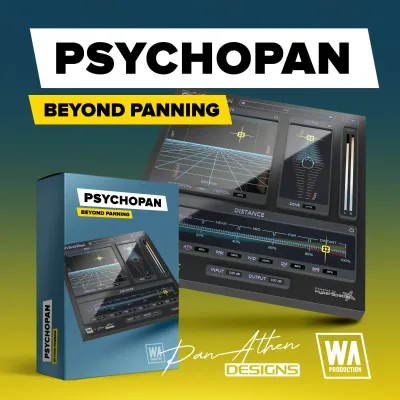
Your dialogue track sits dead center, the ambience is panned wide, and everything still feels like it lives on the same flat plane. That's the problem PsychoPan is built to fix. At $14.90, W. A. Production's psychoacoustic positioning plugin encodes 3D depth, elevation, and distance directly into a standard stereo stream. No Atmos routing. No binaural headphone trick that falls apart on speakers. It's aimed at film composers, game audio designers, post-production mixers, and any producer who needs foreground-to-background contrast without rebuilding their entire signal chain. If that's your session right now, read on.
What's Actually Inside PsychoPan
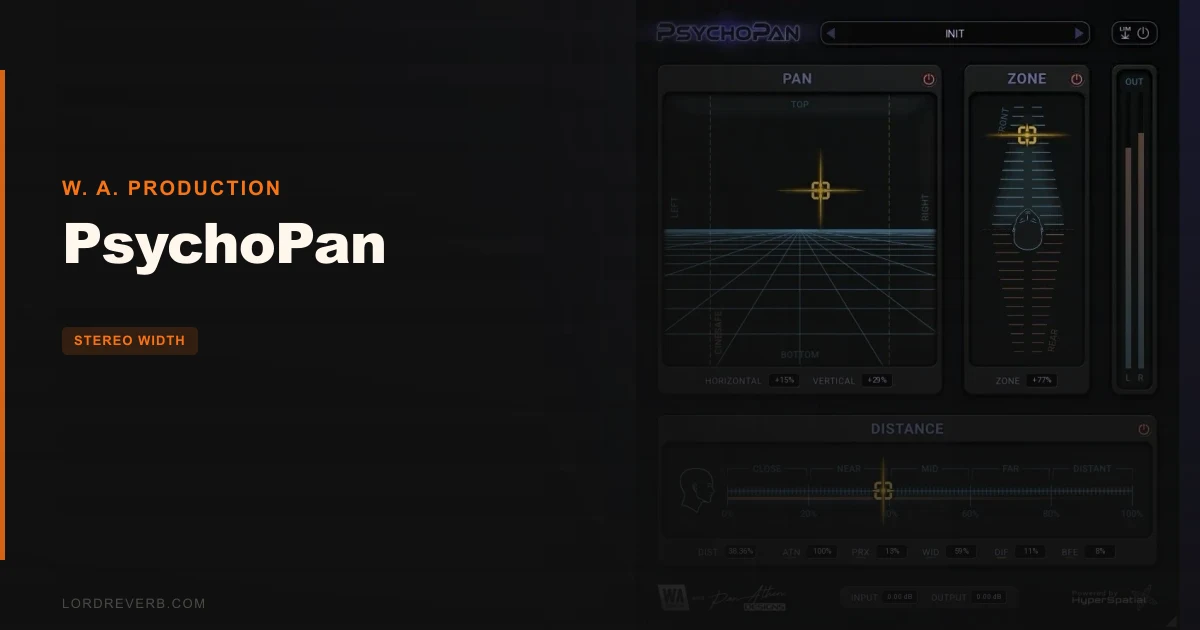
PsychoPan runs on W. A. Production's HyperSpatial™ framework, which encodes 3D positioning psychoacoustically into a standard stereo output. The interface is a resizable vector graphics panel built around a central XY pad with built-in energy visualizers showing processing in real time.
Horizontal movement on the XY pad uses psychoacoustic phase and time differences. Vertical dragging controls perceived elevation, placing audio above or below the horizon. A dedicated Zone Module handles front-to-back positioning via spectral shifts.
The Distance Slider is percentage-based with five distinct perceptual zones ranging from Close (meters) to Distant (tens of kilometers). Each zone feeds into a set of modules: Level Attenuation (ATN) for natural volume loss, Proximity Effect (PRX) for ultra-close near-field simulation, Width Loss (WID) for stereo narrowing over distance, Distant Diffusion (DIF) for environmental late reflections, and Big Freakin Event (BFE) for sub-bass reinforcement on massive phenomena. Per-module Bypass buttons let you isolate each stage. A zero-latency Safety Limiter sits at the end of the output chain. Factory presets, a full PDF manual, and a tutorial video are included. Available in VST, VST3, AU, and AAX.
Where PsychoPan Fits in a Real Session
You'll want to drop PsychoPan on individual buses or specific tracks, not across your master bus. Think of it as an insert on your room-tone bus, your SFX group, your ambient layer, or a secondary synth pad that's fighting the lead for attention. It's not a master limiter companion. It's a placement tool.
The workflow sequence is straightforward. Set your XY position first, dial the elevation, engage the Zone Module for front-to-back depth, then work down the Distance Slider. Each module in the chain builds on the last. Because every section has its own Bypass, you can toggle components in and out as you go to hear exactly what each is contributing. That per-module isolation is genuinely useful in a session where you're second-guessing whether the DIF or WID module is what's doing the work.
System requirements are Windows 10/11 or macOS 10.15 and later. It's described as CPU-friendly, so loading it on several tracks or buses in parallel shouldn't spike your meter. The real workflow cost isn't CPU. It's the listening checks you need to run on multiple playback systems, because spatial translation varies depending on speakers, headphones, room acoustics, and streaming encoding.
Owners report the plugin integrates easily without requiring a workflow redesign. That tracks with what it is. You're not rerouting into a 7.1 bus or spawning immersive stems. The stereo in and stereo out model means it slots into your existing setup without touching anything else.
The XY Pad: Where You'll Spend Most of Your Time
The XY pad is the heart of the plugin, and it's the right choice as a primary interface. Grab your sound, drag it where you want it in the stereo field horizontally, then drag vertically to lift or drop it in perceived elevation. The energy visualizers update in real time, so you're not working blind.
Horizontal panning here is not the same as a standard pan knob. The HyperSpatial™ framework applies psychoacoustic phase and time differences to create placement that owners describe as convincingly three-dimensional, especially on headphones. Push something to the hard left and it doesn't just drop out of the right channel. It moves in space.
The elevation axis is where it gets interesting for anyone mixing for picture. You can place a helicopter above the frame, a subway rumble below the horizon, or a choir high in the mix space without touching EQ or reverb on those elements. That's a real time-saver in post-production.
One limitation owners note: the behind-the-head effect produced by elevation and lateral positioning together can feel subtle rather than dramatic. If you're expecting something that sounds like a full Atmos render on stereo headphones, that's a different tool. PsychoPan is more convincing when you're listening for spatial contrast between elements in a mix than when you're auditioning it in isolation trying to impress someone with the spatial trick.
There's also no independent explicit width control on the XY pad itself. The Width Loss (WID) module handles narrowing as part of the distance chain, but if you want to widen something at close range, you're working around that rather than with it. Annoying if width shaping is part of what you're after.
The Zone Module and Front-to-Back Separation
This is the feature that separates PsychoPan from a standard stereo panner with phase tricks. The Zone Module handles front-to-back directionality using spectral shifts, creating the impression that a sound is in front of or behind the listener, not just left or right of them.
In practice, you use this when you want contrast between a close, present foreground element and a more recessed, distant background layer. Push your room ambience behind the horizon while your dry lead stays in front. That depth gap is exactly what owners report the plugin addresses well: establishing contrast between foreground and background elements.
The spectral shift approach is psychoacoustic, meaning it's manipulating how your brain interprets frequency content to suggest direction. It doesn't require binaural rendering or headphone-specific decoding. That's the developer's core claim, and owners' reports back it up with real-world session use. The separation is audible and immediate.
What you won't find here is measurement data showing exactly how the spectral shifts behave at the codec level, or how the front-to-back cues survive heavy streaming compression. That's not a knock invented for balance. It's a gap in the verifiable record.
The Distance Slider and Its Five Zones
The Distance Slider might be the most satisfying part of PsychoPan to dial in. It's percentage-based and divides into five distinct perceptual zones. Here's what each one is doing:
Close
At the near end of the slider, you're in the Proximity Effect (PRX) zone. PRX simulates intimate, ultra-close near-field acoustics. Think a whispered vocal, a contact mic on a surface, or a sound object placed right in front of the listener's face. If you're scoring an ASMR sequence or a tense dialogue scene, this is where you live. The low-end thickens and the stereo image tightens in ways that read as physically close.
Mid-Distance
Moving the slider outward engages the Level Attenuation (ATN) module, which mimics standard acoustic volume loss over distance. This is physics-accurate in concept: sounds get quieter and lose high-frequency content as they move away. ATN handles the volume component. Combined with WID, which narrows the stereo width as the source recedes, the mid-distance zones are where most standard film and game audio objects will sit.
Distant and Beyond
At the far end, Distant Diffusion (DIF) activates to recreate the environmental diffusion cloud and late reflections around distant sources. This is where PsychoPan gets genuinely clever for sound design work. A crowd heard across a city plaza, a foghorn a kilometer off, thunder rolling in from a ridge. The DIF module adds the smeared, enveloping quality that separates a distant sound from just a quieter close one.
Big Freakin Event
BFE is exactly what it sounds like. It reinforces sub-bass frequencies to simulate massive high-energy phenomena. An explosion. A shockwave. A stadium crowd. It's a bold module with an appropriately ridiculous name, and in context it makes sense. Huge events at distance don't just get quieter. They get physically felt through the floor. BFE attempts to simulate that sensation in the mix.
Keep BFE subtle unless you're mixing for a system that can actually reproduce sub-bass. On laptop speakers or small nearfields, pushing it hard will muddy the low end without creating the felt impact it's simulating.
Cinesafe Guidelines and Real-Time Displays
The built-in Cinesafe guidelines are a smart addition for anyone mixing for picture. They frame sound placement to on-screen action, giving you a visual reference for whether your positioned audio makes sense relative to what's happening in the frame. It's not a replacement for proper dubbing stage monitoring, but as an ITB reference it's useful.
The multiple live displays showing processing in real time are worth mentioning specifically because they change how you work. You're not setting a position and trusting it. You can watch the signal as it moves through each stage of the HyperSpatial™ chain. That visibility makes the plugin feel transparent in the best sense: you understand what's happening to your audio.
The Safety Limiter at the output is zero-latency, which matters in post-production where you're often working picture-synced. It's there to catch gain spikes from aggressive distance or BFE settings without adding any delay to your signal. You'll probably forget it's there. That's the point.
What It's Genuinely Good At
PsychoPan is good at one specific thing: making a stereo mix feel like it has three dimensions without leaving the stereo bus. That's not a small thing. It's exactly what most post-production and game audio workflows need.
Owners consistently report immediately audible results and fast integration. You don't spend a session learning the tool. You position your sounds and move on. That speed matters in deadline-driven work.
The five-zone Distance Slider creates depth contrast that's otherwise hard to achieve without stacking automation, reverb sends, and low-pass filtering manually. PsychoPan consolidates that into a single percentage drag. That's genuinely useful. Not a shortcut for lazy work. A purpose-built tool that does one thing efficiently.
The per-module Bypass buttons are a smart design choice. Being able to isolate ATN, PRX, WID, DIF, and BFE independently means you're never guessing what's contributing to the result. You toggle and you know.
Factory presets create environments that owners describe as jumping right out of a stereo speaker. For anyone who wants a quick starting point before fine-tuning, that's a low-friction entry into the plugin.
The Rough Edges
Translation is the real problem. Spatial processing that sounds convincing on your studio monitors might not survive the journey to earbuds, a TV speaker bar, a theater system, or a streaming platform that re-encodes your audio. Owners report this varies with speaker placement, listening distance, room acoustics, and codec processing. That's not a PsychoPan-specific flaw. It's inherent to psychoacoustic stereo encoding. But it means your QC pass needs to cover more playback scenarios than a standard mix would.
Excessive positioning is a real risk. Push the XY pad too far, run BFE too hot, or stack multiple spatially-processed elements without checking them together, and you'll weaken localization, reduce center-image stability, and introduce what owners describe as an artificial quality over extended listening. PsychoPan works best with restraint. It is not a corrective tool for a mix that lacks depth because of a fundamental balance problem.
An earlier version (1.0.1) had a random clicking issue on horizontal pan movement. Version 1.0.2 is the current release. If you're running anything older, update before you spend a session troubleshooting a noise that isn't in your audio.
There's no explicit width control independent of the Distance Slider. If you want to push width at close range, you're working around the architecture. And there's no third-party measurement data on mono collapse behavior. That's a gap worth noting before you commit to PsychoPan on broadcast work where mono compatibility checks are non-negotiable.
Who This Is Really For
- ✅ Buy if you mix for film, TV, or game audio and need fast, convincing depth without an immersive routing setup.
- ✅ Buy if your productions consistently feel flat and you want foreground-to-background contrast with a single insert rather than stacked processing.
- ✅ Buy if you're doing sound design and need tools like BFE and DIF to create large-scale, environmental distance effects on a stereo bus.
- ❌ Skip if your priority is mono-safe mixing and you need verified collapse data before trusting a spatial tool.
- ❌ Skip if you're looking for a full binaural headphone experience with hard behind-the-head effects. DearVR Micro or Pro is the right tool for that.
- ❌ Skip if you need to fix a mix that has balance problems at its core. No amount of spatial positioning repairs a mix that hasn't been leveled and EQ'd correctly first.
Specs & Technical Details
| Spec | Detail |
|---|---|
| Developer | W. A. Production |
| Price | $14.90 |
| Plugin Format | VST / VST3 / AU / AAX |
| OS Support | Windows 10/11 / macOS 10.15 and later |
| Activation | N/A |
| CPU Usage | Light (described as CPU-friendly by developer) |
| Trial Available | N/A |
| Version Reviewed | 1.0.2 |
Score Breakdown
| Category | Score | Notes |
|---|---|---|
| Sound Quality | 4.0/5 | Convincing depth and distance when used with restraint; translation across playback systems is uneven |
| Value for Money | 4.5/5 | At $14.90, the Distance Slider modules alone justify the cost for post-production work |
| Ease of Use | 4.5/5 | XY pad and per-module bypasses make the workflow genuinely fast; presets lower the learning curve further |
| Features | 4.0/5 | Five distance zones, elevation control, Cinesafe guidelines, and BFE are a strong set; no independent width control is a gap |
| CPU Efficiency | 4.5/5 | Developer and owner reports both point to light CPU load across multiple instances |
| Overall | 4.1/5 | A focused, fast spatial tool that earns its place on post-production and game audio sessions |
Alternatives to Consider
PsychoPan isn't the only plugin trying to solve the stereo-depth problem. Here's how the main alternatives stack up.
| Plugin | Strongest Point | Weakest Point | Best Situation |
|---|---|---|---|
| PsychoPan | Five-zone distance slider with dedicated modules for each perceptual range; Cinesafe guidelines for picture work | Translation consistency unverified across playback systems; no third-party mono collapse data | Film, TV, and game audio needing fast depth on a stereo bus |
| Transpanner 2 | Psychoacoustic depth encoding for stereo positioning | N/A from available data | Similar psychoacoustic depth work; compare directly if you're between the two |
| DearVR Micro / Pro | Binaural immersive positioning; strong headphone performance | Binaural rendering doesn't translate the same way on speakers | Headphone-primary listening; VR and gaming content where binaural is expected |
| Panagement | Binaural movement positioning | Movement-based, which may not suit static placements | Moving sound objects and animated spatial panning on headphones |
The clearest split is this: if your audience listens on speakers and you're mixing stereo for picture, PsychoPan and Transpanner 2 are your lane. If your audience is on headphones and binaural is expected, DearVR Micro or Pro is the stronger call. PsychoPan's Cinesafe guidelines and Distance Slider modules are a genuine advantage in post-production contexts where DearVR's binaural rendering doesn't translate to a theater or TV.
Panagement is worth a look if movement is part of the brief. Sound objects that need to sweep across the stage as part of the mix automation are a different problem than static placement, and Panagement is built for that specific use.
THX Spatial Creator is the other name that comes up in the same conversation. Like PsychoPan and Transpanner 2, it's working in the psychoacoustic stereo depth space. If you're deciding between those three, the XY pad interface and the five-zone distance structure are PsychoPan's strongest differentiators in terms of workflow speed.
The Honest Verdict on PsychoPan
You're mixing a cue for a corporate video. The music sits flat, every element on the same plane, and no amount of panning or reverb is fixing the sense that nothing has depth. That's the scenario where PsychoPan earns its price of $14.90 in about four minutes.
It's not a perfect tool. The translation problem is real, and you'll need to check your positions across at least two or three playback situations before you lock a mix. Mono compatibility checks are your responsibility; no independent third-party measurement data exists on actual mono collapse behavior. And if you push the positioning hard, you will hear the artificiality creep in. The plugin rewards subtlety and punishes overuse.
But for what it costs and what it does, PsychoPan fills a gap that matters: convincing 3D depth on a standard stereo bus, with a workflow that's fast enough to actually use in a session rather than spend a session learning. The five-zone Distance Slider alone is worth the ask if depth contrast is something you currently achieve by stacking three different processors together.
If you mix for picture or design sound for games and you're ITB, we think this earns a place in your toolkit. If you need verified mono collapse data or you're chasing binaural headphone drama, buy something else.
Frequently Asked Questions
Does PsychoPan work on speakers, or is it only for headphones?
PsychoPan is built to translate across speakers, headphones, TV systems, and theater setups via psychoacoustic stereo encoding. Owners and the developer both report stereo speaker compatibility as a core design goal. That said, translation does vary with room acoustics, speaker placement, and listening distance, so checking your positioning on multiple playback systems before locking a mix is worth your time.
What is the HyperSpatial™ framework?
HyperSpatial™ is W. A. Production's proprietary framework for encoding 3D audio within a standard stereo stream. It applies psychoacoustic phase and time differences for horizontal placement, spectral shifts for front-to-back directionality via the Zone Module, and a chain of distance-dependent processing modules for the five perceptual zones on the Distance Slider. The specifics of the algorithm are not publicly disclosed beyond the developer's descriptions.
Is there a clicking issue in PsychoPan?
Earlier version 1.0.1 had a random clicking issue when moving the horizontal pan. Version 1.0.2, released October 16, 2026, is the current build. If you've recently purchased PsychoPan and hear unexpected clicks, check which version you're running and update if needed before troubleshooting further.
Can PsychoPan be used on a master bus?
Owners and the plugin's design both suggest it works best as an insert on individual tracks or group buses rather than across the master bus. Applying psychoacoustic positioning to the entire mix at once increases the risk of weakening center-image stability and reducing overall localization. Use it surgically on specific elements where depth and distance contrast are the goal.