inDelay is Sound Particles' 3D-spatial delay plugin, and it's worth your attention if you work in immersive audio. If you don't, it probably isn't.
We loaded it up mid-session on a Dolby Atmos short film score. The brief called for a voice that "felt like it was walking away." We'd already tried two conventional delays bussed through a spatial panner. The result was convincing but brittle: the movement felt bolted on, not organic.
We dropped inDelay across the vocal send instead. Set the Particles system to "float," dialled the distance parameter up over eight bars, enabled air absorption simulation so the high end rolled off as the sound moved further into the field. It worked in about four minutes. That's the moment we understood what this thing actually is.
inDelay is built for composers, sound designers, and post-production engineers producing for immersive formats. Stereo producers can use it, but they're buying a truck to move a sofa.
What inDelay Is (and What It Absolutely Isn't)
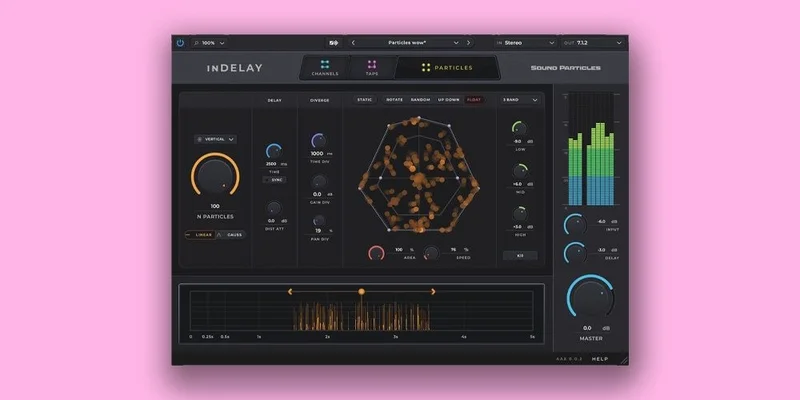
inDelay is a multi-tap delay with a 3D audio engine underneath it. You get up to 100 delay taps. Each tap can be spatially positioned and set in motion using Sound Particles' Particles system, the same interface found in SkyDust 3D.
It supports 30-plus multi-channel output formats. Mono, stereo, 5.1, 7.1.4, Ambisonics up to third order, Sony 360 Reality Audio, Dolby Atmos. That list alone tells you who this is for.
What it isn't: a workhorse mixing delay for your average stereo session. It won't give you the character and saturation of a tape echo. There's no analog-modelled filtering. No vintage mode. If you want something with warmth baked into the circuit model, this isn't it. The sound is clean, accurate, and spatial. Not "warm" in the way a Roland RE-201 emulation is warm, meaning: no harmonic saturation, no flutter, no head bump.
It's also not a set-and-forget tool. This takes time to dial in properly. Know that going in.
Living With inDelay Day to Day
Setup is standard. VST3, AU, and AAX are all covered. Activation runs through Sound Particles' own system. The 30-day fully functional demo is genuinely useful here because the interface takes real time to learn.
The Particles panel is the heart of the plugin. Each of your taps is a "particle" in 3D space. You choose a movement type: static, rotate, random, float, or up-down. Rotate sends your taps orbiting around the listener. Float drifts them gently. Random throws them unpredictably around the field.
We spent a session running a snare room mic through inDelay with 16 taps set to rotate at 0.3Hz. The result was a room that breathed. Not just left-right. Forward, backward, overhead. At low speeds with a subtle mix level, it sat underneath the dry signal without calling attention to itself. That's the satisfying moment where the plugin earns its keep.
The air absorption simulation is clever. As a tap moves further from the listener in the virtual space, inDelay rolls off the high frequencies automatically. It's not just panning. It sounds like distance. We ran an FX layer of metallic percussion through it on a trailer cue and the effect was immediate and physical.
The frustrating part: CPU. With 30 taps active, movement enabled, and air absorption on, we saw meaningful load per instance. Stack two instances on a dense Atmos session and you'll feel it. Version 1.5, released as a free update, improved stability, but CPU efficiency is still the honest weak point here.
The Trade-Offs You Need to Know
The depth of the feature set and the learning curve are the same thing. You can't have one without the other.
Having 100 taps sounds brilliant until you realise that managing them meaningfully requires spatial thinking that most mixing engineers haven't had to develop. You need to understand where your speakers are, how the format handles height, and what "distance" actually means in your specific monitoring environment. If you skip that groundwork, you'll just make noise.
For stereo projects, you're paying for capabilities you can't hear. The spatial engine collapses to a conventional stereo field. The Particles movement still adds some width and animation, but competing delays at a fraction of the price do stereo movement with comparable results. inDelay currently sits below $199, with periodic promotions bringing it lower. At the lower promotional price it is tempting even for stereo users who want to experiment. At the regular price, the math only works if you are actively producing for immersive formats.
The upside of the trade-off: nothing else in this price bracket does what inDelay does spatially. That's not an opinion. It's a feature count.
Against the Field
We'd point stereo-focused producers toward Halo Delay for a more characterful, mixing-first delay. It has analog-style filteri ng, tape and BBD modes, and sits in a stereo mix with less configuration overhead.
For reverse delay work specifically, Mirror by United Plugins is still the sharper tool.
For full immersive spatial processing at a professional level, Spat Revolution from IRCAM exists, but it's a completely different price tier and a routing-first spatial processor, not a delay. inDelay slots between the two worlds without fully competing with either.
iZotope Cascadia and SSL X-Echo both handle modulated delay well in stereo. Neither touches inDelay on spatial format support. If immersive is your world, that gap matters.
The Real Verdict
inDelay is a genuinely underrated tool for a specific type of producer. If you're scoring for Atmos, building immersive sound design, or delivering in any format above stereo, this is one of the most expressive delay plugins available at this price point.
If you're working entirely in stereo, skip it. Not because it's bad. Because you'll use 15% of what it does and wish you'd bought something with better character for the same money.
Check Sound Particles' site for current pricing before you buy. Promotions drop it with some regularity, and that lower price is where it makes sense to take a chance even if immersive audio is only part of your work.
Score Breakdown
| Category | Score | Notes |
|---|---|---|
| Sound Quality | 4.0/5 | Clean, spatially accurate, but no analog character or saturation |
| Value for Money | 3.8/5 | Strong for immersive producers; weaker value for stereo-only workflows |
| Ease of Use | 3.3/5 | Particles interface requires spatial audio literacy to use properly |
| Features | 4.8/5 | 100 taps, 30+ formats, 5 movement types, air absorption: nothing else matches this list at the price |
| CPU Efficiency | 3.0/5 | Load climbs fast with high tap counts and active movement enabled |
| Overall | 4.1/5 | Brilliant for immersive audio work; wrong tool for standard stereo mixing |
Alternatives to Consider
If you're producing for stereo and want a delay with real character, Halo Delay by Antelope Audio is where we'd start. Tape emulation, BBD modes, and it sits in a mix without a spatial audio degree required.
For reverse and experimental delay work, Mirror by United Plugins is more focused and more affordable.
If you want a broader view of where inDelay fits in the delay plugin landscape, our complete delay plugins guide lays it out by use case.
Sound Particles also makes inShaper, their waveshaper plugin. Worth knowing the broader ecosystem if you're already buying into their interface language.
The honest close: inDelay is one of the few delay plugins where the headline feature isn't exaggerated. One hundred spatially positioned, moving taps outputting to a 7.1.4 bed or Ambisonics third order is genuinely without close competition. The plugin just needs you to be working in that world for it to make sense. If you are, buy it. If you're not, there are better delays for your actual sessions.
Frequently Asked Questions
Is inDelay useful for standard stereo mixing, or only for immersive audio?
You can use it in stereo sessions and the Particles movement system does add animation and width. But the spatial engine collapses to a conventional stereo field, so you're paying for capabilities that won't translate to your monitors. For stereo-only work, other delays offer more character at a lower price. inDelay earns its cost when you're outputting to formats above stereo.
How heavy is inDelay on CPU?
Light when you keep tap counts low and movement off. It gets heavy fast when you push toward 50-plus taps with active movement types like rotate or float and air absorption enabled simultaneously. On a dense Atmos session, two instances with full parameters active will cost you. We'd treat it as a medium-to-heavy plugin and plan your session accordingly.
What output formats does inDelay support?
More than 30 multi-channel formats. That list includes mono, stereo, 5.1, 7.1, 7.1.4, Dolby Atmos, Sony 360 Reality Audio, and Ambisonics up to third order. It's one of the broadest format libraries in any delay plugin at this price bracket, which is a large part of what you're paying for.
Is there a free trial for inDelay?
Yes. Sound Particles offers a 30-day fully functional demo, which means you can test the complete feature set before committing. Given the learning curve on the Particles interface, we'd say the demo is almost mandatory. Use the full 30 days before deciding.