The 3Dust Collection review you actually need starts here: this suite is one of the most ambitious spatial instrument bundles ever shipped as a plugin, and whether it belongs in your session right now is a question with a real answer, not a PR-friendly non-answer.
Picture this. You're building a score for a binaural experience. You've got a bed of strings, some textural ambience, and then the brief calls for something that moves. Not panned, not automated across a stereo field. Actually moves, in three dimensions, with the sound design baked into the spatial behaviour from the moment you press a key.
That gap is exactly what Sound Particles built the 3Dust Collection to fill.
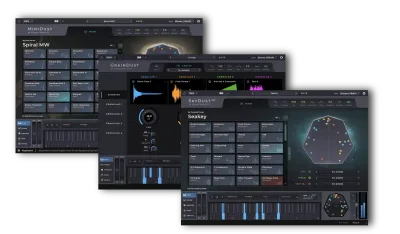
The suite costs $449 and bundles three plugins: GrainDust, SkyDust 3D, and MiniDust. Together they cover granular synthesis, a full-spec spatial synthesizer, and a stripped-back entry-level version of that synthesizer. They're aimed squarely at producers working in immersive formats, composers scoring for spatial audio, and sound designers who want to build sounds that exist in three-dimensional space by default, not as an afterthought.
But there's a version of this story where $449 buys you a suite with brilliant architecture and a workflow that'll make you want to throw your interface out of a window. We're going to walk through both versions honestly.
Quick Verdict
The 3Dust Collection sits at 3.5 out of 5. The ceiling is extraordinary: SkyDust 3D in particular is a genuinely singular tool with spatial modulation depth nothing else touches. But the floor is frustrating. Automation is awkward, the Sequencer is underpowered, Ambisonics will destroy your CPU, and version 1.0.0 shipped with crashes that reviewers are still talking about. If immersive audio is your primary format and you have the machine to handle it, $449 is defensible. If you're a stereo producer curious about spatial sound, you might find the overhead too high for how often you'd use the 3D features.
What's In The Box
Three plugins, three distinct tools, one spatial philosophy running through all of them.
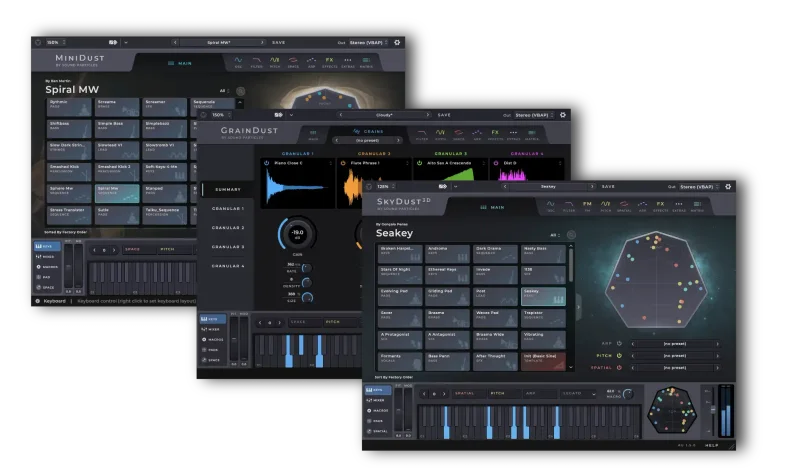
GrainDust is the granular engine. It has 4 fully independent granular layers, over 500 samples, over 500 presets and sub-presets, built-in spatial movement that animates grains across space and time, MPE support, and the ability to import your own samples into each layer. Format support covers stereo, surround, binaural, 7.1.4, and Ambisonics.
SkyDust 3D is the headline act. Sound Particles calls it the world's first spatial synthesizer plugin. It carries 40 envelope generators per voice (8 each for gain, pitch, filter, spatial, and extra), 40 LFOs per voice in the same configuration, FM modulation with 8 operators, 6 FX types, 11 Movement modifiers, an Arpeggiator and a Sequencer, 5 HRTF datasets with over 100 HRTF profiles, Ambisonics support up to 6th order, and 22 multichannel format options including 5.1.4, 7.1.4, and 22.2.
MiniDust is the accessible version of the spatial engine. Two oscillators, 190+ waveforms, 70+ waveform modifiers, a 2-slot FX rack with 9 FX types, an Arpeggiator and Sequencer, filters, pitch EG, LFO, and a Randomness feature for quick sound generation.
Where It Fits In Your Workflow
Let's be direct about the workflow context here, because it shapes everything.
If you're working in stereo, GrainDust and MiniDust still function and produce spatial-feeling sounds. SkyDust 3D supports stereo output too. But running these plugins purely as stereo instruments means you're using a fraction of what they're built for, and the complexity-to-reward ratio tips against you fast. Sound Particles themselves say SkyDust 3D is "fantastic for stereo and exceptional in 3D." That hierarchy is telling.
The 3Dust Collection belongs in sessions where the deliverable is binaural, surround, or Ambisonics. Game audio. Spatial music. Immersive documentary scores. VR audio. That's the environment where every architectural decision in these plugins pays off.
If that's your world, these plugins slot in as primary sound design instruments, not effects. You play a note, and the spatial behaviour is already in the sound. You're not routing a mono synth into a spatial processor afterwards. The sound is spatial at the oscillator level.
The CPU ceiling is a real workflow constraint. Running SkyDust 3D in Ambisonics mode, especially at higher orders, puts serious load on your machine. Owners report that a 12-core, 64GB system couldn't handle 3rd-order Ambisonics across all presets. You'll need to plan track freezing and bouncing into your process if you're working at that level.
GrainDust: The Granular Layer Breakdown
Granular synthesis is already a specific taste. You're either the kind of producer who builds textures from shredded audio, or you're not. GrainDust is built for the first group, and it goes deep.
Four independent granular layers is the foundation. Each layer runs its own grain engine, which means you can stack four completely different granular processes running simultaneously. You could have one layer breaking down a pitched sample into slow atmospheric shimmer, a second running a faster grain rate on a percussion hit to generate rhythmic texture, a third set to a different sample entirely, and a fourth providing binaural width underneath all of it. The combination is where the sound design potential opens up.
The sample library running through GrainDust is 500+ strong, and there are 500+ presets and sub-presets to map the architecture for you. For producers who want to get into spatial granular work without starting from a blank slate, the preset library is a genuine resource. You can load a preset, hear how the layers are configured, and learn by pulling it apart.
The sample import feature is where experienced sound designers will spend real time. Each layer accepts your own samples. Bring in a recording of rain on a window, a bowed guitar string, a contact mic on concrete, and GrainDust will run its grain engine through it. Then the spatial movement layer animates those grains through three-dimensional space. That combination of custom source material and spatial animation is the creative engine here.
Built-in movement is what separates GrainDust from a standard granular plugin. Grains don't just sit in stereo. They animate through space over time. The movement is baked into the instrument's behaviour, not something you automate separately. That's a meaningful workflow difference when you're building for binaural or surround: the immersive quality isn't a post-processing step.
MPE support means controllers like the Roli Seaboard or any other MPE-capable keyboard can drive GrainDust with per-note pressure, pitch slide, and positional data. If you have an MPE controller, you can push a grain layer through spatial space with finger pressure. That's a genuinely expressive workflow for live performance and for recorded sound design sessions where you want the performance to feel physical.
Format support in GrainDust runs from stereo all the way to 7.1.4 and Ambisonics. The same CPU warning that applies to SkyDust 3D applies here in Ambisonics mode: this is not light on resources.
SkyDust 3D: The Core Spatial Synthesizer
This is the one reviewers call brilliant. It's also the one they call in need of serious polish. Both are accurate.
The Modulation Architecture
40 envelope generators per voice. Let that sit for a moment.
Standard synthesizers give you a handful. ADSR for amplitude, maybe one more for filter. SkyDust 3D gives you 8 gain envelopes, 8 pitch envelopes, 8 filter envelopes, 8 spatial envelopes, and 8 "extra" envelopes that you assign to additional parameters. Per voice. Not per patch, per voice. That means every note you play has its own complete modulation stack running independently.
The 40 LFOs follow the same structure: 8 each for gain, pitch, filter, spatial, and extra. Per voice.
The spatial envelopes and spatial LFOs are the differentiator. You're not just modulating the sound of a note over time. You're modulating where that note sits in three-dimensional space over its lifetime. A pad chord can have each voice starting in a different position and moving through space along its own trajectory, defined by its envelope and LFO settings. That's sound design that can't be replicated with a conventional synth plus a spatial processor, because the spatial behaviour is tied to the synthesis parameters at the modulation level.
The FM engine adds 8 operators. That's a serious FM spec. Eight operators means FM patches of real complexity: stacked carrier-modulator relationships, feedback routing, complex timbral evolution. Combine the FM depth with the spatial modulation layer and you're building sounds with both harmonic and positional complexity woven together.
Movement Modifiers
SkyDust 3D has 11 Movement modifiers. These include Random rotation, Oscillate, and Floating, among others. Movement modifiers define how sounds behave spatially in a broad sense, layered on top of whatever the LFOs and envelopes are doing to individual voices.
Floating, in particular, is the setting that makes SkyDust 3D feel like a different class of tool. You get sound that drifts through space in a way that feels physical rather than automated. Turn Floating up on a pad and the sound doesn't just widen: it actually moves, slowly, with the slightly irregular drift of something suspended in liquid. Restraint is the advice reviewers pass along: go too heavy on surround effects and the result gets messy. Used with a light hand, the Movement modifiers produce spatial depth that's genuinely hard to achieve any other way.
Random rotation gives you unpredictable but bounded positional movement. Oscillate creates regular back-and-forth spatial movement, like a controlled ping-pong across the listener's space. Each modifier has its own character and its own appropriate context.
Arpeggiator and Sequencer
The Arpeggiator covers 7 patterns with an octave range from -2 to +2. That's a solid range for spatial arpeggio work, and the Arpeggiator in SkyDust 3D has a spatial dimension that a standard arpeggiator obviously can't touch: each arpeggiated note can have its own positional behaviour.
The Sequencer is where the frustration lives. It supports up to 128 steps, which is a long sequence, and it handles polyphonic input with multiple notes per step. That's genuinely useful for building complex, evolving spatial patterns. But it's missing swing, gate control, random, and ratcheting. For a sequencer on a synthesis tool this ambitious, those omissions are annoying. Swing alone would dramatically expand what you can do rhythmically. Without it, sequences feel locked to a grid in a way that clashes with the fluid spatial movement everywhere else in the plugin.
Reviewers have flagged this directly. It's not a minor complaint. Swing is a basic expectation in a modern sequencer.
Binaural Engine: HRTF Profiles and SOFA Support
SkyDust 3D's binaural implementation is one of its strongest technical achievements and one of the things that puts it in a category of its own.
Five HRTF datasets with over 100 individual HRTF profiles. HRTF (Head-Related Transfer Function) data defines how your ears perceive sound coming from different directions, and different listeners have measurably different HRTFs based on ear shape and head geometry. Generic binaural plugins use one or two averaged HRTFs. SkyDust 3D gives you 100+.
The SOFA file support goes further. SOFA (Spatially Oriented Format for Acoustics) is the standard file format for HRTF measurement data. If you have a personalized HRTF profile measured for your own head and ears, you can load it into SkyDust 3D as a SOFA file and work with your own spatial perception model. That's professional-grade binaural capability.
The two XY pads with custom parameters per axis let you dial in spatial positioning interactively for binaural output. Grab a pad and drag: the sound moves in three dimensions as you work. That tactile interface makes the binaural positioning feel immediate rather than parameter-heavy.
Multiple 3D views support the spatial workflow. The 360, rear, top, spherical, and SkyDust views give you different ways to visualize where your sound sits in space. Depending on how you think spatially, one of these will suit your mental model better than the others. Having five options means you're likely to find one that clicks.
Multichannel Format Support
22 multichannel formats is not a number you find in most plugins. SkyDust 3D supports 5.1.4, 7.1.4, 22.2, and 19 others. That breadth covers broadcast surround, theatrical immersive audio (Dolby Atmos-compatible channel layouts), and specialist formats used in research and high-end installation audio.
Ambisonics support goes to 6th order. First-order Ambisonics is what most tools support. Third order is considered professional-grade for most applications. Sixth order is research and high-end installation territory. The fact that SkyDust 3D supports it is remarkable on paper. The catch is what that support costs computationally, which we address in the CPU section below.
The UI and Workflow Details
The resizable window is a quality-of-life feature that sounds minor until you've worked with plugins locked to a small fixed size on a high-resolution monitor. Being able to resize SkyDust 3D's interface to fill your screen is genuinely useful when you're navigating the depth of modulation available.
The mixer panel with independent oscillator control and muting options gives you per-oscillator management at a glance. The curve editor with point editing and knob adjustments gives you precise control over envelope and LFO shapes. The keyboard editor per sequencer step is a clever detail: you can define which note or chord each step plays directly from a visual keyboard interface rather than typing values.
The virtual keyboard includes a pitch-bend wheel, modulation wheel indicator, and sustain pedal indicator. Useful for checking MIDI behaviour without a controller.
Legato and Mono modes cover monophonic behaviour for leads and basslines. Nothing exotic there, but correct implementation matters.
The tab-switching workflow is the UI complaint that comes up most in reviews. To access different sections of SkyDust 3D, you switch between tabs. When you're building a patch, that means switching back and forth between the modulation tab, the spatial tab, the sequencer tab, and so on. Tab-switching slows sound creation compared to having multiple sections visible simultaneously. That's a valid critique of a design decision. It keeps the interface manageable in terms of visual complexity, but it adds friction to the iteration process. Honest answer: it's a trade-off, and whether it's an acceptable one depends on how you work.
MiniDust: The Accessible Spatial Synthesizer
MiniDust is not just a beginner's version of SkyDust 3D. It's a complete polyphonic synthesizer with its own character and its own use case.
Two oscillators with 190+ waveforms and 70+ waveform modifiers. That waveform count is generous. You're not locked to sine, saw, square, and triangle. The modifier layer on top of the raw waveforms adds harmonic shaping options that push MiniDust past a basic entry-level synth in terms of timbral range.
The 2-slot FX rack covers Delay, Bit Crush, Distortion, Equalizer, Reverb, Flanger, Vibrato, Chorus, and Phaser. Nine FX types in two slots. You can only run two simultaneously, which is a real constraint if you want to stack spatial-feeling effects. But for a lite synth, the FX options are well-chosen for spatial sound design: Delay and Reverb push sounds into space, Chorus widens them, Bit Crush gives character.
Filters, Pitch EG, and LFO are the standard synthesis tools you'd expect. Nothing exotic, correctly implemented.
The Randomness feature is genuinely useful. Hit it and MiniDust generates a random sound configuration. The results can be wild. They can also be surprisingly usable. For producers who work by discovery rather than by design, Randomness is a fast route to unexpected spatial textures that you can then refine.
MiniDust includes its own Arpeggiator and Sequencer. The same Sequencer critique applies: no swing, no gate control, no ratcheting. Annoying in a plugin at this price point.
The strength of MiniDust is accessibility. You can dial in a spatial sound faster in MiniDust than in SkyDust 3D. The modulation depth is lower, the spatial complexity is more contained, and the Randomness feature helps you get to something interesting quickly. For producers who want to add a spatial-sounding synth to a stereo mix without a deep learning curve, MiniDust is where that happens in this bundle.
What It's Genuinely Good At
The spatial modulation depth in SkyDust 3D has no peer in the plugin world we're aware of. 40 envelopes and 40 LFOs per voice, with 8 of each dedicated to spatial parameters, means you can design sounds where spatial position is modulated with the same precision and variety you'd apply to pitch or filter. That's a new kind of sound design workflow, not an incremental improvement on existing tools.
GrainDust's four-layer architecture with custom sample import is a serious granular workstation. The spatial movement built into the grain engine means you're building immersive textures, not panning stereo signals around. For scoring, game audio, and experimental sound design, that combination is powerful.
The binaural implementation in SkyDust 3D is credible at a professional level. Over 100 HRTF profiles plus SOFA file support means you're not stuck with a one-size-fits-all approximation. The spatial accuracy available here is appropriate for professional binaural productions, not just a feature checkbox.
Owners report surprising ease of use given the depth on offer. Reviewers consistently call the sound design potential "amazing" and the design itself "innovative." For a suite this architecturally complex, the fact that users find it approachable is a real achievement.
The preset libraries across all three plugins give you a working starting point. 500+ presets in GrainDust alone means the suite is immediately useful even before you understand the underlying architecture. You can load and explore before you learn.
The Rough Edges
Let's be direct: the rough edges here are real and they affect real sessions.
The CPU demand in Ambisonics mode is severe. A 12-core machine with 64GB of RAM couldn't handle 3rd-order Ambisonics across all presets. That's a very powerful machine by most standards. If your production environment isn't high-spec, Ambisonics mode may not be practically usable without extensive track freezing. Third-order Ambisonics is mid-range in the context of immersive audio post-production. Sixth-order, which SkyDust 3D technically supports, may be aspirational on hardware most producers currently own.
The Sequencer missing swing is frustrating. It's not a niche feature. Swing is foundational for any rhythmically interesting sequence. Gate control and ratcheting are missing too. For a synthesizer at this price targeting professional immersive audio producers, the Sequencer feels underbuilt. The 128-step capacity and polyphonic input are there, but the expressive tools around timing and dynamics are not.
Automation and Undo are problem areas that reviewers flag specifically. One reviewer describes the product as "brilliant but in need of serious polish," citing automation difficulties and Undo limitations as the concrete examples. In a production workflow, a limited Undo history is a confidence problem: it changes how willing you are to experiment, because you can't easily walk changes back. Automation difficulties are a session workflow problem in any DAW-integrated production.
Version 1.0.0 had crashes and freezes. Version 1.0.6 corrected them, according to owner reports. The demo version crashed Cubase when activating the distortion module. If you're evaluating via demo, check the demo version number. A crash in evaluation is not a great introduction.
The tab-switching workflow slows iteration. This is a design choice with a logic to it: keeping each section's UI clean and readable. But when you're refining a patch and need to cross-reference spatial envelopes against modulation settings, switching tabs adds friction. Frustrating when you're in flow.
SkyDust 3D's FX Section: Six Types, Six Contexts
The onboard FX in SkyDust 3D cover 6 types: Delay, Reverb, Bit-Crusher, Distortion, EQ, and Parametric EQ.
Delay and Reverb are the spatial support acts. In a spatial synthesizer, adding delay and reverb to a sound that's already positioned in three-dimensional space requires care. The wrong reverb tail can blur the spatial positioning you've built. Used sparingly, they reinforce depth. Used heavily, they wash out the precision of the HRTF positioning. Restraint is the consistent advice from reviewers, and it applies to the FX section as much as to the Movement modifiers.
Bit-Crusher and Distortion add harmonic colour and character. The Bit-Crusher in particular can push a clean spatial synth pad into something gritty and low-fi, which creates an interesting tension with the precise spatial positioning underneath. The distortion module is the one that crashed Cubase in demo mode, so proceed carefully in evaluation.
EQ and Parametric EQ are the utility tools. Having EQ built in saves you a DAW insert slot and keeps the spatial signal path contained within the plugin. The parametric option gives you precise frequency sculpting rather than just broad shelves or bands.
Six FX types across a synthesis engine this deep is a relatively compact offering. For most users it's enough to shape sounds within the plugin before they hit the DAW. For complex effects processing you'll still reach for external tools.
GrainDust's Spatial Movement Engine in Practice
The movement feature in GrainDust is worth its own section because it's the thing that distinguishes it most clearly from conventional granular plugins.
Standard granular synthesis gives you control over grain size, position, density, pitch, and envelope. You're shaping how the grains sound. GrainDust adds a spatial animation layer that controls where the grains move over time. The grains don't just exist in a position. They travel.
Imagine you're building a texture for a scene transition in a spatial audio experience. You bring in a sample of distant rain. GrainDust's granular engine chops it into grains and you set the density to something sparse and irregular. Then the movement layer pushes those grains slowly around the listener in the horizontal plane. The texture isn't a static spatial bed: it circles, it drifts, it arrives from behind and passes through. That's the kind of spatial storytelling that conventional tools force you to build with automation lanes and spatial processing chains. GrainDust bakes it into the instrument.
You can bring your own samples into each of the four layers and set each layer's movement parameters independently. Four layers, four different movement configurations, all running simultaneously, all contributing to the spatial composite. The upper ceiling of that architecture is genuinely high.
The 500+ bundled samples cover enough sonic territory to be useful immediately. Import your own for anything the library doesn't cover. The combination of what's there and what you can add makes GrainDust a long-term spatial sound design tool rather than something you'll outgrow.
The CPU Reality Check
This needs honest space because it affects whether the 3Dust Collection is practical for your specific setup.
Ambisonics processing is computationally expensive by nature. Higher-order Ambisonics requires more channels of audio processing, more spatial encoding math, and more decoding on output. A 6th-order Ambisonics signal carries 49 channels. Running a synthesizer that generates and modulates spatial position across that many channels in real time is genuinely heavy work.
The owner report of a 12-core, 64GB machine struggling with 3rd-order Ambisonics across all presets is informative. 3rd-order Ambisonics carries 16 channels. That's significant processing, and on demanding presets the plugin's internal spatial calculations amplify that load.
Practical mitigation: freeze tracks aggressively. Bounce your SkyDust 3D patches to audio once you've committed to a sound. Work in lower-order Ambisonics or binaural during the composition phase and render at higher order for delivery. These are standard immersive audio session management practices, and they apply doubly here.
Stereo and binaural modes are considerably lighter. If your deliverable is binaural headphone audio, the CPU situation is far more manageable. The 3Dust Collection's most accessible use case from a hardware perspective is binaural, where the rich HRTF library and spatial modulation depth are still fully available without the multichannel processing overhead.
What does this mean practically? If you're on a current-generation machine with a high-core-count processor, you'll manage. If you're on an older setup, plan your session around freezing. Don't expect to run five instances of SkyDust 3D in Ambisonics mode simultaneously on any machine in most producers' price range.
The Crash and Stability History
Version 1.0.0 had crashes and freezes. Owners confirmed these. Version 1.0.6 addressed them, and current owner reports are more positive on stability. But the demo version crashing Cubase when the distortion module was activated is a more recent and specific report that's worth noting.
If you're evaluating the demo, test the distortion module early. If it crashes your DAW, note the demo version number and check whether a newer demo build is available before you write off the plugin entirely. A crash in evaluation is frustrating but may not represent the current release state.
One reviewer described the suite as "brilliant but in need of serious polish." That framing is fair. The architecture is genuinely impressive. The execution has visible seams. Sound Particles is a developer with a track record of iterating on their tools, and the version jump from 1.0.0 to 1.0.6 with stability fixes shows they're responding to feedback. But you're still taking on a suite that hasn't reached the stability and workflow polish of more mature tools. Factor that into your evaluation.
What It's Like to Actually Build a Patch in SkyDust 3D
You're going to build a spatial pad for a binaural mix.
Pick a waveform, set the FM operators to add some harmonic movement, and set a basic amplitude envelope. This part feels like a normal synthesizer. Play a note. It sits in the center of the binaural field.
You'll switch tabs to get here, which is where the workflow friction begins. Set one of the 8 spatial LFOs to a slow sine wave and assign it to horizontal position. Play the note again. The sound begins to move slowly left and right. You're still in familiar territory: this is like auto-panning.
Now the sound is moving both horizontally and vertically, in a figure-of-eight through three-dimensional space. You're past what auto-panning does.
Add Floating. The movement becomes less regular, with a slight drift quality added on top of the LFO motion. Play a chord. Each voice starts in a slightly different position and follows its own movement trajectory while the Floating modifier adds organic variation to all of them. The result sits in space in a way that a stereo synthesizer can't approximate.
Watch the position indicators for each voice while you hold a chord. They're distributed through the 3D sphere, moving slowly, each with its own trajectory. In headphones, you hear exactly what you're watching: sound that exists in a specific place and moves through it.
That process is what SkyDust 3D does. It's also where the tab-switching slows you down: four tab transitions to reach that state, rather than having spatial and modulation parameters visible simultaneously. The result is worth it. The path has friction.
Who This Is Really For
- ✅ Buy if you work primarily in binaural, surround, or Ambisonics formats and want a synthesizer where spatial position is a first-class synthesis parameter, not an afterthought.
- ✅ Buy if you score for games, VR, or spatial music experiences and need a granular instrument that can generate immersive, animated textures from custom samples without building a complex signal chain.
- ✅ Buy if you have an MPE controller, a high-core-count CPU, and the patience to work through a suite that's architecturally brilliant and still developing its workflow polish.
- ❌ Skip if you work almost exclusively in stereo and have no immediate immersive audio deliverables. The spatial depth won't pay off and the complexity overhead won't be worth it.
- ❌ Skip if you need a reliable, crash-proof tool for client sessions on a deadline. The stability history and Undo limitations are a real risk in professional delivery contexts.
- ❌ Skip if you do significant rhythmic sequence work and depend on swing, gate control, or ratcheting in your Sequencer. The current Sequencer won't satisfy that need.
Specs & Technical Details
| Developer | Sound Particles |
| Price | $449 |
| Plugin Format | VST3 / AU / AAX |
| OS Support | Mac / Windows |
| Activation | N/A |
| CPU Usage | Heavy (severe in Ambisonics mode) |
| Trial Available | Yes (demo version available) |
| Version Reviewed | 1.0.6 |
Score Breakdown
| Category | Score | Notes |
|---|---|---|
| Sound Quality | 4.5/5 | Spatial synthesis depth and granular architecture produce sounds genuinely unavailable elsewhere |
| Value for Money | 3.0/5 | Hard to justify at $449 for stereo producers; strong value for dedicated immersive audio work |
| Ease of Use | 3.0/5 | Tab-switching, automation difficulties, and Undo limits add real friction despite a reasonably accessible surface |
| Features | 4.5/5 | Sequencer gaps aside, the feature set is extraordinary and without direct comparison |
| CPU Efficiency | 2.0/5 | Ambisonics mode will strain even high-spec machines; binaural mode is more manageable |
| Overall | 3.5/5 | A singular spatial instrument suite with workflow roughness that matches its architectural ambition |
The Honest Spatial Audio Case for This Bundle
There's a version of the 3Dust Collection pitch that's completely convincing. If you're a composer working on a spatial music project and you need an instrument that puts spatial position at the centre of synthesis rather than at the end of a signal chain, SkyDust 3D is the argument for buying this suite today. Nothing else operates this way. The 40 envelopes and 40 LFOs per voice with dedicated spatial modulation slots is a genuinely different approach, not just more controls on a familiar layout.
GrainDust with four independent layers, 500+ samples, and built-in spatial animation is the granular workstation that immersive audio producers have been patching together from separate tools for years. Having it in a single plugin with native spatial output is a real workflow improvement for that specific use case.
MiniDust is the smart on-ramp. Less CPU demand, faster iteration, Randomness for discovery-based sound design. If you're evaluating whether Sound Particles' spatial synthesis approach fits your work, starting with MiniDust makes sense before you commit to the deep end of SkyDust 3D.
The case against is just as coherent. The Sequencer is underbuilt for rhythmic work. Automation is awkward. The CPU demand in Ambisonics mode is severe enough to be a practical limitation for many real-world setups. And version 1.0.6 is still a young plugin with stability history that hasn't fully cleared. $449 is a significant commitment for a tool you might need to freeze constantly, work around Undo limitations, and avoid certain presets in Ambisonics mode.
The suite will reward you if you love spatial sound design and work in immersive formats. It will frustrate you if you need a polished, friction-free tool for client sessions right now. Both of those things are true simultaneously, and we're not going to paper over the gap.
Diving Into the MiniDust Waveform Library
190+ waveforms across two oscillators is a specification that deserves examination. On a standard two-oscillator synth, the waveform options define the timbral palette available before modulation. With 190+ options, MiniDust's palette is wide.
The 70+ waveform modifiers sit on top of the raw waveforms. Modifiers reshape a waveform's harmonic content in defined ways: foldback, waveshaping, saturation-style distortion of the waveform shape itself. With 70+ modifier types available, the combination of waveform and modifier gives you a very large pre-filter timbral space to work in.
For a "lite" spatial synth, MiniDust's oscillator spec is genuinely competitive. The two-oscillator limit is real, but 190 waveforms times 70 modifiers means the two slots cover enormous harmonic territory.
The Randomness feature deserves a try before you settle into preset browsing. Load MiniDust. Hit Randomness. Listen to what comes out. Hit it again. Some results will be ugly. Some will be surprisingly usable. And occasionally you'll get a spatial texture that you'd never have dialled in deliberately. That's the value: discovery rather than design. For sound design sessions where you're hunting for something unexpected, it's a fast, fun route.
The SkyDust 3D Visualization Suite
Five 3D views is a significant UI investment. SkyDust 3D offers 360, rear, top, spherical, and the SkyDust-specific view as ways to visualize where your sound sits in three-dimensional space.
The 360 view gives you the horizontal plane: left, right, front, back. It's the most immediately legible for producers used to working with stereo panning and surround beds. You can see where each voice sits and track its movement across the horizontal field.
The top view shows elevation from above: useful when you're working with overhead channels in a 7.1.4 or 22.2 format and need to see how sounds distribute across height channels.
The rear view and spherical view give you perspectives that are less familiar from conventional mixing but important for full-sphere spatial audio: understanding what's happening behind and above the listener, not just in front.
The SkyDust view is the developer's own spatial representation designed for the plugin's specific sound positioning system. It's worth spending time with all five views to find which maps best onto how you think about three-dimensional space. For some producers the spherical view will be the mental model that clicks. For others it'll be the top-down. Having all five available means you find your own.
Closing: A Brilliant Instrument, an Honest Assessment
The 3Dust Collection is the most architecturally ambitious spatial instrument suite available as a plugin. That's a real achievement. SkyDust 3D's spatial modulation depth, binaural precision, and multichannel format support have no direct equivalent. GrainDust's four-layer granular engine with spatial animation is a tool that fills a genuine gap for immersive audio composers. MiniDust handles the accessible end with enough waveform and modifier depth to stay interesting.
And yet.
The Sequencer lacks swing. Automation is awkward. Undo is limited. Ambisonics mode is CPU-heavy enough to be a practical constraint for most producers' hardware. The suite shipped with crashes that reviewers documented, and the demo still has a known crash on distortion activation in Cubase.
These aren't abstract concerns. They're session-day problems.
If you love spatial sound design, work in binaural or surround, and you're prepared to manage the CPU overhead and workflow friction, the $449 asks you to buy into a category-defining tool that's still developing its execution. That's the honest offer on the table. Whether you take it depends on how central immersive audio is to your work right now, and how much patience you have for a suite that's brilliant in architecture and still rough in practice.
The 3Dust Collection won't be for everyone. For the right producer, it might be exactly right.
Related reviews: REV + REV X-Loops Bundle · BioTek 3 Bundle Review
Frequently Asked Questions
What is the 3Dust Collection and what does it include?
The 3Dust Collection is a bundle of three spatial synthesizer plugins from Sound Particles: GrainDust, SkyDust 3D, and MiniDust. GrainDust is a four-layer granular synthesizer with built-in spatial movement and support for binaural, surround, 7.1.4, and Ambisonics formats. SkyDust 3D is described as the world's first spatial synthesizer plugin, with 40 envelope generators and 40 LFOs per voice and support for 22 multichannel formats. MiniDust is a polyphonic spatial synthesizer built for accessible spatial sound design.
Is the 3Dust Collection suitable for stereo-only producers?
The plugins do support stereo output, and Sound Particles describes SkyDust 3D as "fantastic for stereo." But the architectural depth of all three plugins is built around spatial and immersive audio workflows. If you work exclusively in stereo with no immersive deliverables, the complexity and CPU overhead won't pay off in proportion to the cost. Stereo producers who are curious about spatial audio would get more value from a lower-cost entry point.
How demanding is the 3Dust Collection on CPU?
Heavy, particularly in Ambisonics mode. Owner reports confirm that a 12-core, 64GB RAM machine couldn't handle 3rd-order Ambisonics across all presets in SkyDust 3D. Binaural and stereo modes are more manageable. If you plan to work in Ambisonics, aggressive track freezing and bouncing to audio is a practical necessity on most current hardware. Plan your session workflow accordingly.
Has the crash and stability issue been fixed?
Version 1.0.0 had confirmed crashes and freezes, and owner reports say version 1.0.6 corrected the main issues. However, reviewers also reported that the demo version crashed Cubase when activating the distortion module. If you're evaluating via the demo, test the distortion module early and note the version number of the demo you're running. Check Sound Particles' website for the most current demo version before evaluating stability.
Can I use my own HRTF profile with SkyDust 3D?
Yes. SkyDust 3D supports SOFA file import for personalized HRTFs. SOFA (Spatially Oriented Format for Acoustics) is the standard format for measured HRTF data. If you have a personalized HRTF measurement, you can load it directly into SkyDust 3D and work with your own spatial perception model rather than the built-in dataset. The plugin also includes 5 HRTF datasets with over 100 profiles for users who don't have a personalized measurement.
What are the main workflow limitations to be aware of before buying?
Three stand out. First, the Sequencer lacks swing, gate control, random, and ratcheting, which limits rhythmic sequence work. Second, automation and Undo functionality have been flagged by reviewers as genuinely difficult to work with, which is a real constraint in DAW-integrated sessions. Third, the tab-switching UI design means you can't view modulation and spatial parameters simultaneously, which adds friction when iterating on patches. These are known limitations worth factoring into your buying decision rather than discovering mid-session.