You've got a trailer drop coming up, a suspense cue that needs breathing, and your DAW's built-in reverse button has given you the same stale woosh for the fifth session in a row. That's the problem Output's REV + REV X-Loops Bundle was built for. This is a Kontakt library pairing: REV brings over 1,000 reverse instruments playable in real time across 4 engines, and REV X-Loops adds 2GB of multi-layered loops across 20+ categories with its own FX engine. At $278, it's aimed squarely at film composers, electronic producers, and trailer music writers who need atmospheric movement baked into their instrument, not bolted on afterward. If that's your world, read on. If you mostly write pop vocal productions, the answer is probably simpler.
The Reverse Problem Nobody Talks About
Every DAW has a reverse function. Click it, the sample flips, you get a swelling attack that fades in instead of fading out. Done in ten seconds. The problem is it also sounds like it was done in ten seconds.
Real reverse texture is more complex. It's layered. The release of a live instrument becomes a rising swell. A strummed guitar becomes a slow-breath pad. A recorded rainstorm reversed becomes something between a whisper and a roar. Getting that from your DAW's built-in reverse means recording takes, bouncing files, re-importing, and painstakingly adjusting pitch and timing so the tail lands exactly on the one. It's frustrating work, and it pulls you out of the creative moment every time.
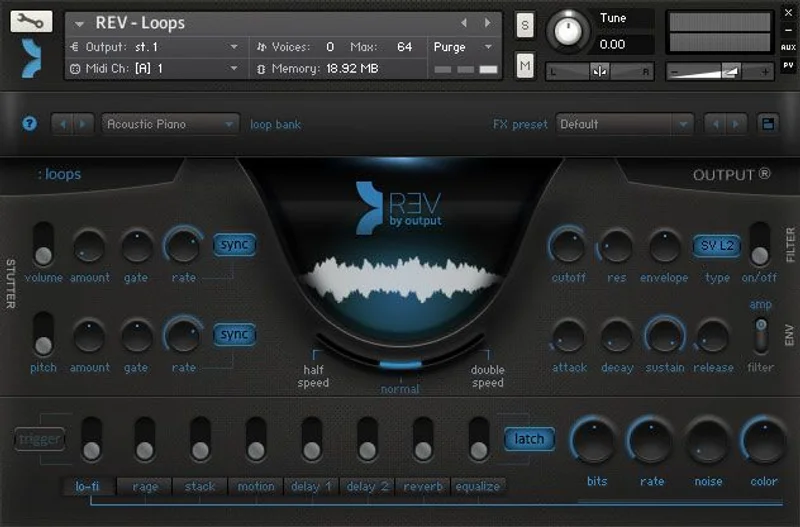
Rises are the clearest example. Electronic and trailer music depend on them. The big sweep up before a drop or a scene cut is one of the most used devices in the genre. But building a rise that actually locks to tempo, that crests at exactly the right bar, is fiddly in a way that breaks flow.
That's the gap REV sits in. Output's sound designers spent months recording live instruments and field recordings, then built engines to let you play that material in reverse, in real time, with tempo-locking built in. You're not reversing your own samples. You're playing an instrument that was designed to behave this way from the ground up.
Whether the execution earns the price tag is what we're here to figure out.
Inside the REV Engine: What You're Actually Getting
REV is organised around 4 engines, and each one handles the reversed material differently.
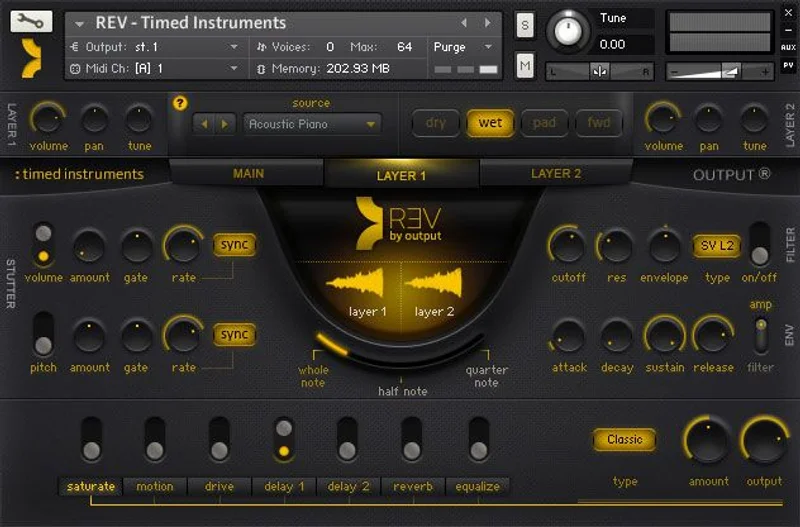
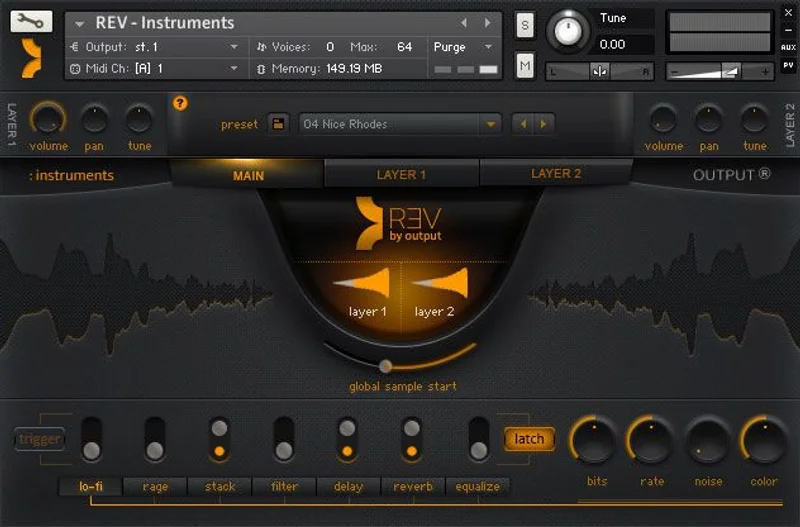
The main instrument engine is where you find the 1,000+ reverse instruments: complex synths, real acoustic sources, and multi-layered organic pads. You play them chromatically. Push higher on the keyboard and the pitch shifts. The reverse behaviour stays intact regardless of the note you're hitting, which is what makes it feel like a real instrument rather than a sample triggered from a fixed root.
All instruments can be played freely or locked to tempo. That choice matters more than it sounds. Locked-to-tempo mode means the reverse swell of a pad finishes at a musically sensible point, not halfway through a bar. Free mode lets the instrument breathe naturally, which works better for ambient or cinematic cues where strict tempo is less relevant.
The Loops Engine
The loops engine carries thousands of live-recorded loops. You can adjust speed and they spread across two octaves on the keyboard, so a higher note gives you a pitched-up, tighter version of the loop while a lower note stretches it darker and slower. Multiple loops can run simultaneously. Stack a swell loop with a stutter loop and a filtered pulse, and you're building motion that would take a dozen automation lanes to replicate manually.
The speed and spread behaviour is satisfying once you dial it in. It's one of the places where REV rewards time spent learning rather than preset-surfing.
That said, some owners find the loop-centric structure limiting. Several users wish the loops could be played as standalone melodic instruments rather than loops with a fixed rhythmic character. It's a real constraint if your workflow leans toward writing melodies first and adding texture second. The loops want to be texture. They don't want to be leads.
The Rises Engine
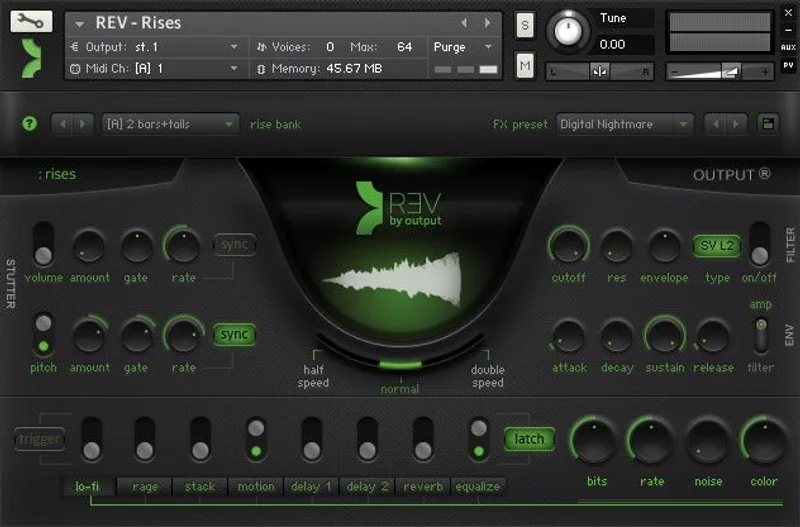
This is probably the most practically useful section for anyone making electronic or trailer music. Rises are adjustable by key and speed, and they lock to tempo automatically. Set your BPM, choose a rise, pick the duration in bars, and it crests at the right moment. No offline bouncing. No manual pitch correction.
Output's own claim is that rises are very prominent in electronic and trailer music, which is true, and the engine reflects that priority. Rises, pulses, swells, and stutters all live here, all tempo-aware.
Honestly? This engine alone makes a strong argument for the bundle if rises are something you build regularly. The time it saves is real.
The FX Engine
Built-in FX include filters, envelopes, distortion, saturation, lo-fi, chorus, delays, reverb, and EQ. All of them can be automated and triggered via keys on the keyboard, which opens up performance possibilities that straight clip automation doesn't. Assign a filter sweep to a high key. Hit it live. Done.
Volume and pitch stutter FX are synced to tempo or adjusted freely. Stutter is one of those effects that sounds impressive in demos and gets used in maybe 20% of real-world cues, but when you do need it, having it already synced and already tuned to the library's content saves real time.
REV X-Loops: The Second Half of the Bundle
REV X-Loops is a separate engine. It doesn't require REV to run, which is worth knowing before you buy. If you already own REV and are considering adding X-Loops, or vice versa, they're independent.
X-Loops brings 2GB of multi-layered loops across 20+ new categories. The content is a mixture of forward and reverse sounds rather than purely reversed material, which gives it a broader sonic palette but a slightly different character from the main REV library.
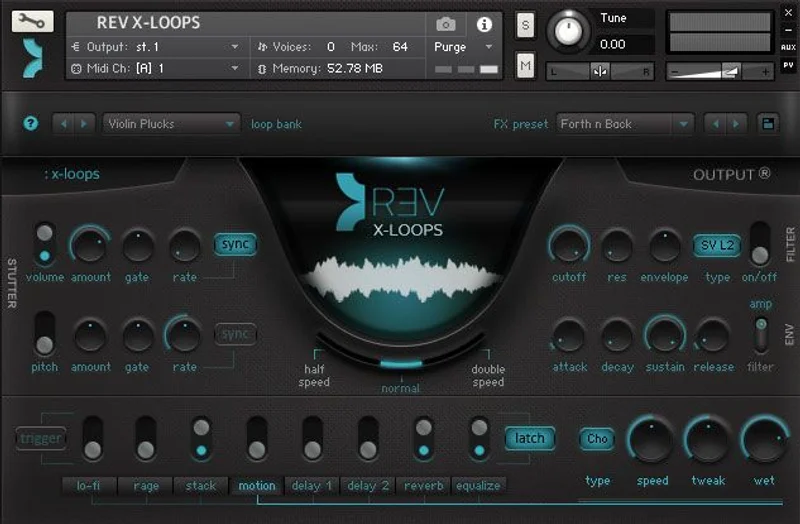
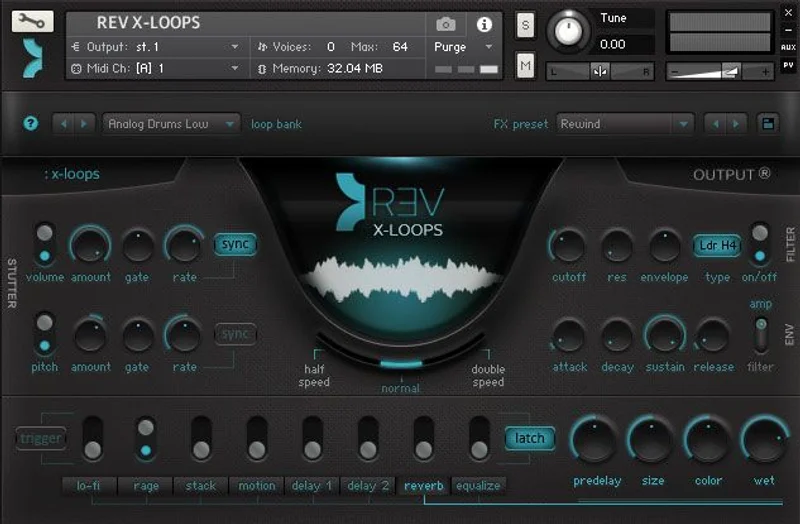
Loops auto-map to your MIDI keyboard and lock to tempo. You can change the key of any loop directly, and you can trigger FX using the keyboard rather than menus. The FX set here is its own list: Stutter, Reverb, Delay, EQ, Rage, and Lo-Fi. Note durations are set to whole note, half note, or quarter note, which keeps the rhythmic behaviour predictable without needing to think about it.
Over 50 FX presets and snapshots are included. Reviewers note that FX tweaking produces genuinely varied textures, and that the chosen FX complement the loop content rather than fighting it. That's not always a given with bundled FX chains.
The X-Loops interface is praised by users for staying on a single page. Everything you'd want to touch is visible without opening submenus. That's a design decision that feels obvious but isn't common.
Strengths and Weaknesses, Honestly
Let's put the good stuff on the table first.
Fourteen-plus gigabytes of content, recorded live by Output's sound designers over months, sounds like a quantity argument. It isn't. Owners report that the content holds up without processing. You can drop a swell or a reverse pad into a mix and it already sits. That's harder to build than it sounds when your source material is reversed instruments rather than forward-recorded ones, because the natural envelope of the original recording shapes the texture in ways that are hard to predict and harder to control.
The tempo-locking across all four engines is a genuine workflow tool. Rises that miss the drop are useless. Rises that land exactly where you placed your marker are invisible infrastructure, the kind of thing that makes a cue feel right without the listener knowing why.
The FX automation via MIDI keys is clever. It turns what could be a menu-diving exercise into something performable.
Now the problems.
Some loops sound dated. That's a reviewer observation, not our spin. The library was built at a specific moment, and certain loops carry that moment with them. This isn't a dealbreaker, but it's worth knowing if you're buying in 2026 expecting everything to feel current.
The Kontakt interface looks tired. Output's sound and feature set are modern, but the visual layer of Kontakt itself is aging, and some owners find it annoying compared to purpose-built plugin UI. That's not Output's fault entirely, but you're living in it every session.
And the loop-as-loop limitation is real. If you want to grab a loop from X-Loops and play it as a melodic instrument, the engine isn't built for that. The loop character is baked in. Some users underuse the bundle because of this. They load it, can't find a way to make it do what they want, and close it.
Who Uses REV + REV X-Loops, and What They Actually Get
The Film and Trailer Composer
You're scoring a chase sequence. The action peaks at bar 64, and you need a rise that crests exactly there. You need a reverse swell under a dialogue scene that breathes without dragging. You need stutter textures that feel chaotic but stay glued to the cut.
REV was built with this person in mind. The rises engine is genuinely useful here. Tempo-locked rises that auto-adjust to your key reduce cue-building time in a real, measurable way. The 1,000+ reverse instruments give you source material that behaves in ways standard samples don't, and the organic recorded content adds the kind of natural movement that synthetic reverses lack.
Buy it. For this use case, $278 is justified.
The Electronic Music Producer
You're building a track that needs atmospheric movement between sections. You want builds that don't sound like the stock Splice rise everyone used in 2022. You want pads that feel like they're going somewhere, not just sitting.
REV's loops engine and X-Loops work well here. Multiple simultaneous loops with stutter and filter FX triggered live can generate a layered build in minutes that would take much longer to assemble from individual samples. The speed control across two octaves gives you pitch flexibility without leaving the instrument.
The caveat is the dated loops issue. Some of the loop content feels like it belongs to a previous era of electronic music. If that bothers you, check demos carefully before buying.
Buy it if atmospheric movement is a regular part of your work. Wait if you mostly write club-forward tracks where texture is secondary.
The Sound Designer
You're building presets for a game audio library, or scoring an installation piece, or creating foley beds for a podcast. You need texture that moves in non-standard ways and you're not afraid to go deep into an instrument.
REV rewards time. The FX automation, the stutter and filter controls, the ability to stack loops and apply tempo-synced effects live: all of it is deeper than a quick browse suggests. Output says users can build their own presets and share them with other REV users, which extends the library beyond what ships in the box.
Reviewers describe it as super powerful but intuitive. That combination is rare and worth respecting.
Buy it. This is probably the audience it serves best.
The Beginner Producer
You're six months in. You've got a DAW, a few plugins, and you're still learning signal chain basics. You want your tracks to sound bigger and more interesting.
The single-page interface and the preset library make REV approachable. You won't drown in menus. But if you don't yet have Kontakt, add that cost. The bundle requires Kontakt 5.8.1 or higher. That's a platform dependency that changes the real price of entry.
Wait. Not because the product is bad, but because you'll get more from it once you understand what you're trying to solve. Come back when you know what a rise needs to do in your cue.
The Mixing Engineer
You're not writing music. You're mixing. You don't need source instruments.
Skip it. This isn't built for your workflow.
Value for the Price
At $278, you're getting 16GB+ of content across two libraries, four engines, 20+ loop categories, 50+ FX presets, and tempo-locked rise, stutter, and loop behaviour. By raw content-per-dollar math, that's a reasonable rate for a specialist library of this type.
The honest question isn't whether you're getting content. You are. It's whether the content is still current enough to justify the price in 2026. Some of it is. Some loops have aged. The core reverse instruments hold up well. The rises engine is still one of the more direct ways to build tempo-locked rises in Kontakt.
If reverse textures and atmospheric movement are regular tools in your work, we think $278 earns its place. If they're occasional, you'll underuse this, the way some owners already report doing.
Check if there's a sale before committing. Output discounts their catalogue regularly.
Who Should (and Shouldn't) Buy This
- ✅ Buy if you write film, trailer, or cinematic music where tempo-locked rises and reverse textures are session staples.
- ✅ Buy if you're a sound designer who wants a large, performable reverse instrument with deep FX control and MIDI-triggerable effects.
- ✅ Buy if you produce atmospheric or ambient electronic music and you want layered loop movement without building it from scratch.
- ❌ Skip if you don't already have Kontakt and aren't planning to invest in the full version or Player separately.
- ❌ Skip if you primarily write melodic or harmonic content and need instruments you can play as leads or bass lines. These engines aren't built for that.
- ❌ Skip if you're in a 32-bit workflow. A 64-bit DAW is recommended for optimised performance.
Specs & Technical Details
| Developer | Output |
| Price | $278 |
| Plugin Format | Kontakt Library (requires Kontakt 5.8.1 or higher / Free Kontakt Player 5.8.1 or higher) |
| OS Support | Mac OS X 10.12 or higher / Windows 7 or higher |
| Activation | Native Access (required for Output's Kontakt-based instruments) |
| CPU Usage | N/A |
| Trial Available | N/A |
| Version Reviewed | N/A |
| RAM | 4GB minimum; 8GB recommended |
| Drive Space | At least 8GB free |
| Content Size | 14GB+ (REV) + 2GB uncompressed (REV X-Loops) |
| Instruments | 1,000+ reverse instruments |
| DAW Requirement | 64-bit DAW recommended |
Score Breakdown
| Category | Score | Notes |
|---|---|---|
| Sound Quality | 4.5/5 | Owners say it sounds great without processing; live recordings hold up well in the mix |
| Value for Money | 3.5/5 | Strong content-to-price ratio, but some dated loops reduce the case for full price |
| Ease of Use | 4.0/5 | Single-page interface is genuinely clear; Kontakt's own UI is the friction point |
| Features | 4.0/5 | Four engines, MIDI-triggered FX, tempo-locked everything; loop-only character is the main limit |
| CPU Efficiency | N/A | No data available from our notes |
| Overall | 4.0/5 | A specialist library that does its specific job well, with some content aging showing at the edges |
Getting the Most Out of REV Before You Commit
One thing that gets missed in most REV discussions: the preset-sharing feature. Output built in the ability to save your own presets and share them with other REV users. That's not just a nice-to-have. For a library with this much content, community presets can double the practical range of what ships in the box. Worth checking the Output community before you decide the library doesn't have what you need.
If you load REV and feel underwhelmed at first, try the rises engine before anything else. Set your tempo, pick a rise that's close to the length of your build section, and let it land on your drop. That's the engine that makes the clearest case for the bundle fastest.
For X-Loops, don't just trigger single loops. Stack two or three simultaneously and run the Stutter FX against them. The layered behaviour is where it gets interesting. A single loop triggered politely is exactly as boring as a single loop sounds. Two overlapping with a stuttered filter on top is something else.
And if you're a sound designer or composer who wants to go deeper: explore the FX automation via MIDI keys. Assign a filter to a high note on your keyboard. Trigger it live during recording. It's one of the more expressive things you can do with a sampler library, and most users don't find it until they've owned the bundle for months.
The best Kontakt instrument bundles for film composers conversation usually surfaces REV as a recommendation in the rises and reverse texture category specifically. That specificity matters. It's not an all-purpose instrument library.
Comparing REV to the Alternative Approach
We're skipping named competitor comparisons here because there are no products we're certain enough about to name directly. But the honest alternative worth considering is this: you could build much of what REV does manually, using a combination of your DAW's reverse function, a third-party convolution reverb, and a few well-chosen sample packs.
The manual route takes longer. A lot longer. And the results are less consistent because you're assembling texture rather than playing an instrument designed to produce it. The difference between sample packs and Kontakt instruments comes down exactly to this: one gives you raw material, the other gives you a playable system built from that material.
REV is the system. If you value the playable, tempo-locked, MIDI-controlled system over raw flexibility, it wins. If you'd rather dig into your own samples and reverse them yourself, save the money.
For what it's worth, reviewers consistently describe REV as intuitive. That word usually means "I could use it from day one without reading a manual." For a library with four engines and tempo-locked everything, that's not nothing. The guide to building cinematic textures in Kontakt walks through the kind of session where REV fits naturally. Worth reading before you decide.
The Kontakt Dependency Question
This needs its own section because it's the main hidden cost.
REV requires Kontakt 5.8.1 or higher. The good news is that it's compatible with both the full Kontakt version and the free Kontakt Player 5.8.1 or higher. Native Access is required for activation of Output's Kontakt-based instruments specifically.
If you don't have Kontakt or Kontakt Player, that's a separate step before you can run a single note. Factor that into the real cost of entry. For users who already have Kontakt as part of a larger plugin library, this isn't a problem. For someone buying their first serious library, it is.
The 8GB minimum RAM requirement is fine by modern standards, but 4GB minimum is cutting it close if you're running a full session. Eight is the real floor for comfortable use.
And the 64-bit DAW recommendation is worth noting: if your setup is older and you're still on a 32-bit host, optimised performance won't be available. That's a workflow question only you can answer.
What Output's Own Claims Are Worth
Output says REV is not a simple reverse button. That's true. The difference between clicking "reverse" in your DAW and playing REV's instrument engine is the difference between flipping a recording and performing a designed reverse instrument. The playability, the tempo-locking, the key-adjustable rises: none of that exists in a DAW's native reverse function.
They also say the result is an "elusive modern sound." That's marketing language, and some of the loops suggest the modernity has a shelf life. Not all of it. But some.
The months-of-recording claim is credible when you hear owners describe the content holding up without processing. Field recordings and live instruments that sound good dry usually come from people who spent real time on capture. The content quality is the strongest argument for the library.
The how Output approaches Kontakt library design explains their broader approach if you want context on how REV fits into their wider catalogue.
The Verdict on REV + REV X-Loops Bundle
REV + REV X-Loops is a specialist tool that knows what it is. It's not trying to replace your synths, your pads, or your melodic instruments. It's trying to solve the specific, annoying problem of building reverse textures and tempo-locked rises in a way that doesn't break your creative session every time you need one.
For film composers and trailer producers, it mostly succeeds. The rises engine alone saves meaningful time. The 1,000+ reverse instruments give you real, live-recorded material to work with. The single-page interface doesn't get in the way.
For electronic producers, it's more conditional. The loop content shows its age in places, and the loop-as-loop limitation means you can't repurpose the material freely. But stacked loops with live MIDI FX triggering? That's a workflow that rewards the producers who go deep.
Some users underuse this. They load it, poke around, don't immediately find what they want, and close it. That's a real risk at $278. If you're the kind of producer who buys libraries and then goes back to your five favourite presets forever, this probably isn't the right spend.
But if reverse textures, cinematic movement, and tempo-locked rises are tools you reach for regularly? REV + REV X-Loops is one of the more direct ways to get there, and the content quality backs up the price when you actually use what's inside.
Related reviews: 3Dust Collection · Hollywood Fantasy Orchestra Bundle Still Delivers in 2026
Frequently Asked Questions
Do I need the full version of Kontakt to run REV + REV X-Loops Bundle?
No. The bundle is compatible with both the full version of Kontakt and the free Kontakt Player, as long as you're running version 5.8.1 or higher. You'll also need Native Access to activate Output's Kontakt-based instruments specifically. If you're buying this as your first Kontakt library, download the free Kontakt Player first to confirm your system is compatible before purchasing.
Can REV X-Loops run without REV installed?
Yes. REV X-Loops is a separate engine and doesn't require REV to run. If you own just one half of the bundle, the other half won't prevent it from loading. This also means if you already own REV, you can add X-Loops independently without reinstalling anything.
Are the loops in REV X-Loops only reverse sounds?
No. REV X-Loops contains a mixture of forward and reverse sounds across its 20+ loop categories. This gives it a broader sonic palette than the main REV library, though the overall character still leans toward atmospheric, textural movement rather than traditional melodic loops.
Can I play the loops as melodic instruments rather than loops?
Not really. The loop engines in both REV and X-Loops are designed for loop playback rather than freeform melodic use. Loops spread across two octaves for pitch variation, but the rhythmic loop character stays intact. Several owners find this frustrating if they want to repurpose loop material as leads or bass lines. It's a genuine limit of the design, not something you can work around in settings.
How do the tempo-locked rises actually work in practice?
You set your project BPM in your DAW, and REV's rises engine reads it. Choose a rise, set the duration in bars, and the rise crests at the end of that duration automatically, regardless of key or pitch. You can adjust the rise by key and speed, and it stays locked to your tempo. This is the most directly useful feature for trailer and film composers who need rises to land on specific markers without offline bouncing.
Is REV + REV X-Loops Bundle good for beginners?
The interface is approachable and reviewers describe it as intuitive, so the learning curve isn't steep. The real issue for beginners is the Kontakt dependency and the question of whether reverse textures are actually what you need at your current stage. If you're still building your core sound and learning your signal chain fundamentals, the money might go further on more versatile tools. Come back to REV when you know specifically that you need what it does.