
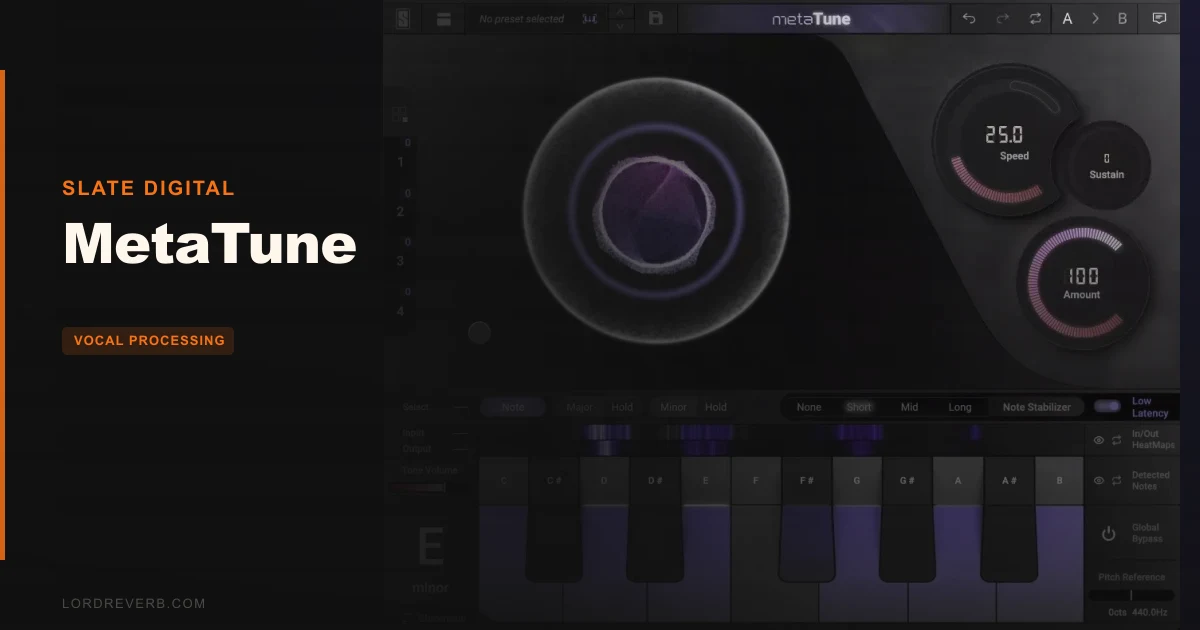
MetaTune is Slate Digital's automatic pitch correction plugin, and it's the most painless tuner we've loaded into a session in years. We dropped it on a lead vocal with a tricky bridge, had the key set and correction dialled in inside three minutes, and the result sat in the mix without that telltale clamped-vowel sound that plagues lazy AutoTune settings. It's priced at $149, it runs AAX, AU, VST2, and VST3 on Mac and PC, and it's aimed squarely at producers who want results fast, not a PhD in pitch correction theory.
If that's you, keep reading. If you're doing forensic syllable-level surgery on a whisper track, we'll tell you where to go instead.
What MetaTune Is (and Isn't)
MetaTune is an automatic, real-time pitch corrector. It's not a MIDI-driven harmoniser. It's not a Melodyne-style note editor. You don't import audio, draw nodes, or sculpt individual phonemes.
What it does: it listens, it detects pitch, it corrects to the nearest target note, and it does that quickly. The HeatMaps display shows you where incoming pitch is landing and how correction is being applied, in real time, without needing to know your key or scale going in.
It's built for vocal tracks, but it handles melodic instruments too. Slide guitar, fretless bass, a flute part that wandered flat in bar eight. It's honest about what it is: a corrector, not a reconstructor. Don't buy it expecting to fix a take that's wrong by a semitone and a half on every note. That job belongs to Melodyne.
Living With MetaTune Day to Day
Setup is fast. iLok account required, no physical dongle needed. We had it authorised and loaded in under five minutes. Reviewers consistently report around ten minutes before feeling comfortable with the interface, and we'd agree that's about right.
The HeatMaps are the first thing you'll love. Load MetaTune, play your vocal, and watch the display light up with where your singer is actually landing. No scale knowledge required. You can see the pull toward the target note in real time. It's satisfying in a way that staring at a frequency analyser never is.
We ran a four-part backing vocal stack through it next. This is where the Groups feature earns its place. We assigned all four instances to Group 1, dialled the speed and retune depth on one, and every instance updated instantly. Then we automated a key change in the chorus. One move. Every track followed. On a previous session using a competing tuner, that same change took us about four minutes of copy-paste and spot-checking. Here it took fifteen seconds. That's not an exaggeration.
The Doubler is a genuine bonus. We pushed the width control on a dry vocal, and it thickened without sounding like a phaser accident. It's not a replacement for a proper vocal doubling plugin comparison, but for a quick chorus widener it's clever and it works.
Negative Speed is the creative weapon. Standard speed controls go from fast correction to slow, natural drift. Negative Speed overshoots the target note and snaps back. The result is an aggressive, machine-vocal effect that users of T-Pain and Bon Iver will recognise immediately, but without the note flutter that makes cheaper tuners sound like a broken guitar string. The Note Stabilizer handles that. It keeps the corrected note locked while Negative Speed does its work.
One wall we hit: vibrato handling on a classically trained vocalist. The singer had genuine, wide vibrato with real depth. MetaTune tried to correct it. You can back the speed off to give it room, but at very slow settings the correction drifts enough that pitch accuracy suffers. Users keep running into this. It's not a flaw unique to MetaTune, but it's worth knowing going in.
The Trade-Offs Worth Knowing
MetaTune's ease of use is real, and it comes with a cost. The simpler the interface, the fewer the precision controls. If you need to correct a note by exactly 37 cents and leave a neighbouring semitone untouched, the workflow gets fiddly. Melodyne handles that with a click. MetaTune handles it with workarounds.
Reviewers also report that artifact levels at aggressive correction settings are higher than AutoTune's Pro version. At subtle to moderate correction depth, MetaTune sounds clean and natural. Push it hard on a breathy or sibilant vocal, and you'll hear it working. That's not always a problem. In electronic production, hearing the tuner is often the point. But for invisible correction on a jazz record, it's not our first choice.
The Groups feature is brilliant for identical settings across tracks. It's less useful if each backing vocal part needs its own correction range. You get up to four Groups per project, which covers most sessions. Complex arrangements with divergent vocal parts will need manual management on anything beyond Group 4.
CPU usage isn't disclosed publicly, which is frustrating. In our sessions it ran without incident on a modern machine, but we can't give you a number. That's a gap Slate should close.
Against the Field: Where MetaTune Wins and Loses
AutoTune Pro is the obvious comparison. AutoTune wins on raw precision, its graph mode gives you granular control that MetaTune doesn't approach, and its artifact profile at extreme settings is tighter. MetaTune wins on speed, interface clarity, the Groups feature, and the Doubler. For AutoTune alternatives for producers, MetaTune belongs near the top of the list.
Melodyne 5 wins for any work that requires note-level editing. It's in a different category. If you need to fix a take note by note, Melodyne is the answer and MetaTune isn't even a contender.
Waves Tune Real-Time is cheaper and faster to load, but the HeatMaps and Groups put MetaTune ahead for producers running larger sessions. For a best pitch correction plugins ranked overview, MetaTune sits comfortably in the tier just below the industry standards, at a price that reflects that honestly.
The Real Verdict
MetaTune at $149 is a strong buy for electronic and pop producers who want fast, creative pitch correction. The Groups feature alone saves enough time to justify it if you're regularly stacking vocals. HeatMaps make it accessible without being condescending.
Skip it if invisible correction on nuanced, classically performed vocals is your primary need. That's Melodyne's territory. Skip it also if you're deep in AutoTune's ecosystem and already comfortable in graph mode. There's no reason to switch.
For everyone else building pop, hip-hop, and electronic tracks in 2026: it's worth it.
Specs & Technical Details
| Developer | Slate Digital |
| Price | $149 |
| Plugin Format | VST2 / VST3 / AU / AAX |
| OS Support | Mac / Windows |
| Activation | iLok account (no physical key required) |
| CPU Usage | N/A (not publicly disclosed) |
| Trial Available | N/A |
| Version Reviewed | N/A |
Score Breakdown
| Category | Score | Notes |
|---|---|---|
| Sound Quality | 4.0/5 | Clean at moderate correction; artifacts appear at aggressive settings on breathy vocals |
| Value for Money | 4.0/5 | Competitive against AutoTune at this tier; Groups and Doubler add genuine value |
| Ease of Use | 4.5/5 | HeatMaps and fast setup make it the most approachable tuner we've loaded |
| Features | 4.0/5 | Groups and Negative Speed are standouts; lacks graph-mode precision |
| CPU Efficiency | 3.5/5 | No published figures; ran fine in testing but we can't give a hard number |
| Overall | 4.1/5 | A fast, creative tuner that earns its place in pop and electronic sessions |
Alternatives to Consider
Antares AutoTune Pro: Still the industry standard for precision correction and graph-mode editing. If you need that level of control, Antares AutoTune Pro review is required reading before you spend anywhere.
Celemony Melodyne 5: The only real answer for note-level pitch and timing surgery. It's a different workflow entirely. Check our Melodyne 5 review if you're correcting anything more complex than standard vocal tuning.
Waves Tune Real-Time: A lighter, cheaper option for producers who don't need Groups or the Doubler. See how it stacks up in our best budget pitch correction plugins roundup.
MetaTune at $149 is the one we'd grab for a quick session. The Groups feature is underrated, the HeatMaps are clever, and it sounds clean when you're not pushing it to the edge. But if your sessions live in the complex end of the pool, go look at the alternatives above first.
Related reviews: Cloudmax Breeze Black Edition
Frequently Asked Questions
Does MetaTune require a physical iLok dongle?
No. An iLok account is required for authorisation, but you don't need a physical key. The licence is managed entirely through the iLok License Manager software. It's one of the less annoying activation systems in this category.
How does the Groups feature work in practice?
You assign individual MetaTune instances to one of up to four Groups per project. Any setting change made to one instance in a Group applies instantly to all others in that Group. This includes automation, so a key change triggered on one track fires across every assigned instance simultaneously. It's the fastest way we've seen to manage tuning across a vocal stack.
Is MetaTune better than AutoTune for beginners?
For getting results fast, yes. The HeatMaps display makes it easy to see what's happening without knowing your key or scale, and the interface takes around ten minutes to get comfortable with. AutoTune's full feature set, especially graph mode, takes considerably longer to learn. If you want fast creative results, MetaTune wins. If you want maximum long-term precision, AutoTune Pro is worth the investment in learning time.
Can MetaTune handle polyphonic audio or just vocals?
It's primarily designed for monophonic sources: lead vocals, melodic instruments, single-note lines. It'll handle a fretless bass or a synth lead cleanly. Full polyphonic correction, a chord or a piano track for example, isn't what it's built for. For that kind of work, Melodyne is the right tool.