Vocal mixing is the part of production that breaks people. You've got a decent recording, your instrumental sits well, and then you drop the vocal in and suddenly nothing sounds like it belongs together. The low-mids are muddy, the sibilance is cutting, the harmonies you tried to build manually sound like a choir of slightly off robots, and you've now spent four hours on a task that was supposed to take forty minutes. That is the specific problem iZotope built Nectar around, and in its fourth iteration, Nectar 4 Standard tries to solve it with machine learning, a full module chain, bundled pitch correction, and an AI assistant that listens to your vocal and makes decisions for you. At $199, it's a meaningful investment. Whether it's the right one depends entirely on what kind of vocal work you're actually doing.
The Specific Pain Point Nectar 4 Standard Is Built to Address
Building a vocal chain from individual plugins is not hard once you've done it a hundred times. But if you're early in your production journey, or you're a beat-maker who records features, or you're a singer who handles your own mixing, assembling EQ, compression, de-essing, reverb, saturation, pitch correction, and harmonies into a coherent, ordered signal chain takes time you don't always have.
And even when you have the time, you've got to know what order the modules should run in, what settings actually make sense for voice, and how to stop the whole thing from sounding like you've processed the life out of it.
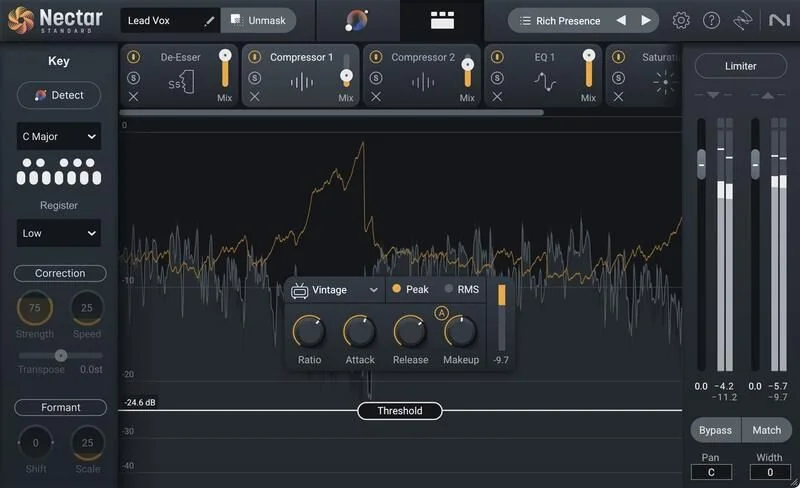
Nectar 4 Standard is a single plugin that handles the entire chain. Pitch correction via Melodyne 5 Essential, compression, two dynamic EQs, de-essing, gate, saturation, dimension effects, reverb, delay, a harmony engine, and a background vocal engine. That's eleven modules in one interface, guided by an AI assistant that analyzes your vocal and sets the whole thing up based on a target sound you choose.
The catch: it doesn't always work that cleanly. Some parts of this tool are genuinely clever. Others are frustrating in ways that feel like they should have been caught before version 4.
Vocal Assistant: The Feature Everyone Opens First
Vocal Assistant is the entry point for most people. You hit the button, it analyzes your vocal, and it sets up the full module chain based on a target sound you select from the library. You can also import your own reference track and have it match the tone of that specific vocal.
This is where the Audiolens integration matters. Audiolens is a companion tool that lets you reference audio from any source, using separation technology to isolate the vocal tone. It then feeds that reference into Vocal Assistant, so you can target the actual sound of a specific record rather than a generic preset category.
Owners report that the Vocal Assistant output in version 4 sounds more natural and less aggressive in the high frequencies than it did in version 3. That's real progress. The starting points are subtle enough that you can actually use them as a foundation rather than immediately fighting the preset.
But here's the honest version: reviewers report that the Vocal Assistant output still requires nearly full manual adjustment before it sounds acceptable. It's a starting point, not a destination. The macro controls let you push the intensity, width, dimension, reverb, and delay amounts globally, which is fast. But the moment you want to get specific, you're going inside each module and working it manually anyway.
So think of Vocal Assistant as a smart template generator. It populates your chain with settings that are in the right ballpark for your vocal. What it won't do is hand you a finished mix.
Reference Track Matching and the Audiolens Library
The reference track workflow is one of the more useful things here. If you've got a vocal from a song you're trying to emulate, you can feed that through Audiolens and build it into your personal library of custom reference targets inside Vocal Assistant.
Over time, that library becomes genuinely useful. You're no longer picking from generic pop or hip-hop presets. You're picking from your own curated set of vocal tones that map to actual records you've studied.
The Audiolens separation technology is designed to handle situations where you're referencing a full mix rather than an isolated vocal. It pulls the vocal tone from the mix and uses that as the target. How well it works depends on how clearly the vocal sits in that reference mix. Dense, heavily processed references give it less to work with.
The Dynamic EQ: Where Nectar 4 Standard Actually Earns Its Price
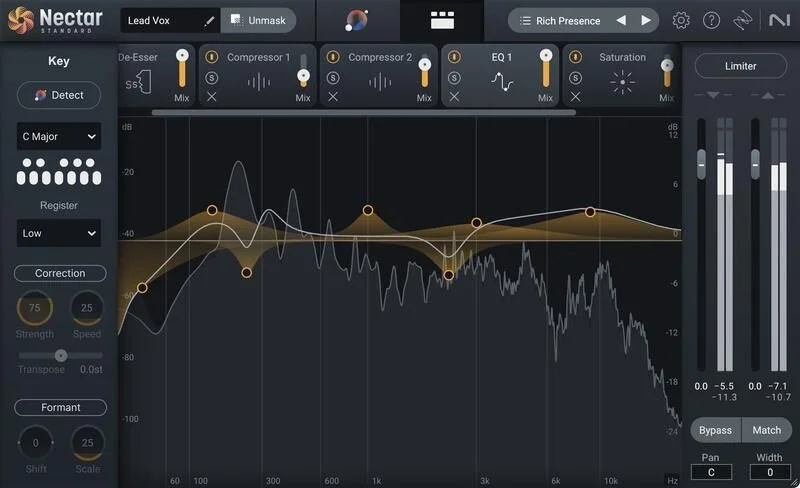
Two 24-band Dynamic EQs. That's not a small thing. Most standalone dynamic EQs that do what Nectar's EQ does cost nearly as much as this whole plugin.
The key feature is Follow EQ mode, and it's one of the most genuinely clever things in this plugin. Standard dynamic EQs react to level, so when a frequency gets loud, the EQ engages. Follow EQ mode tracks the pitch of the vocal and adjusts its frequency targets dynamically as the pitch moves. That means resonant harmonics that shift with the singer's pitch get addressed accurately, without you having to manually automate a moving target.
If you've ever spent twenty minutes trying to suppress a nasal resonance that moves across the frequency spectrum every time the singer changes notes, you know exactly how frustrating that is. Follow EQ makes the EQ node follow the harmonic, wherever it goes. iZotope calls this automatic removal of resonant frequencies and harmonics.
Owners report the EQ is a particular strength on spoken word as well. Podcasters and voiceover producers have found the combination of adaptive nodes and Follow EQ effective for the kind of room resonances that spoken word tends to expose.
Having two separate 24-band instances in one plugin means you can run one early in the chain for corrective work and one later for tonal shaping. That's a workflow that most standalone EQ setups require multiple plugins to replicate.
Adaptive Nodes and Frequency Shaping
The adaptive nodes feature means certain EQ nodes respond to the dynamics of the signal as well as its pitch. You're not setting a static cut at, say, 3.2kHz. The node is watching the vocal and deciding how hard to cut based on how much energy is arriving at that frequency at any given moment.
This is the difference between corrective EQ that sounds like surgery and corrective EQ that sounds like the problem was never there. When it works, the vocal breathes through the EQ rather than getting flattened by it.
When you're setting up the corrective EQ pass, start conservative. The adaptive behavior means pushing Q values too tight can create a kind of pulsing artifact as the node repeatedly engages and disengages on a harsh frequency.
Melodyne 5 Essential: Pitch Correction Without the Extra Cost
Bundling Melodyne 5 Essential into this package is a straight-up value move. Melodyne at any tier is not free, and the Essential version covers the pitch and time correction that most vocal production workflows need.
iZotope calls it a GRAMMY-award winning tool, and that's not marketing exaggeration. Melodyne is the standard for a reason. Even at the Essential tier, you get pitch correction and time editing that is widely used in professional studios.
The important caveat: Melodyne 5 Essential is not the full Melodyne 5. Note-by-note editing with the kind of granular control that Melodyne's higher tiers provide is not available here. If you're doing complex polyphonic pitch editing or you need the full set of note manipulation tools, the bundled version won't cover it. You'd need to look at Melodyne 5 itself, which offers that note-by-note depth beyond what's included.
For standard lead vocal pitch correction and basic time correction, Melodyne 5 Essential does the job. The Pitch module also includes a Speed control that runs from 0 to 200ms, so you can dial in correction from transparent to hard-tuned.
At the tight end of that range, the correction is fast enough that it starts to give you an auto-tuned quality, though not the iconic hard-tune effect that Auto-Tune Pro 11 produces. If that specific sound is what you're after, you should know Nectar 4 doesn't replicate it.
Pitch Module Speed Control
The 0 to 200ms Speed control is where you decide how natural or processed the correction sounds.
Push it toward 0ms and correction is nearly instant. The vocal loses its natural pitch wavering. That's not always bad, it's what modern pop and R&B production often wants, but it's a stylistic choice you're making deliberately. Pull it back toward 100 to 150ms and the correction follows more slowly, letting natural vibrato and micro-pitch movement survive.
If you're working on intimate acoustic recordings or any situation where the processed quality would feel intrusive, start at 150ms and work inward only until you're fixing the actual problems. The transparent algorithm holds up well at the slower settings without introducing obvious artifacts.
The Voices Module: Harmonies That Work Most of the Time
Eleven harmony styles, up to 8 harmony voices, MIDI mode control, Direction control for adjusting whether the harmonies sit above or below the lead, a full editor for customizing voicings and chords, and a Mixer View for placing the harmony voices in the stereo field. This is a serious harmony toolkit, not a basic pitch-shift effect.
The harmony engine is where owners who work in vocaloid and UTAU production report strong results. The pitch correction and harmony generation combined give that kind of synthesized vocal character that works in those styles.
Owners also report the harmony engine is effective for standard pop and hip-hop stacks, which fits with the overall character of this plugin. It's built for that world.
The honest limitation: experienced harmony producers, the kind who've spent years dialing in four-part harmony with real singers or who've used dedicated harmony tools, report that the Voices module produces less sophisticated results than tools like Antares Harmony Engine. The voicings can sound like they're following a rule rather than a musical decision. Antares Harmony Engine is the comparison that comes up most among those users.
MIDI mode is a genuinely useful feature for live use or DAW automation. You can feed MIDI note data to control which harmonies trigger. If you're building out a track and you know exactly what chord movement you want, MIDI control lets you specify rather than letting the engine guess.
Direction Control and Mixer View
Direction control is easy to overlook, but it matters for the character of the harmony stack. Setting harmonies above the lead gives you a bright, lifted sound. Below the lead, the stack gets darker and more rooted.
In a dense pop mix, upper harmonies can get lost in the high-mid content of synths and guitars. Setting Direction to below creates harmonic width in a frequency range that's open in the mix. That's a smarter starting point than defaulting to upper harmonies and then wondering why the stack isn't audible.
Mixer View gives you individual level and pan control over the harmony voices. This is where you place the stack in the stereo field, and doing it inside Nectar rather than via sends keeps the routing simple.
The Backer Module: Big Promise, Uneven Results
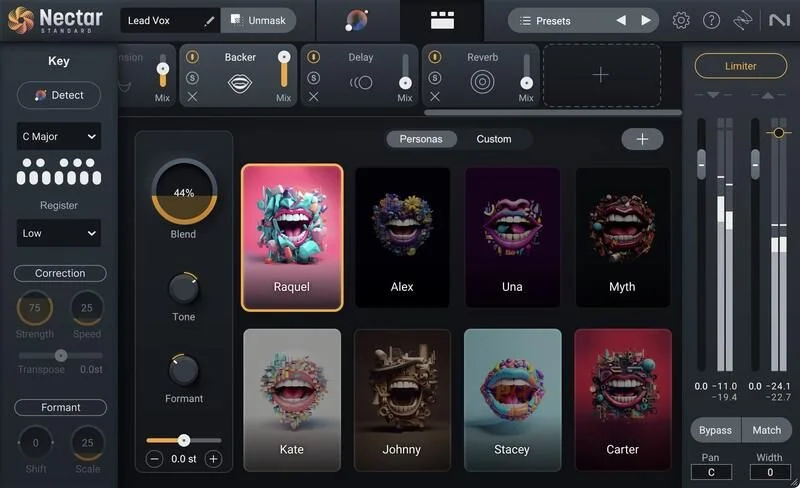
The Backer module is the most ambitious feature in Nectar 4 Standard and also the most disappointing one in practice.
The concept: AI-generated background singers in eight different styles, controlled via tone, pitch, and formant blending. You can import a custom acapella to shape the character of the backing voices, and you can automate style selection and shifting over the course of a song.
On paper, this is the feature that makes Nectar 4 Standard feel like a different kind of tool. Automated background vocal production without hiring session singers, without recording multiple takes, without comping and blending stacks manually.
In practice, reviewers report robotic and glitchy results on anything except clean, dry vocals. The Backer module is trained on English only, which means it sounds artificial on exposed sections and on any language it wasn't built for.
If you're using it on a dense, heavily produced pop track where the backing vocals are buried under reverb and delay, you can get away with it. The texture is there, the character fills a space. But if the backing vocal is exposed, if there's a moment of relative quiet where the listener can actually hear those voices, the artificial quality becomes obvious and hard to ignore.
That is frustrating for a feature that's positioned as a creative highlight of this version. For more flexible AI voice generation, some producers compare tools like RVC and Vocoflex. They offer a different approach that some producers find more convincing on complex material.
Tone, Pitch, and Formant Blending
The blending controls inside the Backer module give you enough adjustment to try to coax the AI singers toward something that works for your track. Formant adjustment is the most useful knob here. If the backing voices sound like they're in the wrong register or the wrong body size for your lead, pushing the formant up or down reshapes the character significantly.
Tone control operates on the overall brightness and density of the backing voices. Keep this conservative. The robotic quality in the Backer module tends to get more obvious at extreme settings, where the AI processing artifacts become more audible.
Automation over style selection is a feature that makes sense on longer pieces where you want the character of the backing to shift with the arrangement. Verse, chorus, bridge getting different backing treatments without manually building separate instances of the plugin is a workflow advantage. Whether the styles themselves are distinct enough to justify the automation depends on how exposed the backing vocals are in your arrangement.
Compressor, De-Esser, and Gate: The Workhorses
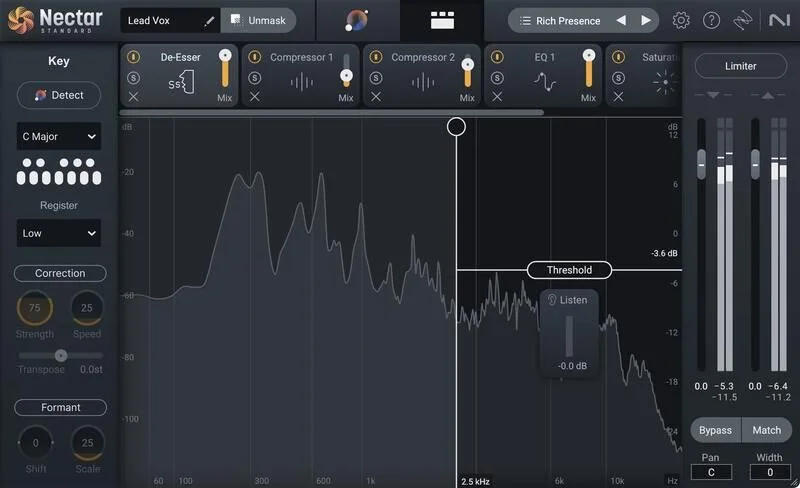
The compressor, de-esser, and gate are not the headline features of Nectar 4 Standard, but they're the parts you'll use most.
Owners specifically flag the De-Esser and Gate as strong performers on spoken word. For anyone mixing dialogue, podcasts, voiceover, or any application where the voice is exposed and the listening environment is quiet and critical, these modules have earned a reputation for handling the work cleanly.
The De-Esser in a vocal chain is the difference between a vocal that sits comfortably in the mix and one that makes listeners unconsciously reach for the volume control every time the singer hits an s or sh. Getting that threshold and frequency range set correctly is the unglamorous part of vocal mixing that takes years to develop an ear for. Nectar 4's De-Esser removes some of that guesswork.
The Gate is the module that stops the channel from breathing between phrases. Set it too tight and you clip the starts of words. Set it too loose and you've got room noise sitting under everything. The Gate in Nectar 4 Standard sits in the full module chain correctly, after the compressor, which is the right order for most vocal applications.
The Compressor handles dynamics across the full phrase. For vocal production, dynamic control is where the energy and intimacy of a performance gets preserved or crushed. Owners report the module handles its job without adding obvious coloration, which is what you want in a vocal compressor.
Reverb, Delay, and the Dimension Module
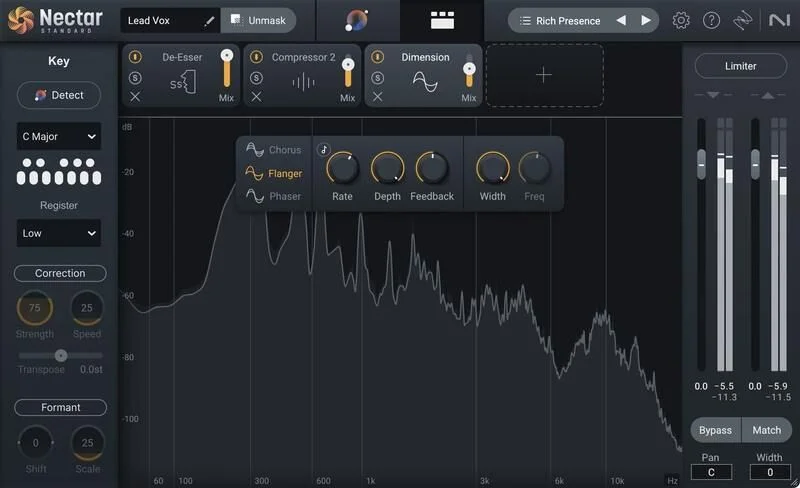
Dimension effects, reverb, and delay are the spatial layer of the vocal treatment. Nectar 4 Standard includes all three in the module chain, and the Vocal Assistant makes initial decisions about how much of each to apply based on your chosen target.
The Dimension module is the most useful of the three for in-box vocal production. It adds width, depth, and movement to the vocal without pushing it into a specific acoustic space the way reverb does. For modern pop and hip-hop, where reverb is often kept minimal but the vocal still needs presence, Dimension is frequently doing more work than the reverb itself.
The Reverb module is the part of Nectar 4 Standard where we'd push back hardest on the design. There is a single reverb algorithm. One. For a plugin at this price that positions itself as a complete vocal solution, a single algorithm is a real constraint. Plate, hall, chamber, and room all have different characters that suit different vocal styles and moments in an arrangement.
What makes this more frustrating is the lack of internal ducking in both the reverb and delay modules. Ducking in a vocal reverb means the reverb tail gets quieter when the vocal is singing, then breathes back in during the gaps. It keeps the reverb from cluttering the vocal while keeping the space alive between phrases. You can achieve a version of this with automation, but having to build it externally on a plugin that's supposed to handle the whole vocal chain is annoying.
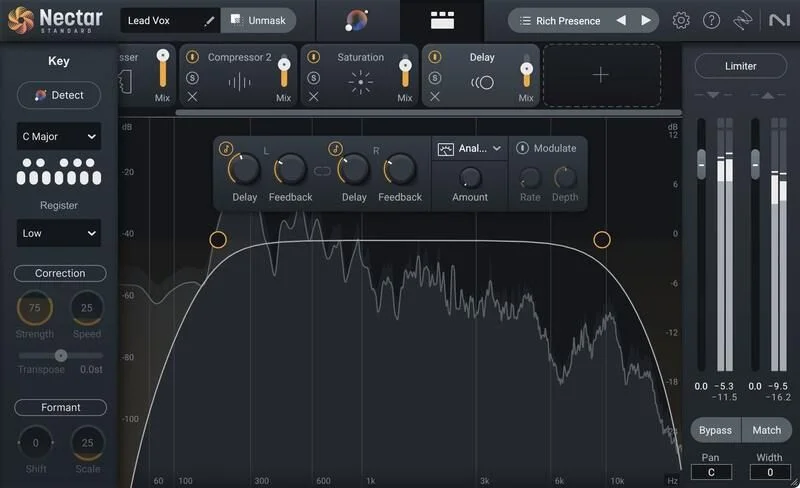
The delay module has the same issue. Without internal ducking, you're managing the relationship between the delay tails and the dry vocal manually or via a send with a sidechain compressor. That's not impossible, but it undercuts the "all-in-one" proposition.
Saturation: The Low-Cut Problem
The Saturation module is there for adding harmonic content, thickening the vocal, and giving it some edge without reaching for a separate distortion plugin.
But the Saturation module has no low cut. That is a specific, known limitation. When you push saturation into a vocal signal, you generate harmonics across the whole frequency range, including the low-mids. That thickens the bottom of the vocal, which sometimes you want and often you don't.
If you're trying to add top-end bite to a vocal without also adding low-mid weight, you can't do it cleanly inside the Saturation module itself. You'd need to use the EQ module after saturation to pull back the low-mid buildup, which is a workaround that adds steps to what should be a simple adjustment.
This is the kind of design decision that feels like it was an oversight rather than a choice. A simple high-pass filter on the input of the Saturation module would solve it. Its absence means the module is less versatile than it needs to be for the range of vocal textures this plugin is supposed to handle.
iZotope Ecosystem Integration and the Relay Hub
Nectar 4 Standard communicates with other iZotope plugins across your session. It includes iZotope Relay as the central connection hub, which lets Nectar talk to plugins like Neutron and Ozone to address tonal balance across the mix.
The Unmask feature within the Vocal Assistant menu is part of this. When you've got a mix where something is competing with the vocal in the same frequency range, Unmask uses iZotope's inter-plugin communication to have that element make space for the vocal. Rather than manually cutting the competing element and boosting the vocal to compensate, Unmask handles the relationship automatically.
The improved version in Nectar 4 is accessible from the Vocal Assistant menu screen, which puts it closer to the main workflow than it was in Nectar 3.
If you're already in the iZotope world, this integration adds real value. If you're using Nectar 4 Standard as a standalone vocal plugin in a chain built entirely from other developers' tools, the ecosystem features don't apply. The plugin works fine without them. But you're leaving some functionality on the table.
CPU Load and Technical Performance
Running a full vocal chain through Nectar 4 Standard with multiple modules active, Melodyne integrated, harmonies generating, and the Backer module running is asking a lot of a single plugin instance. iZotope has a lot of DSP happening simultaneously.
Owners report that the product provides smooth results using very little CPU in lighter configurations. So the experience varies based on how many modules you're running and how much of the full chain is engaged. Using Nectar 4 Standard as a full-stack vocal solution with every feature active is a different CPU conversation than using it for EQ, compression, and pitch correction only.
Loading presets introduces approximately 200 milliseconds of latency. For a mixing session where you're auditioning presets quickly, that 200ms gap before each preset settles is a workflow interruption that adds up.
System requirements include Intel or AMD Dual Core with 4 GB RAM minimum on Windows, or Intel Dual Core or Apple Silicon with 4 GB RAM minimum on macOS. macOS versions 12.6 through 13.5 and Windows 10 and 11 are supported.
If you're on an older machine or a laptop with limited resources, run this in a frozen or bounced workflow. Record your vocal, process it through Nectar 4, bounce the result, and then free the CPU for the rest of the session. That's the practical approach.
Presets: Useful Starting Points or Processed Walls?
Hundreds of professionally-designed presets. That number is what gets listed, and it sounds impressive. What it means in practice is that you have a large library of starting points to audition.
The character of the presets gets described consistently in reviews: processed, dense, and unmistakably iZotope. That last part is worth understanding before you buy. iZotope has a sound. If you've heard Nectar-processed vocals in pop and hip-hop records, you've heard that sound. It's not subtle.
For pop and hip-hop production, that character often fits the music. The presets are built for that world and they work in it.
For intimate acoustic music, singer-songwriter work, folk, stripped-back R&B, or any context where you need the processing to disappear, the presets are a harder starting point. They tend to add a layer that sits between the listener and the performance. You can dial it back, but you're working against the preset's intent rather than with it.
The honest advice: treat every preset as an approximate direction, not a finished sound. Use the macro controls to pull the intensity back from wherever the preset landed, then go into each module and check whether the specific decisions the Vocal Assistant made actually suit your vocal. The presets are more valuable for understanding what the tool can do than for deploying as-is.
Strengths and Weaknesses in Detail
The strength side is real. Two 24-band Dynamic EQs with Follow EQ is a feature set that justifies serious attention. The bundled Melodyne 5 Essential adds pitch correction value that you'd be paying for separately otherwise. The Vocal Assistant starting points, while not finished products, are reported to sound more natural and less aggressive in highs than Nectar 3, giving subtle starting points users can adjust via macro controls. The De-Esser and Gate are strong performers. The harmony engine covers the needs of most pop and hip-hop vocal stacks effectively.
And the weakness side is equally real. The single reverb algorithm is a constraint. The Saturation module's lack of a low cut is a design gap that limits its usefulness. The Backer module underdelivers on its promise for anything beyond clean vocals. CPU load can become a problem on less powerful machines. Loading presets increases latency to approximately 200 milliseconds, which can be annoying in a session where you're moving quickly.
Love the Dynamic EQ approach. Genuinely wish the reverb had more options. The Backer module is a clever idea that the technology isn't quite ready to execute convincingly on complex material.
Value for the Price
At $199, Nectar 4 Standard is competing with both individual specialist plugins and other all-in-one vocal solutions.
What you're getting for that price: a complete vocal module chain, two 24-band Dynamic EQs with Follow EQ mode, Melodyne 5 Essential pitch correction, an AI vocal assistant with reference matching, 11-style harmony generation with up to 8 voices, a background vocal generator, and iZotope inter-plugin communication. That's a lot of functionality in a single plugin.
What you're not getting: a fully flexible reverb section, a Saturation module that handles all tonal goals cleanly, a Backer module that works convincingly on exposed vocal sections, or Melodyne's full note-by-note editing capability.
If you were to buy equivalent individual plugins for the EQ, pitch correction, compression, de-essing, reverb, delay, saturation, and harmonies, you'd spend considerably more. The bundle value is real. But some of those individual plugins would be more capable in their specific area than Nectar's version of the same function.
For a producer who wants a solid, integrated vocal workflow without assembling and managing a chain of eight separate plugins, $199 is defensible. For someone who already has strong individual tools and just wants one specific piece, it's hard to justify.
Who Should (and Shouldn't) Buy This
The answer is not the same for everyone. Here's where the line is.
- ✅ Buy if you produce pop, hip-hop, or any genre where the iZotope preset character fits the aesthetic and you want one plugin to handle the whole vocal chain without building it from scratch every session.
- ✅ Buy if you're a vocalist or singer-songwriter who handles your own mixing and needs a smart, guided tool that gives you a solid starting point without deep technical knowledge of signal chain construction.
- ✅ Buy if you work in vocaloid or UTAU production, where the harmony engine and pitch correction combination has earned a specific reputation for effectiveness in that style.
- ❌ Skip if you need a genuinely convincing AI background vocal generator for exposed, production-forward sections. The Backer module isn't there yet.
- ❌ Skip if you're mixing intimate acoustic music or anything where the iZotope-processed character would work against the aesthetic. The presets and Vocal Assistant outputs fight that aesthetic.
- ❌ Skip if CPU headroom is a real constraint on your machine. This plugin runs heavy under a full module load, and that's a workflow problem you don't want mid-session.
Specs & Technical Details
| Spec | Detail |
|---|---|
| Developer | iZotope |
| Price | $199 |
| Plugin Format | AU / AAX / VST2 / VST3 (64-bit only) |
| OS Support | macOS 12.6–13.5 / Windows 10–11 |
| Activation | N/A |
| CPU Usage | Heavy under full module load |
| Trial Available | N/A |
| Version Reviewed | Nectar 4 Standard |
Score Breakdown
| Category | Score | Notes |
|---|---|---|
| Sound Quality | 3.5/5 | Dynamic EQ and pitch correction are strong; Backer module sounds artificial on exposed material |
| Value for Money | 3.5/5 | Bundle value is real, especially with Melodyne Essential; individual module limitations reduce the case |
| Ease of Use | 4.0/5 | Vocal Assistant and guided workflow are genuinely accessible; preset latency is a friction point |
| Features | 3.5/5 | Eleven modules with strong EQ and harmony tools; single reverb algorithm and Saturation low-cut gap are design limits |
| CPU Efficiency | 2.5/5 | Heavy enough under full load to force breaks; lighter configurations run more smoothly |
| Overall | 3.5/5 | A capable all-in-one vocal chain with real limitations that matter depending on your use case |
Alternatives to Consider
If Nectar 4 Standard isn't quite right for your situation, here are the specific tools that come up most often in comparison.
Auto-Tune Pro 11 is the comparison for pitch correction specifically. It produces the iconic hard-tune effect that Nectar 4 Standard does not. If that specific sound is part of your aesthetic, the choice is clear. Auto-Tune Pro 11 is built to deliver that effect in a way Nectar isn't trying to match.
Melodyne 5 (full version) is the upgrade path for anyone who tries Melodyne 5 Essential bundled with Nectar and finds themselves running into its limits. The note-by-note editing in the full version goes well beyond what the Essential tier provides. If complex pitch editing is a core part of your workflow, that extra capability is worth considering.
Antares Harmony Engine is the tool experienced harmony producers point to when they find Nectar's Voices module too simplified. The harmony generation is more sophisticated, and for producers who've spent serious time building out four-part stacks, the difference in quality is audible.
RVC and Vocoflex both offer more flexible AI voice generation than the Backer module in Nectar 4 Standard. If the AI background vocal idea appeals to you but you're finding the Backer module too limited on complex material, these tools approach the problem differently and may give you more convincing results.
The Verdict
Nectar 4 Standard is a genuinely capable vocal plugin for the right workflow. The Dynamic EQ with Follow EQ mode is clever and useful in ways that individual static EQs can't replicate on a moving vocal. The Melodyne 5 Essential bundle is real value. The Vocal Assistant gives you usable starting points that are better-calibrated than its predecessor.
But it's not the complete vocal solution it positions itself as. The single reverb algorithm, the Saturation module's low-cut gap, the Backer module's artificial quality on exposed vocals, and the CPU load under a full module chain are limitations that show up in real sessions, not just in spec comparisons.
At $199, this is a solid buy if you're in pop or hip-hop production, you want a guided all-in-one workflow, and you're on a machine that can handle the load. It's the wrong tool if you're mixing intimate acoustic music, if your machine is underpowered, or if you need the Backer module to actually sound convincing.
The harmony engine and pitch module are strong enough that for certain styles, Nectar 4 Standard is the right answer. The reverb and background vocal tools are weak enough that for other styles, they'll be the reason you look elsewhere.
Know which category you're in before you spend the money. That's the whole decision.
Frequently Asked Questions
What DAWs are compatible with Nectar 4 Standard?
Nectar 4 Standard works with Logic Pro X, Ableton Live 9 through 10.1, Pro Tools 12.8 through 2020.5, Cubase 9.5 through 10.5, FL Studio 20.6, Studio One 5, Reason 10, REAPER 6, and Bitwig Studio 2 through 3. The plugin runs in AU, AAX, VST2, and VST3 formats, all 64-bit only. If your DAW is a newer version than those listed, check iZotope's current compatibility page before purchasing, as compatibility may have expanded since this article was written.
Does Nectar 4 Standard come with the full version of Melodyne?
No. The bundled pitch correction tool is Melodyne 5 Essential, which covers pitch and time correction for most standard vocal workflows. It doesn't include the note-by-note editing capabilities of the full Melodyne 5. If you need that level of granular pitch editing, the Essential tier will feel limiting and you'd need to look at the full Melodyne 5 separately.
How many harmony voices can the Voices Module generate?
The Voices Module supports up to 8 harmony voices across 11 different styles. You can customize the number of voices, the chord voicings, and the direction (above or below the lead vocal) using the built-in editor. MIDI mode lets you control harmony triggering via MIDI note data, which is useful for more intentional harmony control in a DAW session.
Is the Backer module suitable for non-English vocals?
No. The Backer module is trained on English only, and reviewers and iZotope's own documentation confirm it sounds artificial on non-English vocal material and on exposed vocal sections even in English. It works best when the backing vocals are buried in a dense mix with reverb and delay. For exposed, prominent backing vocal parts, the artificial quality is noticeable.
What is Follow EQ mode in Nectar 4 Standard?
Follow EQ mode is a feature within the two 24-band Dynamic EQs where the EQ nodes track the pitch of the vocal rather than staying fixed at a static frequency. As the singer's pitch moves, the EQ node follows the resonant harmonic associated with that pitch, cutting it dynamically without you having to automate a moving frequency target. iZotope describes it as eliminating manual editing of resonant frequencies and harmonics across a vocal performance.
Can you use Nectar 4 Standard without other iZotope plugins?
Yes. Nectar 4 Standard works as a standalone vocal plugin without any other iZotope products installed. The inter-plugin communication features (like Unmask, which uses iZotope Relay to have competing mix elements make space for the vocal) require other iZotope plugins to function. If you're not in the iZotope ecosystem, those specific features won't be available, but the full module chain operates independently.
How heavy is the CPU load with Nectar 4 Standard running a full vocal chain?
Heavy enough that reviewers report needing to take breaks between processing attempts when running the full module chain. The load is lighter if you're only using a subset of the eleven modules, and owners report smooth performance in lighter configurations. On less powerful machines, a freeze or bounce workflow (processing the vocal, bouncing it, then deactivating the plugin) is the practical approach for keeping the session running cleanly.