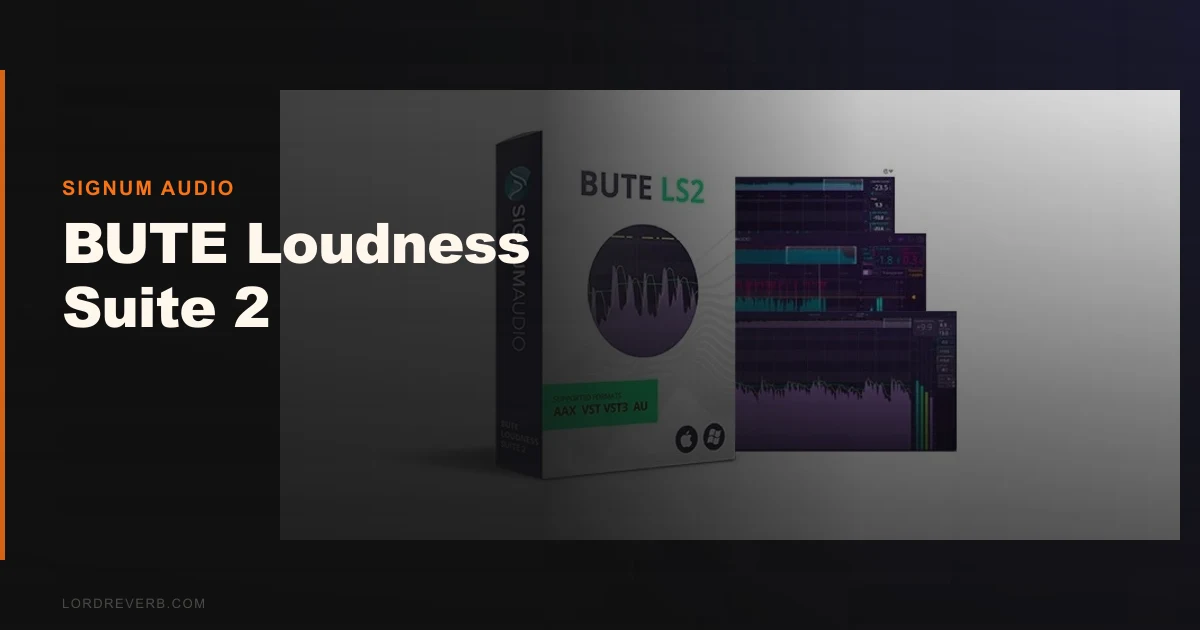
You've finished a mix. It sounds great in your room. You bounce it, upload it to the streaming platform, and it comes back sounding thin and squashed because the platform's normalization hit it harder than you expected. You've been chasing loudness instead of dynamics, and now you're paying for it. That's the exact problem the BUTE Loudness Suite 2 by Signum Audio exists to solve.
This is a complete loudness compliance toolkit: an analyser, a True Peak brickwall limiter, a separate BUTE Limiter 2, and an AudioSuite Normaliser, all shipping together. The Stereo version is $245. The Surround version, which adds support up to 7.1.2 Atmos, costs more than the Stereo version. It runs VST, VST3, AU, and AAX, and it requires Pro Tools 12.6 or higher for the AAX build.
It's built for mastering engineers, broadcast engineers, and post-production teams who need to hit loudness specs without destroying their work in the process.
The Problem This Actually Solves
Most producers learn loudness compliance the hard way. They master to -14 LUFS integrated for Spotify, then find Apple Music normalises differently, then realise their True Peak is clipping at -1 dBTP on Netflix's ingest pipeline. Each platform has its own spec. Chasing them manually with a separate meter and a separate limiter wastes time and invites mistakes.
The frustrating part isn't the loudness targets themselves. It's the workflow fragmentation. You're switching between a meter plugin, a limiter plugin, a reference doc open in your browser, and a mental checklist. Something gets missed. A bounce goes out with a True Peak reading that technically fails spec, and you don't find out until the delivery gets flagged.
BUTE Loudness Suite 2 collapses that into one signal chain. The presets for Apple Digital Masters, Spotify, Tidal, YouTube, Netflix, EBU R 128, and others are built in. You select the target, the analyser tells you where you are, and the limiter handles the True Peak ceiling. That's the pitch. And mostly, it delivers.
How It Performs in Practice
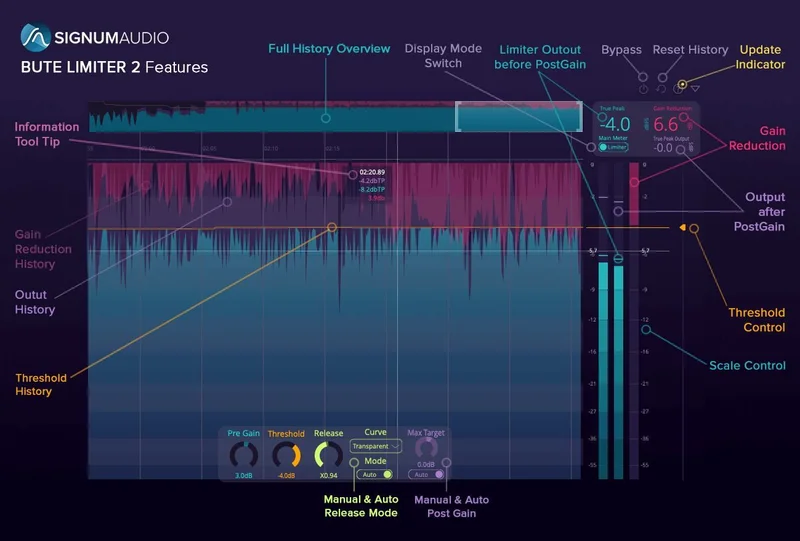
We ran a full mastered stereo mix through the BUTE Limiter 2 with the True Peak ceiling set to -1 dBTP and the integrated LUFS target at -14 for streaming. The limiter held the ceiling clean. No inter-sample peaks bleeding through. No distortion artifacts on transient-heavy material like live drum overhead busses or acoustic guitar attacks.
We pushed it harder. We fed it a mix that was sitting around -9 LUFS integrated and needed pulling back to -16 LUFS for a broadcast delivery spec. That's 7dB of gain reduction work. The Transparent release curve handled most of the material without audible pumping. Switching to Natural introduced a touch of movement on sustained pads, which actually worked. Smooth flattened everything out, which works on dialogue-heavy content but killed the life on music.
The 10-hour historical content tracking is one of the features we'd have dismissed on paper but genuinely appreciated in use. We were working on a long-form documentary audio delivery. Being able to scroll back through the loudness history, identify a section that spiked, and navigate directly to that timestamp without bouncing and re-importing saved real time. Annoying to set up initially. Worth it once it's running.
Compared to running a separate meter and a separate limiter, the integrated workflow is faster. Against a dedicated limiter like FabFilter Pro-L 2, the BUTE limiter is transparent but less configurable. Pro-L 2 gives you more limiting style options and more granular control over transient shaping. BUTE wins on compliance workflow. Pro-L 2 wins on creative limiting. They're solving different problems.
CPU usage sits in the light-to-medium range in our tests. Running the Analyser and Limiter 2 simultaneously on a stereo master bus added no meaningful latency or dropout risk in a session already running a heavy plugin load. We don't have manufacturer-published latency figures, but in practical use it wasn't an issue.
Strengths and Weaknesses
The brickwall limiter is the headline strength. It's clean. We couldn't make it distort on music material without deliberately abusing it past any rational gain reduction amount. The True Peak compliance is solid, and the preset library covers every major delivery standard we'd encounter in a working year.
The auto-adaptive release curves added in Version 2 are a genuine improvement. Transparent, Natural, and Smooth aren't just three flavours of the same thing. They behave differently on different material, and the difference is audible. We love that they named them honestly instead of obscuring them behind vague marketing labels.
The weaknesses are real. The Surround version's routing documentation is incomplete. We spent longer than we should have setting up a 5.1 session correctly, and the manual doesn't cover edge cases well. The AudioSuite Normaliser is useful but slower to reach for than it should be in a Pro Tools workflow. And the price, while fair for the full bundle, is hard to defend if you only need one component. Buying the suite just for the analyser or just for the limiter is wasteful.
Value for the Price
At $245 for stereo, you're getting four tools: analyser, brickwall limiter, BUTE Limiter 2, and Normaliser. Buying comparable standalone tools separately, a quality meter plugin, a quality True Peak limiter, and a normaliser would each cost you extra on top of the others. The bundle pricing is honest.
The surround version is competitive against dedicated broadcast metering solutions from NUGEN, which run significantly higher for comparable feature sets. If you are doing Atmos delivery work, the surround version is a reasonable entry point. If you're strictly in stereo music production, the value calculation is tighter. It's still fair. It is not a bargain unless you catch one of their sale periods, when the price drops considerably.
We'd buy the stereo version ourselves. We'd recommend the surround version to anyone doing post-production or Atmos work regularly.
Who Should (and Shouldn't) Buy This
- ✅ Buy if you're delivering to multiple streaming and broadcast platforms regularly and want compliance presets built into your signal chain.
- ✅ Buy if you're doing post-production or Atmos work and need surround loudness metering up to 7.1.2 without paying NUGEN prices.
- ✅ Buy if you want a clean, transparent True Peak limiter bundled with a proper analyser and you're tired of managing two separate plugins.
- ❌ Skip if you only need a loudness meter and you're happy with a free or low-cost option like Youlean Loudness Meter.
- ❌ Skip if you need maximum creative control over your limiter's character. FabFilter Pro-L 2 gives you more shaping options and is priced similarly.
- ❌ Skip if you're working exclusively in stereo music production and you already own a quality limiter. The upgrade case is weaker there.
Score Breakdown
| Category | Score | Notes |
|---|---|---|
| Sound Quality | 4.5/5 | True Peak limiting is clean; zero audible distortion on music material at sensible gain reduction |
| Value for Money | 4.0/5 | Bundle pricing is honest; weaker if you only need one component |
| Ease of Use | 3.5/5 | Stereo workflow is intuitive; surround routing setup needs better documentation |
| Features | 4.5/5 | 10-hour tracking, all major streaming presets, Atmos support, three adaptive release curves |
| CPU Efficiency | 4.0/5 | Light to medium load; no dropout issues running analyser and limiter simultaneously on a busy session |
| Overall | 4.2/5 | A focused, well-executed compliance toolkit let down slightly by incomplete surround documentation |
Alternatives to Consider
FabFilter Pro-L 2: The better choice if you want more creative control over your limiter's character. Eight limiting algorithms, more transient shaping options, and excellent True Peak support. It doesn't include an analyser or normaliser, so you're building the compliance workflow yourself. See our mastering plugins guide for how it fits into a full chain.
iZotope Ozone (various pricing): If you want an all-in-one mastering suite rather than a loudness-specific toolkit, Ozone covers limiting, EQ, imaging, and metering in one interface. The loudness metering is less dedicated than BUTE's, but the overall feature set is broader. Check the manufacturer's site for current pricing on Ozone 11 Standard and Advanced tiers.
NUGEN Audio VisLM / MasterCheck (check current pricing): NUGEN's broadcast metering tools are the industry standard in broadcast post-production. They're more expensive and more specialised. If you're working at a broadcast facility with strict compliance requirements, NUGEN is the professional standard. BUTE is a credible and more affordable alternative for smaller operations. Also worth reading our Millennia NSEQ-2 mastering EQ review if you're building out a full mastering chain alongside a compliance tool.
For a broader look at where loudness tools fit in a complete mastering setup, our essential mastering plugins guide breaks down the full signal chain.
BUTE Loudness Suite 2 is the most complete loudness compliance toolkit at this price point for stereo and surround delivery. It's not the most creative limiter, and it's not the right buy if you only need one of its four components. But if you're regularly delivering to streaming platforms, broadcast specs, or Atmos pipelines, it earns its place on the master bus. Buy the stereo version at $245. Get the surround version if Atmos is part of your work. Skip it entirely if you're a stereo-only music producer who already owns a quality limiter and a free meter.
The one thing it won't do is make a bad mix compliant. It'll make a good mix deliver correctly. That's exactly what it promises.
Frequently Asked Questions
Does BUTE Loudness Suite 2 work with Pro Tools?
Yes. The AAX version requires Pro Tools 12.6 or higher. The suite also ships in VST, VST3, and AU formats, covering most other major DAWs including Logic Pro, Ableton Live, Cubase, and Reaper. If you're on an older Pro Tools version below 12.6, you'll need to update before the AAX format will load.
What's the difference between the Stereo and Surround versions?
The Stereo version covers standard two-channel delivery. The Surround version adds support for multichannel formats up to 7.1.2, which includes Dolby Atmos immersive audio delivery. The Surround version costs more than the Stereo version. If you're not working on surround or Atmos projects, the Stereo version is all you need.
How does the 10-hour historical content tracking work?
The BUTE Loudness Analyser 2 records up to 10 hours of loudness history as you work, displayed as an interactive timeline. You can click on any point in that history to navigate directly to that moment in your session. It's most useful in long-form post-production work, documentary audio, or broadcast deliveries where you need to audit specific sections of a long file without bouncing and reimporting.
Is BUTE Loudness Suite 2 worth it compared to buying a separate meter and limiter?
If you are buying a quality standalone meter and a quality standalone True Peak limiter separately, the combined cost can match or exceed the price of this suite depending on what you choose. The BUTE suite at $245 for stereo includes four integrated tools with delivery presets already built in. For most engineers doing regular streaming or broadcast delivery, the integrated workflow justifies the bundle price. If you only ever work to one loudness standard and you already own a limiter you're satisfied with, the value case is weaker.