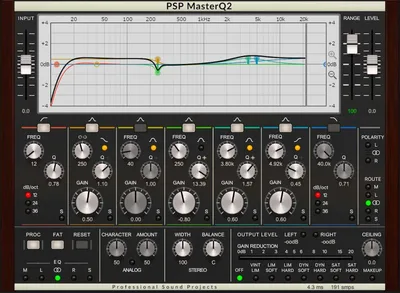
PSP MasterQ2 is a seven-band mastering EQ with analog harmonic character, FAT oversampling, soft-clipping algorithms, and 80-bit floating point processing, priced at $149. We loaded it across a full album mastering session and it earned its place on the chain. Not without complaints. But it earned it.
The moment that sold us happened about forty minutes into a folk record master. The high-mid band at 6.2kHz, boosted 2.5dB with a Q of 1.8, added presence to an acoustic guitar without turning it brittle. We've hit that same boost with cleaner EQs and gotten ice pick. MasterQ2 gave us air. That's the difference this plugin is selling, and it's real.
This one's for mastering engineers who want tonal character alongside precision. It's also worth a look for mix engineers who reach for analog-modeled EQs on their 2-bus and hate paying vintage hardware prices.
What It Is (and What It's Not)
MasterQ2 is a parametric EQ built for color as much as correction. Seven filters total: low cut and high cut available at 12, 24, or 36 dB/octave rolloff, low shelf and high shelf (both switchable to peaking), plus three midrange peaking bands. Frequency range runs from 12Hz on the low shelf down to 40kHz on the high cut. That's serious headroom at both ends.
The soft-clipping and limiting options are a genuine bonus. They're not afterthoughts. Having a soft limiter in the same plugin as your mastering EQ keeps your signal chain tighter.
What it's not: a zero-latency tracking tool. FAT mode introduces roughly 1,100 samples of latency, which is about 25ms at 44.1kHz. That's fine for mastering. It's a problem if you're trying to record a vocalist through it in real time. Don't do that. Also, it's not a dynamic EQ. No frequency-dependent gain riding here. For that, look elsewhere.
Living With It
Setup takes about five minutes if you already have iLok License Manager installed. No hardware dongle required. You get three activation slots. That's fair.
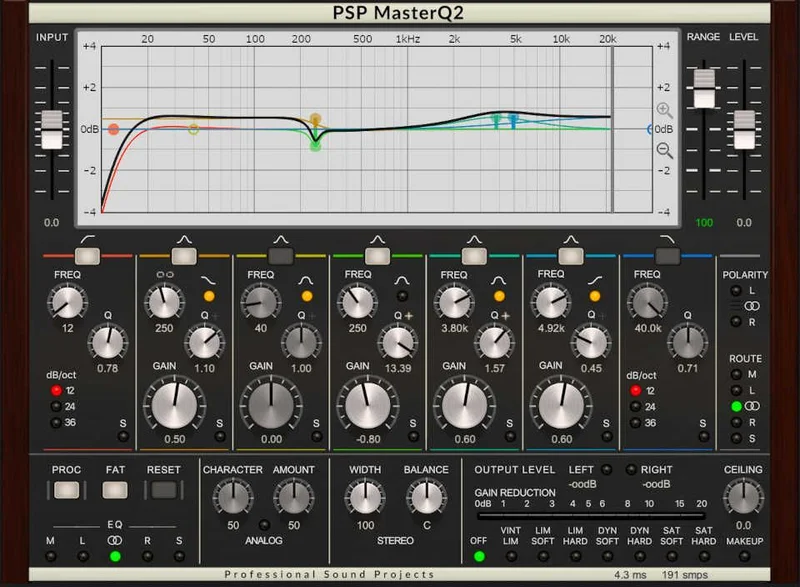
The GUI is functional but it's not pretty. The EQ graph shows the full curve plus individual filter shapes, which helps when you're stacking multiple bands. But the overall interface looks like 2012 called. Compared to FabFilter Pro-Q 3's real-time spectrum analyzer and drag-to-filter workflow, MasterQ2 feels stiff.
In daily use, the Global Gain Range control is a feature we didn't know we needed. It scales your gain range from ±0 to ±150%, so you can tighten all bands down to fine-trim territory when you're making delicate mastering moves. We used it constantly. Set the range to around 40% and suddenly those surgical 0.3dB shelf adjustments become far easier to dial in without overshooting.
FAT mode sounds better than the standard mode. Noticeably. We A/B'd a high shelf boost at 12kHz, +3dB, with FAT on and off. With FAT off, there was a slight hardness in the top end. FAT smoothed it out. The CPU hit is real though. During FAT mode on a stereo master at 96kHz, we saw roughly double the CPU draw compared to standard mode. Not deal-breaking, but don't run 30 instances.
The soft-clipping section has multiple modes. We ran a mix bus at 0.2dB over with the soft clipper engaged and got a result that was satisfying in a way that a brick-wall limiter just isn't. The saturation was subtle. The transients stayed punchy. It's the kind of thing you reach for at the end of a long session when you want to add a little glue without opening another plugin.
The Trade-Offs
The analog character is the main reason to buy this. It's also the main reason not to. If you're mastering classical or jazz where absolute transparency is the job, the harmonic coloration MasterQ2 adds will frustrate you. It's not aggressive saturation. But it's there. A full-frequency sweep with FAT engaged picks up a low-level harmonic warmth that some programs love and some don't.
The latency trade-off is worth stating clearly. At 44.1kHz, FAT mode sits at roughly 1,100 samples, around 25ms. For a mastering insert, that's irrelevant. For anything involving live monitoring or recording, it's too much. PSP didn't build this for tracking. We wish more reviewers said that plainly.
The GUI age isn't just cosmetic. No spectrum analyzer built in means you're EQing by ear or running a separate analyzer alongside. That's actually fine for experienced engineers, but it slows down newer users who've been trained on visual-first workflows. Annoying in 2026 for a $149 plugin.
The value math still works out. You're getting seven bands, multiple filter types, FAT oversampling, soft clipping, and 80-bit precision processing for $149. That's a fair deal.
Against the Field
FabFilter Pro-Q 3 costs more (check current pricing) and wins on workflow, spectrum analysis, and dynamic EQ capability. If you're doing mostly corrective work and need to see what you're doing, Pro-Q 3 is the smarter tool. It doesn't have the same harmonic character though. Clean is its thing.
The Kiive Audio M5133 Mastering Equalizer goes harder on vintage hardware emulation. If you want a specific console or hardware EQ character, the M5133 is more committed to that sound. MasterQ2 is more flexible but less "flavored."
Waves Q10 is cheaper and covers more bands. It sounds clinical by comparison. Fine for broadband corrections. Not a replacement for the warmth MasterQ2 delivers on program material.
MasterQ2 wins specifically when you want a mastering EQ that adds something good without you having to ask it to. That's a narrow brief. It's the right tool when that's the brief.
The Real Verdict
We'd buy MasterQ2 for mastering work where tonal character is welcome. We'd skip it for tracking, live monitoring, or anything where zero-latency matters. We'd also skip it if your priority is visual feedback and modern workflow speed. That's not this plugin.
For producers and engineers who master in the box and want an EQ that flatters program material without sounding like a console emulation plugin, $149 is a reasonable ask. It's not our first call for every session. But when the session calls for it, we're glad it's there.
If you want to understand where MasterQ2 sits in a broader chain, the mastering plugins guide covers how to build around tools like this.
Score Breakdown
| Category | Score | Notes |
|---|---|---|
| Sound Quality | 4.5/5 | Harmonic character is real and musical; FAT mode handles high-frequency accuracy cleanly |
| Value for Money | 4.0/5 | $149 for this feature set is fair, especially with soft clipping included |
| Ease of Use | 3.5/5 | Dated GUI and no built-in spectrum analyzer slow things down |
| Features | 4.0/5 | Seven bands, multiple filter slopes, FAT oversampling, soft clipping: well-specified |
| CPU Efficiency | 3.5/5 | Standard mode is fine; FAT mode at high sample rates draws noticeably more |
| Overall | 4.1/5 | A musically honest mastering EQ that earns its price when character is the goal |
Alternatives to Consider
FabFilter Pro-Q 3: Wins on workflow, spectrum visualization, and dynamic EQ. Better for corrective work. Less character. The current price is shown in the buy box on this page. Worth it if you do heavy corrective mastering work alongside creative EQing.
Kiive Audio M5133: The M5133 Mastering Equalizer review covers this in depth. It goes deeper into specific hardware character. Narrower use case. More committed flavor.
PSP Studio Modular Collection: If you're already in the PSP ecosystem, the PSP Studio Modular Collection review is worth reading before buying MasterQ2 standalone. You might already have what you need.
For context on how MasterQ2 fits into a full chain, the mastering suite plugins guide breaks down how to stack your tools without redundancy.
MasterQ2 doesn't try to be everything. That's why it succeeds at what it is. If your mastering sessions keep ending with you reaching for "just a little more warmth on the 2-bus," this is the plugin that gives you that and lets you stop there. $149. No hardware dongle. Thirty-day trial. Run it on a real session before you decide. That's the honest recommendation.
Related reviews: Should You Upgrade MasterCheck 1 to 2 in 2026?
Frequently Asked Questions
Does PSP MasterQ2 require a physical iLok dongle?
No. You need the iLok License Manager software installed and a free iLok account, but no hardware dongle is required. You get three activation slots, which can be computers or iLok dongles. Most users just activate on their machines and move on.
What's the difference between FAT mode and standard mode in MasterQ2?
FAT (Frequency Authentication Technique) is a double-sampling mode that prevents phase errors and linear distortion artifacts at high frequencies. In practice, it sounds smoother and more accurate on high-shelf boosts above 8kHz. The trade-off is roughly double the CPU draw and approximately 1,100 samples of added latency at 44.1kHz. For mastering, use FAT. For low-latency monitoring, leave it off.
Can I use PSP MasterQ2 for mid/side mastering?
PSP MasterQ2 includes mid/side processing capability, which lets you EQ the center image and stereo sides independently. This is useful for tightening the low end in the mid channel or opening up high-frequency width in the sides without affecting the mono sum. It's a legitimate mastering tool for that workflow.
How does PSP MasterQ2 compare to FabFilter Pro-Q 3 for mastering?
Pro-Q 3 wins on visual feedback, workflow speed, and dynamic EQ features. MasterQ2 wins on tonal character: the harmonic coloration from its analog modeling makes program material sound fuller without additional saturation plugins. They're solving different problems. If you master mostly by ear and want color, MasterQ2. If you master visually and need correction tools, Pro-Q 3.