
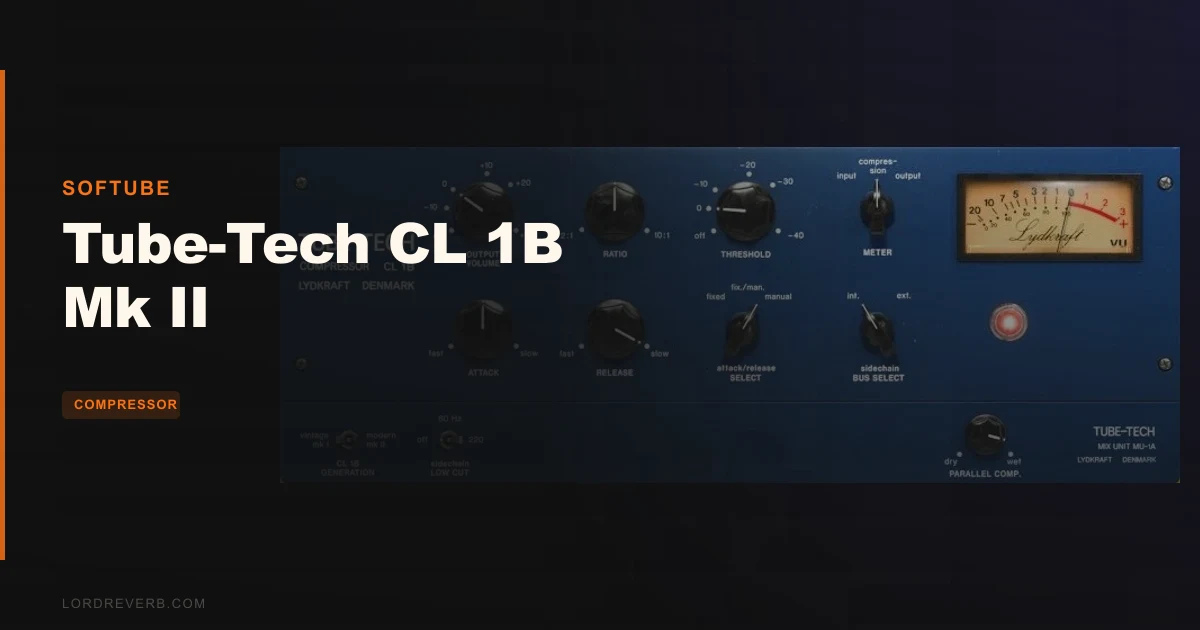
The Tube-Tech CL 1B Mk II plug-in is a serious optical compressor emulation that earns its place on a vocal chain, as long as you're willing to pay $199 for a specific kind of musical leveling and you're not expecting it to fully erase the gap between software and the original hardware.
That's the verdict up front. The CL 1B Mk II from Softube is not for everyone. It's built on a partnership that started in 2006, and the Mk II version released in 2018 was rebuilt from scratch sonically, not just reskinned. Owners describe it as laying back in a mix the way hardware does: dimensional, smooth, present without announcing itself. That quality has real value.
But the CPU hit is real. The steep Mk II knee is finicky in practice. And if you own the original hardware, the plug-in is not going to close the gap completely. At $199, you're buying a character compressor with a narrow but deep lane. If that lane is yours, this is one of the better tools in it.
What You're Actually Getting
The Tube-Tech CL 1B Mk II is a plug-in compressor emulating the Danish-built optical compressor of the same name. It ships in AU, VST, VST3, and AAX formats and runs both as a native plug-in and inside the Console 1 Mixing System.
The key feature that separates this from earlier versions is the Generation Switch. Flip it and you move between the Mk I emulation and the Mk II emulation inside the same plug-in. Two compressors, one licence. The Mk II version was a ground-up sonic remodel, not an update to the Mk I algorithm.
The compression type is optical, with an exponential release curve. That matters. Optical compressors respond to light-dependent resistors in the signal path, which produces a leveling behavior that's slower and more program-dependent than VCA designs. The attack and release controls interact with the material in a way that tends to feel musical rather than mechanical.
Frequency response runs from 5 Hz to 25 kHz at the -3 dB point. Noise sits below -75 dBU at 30 dB gain. Input impedance is 600Ω.
The Mk II brings a GUI three times larger than the original plug-in, resizable, with faster loading. There's dual-bus sidechaining with low-cut filter options at 80 Hz and 220 Hz. There's also a parallel wet/dry mix control, which the hardware doesn't have. These are genuinely useful additions, not marketing padding.
The Generation Switch: Two Compressors in One
The Generation Switch is the most interesting thing about this plug-in. You get both the Mk I and Mk II emulations, and they sound different. The Mk II is described by owners as more tonally laid-back and dimensional, with thickened depth in the low end and a sense of fullness that sits more naturally in a dense mix.
The Mk I is the older character. Some engineers prefer it for its behaviour on certain material. Having both means you're not locked in. If the Mk II's steep knee is fighting you on a particular source, switch to Mk I and see if it breathes better.
That steep knee on the Mk II is worth flagging early. Owners report it makes the compressor finicky to dial in compared to Mk I. You're working with less gradual onset of gain reduction, which means small moves on the threshold or input feel bigger. Take your time with it. Don't set it and walk away on the first pass.
The Mk II is also where the sonic remodel is. If you're buying this plug-in, you're probably buying it for the Mk II sound. But keep the Mk I around. It's not a lesser version, it's a different tool on the same interface.
The Optical Character: What "Musical" Actually Means Here
People throw "musical" at compressors like it means nothing. Here's what it means on the CL 1B.
The optical compression type with exponential release curve means the release doesn't snap back at a fixed rate. It curves. The tail of the gain reduction follows the program material rather than clicking off at a set time. You push vocals through it and the leveling happens without the pumping that a faster VCA might introduce. The body of a sung phrase gets smoothed, the transient at the top of the note comes through, and the room behind it doesn't get squeezed out.
Owners report smooth and even leveling on sung material without snappy aggression. That's the optical curve doing its job. It's why the developer says opto transients are handled transparently with soft musical leveling on the material body. The transient is not the target. The sustained level is.
Push it too hard and it gets slow. That's not a flaw, that's physics. If you need fast transient control on a punchy kick, this is probably not your first call. It can beef up drums, as the developer says, but it's working the body of the drum, not the click. Know the difference before you route it.
On bass, that same quality works brilliantly. You're smoothing the level across the low end, thickening it slightly, without choking the low-mid presence that makes a bass sit in a track. Owners report the Mk II specifically thickens depth of lows. If you've struggled with a bass that sits in the mix when soloed but disappears in the full arrangement, this is worth trying there.
Controls and Workflow: Attack, Release, Ratio
The control set is simple. Attack, release, ratio, plus the threshold and gain. That's the core of it. Optical compressors have never been about deep menus. The CL 1B is not a compressor you spend an hour tweaking. You set a rough input level, dial in the ratio, find the threshold, and let the program-dependent release do the work.
The ratios give you a range from subtle leveling into heavy limiting territory. With an optical design you tend to stay on the lower ratios for vocals and bass. The compression feels less obvious there. Push into higher ratios and it clamps, which some people love on room tracks or parallel processing.
The release interaction with the exponential curve is where things get interesting. Set a fast release and the tail lifts quickly but smoothly. Set a slow release and you're into that classic opto sag where the gain reduction hangs slightly after the transient.
The Mk II's steep knee changes how the threshold interacts with the signal. It means your gain staging going in matters. If you're clipping the input, the steep knee will make that worse. Gain stage clean before it, then set your threshold.
The Sidechain and Parallel Mix: Modern Features on a Classic Frame
The dual-bus sidechaining is one of the clearest wins in the Mk II update. You can high-pass the sidechain at 80 Hz or 220 Hz. This is not a small thing. On a vocal bus or a full mix compressor, you don't want a low-end thump driving the gain reduction and pulling the top end of your mix down with it. High-pass the sidechain, and the compressor responds to the program material without the bass frequencies dominating its behavior.
At 80 Hz you're cutting sub energy. At 220 Hz you're removing most of the bass fundamental as well. On a mix bus, 80 Hz is usually the right call. On a vocal bus where proximity effect is building up around 100 to 200 Hz, the 220 Hz option might be more useful. Try both. Trust your ears.
The sidechain does have a real limit. The sidechain offers only one output or bus choice, restricting flexibility compared to the hardware. If your session has a complex routing setup and you need to trigger the compression from a specific isolated signal, the options here may frustrate you. That's a genuine workflow limitation, not a sound quality issue, but it matters if you work that way.
The parallel wet/dry mix control is a software-only addition. The hardware doesn't have it. Blend the compressed and uncompressed signal from within the plug-in without reaching for a parallel bus in your DAW. This is useful. Set heavy compression on the Mk II, then back the mix knob off until you feel the transients come back without losing the density the compression added. New York style compression without the extra routing. That's clever.
Sound Quality: Where It Wins and Where It Doesn't Catch the Hardware
Owners are consistent on the core sound quality: smooth, non-obvious compression, no distracting distortion or artifacts, and a dimensional fullness that seats the processed signal in a mix rather than pushing it forward. That's the description of a compressor doing its job without calling attention to itself.
The Mk II specifically gets credit for thickened depth in the lows and a tonal layback that hardware-style compressors are valued for. If you're mixing ITB and you want something to make a vocal feel less digitally exposed, this is a valid route.
But there's a ceiling. Owners who've used the hardware report the actual CL 1B hardware maintains a definite edge in dimensional weight, headroom, and analog warmth. The plug-in is a good representation. It's not identical. The software version cannot fully replicate the sonic characteristics of the original hardware. That's true of every hardware emulation ever made, but it's worth saying plainly here because the hardware CL 1B is expensive and some people buy this plug-in expecting parity.
On sparse mix elements, the gap between plug-in and hardware is more audible. On a heavily produced track with a dense arrangement, you're less likely to hear the difference in context. That's a useful framing. Use the plug-in in a full production and trust it. If you're mixing solo or stripped-down material and you have access to the hardware, the hardware is better.
CPU and Stability: The Practical Reality
The CPU usage is heavier than some competing compressor plug-ins. Owners report this directly.
If you're on a modern machine with reasonable specs, you can run several instances. If you're working on an older system or a session that's already close to its limits, this matters. Freeze tracks. Work on a dedicated mix template that budgets CPU by channel type. Don't chain four instances on every track in a sixty-channel session and expect it to be painless.
One owner reported stability issues on verified purchase. It may have been a system configuration issue, a DAW conflict, or a genuine bug at that build version. Check the Softube support pages for known issues before you buy, and make sure you're on a supported OS and DAW version. That's good practice for any plug-in purchase at this price.
The Mk II includes faster loading compared to Mk I. That's a real quality-of-life improvement in sessions where you're opening and closing the GUI frequently.
The GUI: Three Times Bigger and Actually Usable
The GUI in the Mk II is three times larger than the original plug-in and resizable on top of that. This is not a cosmetic upgrade. Optical compressors require precise threshold control. When you're working with a steep knee, small differences in where the threshold sits have big consequences. A larger, clearer display means you're less likely to misread where your controls are sitting.
The resolution is higher in the Mk II version. On a 4K or Retina display, the original plug-in graphics look outdated quickly. The Mk II holds up. This is the kind of update that engineers who spend eight-hour days looking at a session actually care about.
The hardware version of the CL 1B is a large-format rack unit. The plug-in approximates that visual weight without being cluttered. The layout makes sense if you've used optical compressors before. If you haven't, the control set is small enough that you'll find your bearings quickly. There's no hidden menu, no secondary panel of secondary controls. What you see is what you get.
Who Should Buy This: By User Type
Not everyone needs this compressor. Here's a breakdown by who you are and whether this is the right tool.
The Singer-Songwriter Producer
You're recording and mixing your own vocals and acoustic instruments, mostly in a home studio. The CL 1B Mk II is worth real consideration here. The smooth optical leveling on vocal material is exactly what this kind of work calls for. You want even levels without obvious pumping, and you want the compression to be invisible in the mix. That's what this does on sung material.
The parallel mix control makes it even more useful for this workflow. Run heavy compression, back off the mix knob, and you have natural-feeling dynamics with controlled levels. The steep Mk II knee takes some patience to dial in, but on vocals you're usually working at moderate ratios where the onset is less aggressive.
At $199, it's a meaningful investment for a home studio. If this is your primary compressor, buy it. If you're already set for vocal compression and you're looking for a supplement, think harder.
Verdict for this type: buy it.
The Working Mix Engineer
You're mixing full productions, multiple genres, multiple clients. You need tools that work fast, explain themselves quickly, and don't eat your session's CPU budget.
The CL 1B Mk II earns its place here on specific jobs: lead vocals, bass, and acoustic guitars. The opto character on those sources is reliable and consistent. You're not calling it up for every track. You're reaching for it when a source needs that specific dimensional, smooth quality.
The CPU hit limits how many instances you can stack. The sidechain routing limitation may frustrate you if you do complex multi-bus work. But as a character compressor for two or three key channels per mix, this is a satisfying tool to have in the kit.
Verdict for this type: buy it with clear eyes about its lane.
The Console 1 User
If you're working inside the Console 1 Mixing System, the CL 1B Mk II integrates directly. That's a genuine workflow advantage. You're not reaching for a plug-in menu mid-session. The hardware controller and the plug-in are designed to work together. If this is your setup, the CL 1B Mk II should be on your shortlist.
Verdict for this type: buy it.
The Beginner
Optical compression is not the most intuitive place to start. The steep Mk II knee and the program-dependent release make it harder to predict than a simple VCA compressor with clear attack and release times. You'll learn from it, but you might be frustrated while learning.
If you're just starting out with compression, you might love the results when it works, but you'll struggle to understand why something isn't working when it isn't. That's annoying at any stage, but it's especially annoying when you're still building your ears.
Verdict for this type: wait until you've spent time with a more transparent compressor first.
The Hardware CL 1B Owner
Honestly? This is the most complicated case. If you already own the hardware, you know what the real thing sounds like. The plug-in doesn't match it on that front. Where the plug-in adds value is in the parallel mix control, the sidechain low-cut options, and the CPU-free version of that character for dense sessions where the gap is less audible.
Some hardware owners keep the plug-in around for exactly that reason: the hardware for key sources, the plug-in on supporting tracks. That's a reasonable approach. As a full replacement for the hardware? No. It's not that.
Verdict for this type: skip it unless you want the workflow features or you're mixing dense productions where plug-in and hardware are indistinguishable in context.
Who Should Buy This
- ✅ Buy if you want smooth, non-obvious optical compression on vocals and bass with a character compressor that seats in a mix naturally.
- ✅ Buy if you're inside the Console 1 ecosystem and want native integration with Softube's mixing system.
- ✅ Buy if you want both Mk I and Mk II emulations in one licence for different character options on the same interface.
- ❌ Skip if you need low CPU overhead and you're running dense sessions close to the limit of your system.
- ❌ Skip if you need flexible sidechain routing with multiple bus options in a complex mix template.
- ❌ Skip if you're a beginner looking for a teaching compressor that shows you clearly what it's doing and why.
Specs & Technical Details
| Specification | Details |
|---|---|
| Developer | Softube (in partnership with Tube-Tech) |
| Price | $199 |
| Plugin Format | AU / VST / VST3 / AAX |
| OS Support | Mac / Windows |
| Activation | N/A |
| CPU Usage | Heavy (higher than many competing compressor plug-ins) |
| Trial Available | N/A |
| Version Reviewed | Mk II (2018 ground-up sonic remodel) |
| Frequency Response | 5 Hz to 25 kHz at –3 dB |
| Noise Floor | Below –75 dBU at 30 dB gain |
| Input Impedance | 600Ω |
| Compression Type | Optical, exponential release curve |
| Sidechain Low-Cut | 80 Hz and 220 Hz options |
| Parallel Mix | Yes (software version only) |
| Console 1 Compatible | Yes |
Score Breakdown
| Category | Score | Notes |
|---|---|---|
| Sound Quality | 4.5/5 | Smooth, dimensional opto character with real musical leveling on vocals and bass |
| Value for Money | 4.0/5 | Two compressor generations in one licence at $199 is fair; the CPU cost adds to the real-world price |
| Ease of Use | 3.5/5 | Steep Mk II knee makes initial dialing feel finicky; simple control set helps once you're past that |
| Features | 4.0/5 | Sidechain low-cut options and parallel mix control add modern workflow flexibility to a classic design |
| CPU Efficiency | 3.0/5 | Heavier than competing plug-ins; real constraint in dense sessions |
| Overall | 4.2/5 | A focused, characterful opto compressor that earns its place on vocals and bass, with real limits on CPU and sidechain routing |
Alternatives to Consider
The Universal Audio LA-2A is the most common comparison. It has a dusty tube tone and a spongy ballistic feel that the CL 1B doesn't have. The CL 1B has harder-edged ballistics by comparison. If you want that slower, more pillowy LA-2A quality on vocals, it's a different flavour. Neither is objectively better. They suit different sources and different aesthetics. The CL 1B gives you more precise control over the compression parameters.
The UA LA-3A shares the warmth and smoothness, but the CL 1B offers more precise control over what the compression is actually doing. If you're someone who wants to dial in a specific ratio and feel the compression respond to your choices, the CL 1B is the more flexible tool between them.
FabFilter Pro-C 2 is a completely different kind of compressor. It has a wider feature set, more visible metering, and far more compression modes. What it doesn't have is the specific opto character of a CL 1B emulation. If you want to understand compression technically and have precise visual feedback, the Pro-C 2 is the better learning tool and the more surgical option. If you want that specific laid-back, warm, dimensional quality on a vocal without thinking too hard about it, the CL 1B Mk II gets you there faster.
The Closing Verdict
The Tube-Tech CL 1B Mk II is a compressor with a specific job and a satisfying way of doing it. You put a vocal through it and the dynamics settle without a fight. You push bass through it and the low end thickens into the kind of weight that holds a track together. The parallel mix control and dual sidechain filters make it more capable than the hardware in some workflow situations, even if the hardware still wins on pure sonic weight.
At $199, it's not a casual purchase. The CPU overhead is real. The steep Mk II knee takes patience. The sidechain routing will frustrate some engineers. And if you're chasing the actual hardware sound, you won't close that gap completely.
But if you're mixing ITB and you want a vocal compressor that sits back and does the job without announcing itself, the CL 1B Mk II is one of the more satisfying tools in this category. It doesn't try to do everything. It does one thing with a specific character that engineers have been reaching for since the hardware showed up in studios.
Know what it is. Buy it for what it does. It won't let you down on the jobs it was built for.
Frequently Asked Questions
What is the difference between the Tube-Tech CL 1B Mk I and Mk II versions in this plug-in?
The Mk II was a ground-up sonic remodel released in 2018, not an update to the Mk I algorithm. Owners describe the Mk II as more tonally laid-back and dimensionally fuller, with thickened depth in the low end. The Mk I has its own character and may feel more responsive on certain sources. The Generation Switch lets you access both within the same plug-in and licence.
Is the Tube-Tech CL 1B Mk II plug-in a close match to the original hardware?
Close, but not identical. Owners who've compared both report the hardware has a definite edge in dimensional weight, headroom, and analog warmth. The gap is more audible on sparse mix elements. In a dense, heavily produced arrangement, the difference becomes much harder to hear in context. The plug-in adds features the hardware doesn't have, including parallel mix control and sidechain low-cut filters.
What compression type does the CL 1B Mk II use and why does it matter?
It uses optical compression with an exponential release curve. Optical compressors respond more slowly and in a more program-dependent way than VCA designs. The result is gain reduction that follows the shape of the audio material rather than snapping on and off at fixed times. This produces the smooth, musical leveling that opto compressors are valued for, particularly on vocals and bass.
Does the Tube-Tech CL 1B Mk II work inside Console 1?
Yes. The plug-in runs both as a standard native plug-in and inside the Softube Console 1 Mixing System. If you're already working in the Console 1 environment, it integrates directly with that workflow without additional setup.
What does the sidechain low-cut filter do and which setting should you use?
The sidechain low-cut filter removes low-frequency content from the signal that's driving the compression. At 80 Hz it cuts sub energy, stopping a bass thump from triggering gain reduction that pulls down the whole mix. At 220 Hz it removes most of the bass fundamental too. Use 80 Hz on a mix bus as a starting point and try 220 Hz if proximity effect buildup around the lower midrange is making the compression behave unpredictably on a vocal bus.
How CPU-intensive is the Tube-Tech CL 1B Mk II?
Heavier than many competing compressor plug-ins. If you're running a session close to your CPU limit, the CL 1B Mk II will add meaningful overhead. The practical solution is to freeze tracks you're not actively adjusting and limit instances to key channels like lead vocals and bass rather than applying it across every track in the session.
What DAW formats does the Tube-Tech CL 1B Mk II support?
It ships in AU, VST, VST3, and AAX formats, covering Pro Tools, Ableton Live, Logic Pro, Cubase, Studio One, and most other major DAWs. It also works inside the Softube Console 1 Mixing System as a native plug-in.