
SplineEQ FREE is a legitimately clever linear-phase EQ that earns its place in your chain for mastering and experimental sound design, though the 4-band cap and no preset functionality mean it's a tool, not a solution.
Most free EQs hand you a reskinned biquad filter and call it a day. Photosounder did something different here. The spline-based curve design means you're drawing filter shapes as continuous Bézier curves rather than stacking shelf-and-bell combos. That's not a gimmick. It changes how you think about EQ.
It's free. Completely. No trial timer, no watermark, no embarrassing splash screen begging you to upgrade. If you run mastering sessions or you're shaping synth layers ITB, you should have this installed. The caveats are real, but so is the value.
What You're Actually Getting
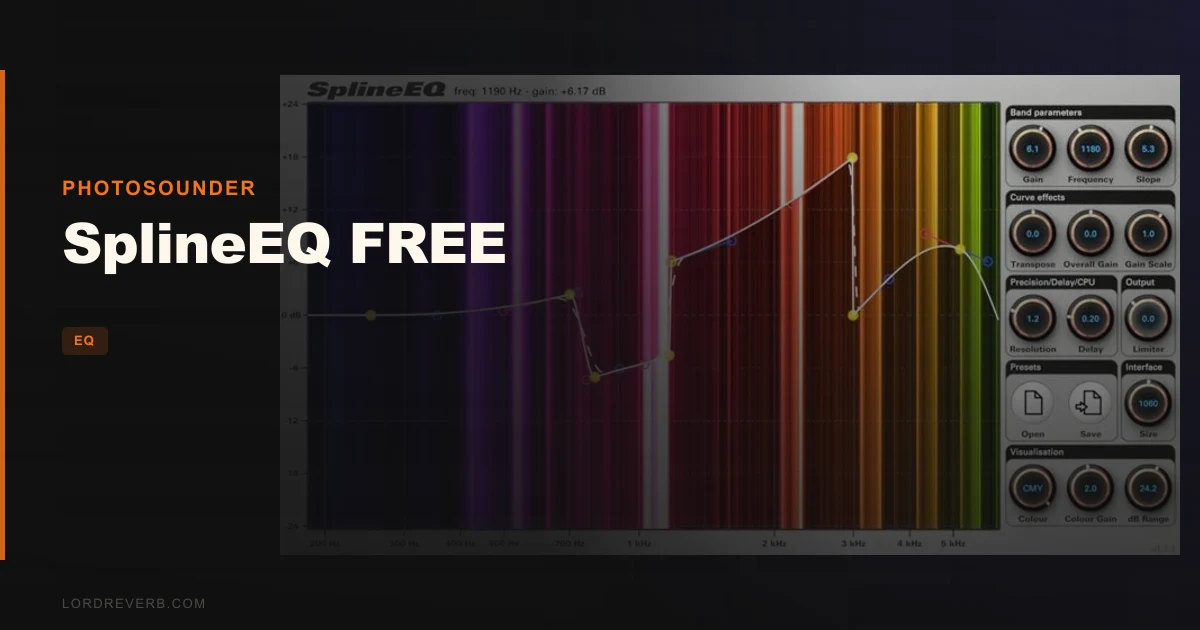
SplineEQ FREE is a linear-phase equalizer built around spline curve design. Instead of choosing filter types, you place control points on an X-Y plot and the plugin generates a smooth Bézier curve connecting them. That curve becomes your filter shape.
The free version gives you up to 4 bands. You get a gain range of negative infinity to +60 dB, which is enormous. There's a built-in limiter that lights up when you push things too hard, which is clever given how aggressive that gain range can get.
The frequency analyser is genuinely unusual. It's colour-based rather than the standard logarithmic waveform display. Before and after filtering, frequencies are represented by colour intensity in a way Photosounder says is tuned to match human perception. It's not just pretty. It's actually easier to read quickly.
Resolution sits at roughly 10 Hz, which is tighter than most free competitors. Latency and CPU usage are both adjustable, trading one for the other depending on your session needs. Supported sample rates go all the way to 384 kHz.
The Good
The linear-phase engine is where SplineEQ FREE earns serious respect. Linear-phase EQs preserve phase relationships across the frequency spectrum, which matters on bus processing and mastering. Minimum-phase designs colour transients. This one doesn't.
We ran a dense stereo mix through SplineEQ FREE on the master bus, pushing a broad high-shelf boost of around 4 dB from 8 kHz upward. The air came up cleanly. No smearing on the transient attack of the snare. No weird comb-filter sensation when bypassing. That cleanliness is what linear phase buys you.
The spline approach is underrated. We placed three points to build a mid-scoop: a gentle cut starting at 200 Hz, deepest around 400 Hz at around minus 3 dB, recovering by 900 Hz. The curve connected them smoothly without the stiff bell-shape you'd get from a conventional parametric. It sat in the mix without sounding like surgery.
The ~10 Hz frequency resolution means the plugin is seeing your signal in fine detail. Users keep praising how the spectrum display helps them find problem areas fast. The colour intensity approach does work differently from a peak-style analyser, and it grows on you quickly.
The gain zoom is satisfying. Pulling the view down to ±3 dB for subtle mastering moves means you're not hunting for precision adjustments on a massive scale.
The Not-So-Good
No preset saving or loading. Full stop. That's the biggest frustration with the free version. You build a clever mastering curve, you close the session, it's gone. For any repeatable workflow, that's annoying enough to push you toward the paid version.
Four bands is limiting for complex work. If you're doing detailed corrective EQ on a vocal, four control points might not be enough to address sibilance, proximity mud, nasality, and top-end air simultaneously without compromises. This is a shaping tool, not a surgical one.
The macOS compatibility situation is a real problem. Catalina and Big Sur are listed as unsupported. If you're on a Mac newer than Mojave, you need to verify your OS version before downloading. Reviewers report stable operation on supported systems, but that's a meaningful chunk of the Mac user base left out.
The format list is VST 2.4 and AU only. No VST3. No AAX. If your studio runs Pro Tools or you've fully committed to VST3 hosts, SplineEQ FREE won't load. That's a legitimate barrier in 2026.
Compared to the Alternatives
FabFilter Pro-Q 4 is the obvious comparison point. Pro-Q operates in linear-phase mode too, and it's exceptional. But it costs real money. SplineEQ FREE does something Pro-Q doesn't: the spline curve design means your filter shape can be genuinely continuous and fluid rather than a sum of discrete bell curves. For broad tonal shaping, that's a real difference.
Melda Production's MEqualizer free version gives you more bands and preset support, which makes it more practical for everyday mixing. But it's minimum-phase by default, and linear-phase mode in the full version costs extra. SplineEQ FREE wins on architecture at zero cost.
For free linear-phase EQ specifically, there isn't much competition. ReaEQ bundled with REAPER is free if you use that DAW, but it's minimum-phase. The BLEASS Motion EQ review for animated EQ movement shows what paid creative EQ tools can do, which underlines how unusual SplineEQ FREE's approach is at no cost.
The honest comparison: SplineEQ FREE wins for linear-phase mastering shaping at no cost. It loses on band count, format support, and preset workflow compared to anything in the paid tier.
Who Should Buy This
- ✅ Buy if you need a free linear-phase EQ for mastering bus work and you're on a supported OS
- ✅ Buy if you want to experiment with spline-based filter curves and learn a genuinely different way of thinking about EQ shapes
- ✅ Buy if you're shaping synth layers or sound design elements ITB and want clean, artifact-free broad-band sculpting
- ❌ Skip if you need to save and recall EQ curves between sessions without rebuilding them each time
- ❌ Skip if your primary DAW is Pro Tools or any VST3-only host
- ❌ Skip if you're doing detailed corrective vocal work where 4 bands won't cover the problem areas
Specs & Technical Details
| Developer | Photosounder |
| Price | Free |
| Plugin Format | VST 2.4 / AU |
| OS Support | Mac (up to Mojave) / Windows |
| Activation | None required |
| CPU Usage | Medium (adjustable via latency/resolution tradeoff) |
| Trial Available | N/A (permanently free) |
| Version Reviewed | SplineEQ FREE (current as of 2026) |
Score Breakdown
| Category | Score | Notes |
|---|---|---|
| Sound Quality | 4.5/5 | Linear-phase architecture delivers clean, phase-coherent results on bus and mastering work |
| Value for Money | 5.0/5 | It's free. The ceiling is the features, not the cost |
| Ease of Use | 3.5/5 | Spline approach has a learning curve; colour analyser takes adjustment |
| Features | 3.5/5 | 4-band limit and no preset support are hard restrictions in the free version |
| CPU Efficiency | 4.0/5 | Adjustable latency/resolution tradeoff helps, but linear-phase always costs more than minimum-phase |
| Overall | 4.1/5 | Brilliant free tool for mastering shaping with real limitations you'll hit fast |
Alternatives to Consider
If you want something purpose-built for movement and animation in your EQ curve, the BLEASS Motion EQ review covers a paid option that does things SplineEQ FREE doesn't attempt.
For classic filter character with a different design philosophy, the VEQ-HLF review: a Pultec-style filter shows where passive-style EQ shaping lands in 2026. It's a different flavour entirely, but worth knowing about if you work on analog-modelled signal chains.
If you're building a full plugin toolkit from scratch and EQ is one piece of a larger puzzle, the 510k SEQUND and POLYLLOP bundle review is worth a read alongside this one for a sense of what you can build without spending serious money.
The honest alternative recommendation: if you need more bands and preset recall above everything else, look at Melda's free MFreqShifter or the free version of TDR Nova. Both are minimum-phase, but they're usable in real sessions. If linear-phase is the priority, SplineEQ FREE has no real free competitor.
Our Verdict
SplineEQ FREE does something most free EQs don't even try: linear-phase processing with a genuinely novel filter design. The spline curve approach isn't a workflow trick. It changes what's possible when you're shaping broad tonal moves on a master bus or sculpting a synth layer into something that actually fits.
We'd install it today without hesitation if you're on a supported system. The 4-band cap won't bother you on mastering tasks. The lack of presets will, eventually.
Download it. Use it on your next mix bus session. If you find yourself rebuilding the same curves repeatedly, that's your sign to look at the paid version. The free version will tell you whether the workflow clicks for you before you spend anything.
For now, it earns its place. It's free, it's clever, and it sounds clean. Hard to argue with that.
Frequently Asked Questions
What's the difference between SplineEQ FREE and the paid version?
The free version caps you at 4 bands and removes preset saving and loading entirely. The paid version extends that to 60 bands and adds full preset functionality. The core linear-phase engine and spline curve design are the same in both.
Does SplineEQ FREE work on macOS Ventura or Sonoma?
No. The plugin page explicitly lists macOS Catalina and Big Sur as unsupported, which means anything from Catalina onward is a risk. If you're on a recent Mac, verify your exact OS version before downloading. Windows users don't face this restriction.
Why use a linear-phase EQ instead of a standard parametric EQ?
Minimum-phase EQs shift phase relationships between frequencies, which can smear transients and cause comb-filtering when summed. Linear-phase EQs process only amplitude, leaving phase untouched. This matters most on the master bus, stereo bus processing, and mastering, where phase integrity affects how the mix translates. The tradeoff is higher CPU load and latency. Mastering EQ guide for producers covers this in more depth.
Can I automate SplineEQ FREE parameters in my DAW?
Yes. The product page confirms that parameters can be adjusted via the host's automatable parameter sliders. Automation changes are applied smoothly with no audio artifacts, according to Photosounder's documentation. This makes it usable for dynamic frequency shaping across a track timeline, not just set-and-forget mastering work.