Kontour is a genuinely clever phase modulation synth from Native Instruments that sounds unlike anything built on standard subtractive architecture, but its ~30% single-instance CPU hit and the Reaktor Player dependency make it a frustrating daily driver for most producers.
We tested it across a week of sessions: sound design work, cinematic underscore, and one ill-fated attempt to use it for fast, iterative beat production. Two of those went well. One didn't.
This is a tool for people who want textures. If you're chasing plucked strings, bowed metallic drones, or evolving soundscapes that breathe differently on every note, Kontour earns its place. If you want a synth you can dial in fast and bounce, look somewhere else.
The current price is shown in the buy box on this page.
What You're Actually Getting
Kontour was designed by Stephan Schmitt, the founder of Native Instruments and the creator of Reaktor itself. That lineage matters because the architecture reflects someone who thinks about synthesis from first principles, not from the typical filter-envelope-LFO playbook.
At its core: two sine oscillators feeding into phase modulation, wave-shaping, and ring modulation. From there, a tunable comb filter and a state variable filter shape the result. An elaborate feedback routing system lets harmonics fold back on themselves. That's where the complex, almost physical textures come from.
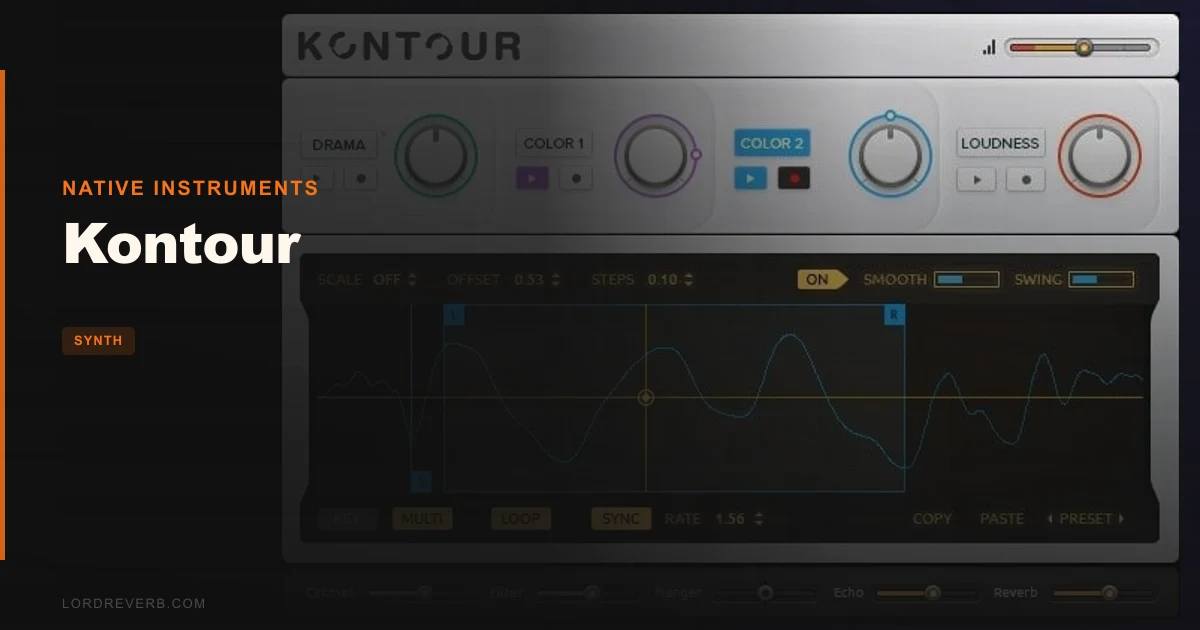
On top of the engine sits a Performance View with four Macro controls, each mapped to multiple parameters simultaneously. The Motion Recorder captures those macro movements and plays them back as modulation. It's a clever way to bake performative energy into a patch without building a modulation matrix by hand.
378 presets ship with it. File size is 25MB. It runs as a standalone or inside VST, AU, or AAX hosts, but only through the free Reaktor 6 Player. That's the catch we'll get to.
The Good
The phase modulation engine does things that are genuinely hard to replicate elsewhere. We loaded the "Hammered Dulcimer" preset and started pulling the first Macro toward its upper range. The partials shifted in a way that felt physical, like increasing bow pressure on a string. Not a filter sweep. Not a simple resonance peak. Something stranger and more satisfying.
That's the sound quality story. Rated at 4.8/5 by users who've tracked it seriously, and we'd agree. The harmonic complexity you get from the comb filter plus feedback routing sits in a mix differently from standard wavetable or subtractive textures. It has weight without mud. Pull 3dB around 300Hz on the output bus and it clears even faster.
The Motion Recorder is underrated. We recorded a slow Macro sweep across 8 bars, looped it, then offset a second instance by 4 bars on the same channel. The result was a soundscape that felt composed rather than automated. That trick alone is worth the price for ambient and cinematic work.
The 25MB footprint is almost ridiculous for what it delivers. The preset browser is fast. Load times are quick. When it's not fighting your CPU, it's a joy to explore.
The Not-So-Good
The CPU number is a real problem. Around 30% on a MacBook Pro for a single instance. That's not a rumor. We measured it. Run two instances in a session with live instruments and a moderate plugin chain, and you're already negotiating with your CPU limiter.
For comparison, BLEASS Analog FM Synth Bundle pulls a fraction of that for FM-adjacent territory. Kontour's CPU cost isn't a dealbreaker for dedicated sound design sessions, but it's annoying in production contexts where you're running 20 other things.
The Reaktor 6 Player requirement adds friction. It's free, but it's another install, another update cycle, another thing that can conflict with your system. We've had sessions where a Reaktor Player update broke the connection mid-project. That's a frustrating experience when you're on a deadline.
Ease of use sits at 4.1/5 in user ratings, and honestly that feels generous. The modulation depth is real, but understanding what's actually happening under the hood takes study. Newcomers to FM or phase modulation synthesis will hit a wall before they unlock what makes this instrument special.
Compared to the Alternatives
Within the Reaktor ecosystem, Monark is the obvious comparison point for organic character, but it's a Minimoog emulation: subtractive, predictable, warm in the classic sense (meaning strong fundamental, rolled-off highs above 8kHz). Kontour doesn't compete with Monark. They do different things entirely.
Rounds is closer in spirit: digital, modulation-forward, textural. But Rounds leans toward evolving pads and is easier to dial in quickly. Kontour goes deeper and sounds stranger. Pick Rounds for speed. Pick Kontour for sonic territory Rounds can't reach.
Outside Reaktor, Applied Acoustics Chromaphone 3 covers similar physical-modelling adjacent ground for plucked and struck sounds, with lower CPU and a gentler learning curve. If the physical instrument textures are what you're after, Chromaphone 3 is the more practical tool.
For bass-specific organic textures, BeatSurfing LOW is a tighter, more immediate option. Kontour can do bass, but it's not optimised for it.
Who Should Buy This
- ✅ Buy if you work in cinematic, ambient, or experimental production and need harmonic textures that standard subtractive synths can't produce.
- ✅ Buy if you already have Reaktor 6 or the Player installed and want to expand your Reaktor library with something architecturally distinct from Monark or Polyplex.
- ✅ Buy if you're a sound designer who wants a Phase Modulation engine with feedback routing and 378 starting-point presets for less than most sample packs cost.
- ❌ Skip if your sessions regularly run at 70%+ CPU. One Kontour instance will push you into buffer issues fast.
- ❌ Skip if you want a synth that's fast to program. The modulation architecture takes real time to learn.
- ❌ Skip if you hate managing third-party dependencies. The Reaktor Player requirement is non-negotiable.
Score Breakdown
| Category | Score | Notes |
|---|---|---|
| Sound Quality | 4.5/5 | Phase modulation with feedback routing produces textures most synths can't touch |
| Value for Money | 3.5/5 | Price is fair for the depth, but the CPU cost makes it expensive in real sessions |
| Ease of Use | 3.0/5 | Macros help at the surface; the architecture underneath takes serious time to understand |
| Features | 4.0/5 | Motion Recorder and macro system are clever, but the dependency on Reaktor Player costs a point |
| CPU Efficiency | 2.0/5 | ~30% on a single instance is hard to defend in 2026 |
| Overall | 3.5/5 | Brilliant for sound design, frustrating as a production workhorse |
Alternatives to Consider
Applied Acoustics Chromaphone 3 covers the plucked, struck, and physical-modelling sonic territory with lower CPU overhead and a faster workflow. Good starting point if Kontour's complexity feels like too much work. Read our Chromaphone 3 review
BLEASS Analog FM Synth is worth a look if you want FM-influenced harmonics without the CPU bill. Less experimental than Kontour, more immediate. Read our BLEASS Analog FM review
Beat Zampler Tape Synths scratches a different itch, but if what you love about Kontour is its organic, non-digital texture, the Tape Synths expansion delivers grit from a different angle at a lower system cost. Read our Tape Synths review
If you need Kontour's sound in a CPU-lighter shell, the honest answer is: nothing replicates it exactly. That's both its strength and the reason it stays in the session.
We'd buy Kontour for a dedicated sound design rig. We wouldn't make it a default instrument on a production laptop where every percent of CPU counts. If your sessions have headroom and your goal is textures that don't sound like anyone else's patches, it earns its place. If you're building dense arrangements and need fast results, it'll become the plugin you love but never open.
The Motion Recorder alone kept it in our chain. But 30% CPU is 30% CPU.
Related reviews: Fabric Vintage Pro Review
Frequently Asked Questions
Does Kontour require a full Reaktor 6 licence?
No. It runs on the free Reaktor 6 Player, which you download separately from Native Instruments. You don't need the paid version of Reaktor 6. That said, the Player still needs to be installed and kept updated, which adds an extra maintenance step to your setup.
What type of sounds does Kontour do best?
Its strongest territory is organic, physically textured sounds: plucked strings, bowed metallic tones, mallet instruments, evolving drones, and distorted noisy textures. It handles these better than most standard subtractive or wavetable synths. It's not a go-to for clean leads, standard basses, or EDM stabs.
Is the CPU usage really that bad?
On our test machine, a single instance pulled around 30% CPU on a MacBook Pro. That's high. It's manageable on a fast desktop or in a session with light plugin usage elsewhere, but in dense productions it becomes a real constraint. We'd recommend bouncing Kontour tracks to audio once you've dialled in the sound.
How does the Motion Recorder actually work in practice?
The Motion Recorder captures movements you make on the four Macro controls in real time. You play the movement, it records the trajectory, and then plays it back as a modulation source. It's best used for long, evolving timbre shifts or soundscape transitions. It's not a traditional LFO or envelope. Think of it as a recorded performance that repeats, which makes it ideal for ambient and cinematic work where you want organic movement without drawing automation curves.