The doubt is fair: does a Kontakt instrument with a genre label slapped on the box actually sound like the genre, or does it sound like someone's polite impression of it? With Deft Lines, Native Instruments mostly delivers the real thing. At $49, it's a legitimate transatlantic drill toolkit, not a costume.
This is for the producer who's building drill beats and doesn't want to spend a month sourcing samples. It's for the person who already has Kontakt and wants to move fast without sacrificing sonic character. It's not for everyone, and we'll be straight about where it runs out of road.
Does It Actually Deliver Transatlantic Drill?
Deft Lines covers UK drill and US drill as distinct sonic territories, which is the right call. UK drill leans into the sparse, sinister, and low-end-heavy. US drill is more melodic, more orchestral stacks, more layered strings. Both live inside this library's 150 presets.
Native Instruments built this around sliding subs, muted keys, warped strings, eastern flutes, plucks, and bass dives. Those aren't vague marketing categories. They're sounds we recognize on actual drill records.
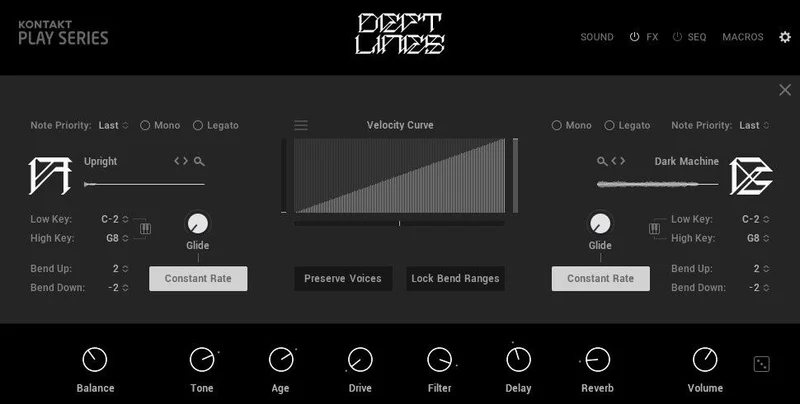
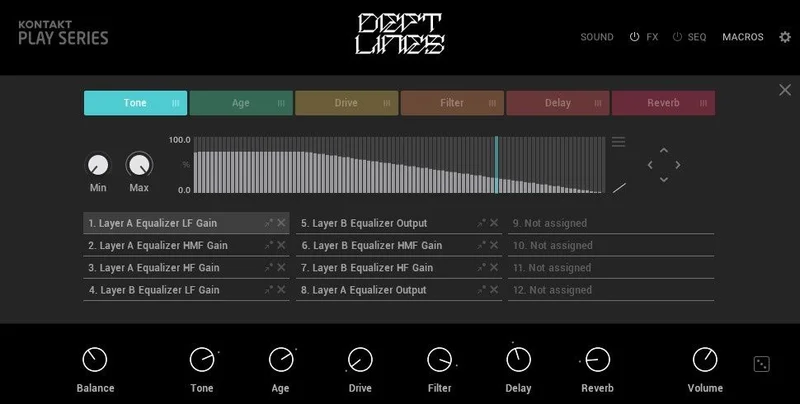
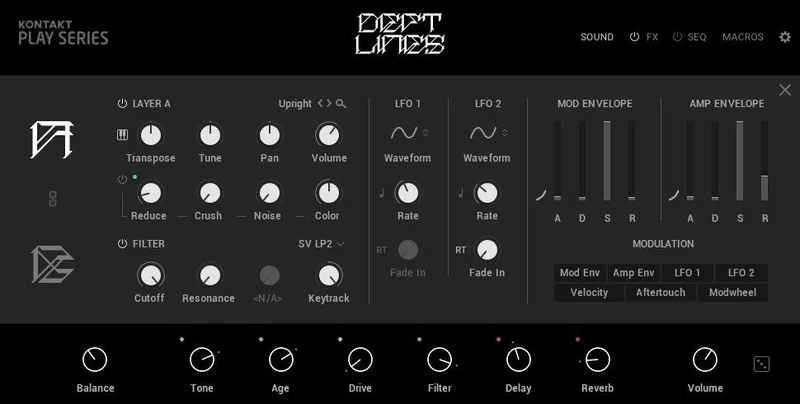
The interface splits into six views: Main, Sound Editor, Effects Editor, Sequence Editor, Macro Editor, and Settings. That's a full workflow in one instrument. The promise is that you can go from preset to finished idea without touching anything outside of Deft Lines. It largely holds up.
If you want to understand how this fits into the broader world of Kontakt instruments, we've broken down the fundamentals in our beginner's guide to Kontakt instruments.
Where It Shines
The 16-step sequencer is where Deft Lines earns its price. Load a sliding sub preset, drop a few steps, and modulate the filter macro over the sequence. You have a rolling drill bassline in under two minutes. That's not an exaggeration.
We loaded the bass dive presets and started assigning macros to filter cutoff and distortion. The coloured macro dots on the main page show you exactly what's mapped to what. It sounds obvious, but the visual clarity is satisfying in a way that most Kontakt instruments aren't. You don't have to memorize your own signal chain.
The Effects Editor is genuinely flexible. Swapping effects from the dropdown and reordering them via drag-and-drop means you're shaping the sound, not just picking a preset and accepting it. We pulled a warped string preset, dropped the reverb pre-delay to tighten the tail, added a bit-crusher after the saturation stage, and had something unrecognizable from the original within five minutes. That's the kind of iteration speed drill producers need.
The eastern flute and pluck presets deserve a mention. They sit in the mix at a frequency range that doesn't compete with the subs, which makes layering effortless. Pull one up alongside a bass dive preset and you've got the sparse melodic-over-bass-heavy structure that UK drill is built on.
Where It Falls Short
The Kontakt requirement is a genuine barrier. You need Kontakt Player or Kontakt 7.6 or higher. If you're on an older Kontakt license, you may need to update first. That's friction that competing sample-based tools don't create.
The 3.96GB download is heavy. Not disqualifying, but annoying if you're managing a tight drive situation. For a single-instrument library, that's a real chunk of space.
The bigger frustration is the lack of any critical community data. Every review we found online is five stars. 136 ratings, 100% five-star. That's either a product so good no one has complaints, or a community that hasn't stress-tested it. We'd love to know which presets fall flat, which macros feel undercooked, and whether the orchestral textures hold up at slower tempos outside of drill. We don't know, because no one's written it down.
The Settings view lets you edit key ranges and velocity curves, which is useful. But there's no detailed documentation about how far those velocity curves can be pushed before presets start behaving inconsistently. That's a workflow question we couldn't answer from the product page alone.
How It Stacks Up
The direct competitor territory here is other genre-specific Kontakt libraries built for modern urban production. Splice's sample-based approach gives you more raw material to work with, but you're building sounds from scratch. Deft Lines gives you structured presets with a sequencer baked in. Different workflow, not strictly better or worse.
For producers who want a more cinematic drill sound, there are orchestral Kontakt libraries that do hybrid textures with more depth. But they don't come with a genre-specific sequencer or macro system wired for drill. Deft Lines wins on workflow integration. It loses on raw sonic complexity if you're building film-score-adjacent tracks.
The Loot Audio Palm Mute Piano is a useful comparison point for understanding how genre-focused Kontakt instruments differ in their approach. That instrument goes deep on one sound. Deft Lines goes wide across a whole genre's palette.
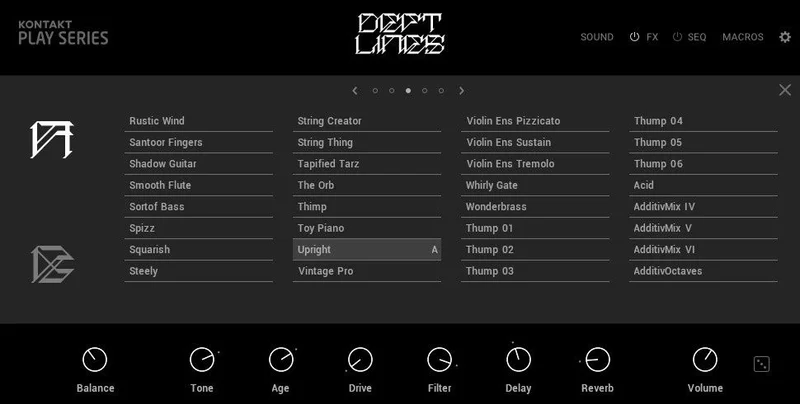
If you're building UK drill specifically, this library's sparse melodic presets and sliding sub range are hard to beat at this price tier. US drill producers get usable orchestral stacks, but might wish for more layering depth in the hybrid textures.
Is the Price Fair?
At $49, this is a straightforward yes for any producer already working in drill. You get 150 presets, a built-in sequencer with macro modulation, and a full effects chain editor. That's a complete creative environment for the genre.
The caveat: if you're not making drill, this library has limited transfer value. The sounds are specific. That specificity is the point, but it means you're paying for a focused tool, not a general-purpose instrument. Know what you're buying.
Specs & Technical Details
| Developer | Native Instruments |
| Price | $49 |
| Plugin Format | Kontakt Instrument (requires Kontakt Player or Kontakt 7.6+) |
| OS Support | Mac / Windows |
| Activation | Native Access |
| Download Size | 3.96GB |
| CPU Usage | Medium |
| Trial Available | N/A |
| Version Reviewed | Current as of 2026 |
| Preset Count | 150 |
| Sequencer | 16-step with 6 assignable macros |
Score Breakdown
| Category | Score | Notes |
|---|---|---|
| Sound Quality | 4.0/5 | Authentic transatlantic drill character, though orchestral textures could go deeper |
| Value for Money | 4.0/5 | 150 presets plus a full sequencer at this price is a fair deal for drill producers |
| Ease of Use | 4.5/5 | Macro dots and drag-and-drop effects ordering make this one of the more intuitive Kontakt instruments we've used |
| Features | 4.0/5 | Six dedicated views cover the full workflow, though velocity curve documentation is thin |
| CPU Efficiency | 3.5/5 | 3.96GB footprint and Kontakt dependency add overhead; performance varies by system |
| Overall | 4.0/5 | A focused, well-built drill toolkit that earns its price without pretending to be more than it is |
Alternatives to Consider
If you want more sonic flexibility outside of drill, look at broader Kontakt libraries built for urban production. They won't have the genre-specific sequencer, but they'll give you a wider palette to pull from. Check our best Kontakt instruments for producers for a mapped-out overview of the landscape.
For producers who want to go deeper on a single sound type rather than a genre library, the Loot Audio Palm Mute Piano shows how a focused Kontakt instrument can deliver exceptional depth within tight constraints. Different philosophy, different use case.
If you're building drill from samples rather than instruments, Splice's curated drill packs give you more raw material but require you to build the sound design yourself. That's a better path for producers who want full control. Deft Lines is better for producers who want to move fast and stay inspired.
Native Instruments' own Komplete library bundles sometimes include Deft Lines at a reduced rate, so if you're building out a wider toolkit, it's worth checking bundle pricing before buying standalone.
The honest version: if drill is a regular part of your output, buy Deft Lines. If you dabble in the genre occasionally, a sample pack might serve you better without the Kontakt overhead.
The best drill instruments make you feel like the beat is already half-written the moment you hit a key. Deft Lines does that more often than not. At $49, that's enough.
Related reviews: Glass Review 2026
Frequently Asked Questions
Do I need the full version of Kontakt to run Deft Lines?
No. Deft Lines works with Kontakt Player, which is free from Native Instruments. You'll need at least Kontakt Player or Kontakt 7.6 or higher. If you're running an older version of Kontakt, check that it meets the 7.6 minimum before buying.
Is Deft Lines only useful for UK drill?
No, and that's one of its real strengths. The library covers both UK and US drill styles. UK drill sounds tend toward sparse, bass-heavy, and sinister. US drill leans more melodic with orchestral stacks. The 150 presets split across both styles, so you're not locked into one territory.
Can I use Deft Lines in any DAW?
If your DAW supports Kontakt as a plugin, yes. Ableton, Logic, FL Studio, Pro Tools, and most other major DAWs work fine. The instrument runs inside Kontakt, so compatibility depends on your Kontakt version and DAW support, not on Deft Lines directly.
How does the 16-step sequencer work in practice?
You load a preset, activate the Sequence Editor, and place steps across the 16-step grid. From there, you can assign up to six macros to parameters like filter cutoff or distortion and modulate them across the sequence. It's a fast way to generate rolling basslines and evolving melodic patterns without external MIDI editing.