Absynth 6 is a hybrid semi-modular synthesizer that picks up where Absynth 5 left off, sixteen years later, and the wait mostly paid off. We had it loaded inside an ambient film-score session, layering a slow-evolving pad against a string ensemble, when we hit the 68-point envelope editor for the first time. We needed a swell that breathed differently every four bars. We'd spent twenty minutes in Serum drawing automation clips to fake that. In Absynth 6 we built the same movement in about six minutes flat, locked the sustain loop, added a randomized breakpoint curve, and moved on. That moment told us almost everything we needed to know about who this synth is built for. At $199, it's aimed squarely at sound designers, ambient composers, film and game audio producers, and anyone who wants textures that feel alive rather than static. If that's you, keep reading.
First Impressions: A Familiar Face, Completely Rebuilt
Installing Absynth 6 through Native Access is as smooth as any NI product these days. Activation takes under two minutes. The download is substantial given the 2,000-plus preset library, so put the kettle on.
Opening the synth for the first time, the redesign hits immediately. Absynth 5's interface was infamously cramped. Everything useful was there, but you needed a map and decent eyesight to find it.
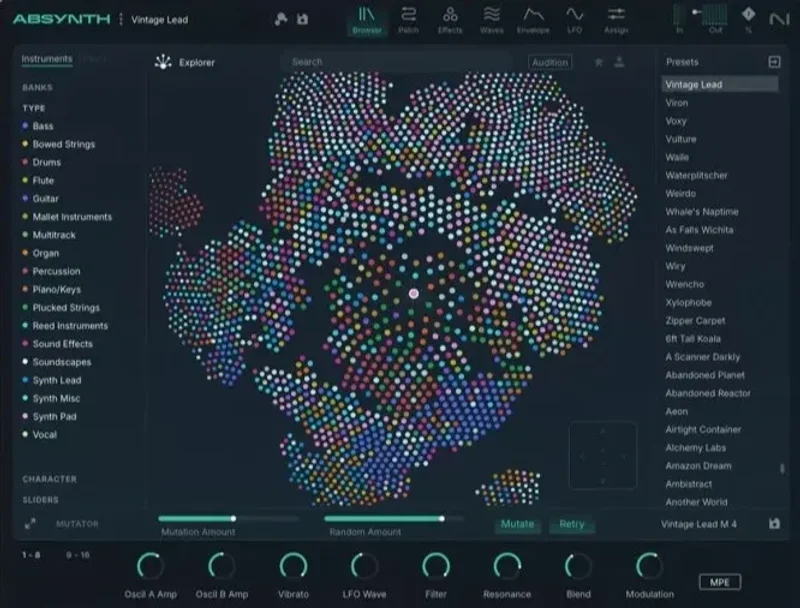
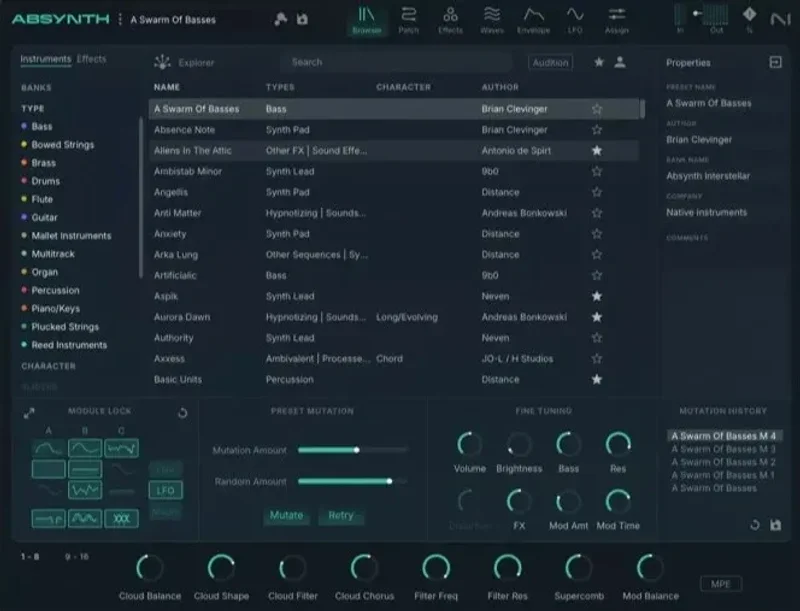
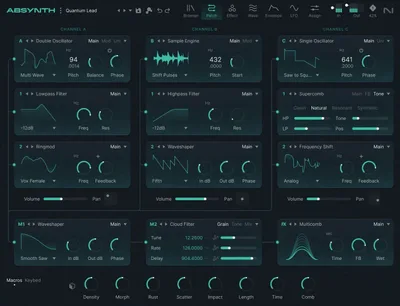
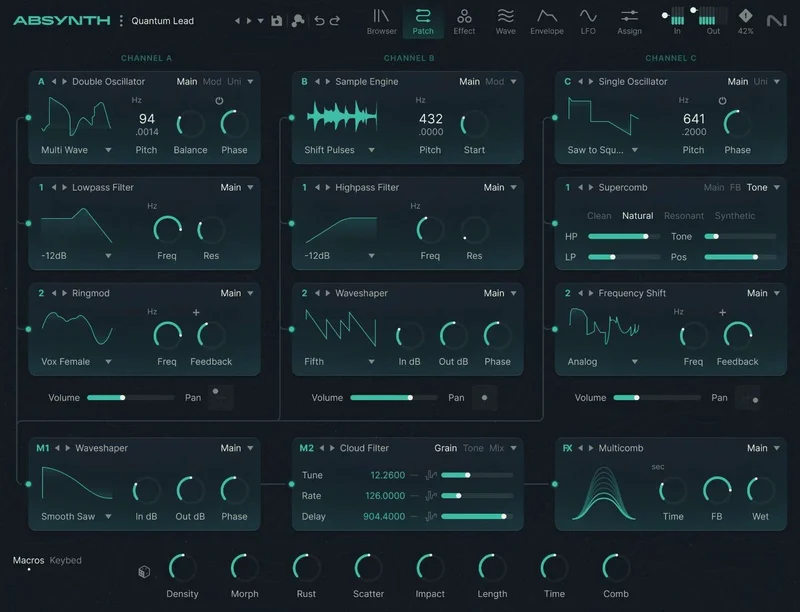
Absynth 6 trades that density for a cleaner, more spacious layout. The three-channel oscillator engine sits at the top. Modulation routing spreads below it. The visual browser takes over the right panel and actually loads quickly.
The waveform editor deserves a mention right here. It's precise, visual, and lets you sculpt harmonic content with a directness that the old interface never managed. We pulled up a basic sine and started dragging overtones within seconds.
Nothing about the first session felt hostile. That's not nothing for a synth of this depth.
Getting It Into a Real Workflow
Absynth 6 does not slot into fast workflows the way a bread-and-butter synth does. That's not a flaw in the design. It's a design decision, and you need to know it upfront.
The semi-modular three-channel architecture means every patch can route oscillators, modulators, and effects in genuinely different configurations. That flexibility is the whole point. But it also means you're making structural decisions every time you build from scratch, not just twisting knobs.
We ran it inside Ableton Live 12 on an M2 Mac. VST3 loaded clean, no issues. On a moderate patch using two oscillators in wavetable mode and one in granular, with the Aetherizer effect active, CPU sat around 18 to 22% on a single core. Add a second complex patch and you're watching the meter.
That CPU behaviour is one of the real friction points. Granular mode in particular scales up fast. Reviewers across forums report similar findings: simple subtractive patches run lean, but push the granular engine on a few simultaneous voices and you'll start bouncing tracks rather than keeping them live.
DAW compatibility is solid. VST3, AU, and AAX are all covered, which means Logic, Ableton, Pro Tools, Studio One, and Cubase all play nicely. NI's Kontrol keyboard integration is tight if you're using NI hardware, with the visual browser mapping to the hardware display.
The learning curve is real. We'd put it at comparable to learning a semi-modular synth from scratch. Budget a full weekend before you feel fluent. After that, the depth becomes an asset rather than an obstacle.
The Three-Channel Oscillator Engine: Where Absynth Lives
This is the heart of the instrument. Three independent oscillator channels, each switchable between subtractive, FM, wavetable, and granular synthesis modes. You can combine modes freely across channels, which is where Absynth gets its character.
A channel running wavetable on top of a channel running FM beneath it, with a third in granular adding unpredictable texture: that's a sound design space most synths can't reach. The interaction between modes is what produces those evolving, non-linear textures Absynth is known for.
Subtractive Mode
Standard subtractive synthesis here, but the filter options go further than most. You can route filters with a range of topologies and push the resonance into self-oscillation without it becoming harsh at moderate settings.
We used subtractive mode on the bass channel of a dark electronic track, driving the filter cutoff via the macro system. The macro assignments in Absynth 6 are well-implemented: you set depth and range per modulation target, and one macro can move five parameters simultaneously with different offsets per destination.
FM Mode
FM synthesis in Absynth works within the three-channel structure rather than as a standalone six-operator engine. This means FM is a flavour you layer rather than the whole recipe. If you want deep FM design, you'll want to look at a dedicated FM synth.
What Absynth's FM does well is add metallic or bell-like partials to an otherwise organic texture. We layered FM on Channel 2 above a granular pad on Channel 1 and hit something close to the sound of a struck dulcimer decaying inside a reverb chamber. Satisfying in a way that's hard to replicate with separate plugins.
Wavetable Mode
The wavetable engine includes a waveform editor that lets you draw, import, or sculpt waveforms directly. Harmonic partials are adjustable individually. You can morph through wavetable positions via the envelope, a macro, or an LFO.
The visual feedback here is genuinely useful. You can see the waveform morph in real time as playback moves through the table. We ran a vocal sample through the waveform editor, chopped it into a short wavetable loop, and had it cycling through as a pad layer. The result was recognizably vocal but deeply processed. Satisfying work.
Granular Mode
Granular is where Absynth 6 earns its reputation for otherworldly textures. The engine scatters sample grains across the stereo field (or surround field, if you're working in multichannel) with controls for grain size, position, density, and randomization.
This is the most CPU-intensive mode. Large grain counts on long samples with high polyphony will stress even modern hardware. We noticed artifacts with 32 simultaneous voices running complex granular patches. At 16 voices it was manageable.
Annoying, but not a dealbreaker. Most ambient and scoring work doesn't need 32 simultaneous granular voices.
The Envelope System: 68 Points of Precise, Living Movement
This is one of Absynth's most distinctive features and the thing that separates it most clearly from synths with standard four-stage envelopes.
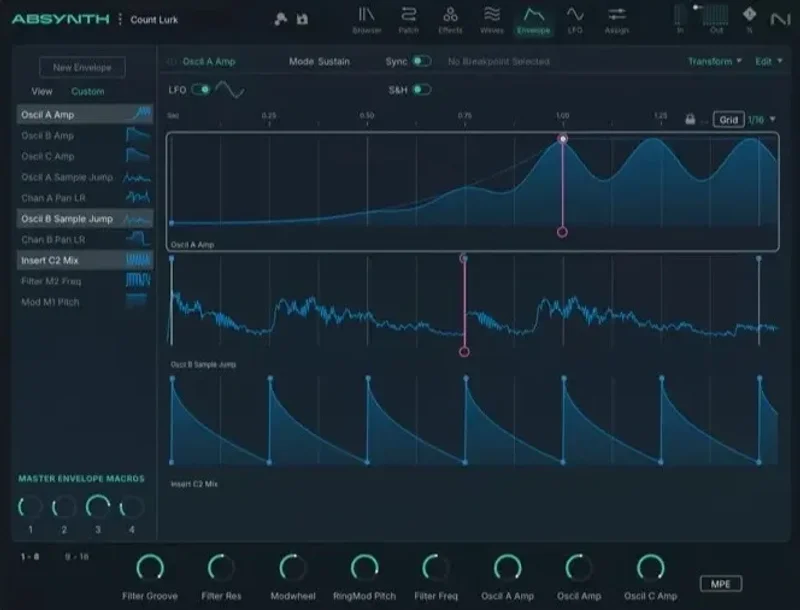
Each envelope can carry up to 68 breakpoints. You can set looping stages within the envelope so it sustains in a complex, non-linear way rather than just holding a flat sustain level. Curves between breakpoints are adjustable. You can create envelopes that accelerate into a peak, plateau for exactly two bars, then release across a 12-second tail with a mid-decay ripple.
We built an envelope for a horror cue that climbed over 8 seconds, hit a broken-up mid-section with irregular movement across 5 breakpoints, then decayed over 15 seconds. No automation. No layered clips. Just the envelope doing what Absynth's envelope system does.
Sample jump envelopes add another layer: randomized breakpoint jumps that produce LFO-like movement without the predictable periodicity of a standard LFO. These work best for textures that need to feel organic rather than mechanical.
Three dedicated LFOs run alongside the envelope system. Each LFO is routable to any modulation target. Standard shapes are included, plus user-drawn shapes via the waveform editor.
For static sounds this depth of modulation is overkill. For evolving, breathing textures in ambient or scoring work, it's exactly what you need and something no other synth at this price point provides in one instrument.
The Modulation System and Macros
Absynth 6 runs a macro-based modulation system that connects performance controls, MIDI input, and internal modulators to synthesis parameters.
You assign macros to parameters with depth and range controls per destination. One macro can simultaneously open the filter cutoff by 40%, increase granular density by 30%, and raise the Aetherizer mix by 25%, all from a single mod wheel move.
Velocity and modwheel come pre-routable across the factory presets. The system is transparent enough that you can audit what a preset is doing without digging through hidden menus.
MPE support means that on an MPE controller, you get per-note pitch bend, pressure, and slide acting independently across polyphonic voices. Polyphonic aftertouch works on compatible hardware too. On a Roli Seaboard or Expressive E Osmose, Absynth 6 opens up in ways that a standard keyboard simply can't access.
We tested a patch with polyphonic aftertouch mapped to granular grain density per note. Pressing harder on individual keys changed the texture of each voice independently. That level of expressive control is rare. We love it.
The Preset Library: 2,000 Sounds, Genuinely Varied
The factory library holds over 2,000 presets. 350-plus are new to version 6. Sounds contributed by Mark Mothersbaugh and Brian Eno are included in the version 6.1 update alongside 100 new samples and 32 additional factory presets.
The library quality is uneven in the way that all large libraries are, but the high end is genuinely excellent. The ambient pads, evolving textures, and sound-design starting points are strong. Bread-and-butter leads and basses feel secondary here, which tells you something about the synth's identity.
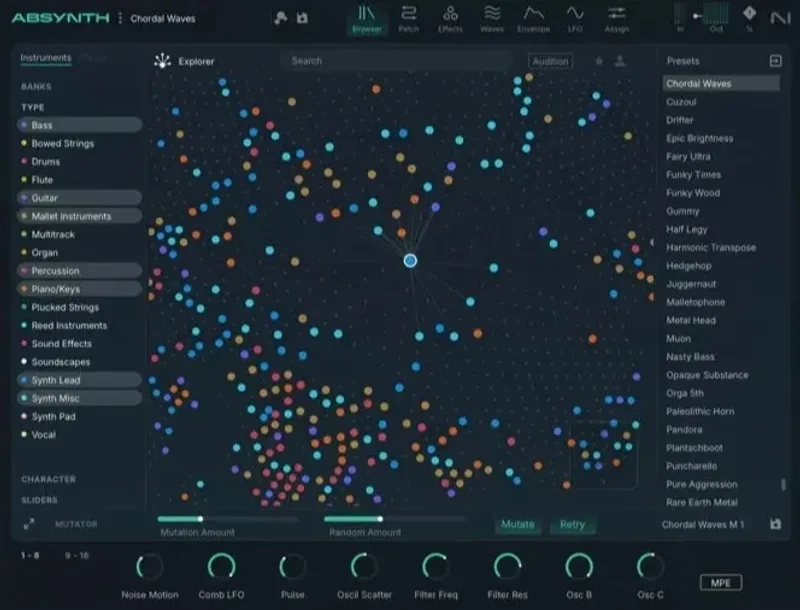
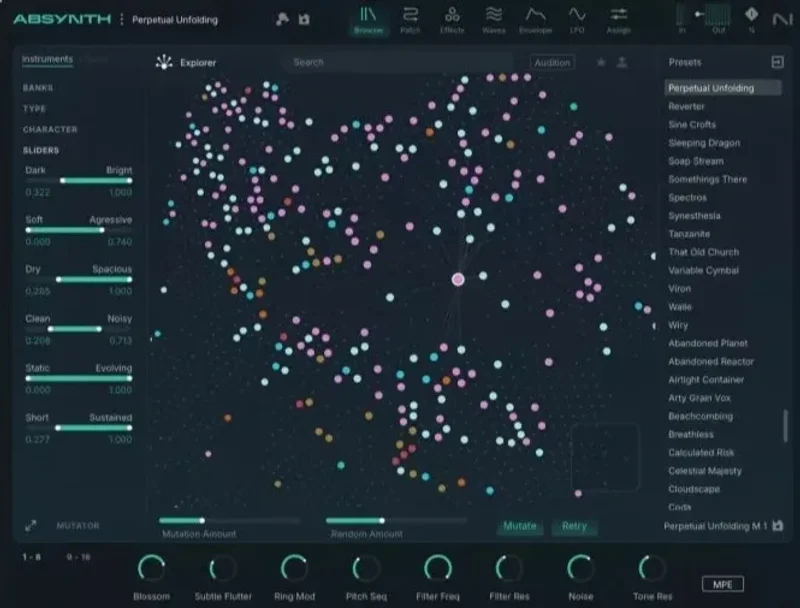
Preset loading is fast via the visual browser. You can filter by type, character, and instrument category. This is a genuine improvement over Absynth 5's list-based browser.
Full backward compatibility with Absynth 5 patches is confirmed. If you have a library of Absynth 5 presets, they load in version 6 without manual conversion. That's a significant practical win for long-time users.
The Mutator: Clever Concept, Limited Execution
The Mutator is Absynth 6's headline creative tool for fast preset generation. You set a starting preset, adjust depth and randomness controls, and the Mutator generates variations. A mutation history lets you step back through generations to find interesting stops along the way.
In practice, the Mutator works best as a way to stumble across useful accidents. We started with a granular texture preset, ran five mutations at medium depth, and found two results we kept and named. Both became usable elements in a game audio project.
The limitation is that it's genuinely random within the parameter space, not intelligently directed. The marketing around the Preset Explorer suggests AI-driven timbral analysis, but reviewers and users consistently report that the analysis happens once, then the results are fixed. It doesn't adapt to what you're doing mid-session.
Useful, not groundbreaking. Don't buy this synth for the Mutator. Buy it for the engine.
The Effects Section: Aetherizer, Cloud Filter, and Surround
Absynth's creative effects have always been part of its identity. Version 6 keeps the signature tools and expands their routing.
Aetherizer
The Aetherizer is a granular echo effect that chops the signal into grains and redistributes them across the stereo or surround field. It's not a standard delay. The grains decay independently, which creates a shimmer that sits somewhere between reverb and granular processing.
We ran a plucked wavetable tone through the Aetherizer at a slow grain rate and high diffusion. The attack stayed present while the tail spread into a hall-sized shimmer that lasted eight seconds without becoming muddy. That is the kind of thing you'd normally send to three separate plugins to achieve.
Cloud Filter
The Cloud Filter is a filterbank-style effect that distributes resonant peaks across the frequency spectrum. At moderate settings it adds density and movement to a pad. At aggressive settings it produces pitched resonance that's almost like additive synthesis on top of your source sound.
It's one of those effects that sounds ridiculous in a good way on the right source material. On a plain sawtooth it can produce something close to a tuned metallic resonator. On a granular pad it adds a sense of air pressure.
Surround Spatialization
True multichannel surround output is a real differentiator for scoring and post-production work. Most synths fake this in the DAW. Absynth handles spatialization per effect, meaning you can have the Aetherizer's tail spinning around a 5.1 or 7.1 monitoring setup independently of the dry signal's position.
For anyone working in film or game audio with a proper monitoring setup, this is a legitimate workflow tool. For everyone else, it's irrelevant but doesn't cost you anything to ignore.
MTS-ESP and Microtuning: Underrated Feature
Absynth 6 supports MTS-ESP, which means it integrates with global microtuning systems like Oddsound MTS-ESP master. You can retune the entire instrument in real time from a master plugin, switching between just intonation, quarter-tone, or fully custom harmonic systems without touching Absynth's interface.
This is underrated in most coverage of the synth. For composers working outside 12-tone equal temperament, such as those doing world music fusion, microtonal electronic work, or experimental scoring, this feature alone is meaningful.
Most competing synths at this price point don't support MTS-ESP at all. Very few synths at any price handle microtuning this cleanly.
What It's Genuinely Good At
The envelope system is the best non-linear modulation tool in any synth at this price. Nothing else gives you 68 breakpoints, looping mid-sustain stages, and sample-jump randomization in one envelope lane.
The hybrid engine produces sounds that feel alive in a way that single-mode synths rarely achieve. Layering wavetable on granular on FM creates interaction between synthesis modes that becomes its own sound source, not just a stack of sounds.
MPE and polyphonic aftertouch support put Absynth 6 ahead of most competitors for expressive performance. On a capable controller, you get per-note modulation that turns a static patch into a different instrument under your hands.
The surround spatialization and MTS-ESP support are real workflow wins for the specific users who need them. Those features don't exist at all in most competing synths.
Backward compatibility is clean and complete. Every Absynth 5 patch we tested loaded without issues.
The Rough Edges
The CPU load on complex granular patches is a real constraint. On older hardware it'll push you toward bouncing patches earlier than you'd like. On a modern Apple Silicon Mac it's manageable with care, but you'll hit limits before you expect to.
The Mutator's "AI-driven" framing overstates what it actually does. The timbral analysis is a one-time scan, not an ongoing adaptive system. Users who come in expecting Mutator to intelligently steer toward useful sounds consistently report disappointment. It's a randomizer with good UI, which is fine. Just don't expect more.
The learning curve is steep for anyone new to semi-modular thinking. This isn't a synth you can drop into a beat session and produce results from in twenty minutes. That's not a flaw, but it is a barrier you need to account for honestly.
KVR Audio's aggregated rating of 4.15 from 13 reviews and Audiofanzine's 7/10 verdict both reflect a synth that's genuinely loved by its audience but with acknowledged rough edges around workflow speed and CPU overhead. We'd place our take in the same territory.
Documentation is thorough but dense. Budget time to read it. The manual is not optional here.
Who This Is Really For
- ✅ Buy if you compose for film, TV, games, or ambient music and need evolving textures that move on their own.
- ✅ Buy if you own an MPE controller and want a synth that takes genuine advantage of per-note expression.
- ✅ Buy if you're an existing Absynth 5 user ready for a full modern rebuild with your existing library intact.
- ❌ Skip if you need fast workflow and quick sound selection for beat production or pop writing.
- ❌ Skip if you're running older hardware and can't afford the CPU headroom granular mode demands.
- ❌ Skip if you're a beginner. Start with a more approachable instrument first. Come back to Absynth when you understand modulation routing and envelope architecture. Something like Chromaphone 3 is a better first instrument.
Specs & Technical Details
| Developer | Native Instruments |
| Price | $199 |
| Plugin Format | VST3 / AU / AAX |
| OS Support | Mac / Windows |
| Activation | Native Access (online activation required) |
| CPU Usage | Medium to Heavy (depends on synthesis mode; granular mode is most demanding) |
| Trial Available | No |
| Version Reviewed | 6.1 |
Score Breakdown
| Category | Score | Notes |
|---|---|---|
| Sound Quality | 4.5/5 | Hybrid engine produces textures no single-mode synth can match; granular and wavetable interaction is exceptional |
| Value for Money | 3.5/5 | Specialist tool at a price that demands you know exactly what you're buying it for |
| Ease of Use | 3.0/5 | Redesigned interface is better than Absynth 5 but the learning curve is still steep for new users |
| Features | 4.5/5 | 68-point envelopes, MPE, surround, MTS-ESP, and a hybrid engine is a spec sheet few synths match |
| CPU Efficiency | 3.5/5 | Subtractive mode is lean; granular patches with high polyphony will stress modern hardware |
| Overall | 4.0/5 | A deep, expressive specialist synth that rewards the right user and frustrates the wrong one |
Alternatives to Consider
If Absynth 6 feels like too much architecture for your current workflow, there are three places worth looking.
Arturia Pigments covers wavetable, virtual analogue, and granular synthesis in a more approachable interface. It's less deep on modulation architecture than Absynth but significantly faster to work with on a deadline. If you want wavetable and granular without the learning investment, Pigments is the practical choice. See how Arturia handles hybrid synthesis.
Xfer Serum is the industry-standard wavetable synth for a reason. The preset ecosystem is enormous, the workflow is fast, and the sound quality is excellent. What Serum doesn't do is match Absynth's envelope depth or granular engine. If your work sits closer to pop and electronic production than scoring, Serum is the stronger choice at a comparable price.
Applied Acoustics Systems Chromaphone 3 is a different category of instrument, but if you're drawn to Absynth for organic, evolving timbres and the acoustic physics model interests you, Chromaphone's percussion synthesis produces unpredictable textures with a smaller CPU footprint. Read our Chromaphone 3 deep-dive.
If the interest is in exploring semi-modular synthesis at a lower commitment price, the SEM V offers a different angle on analogue architecture without the complexity of a full modular system.
The Honest Verdict
Absynth 6 is the synth you buy when you need sounds that move, breathe, and change over time without you managing every parameter in automation. It is not the synth you buy because you heard it was powerful and you want something impressive on your plugin rack.
The sixteen-year gap since version 5 meant Native Instruments had a lot of ground to cover. The rebuild with original creator Brian Clevinger delivers on the core promise: the engine is deeper, the interface is less punishing, and the addition of MPE support puts Absynth in a genuine conversation with modern expressive workflow tools.
The rough edges are real. CPU load on granular patches, the overstated Mutator marketing, and the learning barrier for new users are all legitimate reasons to hesitate. On KVR Audio, 13 reviews averaging 4.15 out of 5 tell the same story: most people who bought this for the right reasons are happy. People who came in expecting a fast workflow tool are not.
At $199, this is a targeted investment. Ambient composers and film and game audio producers will get every dollar of value and then some. Beat producers and pop writers will spend most of that money on a synth they open twice.
The one thing we'd tell you before buying: load the factory presets in the visual browser, find the evolving pad and granular texture categories, and play three or four sounds. If you feel the pull to start pulling them apart and making them your own, you belong in here. If you're waiting for something that sounds like a familiar subtractive synth, look elsewhere.
Some synths make music. Absynth makes weather.
Related reviews: Usynth DRIVE Loyalty Upgrade Is Worth It in 2026 · Stage-73 V Review
Frequently Asked Questions
Is Absynth 6 a free update for Absynth 5 owners?
No. Absynth 6 is a paid upgrade, though Native Instruments offers a discounted update path for registered Absynth 5 owners that is separate from the full purchase price. The upgrade option is available through the Native Instruments store and through plugin retailers like Plugin Boutique. All of your existing Absynth 5 presets load in version 6 without conversion.
What DAWs does Absynth 6 work with?
Absynth 6 ships as VST3, AU, and AAX, covering Ableton Live, Logic Pro, Pro Tools, Studio One, Cubase, Reaper, and any other DAW that accepts those formats. Native Instruments' Kontrol keyboard integration adds hardware display and navigation support for NI keyboard users. There are no reported compatibility issues with any current major DAW.
How does Absynth 6 handle CPU load compared to Absynth 5?
Users and reviewers consistently report that the rebuild has improved CPU efficiency on simpler patches, particularly in subtractive and FM modes. Granular mode with high voice counts remains demanding on any hardware. On Apple Silicon Macs running native ARM builds, overhead is manageable for most production use, but complex granular patches with multiple effects active will push your CPU budget faster than competing synths at similar patch complexity.
Do you need an MPE controller to get value from Absynth 6?
No. The majority of Absynth 6's features, including the full hybrid engine, envelope system, effects, and Mutator, work with any standard MIDI keyboard. MPE and polyphonic aftertouch support opens up an additional layer of expressive control on compatible hardware like the Roli Seaboard or Expressive E Osmose. It's a meaningful bonus if you have the controller. It's not a prerequisite for getting deep value from the instrument.
Is Absynth 6 good for beginners?
Honestly, no. The semi-modular architecture, deep envelope system, and multi-mode synthesis engine require a working understanding of synthesis fundamentals and modulation routing before you'll feel productive. Beginners would be better served starting with a more direct instrument and returning to Absynth once they're comfortable with oscillator, filter, and envelope basics. The payoff for investing the learning time is real, but the learning time is real too.
What is the Mutator and how well does it work in practice?
The Mutator generates variations on a starting preset by randomizing parameters within adjustable depth and randomness ranges. It keeps a history of mutations so you can step back to earlier generations. In practice it works best as a creative accident generator: useful for finding unexpected textures quickly, less useful if you're trying to steer toward a specific sound target. The timbral analysis that drives it is a one-time scan rather than an adaptive system, so don't come in expecting AI-driven intelligence. Think of it as a smart randomizer with good undo. That's genuinely useful. Just not as useful as the marketing suggests.