The claim most often made about the Mastering The Mix Bestsellers Bundle is that it gets you 95% of the way to a finished master in just a few clicks. That claim holds up, with one honest condition: you still need to know what you're listening for.
Quick verdict: At $159, this four-plugin bundle covers mastering, mix referencing, resonance suppression, and channel conflict resolution in one purchase. REFERENCE 3 alone justifies serious consideration. FASTER MASTER is a genuinely clever mastering tool co-created with David Guetta and Nicky Romero, not a gimmick. Owners rate it 4.94 stars across 3,177 reviews, and we think that score is close to fair. Buy it if you're a producer doing your own mastering or a mixing engineer who wants faster analytical tools. Skip it if you already own dedicated specialist solutions for each of these jobs.
What The Bundle Actually Promises
Mastering The Mix positions this as a complete production and mastering suite. Four plugins, two license seats each, covering the four most common pain points producers hit at the end of a session: unbalanced masters, no reference workflow, harsh resonances, and layers that fight each other.
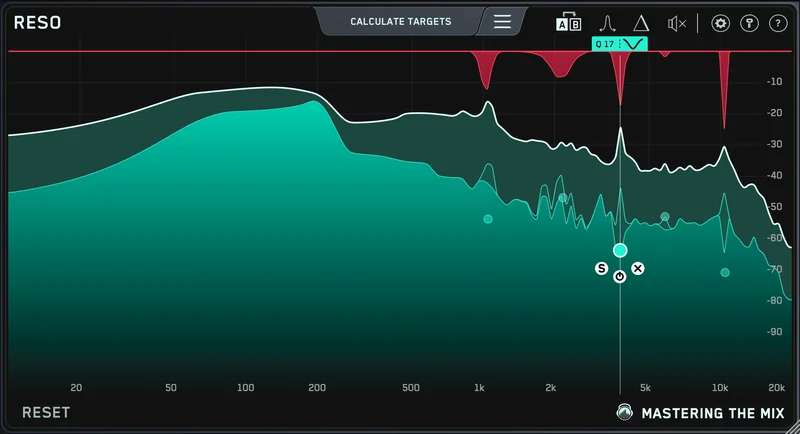
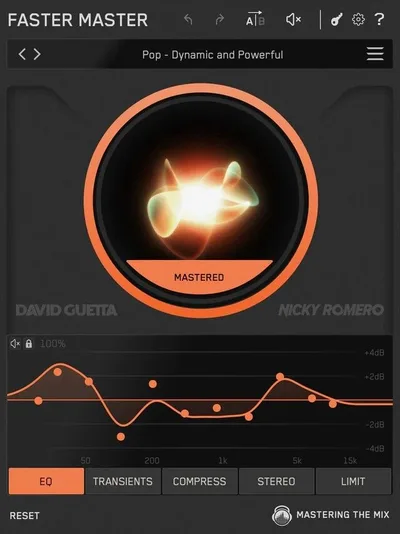
FASTER MASTER promises instant professional masters via 10 custom-generated presets. REFERENCE 3 promises to tell you exactly what your mix needs compared to a commercial reference. RESO promises mastering-grade resonance suppression with automatic frequency targeting. FUSER promises to resolve conflicting channels through phase analysis and mid-side sidechain ducking.
That's a wide net for one bundle. The question worth asking is whether four focused tools hold together as a workflow, or whether you're paying for two plugins you'll actually use and two you'll forget about by next month.
FASTER MASTER: What Those 10 Presets Actually Give You
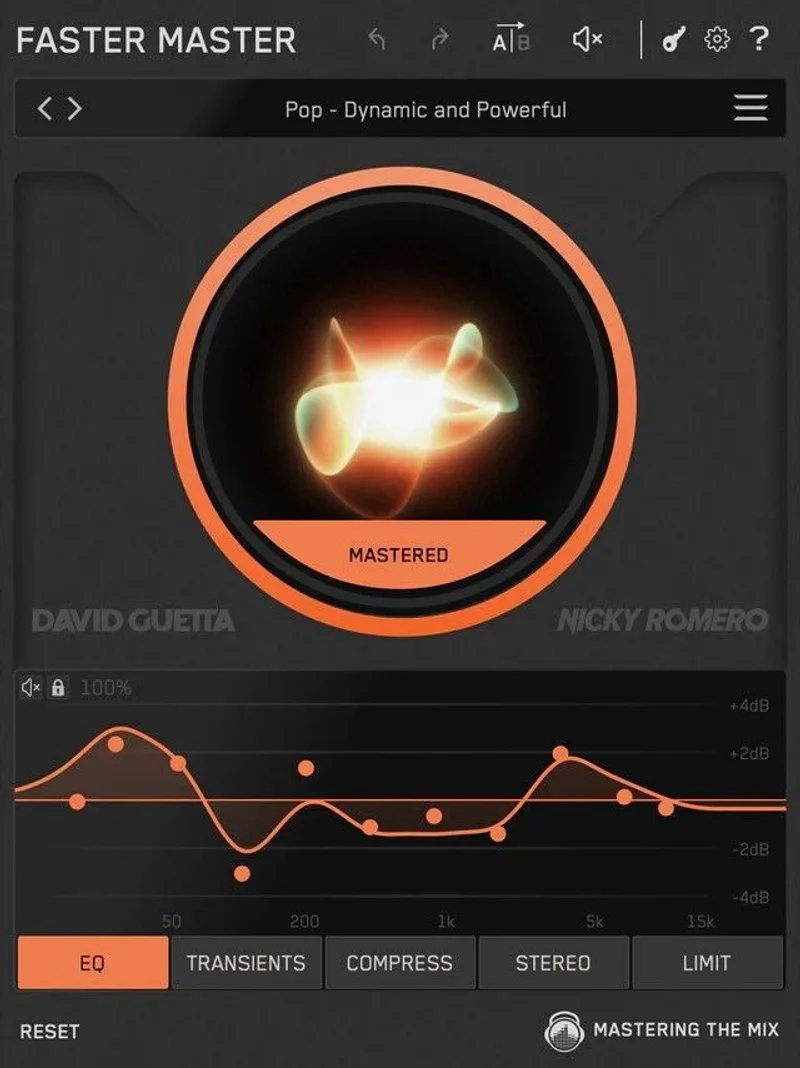
Load FASTER MASTER as the last plugin in your mastering chain. It analyzes your track and generates 10 custom presets tailored to that specific audio. Not generic templates. Not a genre dropdown. Actual analysis-driven starting points.
Each preset runs through five modules: EQ, transients, compression, stereo width, and limiting. The EQ is phase-accurate and transparent, with a mix percentage control so you can blend the processed signal against the dry. That's a detail that matters. Most mastering EQs are all-or-nothing.
Compression offers four modes: Off, Light, Dynamic, and Tight. Dynamic mode preserves movement and works best for music with natural peaks. Tight mode clamps harder and suits louder, denser genres. You're not getting a full compressor with attack and release controls here, so if you want surgical dynamics shaping, you'll do that upstream in your chain before FASTER MASTER even loads.
The transient module uses a drag interface. Pull upward to add punch, pull down to soften. Simple and fast. The stereo width module shapes across four frequency bands, which is the right way to do it. Widening the low end on a full stereo master is a common mistake that causes mono compatibility issues. Having band-specific control keeps that in check.
The Lock Function is the clever bit. It lets you freeze individual module settings while you scroll through all 10 presets. So if you've dialled in a limiter ceiling you like, lock it and keep auditioning the EQ and transient presets without losing your ceiling. That's a real workflow improvement, not a marketing checkbox.
Smart Presets also support reference track import. Load a reference and FASTER MASTER factors it into preset generation. The built-in A/B comparison uses auto-looped, level-matched playback, so you're not comparing an unmastered signal to a commercially louder reference unfairly.
Is it really 95% of the way to a finished master? For straightforward pop, electronic, and hip-hop productions, yes. For jazz, classical, or anything with complex acoustic dynamics, you'll likely need more manual work after the presets give you a starting point.
REFERENCE 3: The Plugin That Turns Your Ears Into Data
This is the one reviewers call a necessity rather than a nice-to-have. Best mixing plugins for producers REFERENCE 3 covers tonal balance, stereo width, phase analysis, and overcompression detection in a single interface.
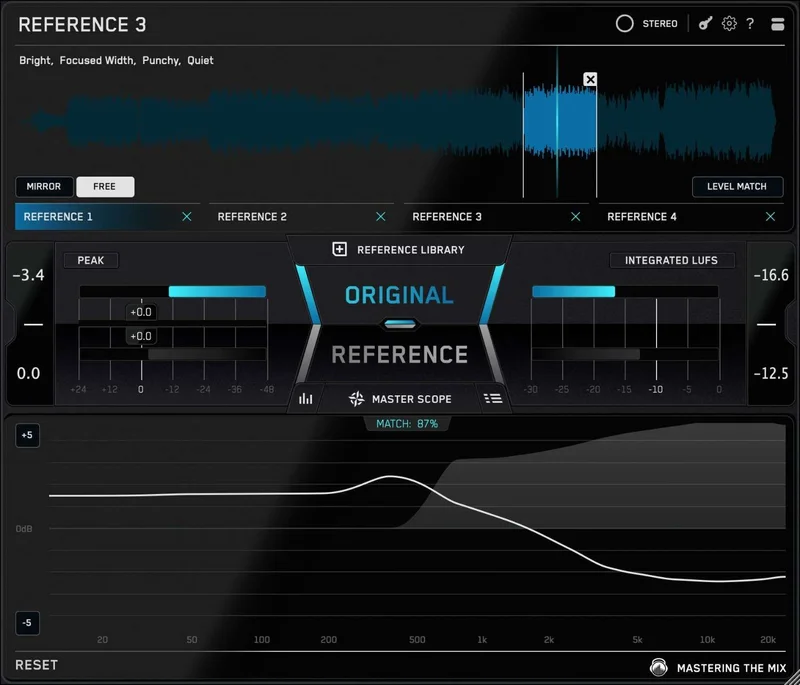
The Level Line feature is satisfying in a way that's hard to overstate once you've used referencing before. It shows you the exact EQ boosts and cuts needed to match your mix's tonal balance to a reference. Not "your low mids are a bit thick." Specific curve suggestions, in the right frequency ranges.
Mix Descriptor Tags label references with eight descriptors: bright, warm, wide, narrow, transient, compressed, balanced, loud. Smart Reference Tracks automatically suggests the best match from your library based on your current mix. If you have a well-organised reference library, this speeds up your workflow considerably.
The Match Percentage gives you a real-time score showing how close your mix is to the reference's tonal profile. Watch it climb as you make adjustments. Some producers love this. Others find it distracting. It's easy to start chasing a number rather than trusting your ears.
Mix Instructor converts the visual analysis into written instructions for low, mid, and high bands. "Boost the low mids slightly" or "reduce high-frequency presence." It reads like advice from an engineer. For producers who don't yet have a strong vocabulary for what they're hearing, this is genuinely useful.
REFSEND lets you A/B test entire processing chains, not just the dry versus processed signal. Track Align syncs alternate versions so you're comparing the same section of audio. Phase analysis by frequency range flags mono compatibility issues before your track goes to streaming platforms and gets summed to mono.
Over 300,000 producers use REFERENCE. That's not marketing fluff. It means there's a real community, real tutorials, and real workflow examples to learn from.
RESO: Fixing Harshness Without Wrecking the Sound
You know that moment where you've bounced a vocal take and there's one note that just rings. Sits wrong in every single mix position. You pull 3kHz down 4dB and suddenly the whole vocal sounds dull. RESO is built for exactly that problem.
Use it on any channel: vocals, synths, percussion, busses, or your mastering chain. The Frequency Sweep tool and Calculate Targets feature locate the most resonant frequencies and provide suppression targets automatically. Click the interface to place a node, use scroll to adjust the Q. The filters use automatic Q optimisation so you're not manually hunting for the right bandwidth.
The developer describes it as mastering-grade transparency, and owners back that up. A producer in the reviews specifically mentions it fixing harsh mixes and working well on vocals without damaging the character of the source. How to fix harsh mixes with dynamic EQ That's the bar for a resonance tool. It should be invisible when it's working.
Honestly, RESO is the plugin in this bundle that's hardest to justify as a standalone purchase at its individual price. As part of the bundle, it earns its place, especially if you're regularly working with synth layers or real instrument recordings where standing frequencies are common.
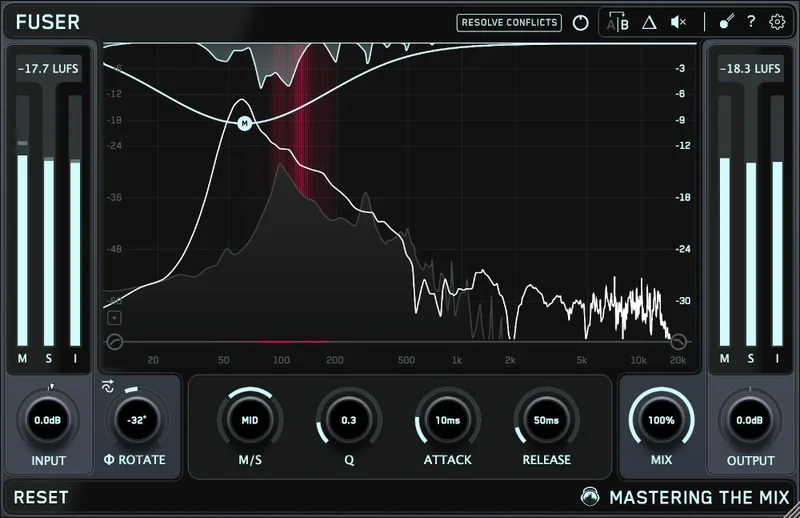
FUSER: The Plugin That Argues With Your Phase Problems
Layering two kick drums. Stacking a room mic with a close mic. Blending a DI with a cab. These are situations where phase relationships either lock together or fight each other, and most producers spend a frustrating amount of time nudging polarity switches and phase rotations to get them to sit right.
FUSER adds as the final plugin in the chain with a sidechain input routed to the focal channel. Conflict Detection identifies the problem. Resolve Conflicts attempts to fix it through volume balance, phase optimisation, and mid-side sidechain ducking. Phase Analyze automatically identifies the optimal phase rotation for layering.
The Input Gain Level Match Pointer ensures you're setting relative volume balance correctly before letting the phase analysis run. That's the right order of operations. Volume differences skew phase perception, so matching levels first is smart design.
Owners describe FUSER as a time-saver that handles what used to be a manual process. That's probably the most accurate way to describe it. It won't replace understanding phase. But for producers who want to move faster and don't want to spend 20 minutes manually flipping phase on six drum mic channels, it does the heavy lifting.
What Doesn't Quite Match The Promise
The gaps are real, even if the bundle is strong overall.
There are no independent third-party editorial benchmarks for this bundle against competing suites. That's not a dealbreaker, but it does mean you're largely relying on the 4.94-star average from 3,177 customers, which skews positive by the nature of self-selection.
CPU load is undocumented. Running four analysis-heavy plugins on a mastering chain or mix bus is going to cost you something. You won't know what until you're in your session and your meter is climbing.
The learning curve is real. Each plugin is approachable on the surface, but REFERENCE 3 alone has enough features to take a few sessions to understand fully. The Mix Instructor and Match Percentage features are useful shortcuts, but if you lean on them too heavily early on, you can start mixing with your eyes and ignoring your ears entirely. That's a frustrating habit to break later.
FASTER MASTER's compression and transient controls are intentionally simplified. That's a feature for some users and a limit for others. If you want full attack and release control on your mastering bus compressor, you're doing that in a separate plugin upstream.
Filtek Mk3 Review: Worth $159 for Mastering?
Who Gets The Most From This Bundle
Producers who write, mix, and master their own tracks get the full value here. FASTER MASTER speeds up the mastering stage. REFERENCE 3 tightens the mix. RESO handles problem frequencies that would otherwise need a separate dynamic EQ plugin. FUSER sorts out layering issues in the session itself.
Bedroom producers moving toward semi-professional work will find REFERENCE 3 and FASTER MASTER the most transformative. If you've never used serious referencing tools before, REFERENCE 3 will change how you hear your own mixes.
Mixing engineers who already own dedicated phase tools, standalone mastering limiters, and specialist referencing software will find less new ground here. The bundle isn't designed for professionals who already have every slot covered. It's designed for producers who don't want to build that toolkit piece by piece.
Skip it if you only need one of the four plugins. The individual pricing means the bundle only makes sense if you genuinely need two or more of them.
The Verdict
At $159, the Mastering The Mix Bestsellers Bundle earns its place on a producer's plugin list. Not because any single tool here is the best in its class at any price, but because four well-designed, focused tools that genuinely work together is worth more than four isolated plugins that don't know each other exist.
REFERENCE 3 is the anchor. FASTER MASTER is the shortcut that actually works. RESO and FUSER handle problems you've probably been solving the slow way. The 4.94-star average across over three thousand buyers isn't an accident.
Buy it if you're producing and mastering your own music and you want a faster, smarter workflow without patching together five separate tools. Pass on it if your toolkit is already mature and you're only missing one of these four jobs. This bundle is built for the producer who needs all four.
Specs & Technical Details
| Developer | Mastering The Mix |
| Price | $159 |
| Plugin Format | VST3 / AU / AAX |
| OS Support | Mac / Windows |
| Activation | N/A |
| CPU Usage | N/A |
| Trial Available | N/A |
| Version Reviewed | N/A |
Score Breakdown
| Category | Score | Notes |
|---|---|---|
| Sound Quality | 4.5/5 | Phase-accurate EQ, mastering-grade filters, transparent processing throughout |
| Value for Money | 4.5/5 | Four tools with real depth at a bundle price that makes individual purchase hard to justify |
| Ease of Use | 4.0/5 | Each plugin is approachable but REFERENCE 3 especially rewards time investment to learn fully |
| Features | 4.5/5 | Lock Function, Mix Descriptor Tags, Phase Analyze, Calculate Targets: all genuinely useful, not filler |
| CPU Efficiency | 3.5/5 | Undocumented CPU load across four analysis-heavy plugins is a legitimate unknown |
| Overall | 4.5/5 | A focused, well-built suite that earns its price for producers mastering their own work |
Frequently Asked Questions
Can I use the Mastering The Mix Bestsellers Bundle plugins separately across different projects?
Yes. Each plugin operates independently and each comes with 2 license seats, so you can install them on two machines. FASTER MASTER works as your mastering chain endpoint, REFERENCE 3 sits on your mix bus during mixing, RESO drops onto individual channels or busses, and FUSER handles any channel where layering conflicts appear. There's no requirement to run all four together.
Is FASTER MASTER a replacement for a full mastering chain?
FASTER MASTER is designed to sit at the end of a mastering chain, not replace the entire thing. Its modules cover EQ, transients, compression, stereo width, and limiting. For most pop and electronic productions it handles the complete mastering stage. For more demanding work, you'll likely want dedicated compression and EQ upstream before FASTER MASTER takes over with its preset analysis.
Do the Mastering The Mix plugins work with all major DAWs?
The bundle supports VST3, AU, and AAX formats on both macOS and Windows. That covers Ableton Live, Logic Pro, Pro Tools, Cubase, FL Studio, Studio One, and most other major DAWs. AU is macOS-only, VST3 covers both platforms, and AAX is for Pro Tools. If your DAW supports any of those three formats, you're covered.