
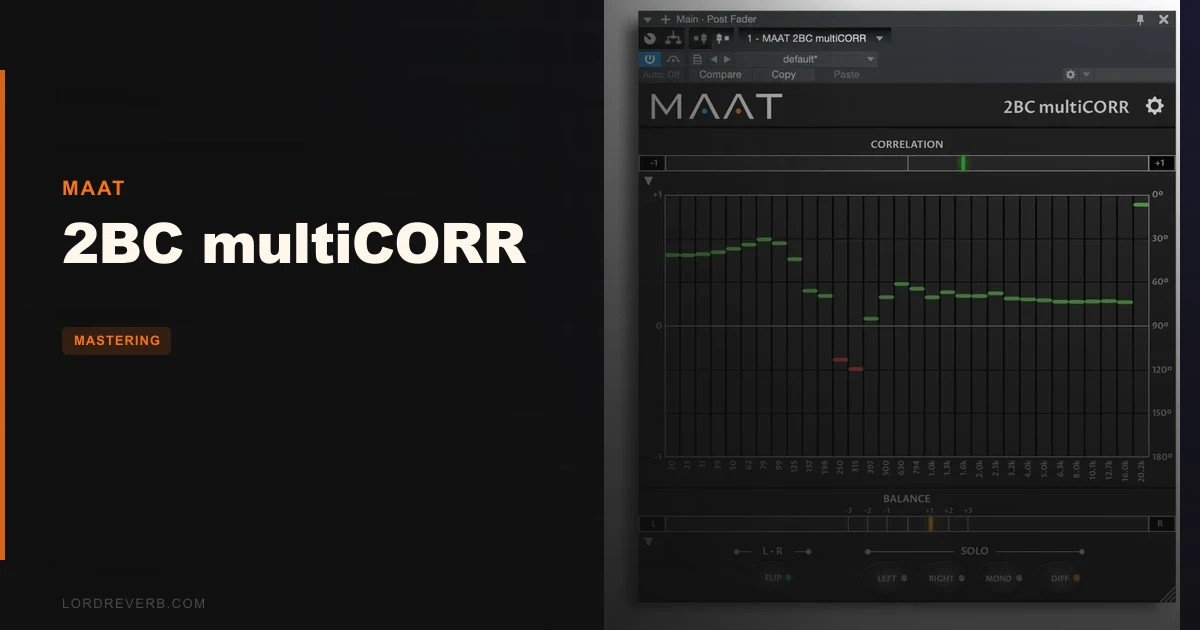
The real question about 2BC multiCORR isn't whether it looks slick. It's whether a $49 correlation meter can justify itself when free options already exist. The answer, after running it through mastering sessions on everything from dense rock mixes to wide electronic productions, is: yes, but with an honest caveat about who actually needs it.
2BC multiCORR is a 31-band stereo correlation analyzer from MAAT. It launched in May 2019 at an intro price, currently sits at $49 full price, and has been spotted at a lower price during sales. It does one job: shows you exactly where in the frequency spectrum your mix has phase problems that will kill mono playback.
That specificity is the whole product. If you're finishing mixes for streaming, vinyl, broadcast, or anything that touches a mono smart speaker, this is built for you. If you're a hobbyist who rarely checks mono, skip it and grab a free option.
Does It Actually Deliver On Its Single Promise?
MAAT built this as the paid, specialist companion to their free 2BusControl plugin. The idea is clean: one needle on a standard correlation meter tells you the overall phase health of your stereo mix. That's fine for a quick pass. It's completely useless when the problem lives at 60Hz but not 120Hz, or when your 3 kHz overheads are causing cancellation that your low-end mono subwoofer test completely misses.
The 31-band display solves that. Four bands cover the bottom octave below 50Hz, six bands run from 50Hz to 200Hz, and three bands handle the 200-400Hz range. That bottom-end density is clever. It's exactly where mix translation problems hide on club systems and vinyl cuts.
We loaded a wide mix that tested fine on a single-band meter. The multiCORR immediately flagged two bands around 80-100Hz sitting in negative correlation territory. We pulled up the low end in mono, and sure enough, the kick was partially cancelling. One glance at the display told us exactly where to look. That's the promise delivered.
Where It Shines
The trueLinear™ Scale Is Not Marketing Fluff
Standard correlation meters use a cosine scale. The problem is that cosine scales compress the negative end, which is exactly where the dangerous information lives. MAAT's trueLinear™ scale spreads that range out in a way that matches how your ear actually perceives phase relationship severity.
In practice: a reading of -0.3 on a cosine meter looks like a minor issue. On the trueLinear™ display it sits visually closer to the danger zone, which it actually is. We'd spent years looking at cosine meters and underreacting to mild negatives. The trueLinear™ scale fixed that muscle memory in about two sessions.
The Five Monitor Modes Save Routing Time
Left-Only, Right-Only, L+R, L-R, and Flip are all built in. No send, no extra bus, no routing gymnastics in your DAW. We used the L-R mode during a drum bus session to isolate a hat that was sitting awkwardly wide, and the Flip mode to hear polarity reversal instantly. Having that in one plugin UI instead of a patchwork of routing workarounds is satisfying in a way that's hard to overstate until you've done it twenty times the slow way.
Standalone App for Quick File Checks
The standalone version is underrated. Drop a bounce in, check the correlation map before you send it to a client. No session load required. Works up to 384 kHz sample rate, so it handles high-resolution masters without resampling artifacts messing with your readings.
Where It Falls Short
The CPU usage is annoying. For a plugin that produces zero audio processing, just analysis, the CPU hit lands higher than it has any right to. Anecdotal reports in forum threads describe it as a "surprisingly high CPU hit," and we'd agree. It's not session-killing, but if you're running a maxed-out mix on older hardware, you'll feel it. A meter should not be the thing making your fans spin up.
The $49 full price is also a genuine friction point. This is a visualization tool. It doesn't touch your audio. Competing free options like Voxengo Correlometer give you multi-band correlation at no cost. The trueLinear™ scale and the monitor modes are the real differentiators, but $49 is a hard sell when "free but slightly worse" exists.
Reading the display fast under session pressure takes practice. The 31 bands are dense. In a real mastering context, glancing at it between playback passes and correctly identifying a band-two problem versus a band-three problem takes a few weeks of daily use before it becomes instinctive. That's a real learning curve for a meter.
How It Stacks Up Against The Competition
Voxengo Correlometer is the obvious comparison. It's free, it's multi-band, and it runs lighter on CPU. If your budget is zero and you just need band-resolved correlation data, start there. We'd genuinely recommend it for anyone who only needs the numbers.
Where 2BC multiCORR wins is the trueLinear™ scale, the integrated monitor modes, and the standalone app. Those three things together create a faster workflow for anyone doing serious mastering work. Voxengo gives you the data. MAAT makes the data actionable faster.
iZotope Insight 2 covers correlation as part of a broader metering suite. If you don't own a full metering package yet, Insight 2 might make more sense at its price point because it also covers loudness, spectrum, and imaging. But if you already have broad metering covered and you specifically need better correlation resolution, multiCORR is the sharper tool for that one job. See our mastering plugins guide for context on where metering fits into a full chain.
Is the Price Fair?
At $49, it's tight. At the intro or sale price, it is a clear yes. Watch for sales. MAAT runs promotions, and the jump from the intro price to full price is genuinely where the value argument shifts from obvious to dependent on your workflow.
If mono compatibility is a daily concern in your sessions, $49 is one session's billable hour and you'll use this for years. If you check mono occasionally, the free alternative does the job well enough and the math doesn't work in MAAT's favour. Don't let us talk you into a purchase that doesn't match your actual workload.
Score Breakdown
| Category | Score | Notes |
|---|---|---|
| Sound Quality | N/A/5 | Analysis only, no audio path, no coloration, nothing to score here |
| Value for Money | 3.5/5 | Strong at sale price; harder to justify at full price versus free alternatives |
| Ease of Use | 3.5/5 | UI is clean but reading 31 bands fluently under session pressure takes time |
| Features | 4.5/5 | 31 bands, trueLinear™ scale, five monitor modes, standalone app: genuinely complete |
| CPU Efficiency | 3.0/5 | Higher CPU than a meter should draw, a real complaint, not a nitpick |
| Overall | 4.1/5 | Best-in-class for frequency-specific mono analysis; price and CPU are the only real friction |
Alternatives to Consider
Voxengo Correlometer (Free): Multi-band correlation, zero cost, lighter CPU. Lacks the trueLinear™ scale and monitor modes, but it's genuinely good enough for most use cases. Start here if you're unsure whether you need this level of detail.
iZotope Insight 2: Covers correlation inside a full metering suite with loudness, spectrum, and imaging analysis. Better value if you're building out metering from scratch. Check our mastering plugins overview for where it fits in a signal chain.
Plugin Alliance Bettermaker Mastering Compressor: Not a direct comparison, but if your mono problems are coming from over-compression widening the stereo field unpredictably, treating the cause beats measuring the symptom. See our Bettermaker Mastering Compressor review for that angle.
Also worth looking at your full chain context. We cover how meters and processors interact in our mastering EQ roundup and PSP MasterComp review.
Here's the honest close: 2BC multiCORR is a brilliant solution to a real problem, priced at a level that only makes sense if that problem costs you more than $49 per year in remixes, recalls, or embarrassing mono checks.
Buy it if mono translation is a recurring headache in your mastering sessions and you're doing this professionally. Skip it if you check mono twice a month and Voxengo Correlometer gets the job done for free. The plugin won't make your mixes sound better. It'll show you exactly why they don't translate, which is a different kind of value.
At $49, we'd buy it without hesitation on a sale. At full price, we'd wait for the next promotion and spend the difference on coffee you'll drink while actually using it.
Frequently Asked Questions
What does 2BC multiCORR actually do that a regular correlation meter doesn't?
A standard correlation meter gives you one number: the overall phase relationship of your stereo mix. 2BC multiCORR splits that analysis across 31 frequency bands, so you can see that your mix is fine at 1 kHz but has a phase problem at 80Hz. That band-specific information is what lets you locate and fix a problem rather than just knowing one exists.
Is 2BC multiCORR worth it if I already have iZotope Insight?
Insight's correlation display is useful but not its main feature, and it uses a standard cosine scale. multiCORR's trueLinear™ scale and denser low-frequency band resolution give you more actionable information in the critical sub-bass range. If mono compatibility is a daily concern, multiCORR is the sharper dedicated tool. If correlation is occasional for you, Insight's built-in display probably covers it.
Does 2BC multiCORR work with all major DAWs?
It supports VST, VST3, AU, and AAX formats, which covers Pro Tools, Logic, Ableton, Cubase, Studio One, and Reaper. It also runs as a standalone application, so you can analyze a bounced file without opening any DAW at all. macOS and Windows are both supported.
Why does a plugin that doesn't process audio use significant CPU?
Real-time multi-band analysis across 31 frequency bands with independent correlation computation per band does involve meaningful DSP work, even with no audio output path. The 384 kHz sample rate support adds to that overhead. It's not as lightweight as a simple peak meter and the CPU cost is a legitimate complaint, but it's not session-ending on modern hardware.