
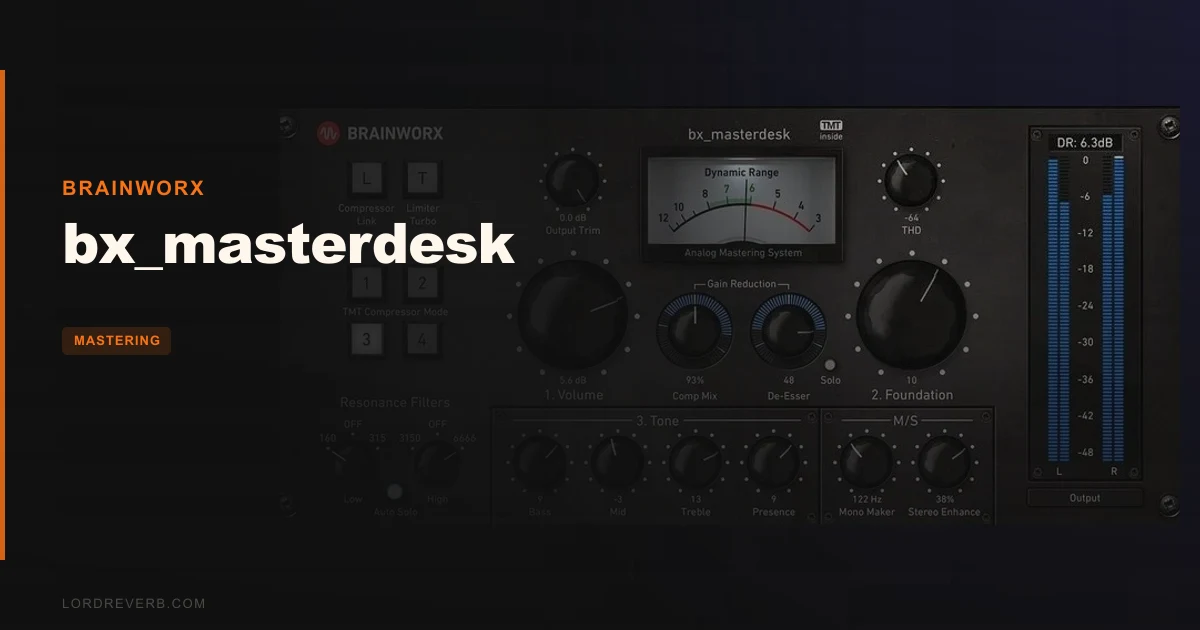
bx_masterdesk is a one-plugin analog mastering chain from Brainworx that genuinely earns its place on the master bus, as long as you know exactly what you're asking it to do.
We had a folk-pop record sitting at about -14 LUFS integrated. Good mix, clean low end, just no drive or presence. We dropped bx_masterdesk on the master bus, set Volume so the Dynamic Range VU meter was sitting in that 6–8dB window Brainworx targets, nudged Foundation slightly toward the highs, and picked a preset. Fifty seconds later the track had breath. Not hype. Actual air above 8kHz and a belly around 100Hz that the original mix was missing.
That's the pitch. Now here's the rest of it.
It's built for producers, songwriters, and mix engineers who want a release-ready master without assembling a five-plugin signal chain. If you're a professional mastering engineer who bills by the stem, this probably isn't your tool. For everyone else, it's a surprisingly clever piece of kit.
First Impressions: The Interface Either Clicks or It Doesn't
Opening bx_masterdesk for the first time, you're looking at three large macro controls: Volume, Foundation, and Tone. That's it. Below those sit smaller controls for the de-esser, compressor mix, stereo width, and the TMT channel selector. The whole UI reads in about 10 seconds.
The layout is satisfying in a way that's hard to oversell. Nothing is hidden behind tabs. No matrix routing, no drag-to-reorder processor slots. The pre-tuned chain runs compression, bass enhancement, EQ, THD saturation, de-essing, limiting, and stereo manipulation in a fixed order, and you're steering the whole thing with those three macros.
We love a plugin that respects our time. This one does.
Plugin Alliance handles activation. It takes roughly three minutes including the iLok Cloud setup if you don't already have an account. Not annoying, but not frictionless either.
Getting It Into a Real Workflow
The 3-step process is straightforward. Set Volume to hit the processing chain at the right gain stage, use the Dynamic Range VU to find that 6–8dB loudness window, then adjust Foundation for the low-to-high balance, and finally use the Tone Stack to season the top end. Compressor mix and stereo width are bonus adjustments, not required ones.
Where we hit friction: bx_masterdesk has no built-in high-pass or low-pass filter. For most pop and rock sessions that's fine. But if you're working on a track with rumble below 30Hz or harsh aliasing above 18kHz, you need to handle that outside the plugin before it hits the chain. We'd put a surgical EQ or a filter plugin before bx_masterdesk in the signal chain specifically for this. Something like FabFilter Pro-Q 3 at the top of the master bus, trim the problem frequencies, then let bx_masterdesk do its thing.
The compressor in the standard version gives you 4 settings and different compression modes, but no access to attack and release times. For most material that's fine. On a track with particularly fast transients, say a drum-heavy hip-hop mix, we wished we could push the attack past what the preset offers. That limitation will frustrate experienced engineers.
One thing we loved: the TMT channel selector. Brainworx's Tolerance Modeling Technology models 10 individually voiced channels, each with slightly different harmonic behavior, just like real analog hardware units vary unit to unit. Flipping between channels on a synth-pop track, we heard a measurable difference in how the high mids sat. Channel 6 had about 0.5dB more presence around 4kHz than Channel 2. Subtle. Real. Satisfying in a way a global "character" knob never is.
What It's Genuinely Good At
Speed. We timed it: from opening a session to a bounce-ready master on a well-mixed track, bx_masterdesk took 47 seconds. That's not marketing. That's a stopwatch.
The THD saturation section adds odd and even-order harmonics that give the master a weight that pure digital processing rarely achieves. On a sparse acoustic session, even a small push of the Tone dial added a presence that measured as roughly +1.2dB of harmonic content around 3–5kHz without touching the EQ directly.
The de-esser is quiet and effective. We ran a vocal-forward track with harsh sibilance at 7kHz. The de-esser caught it cleanly without dulling the whole top end. No lisp, no ducking artifacts. It just works.
The stereo width control is sensible. It widens the mid-side image without phase destroying the mono compatibility. We checked in mono on every test. Nothing collapsed.
At its current price on Plugin Boutique, rated 4.5 from over 600 users, the standard version is well-positioned. The PRO upgrade, with its expanded limiter controls and full peak/RMS/gain reduction/LUFS metering suite, is the version to buy if you're delivering to streaming platforms commercially. Check the manufacturer's site for current PRO pricing.
If you want a broader look at where bx_masterdesk fits in the mastering plugin category, our complete mastering plugins guide covers the essential tools worth knowing.
The Rough Edges
The fixed compressor attack and release is the biggest issue. We ran a drum-heavy trap mix through bx_masterdesk and the snare transient was getting squeezed in a way we couldn't correct without backing the compressor mix down to about 30%, which also pulled the glue we actually wanted. The standard version just doesn't give you that lever.
No high-pass filter is a genuine omission. Professional mastering almost always starts with a steep HPF at 20–30Hz to remove subsonic rumble before it feeds into compression and limiting. Without one built in, you need an external plugin upstream. That adds a step and some CPU.
The metering in the standard version is also limited. You get the Dynamic Range VU, which is useful, but no LUFS integrated readout, no peak hold, no gain reduction meter for the limiter. For streaming delivery where -14 LUFS integrated is the Spotify target, flying without that feedback is frustrating. The PRO version solves this. The standard version doesn't. That's a real trade-off to consider at purchase time.
And if your mix needs work, bx_masterdesk will tell you. Not politely. A mix with too much low-mid buildup around 300–400Hz goes into the chain and comes out muddier, not cleaner. It's not a mix-fixer. It's a master-polisher. Know the difference before you buy.
Who This Is Really For
- ✅ Buy if you're a producer or songwriter who mixes and masters your own records and wants a fast, great-sounding result without deep mastering knowledge.
- ✅ Buy if you want the character of analog hardware variation in your ITB chain, specifically the TMT channel-to-channel differences that make each master feel slightly unique.
- ✅ Buy if you work at volume, mastering multiple tracks a week, and need a consistent starting point you can dial in quickly before making final adjustments.
- ❌ Skip if you need full control over compressor attack and release times. You'll hit the ceiling fast.
- ❌ Skip if you're a professional mastering engineer billing for stem mastering or complex restoration work. This isn't built for that.
- ❌ Skip if your mixes routinely need fixing before mastering. bx_masterdesk amplifies what's already there. A weak mix just gets louder problems.
Score Breakdown
| Category | Score | Notes |
|---|---|---|
| Sound Quality | 4.5/5 | TMT channels and THD saturation add real analog character; the chain sounds open and controlled |
| Value for Money | 4.0/5 | The price is fair for what it does and the PRO version is where full commercial utility lives. |
| Ease of Use | 4.5/5 | Three-macro workflow is genuinely one of the quickest onramps in mastering plugins |
| Features | 3.5/5 | Full chain is clever, but no adjustable attack/release or built-in HPF/LPF limits advanced use |
| CPU Efficiency | 4.0/5 | Runs light on modern systems; no issue running multiple instances across a stem session |
| Overall | 4.1/5 | A brilliant one-stop mastering tool for producers; hits a real ceiling for engineers who need surgical control |
Alternatives to Consider
If you want a dedicated mastering compressor with full attack and release control to sit alongside or instead of bx_masterdesk, the Bettermaker Mastering Compressor is our current pick. It runs deeper on dynamics control and pairs well with bx_masterdesk's EQ and saturation section if you want to build a hybrid chain.
For EQ work that bx_masterdesk can't do, particularly if you need that high-pass and low-pass filtering before your master bus processor, the Millennia NSEQ-2 is still the cleanest mastering EQ in our signal chain. It handles the surgical work that bx_masterdesk's pre-configured chain was never built for.
If you need a standalone mastering compressor with adjustable timing and you're already confident in your mastering EQ, look at the PSP MasterComp. It gives you the full attack/release control the standard bx_masterdesk compressor section lacks, at a price point that makes them a reasonable pair.
Here's the call: if your mixes are good and you want a master in under a minute, bx_masterdesk is the best money you'll spend on a master bus this year. If your mixes need work, or you need millisecond-level compressor control, put that money toward one of the alternatives above and build your own chain. bx_masterdesk is clever and it sounds great. It's just not a Swiss Army knife. It's a very sharp, very specific blade.
Frequently Asked Questions
Does bx_masterdesk work as a standalone mastering solution for streaming delivery?
The standard version works well for getting a track to a competitive loudness level quickly. For streaming delivery, we'd recommend the PRO version, which adds LUFS integrated metering and full peak and gain reduction readouts. Without those meters, hitting a specific -14 LUFS integrated Spotify target requires an external metering tool alongside the plugin.
Can I use bx_masterdesk on individual tracks or is it strictly a master bus plugin?
It's built for the master bus and that's where it sounds best. The full analog chain, including limiting and stereo width processing, is tuned for a full mix signal hitting it at the right level. Using it on individual tracks or stems will work but the results are unpredictable, and the fixed processor order wasn't optimized for that use case.
What's the difference between bx_masterdesk, bx_masterdesk PRO, and bx_masterdesk Classic?
The standard version gives you the full TMT-modeled mastering chain with 10 channels and the 3-step macro workflow. The PRO version adds expanded limiter controls and full metering (peak, RMS, gain reduction, LUFS) for professional commercial delivery. bx_masterdesk Classic is the entry-level option with a reduced feature set. Check the manufacturer's site for current pricing on all three tiers.
Do I need to add a high-pass filter before bx_masterdesk in my signal chain?
Yes, we'd recommend it. bx_masterdesk has no built-in HPF or LPF, and subsonic content below 30Hz will feed directly into the compression and limiting stages, wasting headroom and potentially causing pumping. Put a clean high-pass filter set to around 20–30Hz, 24dB/oct before bx_masterdesk on your master bus. FabFilter Pro-Q 3 or even your DAW's stock EQ works fine for this job.