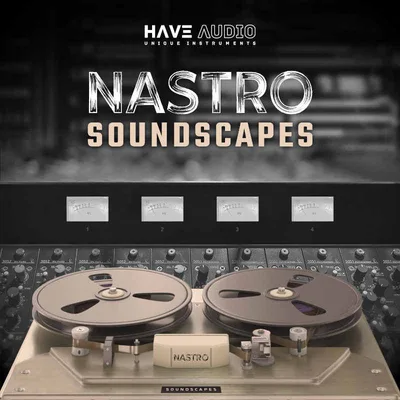
NASTRO Soundscapes, by Have Audio, is a Kontakt instrument library built entirely around the sound, character, and imperfections of vintage tape. If you don't own the full version of Native Instruments Kontakt 6.5.2, stop reading now. The free Kontakt Player will not run this library. That's the gate, and it's the first thing you need to know before spending $69.
For everyone who clears that gate, NASTRO Soundscapes is a focused, personality-driven texture library. It's not a do-everything atmospheric tool. It's a 2.78 GB collection of 821 samples that have been deliberately aged, warped, and run through real analog tape machines, walkmans, boomboxes, and VHS decks to give them a quality that no plugin saturation fully replicates.
The name says it directly: "NASTRO" is Italian for "tape." Have Audio built this as the first entry in a series dedicated to tape and reel-based sounds, and that commitment shapes every design choice inside it. You're not buying a general-purpose synth library with a tape knob bolted on. You're buying something that treats tape not as an effect but as the whole instrument.
At $69, this either suits your aesthetic completely or it doesn't touch your workflow at all. There's not much middle ground. We think it's one of the more honest niche libraries on the market right now, and this review walks through exactly why, and exactly who should look elsewhere.
The Catch Up Front
The Kontakt Full Version requirement is a real barrier for a meaningful chunk of producers. Kontakt Player, which comes free with many Native Instruments products and third-party bundles, cannot load this library. You need a licensed copy of Kontakt 6.5.2 or above.
If you have Komplete, you likely have it. If you bought individual NI instruments, you may or may not. Check before you buy.
Beyond the technical gate, there's a creative one. NASTRO Soundscapes was built for a specific sound: lo-fi, tape-saturated, vintage, slightly broken, and intentionally imperfect. Owners report that the unconventional aesthetic exceeded their expectations. But that same character is explicitly listed as a limitation for producers who work in cleaner sonic territory. If your sessions run pristine, bright, and modern, this library will fight you, not help you.
There's no trial version information available, which is frustrating when you're being asked to buy something this niche. That's a legitimate complaint. You're making a taste-based purchase without a test drive.
The Reel Noise category is also worth flagging upfront. It contains cassette walkman hiss, dictaphone motor noise, wobble, and similar artefacts. That's a feature for the right producer and completely useless for anyone else. Know which one you are.
What You Get If You Clear It
Inside NASTRO Soundscapes you get 821 samples in .ncw format, totalling 2.78 GB uncompressed. The library structures those samples into 64 sound sources spread across 4 independent tracks. With different playback modes applied per track, Have Audio counts 1,024 unique-flavoured sources in total.
The 80 factory presets land in 8 categories: Arp, Atmosphere, Chords, FX Noise, Motion, Perc, Synthetic, and Textures. Those categories map loosely onto the 6 source types: Synthetic Tones (15 patches), Synthetic Chords (21 patches), Synthetic Textures (4 patches), Arpeggiation (7 patches), Hybrid (11 patches), and Reel Noise (6 patches).
The Synthetic Chords section offers minor, major, maj7, min7, sus2, sus4, and augmented voicings. That's a genuinely useful set of options for scoring and ambient work where you need mood without thinking too hard about theory.
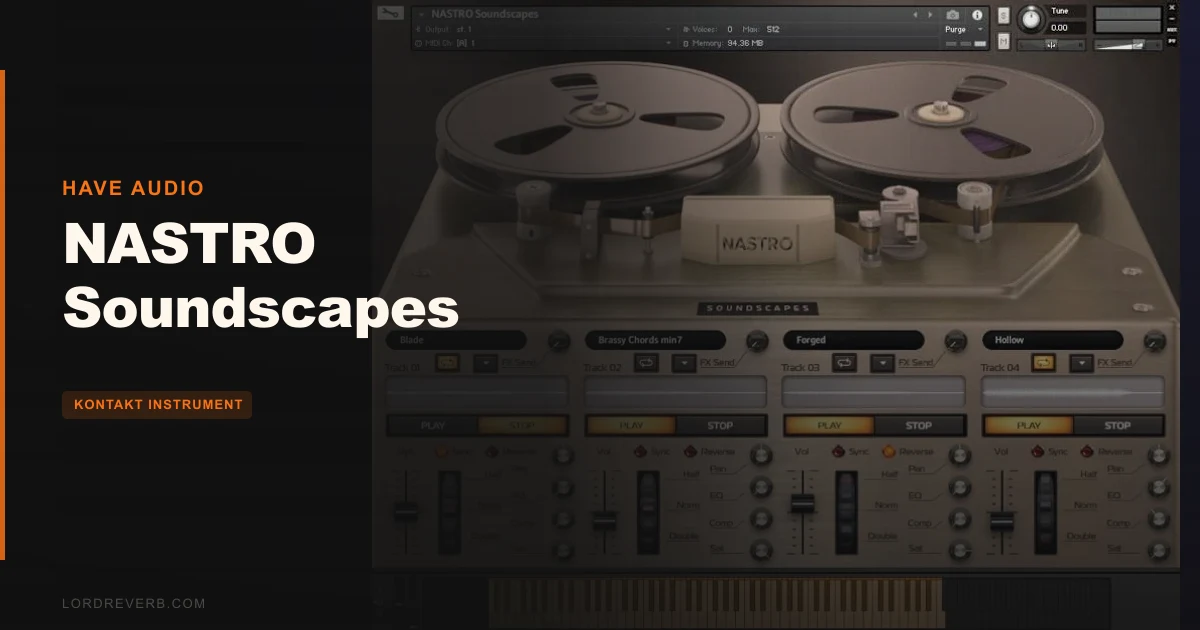
Every track inside the instrument has its own playback mode: normal, reverse, loop normal, or loop reverse. Speed controls operate in two modes. In sync mode, you get three speeds: normal, half, and double. In free mode, you control speed manually per track. That combination, four tracks, four playback modes, and independent speed, is where the real sound-design work happens.
The FX Macros add panning, EQ, compression, and saturation controls. The 58 unique IR effects are built from vintage devices and analog equipment including sampled tape machines, walkmans, and boomboxes.
The Four-Track Architecture: Where Experimentation Lives
The 4-track design is the core of how NASTRO Soundscapes works, and it's worth spending real time understanding it before you touch a preset.
Each of the 4 tracks is independent. You assign a sound source to each one and set its playback mode separately. So you can run a Synthetic Tone forward on track one, loop a Reel Noise source in reverse on track two, play a Synthetic Chord at half speed on track three, and trigger an Arpeggiation patch normally on track four. Stack those and you get something that didn't exist before you loaded the instrument.
Owners report the interface actively invites this kind of layering. The playback modes and speed controls are the reason. Reverse mode on a tape-saturated pad creates a swell that feels organic in a way that a simple reverb pre-delay does not. Half speed on a chord voicing turns something that was rhythmic into something atmospheric. These aren't abstract possibilities. They're built into the architecture deliberately.
Free mode speed control gives you pitch-shifting via tape mechanics, which is a different character from plugin-based pitch processing. Tape slows down unevenly at the edges. That wobble lives in the samples already, but free speed control lets you push it further or pull it back.
Sync mode locks all tracks to your DAW tempo. For scored work where texture layers need to breathe in time with the picture, this matters. Set track one to double speed and track three to half speed over the same tempo grid and you get polyrhythmic movement that still locks to the session.
This is the most satisfying part of the instrument. It rewards the producer who sits with it for an hour rather than the one who browses presets and moves on.
The Hybrid Sources: Where Organic and Synthetic Meet
Eleven Hybrid patches sit at the intersection of acoustic and electronic, and they're one of the more clever design choices in this library.
The source instruments are sax, electric guitar, bouzouki, saz baglama, and persian santoor. Not typical choices. The bouzouki and saz baglama in particular bring a geographic character that Western synthesis doesn't naturally produce. Run them through the tape processing chain and what comes out sounds neither fully like the instrument nor fully like a synthesiser. It sounds like something else.
That's the goal. And it works. Owners describe the retro character of these sources as exceeding their expectations, and the Hybrid category is probably where that reaction comes from most often. Processed sax breath through a Grundig boombox isn't a sound you can dial up in a standard synth library.
For film and game composers specifically, the Hybrid category solves a real problem. You want texture that feels human but doesn't read as an identifiable instrument in the final mix. Something that sits under dialogue or action without pulling focus. These patches, particularly at lower velocity ranges and with the reverse playback mode, do exactly that.
The 4 Synthetic Textures patches are the most ambient options in the set. They're the ones to reach for when you need a bed that disappears into the mix rather than anything with a defined pitch or attack. Combined with the loop playback modes and a slow free-speed setting, they become long-form evolving layers that need no MIDI input once they're running.
The 58 IR Effects: Convolution as Character
This is where NASTRO Soundscapes makes its most direct argument against generic ambient libraries.
Fifty-eight impulse responses, built from real vintage devices and analog equipment. Convolution reverbs normally sample rooms, halls, or studios. These IR effects also include the responses of vintage pedals and "unrealistically large or small halos" built from equipment responses. Have Audio says development and fine-tuning took many hours. That's believable, because 58 custom IRs is not a small undertaking.
Convolution reverb takes the acoustic fingerprint of a real space or device and applies it to your signal. When that fingerprint comes from a dictaphone or a VHS player rather than a concert hall, the result sits in an acoustic world that doesn't exist anywhere in reality. That's the appeal. Your pad sounds like it was recorded somewhere impossible.
Owners confirm the depth these add. The "organic or otherworldly quality" they report isn't a vague description. Put a clean Synthetic Tone through one of the tape machine IRs and the result has a physical presence that plugin reverb modelling struggles to replicate. The early reflections carry the character of the source device, not just the decay time.
The practical question is whether you need 58. Honestly, probably not all 58. But having that range means you can match the intensity of the tape character to the level the track needs. Some IRs add a whisper of age. Others make the signal sound like it was found in a damaged tape archive. That spectrum is useful.
Reel Noise: The Category That Divides Producers
Six patches. Cassette walkmans, dictaphones, reel-to-reel units. Hiss, wobble, motor sounds.
This is the most divisive section of the library, and we think it's worth being direct about what it is. Reel Noise is not an ambient texture section. It's a noise and artefact section. These are the mechanical sounds of tape playback: the hiss of oxide particles, the flutter of an uneven capstan, the low-frequency hum of a motor running in a plastic shell.
If you're building lo-fi beats, tape-stop effects, or film sound design that requires the physical presence of an analog recording medium, this section is genuinely useful. You can layer cassette hiss under a sample to age it without reaching for a noise plugin. You can use reel-to-reel flutter on a sustained pad to give it micro-pitch movement that sounds different from LFO modulation because it was captured from an actual physical process.
If you work in any style where cleanliness is the goal, skip this section entirely. It won't ruin the library for you, because the other categories don't require it. But don't buy NASTRO Soundscapes primarily for the Reel Noise patches unless you've thought hard about whether you'd actually put hiss and motor sounds in your mix on purpose.
The vintage tape machines sampled here include the Akai GX210-D, Sony TC630, Philips 4307, National RQ210-S, and Grundig RR1140 boombox. Those are real machines with real sonic personalities. The Grundig boombox in particular has a mid-heavy, slightly honky character that comes through in the samples in a way that generic hiss generators don't replicate.
The FX Macros and Sound Shaping Controls
NASTRO Soundscapes doesn't ask you to do your mix processing entirely outside the instrument. The built-in FX Macros handle panning, EQ, compression, and saturation per track.
For a library this atmospheric, that's the right call. You want to be able to push the saturation on one track's source without opening a separate plugin and routing it. The saturation control in particular is relevant because you're working with samples that already have tape character baked in. Adding more saturation in the macro is layering tape colour on top of tape colour. Done lightly, that adds density. Pushed too hard, it clouds everything together.
The EQ in the macro chain is a practical tool for making sure your texture layers sit at the right frequency weight in the mix without separate processing on the channel strip. The EQ macro can be used to shape the frequency content of your texture layers in the mix. The macro makes that adjustment immediate.
Compression in the macro is a gentle tool for controlling the dynamic range of a texture layer that might otherwise swell unpredictably during the loop playback modes. Atmospheric layers with long loops can breathe in ways that clash with the transients in your main arrangement. The compressor addresses that without you needing to leave the instrument window.
Panning per track, independently, is how you create stereo width inside the instrument rather than relying on a stereo imager on the output. Two tracks panned opposite with slightly different playback speeds creates movement that feels three-dimensional in a way static stereo spreading doesn't.
Who This Library Is Really Built For
This is the section that matters most. NASTRO Soundscapes has a strong identity, and that means it genuinely fits some producers and genuinely doesn't fit others. Here's how we see it.
The Film and TV Composer
You need atmosphere that sounds sourced rather than synthesised. You need textures that feel like they belong in a scene without announcing themselves as "a Kontakt preset." The Hybrid category, which includes electro-acoustic instruments like sax, electric guitar, bouzouki, saz baglama, and persian santoor, combined with the 58 IR effects and 4-track architecture, makes NASTRO Soundscapes a solid tool for underscores, title cards, and transition beds.
The ability to lock playback to sync and set different speed rates per track means your textures breathe with the edit rather than fighting it. If you're scoring to picture and you want something that sounds like it was pulled from a damaged film archive, this library gives you that without requiring hours of manual processing in your session.
Buy it.
The Ambient and Electronic Producer
You make music where texture is the composition. You want evolving pads that carry history in their sound. The loop playback modes, reverse functionality, and Synthetic Textures patches are built for your workflow. Load two tracks in loop reverse at different speeds and you get a shifting harmonic bed with evolving texture.
The Synthetic Chords section with its full voicing range means you can anchor a mood harmonically without playing a chord yourself. The tape character gives everything a shared sonic identity, so layering different sources doesn't produce the disconnected, mismatched texture problem you get when combining samples from different libraries.
Buy it. This is the primary audience.
The Sound Designer
You work in post-production, game audio, or experimental music. You want starting points, not finished sounds. The Reel Noise category and the Hybrid patches are your tools here. Cassette walkman hiss on a horror game ambient layer. Persian santoor run through an analog tape IR for a menu screen. Dictaphone motor sounds layered under a tension cue.
The 4 playback modes give you eight different first treatments of any sample before you've touched a single effect. That's a fast experimentation loop for someone who needs to generate options quickly.
Buy it if lo-fi and degraded sounds are part of your regular toolkit.
The Mixing Engineer Looking for Utility
NASTRO Soundscapes is not a mixing tool. It's a composition and sound design library. If you're looking for something to process audio in a mix context, this isn't the right purchase. The IR effects are inside the instrument and aren't standalone reverb plugins you can insert on a channel.
Skip it. Your money is better spent elsewhere.
The Pop or EDM Producer Working in a Clean Aesthetic
Straight talk: if your mixes are polished, modern, and clear, NASTRO Soundscapes is going to feel like bringing the wrong tool to the session. The library's character is deliberately imperfect. That imperfection is the point. You can use individual presets carefully, but you'd be fighting the identity of the library at every step.
That's not a criticism. It's an honest statement about scope. This library doesn't try to serve everyone.
Skip it. There are better-suited libraries for your workflow.
The Lo-Fi Beat Maker
The Reel Noise section alone is interesting to you. Add the Arpeggiation patches, the Synthetic Chords, and the tape processing on every source, and NASTRO Soundscapes gives you the raw material for a whole lo-fi project. The hiss, wobble, and motor sounds are authentic rather than simulated, because they were captured from real machines.
The Akai GX210-D and the Sony TC630 have different characters. That variety means your lo-fi tracks don't all carry the same noise floor, which is a small but audible difference from using a single hiss generator across every session.
Buy it if lo-fi is your primary output. Wait if it's occasional.
The Synthetic Chord Section: A Closer Look
Twenty-one patches. That's the largest single category in the library by patch count, and it deserves specific attention.
The voicing options cover minor, major, maj7, min7, sus2, sus4, and augmented. Those seven chord types handle the majority of emotional palette work in ambient and scored music. Minor and min7 carry weight and tension. Maj7 carries a specific kind of longing that works brilliantly in slow-moving scores. Sus2 and sus4 are unresolved, useful for transition moments where you don't want to signal a key change.
All of these have been processed through the tape chain. That means you're not playing a clean digital chord. You're playing a chord that sounds like it was recorded to tape, stored on a shelf for a decade, and then played back on equipment that isn't quite working correctly. For certain emotional contexts, that's exactly right.
The tape wobble in chord patches gives them a slow vibrato that you didn't program. It's inconsistent, which is the whole point. A programmed LFO vibrato has a period. Tape wobble doesn't, and your ear knows the difference even if your brain doesn't immediately name it.
If you're scoring something melancholic, pull up a min7 chord patch, set the speed to half in sync mode, and play it as a single sustained note. That sound will do more work in your mix than you'd expect for a single MIDI note and no additional processing.
Who Should Buy This
- ✅ Buy if you score film, TV, or games and need textures that feel sourced from physical media.
- ✅ Buy if your ambient or electronic productions lean lo-fi, vintage, or degraded by design.
- ✅ Buy if you're a sound designer who needs authentic tape artefacts: hiss, wobble, motor noise, and analog character that plugin simulations don't quite reach.
- ❌ Skip if you don't own Native Instruments Kontakt 6.5.2 Full Version and aren't planning to buy it.
- ❌ Skip if your productions are clean, polished, and modern. This library will feel like friction, not inspiration.
- ❌ Skip if you need a general-purpose atmospheric library that sits comfortably in any genre. NASTRO Soundscapes has a point of view, and it holds it firmly.
Specs & Technical Details
| Developer | Have Audio |
| Price | $69 |
| Plugin Format | Kontakt Instrument (.nki) |
| OS Support | Mac / Windows (via Kontakt 6.5.2+) |
| Activation | N/A |
| CPU Usage | N/A |
| Trial Available | N/A |
| Version Reviewed | N/A |
| Sample Format | .ncw (821 samples, 2.78 GB uncompressed) |
| Presets | 80 factory presets across 8 categories |
| Sound Sources | 64 sources across 4 independent tracks |
| IR Effects | 58 unique impulse responses from vintage devices |
| Kontakt Version Required | Kontakt 6.5.2 Full Version (Player not supported) |
Score Breakdown
| Category | Score | Notes |
|---|---|---|
| Sound Quality | 4.5/5 | Authentic tape character from real machines; Hybrid sources add organic depth that synthetic libraries miss |
| Value for Money | 4.0/5 | 58 custom IRs and 1,024 source variations justify the price if the aesthetic fits your work |
| Ease of Use | 4.0/5 | 80 presets give quick entry; the 4-track architecture rewards deeper exploration but has a learning curve |
| Features | 4.2/5 | 4 playback modes, adjustable speed sync, per-track FX macros, and Reel Noise are a cohesive, purposeful set |
| CPU Efficiency | N/A | No data available from current sources |
| Overall | 4.2/5 | A focused, personality-led library that delivers exactly what it promises for the right producer |
The Verdict on NASTRO Soundscapes
NASTRO Soundscapes is one of the more honest library releases we've seen in the Kontakt space. It knows exactly what it is: a tape-obsessed, lo-fi, texture-first instrument for producers who want their sounds to feel like they were rescued from analog equipment rather than rendered in a clean digital environment.
The 58 custom IRs are the strongest argument for the purchase. That's a level of sonic specificity that takes genuine development time and a collection of real hardware that most library makers don't have access to or the patience to properly capture. The Akai GX210-D sounds different from the Grundig RR1140 boombox, and that specificity matters when you're building a mix where every layer has to carry its own identity.
The 4-track architecture is satisfying to use once you understand what it's offering. It's not a sampler in the traditional sense. It's closer to a tape machine simulator where each head can run a different source at a different speed in a different direction. That framing makes the interface click.
The Kontakt Full Version requirement is a hard gate that we won't soften. It's a real cost if you don't already have it, and it's a genuine frustration that no trial option appears to be available at $69. Both of those complaints are valid and they're the reason the score isn't higher.
But for film composers, ambient producers, and sound designers who work with lo-fi and tape aesthetics: NASTRO Soundscapes is worth every cent and then some. It fills a specific gap in the texture library market with a clarity of purpose that makes it genuinely useful rather than decorative.
If your sessions need age, grit, and the sound of something that's been through a machine twice, this library belongs in your Kontakt folder. If they don't, save your money for a tool that actually fits your work.
Frequently Asked Questions
Does NASTRO Soundscapes work with the free Kontakt Player?
No. NASTRO Soundscapes requires Native Instruments Kontakt 6.5.2 Full Version. The free Kontakt Player will not open this library. If you own Komplete or a full Kontakt licence at version 6.5.2 or higher, you're good. If not, that's an additional cost to factor in before purchasing.
What kind of music is NASTRO Soundscapes built for?
It's built for film and TV scoring, ambient and lo-fi electronic music, and sound design work where tape character and vintage imperfection are desirable qualities. It's not a versatile all-genre library. Producers working in clean, modern, or polished production styles will find the aesthetic a poor fit for their sessions.
What are the 58 IR effects and how do they work?
The 58 impulse responses were created from real vintage devices and analog equipment, including vintage pedals and tape machines. Convolution reverb captures the acoustic fingerprint of a real space or device and applies it to your signal. These IRs place your sounds in acoustic environments that come from real analog hardware rather than simulated room models, giving results a physical and often unusual quality.
What does the 4-track architecture mean in practice?
You have 4 independent tracks inside the instrument, each carrying its own sound source and playback mode. You can set each track to play forward, in reverse, loop forward, or loop reverse, and control the speed independently per track. The practical result is that you can build layered textures from a single instrument instance without requiring multiple instances or external routing.
What are the Hybrid patches and what instruments were sampled for them?
The 11 Hybrid patches combine electro-acoustic instruments with the library's tape processing chain. The source instruments are sax, electric guitar, bouzouki, saz baglama, and persian santoor. After sampling, all material was reprocessed through vintage tape devices and analog equipment, creating sounds that sit between acoustic and synthetic and carry a geographic character that standard synthesis doesn't produce.
Is NASTRO Soundscapes suitable for beginners to Kontakt?
The 80 factory presets make it accessible at the surface level. You can load a preset, play it, and get results without needing to understand the 4-track architecture immediately. The deeper functionality, particularly the per-track playback modes, speed controls, and IR selection, rewards time spent learning the interface. It's not complex in a technical sense, but it has more depth than a simple preset browser suggests.
How large is the library and what are the system requirements beyond Kontakt?
The library contains 821 samples in .ncw format with an uncompressed size of 2.78 GB. The only confirmed system requirement beyond storage is Native Instruments Kontakt 6.5.2 Full Version.