Finding a genuinely characterful electronic organ library that doesn't sound like a preset from 2004 is harder than it should be. Jewel Empire II by Soundiron answers that frustration directly, pulling deep from a GEM Imperial II organ built in Italy during the late 1980s and early 1990s, and turning it into a $14.50 Kontakt instrument with more modulation muscle than most libraries twice its size. This is for film composers who want that specific large-format organ grit, for sound designers who need strange and beautiful starting points, and for producers willing to put in a full Kontakt license and 7.5 GB of drive space to get there.
The Specific Problem This Library Exists to Solve
Electronic organs in sample libraries tend to fall into two camps. The first is the church organ built for liturgical realism. The second is a Hammond-adjacent vintage B3 situation, all drawbars and rotating speaker sims.
Neither camp gives you the particular sound of an Italian large-format electronic organ from the late analogue era. The GEM Imperial II is a two-keybed instrument. It has its own texture, its own harmonic signature. That sound sits in a gap between sacred and secular, between jazz organ and film score, and it's genuinely underrated in modern production.
Jewel Empire II fills that gap. It's not trying to replicate a Hammond. It's not trying to be a pipe organ simulation. It's the GEM Imperial II, recorded wide in stereo and direct line in, with the full dual-keybed character intact. That specificity is exactly why it works.
How the Source Material Performs
The library is built on 6,973 stereo samples in 24-bit / 48kHz uncompressed PCM WAV. That's a serious sample count. The fidelity headroom is there before you touch a single control.
Three open-format NKI instruments form the core. You get sustains, staccatos, and FX pads, plus 20 custom sound-designed FX and ambient presets layered on top of the main instruments. The ambience patches alone number 20, and they give the library a second life as a cinematic texture source.
Owners describe the character as warm with a slight low-mid presence, sitting naturally in orchestral mixes without needing aggressive EQ carving. Push the drive controls in the multi-effects rack and the top end turns gritty in a way that feels period-appropriate rather than digital-harsh. Dial in the vibrato control and the organ breathes. It's physical in a way that many sample libraries aren't.
The recordings were made in wide stereo and direct line in, which means you get two distinct flavours from the source. The wide stereo captures the organ's natural room and spread. The direct signal gives you something tighter and more controllable. That duality matters when you're deciding whether the organ needs to live in the room or sit dry in a dense mix.
What the Controls Actually Do
Glide and Polyphony
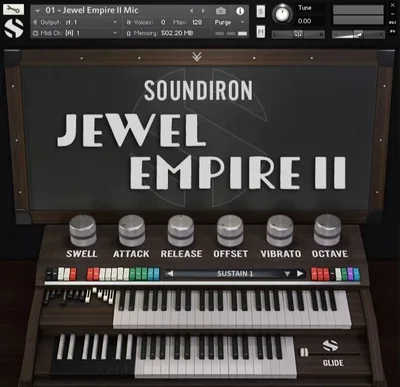
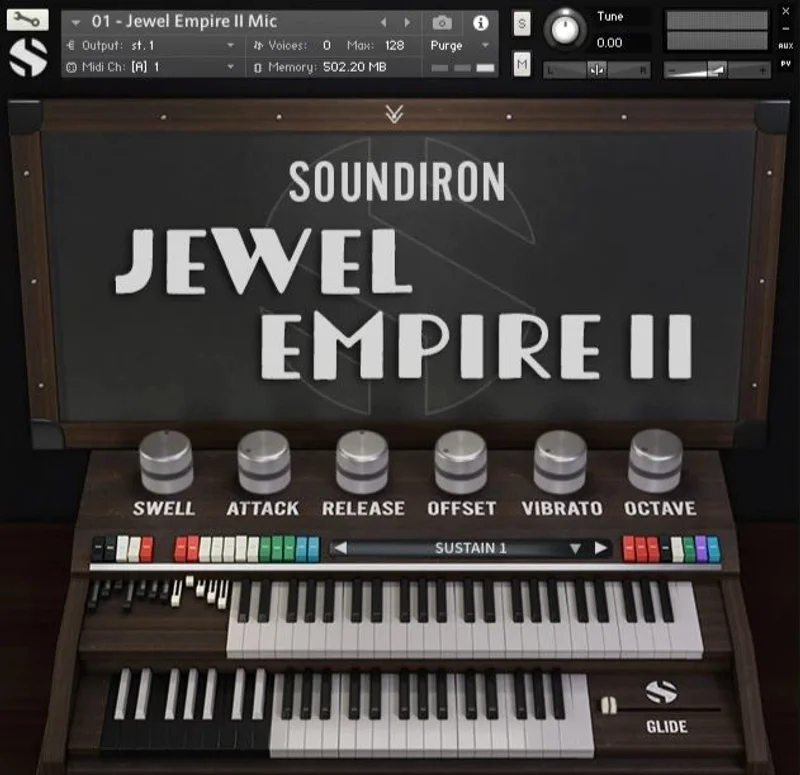
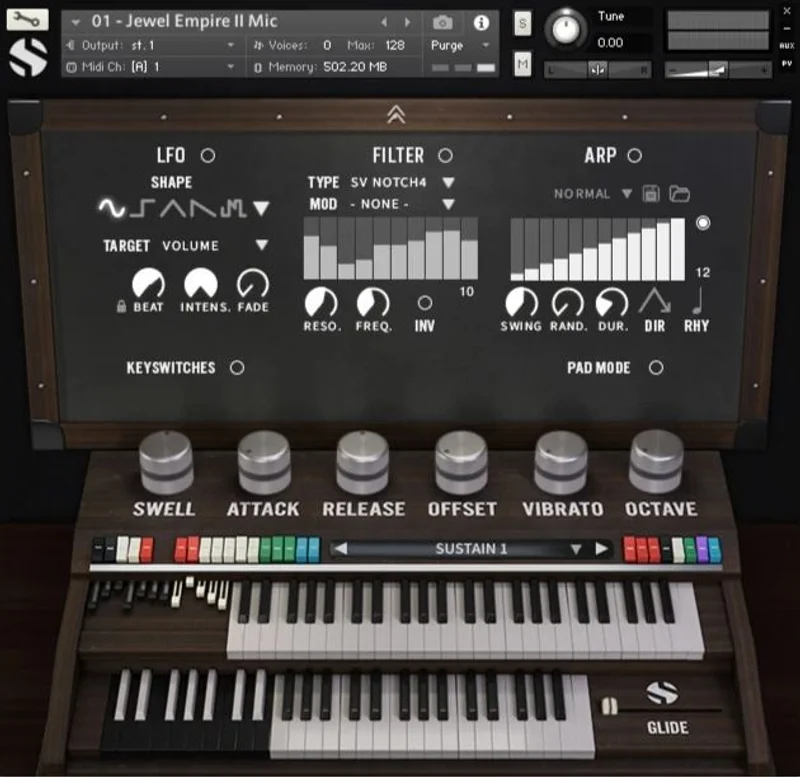
The glide control slider is one of the more satisfying features here. At 0, you're in standard polyphonic mode: chords, pads, full organ playing. Engage the slider and you shift into monophonic legato mode, with portamento glide on lead lines.
If you're writing a film score cue that needs a haunting single-note melody drifting between pitches, that's your control. Set the glide speed slow and play into the transition. The portamento doesn't feel mechanical because the source material is organic enough to absorb it.
The octave knob adds lower and higher octave doubling. It thickens the organ immediately. Used gently, it adds weight to a lead. Used heavily, it becomes a sound-design tool on its own.
Convolution Reverb: 119 Impulses
This is where the library earns its keep for composers who want one instrument and a workflow, not a chain of plugins.
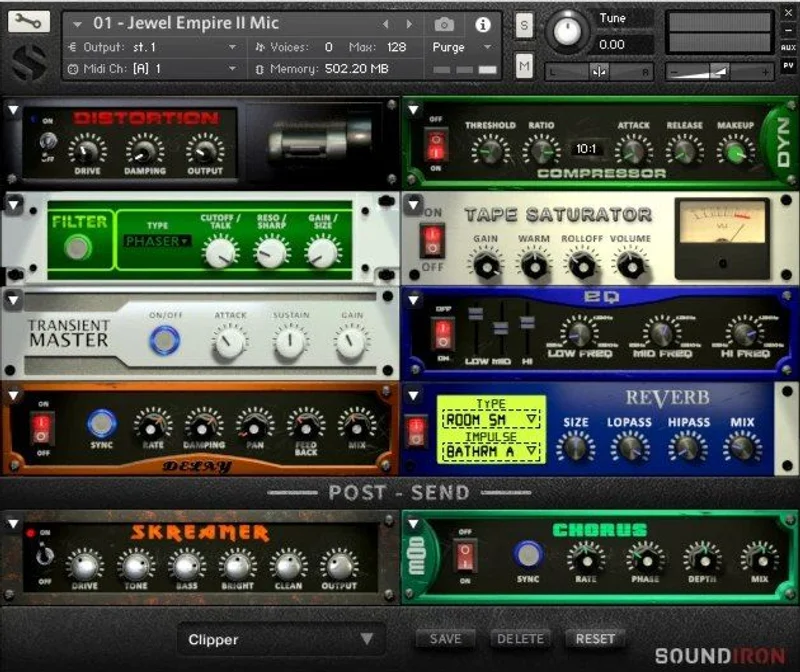
119 convolution reverb impulses are built in. Cathedrals, churches, chambers, rooms, halls, bunkers, garages, tunnels. That's not a list you usually see in an organ library. The bunkers and tunnels in particular open up sound-design territory that you wouldn't associate with a church organ source.
Put the organ sustains through a tunnel impulse and you get something that belongs in a thriller score, not a Sunday service. That's clever library design. The source material is religious-adjacent by nature, but the impulse selection deliberately pulls it somewhere stranger.
Multi-Effects Rack
The full multi-effects rack covers EQ, filter, phaser, flanger, delay, distortion, and amp and speaker simulation. For an organ library, the amp and speaker simulation matters more than it might seem. Organs were designed to live through speakers, and the cabinet character shapes the final sound significantly.
13 lowpass, highpass, and FX filters are available separately. The filter selection isn't enormous, but 13 options with the LFO system assigned to them gives you enough movement to build evolving pads from static sustain samples.
The LFO System
Selectable LFO shape, modulation target, speed, intensity, tempo sync, and fade-in time. That fade-in control is the detail that separates a good LFO from an annoying one. If you want tremolo that swells in after the note hits rather than chopping the attack, fade-in handles it cleanly.
Modulation targets include velocity, modwheel, expression, aftertouch, key position, and a step-sequencer table. You can build a patch where the filter opens with key position, the vibrato depth responds to aftertouch, and the LFO rate is locked to your session tempo. That's a real modulation matrix for a library in this price range.
The Arpeggiator
The customizable arpeggiator has a built-in velocity sequencer table. Direction, note timing, swing, randomization, and duration are all adjustable. This isn't a simple up-down arpeggiator you'd ignore after the first play. The velocity sequencer table turns it into a rhythmic composition tool.
Set it to a sixteenth-note pattern with swing and randomized velocities, and the library stops being a recreation and starts being an instrument.
Attack, Release, and Transient Offset
Attack and Release controls are standard. The Transient Offset control is less obvious. It lets you shift where in the sample playback starts, which affects how much of the original attack character you hear. Push it back and the organ enters softer. Pull it forward and you catch more of the initial key-down transient.
For staccato patches in particular, the Transient Offset interacts with Attack in ways that give you fine control over how percussive the organ feels. Useful for rhythmic pad work. Genuinely useful, not just present on the GUI.
Who This Library Is Actually For
The Film and TV Composer
Imagine you're building an underscore for a mid-century European thriller. You need an organ that sounds like it belongs in that world, not in a modern recording studio. The GEM Imperial II source material lands there naturally. The 119 reverb impulses let you place it in a believable acoustic space without leaving the instrument.
Buy it. This is exactly your use case.
The Sound Designer
For a game score or horror podcast needing textures that start recognizable and get strange, the FX pads, the tunnel and bunker impulses, and the LFO system assigned to a filter form a capable chain. The unlocked WAV files mean you can pull individual samples into your sampler of choice and push them further in ways Kontakt doesn't offer.
Buy it. The $14.50 buys you a texture toolkit that would take days to build from scratch.
The Working Producer in Popular Music
If you're making hip-hop, pop, or anything where an organ is an occasional seasonal ingredient rather than a core sound, this is probably more library than you need. The 7.5 GB install and the Kontakt Full requirement are real overheads for something you'll reach for twice a year.
Wait, or skip it. A smaller organ library serves you better.
The Beginner Producer
The GUI is packed with controls. The LFO system, the arpeggiator velocity table, the multi-effects rack: none of these are hard to learn, but they reward producers who know what they're listening for. If you don't yet have a feel for what convolution reverb does to a dry organ sample, the 119 impulses will be more overwhelming than helpful.
Wait until you've got Kontakt workflows down. Then come back.
The Annoying Bit: Kontakt Full Is Non-Negotiable
The free Kontakt Player gives you demo mode only. That's a hard stop for a lot of producers who haven't purchased Kontakt Full. It's frustrating because Soundiron doesn't control that limitation, but it's real and it matters.
If you're already in the Kontakt Full ecosystem, it's a non-issue. If you're not, the cost of admission just went up significantly before you've heard a note.
The 7.5 GB installed size is the other friction point. That's not a complaint about the sample count, it's a natural result of 6,973 uncompressed 24-bit stereo WAVs. But if your sample drive is already under pressure, clear 7.5 GB before you buy.
Value for the Price
At $14.50, Jewel Empire II sits in territory where it's hard to find fault with the exchange. The source instrument is specific and characterful. The modulation and FX system is deep enough to build original sounds rather than just play presets. The 119 reverb impulses alone would justify a chunk of that price as a standalone add-on in another library.
The Kontakt Full requirement is the real cost variable. If you're counting full acquisition cost, factor that in. If you already own Kontakt Full, the $14.50 is straightforward and the value is strong.
Who Should (and Shouldn't) Buy This
- ✅ Buy if you write for film, TV, or games and need a distinctive European electronic organ with cinematic placement tools built in.
- ✅ Buy if you're a sound designer who wants characterful source material with unlocked WAVs and a deep FX chain already baked in.
- ✅ Buy if you already own Kontakt Full and your drive can spare 7.5 GB for a library that covers both tonal and textural territory.
- ❌ Skip if you only have the free Kontakt Player. Demo mode is not a usable instrument.
- ❌ Skip if you need a quick, lightweight organ for occasional use in pop production. The overhead doesn't match the use case.
- ❌ Skip if your machine is underpowered. Slow loading and instability in heavy sessions is a documented limit, not a rare edge case.
Specs & Technical Details
| Category | Details |
|---|---|
| Developer | Soundiron |
| Price | $14.50 |
| Plugin Format | Kontakt NKI (requires Kontakt Full 5.5 or later) |
| OS Support | Mac OSX 10.9 or higher / Windows 7 or higher |
| Activation | N/A |
| CPU Usage | Heavy on demanding sessions; Dual-Core CPU and 2 GB RAM minimum recommended |
| Trial Available | Demo mode via free Kontakt Player only |
| Version Reviewed | N/A |
Score Breakdown
| Category | Score | Notes |
|---|---|---|
| Sound Quality | 4.5/5 | 6,973 samples at 24-bit/48kHz from a distinctive two-keybed organ source; wide stereo and direct line recordings give real depth |
| Value for Money | 4.0/5 | At $14.50 the sample count and feature set are strong; the Kontakt Full requirement adds hidden cost for newcomers |
| Ease of Use | 3.5/5 | The GUI is packed; the LFO system and arpeggiator reward producers who know what they're doing, but can overwhelm beginners |
| Features | 4.5/5 | 119 reverb impulses, full multi-effects rack, velocity sequencer arpeggiator, and deep modulation routing are well above average for this category |
| CPU Efficiency | 3.5/5 | Heavy sessions can cause slow loading and instability; not a library for underpowered machines |
| Overall | 4.2/5 | A specific, feature-rich organ library that earns its place for composers and sound designers already in the Kontakt Full ecosystem |
Try It Yourself
The demo mode via the free Kontakt Player gives you enough to hear the character of the source material. Three things worth checking before you commit.
The Bottom Line
Jewel Empire II is a love letter to a specific Italian electronic organ that most producers have never heard of, and that specificity is its biggest strength and its natural limit. If the GEM Imperial II is exactly the character your project is missing, this library delivers it with a modulation and FX system that keeps it alive and moving. If you're shopping for a general-purpose organ, the 7.5 GB footprint and Kontakt Full requirement make the entry cost feel disproportionate to occasional use. Know what you need. This one rewards the buyer who does.
Frequently Asked Questions
Does Jewel Empire II work with the free Kontakt Player?
No. The free Kontakt Player runs the library in demo mode only. Full functionality requires Kontakt Full version 5.5 or later. If you're not already in the Kontakt Full ecosystem, factor that into the total cost before buying.
What is the GEM Imperial II and why does it matter?
The GEM Imperial II is a large electronic organ manufactured by GeneralMusic in Italy during the late 1980s and early 1990s. It features two keybeds and a character distinct from Hammond-style organs or classical pipe organ simulations. That specificity is what makes this library interesting: it's a source instrument with its own identity, not a recreation of something you've already heard a hundred times.
Can I use the samples outside of Kontakt?
Yes. The WAV samples are unlocked and can be imported directly into any DAW or sampler that supports WAV files. That's a meaningful advantage if you want to build your own patches, layer the organ with other instruments, or process the samples in ways Kontakt's engine doesn't allow.
How much storage space does Jewel Empire II need?
The installed size is 7.5 GB. The library uses 24-bit stereo uncompressed PCM WAV files, which is why the footprint is large. A SATA or SSD drive is recommended. Installing on a spinning hard drive will work, but load times will be noticeably slower.
Is Jewel Empire II suitable for beginners to Kontakt?
The library's controls are well-laid-out, but the depth of the LFO system, arpeggiator velocity table, and 119 reverb impulses rewards producers who already understand what those tools do. Beginners will get sound out of it quickly using presets, but won't be getting full value until they've spent time learning the modulation routing. It's not a bad place to learn, but it's not the simplest starting point either.