Dyno Mite, Harrison Consoles' transient-shaping plug-in, is a straightforward tool that does exactly what it promises at $49, and the regret you're most likely to feel isn't buyer's remorse. It's the quiet frustration of wishing it did five percent more. Owners report it's simple, musical, and quick to dial in. But if you bought it expecting mid-side capability, or a deeper feature set than three knobs and a threshold, you might feel a little shortchanged. At $49 it's a lean, focused purchase. The question is whether lean is what your session actually needs.
Who Ends Up Regretting This
The most common misfire here is the mixing engineer who loads Dyno Mite on a stereo bus hoping to tighten the sides without touching the mid. There's no M-S mode. That's not a rumour. It's a confirmed limit, and users have flagged it as a wish-list item.
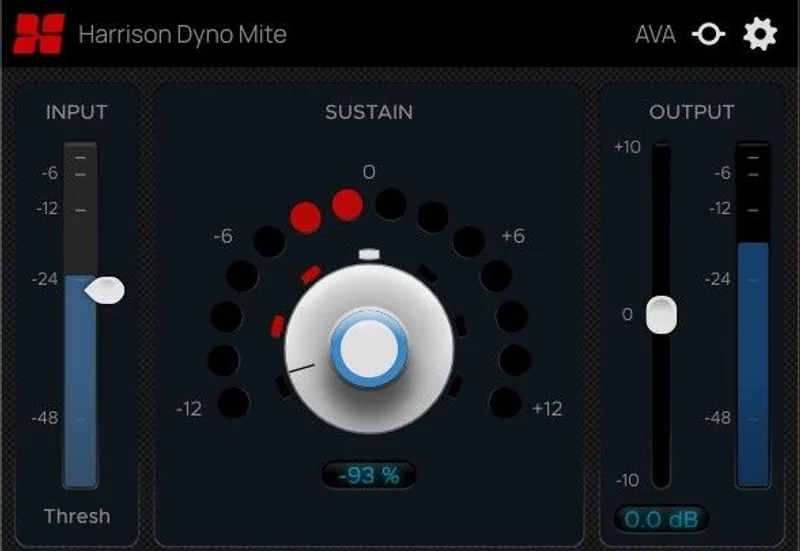
The other buyer who walks away slightly flat is someone who wants deep transient sculpting: multi-band shaping, attack time controls with millisecond readouts, sidechain filtering. Dyno Mite doesn't do that. The three-knob layout is the whole interface. If you came from something like transient shaper plugin comparisons expecting surgical options, this will feel blunt.
If neither of those descriptions fit you, the regret risk drops sharply.
What Owners Actually Say
The word that comes up most in owner reports is "musical." Not in a vague, press-release way. Producers describe it as a tool that reins in or spotlights peaks without making the result sound processed. That's a real distinction from transient shapers that add a brittle, pumped quality when pushed.
Drums get mentioned constantly. Users report that Dyno Mite handles drum material well, which is not surprising given it's inspired by legendary hardware transient designers. Boosting the attack tightens a kick. Pulling back sustain stops a snare from washing into the next beat.
One user ran Dyno Mite on a Beatles recording at a -6 to -8 setting and described it as making the track slightly smoother. That's a specific, revealing data point. It tells you the sustain reduction reads as polish rather than clamp at that range. Satisfying, when it works.
The complaint about missing M-S is real and repeated. It's not a dealbreaker for most, but if you need it, you need it.
What You Actually Get
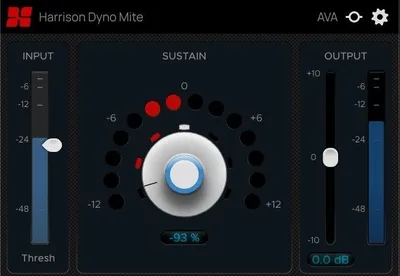
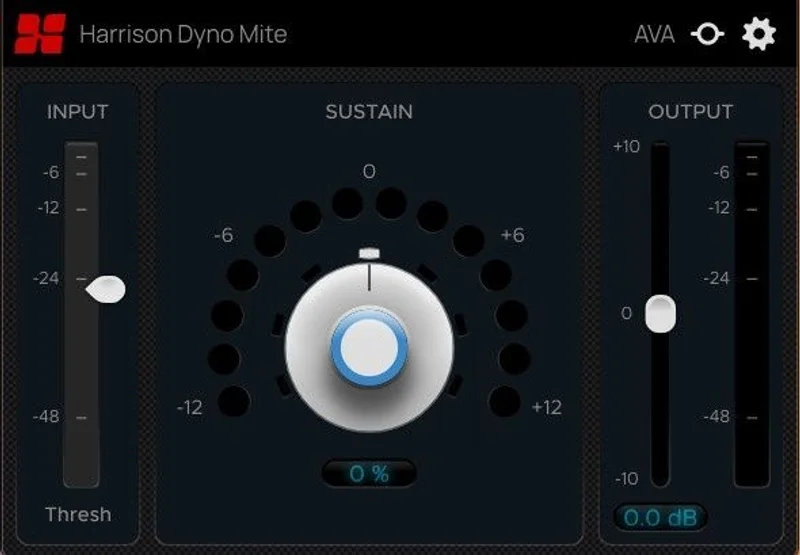
Three controls and three meters. That's the whole instrument.
The Threshold slider sets the level at which shaping begins. The Sustain knob handles both the type and intensity of adjustment. Pull it left and you reduce sustain. Push it right and tails lift. The Output Trim compensates for the level shift that shaping introduces, which is something cheaper tools often skip entirely.
Three meters keep you informed: Input shows incoming signal level, Sustain shows reduction in red on the left and boost in green on the right, and Output shows post-processing levels. You're never guessing what the plug-in is doing.
Format support covers AAX, AU, and VST. It runs on macOS 13 or later and Windows 10 or later, 64-bit only. iLok authorization is required. Released in August 2025, so this is genuinely new hardware-inspired software, not a rebadge.
The Smarter Route
If you need M-S transient shaping, Dyno Mite isn't your tool. Look at something with a proper stereo processing mode before spending anything.
Producers comparing this to Devil Loc will find similar DNA on drum material. Devil Loc leans into a more character-heavy, coloured sound. Dyno Mite sits closer to a transparent surgical tool, at least based on what owners describe. Worth knowing before you choose.
If you want a deeper feature set with attack time controls and multi-band options, check our best transient shaper plugins for producers roundup. Some of those offer more knobs and more complexity, which is either a pro or a con depending on your workflow speed.
For basic track-level transient work though, Dyno Mite at $49 competes well. It's not the cheapest option in the category, but it's not overpriced for what Harrison Consoles is delivering.
Buy or Wait?
Here's how we'd split it by who's asking.
The bedroom producer or beat-maker
You drop a one-shot kick that's too boomy, or a snare loop that's got too much room. Load Dyno Mite, nudge the Sustain left to reduce sustain, and the track tightens. No routing, no manual-reading, no wasted afternoon. Buy it.
The working mixing engineer
You'll likely want it as a quick-grab tool on individual tracks, not your main bus processor. For a drum bus or a mono vocal group? Clever addition. For a full stereo mix with M-S needs? Not enough. Wait, or pair it with something that handles the stereo field properly.
The sound designer working with synths and loops
Dyno Mite processes synths and loops alongside instrument recordings. Pulling back attack softens pads. Lifting tails extends sustain on stabs. There's real creative use here for anyone shaping texture rather than just fixing problems. If that sounds like your session, buy it.
The advanced mixing engineer wanting deep control
Annoying answer: look elsewhere. Three knobs won't satisfy workflows that need attack time in milliseconds, ratio controls, or multi-band shaping. The interface is the limit. Skip it and spend your money on something with more under the hood. Check our advanced transient shaper plugin reviews for what fits that use case better.
Specs & Technical Details
| Developer | Harrison Consoles |
| Price | $49 |
| Plugin Format | VST / AU / AAX |
| OS Support | macOS 13 or later / Windows 10 or later |
| Activation | iLok authorization required |
| CPU Usage | N/A |
| Trial Available | N/A |
| Version Reviewed | N/A |
Score Breakdown
| Category | Score | Notes |
|---|---|---|
| Sound Quality | 4.0/5 | Owners describe results as musical and transparent at moderate settings |
| Value for Money | 4.0/5 | Focused feature set at a fair price, but rivals offer more at the same spend |
| Ease of Use | 4.5/5 | Three knobs and three meters; almost nothing to learn |
| Features | 3.5/5 | No M-S, no attack time controls; intentionally minimal |
| CPU Efficiency | N/A | No data available from current owner reports |
| Overall | 4.0/5 | A tight, purposeful tool that earns its place on drum and synth tracks |
Alternatives to Consider
Sonnox Transient: More parameter control and a longer track record on bus work. If you want millisecond-level precision, it belongs in your signal chain. See our Sonnox Transient review for how it compares on drums.
Waves Smack Attack: A different approach to attack shaping with more controls on offer. Some producers love the extra flexibility; others find it overkill. Worth a look if three knobs leaves you frustrated.
SPL Transient Designer Plus: The plug-in version of the hardware that Dyno Mite is inspired by. More controls, more history, and a stereo field option. If you want the source rather than the homage, that's where to look. Our SPL Transient Designer Plus review covers it in full.
Dyno Mite sits in good company. It doesn't try to beat everything on features. That restraint is either its best quality or its biggest flaw, depending on the track in front of you right now.
If you're a producer who hates wading through parameters to fix a drum hit that's too roomy, this is the one to grab. If you need M-S control or deeper settings, save your money and read more carefully before clicking buy. At $49, the stakes aren't high. But the fit still has to be right.
Related reviews: UNCHIRP Educational Version
Frequently Asked Questions
Does Dyno Mite support mid-side processing?
No. Dyno Mite processes mono and stereo signals but has no mid-side mode. This is a confirmed limit, and users have flagged it as a missing feature. If M-S transient shaping is part of your workflow, you'll need a different tool alongside or instead of it.
What DAWs is Dyno Mite compatible with?
Dyno Mite runs in AAX, AU, and VST formats, which covers Pro Tools, Logic Pro, Ableton Live, Cubase, and most other major DAWs. It requires a 64-bit environment, macOS 13 or later, or Windows 10 or later. iLok authorization is required for activation.
Is Dyno Mite good for drums specifically?
Drums are where owners report the clearest results. Boosting the attack tightens transient punch on kicks and snares. Reducing sustain stops room bleed from muddying the pocket. One user ran it on a Beatles recording at -6 to -8 and described the result as smoother without sounding clamped. For a straightforward drum-track shaper, it earns its place.