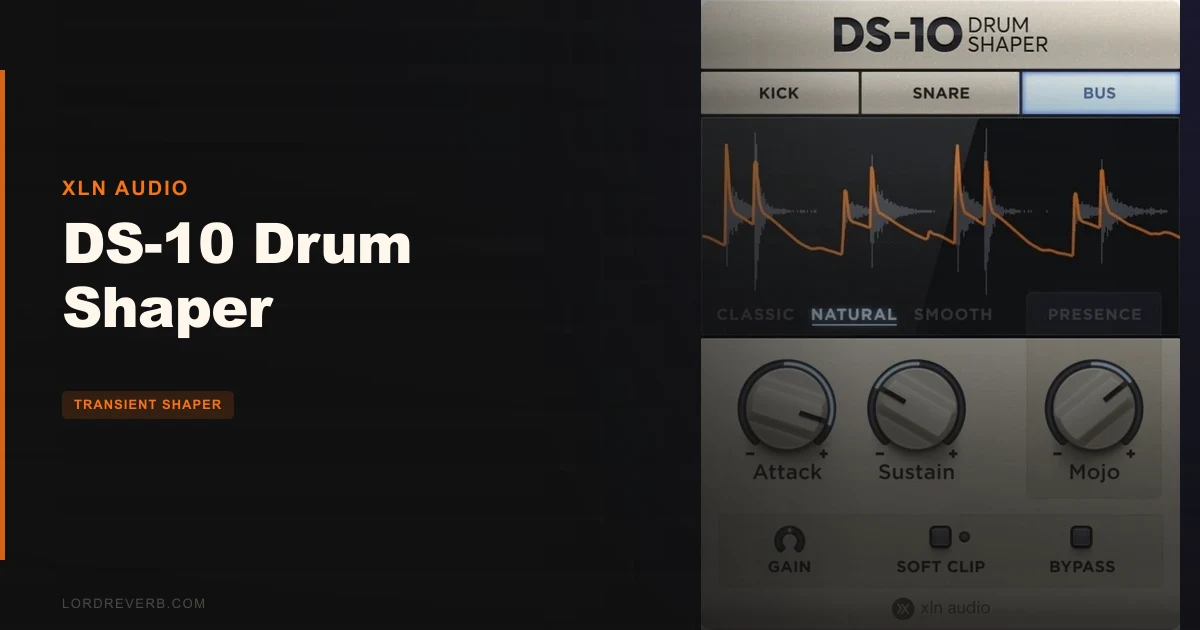
The boldest claim floating around about the DS-10 Drum Shaper is that it "blows every single transient shaper plugin out of the water." That's a lot. And honestly? It partly holds up, but not in the way you might expect.
The DS-10 doesn't win on feature count. It wins on focus. XLN Audio built three modes (Kick, Snare, Bus) instead of one catch-all algorithm, and that design decision alone separates it from most of the competition. If that problem is yours, you'll love it. If you need multiband transient control or sustain-reduction for isolation work, look elsewhere.
This review is for producers sitting on a drum bus wondering why their kick sounds polite, engineers who want snares that crack without reaching for a compressor, and anyone who's maxed out the transient controls inside their drum sampler and still come up short.
The Claim: Huge or Tight, in Seconds
XLN Audio's pitch is simple. Drop DS-10 on a kick, a snare, or a full drum bus. Push it. Get more smack in the attack and more gain in the sustain. Done in seconds, not minutes. No grainy artefacts, no unnatural-sounding results.
They also say the three modes give creative options that sound great regardless of mix style. That's the promise. Big drums, fast workflow, clean results.
The developer frames it as a tool that makes drums sound "huge or tight and punchy." Both directions. That matters, because a lot of transient shapers only really excel in one direction. DS-10 is built to move both ways with equal confidence. Whether that claim survives contact with a real session is what we need to unpack.
What Actually Holds Up
Three Modes That Know What They're Doing
The Kick, Snare, and Bus modes aren't cosmetic. Each one is individually tuned to the frequency profile of that source. Kick mode isn't just a label slapped on a generic algorithm. It's calibrated for low-frequency transient energy, which is where kick punch actually lives.
Put it on a kick that's been sitting too politely in your mix and push the attack. The front edge tightens without the thickened, artificial quality you sometimes get from broadband shaping. Owners consistently report that DS-10 wakes up kick and snare beyond what built-in drum sampler effects can manage. That's a real observation, not marketing language.
Snare mode works best when you've got a snare that sounds good but doesn't crack. Dial up the attack and it snaps forward in the mix without touching anything else. The frequency targeting keeps the shape from turning brittle.
Bus mode is where some of the most enthusiastic owner reports come from. Users describe it as the glue holding a drum bus together. Push it on a full kit and the elements start to feel like one thing rather than separate samples stacked on top of each other. That's satisfying in a way a generic bus compressor often isn't.
Attack and Sustain: Independent and Intentional
You get independent control over attack and sustain. That's not unusual for a transient shaper, but the combination of independent control plus mode-specific tuning is where DS-10 earns its price.
Boost the sustain on a snare in Bus mode and the room breathes. Pull the sustain back on a kick in Kick mode and the low end cleans up without losing weight. These aren't complex operations. That's the point.
The MOJO Knob
This is the one control that makes DS-10 genuinely different from a standard transient shaper. MOJO adds flavour and colour by shaping attack and punch across curated frequency bands. It's not a simple saturation knob. It targets specific bands where the character of a drum sound actually lives.
Forum users praise MOJO specifically on acoustic drums and hip-hop drums. On acoustic kits, it adds the kind of weight that makes a close-miked snare feel like it's in a room. On hip-hop drums, it pushes samples forward without washing them out.
You do need to watch it. Push MOJO too hard on material with a lot of high-frequency content and some users report the highs sounding a bit fried. Back it off when you start to feel the urge to stop. That's the safe zone for most sources.
Interface: Genuinely Clean
No menu-diving. No hidden pages. The interface is clean and the controls are right there. You switch modes with one click, adjust three or four knobs, and you're done. There's a real argument that the simplicity is the feature, not a limitation. For fast sessions where you need drums sorted quickly, that matters more than a deep parameter set.
What Doesn't Hold Up
The "Blows Everything Out of the Water" Bit
One reviewer argues you can get equivalent results with a standard transient shaper, some EQ, and a saturation plugin. That's a fair point. You probably can. The DS-10 just does it faster and with fewer decisions. If you already own a well-stocked plugin collection, the honest question is whether the workflow speed and MOJO justify the spend. At least one owner has raised exactly that hesitation.
The answer is: probably yes, if drums are a regular problem in your sessions. Probably no, if you're already satisfied with what you've got and just want something new.
No Sustain-Reduction Capability
This is the gap that's most annoying in practice. If you want to isolate a pure transient by reducing the sustain aggressively, DS-10 doesn't do it. Native Instruments Transient Master does. Some users specifically note this comparison and it's a real limitation. DS-10 can add sustain or leave it neutral. Pulling it back significantly to clean up a muddy tail isn't the tool's strength.
If transient isolation is your primary goal, you're looking at the wrong plugin.
No Input Gain Control
Frustrating. No input gain means you're managing levels before the plugin rather than inside it. It's a small omission that adds a step to every instance you use. Not a dealbreaker, but it's the kind of missing control that makes you wonder why it wasn't included. Gain staging into a transient shaper matters because the detection responds to level.
High Frequencies Under Pressure
Push hard on source material with prominent highs and some users report an unpleasant, fried quality in the top end. This is reported specifically in the context of heavy MOJO use. It's not a constant problem, but it's worth knowing before you pin DS-10 on a cymbal-heavy overhead bus and drive it.
Who It Suits: A Section for Each User Type
The Beatmaker Working Fast
You've got a hip-hop drum loop or a programmed kit and you want it to hit harder. You don't want to spend twenty minutes on it. Drop DS-10 on the bus, switch to Bus mode, push the attack, dial in some MOJO, and you're done. Forum reports on hip-hop drums are consistently positive.
Buy it.
The Producer Using a Drum Sampler
You've maxed the transient controls inside the sampler and the kick still sounds polite. Owners specifically report DS-10 waking up kick and snare beyond what built-in sampler effects can do. This is the use case the plugin was clearly built for.
Buy it.
The Mixing Engineer Doing Drum Bus Work
You want glue and punch on a full kit without losing the room or thinning the sound. The Bus mode and MOJO combination gets strong marks from owners here. Acoustic drums, sampled drums, and programmed beats all benefit. One user reports superior detection behaviour even when using it as a mastering tool, though that's an edge case.
Buy it. Watch the MOJO on cymbal-heavy material.
The Sound Designer or Producer Who Needs Transient Isolation
You want to strip a drum sample down to pure attack. You need aggressive sustain reduction to pull the body out and leave just the crack. DS-10 can't do this well. The sustain control doesn't pull far enough to isolate transients the way some competing tools can.
Skip it. Look at iZotope Alloy or Neutron for multiband work, or Native Instruments Transient Master for isolation.
The Veteran Producer with a Full Plugin Shelf
You already own a transient shaper, a saturator, and a good EQ. One reviewer argued equivalent results are achievable via standard transient shapers, EQ, and saturation. The question is whether MOJO and the workflow speed justify the cost on top of what you've already paid for.
Wait. Try a demo first if one is available. The MOJO knob is the one thing you can't easily replicate with what you've got, but it depends whether that matters for your sessions.
The Verdict
DS-10 is a brilliant little tool for producers who work with drums regularly and want results without a decision tree. The three-mode design is clever and the MOJO knob does something no generic transient shaper does. The gaps are real: no input gain, no sustain-reduction, and a tendency to get a bit fried on the top end if you push it. None of those limits cancel the value for the right user.
At $59, it earns its place on a drum bus. It doesn't earn it as a replacement for a full-featured transient shaper if isolation or multiband control is what you actually need. Buy it with your eyes open and it won't disappoint. Buy it expecting everything and it will.
Specs & Technical Details
| Developer | XLN Audio |
| Price | $59 |
| Plugin Format | VST, AU, AAX (64-bit), Standalone (Mac); VST, AAX (64-bit), Standalone (Windows) |
| OS Support | Mac (macOS 10.13 or later, M1 Native), Windows (7-11), 64-bit only |
| Activation | N/A |
| CPU Usage | N/A |
| Trial Available | N/A |
| Version Reviewed | N/A |
Score Breakdown
| Category | Score | Notes |
|---|---|---|
| Sound Quality | 4.0/5 | Mode-specific tuning sounds focused and natural; high-frequency content can get fried under heavy MOJO |
| Value for Money | 4.0/5 | Strong for dedicated drum work; harder to justify if you already own a full transient-shaping toolkit |
| Ease of Use | 4.5/5 | One of the fastest interfaces in the category; no menu-diving, no learning curve |
| Features | 3.5/5 | Three great modes and MOJO, but no input gain and no sustain-reduction leave real gaps |
| CPU Efficiency | N/A | N/A |
| Overall | 4.0/5 | Focused, fast, and genuinely good at what it does; not a replacement for a full-featured transient shaper |
Alternatives to Consider
Native Instruments Transient Master is described as more generic and with less standout features than DS-10. But if you need aggressive sustain-reduction to isolate pure transients, it handles that better. DS-10 wins on character; Transient Master wins on clinical precision.
iZotope Alloy and iZotope Neutron both offer multiband transient shaping. If you need to treat different frequency bands of a drum bus independently, for example pulling attack on the low end while leaving the top end untouched, either of those gives you that control. DS-10 doesn't. They're more complex tools and take longer to dial in, but the complexity is there when you need it.
iZotope Ozone is noted as flexible but requires more tweaking than DS-10. It's a mastering-focused tool with transient shaping as one component of a much larger system. If you're already in Ozone's world, you may not need DS-10 on top of it. If drums are the specific problem and you want a dedicated fix rather than a suite, DS-10 is the faster answer.
One Last Thing Before You Buy
If you've been staring at a kick that sits in the mix like it's apologising for existing, DS-10 fixes that. Kick mode, push the attack, touch the MOJO, done. That's the whole promise and it's a real one.
What it won't fix: a sustain problem you need to surgically remove, a mix that needs multiband transient work, or a workflow where you want one knob to control level into the plugin. Those gaps are annoying enough that the wrong user will feel burned.
The right user will wonder how they kept their drum buses sounding thin for so long without it. That's the split. Know which side you're on before you checkout.
Frequently Asked Questions
Does DS-10 Drum Shaper work on a full drum bus or only on individual drums?
It works on both. DS-10 has a dedicated Bus mode tuned for full drum submixes, in addition to separate Kick and Snare modes for individual channels. Owners consistently report strong results on drum buses, describing it as a glue plugin that holds the kit together. Individual channel use is equally supported and the mode-switching is instant.
Is DS-10 compatible with Apple Silicon Macs?
Yes. DS-10 supports M1 Native on macOS 12 Monterey and later. It requires macOS 10.13 or later for the Mac version generally, and it's 64-bit only on both Mac and Windows. It will not run on 32-bit hosts or older operating systems.
What makes the MOJO knob different from a standard saturation control?
MOJO shapes attack and punch across curated frequency bands rather than applying broad harmonic saturation. It's tuned to target the specific frequency ranges where drum character lives, which is why owners report it sounding natural on acoustic drums and forward on hip-hop drums without washing the mix out. Push it too hard on high-frequency material and you may get an unpleasant, fried quality in the top end, so treat it as a dial-to-taste control rather than a drive-to-max one.