You’ve got a bassline looping, a pad that feels too polite, and a hunch that a fat, slightly unstable analogue voice pair would fix both. The Oberheim TVS Pro, at $59.99, is the plugin you open for that moment. It’s built for producers chasing classic SEM tone with a sequencer you’ll actually use, and we think it earns its spot.
Here’s the short version. It sounds the way owners say the old Oberheim gear sounds: fat, a bit uneven, alive.
The catch is real, though. It plays two voices, not eight, and a few conveniences are missing.
What It Is (and What It's Not)
The TVS Pro is a duophonic synth plugin modeled on the hardware TVS Pro. GForce built it with Tom Oberheim himself, which matters for a recreation of this kind.
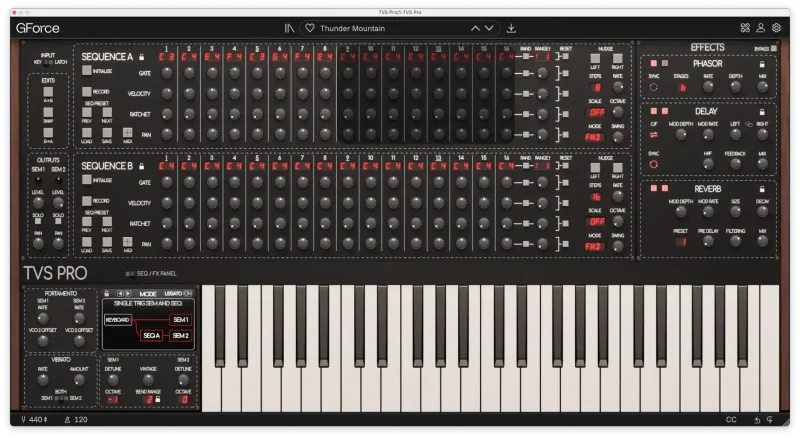
Inside are two complete SEM synthesizers. Each has two VCOs, a multi-mode filter, two ADS envelope generators and one LFO. A third VCO doubles as an extra LFO.
It is not a polyphonic pad machine. Two independent voices is the ceiling. If you want to hold a six-note chord with one patch, you’ll want the OB-E or OB-EZ instead, and we’ll get to that.
It also isn’t a modern wavetable playground. Each SEM offers pulse and sawtooth waveforms. That’s the palette. Narrow on purpose.
Where It Fits In Your Session
Picture the loop again. Your kick and sub are locked, and you need movement on top. Load the TVS Pro, pick a converted SEM patch, and start the sequencer.
That’s the fast path. The sequencer lives on its own easy-access page rather than buried in a menu, and owners say it’s more usable than the fiddly original hardware. We love that decision. A sequencer you avoid is a sequencer you wasted money on.
Now layer. Two SEMs mean two timbres under one roof. Run a sawtooth voice for body and a pulse voice for edge, and you’ve got a stacked lead without opening a second instance.
CPU won’t punish you either. Standalone load sits under 1%, and inside a DAW it lands at 5-10%. You can run several instances on a busy session and not sweat.
The Two SEMs: Where the Sound Comes From
Everything starts with the pair of modeled SEMs. Each one carries two VCOs, so a single SEM already gives you a detunable oscillator stack before the filter touches anything.
The oscillators
Pulse and sawtooth, nothing else. That sounds limiting until you remember what the SEM was known for. Detune the two VCOs inside one SEM and the sawtooth thickens into that slightly drifting analogue wall.
The emulation keeps subtle analogue inconsistencies from the original instrument. Don’t expect every note to behave identically. Honestly? That’s the point.
The filter and envelopes
Each SEM has a multi-mode filter plus two ADS envelope generators. Two envelopes per voice is generous. Point one at the filter and the other at amplitude, and you can shape a pluck or a swell without reaching for the LFO.
Reviewers describe the results as fat and gorgeous, in line with the original SEM and the OB-E. Push the filter and the top end turns gritty rather than sterile. That’s the character you’re paying for.
The LFO and the third VCO
Each SEM gets one LFO, and the third VCO works as an additional LFO on top. So modulation isn’t starved. You can run slow pulse-width movement from one source while another handles vibrato or filter wobble.
The Dual 16-Step Sequencer
This is the feature we’d buy it for. Two 16-step sequencers, one per SEM, with ratcheting effects.
Ratcheting repeats a step rapidly within its own time slot. Set one on a bass step and a flat eighth-note pattern suddenly stutters and rolls. Cheap trick, huge payoff.
Because there are two sequencers, you can run offset patterns against each other. One voice walks a sixteen-step line while the other holds longer figures. That polyrhythmic push is hard to fake with a single arpeggiator.
The dedicated interface is the quiet hero here. You edit steps without menu-diving. Owners call it more usable than the hardware, and we’d say the gap isn’t close.
Undo and redo are built in too. Mangle a pattern, regret it, step back. Simple. Wonderful.
Playability: Velocity, Aftertouch and Edit Modes
Velocity and aftertouch modulation are supported per SEM. Play harder and one voice can open the filter while the other stays put. That kind of split response makes a duophonic instrument feel like an instrument, not a preset player.
Now the first real complaint. Aftertouch routing is more limited than in Arturia’s and Cherry Audio’s SEM emulations. If deep aftertouch mapping is your thing, those two give you more to work with. Annoying, and we wish GForce had matched them.
Extend and flip modes round out the editing tools. They’re quick ways to reshape patches and patterns without rebuilding from scratch. Small features, but they save you minutes every session.
Effects: Phaser, Delay and Reverb
Three effects ride on the output: a phaser, an analogue-style stereo delay, and a reverb.
The phaser suits sawtooth pads, where it sweeps the harmonics into that classic slow churn. The stereo delay widens a mono sequence without washing it out. The reverb places the whole thing in a space.
None of this replaces your own bus processing. But it means a patch sounds finished the moment you load it, which matters when you’re auditioning fast. We’d still send the TVS Pro out to your own reverb bus for anything that has to sit in a dense mix.
Patches, Librarian and Compatibility
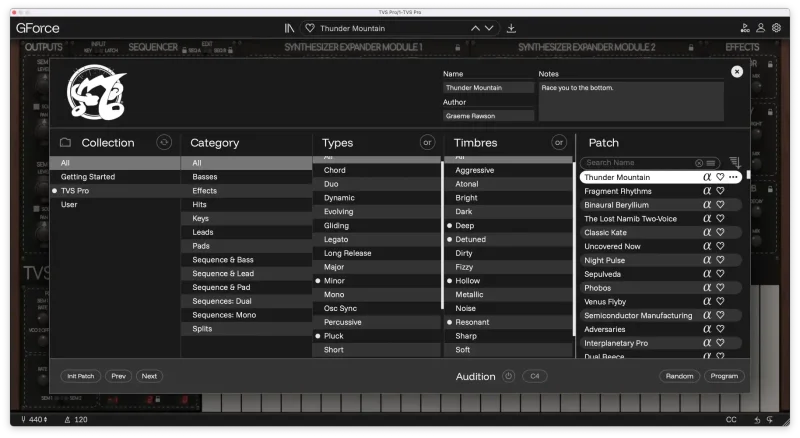
You get over 635 patches. More than 400 are converted from the GForce SEM, and over 220 are brand new.
A categorised librarian keeps that pile browsable. That’s the difference between 635 patches and 635 patches you’ll never find. Filter by category, audition, move on.
Compatibility is a quiet strength. SEM presets export to and import from OB-E and SEM. If you already own one of those, your patches travel with you. Nice touch for anyone with an existing GForce library.
Formats cover AU, AAX, VST2, VST3 and Standalone. Pretty much every host is covered.
The Trade-Offs
The sound and sequencer are the draw. The gaps are mostly convenience gaps.
There’s no global volume control. You adjust level inside your DAW instead. It’s a small thing, but it’s the kind of small thing that irritates you at 1 a.m. when a patch jumps 6dB louder than the last.
There are no macro controllers either, and other GForce products have them. For quick, performance-friendly tweaking, that absence stings a little.
Duophony is the structural trade-off. Two voices keeps the instrument focused and light on CPU. It also caps what you can play. Chords beyond two notes aren’t happening.
And the emulation isn’t a perfect clone. Owners report subtle sonic deviations from the original hardware, attributed to normal analogue aging. We’d call that a feature, not a flaw, but purists should know.
Against the Field
Here’s how the realistic alternatives stack up on the points your notes support.
| Product | Strongest point | Weakest point |
|---|---|---|
| Oberheim TVS Pro | Dual SEM voices, dual 16-step sequencer, very low CPU | Limited aftertouch routing, no global volume, no macros |
| Arturia SEM emulation | More aftertouch routing options | Lacks the TVS Pro's dual-sequencer focus |
| Cherry Audio SEM emulation | More aftertouch routing options | Lacks the TVS Pro's dual-sequencer focus |
| GForce OB-E / OB-EZ | Polyphonic playing with preset cross-compatibility | Not duophonic TVS Pro architecture |
Arturia and Cherry Audio win if aftertouch depth drives your decision. The OB-E and OB-EZ win if you need chords. The TVS Pro wins when you want the sequencer and a pair of SEMs working together.
The Real Verdict
Buy it if you want classic Oberheim tone and a sequencer you’ll open every session. At $59.99, the sound, the 635-plus patches and the featherweight CPU load make a strong case.
Skip it if you need polyphony or deep aftertouch routing. Grab an OB-E or OB-EZ for chords, or look at Arturia and Cherry Audio for aftertouch. Everyone else: this one’s a keeper.
Specs & Technical Details
| Developer | GForce Software |
| Price | $59.99 |
| Plugin Format | AU / AAX / VST2 / VST3 / Standalone |
| OS Support | N/A |
| Activation | N/A |
| CPU Usage | Light (under 1% standalone, 5-10% in a DAW) |
| Trial Available | N/A |
| Version Reviewed | N/A |
Score Breakdown
| Category | Score | Notes |
|---|---|---|
| Sound Quality | 4.6/5 | Reviewers call it fat and gorgeous, true to the SEM and OB-E |
| Value for Money | 4.4/5 | 635-plus patches and a full dual-SEM engine |
| Ease of Use | 4.5/5 | Dedicated sequencer page beats the fiddly hardware |
| Features | 4.0/5 | Strong core, but no macros and limited aftertouch routing |
| CPU Efficiency | 4.8/5 | Under 1% standalone, 5-10% in a DAW |
| Overall | 4.4/5 | A focused, great-sounding duophonic synth with minor gaps |
Alternatives to Consider
GForce OB-E
Polyphonic, so chords work. Presets cross-load with the TVS Pro, which makes it a natural second purchase.GForce OB-EZ
Another polyphonic route with the same preset compatibility. Pick it when duophony is too tight.Arturia and Cherry Audio SEM emulations
Both offer more aftertouch routing options. If expressive aftertouch is central to how you play, start there.Final Call: Buy or Skip?
Buy it. At $59.99, you’re getting two modeled SEMs, a sequencer that respects your time, and a CPU footprint you’ll forget about.
It’s wrong for anyone who plays chords or lives on aftertouch. For those players, the OB-E, OB-EZ, Arturia or Cherry Audio will fit better.
Everyone else gets a loop-starter that actually sounds like a record.
Related reviews: Morpho · Usynth PIXEL Loyalty Upgrade from any paid UJAM product
Frequently Asked Questions
Is the Oberheim TVS Pro polyphonic?
No. It's duophonic, meaning two independent voices play at once, one per SEM. If you need larger chords from a single patch, the GForce OB-E or OB-EZ are the polyphonic alternatives.
How heavy is the Oberheim TVS Pro on CPU?
Very light. Load runs under 1% standalone and around 5-10% inside a DAW. Owners report extremely low usage in both standalone and VST3 plugin form.
Can I use my OB-E or SEM presets with it?
Yes. SEM presets can be exported to and imported from OB-E and SEM. The plugin also ships with over 400 patches converted from the GForce SEM, plus over 220 new ones.