Noisy 2 is most often compared to Pigments and Arturia’s modal-leaning synths, and our verdict is that it beats them for expressive playing and loses to them for general-purpose production. At $149, it’s a strong buy if you own an MPE controller and a weak one if you don’t. This is a niche synth with a real point of view.
This review is based on the product page, the developer’s published material and the documented feature set. No hands-on session is claimed here. Anything that can’t be verified yet is marked as such.
Noisy 2 is Expressive E’s second-generation synth. It supports VST2, VST3 and AU on macOS and Windows.
The original Noisy launched in 2020, so this is a follow-up to a synth with an existing user base. That matters for the preset count, as you’ll see below.
What Noisy 2 Actually Does
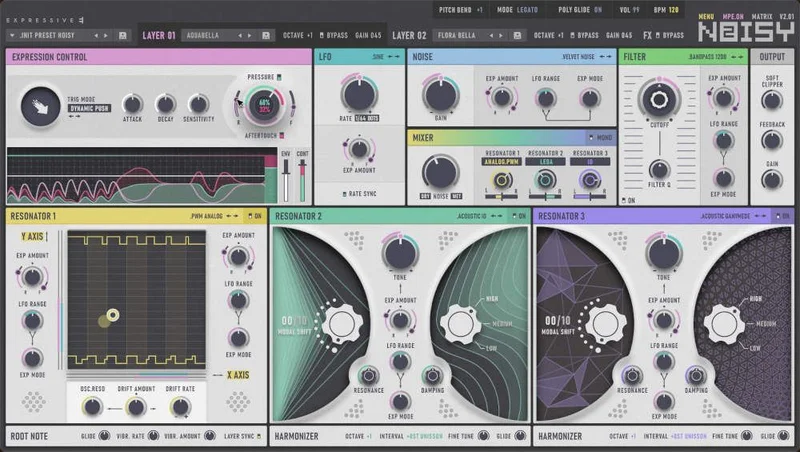
The core idea is simple. A noise source excites resonators, and the resonators turn that noise into pitched, evolving sound.
Think of a bow dragged across a metal plate, or a breath blown across a bottle. The excitation is unpitched. The resonator decides the note.
Noisy 2 gives you three resonators per layer to shape that result. You pick a noise source, activate the resonators and layer them to taste, according to the developer.
It’s a physical-modelling-flavoured approach, not a wavetable or subtractive one. That’s the first thing to understand before you spend money.
If you want a saw wave and a filter, look elsewhere. This synth exists for textures that sit between acoustic and electronic.
How Does Noisy 2 Compare Out of the Box?
Open a subtractive soft synth and you start with oscillators. Open Noisy 2 and you start with a noise type and a resonator.
That changes your whole first ten minutes. You audition presets and reshape them, rather than building from a blank init patch.
Pigments gives you more oscillator engines and a bigger modulation matrix. Noisy 2 gives you a faster path to a playable, characterful sound.
The developer’s pitch is that sound design should be easy, playful and efficient. We like that goal. We’re sceptical it holds once you want something very specific.
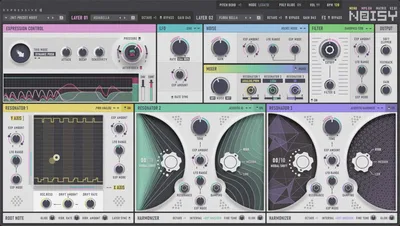
The colour-coded interface is a clear step from the first Noisy, going by reviewer coverage of the redesign. Sections are easier to tell apart at a glance. That’s a small thing that saves real time.
The Two-Layer Preset Structure
Each preset is built from two independent layers. The developer describes this as a playful bi-timbral workflow.
Thousands of layer presets are available to recombine. Swap one layer and the whole patch changes character.
We love this idea. It lets you treat layers like ingredients. Keep the breathy top layer, drop in a different body underneath, and you’ve made a new sound in two clicks.
It also lowers the barrier for people who don’t want to learn resonator theory. You can tweak by ear.
The catch is that a layer-first workflow hides the engine somewhat. If you want to understand why a patch sounds the way it does, you’ll have to dig.
The Resonator Engine
This is where Noisy 2 earns its price. The engine uses acoustic and analog resonators together, and version 2 adds to both.
Modal-acoustic resonators
Modal synthesis arrives with four new acoustic resonators. Modal models simulate how a physical object vibrates at its natural frequencies.
That gives you struck-and-ringing textures: bar, plate, bell and tube-style tones. The decay behaviour feels organic because it’s modelled on physical resonance, not looped samples.
The Noise block also grew. The developer says it now offers new, carefully crafted noise types, with reviewer coverage citing 21 types of unpitched noise.
Different noise changes the attack character. A soft breath noise gives a gentle onset. A harsh grain noise gives a sharp, rasping one.
Analog-style resonators
The analog side is new too. There’s a pulse-width modulation (PWM) resonator, four extra filter emulations and an upgraded soft clipper.
The soft clipper now has a feedback control, per the developer. Feedback in a clipper stage pushes saturation into more aggressive, self-reinforcing territory. Use it sparingly.
PWM is a classic analog trick. Modulating pulse width gives that moving, chorused thickness you hear in old string-machine and polysynth patches.
Pairing PWM with the acoustic resonators is the clever bit. You can stack a ringing metallic tone over a thick analog pad in one layer.
Four Expression Modules
Noisy’s four expression modules let you change any preset’s texture and effects without advanced sound design knowledge, according to the developer.
The idea is four sonic dimensions you can push. You reshape a sound by moving those, instead of hunting through twenty parameters.
We like this a lot for live use. Fewer, broader controls mean you can make a meaningful change in real time.
It’s also the part we’d test hardest. Broad macros are only as good as the mapping behind them. A well-mapped macro feels musical. A poorly mapped one just changes volume and brightness together.
That’s something we can’t verify from the documentation. It’s the first thing we’d check in a long session.
MPE Integration: The Real Reason to Buy
MPE is where Noisy 2 plants its flag. The developer calls the new MPE mode the deepest integration available, going beyond regular MPE support.
MPE lets each note carry its own pitch bend, pressure and slide. On a hardware controller, that means every finger shapes its own voice.
Reviewers who cover it single out Noisy 2’s pairing with the Osmose as especially strong. That makes sense, because Expressive E makes the Osmose.
Be honest about that. The synth and the controller come from the same company, so the fit is by design.
Trig Modes
Trig Modes are a new way to trigger envelopes. You add sound impulses by moving a key in specific ways.
There are three gestures. Push accelerates your finger downward. Lift accelerates upward. Shake alternates up and down.
Each can fire at any point within the key’s travel. That’s a very physical way to articulate a sound.
It’s also hardware-dependent. Without a controller that reads key travel, you won’t get much from it.
Gesture transformation
You can choose how a preset responds to your playing. A few clicks set the balance between Pressure, Aftertouch and the envelope generator.
That’s a smart design choice. Everyone’s hands and controllers differ, so letting you tune the response matters.
The Visualizer
A visualizer shows in real time how your envelopes and continuous control affect the sound. This is a small feature we wish more MPE synths copied.
MPE is hard to debug. When a patch feels wrong, you can’t tell if the problem is your touch, your controller or the mapping. Seeing the curves helps.
Using Noisy 2 Without an MPE Controller
You don’t need MPE hardware. The developer says Noisy 2 works with expressive controllers like Osmose, Touché, Push 3 and the Seaboard, and a classic mode serves everyone else.
Classic mode uses a mod wheel or generic knob controller to add motion. 700 non-MPE presets are included.
We’d temper expectations here. A mod wheel is one dimension. The synth is built around many.
You’ll still get unusual acoustic-synth timbres. But you’re using maybe a third of what makes Noisy 2 special.
If you’re a keyboard-and-mouse producer, ask yourself honestly whether you’d miss the MPE depth. If not, a cheaper, simpler synth is the smarter buy.
Presets: 1,200 and What They Tell You
The library totals 1,200 presets. 500 are for MPE and 700 are for classic controllers.
The MPE presets are described as tailored to flow along with your gestures. That’s marketing language, but the intent is sound: a pad that only works with aftertouch feels dead on a mod wheel.
Touché owners get a clear bonus. The 700-preset Touché library combines the 400 originals from Noisy 1 with 300 new patches built around Noisy 2’s features.
That’s a good deal of continuity. Existing users don’t lose their sound library.
We can’t judge preset quality from a product page. We’d want to hear how many are genuinely usable versus demonstration pieces.
The Effects Section
Noisy includes a full set of effects, designed for real-time manipulation. The developer highlights fluid articulations, breaks and drops, and dynamic changes to reverbs and delays.
Reviewer coverage mentions a stereo delay with times up to 5 seconds. That’s long enough for ambient layering and slow, evolving echoes.
Treating effects as performance tools is the right call for this synth. A reverb you can ride in real time is more musical than a static one.
Effects are also where heavy patches can get CPU-hungry. The developer’s recommended minimum is an Intel Core i5 7400 or Ryzen 5 2600, with an i7 or Ryzen recommended.
We haven’t measured CPU load, and the developer publishes no per-voice figures. We’d treat it as medium and watch it on dense layered patches.
DAW Integration and Compatibility
Format support covers VST2, VST3 and AU. On macOS it requires version 11 (Big Sur) or higher, on both Apple silicon and Intel. On Windows it requires 10 or higher.
The recommended minimum RAM is 4 GB. That’s modest.
Copy protection is PACE iLok, with no hardware dongle required and up to 3 activations. Three activations is generous for a studio and a laptop.
We have no DAW-specific testing to report for Logic, Ableton Live or Cubase. Reviewers have noted that gap in existing coverage.
MPE handling varies between DAWs. Some need a specific track setup to receive per-note expression. Check your host’s MPE support before you buy.
Where Noisy 2 Wins
It wins on expression. Few synths give you three triggering gestures, tunable response and a live visualizer.
It wins on onboarding. Two-layer presets and four expression modules mean you make good sounds fast.
It wins on texture. Acoustic modal resonators beside analog PWM voices is a combination you won’t get from a standard subtractive synth.
It wins on continuity for Touché owners. 700 presets, including 400 carried over, is real value.
Our favourite part is the physicality. Sound that responds to push, lift and shake feels like playing an instrument, not editing a patch.
Where the Competition Wins
Pigments wins on breadth. It offers more engine types and deeper modulation for general production.
Arturia’s synths win on familiar workflows. If you want classic subtractive sounds, they’re quicker.
Applied Acoustics’ modelled instruments win on pure physical realism in specific families like struck bars and strings. Noisy 2 trades that focus for hybrid weirdness.
Reviewers also flag navigation complexity and envelope control limits in Noisy 2. Advanced designers who want fine envelope shaping may find it restrictive.
And honestly, it’s not a bread-and-butter synth. You won’t build a bassline or a lead with it as easily as with a conventional instrument.
Who Should Buy Which
- ✅ Buy if you own an Osmose, Touché, Seaboard or Push 3 and want a synth built around them.
- ✅ Buy if you love textural, acoustic-leaning pads, plucks and drones.
- ✅ Buy if you want fast, preset-driven results without deep sound design.
- ❌ Skip if you only have a basic keyboard and want an all-round synth.
- ❌ Skip if you need detailed envelope control for precise programming.
- ❌ Skip if your main need is classic basses, leads and arps.
Specs & Technical Details
| Developer | Expressive E |
| Price | $149 |
| Plugin Format | VST3 / AU / VST2 |
| OS Support | Mac (macOS 11+) / Windows 10+ |
| Activation | PACE iLok, no dongle required, up to 3 activations |
| CPU Usage | Medium (not verified; no developer figures published) |
| Trial Available | N/A (none mentioned in material reviewed) |
| Version Reviewed | 2.x (reviewer coverage cites 2.6) |
Score Breakdown
These scores are based on the documented feature set and published figures. We’ll revisit them after longer use.
| Category | Score | Notes |
|---|---|---|
| Sound Quality | 4.5/5 | Acoustic modal plus analog PWM is a distinctive palette, per the developer. |
| Value for Money | 4.0/5 | 1,200 presets and deep MPE, but only worth it with the right controller. |
| Ease of Use | 4.5/5 | Two-layer presets and four expression modules keep editing quick. |
| Features | 4.5/5 | Trig Modes, visualizer and a long delay set it apart. |
| CPU Efficiency | 3.5/5 | Unverified. Recommended i5 7400 or Ryzen 5 2600 minimum. |
| Overall | 4.3/5 | A strong, focused MPE synth with niche appeal. |
Alternatives to Consider
Arturia MiniFreak V. A more conventional, hybrid-style synth with a broad sound range. Pick it if you want one instrument that covers many roles. MiniFreak V review
Applied Acoustics Chromaphone 3. A physical-modelling instrument for struck and resonant sounds. It’s the closest match to Noisy 2’s acoustic side. Chromaphone 3 sound bank review
Arturia SEM V. A classic analog emulation with a simple, warm character. Choose it for traditional subtractive tones instead. SEM V review
For more in this category, browse our synth plugin reviews.
How Noisy 2 Compares to the Alternatives
Chromaphone is the nearest cousin. Both use resonators to model physical sound.
The difference is scope. Chromaphone focuses on struck instruments. Noisy 2 adds noise excitation, analog PWM and a performance-first MPE design.
Pigments and the Arturia V Collection cover far more ground. They’re broader, and they cost more in learning time.
Noisy 2 may not be the first of its kind, but its MPE depth is the sharpest part of its identity. That’s the reason to pick it over the rest.
Pricing and Value
The price is $149. For that you get the synth and a 1,200-preset library.
The value case depends on your gear. With an expressive controller, it’s good value. Without one, you’re paying for features you can’t reach.
No free trial or discount is mentioned in the material reviewed. Check the retailer before buying.
The Verdict on Noisy 2
Noisy 2 is worth $149 if you play MPE. It’s an easy recommendation for Osmose and Touché owners.
It’s the wrong buy for producers who want one all-purpose synth. A mod wheel gets you the sounds but not the soul.
We still want to see how its CPU load behaves on dense layered patches, how well the macros map and how the envelopes feel in a real session. Those can’t be answered from a product page.
Play it with your hands, not your mouse. That’s where Noisy 2 stops being a preset browser and becomes an instrument.
Related reviews: EUPHORIA Loyalty Upgrade Still Beats 3 Serum Hours
Frequently Asked Questions
Is Noisy 2 worth it without an MPE controller?
It's less compelling. A classic mode with 700 non-MPE presets works with a mod wheel or knobs, but you lose Trig Modes and most of the per-note expression. A conventional synth is the smarter buy for keyboard-only setups.
What controllers work with Noisy 2?
The developer lists Osmose, Touché, Push 3 and the Seaboard, plus any expressive MIDI controller. A classic mode covers standard controllers. The Osmose is the best match, since Expressive E makes both.
Does Noisy 2 include the original Noisy presets?
Touché owners get 700 presets, combining the 400 original Noisy 1 presets with 300 new ones. The full library totals 1,200 presets, split into 500 for MPE and 700 for classic controllers.
What are Noisy 2's system requirements?
It needs macOS 11 (Big Sur) or higher on Apple silicon or Intel, or Windows 10 or higher. The recommended minimum is an Intel Core i5 7400 or Ryzen 5 2600 with 4 GB of RAM. It runs as VST2, VST3 and AU.
How does Noisy 2 copy protection work?
It uses PACE iLok, with no hardware dongle required. You get up to 3 activations, which covers a studio machine and a laptop.
Is Noisy 2 a good general-purpose synth?
No. It's built for expressive, textural and acoustic-leaning sounds. Reviewers describe it as a niche instrument for performance rather than an all-round production synth. Choose a broader synth for basses, leads and standard arps.