If you own any full Bloom product and want a choir instrument that goes deeper than a preset browser, the Bloom Vocal Choir Crossgrade is worth the move at $39. That said, it's not a no-brainer for everyone who qualifies. Let us explain why, and who should hold off.
Bloom Vocal Choir launched in April 2025 from Excite Audio, the team behind a growing family of Bloom instruments. This crossgrade path exists specifically for owners of any full Bloom product, and the discount is real: you're stepping into a full-featured choir instrument at a reduced entry point.
The pitch is simple. You get 250 presets, a BPM-synced sequencer, Hall/Plate/Spring reverb sourced from Excite Audio's Lifeline Series, and the ability to import up to 112 of your own samples. For producers in electronic, ambient, or hybrid cinematic spaces who keep hitting creative walls, that's a genuinely useful toolkit.
But "useful toolkit" and "buy it now" aren't the same thing. We'd rather walk you through what you actually get, what's frustrating, and what the value case really looks like before you hand over anything.
What You're Upgrading To
Bloom Vocal Choir is a dedicated choral sample instrument built on the same Bloom engine you already know from your existing product. It's not a preset pack or a reskin. It's a full instrument with its own sample library, its own sequencer logic, and its own effects chain.
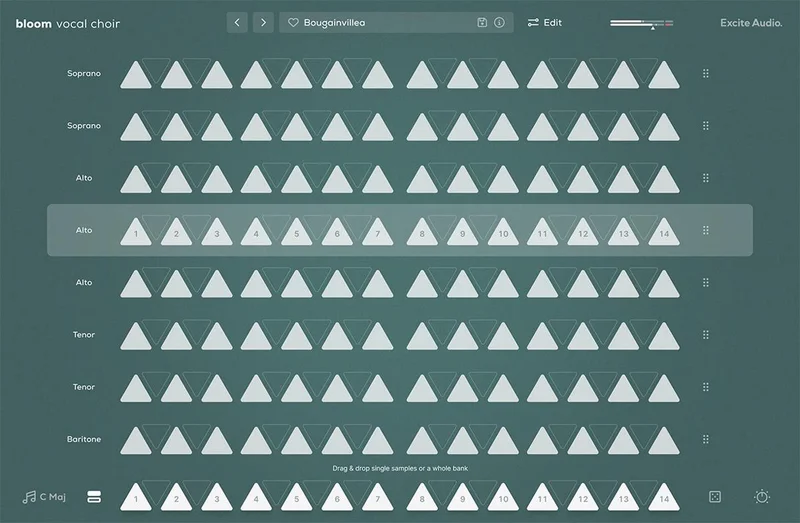
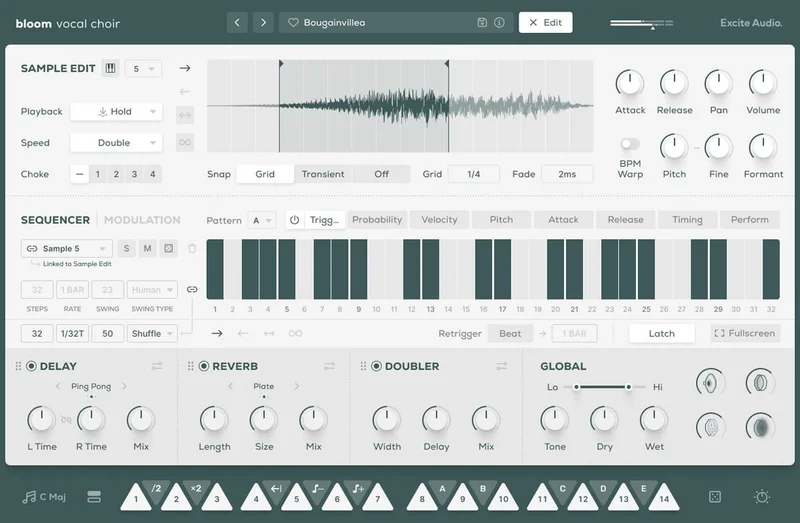
The core sound source covers the full vocal spectrum: deep baritones through to the highest sopranos. Excite Audio recorded and organised these into 112 choir samples across 8 banks, with 14 BPM-synced sample keys spread over two octaves on the keyboard. White keys trigger choir samples and loops. Black keys modify playback behaviour: speed, pitch, sequences, and effect modulation.
What changes versus a generic Bloom product is the specificity. The macros here are built around vocal textures: Ascend, Dust, Phaser, and Speaker. The reverb algorithms came from Excite Audio's Lifeline Series. The preset categories run from Basic and Drones to Rhythmic and Experimental, which means the content was designed with specific use cases in mind, not just bulk-filled to hit a number.
You also get the sample import feature, which lets you drag in your own audio files, set the key and BPM, and have them integrate with the Bloom engine. That's not a feature you find in every instrument at this price level.
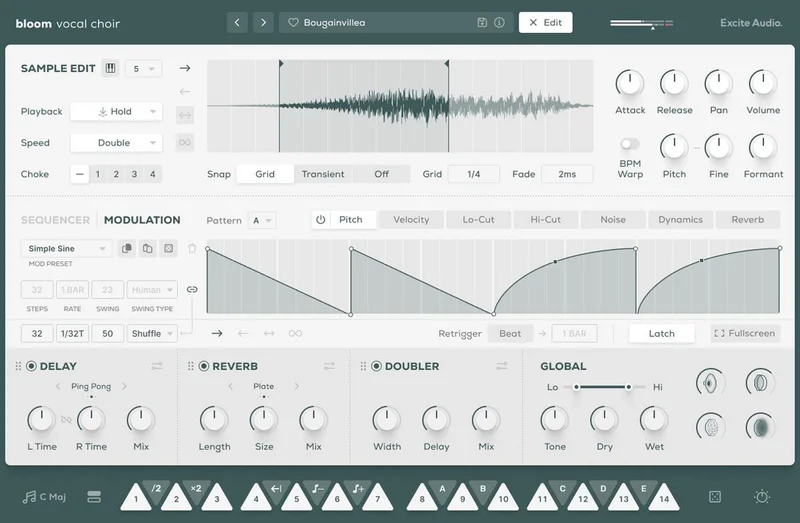
The Edit page is where the depth lives. Start and end markers, crossfade, attack, release, formant controls, BPM Warp, playback direction options (forwards, backwards, pendulum, loop), four choke groups. It's a lot. More on whether that depth is accessible later.
Who Qualifies for the Crossgrade
This one's clear: you need to own any full Bloom product. The Lite version doesn't count. If you've got Bloom Ensemble Strings, Bloom Drum Breaks, Bloom Vocal Aether, or any other full-version Bloom title in your library, you qualify.
If you're not sure whether you own a "full" version, check your Plugin Boutique or Excite Audio account. The distinction matters: full versus Lite is where the eligibility line sits.
If you don't own any full Bloom product yet, the full version of Bloom Vocal Choir is available separately, but that's a different purchase decision. This review is specifically about whether the crossgrade path makes sense for existing full Bloom owners.
The Value Case: Does $39 Actually Buy You Enough?
The honest answer is yes, for the right producer. Here's how to think about it.
You're getting 250 professionally designed presets. That's not a throwaway number. They're split across eight categories that map directly to production use cases: Drones for bed layers, Rhythmic for glitchy chops, Full Ensemble for cinematic lifts, Melodic for pitched leads across two octaves. These aren't random sound design experiments thrown at a preset slot.
The sequencer adds compounding value. Stack multiple vocalists, build interweaving harmonies, automate pitch, volume, filter, and effects across the sequencer grid. No music theory required is a real claim here, not just marketing. The black keys on the keyboard handle modifier duties: half-time, double-time, reverse, octave shifts. You can build complex choir arrangements without writing a single MIDI chord.
The effects chain is borrowed from good lineage. The reverb uses Hall, Plate, and Spring algorithms from Excite Audio's Lifeline Series. The doubler has proper stereo controls: width, delay, mix, detune, pan, and lo-cut. The delay runs in stereo or ping-pong mode with R/L link, sync time, feedback, and ducking. You're not dealing with token effects bolted on for the spec sheet.
Then there's the sample import system. You can bring in up to 112 of your own audio files, set their key and BPM, and slot them into any of the 14 sample keys or any empty bank slot. That's a real studio tool, not a gimmick. Your own processed vocals, field recordings, layered choirs you've recorded yourself: all of it can live inside the Bloom engine and respond to the same sequencer and effects.
All factory samples are royalty-free. That matters if you're shipping music commercially.
Where the value gets complicated is the learning curve. Reviewers report the sequencer is convoluted to new users on first approach. The Edit page carries a lot of controls, and understanding how playback modes interact with choke groups and the sequencer's step controls takes time. If you need results in twenty minutes, the preset browser will do it. If you want to go deeper, budget an afternoon.
If you're weighing up other crossgrade options in the Bloom family, our Bloom Drum Breaks crossgrade review covers similar value-for-money ground
The Preset Banks: Where You'll Actually Start
Every producer lands on the preset browser first. Bloom Vocal Choir makes this fast. The 8 banks are labelled clearly and the categories behave like actual creative directions rather than arbitrary folders.
BA (Basic) gives you single-section choir sounds. Good starting point when you want clean, unprocessed vocal texture without commitment to a complex arrangement. Load one onto a pad track and let it breathe.
DRN (Drones) is probably where most ambient and cinematic producers will spend the most time. Long, sustained notes, slow movement. Drop one under a melodic synth and push the Ascend macro to move the harmonic content, something a simple pad synth rarely offers.
EXP (Experimental) is the most polarising bank. Abstract sound design, unusual textures, things that don't sound immediately "choir." Some of these are brilliant. Some are ugly in a way that's useful. Load one into a rhythmic section when you're bored with your template.
FE (Full Ensemble) covers all four registers together: soprano, alto, tenor, bass. These are the big cinematic statements. Use them for builds and drops, not for background texture.
HI and LO split the ensemble into high registers (sopranos and altos) and low registers (tenors, baritones, bass). Clever move by Excite Audio. You can layer HI and LO separately to build your own ensemble blend without committing to the full FE sound.
MLD (Melodic) pitches samples in a scale across two octaves. This is where you play the choir like an instrument. Use it for melodic lines, harmonies you're writing yourself, or supporting a lead. It responds well to the formant control on the Edit page.
RHY (Rhythmic) is the most surprising bank. Percussive vocal chops, glitchy processing, rhythmic patterns. In a genre like electronic or hybrid cinematic, these are often the sounds that make a track stand out. Run them through the delay with ping-pong mode and you'll get results that don't sound like anything else in your session.
You can drag any sample from any bank onto any of the 14 white keys. That flexibility means you can build a custom 14-slot layout mixing DRN, RHY, and FE sounds on a single keyboard range. Randomise is available for both samples and modulation, which helps when you're stuck.
The Sequencer: Powerful, But Give It Time
The sequencer is where Bloom Vocal Choir earns its price. It's also where frustration lives.
The design intention is clear: you should be able to layer multiple vocalists, build interweaving rhythmic patterns, and automate effects without writing a note in the piano roll. The tool for this is the Bloom Sequencer, which is built for triggering and layering one-shots and looping sequences rather than traditional MIDI note sequences.
Load a RHY preset, open the sequencer, and set up a four-step pattern with swing. Add a second track with a DRN sample on a different step rate. Now automate the reverb mix across the sequencer grid. You're building textured, evolving choral arrangements without touching your DAW's arrangement view. That's the promise.
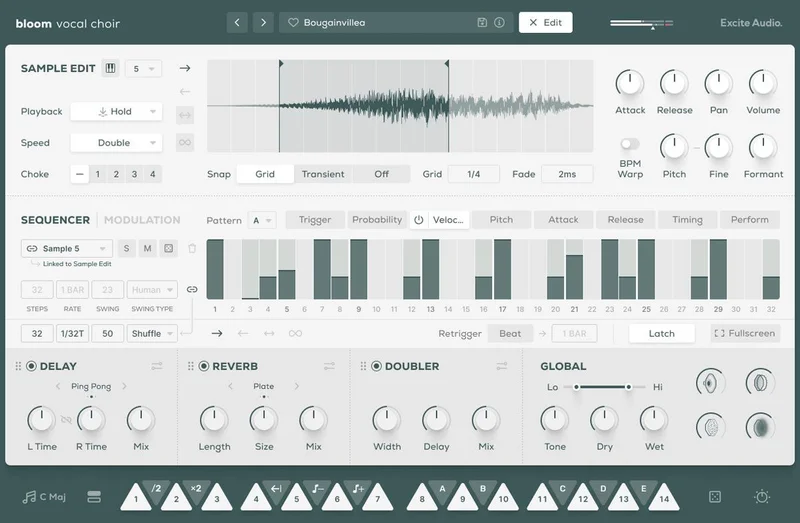
The FX modulation section inside the sequencer gives you control over doubler, delay, reverb, lo-cut, hi-cut, pitch, and volume, all step-sequenced. Playback direction per track: forwards, backwards, pendulum, loop. Randomise on both sample selection and modulation. Beat retrigger. Latch mode. Probability per step.
Probability is underrated here. Set a step to 60% probability and your choir arrangement starts to breathe. It's less predictable. It sounds less like a loop.
Now the frustration. Reviewers report the sequencer has a convoluted learning curve on first approach. The sheer number of per-track controls (trigger, velocity, probability, attack, release, timing, perform) means there's no obvious starting point if you've never used it. The fullscreen mode helps. Starting from a preset that already has sequencer data loaded helps more.
One specific issue that users have flagged: high-volume crackle. This appears to be a known behaviour at extreme output levels, and the recommended buffer size of 512 samples or higher is there for a reason. If you're working at 128 or below and wonder why things are breaking up, that's likely it. Raise the buffer, especially on a loaded session.
We'd recommend spending an hour specifically on sequencer tutorials before diving into a project with a deadline. Not because the tool is bad. Because the payoff for understanding it properly is significant, and the frustration of not understanding it is real.
The Edit Page: Sculpting Samples Your Way
The Edit page is where Bloom Vocal Choir separates itself from simpler choir instruments. And there's a lot here.
The waveform display shows your sample with start and end markers. Snap to grid or snap to transient. Set a crossfade between where the sample loops. Set attack and release independently per sample slot. Pan and volume per slot. Four choke groups for managing polyphony. This is sample editing, not just preset tweaking.
Playback direction per slot: forwards, backwards, pendulum, loop. Playback mode: hold, latch, relative, oneshot. Speed: normal, double, half. These aren't decorative options. Reverse a DRN sample, set it to pendulum playback, and push the Phaser macro: you're in ambient territory that would take ten minutes to achieve with manual processing in your DAW.
Pitch and formant controls deserve attention. The formant control is where you shift the vocal character without changing pitch. Push formant up on a tenor sample and it starts to feel more soprano-adjacent. Useful for blending between banks or creating hybrid vocal textures that don't exist in the factory library.
BPM Warp is specifically for imported samples. Set the BPM of your source file and it aligns with the host tempo. Bring in a vocal recording from your own session, set the BPM to what it was recorded at, and the Bloom engine handles the time-stretching. It integrates cleanly with the sequencer from there.
Sample Import: The Feature That Justifies the Upgrade
Let's be direct: the ability to import your own samples is the feature that most justifies the crossgrade price at $39.
You can load up to 112 audio files. Drag into the waveform view on the Edit page, or drop directly into any empty bank slot. Set the key. Set the BPM. That's it. Your samples are now inside the Bloom engine and respond to everything: the sequencer, the effects chain, the macros, the Edit page controls.
Think about what that means practically. Record a raw choir session, chop it into phrases, import those phrases, and build a custom bank. Every macro, every sequencer step, every reverb setting applies to your own recordings. You're not limited to the factory library. You're using the instrument as a platform.
The same applies to processed material. Got a heavily effected vocal pad you've been using in your template? Bring it in, set the formant controls, run it through the sequencer with probability on. Now it evolves in a way a static sample in your DAW never would.
Earlier versions of Bloom Vocal Edit had some sample import limitations that users flagged in older reviews. The current version appears to have addressed those. The 112-slot capacity, the free-swap capability, and the BPM Warp integration are all present and functional as described in the current product page.
If you want to see how the Bloom engine handles a completely different sample set, our Bloom Vocal Aether crossgrade review covers similar import and Edit page mechanics
The Macros and Effects Chain
Four macros. All four have specific sonic purposes that are tuned to the vocal content.
Ascend pushes the harmonic character upward. Use it on drone and full ensemble presets to create a sense of building tension without a volume automation move.
Dust adds grain and texture. Think of it as a subtle degradation control. Useful when your choir sounds too clean for the mix it's sitting in.
Phaser introduces phase movement across the stereo field. On long sustained notes, it creates motion without obvious rhythm. On rhythmic samples, it can feel like too much quickly.
Speaker is a lo-fi filtering macro. Narrows the frequency range, adds character that reads as vintage or radio-adjacent. Clever in small doses on melodic bank samples.
The effects chain underneath sits in three rearrangeable modules: Doubler, Delay, Reverb. Rearrangeable order matters. Run the delay before the reverb and the echoes wash into the reverb tail. Run the reverb first and the delay repeats sit dry against a wet source. These are different sounds. The fact that you can swap the order is a small but real workflow win.
Reverb: Hall, Plate, Spring. All three from the Lifeline Series. Length, size, mix, pre-delay, duck, lo-cut, hi-cut, input, output. The duck control lets the reverb tail pull back when new material triggers, which keeps the low end from building into a wash. On dense choir arrangements, that ducking control alone can save a mix.
Delay: stereo or ping-pong. R/L time, link option, sync time, mix, feedback, duck, lo-cut, hi-cut. The ping-pong on RHY bank samples is where this gets interesting. Short feedback, high mix, set to sync at an eighth note: the rhythmic chops start bouncing between speakers in a way that feels more produced than a simple loop.
Global lo-cut and hi-cut at the top level mean you can roll off the low mud or tame the top-end air without opening an EQ in your DAW. Small thing. Saves two clicks. We appreciate it.
How It Sits in a Real Signal Chain
Bloom Vocal Choir runs standalone or as VST/VST3/AU/AAX. On Mac it supports both Intel and Native Apple Silicon natively. On Windows you're looking at Windows 7 or higher, 64-bit. Recommended buffer size is 512 samples or above.
No CPU benchmarks are published by Excite Audio. That's a gap we'd like to see them fill. Reviewers haven't flagged it as a CPU-hungry instrument in general use, but the lack of published figures means you should try it at your standard buffer setting on a loaded session before committing to it in a large project.
The reported crackle at high volume levels is worth flagging again. If you're pushing output hard into a bus, check your buffer first. If you're at 512 samples and still hearing crackle, check the output level on the instrument's own effects chain. The input and output controls on the delay and reverb modules are separate from the instrument master, and they can contribute to clipping inside the plugin if you're not watching them.
Activation requires an internet connection. That's the standard Excite Audio method. Not unusual, but worth knowing if you're working on a disconnected machine.
Inside a hybrid cinematic session, Bloom Vocal Choir typically sits on its own instrument track with a send to the room reverb bus. The internal reverb handles close-field ambience, the bus handles the hall sound the whole session shares. Don't double up: if you've got the internal Hall reverb and a room bus, you'll bury the choir in reverb tail before you've had a chance to hear it clearly. Keep internal reverb short and dry. Let the bus do the space.
In an electronic session, the RHY and EXP banks work best routed to a dedicated bus with sidechain compression from the kick. Let the kick duck the choir slightly on the beat. It locks the choir into the groove in a way that mixing the level manually rarely achieves.
Who Should Skip It
Skip the crossgrade if you own a full Bloom product but spend most of your time in genres where choral textures aren't useful. If you make trap, pop with clean production, or genre-specific work where a choir instrument is genuinely not in your toolkit, $39 spent on something you'll load twice is $39 wasted.
Skip it if you want a traditional choir instrument with round-robin sampling, multiple mic positions, and realistic orchestral behaviour. Bloom Vocal Choir is a producer instrument, not a virtual orchestral library. It's built for texture, arrangement speed, and creative sequencing, not for authentic choral replication.
Skip it if you need something you can open and use in under ten minutes without thinking. The preset browser gets you there fast, but the learning curve on the sequencer is real. Reviewers note it's convoluted until it clicks. If you have a deadline in two days and no prior Bloom sequencer experience, wait until you have space to learn it properly.
And skip it if you're hoping the crossgrade path gives you a significant discount over a full purchase but you don't already own a qualifying full Bloom product. The crossgrade price only applies to existing full Bloom owners. If you're starting from scratch, look at the full product pricing for Bloom Vocal Choir directly.
If you're new to virtual instruments and want to understand the landscape before spending anything, our virtual instruments guide covers the categories worth knowing
Try It First
If a trial is available at the time you're reading this, check three things specifically before deciding.
First: open a DRN preset, push the reverb mix to around 70%, and set playback direction to pendulum. Listen to how the tail behaves when you release the key. That decay characteristic is what you'll be living with on every ambient and cinematic cue.
Second: load the sequencer with a RHY bank preset and turn on probability at around 60% on three steps. Play it for thirty seconds. If that evolving, slightly unpredictable rhythm pattern fits the music you make, this instrument is worth serious consideration.
Third: try importing one of your own short audio files. Set the BPM. Trigger it from a white key. Then run the sequencer over it. If that workflow feels immediately useful, you'll get value from this instrument for a long time.
The Verdict
For full Bloom owners making electronic, ambient, or hybrid cinematic music, the Bloom Vocal Choir Crossgrade at $39 is a smart buy. The preset library is genuinely useful, not just generous in number. The sample import system turns it into a platform, not just a library. The effects chain is borrowed from quality lineage.
The sequencer will frustrate you before it rewards you. That's a real caveat, not a minor one. But once it clicks, the rhythmic and harmonic possibilities go well beyond what any static sample library can offer.
We'd buy it. We're sceptical of the lack of published CPU data. And we wish the sequencer had better onboarding. But at $39 for existing Bloom owners, the value is there if you make the right music and give it the time it asks for.
Specs & Technical Details
| Developer | Excite Audio |
| Price | $39 |
| Plugin Format | VST / VST3 / AU / AAX / Standalone |
| OS Support | Mac (10.15+, Intel & Apple Silicon) / Windows 7+ |
| Activation | Online internet connection required |
| CPU Usage | N/A (no benchmarks published) |
| Trial Available | Check Excite Audio website |
| Version Reviewed | N/A |
Score Breakdown
| Category | Score | Notes |
|---|---|---|
| Sound Quality | 4.2/5 | Full vocal spectrum from baritone to soprano, Lifeline Series reverb gives the factory patches real depth |
| Value for Money | 4.3/5 | Sample import, 250 presets, quality effects chain, and crossgrade pricing make this strong for existing Bloom owners |
| Ease of Use | 3.5/5 | Preset browser is fast; sequencer has a reported learning curve that stalls new users |
| Features | 4.2/5 | Sequencer, 112-slot import, 8 preset banks, rearrangeable effects, four vocal-tuned macros |
| CPU Efficiency | 3.5/5 | No benchmarks published; reported crackle at high volumes suggests buffer management matters |
| Overall | 4.1/5 | Rewarding producer instrument for the right genre, with a learning investment the sequencer demands |
Alternatives to Consider
Spitfire Audio LABS Choir is free. It's a static, beautifully recorded choral library with no sequencer and no sample import. If you want realistic choral samples for occasional use without any cost, LABS Choir is the honest answer. It won't do what Bloom's sequencer does, but it's hard to argue with free.
Output Movement is a rhythm engine that processes any audio source, including choral samples. It's not a choir instrument, but if what you actually want is rhythmic, evolving vocal texture rather than a choir arrangement tool, Movement covers that territory with a different workflow philosophy.
EastWest Hollywood Choirs is a full orchestral choir library at a significantly higher price point, aimed at professional scoring. If your work demands realistic, positional choral recording with round-robin and multiple dynamic layers, EastWest is in a different category. If that's not what you need, Bloom is the smarter buy at $39.
The bottom line on alternatives: if you make electronic or cinematic music and want a tool that sequences, layers, and imports, there's nothing at this price level that competes with Bloom Vocal Choir's feature set. The alternatives either go far cheaper with far less functionality, or far more expensive with a different purpose entirely.
At $39 for existing full Bloom owners, Bloom Vocal Choir Crossgrade earns its place. Just don't buy it on a Tuesday night with a mix due Wednesday morning. Give the sequencer the afternoon it deserves first.
Related reviews: FREEZE
Frequently Asked Questions
Do I need to own a specific Bloom product to qualify for the crossgrade?
You need to own any full Bloom product. The Lite versions don't qualify. If you have a full-version Bloom instrument in your account, you're eligible. Check your Plugin Boutique or Excite Audio account to confirm which version you own before purchasing.
Can I import my own vocals into Bloom Vocal Choir?
Yes. You can import up to 112 audio files via drag and drop into the waveform view on the Edit page, or directly into empty bank slots. Set the key and BPM of each file and the Bloom engine handles the integration. The samples can be swapped out freely at any time, and all the plugin's sequencer and effects features apply to imported material.
Is the sequencer difficult to learn for new users?
Reviewers report it has a real learning curve on first approach. The controls are deep: per-track trigger, velocity, probability, attack, release, timing, and perform options on top of global step rate, sync, swing, and latch. Starting from a preset with existing sequencer data is the fastest way in. Budget time specifically for the sequencer before using it under deadline pressure.
What's the difference between the Full and Lite versions of Bloom Vocal Choir?
The full version runs at a higher price point and is what this crossgrade upgrades you to. The Lite version has a lower entry price and reduced feature set. The crossgrade page notes the full version is also available separately, but the crossgrade pricing applies specifically to existing full Bloom owners and represents a meaningful saving over buying the full version at standard price.
What reverb algorithms does Bloom Vocal Choir include?
Three: Hall, Plate, and Spring. All three come from Excite Audio's Lifeline Series. Each has controls for length, size, mix, pre-delay, duck, lo-cut, hi-cut, input, and output. The duck control is especially useful on dense choir arrangements where reverb tails can build into a wash. The three effects modules (Reverb, Delay, Doubler) are rearrangeable in the signal chain.
What genres is Bloom Vocal Choir best suited to?
Electronic, ambient, and hybrid cinematic production are where it works best. The BPM-synced sequencer, rhythmic bank, experimental textures, and macro-controlled effects chain suit producers who layer sound rather than score realistically. It's not built for traditional orchestral choral replication. If you need authentic round-robin choir sampling with mic positions, a library like EastWest Hollywood Choirs is a different tool for a different purpose.