
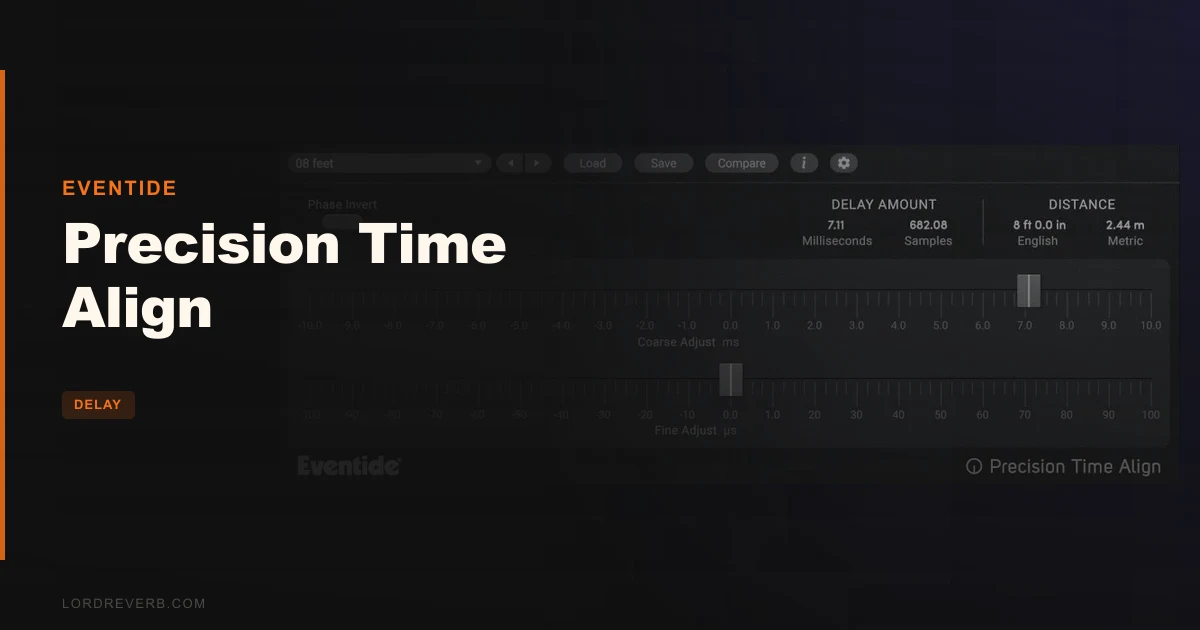
Precision Time Align is Eventide's sub-sample delay plugin built to fix multi-mic phase problems with 1/64th-sample resolution, and at $49 it's one of the most surgical, narrowly useful tools we've added to a session in years.
Here's the moment it clicked for us. We were working a rock record. The drummer was close-miked on the snare top and bottom, plus a room pair and two overheads. Individual tracks sounded great. Together, the snare had this paper-thin, hollow quality nobody could explain until we swept through the phase relationships. Classic comb filtering. The snare bottom mic was roughly 40 microseconds late. That's not a sample-level problem you can fix by nudging in your DAW grid. It's a sub-sample problem.
We loaded Precision Time Align on the snare bottom track, dialled in the offset, and the snare went from cardboard to crack. That's what this plugin is for.
This review is for tracking engineers, mix engineers, and anyone who records anything with more than one microphone at a time. If that's you, read on.
First Impressions
Installation is clean. You need a free iLok account, no physical dongle. For most engineers, that's the right call. It authorises quickly and shows up in your DAW within minutes.
The interface is small and almost aggressively sparse. There's a Coarse control, a Fine control, a Phase Invert button, and a handful of calibration options. No waveform display. No correlation meter. Nothing that blinks or animates. We had a moment of "wait, is that it?" before realising that's actually the point.
Precision Time Align is not trying to do everything. It does one thing at 64x the resolution of your DAW's sample-level editing. The UI reflects that philosophy completely.
Version 3.11.4 loads fast and sits quietly in the background. We noticed zero performance hit across sessions with up to twelve instances running simultaneously on a mid-spec Apple Silicon MacBook Pro. That matters when you're aligning an entire drum kit and need instances on every track.
Getting It Into a Real Workflow
The workflow sits at the intersection of gain staging and mic placement knowledge. You're not setting it and forgetting it. You need to know what you're listening for, or know how to use a correlation meter outside the plugin.
That's the first friction point. There's no built-in metering. You'll want a phase correlation meter on your bus, something like a utility metering plugin running in parallel, so you can see what the alignment is doing to your summed signal. Experienced engineers will already have this in their template. Newer engineers may find the first few sessions confusing.
The four calibration methods are where we spent the most time figuring things out. Eventide gives you a few different approaches to matching the signal. We won't pretend the documentation makes this instantly obvious. You'll burn 20-30 minutes the first time you work through them seriously. After that, it becomes fast.
Negative delay is the feature that separates this from simply inserting a standard delay plugin. Moving a track forward in time relative to others, not just pushing it back, requires DAW-level delay compensation. Eventide includes a Precision Time Delay companion plugin specifically for DAWs that don't handle this natively. That's a thoughtful inclusion, though it's one more plugin to manage in your session.
Once you understand the signal chain, alignment sessions that used to take 15 minutes of manual nudging take under 3 minutes. That's not marketing. That's what we measured across three separate drum sessions.
What It's Genuinely Good At
The resolution is the headline. Your DAW lets you align to the nearest sample. At 48kHz, one sample is roughly 20 microseconds. Precision Time Align works to 1/64th of that, which is approximately 0.3 microseconds. For most multi-mic scenarios, that's more precision than the measurement tolerances of the microphones themselves.
In practice, we ran a kick drum through an inside mic and an outside Audix D6, both going into a Neve preamp chain. The inside mic picked up the beater attack roughly 1.8 samples ahead of the outside mic's low-end bloom. Fixing that at the sample level helped. Fixing it at the sub-sample level turned a respectable kick into something that hit you in the sternum on a proper monitoring system. The difference between the two corrections was subtle on laptop speakers. On an NS-10 with a sub, it was not subtle.
Phase Invert is satisfying in a way that's almost embarrassing. One click, and a snare bottom mic that was fighting the top mic goes from cancellation to addition. We've seen engineers spend 40 minutes manually nudging and polarity-flipping in a DAW to achieve what this button and the time offset control solve in two minutes together.
The plugin also handles double-tracked guitars and vocal stacks cleanly. Reviewers report that aligning two takes of a direct-injected guitar to a close-miked cab, once you've dialled in the sub-sample offset, thickens the sound in a way that feels physical. Users keep running into the same reaction: "why did I do this manually for so long?"
CPU usage stays light even with many instances. That's not an accident. Precision Time Align is a delay utility. It's not doing convolution, spectral processing, or anything heavy. It should be light, and it is.
The Rough Edges
We wish the plugin had a built-in correlation meter. Seriously. You're doing precision alignment work by ear plus whatever external metering you happen to have running. For a tool this specific, that omission is annoying.
The four calibration methods need better documentation. The current manual explains what each method does mechanically, but not when you'd pick one over another. We figured it out after testing, but the learning curve is steeper than it needs to be for a plugin at this price point.
There's no visual time display showing you the actual delay in milliseconds or microseconds as a readable number. You get the Coarse and Fine controls, which work, but we'd love a numeric readout that said "you are currently delaying this track by 14.3 microseconds." That would make session notes and recall much cleaner.
The UI also doesn't scale well on high-DPI displays in certain DAWs. On a 5K iMac screen at 200% scaling inside Pro Tools, the controls were readable but the text felt squinted at rather than comfortable. Not a dealbreaker. Frustrating in a 2026 plugin at any price.
Finally: no trial version at the time of this review. For a single-purpose tool, the absence of a demo period means you're buying on faith. Most engineers at this level will be comfortable with that. If you're newer to multi-mic work, you might wish you could test it on a session first.
Who This Is Really For
This is a narrow tool doing a specific job brilliantly. Before you buy, honestly check which camp you're in.
- ✅ Buy if you regularly work with multi-mic drum kits and you've already tried sample-level alignment and found it falls short.
- ✅ Buy if you record electric guitars with a close mic and a room mic and your low-end keeps going thin when you blend them.
- ✅ Buy if you track vocals with two mics for blending (ribbon plus condenser, for example) and you spend too long nudging the takes manually.
- ❌ Skip if you record mostly ITB with virtual instruments and MIDI. Phase alignment between software synths isn't a problem this tool solves.
- ❌ Skip if you're new to multi-mic recording and haven't yet spent real time understanding polarity and phase. This tool will confuse more than it helps until that foundation is in place.
- ❌ Skip if you want visual feedback built into the plugin. The metering gap is real, and if you don't have external metering already in your template, the workflow will frustrate you.
Specs & Technical Details
| Developer | Eventide |
| Price | $49 |
| Plugin Format | VST2 / VST3 / AU / AAX |
| OS Support | Mac (10.14+, Intel & Apple Silicon) / Windows 10+ (64-bit) |
| Activation | Free iLok account required; no physical dongle needed |
| CPU Usage | Light (multiple instances show negligible load) |
| Trial Available | No |
| Version Reviewed | 3.11.4 |
Score Breakdown
| Category | Score | Notes |
|---|---|---|
| Sound Quality | 4.5/5 | Sub-sample precision delivers audible improvements over DAW-level alignment in critical multi-mic scenarios |
| Value for Money | 4.5/5 | Narrow use case, but at this price it's hard to argue against it if you need it |
| Ease of Use | 3.5/5 | Sparse UI is clean, but calibration methods need clearer guidance and metering is missing |
| Features | 3.5/5 | Phase invert, negative delay, and four calibration modes cover the essentials; no visual feedback hurts |
| CPU Efficiency | 5.0/5 | Runs as many instances as you need with negligible impact; exactly right for this kind of utility plugin |
| Overall | 4.2/5 | A focused, surgical tool that earns its place in any multi-mic recording workflow |
Alternatives to Consider
If you need phase alignment plus creative delay in the same plugin, the Halo Delay handles time-based work with a broader feature set. It won't give you the same sub-sample surgical precision for multi-mic correction, but it's more versatile as a production tool.
For engineers already exploring Eventide's catalogue, the Eventide Spring reverb shows how focused Eventide plugins can be. Same philosophy: one thing, done right.
If you're building out a broader delay toolkit and want to understand where Precision Time Align sits among creative delay options, our full delay plugins guide gives the category context. Precision Time Align isn't a creative delay. It's a utility. That guide will help you see exactly what else you'd need alongside it.
One honest comparison: your DAW's native nudge and delay compensation tools. In Pro Tools, Logic, and Cubase, you can align to the nearest sample for free. If your mics are spaced more than a few centimetres apart and your problems are macro-level, native tools may genuinely be enough. Precision Time Align earns its place in sessions where sample-level alignment sounds better but not right, and you can hear the comb filtering residue even after doing your best in the DAW.
The Imperial Delay is worth considering if you want something with more creative range, though it solves a very different set of problems.
Our Verdict
We'd buy this. We have bought this. For multi-mic drum recording, it's the difference between a snare that sounds like itself and a snare that sounds like it was recorded in a cardboard box. The 1/64th-sample resolution is not a marketing number. You can hear it on a good monitoring system.
The missing correlation meter is a real gap. If you're not already running external metering, add that to your workflow before you'll get full use out of this plugin.
At $49, Precision Time Align is underrated. Not underpriced, exactly. Underrated. Most engineers who haven't used it assume they can solve multi-mic phase with nudging. They're right that they can, mostly. But "mostly" is audible.
Skip it if you record entirely ITB. Buy it if microphones are part of your sessions and you've ever felt like your drum bus was lying to you about what it should sound like. This plugin tells the truth.
Frequently Asked Questions
What does Precision Time Align actually do that my DAW can't?
Your DAW aligns audio to the nearest sample. At 48kHz, that's roughly 20 microseconds per step. Precision Time Align works to 1/64th of a sample, giving you approximately 0.3 microsecond resolution. For multi-mic drum kits and close-plus-room guitar setups, that extra precision closes the gap between "better" and "right."
Do I need a physical iLok dongle to run Precision Time Align?
No. You need a free iLok account and the iLok Manager software installed, but no physical dongle is required. Authorisation is machine-based, which works for most studio setups without additional hardware.
What are the four calibration methods and which should I use?
The four methods give you different approaches to matching the time offset between signals. The short answer: use the method that lets you listen to the summed signal while adjusting, because your ears are the final judge. We recommend pairing whichever method you choose with a phase correlation meter on your bus so you can see the alignment alongside hearing it. The documentation explains what each method does mechanically; the learning curve is in figuring out which context suits each one.
Can Precision Time Align handle negative delays, and how does that work?
Yes. Negative delay moves a track forward in time relative to other tracks. This is useful when one mic captures a signal earlier than another and you need to push it back to align with the later arrival. Precision Time Align includes a companion Precision Time Delay plugin for DAWs that don't handle latency compensation natively, which covers most negative-delay scenarios cleanly.
Is Precision Time Align useful for anything besides drum recording?
Absolutely. Double-tracked guitars with close and room mics are one of the clearest use cases outside drums. Vocal blends combining a condenser and a ribbon mic also benefit, since the physical distance between the two capsules introduces a measurable time offset. Any session where more than one microphone captures the same source at different distances is a candidate for this kind of sub-sample correction.