If you own Evolve Air Lite and want to know whether the Upgrade is worth $20, the answer is yes, but only if you've already hit the walls of the Lite version. Those walls are real: 75 sound sources instead of 250, no user sample import, and a stripped-back preset list that starts to feel limiting the moment you're building a whole record rather than a single cue. The Upgrade removes all three of those ceilings in one move.
This is a virtual instrument built for atmospheric and ambient music. Breathy textures, wide pads, slow-evolving layers, the kind of sound design that sits under everything else and makes it feel like it exists in a room. If that's your work, $20 is a low bar.
If you're a producer who bounces between genres and treats pads as an afterthought, this upgrade probably isn't your priority. But if atmosphere is the job, read on.
Quick Verdict
The Upgrade is a smart, focused jump from Lite. The tripled library alone justifies it for anyone who's found themselves reusing the same 20 presets. The unlocked sample import turns what felt like a sketch tool into a complete instrument. We score it 4.2 out of 5. The only honest hesitation is the CPU behaviour on heavier presets and the three-slot effects chain, which will frustrate anyone who wants to build long, layered signal paths. At $20, though, the case is hard to argue against.
What You Are Actually Getting
Evolve Air Upgrade runs a quad-layer sound engine. That means four independent sound sources, A, B, C, and D, each of which can hold either a sample-based instrument or a synth oscillator. You stack them, blend them, and shape them together.
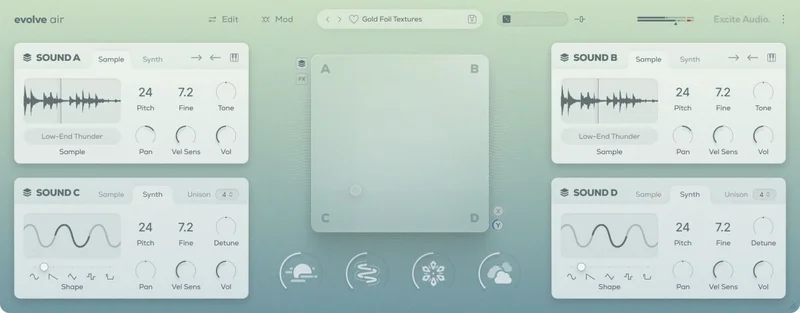
In the Lite version, you had 75 sound sources to populate those four slots. In the Upgrade, you have 250. That's the bluntest number in this whole review, and it's the most important one.
The 250 sources span seven categories: Chords, Hits and Percussive, Instruments, Multisamples, Synths, Textures, and Vocals. That spread matters because it means you're not just getting more of the same thing. You're getting architecturally different material: short one-shots alongside long evolving pads, melodic instruments alongside noise-based textures.
Synth oscillators come in five shapes: Sine, Triangle, Saw, Square, and Pulse. When you're running a synth source rather than a sample, those oscillators sit inside the same layer structure, so you can blend a Sine wave under a breathy vocal texture and a Saw under a string multisample, all within one patch.
The sample engine for each layer gives you Pitch, Fine, Tone, Pan, Velocity Sensitivity, Volume, and Playback Direction. That Playback Direction control is worth calling out: reverse playback on a breathy texture opens up sound design territory that forward playback alone can't reach.
The synth engine adds Unison and Detune per layer. Push Detune up on a Saw oscillator layer and you get that slow, wide shimmer that sits under everything else. It's satisfying in a way that takes about four seconds to dial in.
Who This Upgrade Is Built For
You need to own Evolve Air Lite. That's the baseline. The Upgrade isn't a standalone purchase path; it moves Lite users to the full version.
Beyond that, the people who get the most from this upgrade are the ones who've found specific limits in Lite. If you've run out of sound sources, if you want to bring your own samples into the engine, or if you need the full preset library to find the right starting point quickly, those are the three clearest reasons to move up.
Owners report that the upgrade gives access to complete features and sounds compared to the Lite version. That tracks with the architecture: the Lite version isn't a demo or a trial. It's a genuinely functional plugin with 75 sources. The Upgrade just removes the ceiling.
If you're making ambient, atmospheric, or cinematic music regularly, the full 250-source library with its Vocals and Textures categories is where the instrument becomes a proper tool rather than a shortcut.
The Value Case at $20
At $20, the Upgrade is priced as an accessible step rather than a premium tier. That changes the value logic somewhat: you're not deciding between a cheap option and an expensive one. You're deciding whether the gap between Lite and Upgrade is worth the number.
The gap is real. 175 additional sound sources is not a marginal improvement. For producers in the ambient and atmospheric space, more starting material means fewer sessions where you cycle through the same patches and settle. The user sample import alone could justify the cost if you have a folder of field recordings or custom IRs you want to run through the engine's filter and modulation structure.
The Upgrade also includes over 250 presets, which are preconfigured patches built from the sound sources. Presets are starting points with the modulation matrix already configured. If you're time-poor or working to briefs, having more of those preset structures to pull from is worth something concrete.
One reviewer expressed a preference for a core plugin with expansions rather than separate plugins for each Evolve release. That's a fair structural complaint. But it's a complaint about the product line, not about whether this specific upgrade gives you what it promises. It does.
The Modulation System
This is where Evolve Air Upgrade earns its place as a complete instrument rather than a preset machine.
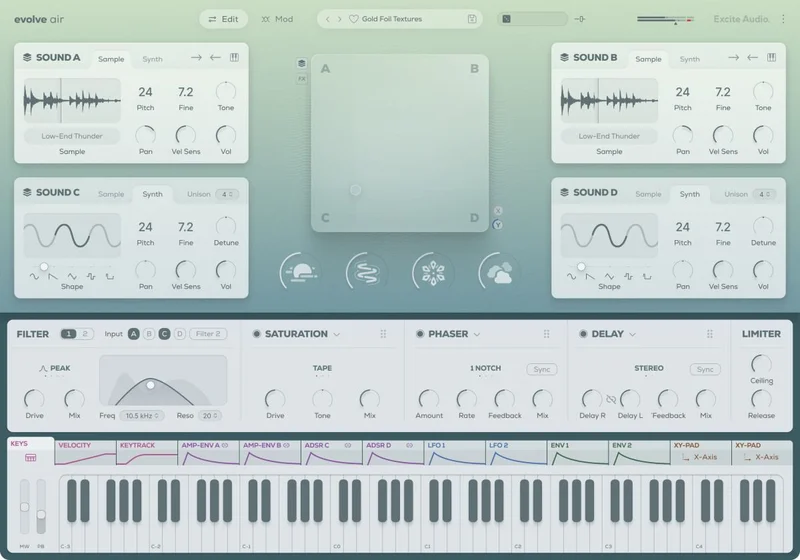
The modulation system has 12 sources: six ADSR envelopes, two LFOs, Velocity, Keytracking, and XY Pad X and Y position. You can route any of those to any available parameter. The modulation matrix shows all assigned routings as a list, which keeps complex patches readable.
LFO shapes cover Sine, Saw Up, Saw Down, Triangle, Seq 1, Seq 2, Exponential, and Build Up. The Seq shapes are worth exploring if you want rhythmic movement in a pad without reaching for an arpeggiator.
Polyphony runs from 1 to 32 voices. That range lets you go from a purely monophonic lead with glide all the way to dense, fully polyphonic chord stacks. Glide time stretches from 0 to 5000ms. At 5000ms a note slides over five full seconds to its target pitch. That's not a subtle parameter.
Pitch bend range goes from 1 to 12 semitones. Global pitch adjustment sits at plus or minus 100 cents. Those two controls together mean you can retune the whole instrument without resampling or processing downstream.
Keytracking on and off is available per layer. Turn it off on a texture layer and that layer holds its pitch regardless of what you play. It becomes a drone. Stack a drone texture under a pitched instrument layer and the two move independently. That's a simple setting with a lot of expressive mileage.
The XY Pad
The XY Pad works in two modes: Sounds Mode and FX Mode.
In Sounds Mode, the pad blends between the four sound sources. Drag the crosshair toward corner A and that layer dominates. Push it toward the centre and all four sources blend equally. Play a chord and move the crosshair while the notes sustain: the character of the sound shifts under your fingers without retriggering.
In FX Mode, the XY Pad position becomes a modulation source. You can assign the X axis to, say, the reverb size and the Y axis to the filter cutoff. Then perform both parameters simultaneously with one hand. For live performance or expressive recording takes, that's a clever design decision rather than a cosmetic feature.
The XY Pad position is listed as one of the 12 modulation sources in the matrix. That means you can also automate it from your DAW's automation lane if you'd rather draw the movement than perform it.
Dual Filters and the Effects Chain
The dual filters offer HPF, LPF, BP, and Peak modes and can be routed in parallel or series. Series routing means the signal passes through both filters sequentially. Parallel means they process independently and blend. Run an HPF in series with an LPF and you're band-passing the signal. Run them in parallel and you can sculpt two separate frequency regions at once.
The filter section is well-designed for this type of instrument. Atmospheric pads often need high-pass filtering to stay out of the low end, and the ability to dial that in per patch rather than relying on a channel EQ downstream keeps the workflow clean.
The effects chain gives you three rearrangeable slots. Each slot pulls from a list of 16 effects: Saturation, Feedback, Bitcrush, Delay, Reverb, Compressor, Transient, Modulation, Phaser, Auto-Wah, Speaker, Width, Noise, EQ, Pitch Drift, and Filter.
Three slots is limiting. If you want Saturation into Reverb into Delay, you've used all three slots and there's no room for Width or Pitch Drift on top. For users who build complex, layered signal chains, three slots forces hard choices.
That said, each slot does real work. The Reverb offers Hall, Plate, and Spring modes. The Delay offers Ping-Pong and Stereo. Saturation covers Tape, Tube, and Fuzz. The Speaker modes, Device, Cabinet, Hi-Fi, and No Speaker, give you basic cabinet simulation that can push an atmospheric pad into something more lo-fi and broken. Those aren't shallow implementations.
The Pitch Drift effect has four modes: Sine, Tri Up, Tri Down, and Random. It's a subtle detuning effect that makes static pads feel like they're breathing. On slow settings it reads as natural instrument inconsistency. On faster settings it starts to sound like a chorus without the comb filtering.
The Four Macro Effects
Mist, Drift, Frost, and Cloud are the four macro effects, and they sit outside the three-slot chain as one-knob treatments. These are where the developer's reference points (Tim Hecker, Jon Hopkins, Brian Eno, Oneohtrix Point Never) become most audible.
Mist adds a noise layer for grain and texture. It's the kind of effect that disappears at low settings and makes everything feel slightly worn. Bring it up and the pad starts to feel like it's being heard through a window rather than through headphones.
Drift stacks two layers of gently oscillating pitch modulation. At low amounts it sounds organic. At high amounts it sounds unstable. That instability is the point: some of the reference artists use pitch drift as a primary texture, not a subtle seasoning.
Frost applies what the developer describes as a shimmering, pristine delay. It adds space without washing out the attack of the sound. If you're placing a melodic instrument layer under ambient textures and you want it to trail away without a standard Ping-Pong delay, Frost is cleaner.
Cloud applies a long, low-passed reverb. It's the most cinematic of the four. Push Cloud up on a Vocals source and the syllables blur into a room-filling wash. Honestly, Cloud is probably the macro most people reach for first, and it earns its place.
One-Click Randomisation and Sample Import
The randomise button changes all four sound sources, their parameters, and the effects in one click. That's both brilliant and annoying depending on your session state. If you're stuck and need a direction, it's a fast reset. If you've dialled in three of the four layers and want to randomise just one, there's no partial randomise. The whole patch changes.
User sample import is an Upgrade-only feature. The Lite version doesn't have it. For producers with custom sound libraries, field recordings, or resampled material they want to process through Evolve Air's filter and modulation structure, this is the most practical reason to upgrade.
The import workflow drops your samples into the sound source slots and then gives you the same Pitch, Fine, Tone, Pan, Velocity Sensitivity, Volume, and Playback Direction controls as the built-in library. The plugin's architecture doesn't treat your imports as second-class material. They sit inside the same engine.
If you have a folder of ambient recordings you've made and you want to run them through the dual filters, modulation matrix, and macro effects, that use case is now open. It wasn't in Lite. That's not a small thing.
CPU Behaviour and the Eco Mode
Users report high CPU usage on certain presets. That's a real issue, not a niche complaint. Some presets stack complex modulation, long reverb tails, and dense unison layers simultaneously, and the CPU hit reflects that.
Eco Mode is available on the Settings page. It's a sensible addition. If you're on an older machine or a laptop session, turning on Eco Mode lets you use the instrument without spiking your buffer or causing dropouts.
Legato is also on the Settings page, toggleable on and off. When you're working with a monophonic patch at polyphony 1 and want smooth note transitions without retriggering the envelopes, that toggle earns its place.
The CPU situation is worth planning around. If you're running multiple instances of Evolve Air Upgrade in a full mix, test your preset choices before the session gets busy. Texture and chord presets tend to be less demanding than dense multisample and synth-heavy patches. The heaviest presets are real CPU killers. Not great on constrained systems.
Who Should Skip This
If you don't own Evolve Air Lite, this isn't the right purchase. The Upgrade path requires the Lite version as its base.
If you own Lite and you're genuinely happy with the 75 sound sources and you've never needed to import your own samples, the Upgrade doesn't solve a problem you have. That's an honest position to take.
If you work primarily in genres where atmospheric texture is rare (hard club music, full-band recording, heavily grid-based production), the extra 175 sources aren't going to shift your work. The instrument is built for a specific sound world. If that's not your world, the upgrade cost is better spent elsewhere.
Users who want a deep effects chain with five or more slots will find the three-slot limit frustrating. If that's a dealbreaker, it won't become less frustrating after purchase.
Settings Page Details
The Settings page is worth a few minutes when you first load the upgrade. Beyond Eco Mode and Legato, tooltips can be toggled on and off here. If you're new to the instrument, leave them on. They explain parameter behaviour without opening a manual.
The tooltips are a small thing that reflects good design thinking. Atmospheric instruments often have controls that behave differently from standard synths (Drift, Mist, Cloud, Frost don't have analogues in most other instruments). Tooltips reduce the guesswork.
Once you know the instrument, turning tooltips off declutters the UI. It's a toggle that respects the fact that users change over time.
The Sound, as Owners Describe It
Owners report inspiring sound quality and describe the instrument as effective at filling background spaces in music tracks. That's not vague praise. Background space in a track is a specific problem: too much and the mix feels empty; too little and nothing breathes. An instrument that fills that space without crowding the foreground elements is doing specific work.
The reference artists (Hecker, Hopkins, Eno, Oneohtrix Point Never) share a characteristic: their atmospheres aren't just sustained chords. They move. They drift. They have grain and inconsistency. The Mist and Drift macros are the clearest attempt to build that behaviour into a playable instrument rather than leaving it to post-processing.
The Verdict
Evolve Air Upgrade is a focused step for Lite owners who've hit the instrument's limits. The 175 additional sound sources, the user sample import, and the full 250+ preset library make it a complete atmospheric instrument rather than a capable but constrained sketch tool.
The three effects slots will irritate anyone who wants to build longer chains, and the CPU behaviour on heavy presets needs managing. But at $20, the ceiling is raised high enough that most users in the ambient and atmospheric space will spend a long time before hitting it again.
If atmosphere is your craft, upgrade. If you're a Lite owner who hasn't run out of sources and doesn't need sample import, hold off and revisit when the limits show up in a session. They probably will.
Specs & Technical Details
| Developer | Excite Audio |
| Price | $20 |
| Plugin Format | N/A |
| OS Support | N/A |
| Activation | N/A |
| CPU Usage | Heavy on certain presets; Eco Mode available |
| Trial Available | N/A |
| Version Reviewed | N/A |
Score Breakdown
| Category | Score | Notes |
|---|---|---|
| Sound Quality | 4.5/5 | Owners report inspiring results; macro effects nail the atmospheric brief |
| Value for Money | 4.5/5 | 175 extra sources and sample import at this price point is hard to argue with |
| Ease of Use | 4.0/5 | Simple layout with tooltips; one-click randomise aids quick exploration |
| Features | 4.0/5 | 12 modulation sources and XY Pad are strong; three effects slots is the ceiling |
| CPU Efficiency | 3.5/5 | Eco Mode helps but heavy presets cause real usage spikes |
| Overall | 4.2/5 | A complete atmospheric instrument for Lite owners ready to move up |
The three-slot effects chain is the one thing we keep coming back to. Load Cloud reverb, Frost delay, and Saturation and you've got nothing left for Width or Pitch Drift. That's not a workflow problem you can configure around. It's baked in. Plan your patch architecture early or you'll spend time switching modules in and out.
Beyond that? The instrument does what it says. Atmospheric, breathy, wide. Load a Vocals texture into layer A, a Textures source into layer B, and a Synth Saw into layer C with Drift at 25%. Pull the XY crosshair slowly toward the Synth corner while sustaining a chord. The mix shifts. The pad opens up. That's the experience Evolve Air is built for, and the Upgrade version gives you enough material to find that moment in every session.
At $20, this is the upgrade you make and don't regret. Just know going in that the effects chain has a ceiling, and budget your CPU accordingly.
Frequently Asked Questions
Do I need to own Evolve Air Lite before buying the Upgrade?
Yes. The Upgrade is a step up from the Lite version, not a standalone product. You need the Lite version as your starting point before the Upgrade purchase applies.
What is the main difference between Evolve Air Lite and the Upgrade?
The most significant changes are the library size (75 sound sources in Lite versus 250 in the Upgrade), the user sample import feature (Upgrade only), and access to the full preset library of over 250 presets. The Upgrade removes all three of Lite's hard limits in one move.
Can I import my own samples into Evolve Air Upgrade?
Yes. User sample import is an Upgrade-exclusive feature. You can load your own samples into any of the four sound source slots and use them with the full engine: dual filters, modulation matrix, macro effects, and all. The Lite version does not have this.
How many effects can I run simultaneously?
Three. Evolve Air Upgrade has three rearrangeable effects slots, each drawing from a list of 16 effect types. Beyond those three slots, the four macro effects (Mist, Drift, Frost, Cloud) are available as separate one-knob controls. If you need a longer effects chain, three slots is the ceiling and there's no workaround within the plugin.
How bad is the CPU usage?
It varies by preset. Owners report high CPU usage on certain patches, particularly those with dense modulation and long reverb tails. Eco Mode on the Settings page reduces the load. If you're on a constrained system or running multiple instances, test your preset choices before committing to a full session.
Is Evolve Air Upgrade useful for genres outside ambient and atmospheric music?
The instrument is designed around breathy textures, atmospheric pads, and spacious sound design inspired by Tim Hecker, Jon Hopkins, Brian Eno, and Oneohtrix Point Never. It can contribute textural layers in cinematic, post-rock, or electronic contexts. For producers whose work doesn't use atmospheric texture, the 250 sources and macro effects don't solve problems that come up regularly, so the value case is weaker.