
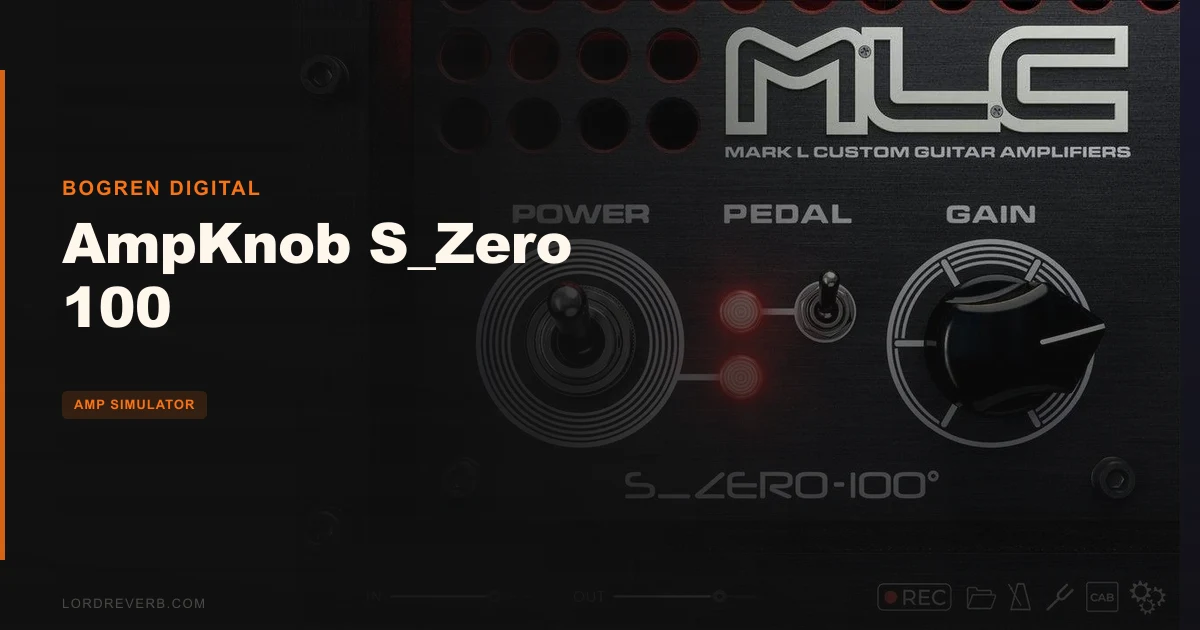
Every guitarist who's ever opened a DAW has hit the same wall: you've got a riff, you need a tone, and suddenly you're thirty minutes deep in amp-sim menus tweaking presence knobs and crossover frequencies when you should be recording. The AmpKnob S_Zero 100 by Bogren Digital exists specifically to kill that loop. It's a boutique three-channel guitar amp plugin built around one knob and one switch, priced at $49, and it earns that simplicity by squeezing a genuinely detailed tube amp character across the entire gain range. If you're a guitarist, home-studio producer, or working engineer who wants plug-in and play amp tone without sacrificing the depth of a real boutique head, this is worth your attention.
The Problem: Too Many Knobs, Not Enough Tone
Most amp simulators sell you options. Eight-band EQ. Three gain stages. Separate presence, resonance, and depth controls. It sounds like value. In practice, it often means you spend more time fighting the plugin than writing music.
The frustration isn't just time. It's decision fatigue. You're staring at a virtual faceplate trying to remember whether you wanted the bright switch on or off, and the riff you had in your head five minutes ago is gone.
Bogren Digital's answer is aggressive minimalism. The S_Zero 100 is based on a physical, hand-built boutique tube amp, the MLC S_Zero 100, and the plugin distills that real instrument into a single Gain knob and a pedal switch. Three channels live across the knob's range. You turn it, the LEDs shift, the character changes. That's the whole interface.
Whether that trade-off works for you depends entirely on what kind of player or producer you are. We'll get to that. But the pain point it targets is real, and Bogren has been direct about it: this is a distraction-free path to boutique tube amp sound, shaped by Jens Bogren's 20+ years in professional production.
How the Gain Knob Actually Works
The single Gain knob isn't just a volume control with ambitions. It gates three genuinely distinct amp voices.
Low Gain settings access Channel 1. Clean through to three-dimensional overdrive. It's where you'd go for open chord work, fingerpicking, or pushing into a light breakup. Owners describe the warm breakup here as satisfying in a way that doesn't feel artificial, more bloom than clip.
Dial into the middle range and Channel 2 opens up. Organic tube crunch is the developer's phrase for it, and based on what owners report, it holds up. This is the range where the amp behaves like something you've put a touch too much signal into. The kind of dirt that still feels musical. Push a chord and the attack cracks; let it decay and the tail cleans itself up.
High Gain takes you to Channel 3. The description is "fire-breathing yet clear," which is developer language, but owners back it up: they report difficulty making it sound bad even at extreme gain settings. Clarity at high gain is genuinely hard to achieve in a tube circuit, physical or virtual, and it's one of the most convincing claims Bogren makes here.
The LED channel indicators give you visual feedback as you cross the thresholds. That's a clever design decision. You're not guessing where one channel ends and another begins.
The Pedal Switch: One Button, Meaningful Difference
The second control is a pedal switch that drops an overdrive pedal in front of the amp signal.
On the clean channel, owners say it adds fatness. Not just level: actual body. If you're tracking rhythm parts that need to sit in a dense mix without getting lost in the low-mids, that's the move. Flick it on, the channel fills out.
On the crunch and high-gain channels, the pedal switch pushes into extra crunch or what owners describe as a modern metal character. If you play heavier material and need that tighter, compressed attack, this is where you get it without touching the gain knob.
It's one switch. But it effectively doubles the tonal range of the plugin. Annoying that there's no more granular control over the pedal's drive level, but what it does is consistent and useful.
IRDX Technology: What It Actually Changes
Standard impulse responses are static. They capture a speaker's linear frequency response at a specific moment and play it back the same way every time. Real speakers don't behave that way. Push a guitar cabinet hard and the cone movement changes, the way frequencies compress shifts, the whole thing becomes non-linear.
Bogren's IRDX technology is built to mimic that non-linear speaker behaviour. The plugin ships with two cabinet IRs, Vintage and Modern. Both are processed through IRDX.
Owners consistently flag this as one of the S_Zero 100's strongest points. The physicality and depth they describe compared to standard IR-based plugins lines up with what IRDX is designed to do. There's a difference between a plugin that sounds like a recorded amp and one that sounds like an amp in the room. IRDX is Bogren's attempt to close that gap.
You can also load your own IRs. Any third-party IR you drop in gets the IRDX treatment automatically. That's a genuinely useful feature if you have a favourite cabinet sound already. It means the two bundled IRs aren't a hard ceiling on your tonal options.
Tube Switching Per Channel: Plugin-Only Feature
Here's something the physical amp can't do. In the plugin, you can switch between 6L6 and EL34 tube types on a per-channel basis.
6L6s run cleaner and fuller in the low end. EL34s push into harmonic saturation faster and have a characteristic midrange bite. Being able to assign different tube types to different channels is the kind of thing that would require physically swapping output tubes on a real amp. In the S_Zero 100, it's a plugin-only toggle.
The tube switching control is accessible per channel within the single-knob framework. But it's there, and it meaningfully expands what you can do within the single-knob framework. Your clean channel can run 6L6 warmth while your high-gain channel runs EL34 aggression.
Standalone Mode: For When the DAW Gets in the Way
The standalone version isn't an afterthought. It ships with a tuner, a metronome, and a riff recorder.
Say you're sitting on the couch with a guitar and an idea hits. You don't want to boot a DAW, create a project, set a buffer, and configure routing just to capture a riff. The standalone handles that. Plug in, hit record, get the idea down.
The tuner and metronome are what you'd expect. Nothing glamorous. But having all three in the same interface as the amp sim means you can practice, record, and stay in tune without switching applications. For home studio players who mostly live inside a DAW but occasionally want something simpler, this adds real-world value.
Strengths and Weaknesses
The S_Zero 100's biggest strength is something most amp sims can't claim: it sounds convincing straight out of the box at every gain level. Owners report genuine difficulty making it sound bad. That's not typical. Most amp sims have a sweet spot and fall apart outside it.
The IRDX-enhanced IRs give the plugin a physical quality that owners notice immediately. The per-channel tube switching is a clever capability. And the simplicity of the interface is something you'll either love or find frustrating, depending on your workflow.
The weaknesses are structural. One knob and one switch means you're locked out of EQ, presence, resonance, bass, and mid controls. If a channel doesn't sit in your mix at the right frequency balance, you're reaching for an EQ plugin on the output. That's not a disaster, but it's a real limit.
Two bundled IRs is thin. Vintage and Modern cover broad territory, but players who want surgical cabinet matching will need to bring their own. The good news is that IRDX works on external IRs, so it's a manageable gap.
And version 1.0.415 means you're early in the product's lifecycle. The independent review base is still small. Stability across sessions is something to watch.
Value for the Price
At $49, the S_Zero 100 sits in a range where it competes with serious tools. The boutique tube amp pedigree, the IRDX technology, the standalone mode, and the per-channel tube switching all justify the ask for players who need a grab-and-go solution that doesn't compromise on tone.
Where it's harder to justify is for producers who need detailed, tweakable amp control. If you regularly dial in amp tone across multiple sessions with different genre requirements, the minimal interface will frustrate you. That frustration is worth more than $49 of your time to factor in before buying.
For its target user, the value is fair. For the wrong user, no price makes minimal controls less minimal.
Who Should (and Shouldn't) Buy This
For the Guitarist Who Just Wants to Play
You have a guitar, an audio interface, and a persistent hatred of menus. You want to record a part and move on. The S_Zero 100 is an easy buy for you. The single-knob design removes every barrier between you and a usable tone, and based on owner reports, the tone you get is genuinely good. For this user type: buy it.
For the Working Producer or Mixing Engineer
You're shaping guitar tones for clients across pop, rock, and metal sessions. You know what frequency range a rhythm guitar should occupy and you want to carve it precisely. The S_Zero 100's minimal controls will feel like a constraint. You'll likely need a parametric EQ on every output to compensate for what the plugin doesn't let you dial in. The sound quality is there, but the workflow friction adds up. For this user type: consider the Bogren Digital Subzero 100, which offers more control. The S_Zero 100 is a wait.
For the Bedroom Producer Getting Started
You've got a guitar and you're building your first home studio. You don't yet know what a presence knob does or why you'd want separate cab and head controls. The S_Zero 100 is a brilliant entry point because it teaches you nothing bad. It sounds good, it's uncomplicated, and it won't punish you for not knowing what EL34 tubes sound like. For this user type: buy it. Learn other amp sims later when you need them.
- ✅ Buy if you want boutique amp tone with no setup overhead
- ✅ Buy if you're new to amp sims and want a trustworthy starting point
- ✅ Buy if you have a favourite IR library and want IRDX processing on top of it
- ❌ Skip if you need surgical EQ control over your amp tone inside the plugin
- ❌ Skip if two bundled cabinets won't cover your genre needs and you don't own external IRs
- ❌ Skip if you're a working engineer who needs to match amp tones precisely across different projects
Specs & Technical Details
| Developer | Bogren Digital |
| Price | $49 |
| Plugin Format | VST3 / AU / AAX / Standalone |
| OS Support | macOS 10.13+ (Intel & Apple Silicon) / Windows 10+ |
| Activation | N/A |
| CPU Usage | N/A |
| Trial Available | N/A |
| Version Reviewed | 1.0.415 |
Score Breakdown
| Category | Score | Notes |
|---|---|---|
| Sound Quality | 4.5/5 | Three distinct channels, convincing tube character, IRDX adds real depth |
| Value for Money | 4.0/5 | Fair at $49 for the right user; wrong for producers needing deep control |
| Ease of Use | 4.5/5 | One knob and one switch is about as simple as it gets |
| Features | 3.5/5 | Per-channel tube switching is clever; only two bundled IRs is thin |
| CPU Efficiency | N/A | No data available |
| Overall | 4.2/5 | A genuinely good-sounding minimal amp sim with a clear, narrow target audience |
Alternatives to Consider
If you want more hands-on control while staying in the Bogren Digital world, the Bogren Digital Subzero 100 is the logical next step. It's built around the same sonic philosophy but gives you more parameters to work with.
The Neural DSP Archetypes series is the most common comparison players make. Owners who've used both report the S_Zero 100 holds its own on tonal quality, which says something. If you want the Neural DSP level of visual interface depth with artist-driven presets, the Archetypes are worth looking at, but the S_Zero 100 reportedly sounds better to ears that have spent time with both.
For broader context on where amp sims sit in 2026, Amp Simulator Plugins Guide: How They Stack Up in 2026 is the place to map your options before committing.
If you're building a full guitar recording chain, you'll also want to look at best IR loaders for guitar plugins to make the most of the S_Zero 100's external IR support.
The Bottom Line
The S_Zero 100 is a love it or leave it kind of plugin, and which side you land on has nothing to do with whether it's good. It's good. It's genuinely hard to make it sound bad, the IRDX technology does something real, and three convincing amp channels across a single knob is a clever, disciplined piece of design.
The question is whether disciplined minimalism fits your actual workflow. If you're the guitarist who wastes thirty minutes tweaking controls when you should be recording, the S_Zero 100 is an honest answer to a genuine problem. If you're the engineer who needs surgical control over amp tone, the minimal interface will feel like a missing tool, not a feature.
The second camp will wish there were at least a three-band EQ hiding somewhere on the panel. There isn't.
The plugin is version 1.0. Watch the update history before committing if long-term stability matters to you. But the foundation sounds like it was built by someone who knows what a boutique tube amp is supposed to do. That's not nothing.
Related reviews: STARK
Frequently Asked Questions
How does the single Gain knob access three channels?
The Gain knob's range is divided into three zones. Low settings access Channel 1 (clean to overdrive), mid settings access Channel 2 (tube crunch), and high settings access Channel 3 (high gain). LED indicators show you which channel is active as you move through the range. There are no separate channel buttons or menu selections.
Can I use my own impulse responses with the AmpKnob S_Zero 100?
Yes. The plugin accepts external IRs and automatically processes them with Bogren's IRDX technology, the same non-linear speaker behaviour simulation used on the two bundled cabinet IRs. This means your favourite third-party cabinet IR gets the same physical depth treatment as the Vintage and Modern cabs that ship with the plugin.
What DAWs are compatible with the AmpKnob S_Zero 100?
The plugin ships in VST3, AU, AAX, and Standalone formats. Confirmed compatible DAWs include Reaper, Logic, Cubase, Pro Tools, Studio One, and Luna. It will also load in any DAW that supports VST3, Audio Units, or AAX third-party plugins.
What is the difference between the AmpKnob S_Zero 100 and the Bogren Digital Subzero 100?
Both are based on the same MLC S_Zero 100 boutique tube amp, but the Subzero 100 offers more hands-on controls compared to the one-knob S_Zero 100. If you want deeper sound customization within the same tonal family, the Subzero 100 is the version to look at. The S_Zero 100 trades control for simplicity.
Does the AmpKnob S_Zero 100 work on Apple Silicon Macs?
Yes. The plugin supports Apple Silicon natively alongside Intel-based Macs. macOS 10.13 or newer is required. Windows users need Windows 10 or newer. Both platforms have access to the full feature set including IRDX processing, the standalone mode, and per-channel tube switching.