Finding textural, atmospheric source material that doesn't sound like every other producer's ambient bed is the specific problem AudioThing's Soundscapes Bundle exists to solve.
You know the situation. You need something underneath a sparse mix. A slow-moving tension layer for a game scene. A concrete, slightly wrong bed for an experimental track. You open your go-to library and everything sounds polished, processed and instantly recognisable. You've heard that particular pad on three Netflix trailers. That ambient drone is on the Splice homepage. Nothing you can actually claim as your own.
The Soundscapes Bundle, two volumes of field-recorded and gear-derived textures at $15, is AudioThing's answer to that problem. It's not a conventional instrument. It doesn't try to be. What it offers is a set of real-world, physically-captured sound sources from Paris, Dublin, Prague, Las Vegas, Naples, Cosenza and London, recorded with everything from large condensers to handmade piezo and inductor microphones, wrapped in Kontakt instruments with a pitch-bend-to-glitch trick baked in.
We'd point this at producers working in ambient, experimental and cinematic spaces, and at game sound designers who need beds that don't sound library-bought. But there are real caveats, and we'll be straight about them.
The Problem This Solves: When Every Texture Sounds Like Someone Else's
The texture problem in modern production is specific. It's not that good atmospheric tools don't exist. It's that the good ones get used by everyone, and the source recordings start sounding familiar fast.
Most commercial texture libraries pull from the same pool of processed room tones, analogue synth drones, and reverb-soaked found sounds. They're well-made. They're also overexposed. When you need something with genuine character, something that sounds like it came from a specific place or a specific piece of hardware, those libraries fall short.
AudioThing's approach here is different. Both volumes of the Soundscapes Bundle are built from recordings that most producers couldn't replicate without significant effort: a Custom Eurorack Modular Synth, a Thingamagoop 2, guitar pedals, water boiling, escalators, fans, fridges, rain, sand, violin and voices (Vol. 1), then handmade piezo and inductor microphones capturing objects and places across five countries (Vol. 2). These aren't reconstructed textures. They're source recordings from the physical world, made with unconventional tools.
That specificity is the bundle's real value proposition. Not the Kontakt packaging, not the effects. The sources themselves.
Vol. 1 also contributed sounds to The Swapper, an award-winning indie game. That's a meaningful data point about real-world use, not marketing.
What You're Actually Getting: The Two Volumes Broken Down
The bundle is two separate instruments bundled together. They share a philosophy but they're not the same product.
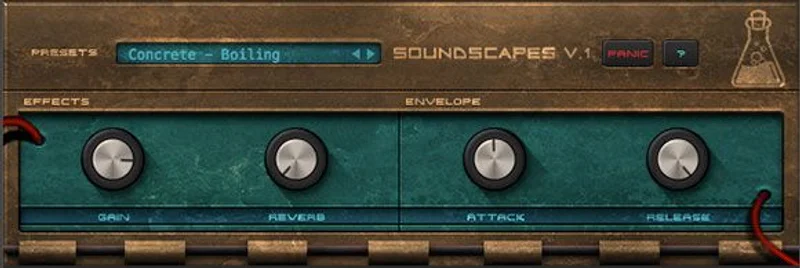
Vol. 1: Concrete and Gear
Vol. 1 contains 30 Kontakt Instruments (.nki) and 10 Kontakt Multis (.nkm), built from 31 samples at 48kHz/24-bit. The total install size is 115 MB. Small, by any standard.
The two categories, concrete and gear, divide the source material cleanly.
Concrete covers real-world field recordings from Paris, Dublin, London and Naples. The developer says these were captured with studio or portable equipment. The sources span water boiling, an escalator, fans, a fridge, rain, sand, violin, voices and mixed environmental sounds. These are not abstract synthesis results. They're things you'd encounter in a building or a street, processed and looped.
Gear covers hardware synthesis sources: a Custom Eurorack Modular Synth, guitar pedals, and a Thingamagoop 2. If you don't know the Thingamagoop, it's a small, open-source noise box that generates light-sensitive oscillator sounds. Not a polished synthesis platform. Very much the right kind of wrong.
All 31 samples are perfect loops. That matters more than it sounds. Perfect looping means you can pull the raw WAV files straight into your DAW without any crossfade engineering, and they'll sit cleanly in a scene without audible join points.
The pitch bend across the whole instrument is mapped to ±24 semitones of transpose. That's two full octaves of movement on a wheel. The developer describes this as useful for glitch effects, and it's a reasonable design choice: radical pitch shifts on granular source material create artefacts that work in industrial and experimental contexts where smooth would actually be wrong.
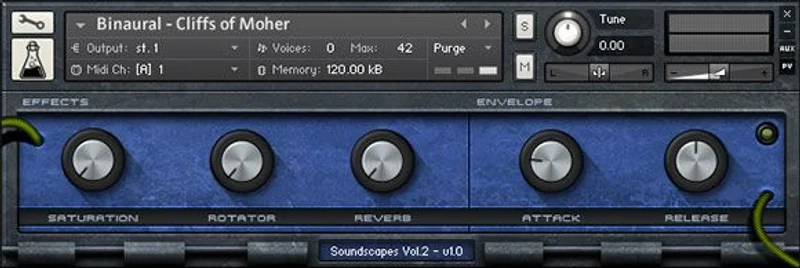
Inside each Kontakt instrument, the interface includes saturation, a rotary/Leslie effect, and reverb. We'll address the quality of those shortly.
Vol. 2: Binaural, Concrete, Inductor and Piezo
Vol. 2 expands the recording geography and the microphone toolkit significantly.
35 Kontakt Instruments (.nki), 35 samples at 48kHz/24-bit, 207 MB total. Slightly larger per-sample than Vol. 1, which suggests more processing headroom in the source files.
The four categories here are binaural, concrete, inductor and piezo. Concrete returns from Vol. 1. The other three are new.
Binaural recordings use a matched microphone set positioned to simulate the spatial separation of human ears. Loaded into a stereo field, binaural sources carry an inherent three-dimensional quality that standard microphone techniques don't replicate. Useful for headphone-first music and game audio where spatial placement matters.
Inductor microphones work by capturing electromagnetic fields from electrical devices rather than acoustic pressure. The developer used handmade versions. What that picks up are the internal electrical signatures of objects: motors, transformers, circuits. Not what you'd hear in the room, but what the object is electrically doing. Genuinely unusual.
Piezo microphones sense vibration directly through contact with a surface, bypassing the air entirely. Again, handmade. Applied to physical objects, they capture resonance and structural sound that a standard condenser in the room would miss or muddy. The developer also used a large condenser for some sources and the binaural set for others.
Recording locations for Vol. 2 span Las Vegas, Dublin, Prague, Naples and Cosenza. Across five cities, across two continents. The source material carries that geographical specificity in its character.
Vol. 2 samples are described as seamless loops. The distinction from Vol. 1's "perfect loops" is minimal in practice, but both are confirmed drag-and-drop ready as WAVs directly into any DAW.
The pitch bend mapping carries over from Vol. 1: ±24 semitones, tuned for glitch and textural shift rather than melodic performance.
How It Performs in a Real Session
Loading It Into Kontakt
You need the full version of Kontakt 4.2.4 or higher. Not Kontakt Player. Not a newer free version. The full paid version. That's the hard requirement, and it's a real filter on who this suits.
The instruments load as standard .nki files. Load one on a track, open the custom performance view, and you're looking at the saturation, rotary and reverb controls alongside your keyboard range.
The pitch bend assignment is fixed at ±24 semitones. You can't reassign it without editing the instrument script. For glitch-style movement, push the wheel hard. For subtle pitch drift, dial in quarter-wheel increments and automate them.
Using the WAV Loops Without Kontakt
This is the more interesting workflow for many producers.
Drag a loop from the bundle directly onto a track in your DAW. It plays. No plugin required. No Kontakt licence check. Because the loops are pre-edited to loop perfectly (Vol. 1) or seamlessly (Vol. 2), you can drop them onto a timeline, set a loop region and they'll cycle without audible joins.
From there, process them yourself. Put your own convolution reverb on them. Run them through a pitch shifter. Feed them into a granular processor. Use them as modulation sources for other instruments. The raw WAV approach hands you the source material with no fixed processing chain, which is actually a better starting point than the Kontakt version's built-in effects if your DAW has decent tools.
Reviewers have specifically flagged this as the preferred workflow for producers who want maximum flexibility. We'd agree with that read.
The Built-In Effects: Honest Assessment
The Kontakt interface gives you saturation, a rotary/Leslie effect, and reverb. Convenient. But reviewers have flagged the quality of the saturation and reverb specifically as weaker than DAW defaults. That's a fair criticism and we'd pass it on.
The rotary effect is the more distinctive option, applying a Leslie-style amplitude and pitch modulation that suits the droning, mechanical character of many of these sources well. Push it on an inductor recording and the result is something between a vintage organ effect and radio interference. Interesting, if narrow in application.
The reverb, by contrast, sounds generic. Your DAW's convolution reverb or an external algorithmic reverb will do a better job of placing these sounds in a convincing space. Skip the built-in reverb. Use your own chain.
The saturation adds harmonic content to otherwise clean source material. But reviewers' concern about its quality is legitimate: it's not a reason to reject the bundle, but it is a reason to treat the Kontakt version as a starting point rather than a finished signal chain.
The Kontakt Compatibility Question
This is the part we're genuinely sceptical about, and you should be too.
The bundle runs as a Kontakt 4 format library. It requires Kontakt 4.2.4 or higher, and it's packaged in the older .nki format. Native Instruments has, historically, maintained backward compatibility through major Kontakt versions. But that's not guaranteed indefinitely.
If NI ever drops Kontakt 4 library support in a future version, these instruments stop working in Kontakt. Not catastrophically, because the WAV files remain fully functional regardless. But you'd lose the custom GUI, the pitch bend mapping, the rotary effect, and the Multis.
For a bundle at $15, that's a manageable risk. If you're paying library prices and building a core workflow around it, the format age matters more. At this price point, the WAV fallback makes the compatibility question feel more like a quirk than a dealbreaker. But you should know it going in.
Check the trial version if one's available before committing. Load a few instruments in your current Kontakt version and make sure they open cleanly before buying.
The Recording Sources Are the Real Story
Let's spend time here, because this is what the bundle actually sells.
Most commercial texture libraries record to conventional studio microphones in controlled environments, then apply heavy processing to create character. The result is technically clean and often creatively inert.
AudioThing's approach for Vol. 2 specifically inverts that. Handmade piezo mics mean someone built the transducers themselves and attached them directly to surfaces in Las Vegas, Prague, Naples, Cosenza and Dublin. What those mics capture isn't the ambient sound of a room. It's the vibrational signature of specific physical objects in specific places.
Inductor mics work differently again. They're essentially coils that pick up magnetic fields. Point one at a CRT monitor, a transformer, a motor, and you hear its electromagnetic output as audio. It sounds industrial, electrical and genuinely strange. Not "processed to sound strange." Actually strange at the point of capture.
Binaural recordings carry spatial information that mono and standard stereo don't encode. Played on headphones, a good binaural recording has depth cues that feel three-dimensional. Useful for game audio in particular, where headphone playback and spatial positioning matter.
The Vol. 1 gear sources are similarly specific. A Eurorack modular synthesizer isn't a VST preset library. It's a physical circuit whose output depends on the patch, the modules, the voltages, the day. A Thingamagoop 2 is a light-controlled oscillator that responds to shadows and hand movement. These aren't recreatable on demand. They were captured in sessions and looped.
That's the honest case for the bundle: not the plugin wrapper, but the source material itself.
Workflow Scenarios: Three Specific Situations
Put a Vol. 2 inductor recording on a new track and route it to a reverb send in your mix. Automate the send level to swell during a bridge. You've just built a tension layer that doesn't share a sample pool with anyone else's music. That's the specific use case this handles well.
Now try this: open a binaural recording from Vol. 2 in a granular processor like your DAW's built-in sampler or a dedicated grain tool. Set a short grain size, around 80 to 120ms, spread the pan position, and automate the position parameter slowly. The binaural spatial information survives light granular processing and creates movement that stereo sources don't generate the same way.
For the concrete sources in Vol. 1, try layering the rain or fan loops underneath a sparse piano arrangement. Drop the level to around 20 to 25dB below the piano, high-pass everything below 400Hz to clear headroom, and let the texture sit in the upper midrange as presence without occupying the low end. That's a frustratingly simple technique that works because these loops don't have strong tonal centres competing with your harmonic content.
Strengths and Weaknesses in Detail
What Works
The dual-format delivery is genuinely clever as a design decision. The developer anticipated the Kontakt compatibility concern before it existed as a public worry, and gave every buyer a format-agnostic alternative. Every sample in both volumes is a usable WAV loop regardless of what happens to Kontakt's backward compatibility policy.
The recording geography matters. Five countries, two continents, unconventional microphone types. These sources carry genuine character at the capture stage, not as a post-processing affectation.
The price at $15 for both volumes is hard to argue with. The raw sample counts are modest (31 in Vol. 1, 35 in Vol. 2), but the diversity of the sources and the loopability of every file mean the utility per-file is high.
The Multis in Vol. 1 (10 .nkm files) are worth exploring. Kontakt Multis let you layer multiple instruments across a single performance interface. For textural layering, having pre-built combinations that the developer designed is a faster starting point than building your own stack from scratch.
The ±24 semitone pitch bend range is underrated as a creative tool. Most producers use pitch bend for subtle vibrato, a few semitones up or down. Mapped to ±24 semitones, a hard push becomes a two-octave pitch dive applied to granular source material. That creates artefacts. Those artefacts are interesting.
What Doesn't
31 samples in Vol. 1 is a small pool. If you're buying this expecting depth of choice, you'll be frustrated. These volumes offer diversity, not density. You're getting 66 total source files across both volumes. That's not a lot.
The built-in effects are the weakest part. The reverb in particular is not competitive with what your DAW already offers. Annoying, because a better reverb algorithm in the Kontakt wrapper would make the instruments more immediately usable without reaching for external tools.
The Kontakt 4 format age is a real, if managed, concern. It's not a problem today. It's a flag for tomorrow.
No quantified CPU or latency data has been published. For a simple sample player of this size, heavy load seems unlikely. But "seems unlikely" isn't a spec, and we wouldn't stake a dense session on an assumption.
Value for the Price
At $15 for two volumes, this is a price point that removes almost all buyer's risk.
The bundle was previously available at an even lower price when bundled with NI Freak, which establishes a floor for what AudioThing considers a promotional value. The current standalone price still reflects a clear emphasis on accessibility over margin.
For game sound designers, the value case is direct: field-recorded sources with genuine geographical and technical diversity, loopable WAVs that work without any plugin installed. That's usable in game audio middleware regardless of your DAW or plugin compatibility.
For producers, the value case is also strong but narrower. You need to work in ambient, experimental, cinematic or industrial spaces for these textures to earn their place in your sessions. If your output is contemporary pop or hip-hop, the use cases are fewer, though not zero.
We'd buy this. Clearly.
Who Should (and Shouldn't) Buy This
- ✅ Buy if you work in ambient, cinematic or experimental production and need textural sources that don't sound library-bought.
- ✅ Buy if you're a game sound designer who needs licensable, loopable WAV beds with genuine character at a low price.
- ✅ Buy if you already own full Kontakt and want to expand your instrument palette without spending significant money.
- ❌ Skip if you only have Kontakt Player. The instruments won't open. Full Kontakt is a hard requirement.
- ❌ Skip if you need a high-density library with hundreds of sources. This is 66 samples across two volumes. That's intentionally curated, not comprehensive.
- ❌ Skip if contemporary pop or hip-hop is your primary output and you have no current need for atmospheric texture work. The sounds are too specific to be general-purpose.
Specs & Technical Details
| Developer | AudioThing |
| Price | $15 |
| Plugin Format | Kontakt (.nki / .nkm) and WAV (loops) |
| OS Support | Mac / Windows (via Kontakt) |
| Activation | Full Kontakt 4.2.4 or higher required; WAV files require no activation |
| CPU Usage | N/A (not published) |
| Trial Available | N/A |
| Version Reviewed | Bundle (Vol. 1 + Vol. 2) |
| Vol. 1 Instruments | 30 .nki, 10 .nkm, 31 samples, 115 MB |
| Vol. 2 Instruments | 35 .nki, 35 samples, 207 MB |
| Sample Rate / Bit Depth | 48 kHz / 24-bit (both volumes) |
| Pitch Bend Range | ±24 semitones |
| Loop Format | Perfect loops (Vol. 1), Seamless loops (Vol. 2) |
Score Breakdown
| Category | Score | Notes |
|---|---|---|
| Sound Quality | 4.0/5 | 48kHz/24-bit sources with genuine capture diversity; built-in effects pull the score down |
| Value for Money | 5.0/5 | Hard to find fault at this price for two complete volumes |
| Ease of Use | 3.5/5 | Kontakt-only for full instrument access; WAV workflow is trivially simple |
| Features | 3.5/5 | Pitch bend glitch and rotary are clever; reverb and saturation are weak links |
| CPU Efficiency | 4.0/5 | No published figures, but a 322 MB sample player isn't a heavy load by any reasonable expectation |
| Overall | 4.0/5 | Underrated atmospheric bundle with sources worth having and a WAV fallback that future-proofs the investment |
Alternatives to Consider
Comparing the Soundscapes Bundle to the wider atmospheric library category honestly, two products sit in the adjacent space.
AudioThing SX1000 review is worth reading if you're already in the AudioThing ecosystem. Different product category, but it shows AudioThing's approach to hardware emulation alongside their field recording work. Knowing both helps you understand where the Soundscapes Bundle sits in their catalogue.
Spitfire Audio's LABS range offers free atmospheric instruments built from high-quality recordings, with a polished Kontakt-adjacent player (their own free LABS plugin). The sources skew more toward conventional orchestral and acoustic spaces. For organic, warm atmospheric beds, LABS is the comparison point. It's free. The Soundscapes Bundle is not, but its sources are far more unconventional.
Output's Exhale targets vocal textures and atmospheric beds specifically, with a more fully-featured performance engine, more modulation options, and considerably more source material. It also costs significantly more. If you need depth of content and a polished real-time performance interface, Exhale is the upgrade path. If you need affordable, specific and format-flexible, the Soundscapes Bundle is the smarter buy.
| Product | Strongest Point | Weakest Point | Best For |
|---|---|---|---|
| AudioThing Soundscapes Bundle | Genuinely unusual recording sources; dual-format WAV fallback | Small sample count; Kontakt 4 format age | Producers and game designers wanting affordable, unique textures |
| Spitfire LABS (Atmospheric instruments) | Free; polished player; high recording quality | Sources lean conventional; less industrial/experimental character | Producers wanting quality organic beds at zero cost |
| Output Exhale | Deep content library; full performance engine; extensive modulation | Significantly higher price; more complex learning curve | Producers who need atmospheric depth as a core tool, not an addition |
best Kontakt libraries for ambient production
field recording in music production: a producer's guide
AudioThing SX1000 review
Our Verdict
The Soundscapes Bundle is an underrated piece of source material dressed up as a plugin.
The Kontakt instruments are functional, the built-in effects are average, and the sample counts are modest. None of that is the point. The point is that handmade piezo mics in Cosenza and Las Vegas captured sounds you cannot find anywhere else, looped cleanly at 48kHz/24-bit, and delivered in a format that works in any DAW with or without Kontakt.
Vol. 1 contributed sounds to an award-winning indie game. That's the honest measure of what this material can do in the right hands.
At $15, the question isn't whether the Soundscapes Bundle is worth it. It clearly is. The question is whether your production practice has a use for genuinely unusual atmospheric source material. If the answer is yes, buy it. Skip the built-in reverb. Use your own convolution. Pull the WAVs straight into your granular processor and start there.
If you only work in conventional harmonic music with no ambient or textural layer in your signal chain, this is the wrong tool. But you probably already knew that before this sentence.
Related reviews: Future-Vocal Bundle
Frequently Asked Questions
Does the Soundscapes Bundle work with the free Kontakt Player?
No. This is a hard requirement: you need the full version of Native Instruments Kontakt 4.2.4 or higher. Kontakt Player won't open the .nki instruments. If you don't have full Kontakt, the WAV loops still work: drag them directly into your DAW and they'll play and loop without any plugin at all.
Can I use the Soundscapes Bundle without Kontakt at all?
Yes. Both volumes include WAV format loops alongside the Kontakt instruments. Vol. 1's loops are described as perfect loops, and Vol. 2's are seamless loops. Both are designed to be dropped directly onto a DAW timeline and looped without audible joins. You lose the pitch bend assignment, the rotary effect and the Kontakt GUI, but you keep the source material.
What's the difference between Vol. 1 and Vol. 2?
Vol. 1 covers two categories: concrete (European field recordings from Paris, Dublin, London and Naples) and gear (hardware synthesis sources including Eurorack modular, guitar pedals and a Thingamagoop 2). Vol. 2 adds three new categories: binaural recordings, inductor microphone captures, and piezo microphone captures, while also including a concrete category. Vol. 2 was recorded across five cities on two continents using more exotic microphone types, including handmade piezo and inductor mics alongside a large condenser and binaural set.
What is a piezo or inductor microphone, and why does it matter?
A piezo microphone captures vibration through direct contact with a surface, not through air. It hears the structural resonance of an object rather than the ambient sound around it. An inductor microphone captures electromagnetic fields, picking up the electrical signature of motors, transformers and circuits rather than acoustic pressure. Both capture sounds that a standard condenser microphone in the room would miss, which is why these sources sound different from conventional library recordings.
Should I use the built-in Kontakt effects or process the sounds externally?
Process externally. The rotary/Leslie effect in the Kontakt interface is the most useful built-in option. The reverb and saturation have been flagged by reviewers as weaker than DAW defaults, and that's a fair assessment. Your DAW's convolution reverb will place these sounds more convincingly than the built-in option. Treat the Kontakt wrapper as a convenient playback and pitch-bend interface, not as your effects chain.
Is the Soundscapes Bundle a good fit for game audio work?
Yes, strongly. The WAV loop format means the files work in game audio middleware without any plugin dependency. The source material, particularly the binaural recordings from Vol. 2, carries spatial information that suits headphone-first game audio where three-dimensional placement matters. The bundle's contribution to the award-winning indie game The Swapper is a real-world example of what this material can do in a game context.