Is the Future-Vocal Bundle worth $218 when VocalSynth 2 is no longer the newest version of itself? For most vocal-hungry producers, yes, because you’re really buying EXHALE and getting a proven vocal-effects suite alongside it.
That’s the doubt worth naming up front. A bundle of two older products can easily be one good plugin and one leftover. Here, they cover different jobs: one gives you a modern, playable vocal instrument, the other turns any audio into robot, choir or talkbox textures.
This is a source-based review, not a hands-on one. It’s built from the Plugin Boutique product page, the developers’ published feature lists and system requirements, and general production knowledge. No free trial of the bundle is mentioned in the material reviewed, and anything we can’t verify is marked as such.
Who’s it for? Pop, EDM, hip-hop and film producers who want vocal layers without hiring a singer, and who also want to wreck a vocal on purpose.
If you only need one of those two jobs, read the “Skip if” list near the end first.
What Is in the Future-Vocal Bundle?
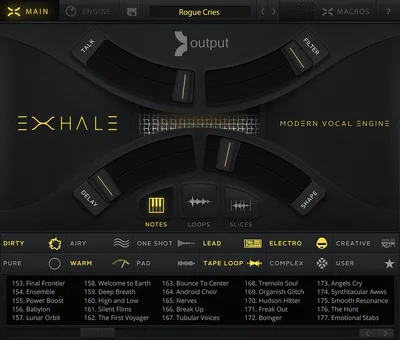
The bundle pairs two products from two companies. Output’s EXHALE is a Kontakt instrument for modern vocal arrangements. iZotope’s VocalSynth 2 is a vocal-processing plugin with five core modules.
Plugin Boutique describes it as exclusive to them and available for a limited time. That “limited time” wording is the retailer’s, and we can’t tell you when it ends.
The pairing makes sense on paper. EXHALE supplies the raw vocal material. VocalSynth 2 shapes, wrecks or doubles whatever audio you feed it, including EXHALE’s own output.
That’s a signal chain you can build inside one session. Play a chord in EXHALE, bus it to a VocalSynth 2 instance, push the Vocoder or Talkbox, and bounce.
Does It Actually Deliver on the Pitch?
The pitch is two-sided. EXHALE promises vocals that sound like today’s records, not a decade ago. VocalSynth 2 promises “past, present, and future vocal sounds” in a single plugin.
We can’t audition either from here, so treat what follows as an assessment of the documented design.
The design logic holds up. A playable instrument and a processor are the two halves of most modern vocal production.
Output’s own account of EXHALE’s origin is a good sign. The team says it talked to music makers and found the top frustration was that vocal instruments weren’t modern. That’s a specific problem statement, not a vague “better quality” claim.
iZotope’s claim is broader and harder to test in a review. “Hundreds of presets” is a quantity, not a quality. What matters is how many of them survive contact with your own vocal.
EXHALE: How It Was Built
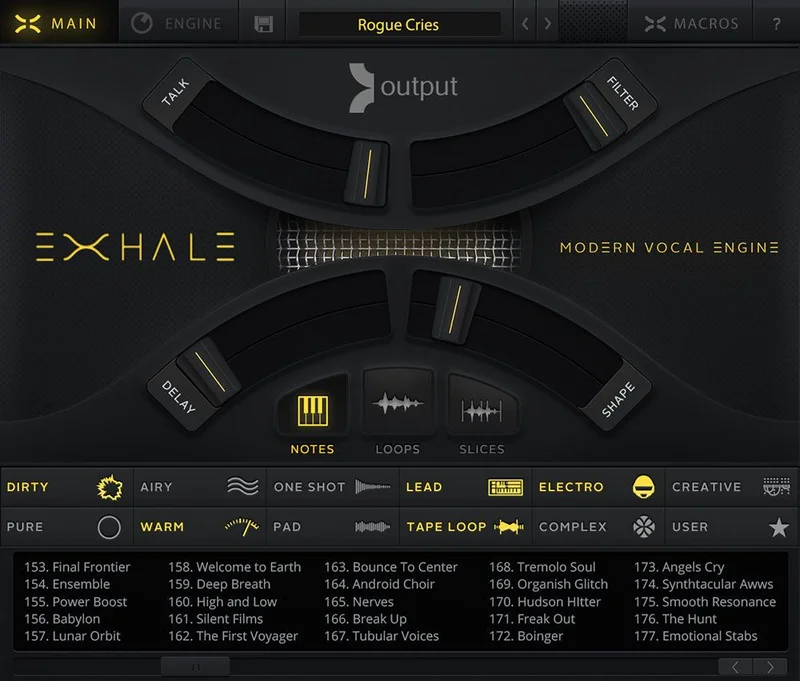
Output says EXHALE was recorded with top producers working with real singers, plus a choir. The page states explicitly that these were not session musicians. We can’t verify who the singers are, and the page doesn’t name them.
Then comes the sound design. Output says 25 sound designers spent 6 months tweaking the sounds. Those are the developer’s numbers, not ours.
The processing chain is described as “endless analog and vintage gear, tape machines, vocoders and more.” That’s marketing-flavoured, but the direction is clear: sung source material, then heavy manipulation.
We like that approach in principle. Pure choir libraries tend to sound like the 2010s film-score template. A library that starts from singers and then abuses them with tape and vocoders is aiming at a different target.
The caveat is obvious. A six-month tweaking figure tells you effort, not taste. Only your ears on the presets can settle that.
The EXHALE Engine
Output says the engine was built from the ground up, with industry-leading modulation, tempo-synced FX and pitch shifting. “Industry-leading” is their phrase, and we’d file it under unverified.
What matters practically is that these are built into the instrument. You don’t need to load a separate delay or pitch plugin to make a sustained vocal pad move with the tempo.
Tempo-synced FX matter more for vocals than for most instruments. A held vocal chord with a rhythmic gate or a synced delay turns a pad into a groove element.
Output also stresses “an immense focus on musicality.” That’s vague on its own. The useful reading is that the library is designed to be played as notes and chords, not as a sample dump you have to repitch by hand.
We’d test one thing first on a real install: how it behaves when you play fast, staccato phrases. Vocal instruments often smear on short notes.
Real Singers, Not a Synth Choir
The “real singers” claim is the whole point of EXHALE. A synthetic vocal pad has a certain glassy evenness. A sung source has breath, vowel shifts and tiny pitch drift.
Output pitches the result as the feeling of “a real singer or choir right in the room with you.” That’s a strong claim from the product page. Hold it loosely until you’ve heard the presets in your own mix.
Who Needs a Modern Vocal Engine?
Think of the producer who keeps reaching for a stock “Choir Ah” patch and hating it. EXHALE is aimed squarely at that frustration.
If your music is bedroom pop, trap melodies, ambient scoring or cinematic trailers, a sung, heavily processed vocal pad is a useful texture to own.
EXHALE: Requirements and Setup
EXHALE runs in Kontakt or the free Kontakt Player, version 5.3.1 or higher. The product page states plainly that it’s compatible with the free Player. That removes a common hidden cost with Kontakt libraries.
It needs at least 4 GB of RAM, with 8 GB recommended. It also needs 9.2 GB of free drive space.
Operating system requirements are Mac OS X 10.7 or later and Windows 7 or later. Those are the page’s stated minimums and read as dated. We’d check current macOS and Windows 11 compatibility with Output before buying.
Delivery is digital, and the page says you need a stable internet connection for download and activation.
- Buy through Plugin Boutique and download the installer files.
- Install EXHALE and point Kontakt or Kontakt Player at the library.
- Activate with a stable internet connection.
- Load EXHALE in your DAW's Kontakt instance and start with a preset.
That’s the generic flow. We haven’t walked it ourselves, so expect minor differences in the actual installer.
VocalSynth 2: The Five Modules
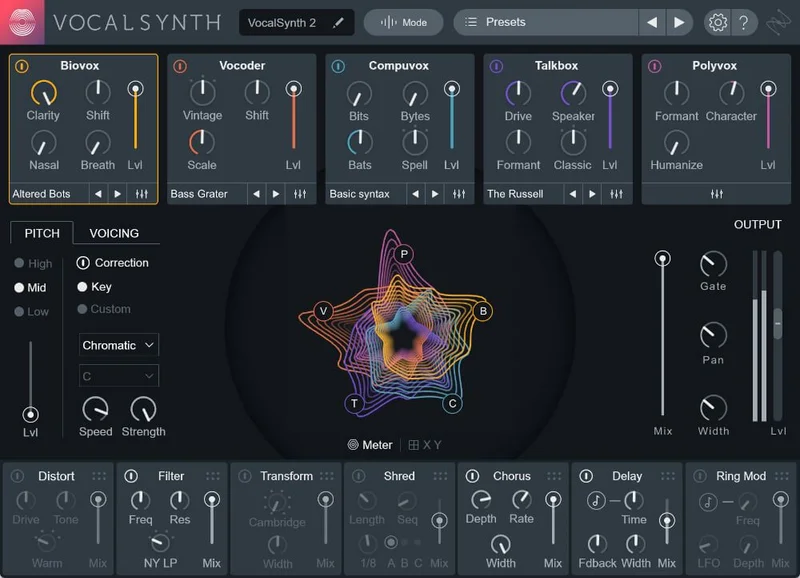
VocalSynth 2 is built around five blendable vocal tools. Plugin Boutique’s copy and iZotope’s feature list name them: Vocoder, Compuvox, Polyvox, Talkbox and Biovox.
The idea is to layer them. You aren’t choosing one effect. You mix several against each other and against your dry signal.
That’s where VocalSynth earns its reputation, and we like the design. A single vocoder is a one-trick sound. Five modules blended together give you a lot of surface area for experimenting.
iZotope says it rebuilt VocalSynth for version 2 to get a better sound, faster. They name specific changes: an expanded Vocoder, more power in Shred, optimised CPU use, more control per module and new presets. Those are the developer’s claims.
Vocoder
The Vocoder is the classic. It imposes the spectral shape of your voice onto a synth-like carrier.
iZotope says it expanded this module for a “more faithful sound.” We can’t judge fidelity from a product page. What we’d check on install is how intelligible consonants stay when you push the effect.
Talkbox
The Talkbox module models the old hardware effect, where a synth is funnelled through a mouth. It’s a staple of funk, electro and a lot of modern pop hooks.
Since you’re playing it by MIDI or by following the input, the result depends heavily on your source. Clear, mid-forward vocals tend to work best.
Polyvox and Compuvox
Polyvox is the harmony and layering voice. Compuvox is the robotic, digital voice. Both sit in the playground of heavily stylised vocals.
iZotope says these modules, along with Vocoder and Talkbox, received improvements to usability, CPU use and sound quality. Again, developer wording.
Biovox
Biovox is the genuinely new idea in version 2. iZotope says it uses scientific modelling of a human vocal tract. You adjust nasality, vowel shapes and formants.
Formant control is powerful. Shifting formants without shifting pitch can turn a voice into a different person, or into something not quite human.
We’re curious about this one and sceptical in equal measure. Formant tools can sound artificial at extremes. The useful range is probably the middle.
Effects and Modulation in VocalSynth 2
VocalSynth 2 includes seven stompbox-style effects that you can drag to re-order. iZotope names them: Shred (with sequencer), Distort, Filter, Transform, Delay, plus two new pedal-style effects, Chorus and Ring Mod with a unique tremolo effect.
Re-orderable effects matter. A distortion before a delay sounds very different to a delay before a distortion. Being able to drag them around is a creative control, not a convenience.
The improved Shred includes a sequencer. Rhythmic effect patterns on vocals are a hallmark of modern EDM and bass music. That’s a feature we’d expect to use a lot.
iZotope also adds advanced synthesiser controls to each module. The page doesn’t list every parameter, so we won’t guess at them.
The interface is described as new and modern, with an evolving visualisation. The visuals need a graphics card with OpenGL 2.0 support, per the system requirements.
Three Ways to Play VocalSynth 2
VocalSynth 2 offers Auto Mode, MIDI Mode and Sidechain Mode. That flexibility is one of its stronger design choices.
Auto Mode is the quick option. The plugin tracks your vocal and handles pitch on its own. It’s the fastest route to a usable sound.
MIDI Mode lets you play the effect from a keyboard or clip. This is where you write harmonies and robotic melodies. You’ll want it if you hear your effect as an instrument.
Sidechain Mode lets another track drive the effect. That opens up classic tricks, like a synth feeding the carrier while your vocal supplies the shape.
We’d tell most people to start in Auto Mode for speed, then move to MIDI Mode once they want precise harmonies.
Presets: The Fast Route
iZotope says VocalSynth 2 ships with brand-new presets designed to show off everything it can do. The page elsewhere mentions “hundreds of presets.”
Presets are the right entry point. The learning curve of five modules plus seven effects is real, and a good preset teaches you the routing.
EXHALE is also preset-driven in spirit. Output positions it as an engine for composers, producers and artists who want a cutting-edge sound quickly.
One practical suggestion: build a short template. EXHALE for the playable layer, VocalSynth 2 on a bus for the effect layer. Save it and reuse it.
DAW Compatibility and Inter-Plugin Features
This is where the bundle shows its age. VocalSynth 2’s listed formats include AudioUnit, AAX (64-bit), AAX-AS, RTAS, DPM, VST 2 and VST 3. RTAS and DPM are legacy formats from the 32-bit era.
The supported host list names Logic Pro X, Ableton Live 9 to 10, Pro Tools 10 to 2018, Cubase 9.5, FL Studio 12, Studio One 3 to 5, Reason 10, Reaper 5 and Bitwig Studio 2. That’s the documented list, and it’s old.
Operating systems are listed as macOS up to 10.15 and Windows 7 to Windows 10. We can’t confirm support on newer systems from this material.
Don’t read that as “it won’t work.” Plenty of older plugins run fine on newer systems. But it’s a real unverified area, and you should check iZotope’s current compatibility notes before buying.
On the bright side, iZotope lists inter-plugin communication. You can use VocalSynth 2 within Neutron 2’s Visual Mixer and Masking Meter, and with Tonal Balance Control. If you already own those, that’s a bonus.
CPU Performance: What We Can and Can't Say
We have no CPU benchmarks of our own, and we won’t invent any. That’s a gap we’d flag for every review of this bundle.
What the developers say: iZotope states that VocalSynth 2 optimises CPU use and improves CPU utilisation in several modules. Output doesn’t publish a CPU figure for EXHALE on the page.
The reasoning is simple. A multi-module effect with visualisations will cost more than a single EQ. A sample-based Kontakt instrument with synced FX and modulation will cost RAM and some CPU.
Our advice is practical. Freeze or bounce your vocal layers once you’re happy. That’s standard practice with any heavy vocal chain.
If you work on a modest laptop, the 8 GB RAM recommendation for EXHALE is the number to watch. Four gigabytes is the floor, and Kontakt libraries tend to be happier with headroom.
Specs and Requirements
| Spec | Detail |
|---|---|
| Developer | Exclusive Bundles+ (bundle); Output (EXHALE); iZotope (VocalSynth 2) |
| Price | $218 |
| Plugin Format | EXHALE: Kontakt / Kontakt Player 5.3.1+. VocalSynth 2: VST 2, VST 3, AU, AAX (listed formats also include legacy RTAS and DPM) |
| OS Support | Mac / Windows (documented: macOS up to 10.15, Windows 7 to 10; newer systems not confirmed in source) |
| Activation | Internet connection required for digital delivery and EXHALE activation |
| CPU Usage | N/A (no figure published; EXHALE needs 4 GB RAM minimum, 8 GB recommended) |
| Trial Available | No trial of the bundle mentioned; iZotope offers a VocalSynth 2 demo separately |
| Version Reviewed | EXHALE (Kontakt 5.3.1+); VocalSynth 2 (as listed on product page) |
Where the Future-Vocal Bundle Wins
The first win is coverage. You get a sung, playable vocal source and a deep vocal processor in one purchase. Most vocal bundles give you only one of those.
The second is the free Kontakt Player compatibility. A lot of Kontakt libraries quietly require the full paid Kontakt. EXHALE doesn’t, per the product page.
The third is VocalSynth 2’s layering design. Five modules, seven re-orderable effects and three play modes give you a wide palette without extra plugins.
The fourth is the preset content. Both products lean on presets to get you somewhere useful fast. For producers who’d rather write than tweak, that’s the right priority.
Where It Falls Short
The real limits first. VocalSynth 2 has a newer successor, so you’re buying a previous generation of that product. If you want the latest iZotope vocal engine, this isn’t it.
Compatibility documentation is dated. The listed hosts and operating systems stop around 2019 to 2020. That doesn’t prove a problem, but it’s annoying and it’s a due-diligence task for you.
EXHALE needs 9.2 GB of free drive space and an internet connection for activation. That’s a real cost for producers on small SSDs or offline studios.
There’s no CPU data. We can’t tell you how either product behaves in a dense session.
Unverified: the exact preset counts for EXHALE, whether the “limited time” bundle pricing has a specific end date, and how both behave on current operating systems.
Who should look elsewhere? Anyone who only wants vocal tuning or pitch correction. Neither product is a tuner. This bundle is for sound design and arrangement, not for fixing a lead vocal.
How the Future-Vocal Bundle Compares
The closest rival for the effects half is iZotope’s own newer VocalSynth, which supersedes this version. If you want the current iZotope engine, buy that instead of this bundle.
For the instrument half, Spitfire Audio’s and similar choir libraries lean traditional and orchestral. EXHALE is aiming at modern production, so it’s a different target.
Another alternative for vocal effects is Waves’ Morphoder or Antares’ vocoder-style tools. They cover narrower ground than VocalSynth’s five-module layout.
For pure sample content, preset-style vocal sample bundles from other publishers cost much less. They give you audio loops, not a playable instrument. That’s a real difference in what you can do with them.
We’d be honest here: the bundle isn’t first in its category. Its value is the pairing, not any single unique feature.
Pricing and Value
The bundle costs $218. Plugin Boutique sells it as an exclusive for a limited time.
The value case rests on buying two full products at once. You’d normally buy EXHALE and VocalSynth 2 separately, and the bundle collapses that into one checkout.
The counter-argument is that cheaper preset-style vocal bundles exist. Those give you audio files rather than a playable instrument and a processing suite.
If you’d use both halves, the price is defensible. If you’d use only one, you’re paying for a second product you’ll rarely open.
Who Should Buy This
- ✅ Buy if you write pop, EDM, trap or cinematic music and want a playable, modern vocal instrument.
- ✅ Buy if you want one plugin to turn vocals into robots, talkboxes and choirs.
- ✅ Buy if you'd rather start from presets than build every patch from scratch.
- ✅ Buy if you don't own full Kontakt and want a library that runs in the free Player.
- ❌ Skip if you only need vocal tuning or clean lead-vocal correction.
- ❌ Skip if you want the newest iZotope vocal engine rather than version 2.
- ❌ Skip if you're short on drive space or can't activate online.
Score Breakdown
These scores are based on the documented feature set and the developers’ published figures, and we’ll revisit them after longer hands-on use.
| Category | Score | Notes |
|---|---|---|
| Sound Quality | 4.3/5 | Real-singer source plus five vocal modules; unverified until auditioned |
| Value for Money | 4.0/5 | Two products in one; older versions limit the upside |
| Ease of Use | 4.5/5 | Preset-led design and three play modes get you moving fast |
| Features | 4.5/5 | Biovox, seven re-orderable effects, Kontakt engine with synced FX |
| CPU Efficiency | 3.5/5 | No published figures; heavy chains and 9.2 GB library likely demand headroom |
| Overall | 4.2/5 | A strong pairing held back by dated compatibility notes and a superseded VocalSynth |
Alternatives to Consider
best vocal plugins for producers
If you mainly want vocal effects, the newest iZotope vocal engine is the obvious step up. It addresses the version-age problem head-on.
best vocoder plugins
If a vocoder is the main draw, a dedicated vocoder plugin covers narrower ground for less money.
best Kontakt libraries
If you want a playable vocal instrument only, other Kontakt vocal libraries target the choir and ensemble side of the category.
vocal processing guide
If you’re unsure what you need, read a general vocal-processing guide first. It helps you decide whether you want an instrument, an effect, or both.
The Verdict on the Future-Vocal Bundle
We’d buy this bundle if we wrote vocal-heavy pop or electronic music and didn’t already own either half. The pairing is sensible, the Kontakt Player support removes a hidden cost, and VocalSynth 2’s layering gives you endless ways to abuse a voice.
It’s the wrong buy if you want vocal tuning, the newest iZotope engine, or a low-disk-space setup.
Before you pay $218, check that your DAW and operating system are supported, and confirm you have 9.2 GB free. Those two checks save the most regret.
A vocal bundle earns its place when you stop hunting for presets and start playing it.
Related reviews: Does This Designer Bundle Review Change How You Buy Sounds?
Frequently Asked Questions
Is the Future-Vocal Bundle worth it?
It's worth it if you'll use both halves. EXHALE gives you a playable, sung vocal instrument, and VocalSynth 2 gives you a five-module vocal effects suite. If you only need one, buy that product alone.
What's included in the Future-Vocal Bundle?
The bundle includes Output's EXHALE, a Kontakt vocal instrument, and iZotope's VocalSynth 2, a vocal effects plugin. Plugin Boutique sells it as an exclusive for a limited time. The product page doesn't list any other software.
Do I need the full version of Kontakt to run EXHALE?
No. The product page says EXHALE is compatible with the free Kontakt Player, version 5.3.1 or higher. You'll need at least 4 GB of RAM (8 GB recommended) and 9.2 GB of free drive space.
What are the five modules in VocalSynth 2?
iZotope lists Vocoder, Compuvox, Polyvox, Talkbox and Biovox. Biovox is new in version 2 and models a human vocal tract, with controls for nasality, vowel shapes and formants. You can blend the modules together.
Does VocalSynth 2 work as a tuner or pitch corrector?
No. VocalSynth 2 is a creative effect for vocoding, talkbox sounds, harmonies and distortion. It isn't designed to correct pitch on a lead vocal. Use a dedicated tuning plugin for that.
Which DAWs does VocalSynth 2 support?
The documented host list includes Logic Pro X, Ableton Live 9 to 10, Pro Tools 10 to 2018, Cubase 9.5, FL Studio 12, Studio One 3 to 5, Reason 10, Reaper 5 and Bitwig Studio 2. Formats include VST 2, VST 3, AU and AAX. Check iZotope for current support.
Will it run on current macOS and Windows?
We can't confirm that from the source material. The documented system requirements list macOS up to 10.15 and Windows 7 to 10. Check iZotope and Output's support pages before buying if you run a newer system.