
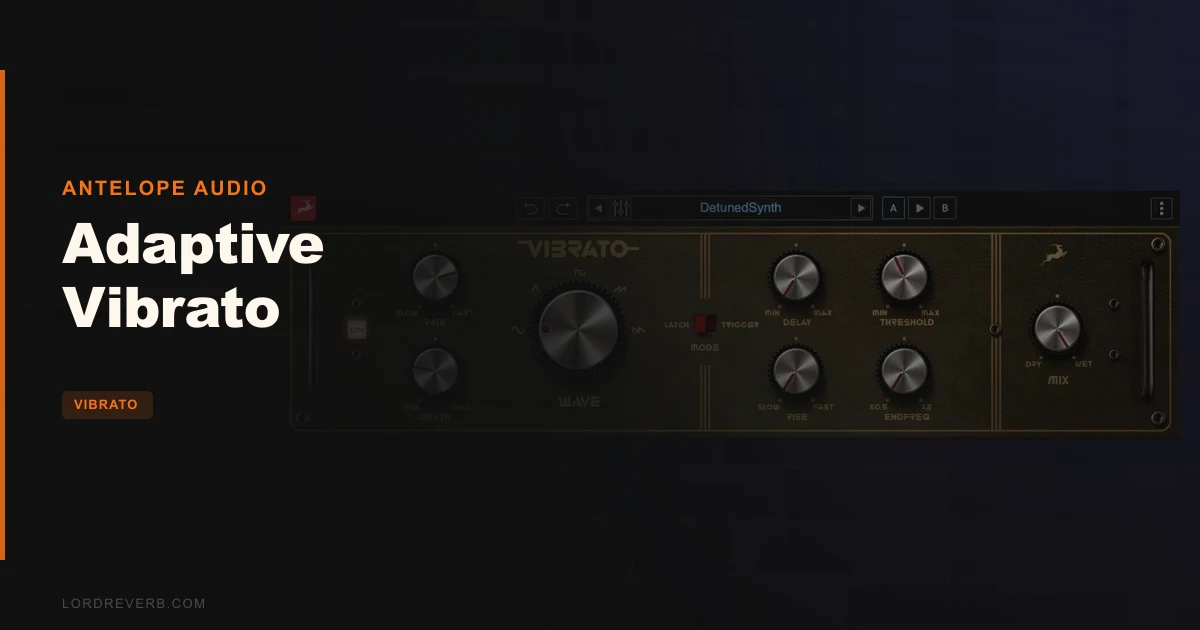
Is Adaptive Vibrato worth $129 for adding movement to guitars and synths? It depends. It's a great fit if you already live in Antelope's world or want trigger-based vibrato control, and a harder sell if you just need a wobble on a lead line.
The control set is deeper than most vibrato plugins. The evidence behind it is thinner than we'd like.
How This Review Was Made
This is a source-based review, not a hands-on one. It draws on the product page, the developer's own description and the documented feature set.
Anything that can't be verified yet is marked as such. That includes CPU load, latency figures and how it behaves on dense material.
We'd rather tell you what's unknown than invent a result.
What Adaptive Vibrato Is
Adaptive Vibrato is Antelope Audio's take on one of the earliest guitar effects. It's built for guitars, synths and bass.
The developer describes it as combining the best features from vintage and modern vibrato units. Antelope says it examined several tried-and-true circuits and folded those impressions into one virtual unit.
It ships in two forms. The native plugin runs on Mac or PC with no extra hardware. The Synergy Core Real-Time version runs with no perceptible latency on compatible Synergy Core devices, per Antelope.
It's also part of the Antelope subscription bundle, which gives it a different buying logic than a standalone plugin.
Who Actually Needs This?
Picture a guitarist tracking a slow, emotional solo. Straight notes sound flat. A touch of pitch wobble that blooms after a beat sounds human.
That's the job here. Vibrato is a shimmer, not a space. Antelope's own pitch is that a good vibrato is comparable to a great reverb, without the room.
Synth players have a similar problem. A static pad needs movement, and vibrato gives it motion without chorus-style thickening.
If you only ever reach for tremolo or chorus, you may not miss this. If you want precise control over how modulation arrives and leaves, keep reading.
What Is the Difference Between Vibrato and Tremolo?
This confuses people, and the product page muddies it too. Tremolo varies amplitude. Vibrato varies pitch.
The Antelope description says vibrato "essentially simulates a tremolo" through amplitude variation of the input signal. That's the historical muddle in guitar-amp marketing, not a clean technical definition.
The Fender Vibrolux, which the page cites for cementing the term in 1956, is the classic example. Fender's "vibrato" channel on many amps was amplitude modulation. Real pitch vibrato is a different animal.
We can't verify from the source whether Adaptive Vibrato modulates pitch, amplitude or both. The documentation we reviewed doesn't specify. Check that before you buy, because it changes what the plugin does to a vocal or a synth lead.
The Five Waveforms
This is the headline feature. Adaptive Vibrato offers five modulation shapes: sine, triangle, square, sawtooth right and sawtooth left.
Sine and triangle
Sine is the smooth, expected choice. Triangle is a little more linear, with a sharper turnaround at the peaks.
For natural-sounding guitar vibrato, these two are where you'll live.
Square
A square wave jumps between two states instead of gliding. That produces a stepped, trill-like effect.
It's the least musical choice for conventional vibrato. It's also the one that makes this plugin useful for sound design.
Sawtooth right and left
Two sawtooth directions is the interesting part. One ramps up and snaps back. The other does the reverse.
That gives you rising or falling motion on each cycle. On a synth pad it can sound like a slow, repeating swell or drop.
Most vibrato plugins give you sine and maybe triangle. Five shapes, including both sawtooth directions, is where Adaptive Vibrato separates itself.
Rate and Depth
These are the two knobs everyone touches first. Rate sets the speed of the modulation. Depth sets how far it moves.
Antelope calls the controls straightforward and deep. That's the developer's framing, and it matches the control list.
The source doesn't publish the rate range in Hz or the depth range in cents. That's a gap.
Without those numbers, we can't tell you whether the slowest setting reaches the glacial sweeps some synth work needs. Test it in the trial or demo if one is offered.
Delay and Rise: The Part We Like Most
Here's where the design logic gets clever. Delay and rise let the effect arrive on its own schedule instead of slamming in at full strength.
Delay holds off the modulation after a note starts. Rise controls how quickly it fades up to full depth.
That mimics how a human player works. You hit the note, let it sit, then add vibrato with your finger.
A static LFO that wobbles from the first millisecond sounds mechanical. A delayed, rising vibrato sounds like a performance.
This is the feature we'd actually try first. It's the one that turns a studio effect into something that feels played.
Latch and Trigger Modes
Latch and trigger modes are listed in the product description, and they're the least explained part of it.
The likely behaviour: in trigger mode the modulation restarts on each new note, and in latch mode it runs continuously. The source doesn't confirm that, so treat it as our reading, not a documented fact.
If trigger mode does restart the cycle per note, that pairs naturally with delay and rise. Each note gets its own vibrato envelope.
That's the difference between a free-running wobble and a phrase-aware effect. It's also why the plugin's name includes "adaptive."
We'd want to hear exactly how the threshold control interacts with this. The research brief lists a threshold parameter, but the product page text doesn't describe it.
Dry/Wet Mix
The Dry/Wet knob lets you blend the processed signal with the original. Antelope suggests dialling in just the right amount of effect this way.
Blending matters more than it sounds. A fully wet pitch-modulated signal can sound seasick. Blending in the dry signal softens it.
Parallel blending is also how you get that subtle shimmer instead of an obvious warble. For bass, a low wet amount keeps the fundamental stable.
Quickstart: Getting a Vocal-Style Guitar Vibrato
This is a suggested starting point built from the documented controls, not a tested recipe.
- Insert Adaptive Vibrato on a guitar track and pick the sine wave.
- Set the rate slow, then raise it until the wobble sits near the tempo feel of the part.
- Keep depth low. Raise it only until you hear the effect, then back off slightly.
- Add delay so the vibrato waits before entering on held notes.
- Set rise so the effect fades in instead of snapping on.
- Use the Dry/Wet knob to blend until it sits naturally in the mix.
Adjust by ear. Source material, pickups and playing style all change what feels right.
Key Controls at a Glance
- Rate: speed of the modulation.
- Depth: how far the modulation moves.
- Delay: how long after a note the effect begins.
- Rise: how quickly the effect reaches full depth.
- Waveform: sine, triangle, square, sawtooth right, sawtooth left.
- Latch / trigger: how the modulation starts.
- Dry/Wet: blend of original and processed signal.
Using It on Synths and Bass
Antelope positions this as more than a guitar pedal replacement. The page names synths and bass explicitly.
On a synth, the sawtooth shapes are the draw. A rising ramp on a pad creates repeating swells that a sine can't.
On bass, restraint wins. Heavy pitch modulation on low frequencies turns the note unstable, so keep depth and the wet amount modest.
The synth side is where we'd spend our time. It's also the area with the least documented evidence.
Pairing With Shred Guitar Amps and Cabs
Antelope suggests combining Adaptive Vibrato with its Shred Guitar Amps and Cabs to build a guitar rig and play emotional solos.
That's a sensible chain. Vibrato usually sits before the amp for a pedal-style sound, or after it for a studio-style one.
It's also a soft sell for the rest of the ecosystem. If you don't own those amps, the suggestion is irrelevant.
Native vs. Synergy Core: What You're Really Choosing
The native plugin runs on Mac or PC with no hardware. That's the simple route.
The Synergy Core Real-Time version runs on compatible Antelope devices with no perceptible latency, per the developer. That matters for tracking through an interface.
If you don't own Synergy Core hardware, the real-time version is irrelevant to you. Most buyers will use the native build.
Formats listed in the research are Audio Units, VST 3 and AAX. That covers the major DAWs on both platforms.
The Honest Caveat: What We Can't Verify Yet
Several things are unknown, and we won't guess.
No CPU usage numbers are published. No measured latency for the native build is documented. The rate and depth ranges aren't specified in the material we reviewed.
There are also no independent user reviews on the usual forums. The research found none on Gearspace or KVR at the time of checking.
That's not a red flag about quality. It means you're buying on the developer's word, and you should weigh that.
Specs and Requirements
| Spec | Detail |
|---|---|
| Developer | Antelope Audio |
| Price | $129 |
| Plugin Format | VST3 / AU / AAX |
| OS Support | Mac / Windows |
| Activation | Antelope account (not detailed in source) |
| CPU Usage | N/A (not published) |
| Trial Available | N/A (not stated in source) |
| Version Reviewed | Adaptive Vibrato 1 |
Where Adaptive Vibrato Wins
The waveform count is the clearest win. Five shapes, including both sawtooth directions, goes beyond the usual sine-and-triangle offering.
The delay and rise controls are the second win. They make the effect behave like a played gesture instead of a constant LFO.
Latch and trigger modes add performance control that many vibrato plugins skip entirely.
Finally, the dual delivery helps. Native for everyone, Synergy Core for people with the hardware.
Where It Falls Short
The biggest problem is evidence. No independent reviews, no published CPU figures, no stated modulation ranges.
It's also single-purpose. You're paying $129 for one effect in a category where simpler, cheaper rivals exist.
The ecosystem angle cuts both ways. If you're not an Antelope user, the bundle logic and the Shred suggestion don't help you.
The documentation we reviewed also blurs vibrato and tremolo. That's frustrating when you're trying to understand what the plugin actually modulates.
Skip it if you only need a basic wobble. Look elsewhere if you want proven, reviewed behaviour before spending money.
How Adaptive Vibrato Compares
It isn't the first vibrato plugin, and it doesn't pretend to be. Sinevibes Duality, which we've covered, takes a dual-engine approach. See our Duality review for that comparison.
Soundtoys Tremolator and Universal Audio's modulation pedals also cover nearby ground. Tremolator is amplitude-focused, so it solves a different problem.
Adaptive Vibrato's difference is scope. Five waveforms, delay and rise, and trigger behaviour sit in one tidy interface.
If you want to understand how these emulations stack up against real hardware, read whether vibrato plugins sound like hardware.
Pricing and Value
The product is listed at $129. It's also part of the Antelope subscription bundle, which includes a large library of native plugins.
The value case splits in two. As a standalone purchase, $129 for one modulation effect is a judgement call.
As part of a bundle you already pay for, it's an easy add. That's the strongest argument for it.
If you're curious about the rest of Antelope's catalogue, our DRM-60 review covers another plugin from the same developer.
Who Should Buy This
- ✅ Buy if you already use Antelope's plugin bundle and want vibrato included.
- ✅ Buy if you want sawtooth and square modulation shapes for synth sound design.
- ✅ Buy if delay and rise controls matter for a played, human-feeling vibrato.
- ✅ Buy if you own Synergy Core hardware and want real-time operation.
- ❌ Skip if you only need a simple, occasional wobble on a guitar.
- ❌ Skip if you want independent reviews and CPU data before spending.
- ❌ Skip if you have no interest in the Antelope ecosystem.
Score Breakdown
These scores rest on the documented feature set and published figures. We'll revisit them after longer use.
| Category | Score | Notes |
|---|---|---|
| Sound Quality | 3.5/5 | Can't verify audio claims yet; design looks promising |
| Value for Money | 3.0/5 | Strong in the bundle, debatable standalone |
| Ease of Use | 3.5/5 | Straightforward controls per the developer |
| Features | 4.0/5 | Five waveforms, delay, rise, latch and trigger |
| CPU Efficiency | 3.0/5 | No published figures to judge by |
| Overall | 3.4/5 | Deep controls, thin evidence, ecosystem-dependent value |
Alternatives to Consider
Sinevibes Duality. A dual-engine vibrato with a different design philosophy. Read our Duality review if you want two modulation engines instead of one.
Soundtoys Tremolator. A tremolo-focused plugin with rhythmic control. It modulates amplitude, so it's the pick if tremolo is what you actually want.
Antelope DRM-60. Not a vibrato, but another entry from the same developer. Our DRM-60 review shows how Antelope handles analog-style modelling.
The Verdict on Adaptive Vibrato
Adaptive Vibrato has a smart control set. Five waveforms, delay and rise, and trigger behaviour give it real depth.
It's let down by what we can't confirm. No independent reviews, no CPU data and no stated ranges mean you're trusting the developer.
At $129, it makes the most sense if you're already in Antelope's world. For everyone else, it's a maybe.
It's wrong for anyone who just wants a quick, cheap wobble. We'd still like to see the modulation type, the threshold behaviour and the CPU load confirmed.
Worth a look, not yet worth a rush.
Frequently Asked Questions
Is Adaptive Vibrato worth buying?
It depends on your setup. It's strongest for Antelope users and anyone who wants five waveforms plus delay and rise. For a basic wobble, simpler plugins cost less.
What formats does Adaptive Vibrato support?
The research lists Audio Units, VST 3 and AAX. It runs natively on Mac and Windows with no extra hardware.
Does Adaptive Vibrato work with Synergy Core hardware?
Yes. A Synergy Core Real-Time version runs on compatible Antelope devices with no perceptible latency, according to the developer.
How many waveforms does Adaptive Vibrato have?
Five: sine, triangle, square, sawtooth right and sawtooth left. The two sawtooth directions give rising or falling modulation.
Can I use Adaptive Vibrato on synths and bass?
Yes. Antelope says it suits guitars, synths and bass. On bass, keep depth and the wet amount low to avoid an unstable low end.
What do latch and trigger modes do?
The source lists both modes but doesn't explain them. Our reading is that trigger restarts the modulation per note and latch runs it continuously. That's unconfirmed.
Is there a free trial for Adaptive Vibrato?
The material we reviewed doesn't mention one. Check the retailer or Antelope's site before buying.