The IEM Plug-in Suite is the most comprehensive free Ambisonic production toolkit available in 2026, and yes, that claim holds up. Twenty-plus plug-ins, 7th-order support, encoding, decoding, spatial processing, reverb, compression, granular synthesis, and visualization tools, all at no cost, with open-source code you can inspect or modify. For spatial audio work, the value proposition is almost frustrating to argue against. Almost.
The honest version is this: what you get is brilliant, and the routing complexity required to use it properly will break beginners before they ever hear a 7th-order decode. If you know what a 64-channel bus looks like in Ableton Live and you're not scared of it, read on. If you've never patched Ambisonic audio in a DAW, the suite will punish that gap fast.
This review is for spatial audio producers, sound designers, immersive media composers, and anyone building 3D audio workflows who wants a serious toolkit without spending anything.
The Claim: One Suite to Handle Every Stage of an Ambisonic Chain
IEM positions the suite as one of the most versatile free resources for spatial audio and 3D sound design. The pitch is a complete signal chain in one download: encode mono or stereo sources into Ambisonic fields, process them spatially, apply dynamics and EQ without collapsing the stereo image, then decode to binaural, loudspeaker, or any playback format you're targeting.
The MultiBandCompressor is described as mastering-ready and the GranularEncoder is the first Ambisonic granular synthesizer plug-in. Those are specific claims. We'll look at whether the tools back them up.
At zero cost, the bar for "does this deliver value" shifts. The question isn't whether it's worth the money. It's whether it's worth the time investment to learn it.
What Holds Up: The Feature Set Is Genuinely Impressive
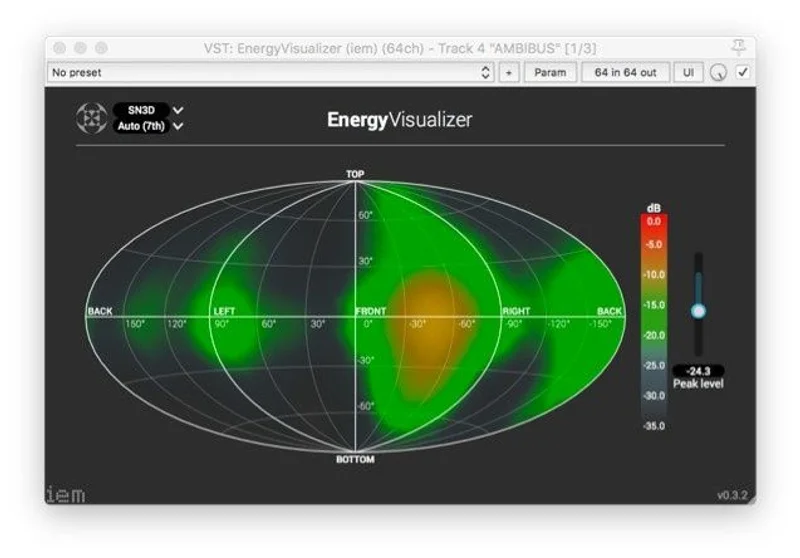
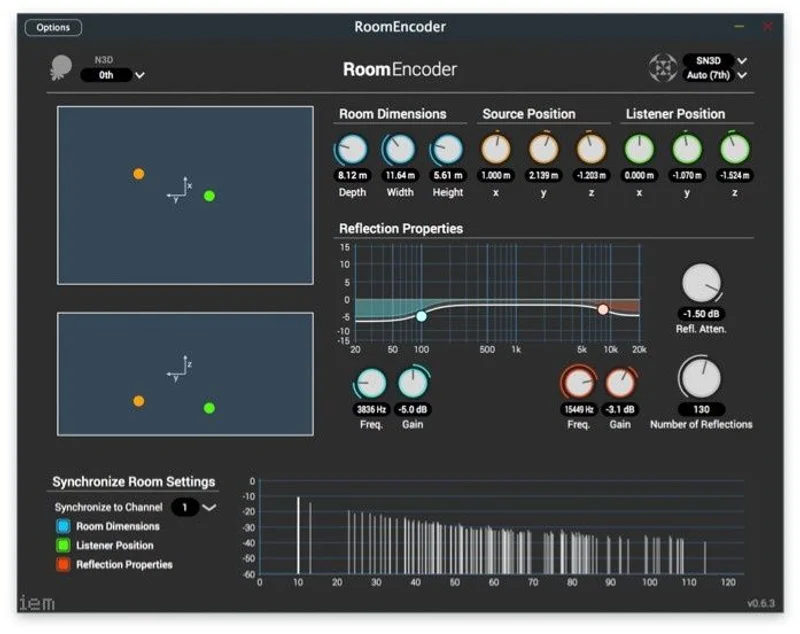
Start with scale. Twenty-plus plug-ins covering the full Ambisonic production chain is not something any paid competitor has casually thrown together for free. The suite covers encoding with MultiEncoder and StereoEncoder, decoding with AllRADecoder, BinauralDecoder, SimpleDecoder, and ProbeDecoder, spatial processing with SceneRotator, RoomEncoder, and DistanceCompensator, dynamics with DirectionalCompressor, OmniCompressor, and MultiBandCompressor, and utilities like CoordinateConverter and EnergyVisualizer.
That breadth is satisfying in a way that's hard to overstate. You're not patching together five different developers' tools and hoping they play nicely. The suite shares a consistent workflow logic across plug-ins.
Seventh-order Ambisonics is the standout technical spec. Owners report that the spatial clarity at 7th order is a step above what lower-order systems deliver. The difference isn't subtle: sources lock into position with presence that 1st or 3rd order can't match. If you're working on binaural delivery for headphone listeners or loudspeaker arrays, that resolution matters.
The GranularEncoder is the tool that earns the suite its reputation in sound design circles. It accepts mono or stereo input and transforms it into 3D textures and particle-like sound clouds placed inside an Ambisonic field. There's nothing like it in any paid suite. If you're scoring immersive film or building spatial soundscapes for installation work, this is the kind of tool you'd normally pay for and not find. Here it ships free.
The DualDelay deserves a mention. DAW sync, BPM-based timing with multipliers, tap delay, signal rotation, and warping in a single plug-in. That's a clever piece of design. Put it on a delayed element and use the rotation to sweep the echo around the listener's head in time with the track. That's the kind of spatial trick that takes other workflows multiple tools to achieve.
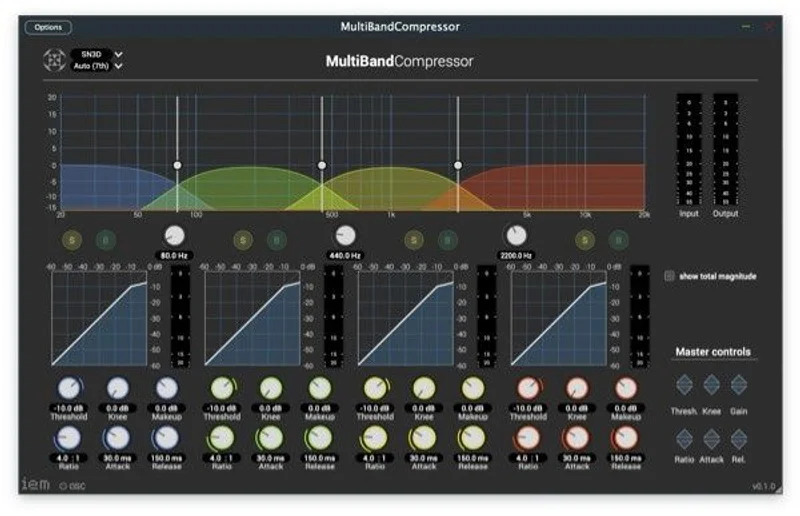
MultiBandCompressor splits Ambisonic input into four frequency bands and compresses each independently. The claim that it preserves spatial imaging during compression is backed by how it works: each band stays in Ambisonics rather than collapsing to stereo for processing. It also runs as a stereo multi-band compressor if you're not in an Ambisonic context. The mastering-ready claim is reasonable for the right source material.
Digging Into the Decoder Options
Four decoders in one suite is worth unpacking because they serve very different purposes.
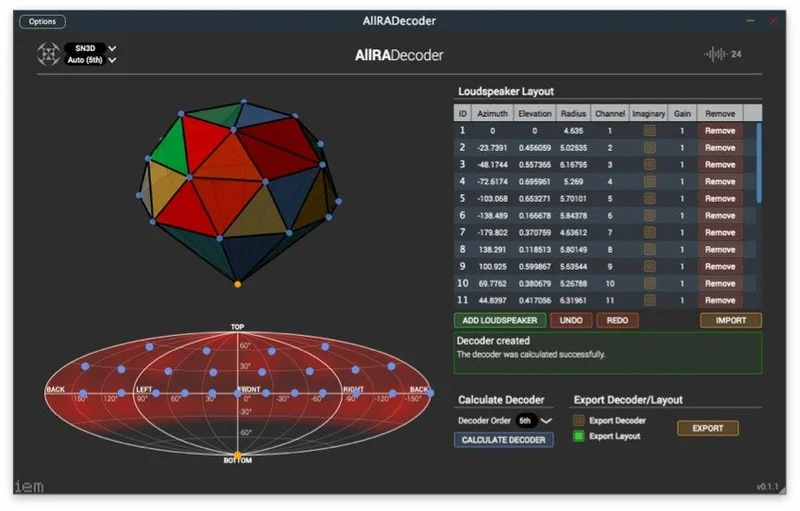
AllRADecoder is the workhorse for irregular loudspeaker arrays. You define your speaker positions and it computes the decoding matrix. For anything beyond a standard 5.1 or 7.1 setup, this is where you'll spend time. It's not quick to configure, but the control is there if you need it.
BinauralDecoder is the tool most producers reach for first. It converts Ambisonic signals to binaural stereo for headphone delivery. For streaming, gaming audio, and VR, this is the exit point for most mixes.
SimpleDecoder does what its name says. Standard formats without the deep configuration of AllRADecoder. Good for prototyping before you commit to a full decode matrix.
ProbeDecoder lets you listen to the field from a specific direction, like pointing a virtual microphone into the mix. Use it while building a scene to check whether a source is sitting where you think it is. It's one of those clever utilities that makes the whole workflow feel considered.
What Doesn't Hold Up: Routing Is Where This Suite Earns Its Complexity Warning
Managing Ambisonic routing at higher orders means managing a lot of channels. First order is four channels. Third order is sixteen. Seventh order is sixty-four. In a DAW like Ableton Live, that's not a trivial bus configuration. Owners are clear: get the channel placement wrong and the spatial image collapses. Not degrades. Collapses. You lose the whole point of working in Ambisonics.
The technical documentation doesn't walk you through resolving routing conflicts or building templates you can rely on long-term. That gap is annoying if you're serious about production. You'll find community fixes and forum workarounds, but the developer hasn't packaged a proper onboarding path for DAW integration.
The VST3 situation is a real problem. VST3 versions above 3rd order are unreliable, and the developer doesn't provide VST3 binaries. For many Windows users running hosts that prefer VST3, this is an ugly limitation. You're pushed toward VST2 for higher-order work, which creates its own compatibility headaches depending on your host.
LV2 format lacks automatic Ambisonic order selection. You have to set the order manually every time. Annoying is the right word for it. It adds a configuration step that breaks the flow of building a session.
The Ambisonic Toolkit (ATK) is available for REAPER users seeking similar spatial encoding capabilities. Beyond that, you're not finding this feature set anywhere else for free.
Who Gets the Promised Result
If you're a spatial audio engineer, an immersive media composer, an academic researcher, or a sound designer with experience routing multi-channel audio in a DAW, the suite delivers on every major claim. Seventh-order resolution, a complete signal chain, and tools like GranularEncoder, the first Ambisonic granular synthesizer plug-in. This is a no-brainer download.
If you're a stereo producer curious about Ambisonics, the suite will teach you the hard way. You'll spend your first sessions fighting routing before you hear anything spatial at all. That's not a reason to avoid it forever. It's a reason to set aside real time to learn the architecture before you try to use it in a project.
If your DAW is REAPER, the Ambisonic Toolkit (ATK) is worth comparing. If you're on Ableton, Logic, or Pro Tools, the IEM suite is what you want. Just go in knowing that the routing setup is your problem to solve.
Film composers working in Dolby Atmos or spatial audio for Apple Music should look at whether the decoding targets they need are supported before committing. The decoder options are flexible, but check your delivery spec against what AllRADecoder can output.
Building a Session: What to Expect on Day One
You open your DAW. You load MultiEncoder on a mono source. You route that channel to a bus wide enough for your target order. At 3rd order, that's sixteen channels. At 7th, sixty-four. If your DAW's bus is set to stereo, the Ambisonic signal collapses immediately and you get nothing useful.
That's the trap. It's not obvious. And the documentation won't tell you exactly how to set it up for your specific host.
Once you're past that, the workflow starts to feel logical. Encode your sources with MultiEncoder, process spatially with SceneRotator or RoomEncoder, apply dynamics with OmniCompressor or DirectionalCompressor, check the field with EnergyVisualizer, and decode at the end with whichever decoder matches your delivery format. The plug-ins share that signal chain logic. Learning one teaches you the structure of the others.
Use ProbeDecoder during the build to check where sources are sitting. Push a sound to the rear, listen through ProbeDecoder aimed behind you, confirm it's there. It's the kind of real-time spatial checking that makes complex scenes manageable.
The GranularEncoder is where things get genuinely exciting. Take a mono pad, feed it into GranularEncoder, and what comes back isn't a positioned source. It's a cloud. A texture that exists in the field rather than at a point in it. For underscore work, ambient design, or anything where you want sound to feel like atmosphere rather than placement, this is the tool you'll love.
The Verdict: Free, Powerful, and Honestly Worth the Learning Curve
The IEM Plug-in Suite is the best free Ambisonic toolkit that exists, and it isn't close. The spatial resolution at 7th order, the breadth of tools, the GranularEncoder, the four decoder options. All of it ships at no cost with open-source code. For anyone serious about spatial audio production, downloading it is a straightforward decision.
The routing complexity is real. The VST3 binary gap above 3rd order is a genuine workflow problem. The documentation won't hold your hand through DAW setup. Those are real limits, not minor complaints.
But at free, the value calculation is simple: invest the time to build your templates correctly and you get a tool set that most studios would pay for without hesitation. The limitation isn't the software. It's the onboarding gap between download and functional session.
Skip it if you need something you can open and use in twenty minutes. Come back to it when you have an afternoon to build your DAW template right, because that afternoon will pay back every project after it.
Specs & Technical Details
| Developer | IEM |
| Price | Free |
| Plugin Format | VST, VST3, LV2, AU, AAX |
| OS Support | N/A |
| Activation | N/A |
| CPU Usage | N/A |
| Trial Available | N/A (fully free) |
| Version Reviewed | N/A |
Score Breakdown
| Category | Score | Notes |
|---|---|---|
| Sound Quality | 4.5/5 | 7th-order resolution delivers spatial clarity and presence that owners consistently report as a step above lower-order systems |
| Value for Money | 5.0/5 | Free and open-source with a feature set that rivals paid spatial audio suites |
| Ease of Use | 2.5/5 | Routing complexity and documentation gaps make DAW setup genuinely difficult for newcomers |
| Features | 4.5/5 | Twenty-plus plug-ins covering the full Ambisonic chain, including the unique GranularEncoder |
| CPU Efficiency | N/A | No data available |
| Overall | 4.3/5 | Exceptional free spatial audio toolkit held back only by routing complexity and sparse integration guidance |
Alternatives to Consider
The Ambisonic Toolkit (ATK) covers similar spatial encoding capabilities and is built with REAPER users specifically in mind. If REAPER is your DAW, ATK's tighter host integration might make the initial setup less painful than the IEM suite's manual routing.
What's worth saying is that no other free suite matches the IEM suite's breadth or its 7th-order ceiling. If you need a paid spatial audio solution with dedicated support and documentation, check what your delivery format requires and research tools built around that spec directly.
Frequently Asked Questions
Is the IEM Plug-in Suite really free?
Yes. Completely free and fully open-source. There's no paid tier, no trial limit, and no activation required. You download it, install it, and the entire suite is available immediately.
What DAWs does the IEM Plug-in Suite work with?
The suite ships in VST, VST3, LV2, AU, and AAX formats, which covers most major hosts. The important caveat is that VST3 binaries aren't provided above 3rd order and those versions are unreliable at higher orders, so check your DAW's format preferences before you build a workflow around a specific format. LV2 also requires manual Ambisonic order configuration.
Do I need experience with Ambisonics to use this suite?
You don't need deep expertise, but you do need to understand multi-channel audio routing in your DAW before the suite will work correctly. Owners report that routing errors collapse the spatial image entirely. Set aside time to build a proper DAW template before you try to use the suite on a real project.
What makes the GranularEncoder different from other granular tools?
It's the first granular synthesizer plug-in built natively for Ambisonics. Standard granular tools process audio and output stereo. GranularEncoder transforms mono or stereo input into 3D textures and particle-like sound clouds placed directly inside an Ambisonic field. For immersive sound design, that's a genuinely different kind of tool.
Can I use the IEM Plug-in Suite for binaural headphone delivery?
Yes. BinauralDecoder converts the Ambisonic field to binaural stereo for headphone playback. It's one of four decoders in the suite and the most common exit point for streaming, gaming audio, and VR mixes. Run your Ambisonic bus through BinauralDecoder as your final stage and the output is a standard stereo file ready for headphone listening.