
We had a vocalist lay down a dry spoken-word track, nothing special, and we needed it to sit inside a synth-heavy arrangement as a robotic choir texture. We pulled up three vocoders in a row. Two of them made her voice sound like a toy walkie-talkie. The third was XILS Vocoder 5000, and when the filter bank locked in, the result was unsettling in the best way: recognisably human, completely synthetic, and utterly clear across every syllable. That moment is why this plugin exists.
The XILS Vocoder 5000 is XILS Lab’s emulation of the EMS Model 5000 from 1976, widely considered the most complex analog vocoder ever made. It’s built for producers and sound designers who want to do formant surgery, not just slap a robot voice on a chorus hook.
First Impressions: More Panel Than You Expect
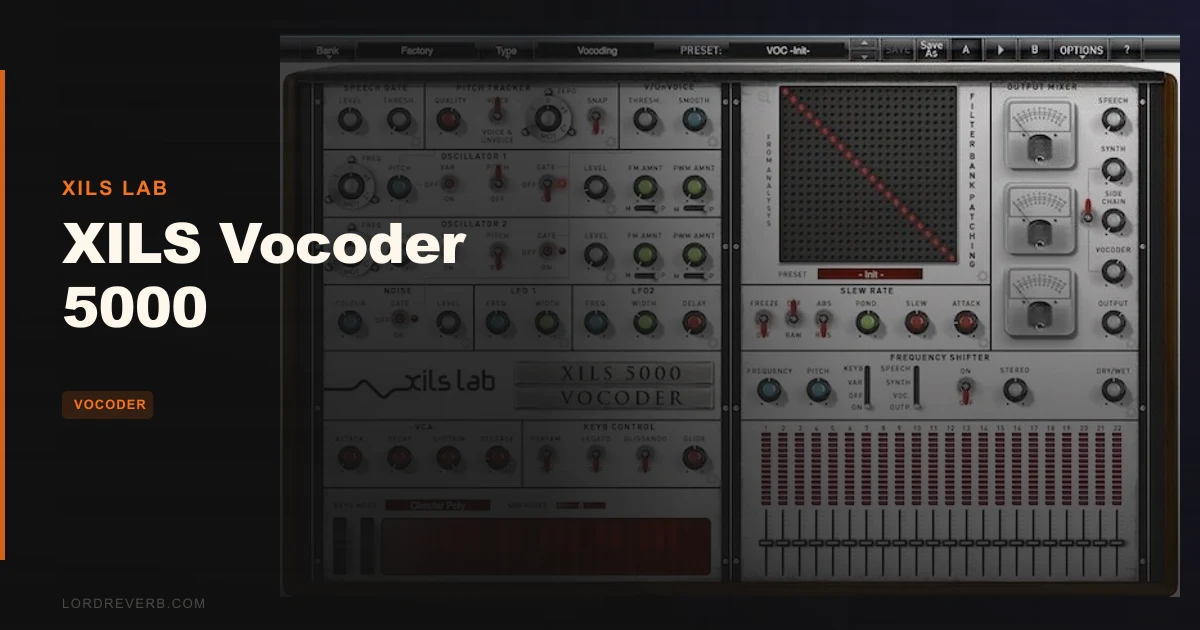
Opening the plugin for the first time is a mild shock. The single-panel view is dense. VU meters, band sliders, oscillator controls, the matrix grid, LFO routing, freeze switches. All of it visible at once.
It’s not pretty by modern standards. The UI reads closer to 2012 than 2026. But give it ten minutes. The layout logic reveals itself, and XILS Lab’s decision to keep everything on one screen actually reduces workflow interruption once you’re past the initial intimidation.
The logo in the center panel doubles as a navigation button. Click it and you switch to deep-parameter views for each module. That’s where the real power lives, and that’s also where the learning curve starts to bite.
Getting It Into a Real Workflow
Routing is the first friction point. The Vocoder 5000 accepts a modulator signal (your voice or audio source) and a carrier signal. The carrier can come from the built-in two-oscillator synth or from an external source via sidechain. Setting up the sidechain correctly in your DAW takes a few minutes the first time. In Ableton Live, you’ll need a second audio track feeding the sidechain input. In Pro Tools, the AAX routing is more straightforward.
We ran a drum loop as the modulator and a sustained synth pad as the carrier. The pitch tracker locked onto the kick transients and pushed formant movement into the pad in a way that felt alive, not processed. That took about 20 minutes to dial in, including time spent reading the module tooltips.
The matrix patchbay is where most users will stall. It’s a 22x22 grid. Each row represents an analysis band from your modulator. Each column is a synthesis band on the carrier. You draw connections by clicking intersections or dragging lines. Once you understand what you’re doing, shifting a man’s voice formants toward a child’s voice is as simple as moving your connections one or two rows upward. Getting there takes patience.
The preset manager for the matrix alone is a clever touch. Save a formant template, reload it for a different voice, and you’re immediately 80% of the way to your target sound.
What It's Genuinely Good At
The filter bank. Full stop. XILS Lab uses zero-delay feedback filters with equal-width band splitting across all 22 bands, and the difference in clarity compared to most software vocoders is not subtle.
We tested intelligibility on spoken English at 120 BPM with a dense mix behind it. Every consonant tracked. Sibilants separated cleanly because the Voice/Unvoice detector (built on XILS Lab’s DeeS algorithm) routes voiced and unvoiced content to the oscillators and noise generator independently. That’s the detail that makes the difference between “robotic voice” and “robotic voice you can actually understand.”
You can adjust filter order: 12dB/oct, 18dB/oct, or 24dB/oct per octave. Steeper slopes tighten band isolation. The ponderation curve lets you soften low-frequency band response without killing clarity up top. Pull bass warmth into the vocoder output without the muddy buildup that kills most vocoder patches.
The frequency shifter adds ring-modulator-adjacent textures. At small shift values (under 20Hz), it creates subtle beating. Push it further and you get proper metallic chaos. Useful for sound design well beyond vocoding.
The Rough Edges
CPU is the honest conversation we have to have. The Vocoder 5000 is heavy. At 44.1kHz with a 256-sample buffer on a current M2 MacBook Pro, we saw consistent CPU spikes when the matrix was fully populated and both synth cores were active. It’s not a plugin you leave running on six tracks. One instance, dedicated bus, freeze it when you’re done sculpting.
Exact CPU percentage varies too much by system to give a clean number, but treat it like a complex reverb: it earns a dedicated track and you bounce it before your session gets dense.
The UI is the other sore point. Resizing is limited. On a high-DPI display the interface can look soft. Competing plugins in 2026 ship with scalable, modern GUIs. This one looks like it was designed for a 1080p monitor in an earlier decade. Annoying, but not a dealbreaker if the sound is what you’re after.
The learning curve is real. This is not frustrating by design, it’s just a complex instrument. But if you want a vocoder you can drop in and not think about, skip this one.
Who This Is Really For
✅ Buy if you want the most accurate EMS 5000 emulation available in software and you’ll spend time learning the matrix.
✅ Buy if you do serious formant work: gender-shifting, choir synthesis from a single voice, or deriving synth patterns from drum loops.
✅ Buy if you’re already inside the XILS Lab ecosystem and you know their filter quality from the XILS 3 or VP-330.
❌ Skip if you want a quick robot-voice effect for one track. Plenty of cheaper options handle that.
❌ Skip if your sessions are already CPU-heavy. This plugin needs headroom and a dedicated bounce strategy.
❌ Skip if a modern, scalable UI matters to you. This one will bother you every session.
Score Breakdown
| Category | Score | Notes |
|---|---|---|
| Sound Quality | 4.8/5 | Filter bank clarity is the best we've heard in a software vocoder |
| Value for Money | 3.8/5 | The promo price is reasonable but the regular price is a harder sell given the aged UI. |
| Ease of Use | 2.5/5 | Matrix patchbay has a real learning curve; beginners will struggle |
| Features | 4.5/5 | 22x22 matrix, dual VCS3 oscillators, frequency shifter, freeze modes, very deep |
| CPU Efficiency | 2.5/5 | Heavy on resources; needs a bounce-and-freeze strategy in busy sessions |
| Overall | 4.1/5 | Best-sounding software vocoder available, held back by CPU demands and dated UI |
Alternatives to Consider
If the CPU load worries you, iZotope VocalSynth 2 review is lighter on resources and ships with a more modern workflow. It doesn’t touch the Vocoder 5000 on filter clarity, but it’s far more approachable and handles pop-production vocoder work cleanly.
For formant shifting specifically without the full vocoder architecture, best pitch correction plugins covers tools like Antares Auto-Tune and Celemony Melodyne that approach the problem from a different angle.
If you want a hardware-software hybrid feel with a simpler signal chain, best vocoder plugins includes options like TAL-Vocoder that trade depth for speed and sit at a fraction of the price.
No alternative we’ve tested replicates what the Vocoder 5000’s 22x22 matrix does to formants. That’s not a knock on the competition. It’s just a different category of tool.
The Bottom Line
At the current promo price through May 31, 2026, the XILS Vocoder 5000 is the right buy if you’re serious about vocoder work and you’ll put in the hours with the matrix. The filter bank is brilliant. The Voice/Unvoice detector keeps intelligibility intact where other vocoders smear it. The VCS3-lineage oscillators have a character you won’t dial out of a basic synth carrier.
But it’s not for everyone, and we’d rather say that plainly than let you spend money on a plugin that sits unopened because the learning curve scared you off on day two.
The CPU hit is the caveat that matters most. Heavy sessions will feel it. Freeze your Vocoder 5000 instances and treat this as a dedicated sound-design instrument, not a drop-in effect.
If you need a quick robot voice for a single chorus, there are better tools that cost much less. If you want to make something that sounds like it came out of a 1976 analog room and also do things that 1976 analog room could never do, this is your plugin.
Frequently Asked Questions
What is the XILS Vocoder 5000 based on?
It's based on the EMS Model 5000 from 1976, widely regarded as the most complex analog vocoder ever built. XILS Lab used experience from emulating both the EMS VCS3 synthesizer and the VP-330 Vocoder Plus to build the filter bank and oscillator models. The built-in oscillators follow the VCS3 lineage directly.
How many filter bands does the XILS Vocoder 5000 have?
It ships with both a 22-band and a 20-band filter vocoder, selectable within the plugin. You can also set filter slope per band at 12dB/oct, 18dB/oct, or 24dB/oct. The band splitting uses equal-width spacing across the spectrum, which XILS Lab says is difficult to achieve accurately in the digital domain and is a key reason for the plugin's clarity.
Do I need an external synthesizer to use the XILS Vocoder 5000 as a carrier?
No. The plugin includes two full synthesizer cores, each with two oscillators modelled from the EMS VCS3, a noise generator, two LFOs, and a VCA-ADSR. You can use those as the carrier signal without any external source. The sidechain input is there if you want to route a hardware synth or a separate software instrument as the carrier instead.
Is the XILS Vocoder 5000 good for beginners?
The preset library gets you to usable vocoder sounds quickly, and the single-panel layout keeps everything visible. But the 22x22 matrix patchbay is genuinely complex and takes time to understand. If you're new to vocoders and just want a robot voice effect, something like TAL-Vocoder will get you there faster for less money. The Vocoder 5000 rewards producers who are willing to study it.