
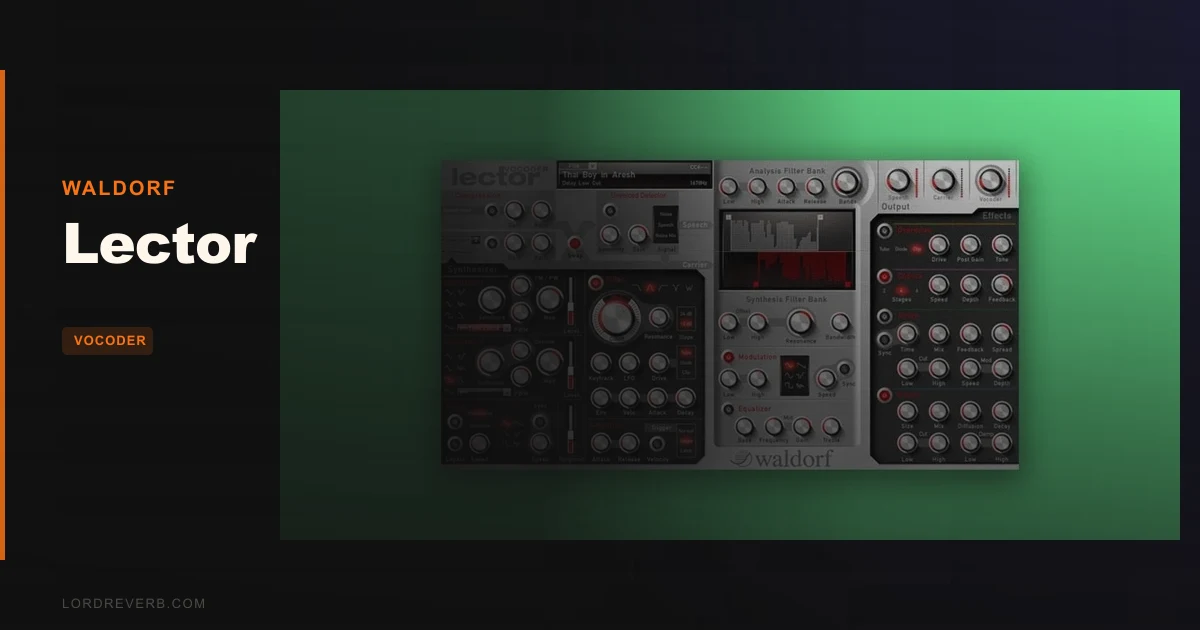
Waldorf Lector is a 100-band stereo vocoder with a 16-voice polyphonic synthesizer built in, and at $165 it sits near the serious end of the vocoder market for good reason. You're staring at a vocal take, an Omnisphere pad running underneath, and you want that robotic speech that sounds like it was designed rather than slapped on. That's exactly the moment Lector exists for.
Quick verdict: Lector earns a 4.2 out of 5. The band resolution and Voiced/Unvoiced Detector put it ahead of most competitors for intelligibility and sonic control. The GUI is frustrating and ugly by modern standards, and you'll spend real time wrestling presets into shape. But if you want vocoded speech that actually sounds clear, or you're building rhythmic pads and talking drums from scratch, $165 is a reasonable price of entry. Not for producers who want quick results out of the box.
What's In The Box
Lector runs on Windows 7, 10, and 11 (64-bit Intel or AMD) and macOS 10.14 or higher, including Apple Silicon. Formats cover VST2, VST3, and AAX on both platforms, plus Audio Unit on Mac. Sidechain input works on VST3 and Audio Unit.
The vocoder analysis section scales from 3 to 100 bands with adjustable filter bank range and envelope followers with independent attack and decay per band. The built-in synthesizer offers sine, triangle, sawtooth, square (variable pulse width), sample and hold, and noise waveforms. Each of the 16 voices gets two oscillators, FM, ring modulation, portamento and glissando, one multimode filter, one synchronizable LFO, and two AR envelopes.
The effects chain includes tube, diode, and clip overdrive, a stereo chorus/flanger with 2 to 6 stages, a synchronizable stereo delay, reverb, and a three-band EQ. Separate compressors handle the speech and carrier signals individually. Over 100 factory presets are included. Native Kontrol Standard is supported.
Where It Fits In Your Workflow
You'll set Lector up as an insert on your vocal or speech track, with the synthesizer running internally as the carrier. If you're on VST3 or Audio Unit, you can route a separate carrier source via sidechain instead.
The filter types (lowpass, bandpass, highpass, notch, with 12dB or 24dB slopes) live inside each synth voice, so you shape the carrier character before it hits the vocoder. That matters: muddy presets usually trace back to voices that haven't been filtered properly. Plan to spend time there before the vocoder's output makes sense.
Latency runs under 3 milliseconds, which keeps it usable in real-time performance or on live vocal chains in a session. CPU load sits around 5%, so you can run multiple instances without it eating your project. The licensing is machine-tied and one-time, so check the activation terms before you buy if you switch computers often.
One reported compatibility issue: Sonar X3 users have hit failures. If that's your DAW, verify before committing.
What It's Genuinely Good At
Push the band count toward 100 and start talking into the mic. What owners describe as the "biting" quality on synths and drums comes from Lector's ability to squeeze the analysis signal's frequency response into a narrower vocoded range. That compression of spectral content is where the character lives.
The Voiced/Unvoiced Detector is clever in a way that matters. It separates tonal content from sibilants and handles them differently. The result is vocoded speech you can actually understand, which is rarer than it sounds. Most vocoders smear the ess and tee sounds into noise. Lector doesn't. Owners consistently call out that clarity as one of the main reasons they stick with it over cheaper options.
The whitening filter is a satisfying tool when you're running choir or voice samples through the vocoder. It flattens the spectral tilt of the input before the band coloring takes over, giving you a more even, controlled result.
At roughly 5% CPU, it's light. That's not a rounding error. Run it in parallel with heavy reverb and saturation chains and you'll barely see it on the meter.
The Rough Edges
The GUI is ugly. That's not a minor complaint. Poor contrast and dated visuals make the interface genuinely harder to read, especially at smaller screen sizes. Annoying doesn't cover it after a long session.
Preset switching occasionally produces silent or hung sounds. That's the kind of bug that makes you hate a plugin mid-session when you're trying to audition options quickly. It doesn't happen constantly, but it happens enough that experienced users have documented it.
The LFO sync has known bugs with reported workarounds. And support responsiveness has been flagged by owners as a concern. If something breaks and you need a fix fast, there's no guarantee you'll hear back quickly.
The presets are a mixed bag. Many are muddy without deliberate filter work. You'll spend real setup time getting usable sounds. If your sessions don't have that time built in, that's a problem.
Who This Is Really For
- ✅ Buy if you want vocoded speech that prioritises intelligibility and you're willing to dial in the filter bank to get there.
- ✅ Buy if you work in sound design and want to build talking drums, rhythmic pads, or processed vocals with serious frequency band control.
- ✅ Buy if you need a low-latency vocoder under 3ms that won't tax your CPU, especially for real-time performance use.
- ❌ Skip if you need a plug-and-play vocoder with immediately usable presets and a clean modern workflow.
- ❌ Skip if you're on Sonar X3 or any older DAW without confirmed compatibility.
- ❌ Skip if GUI readability and polish are non-negotiable for how you work. The contrast issues are real.
Specs & Technical Details
| Developer | Waldorf |
| Price | $165 |
| Plugin Format | VST2, VST3, AAX (Windows & macOS); Audio Unit (macOS) |
| OS Support | Windows 7/10/11 (64-bit Intel/AMD); macOS 10.14+ including Apple Silicon |
| Activation | Machine-tied, one-time license |
| CPU Usage | Light (~5%) |
| Trial Available | N/A |
| Version Reviewed | N/A |
Score Breakdown
| Category | Score | Notes |
|---|---|---|
| Sound Quality | 4.5/5 | Voiced/Unvoiced Detector and 100-band resolution produce unusually clear vocoded output |
| Value for Money | 4.0/5 | At $165, the band depth and built-in synth justify the cost if you use vocoders seriously |
| Ease of Use | 3.0/5 | Setup complexity, muddy presets, and GUI readability issues add friction |
| Features | 4.5/5 | 100-band analysis, 16-voice polyphonic synth, full effects chain, and NKS support is a lot |
| CPU Efficiency | 4.5/5 | ~5% CPU load is light for a vocoder of this depth |
| Overall | 4.2/5 | High ceiling, real learning curve, and some annoying bugs that stop it reaching the top tier |
Alternatives to Consider
Virsyn Matrix produces more unusual, special character to its robotic sound. If you want something that feels weirder and more idiosyncratic, Matrix goes there. It has fewer sculpting tools than Lector, so you trade control for personality.
Image-Line Vocodex gets praised for its interface when it comes to controlling frequency bands. It's VST2 only and Windows-focused, which limits where you can run it. If you're on Mac or need AU or AAX, it's not an option.
MeldaProduction MVocoder is the more affordable path. Owners who've used both tend to find Lector superior in sound, but if the budget's tight or you're unsure how much you'll use a vocoder, MVocoder is worth checking first.
Lector wins on intelligibility and band control over all three. The tradeoff is the setup time and the interface. If those two things don't bother you, it's the strongest of the group for serious use.
At $165, Lector is a deliberate buy. It rewards producers who understand what a vocoder actually does and want to push it. If you're after robot voices you can drop on a track and move on, there are easier tools. But if the Voiced/Unvoiced Detector, the 100-band resolution, and the sub-3ms latency mean something to your workflow, this is a plugin you'll keep. Just go in knowing the presets are a starting point, not a destination.
Frequently Asked Questions
Does Waldorf Lector work on Apple Silicon Macs?
Yes. Lector supports macOS 10.14 and higher on both 64-bit Intel and Apple Silicon. It runs as VST2, VST3, AAX, and Audio Unit on Mac, so you've got all major formats covered on modern hardware.
Can you use an external carrier signal with Lector instead of the built-in synth?
Yes, but only on VST3 and Audio Unit. Those formats support sidechain input, letting you route any external source as the carrier. On VST2, a separate carrier plug-in is available. The internal 16-voice polyphonic synthesizer is always there as a fallback if you want to stay self-contained.
Are the preset switching bugs in Lector a dealbreaker?
They're annoying, not catastrophic. Some owners report silent or hung sounds when cycling through presets quickly. It's a real bug and worth knowing about before you buy. If you're mostly building patches from scratch rather than auditioning presets live, it'll affect you less. Keep that workflow in mind when you're deciding.