
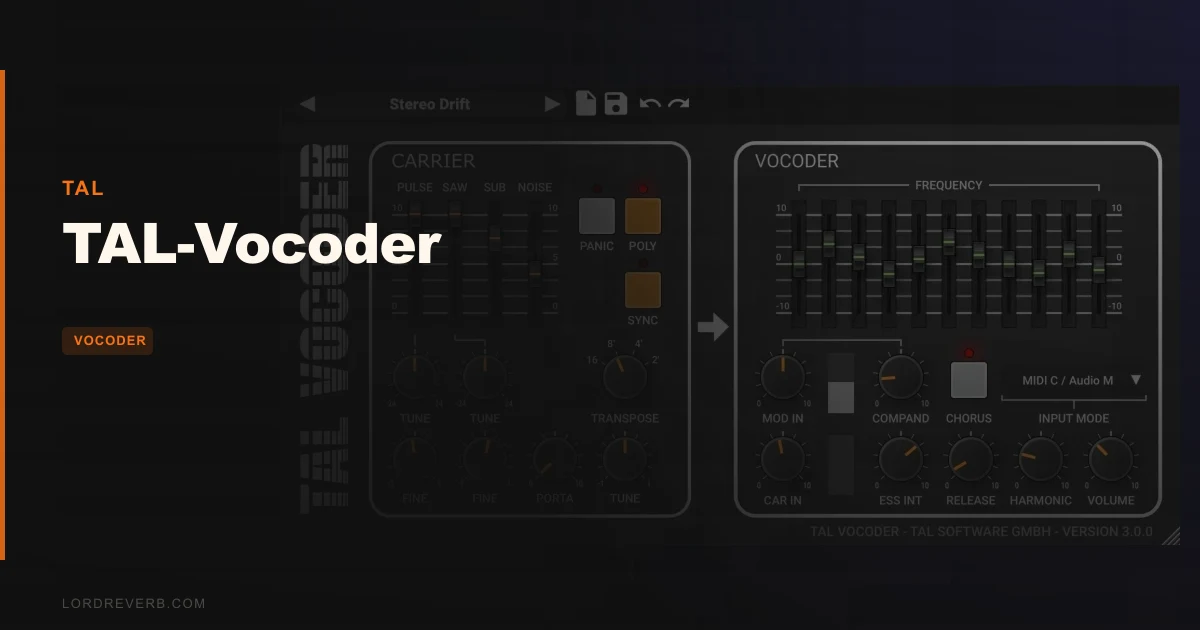
If your DAW treats every plugin as an effect and you've never routed a sidechain before, TAL-Vocoder is going to frustrate you before it rewards you. That's the honest starting point for this review. It's free, it sounds like something pulled from a 1982 synth-pop session, and it has a surprisingly complete internal carrier synth. But the routing setup trips people up constantly, some DAWs actively resist it, and 11 bands will leave you chasing intelligibility you can never quite catch.
Quick verdict: TAL-Vocoder is the best free vocoder you can get right now, and we mean that with a clear asterisk. It nails a specific vintage texture, it's stable, and it costs nothing. But if you want your vocoded vocals to stay legible at speed, 11 bands is a real ceiling. It earns a 3.5. Grab it if you want that early-80s robot-choir sound. Skip it if articulate, modern vocoding is the whole point.
The Catch Up Front
The biggest practical limit is MIDI routing. Several DAWs see TAL-Vocoder as an effect plugin, not an instrument. That means they won't pass MIDI note data to it without a workaround.
Logic Pro users run into compatibility problems with the current routing method. Version 3.0.4 changed how carrier and modulation signals are routed compared to older versions, which catches anyone migrating a legacy session off guard.
Then there's the band count. Eleven bands is what a lot of classic hardware ran, and that's the design intent. But owners report difficulty keeping vocoded vocals intelligible, especially when the carrier lacks high-frequency content. The Ess enhancer helps. It doesn't fix the underlying arithmetic.
CPU usage shows up even at idle, which is worth knowing before you drop eight instances on a dense mix bus.
None of this is hidden, and none of it disqualifies the plugin. But if you're new to vocoders or you're on Logic Pro expecting plug-and-play, you need to know what you're walking into.
What You Get If You Clear the Setup
TAL-Vocoder emulates the character of vocoders from the early 1980s. The processing splits the modulator signal (your voice) across 11 bands, each with its own envelope follower, and uses that envelope data to reshape the carrier signal through matching filters.
The internal carrier is a VCO with four choices: Pulse, Saw, Noise, and Sub Osc. You can run it in mono or poly mode, dial in portamento, and use the sync mode and tune control to lock it to your session. If you'd rather drive it from an external source, the left stereo input accepts an external carrier signal directly.
Harmonic control adds upper harmonics to any carrier signal. This is what gives the vocoder more presence without touching your EQ chain. The Ess enhancer is a separate algorithm built to push consonants through the band structure so your words stay readable. Neither is a magic fix, but both are clever additions that most free vocoders skip entirely.
The GUI is resizable. MIDI Mapping is supported. MTS and MPE both work, so you're not stuck in legacy tuning territory if your workflow has moved on. A Clip LED tells you if the input signal is about to clip. And there's a Panic button that kills hanging notes in the synth. Small thing. Satisfying to have when a note gets stuck mid-performance.
Available formats: VST, VST3, AU, AAX, and CLAP. Linux gets 64-bit VST2 and VST3. macOS support runs from 10.9 upward, covering both Intel and Apple silicon.
Where It Shines
Push the Saw carrier through a chord and you're immediately in that 1982 zone. Tight, buzzy, with a slight metallic edge on the attack. It doesn't try to sound modern. That's not a bug.
The envelope follower on each of the 11 bands responds to your voice in a way that keeps the phrasing alive. Fast phrases stay bouncy. Long vowels bloom outward. If you're designing a sci-fi broadcast voice or stacking vocoder chords behind a synth lead, this is exactly the behaviour you want.
The built-in chorus, praised widely by owners, sits right in that sweet spot between width and smear. Add it to a saw carrier and the vocoder stops sounding like a demo patch and starts sounding like a finished production choice.
Stability is genuine. A long-term user describes it as their go-to vocoder for close to a decade, specifically because of how reliably it loads, runs, and doesn't surprise them mid-session. That kind of track record means something.
The Harmonic control deserves a specific mention. Drive it up and the carrier fills out the top octave. That high-frequency energy feeds the upper bands and gives you more separation between consonants. It's the first thing to reach for before you blame the band count.
And it's free. That changes what "worth it" means entirely.
Dialling It In: Routing, Carrier, and the Ess Enhancer
The first thing you're going to do wrong is feed it a voice and wonder why it sounds like a washed-out hum. That's the carrier. If the carrier has no harmonic content above a few kilohertz, your high bands have nothing to work with. Start with Saw, not Noise.
Your vocal goes in as the modulator. In a DAW that acknowledges the plugin as an instrument, you route MIDI to it and audio to the sidechain. In a DAW that sees it only as an effect, you need a MIDI track feeding the plugin's instrument input through whatever workaround your host supports. This is the routing learning curve owners talk about. It's not intuitive, and the Version 3 routing change means old tutorials may point you in the wrong direction.
Once your signal chain is correct, hit the Ess enhancer early. If your vocoded vocal sounds muddy on "s" and "t" sounds, the Ess is addressing consonants algorithmically to push them through the band structure. It won't turn 11 bands into 24, but it closes the intelligibility gap meaningfully on slower phrases.
Use portamento on pad-style lines where the note-to-note smear adds tension. Turn it off for punchy rhythmic vocoder parts where timing is everything. The sync mode keeps pitch locked to external reference if you're running multiple oscillators or external carriers.
The external carrier input via the left stereo channel opens up a lot. Run a string pad, a guitar through a fuzz, or a layered synth as your carrier and the texture shifts completely. The voice envelope shapes whatever you feed it. That's where the more unusual sound-design results live.
Against the Field
RysUpVocoder offers two contrasting voice modes, direct pitch and formant moves, and scale guidance built into the interface. If you want more interactive pitch control and clearer workflow guidance during a live performance or recording session, that's worth looking at alongside TAL-Vocoder.
ReaVocode also accepts external carrier signals, same as TAL-Vocoder. If external carrier flexibility is your priority and you're on a Reaper-centric setup, it's a natural comparison.
Eosis Vocoder is mentioned specifically for higher intelligibility. If you need vocoded vocals that sit clearly in a dense mix without constant EQ attention, the band structure there is better suited. The 11-band ceiling on TAL is where that conversation starts.
Morphoder limits your external carrier options more than TAL-Vocoder does. If running an external carrier through a vocoder is part of your sound design process, TAL wins that comparison directly.
What TAL-Vocoder does that none of these free alternatives match is the specific analogue-modeled character of an early-80s hardware unit. If that texture is what you're building toward, it's hard to route around it.
Who Should Buy This
- ✅ Buy if you want an authentic vintage vocoder texture and don't want to spend anything to get it.
- ✅ Buy if you're doing synth-pop, electro, or sci-fi sound design where intelligibility is secondary to character.
- ✅ Buy if you're running a DAW that handles instrument plugins and sidechain routing without restrictions.
- ❌ Skip if you're on Logic Pro and expecting a smooth setup out of the box.
- ❌ Skip if articulate, legible vocoded vocals are the whole point of your track. 11 bands will not get you there reliably.
- ❌ Skip if you're a beginner with no sidechain or MIDI routing experience and no patience for a steep initial configuration.
Specs & Technical Details
| Specification | Details |
|---|---|
| Developer | TAL |
| Price | Free |
| Plugin Format | VST, VST3, AU, AAX, CLAP |
| OS Support | Mac (10.9+, Intel & Apple Silicon), Windows, Linux (64-bit VST2 & VST3) |
| Activation | N/A |
| CPU Usage | Low (reported idle usage; stable under normal load) |
| Trial Available | N/A (free) |
| Version Reviewed | 3.0.4 |
Score Breakdown
| Category | Score | Notes |
|---|---|---|
| Sound Quality | 4.0/5 | Accurate early-80s character; Harmonic and Ess controls add real texture, but 11 bands limits vocal clarity |
| Value for Money | 5.0/5 | It's free and genuinely useful; nothing to argue about here |
| Ease of Use | 2.5/5 | Steep routing learning curve; DAW incompatibility issues add real friction for beginners |
| Features | 3.5/5 | Solid carrier synth, MTS/MPE support, resizable GUI, but band count holds it back |
| CPU Efficiency | 3.5/5 | Low under load, but idle CPU usage is a known complaint |
| Overall | 3.5/5 | A brilliant free tool with a specific, honest ceiling on what it can do |
Alternatives to Consider
Eosis Vocoder is the first name that comes up when owners hit the intelligibility ceiling on TAL. If you need vocoded vocals that stay readable in a busy mix, it's worth comparing directly against TAL-Vocoder before committing to either.
RysUpVocoder brings a different workflow feel, with two contrasting voice modes, direct formant and pitch controls, and built-in scale guidance. If you're doing live performance or you want more interactive control over how the vocoded pitch moves, it's the more hands-on option.
ReaVocode is a solid comparison if external carrier flexibility is what you care about and you're already in the Reaper ecosystem. It accepts external carriers the same way TAL-Vocoder does, so the choice often comes down to interface preference and your host setup.
The Verdict
TAL-Vocoder does one thing with real conviction: it sounds like hardware from 1982, it costs nothing, and it runs without breaking your session.
What it doesn't do is make vocoding easy for someone new to it, and it doesn't make vocoded vocals stay articulate when the words matter. If your track needs a robot that speaks clearly, 11 bands isn't enough. The Ess enhancer helps. It won't save you if the phrase is fast and the carrier is thin.
But if you're chasing that specific buzzy, slightly washed, very alive quality that early synth-pop and electro had, TAL-Vocoder puts it in your session for free, with enough control to actually shape it rather than just apply it.
Get the routing right first. That's the whole battle. Once your MIDI is flowing and your carrier is singing, what comes out is genuinely satisfying in a way that makes you wish more free tools were this honest about what they are.
At zero cost, the only real question is whether the 11-band ceiling matches what you need. If it does, there's nothing smarter to reach for. If it doesn't, Eosis Vocoder is the name to look up next.
Frequently Asked Questions
Why does TAL-Vocoder produce no sound when I load it?
The most common cause is incorrect routing. TAL-Vocoder needs both a MIDI signal to trigger the internal carrier synth and an audio signal feeding the modulator input (your voice). If your DAW treats it as an effect rather than an instrument, MIDI won't reach it through the standard instrument track method. Check your host's documentation for sidechain and MIDI routing to an effect plugin before assuming the plugin is broken.
How many bands does TAL-Vocoder have, and does that affect quality?
It runs 11 bands, each with its own envelope follower. That count is accurate to a lot of hardware from the early 1980s and gives you the right vintage character. For intelligible vocals where every consonant needs to track clearly, 11 bands is a real limit. Use the Ess enhancer and push the Harmonic control before deciding it can't do what you need.
Does TAL-Vocoder work with Apple Silicon Macs?
Yes. TAL-Vocoder supports macOS 10.9 and above on both Intel and Apple silicon natively. It's also available in AU format for Logic Pro and other Apple-native hosts. Note that Logic Pro users have reported specific routing compatibility issues with version 3, so check the TAL support pages if you're running Logic.
Can I use my own synth as the carrier instead of the built-in VCO?
Yes. The left stereo input accepts an external carrier signal, so you can route any synth, guitar, or processed audio source into that input and use it as the carrier instead of the internal VCO. Version 3.0.4 changed how this routing works compared to older versions, so if you're following older tutorials you may need to update your signal chain setup.