You've built a solid beat, the kick hits hard, the hi-hats sit right, and then you solo the snare and it sounds like someone slapping a cardboard box in a server room. No air. No room. No life. That's the problem SnareBuzz 2.0 by Wavesfactory was built to fix.
The plugin simulates sympathetic resonance: the physical phenomenon where a snare's wires vibrate in response to other sounds in the room, even when the drum isn't being hit. It's the thing that makes live recordings feel alive and close-mic'd samples feel dead. SnareBuzz puts that sensation back into programmed and sampled drums inside the box.
It's free. No subscription, no iLok, no time-limited trial. We've been running it on sessions since version 1, and 2.0 is worth a proper look in 2026.
Why Sampled Snares Lose That Live Feeling
When you trigger a snare sample in a drum machine or sampler, you get the attack and the tail of that one hit. What you don't get is the snare wires buzzing sympathetically when the kick fires, or when the room fills with low-frequency energy from the bass.
That buzz is annoying in live recordings. Engineers spend real time filtering it out. But its absence in programmed drums is exactly what makes them sound synthetic.
You can try to fake it with EQ and saturation. Cut 300Hz to reduce boxiness, add a little 8-10kHz air, push some 2nd-order harmonics through a tape emulator. It helps. But it doesn't replicate the dynamic, reactive quality of snare wires responding to live room energy. SnareBuzz does that specific thing and nothing else.
How SnareBuzz 2.0 Actually Performs
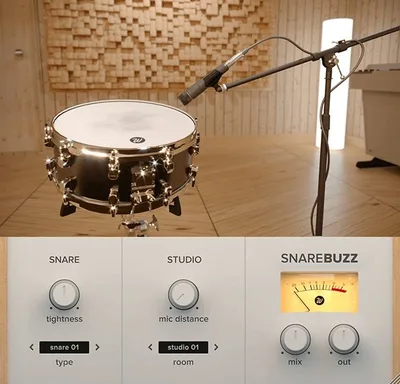
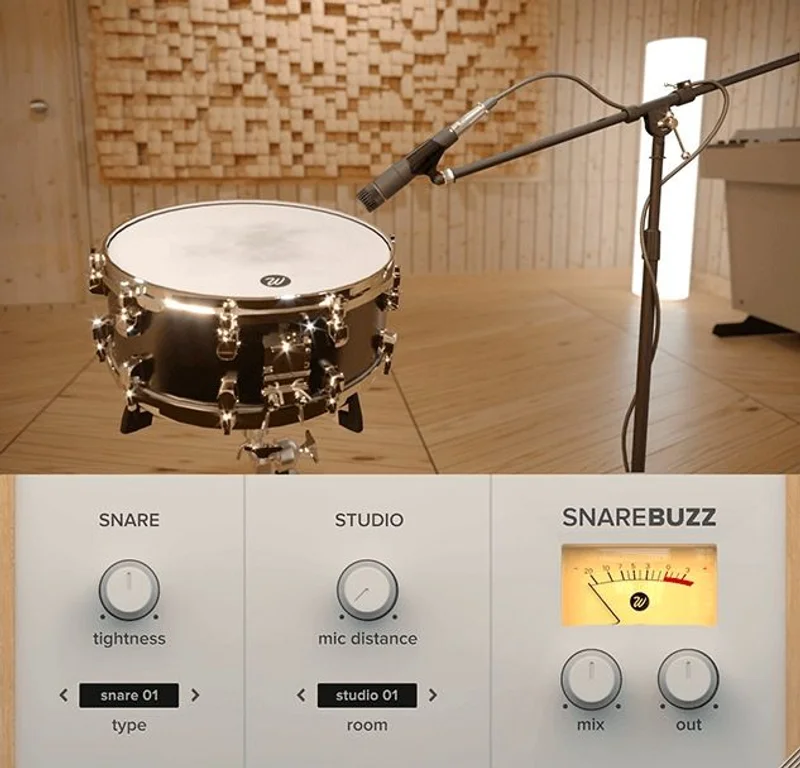
The signal chain here is straightforward. Drop SnareBuzz on your snare bus or directly on a snare channel. Pick one of 5 snare types and one of 5 studio environments. Then dial in Tightness, Mic Distance, and the wet/dry mix.
We loaded a dry, close-mic'd 808-style snare into a session at 140 BPM with a heavy sub-bass line running underneath. With SnareBuzz on the snare bus, Environment set to "Studio B", Snare Type 3, Tightness at about 40%, Mic Distance at 30%, and Mix at 25%, the snare immediately picked up a subtle wire buzz that tracked loosely with the low-end energy of the track. It felt like the snare was in the room with the bass, not layered on top of it in software. That's satisfying in a way that EQ alone can't deliver.
Pull the Mix above 35-40% and it gets ugly fast. The snare starts to sound ringy and phasey, like a bad snare sample someone forgot to gate. This is the plugin's biggest practical limitation: the sweet spot is narrow. We keep ours between 15% and 30% on almost every session.
CPU draw is light. We ran 8 instances across a full session on an M2 MacBook Pro without clipping the meter. No complaints there.
The mic distance parameter is underrated. Push it toward "far" and the buzz gets diffuse, almost room-mic in character. Pull it close and the resonance tightens up, sounding like an overheads-near blend. It's a clever way to place the snare in a perceived space without adding reverb.
Compared to Waves Vitamin Sonic Enhancer for snare enhancement, SnareBuzz does one very specific thing better: reactive resonance. Vitamin is a multiband harmonic exciter and it's great at adding brightness and presence, but it doesn't simulate physical wire movement. They solve different problems. We'd use both in the same chain without hesitation.
What It Gets Right and Where It Falls Short
The sympathetic resonance simulation is clever. We love the way it reacts to the low-frequency content of the track rather than just statically brightening the snare. That reactivity is what makes it feel real.
The 5 by 5 preset matrix gives you 25 starting points without overwhelming you with parameters. For a free plugin, that's a thoughtful amount of variety.
But here's the frustrating part: there's no sidechain input. Users have asked for this repeatedly, and we understand why. Ideally, you'd route the kick drum or the room bus into a sidechain so SnareBuzz triggers its resonance when the kick fires, mimicking exactly what happens acoustically. Right now, it processes whatever audio is running through it, which means you can get unintended buzz on non-snare hits if your routing isn't clean. That's annoying in a way that a relatively simple feature addition would fix.
The 64-bit-only requirement isn't a problem for most producers in 2026, but if you're running legacy gear or an older DAW setup, check your system before you try to load it.
DAW compatibility is mostly solid. Logic Pro users occasionally report AU validation quirks on first load. Quit Logic, re-scan, try again. It's not elegant, but it resolves. Not a dealbreaker given the price.
Value: It's Free. So the Math Is Simple.
Free is free. There's n othing to justify.
But that framing undersells the real value calculation. The question isn't "is it worth the money." It's "is it worth a slot in your signal chain and the 10 minutes to learn it." The answer is yes, with one caveat.
If you're heavy into parallel compression and multiband dynamic enhancement for snare work, SnareBuzz fits neatly before or after without disrupting gain staging. It's not a CPU tax. It doesn't colour the signal in ways that conflict with other processors. It earns its place.
Who Should and Shouldn't Use This
✅ Buy if you produce hip-hop, R&B, or lo-fi where drum realism is part of the aesthetic and your snares consistently sound too clean and digital.
✅ Buy if you're already using drum samples and want that organic room-buzz without committing to a full room reverb on the snare bus.
✅ Buy if you want a free tool that does one specific thing well and doesn't bloat your sessions.
❌ Skip if you need sidechain-triggered resonance keyed to your kick. It can't do this yet, and the workaround is messy.
❌ Skip if your snare problems are primarily tonal (too much 200-400Hz mud, lacking 5kHz crack). SnareBuzz isn't an EQ or exciter. Use a different tool for that.
❌ Skip if you're running a 32-bit DAW or older OS below OS X 10.9. It won't load.
Score Breakdown
| Category | Score | Notes |
|---|---|---|
| Sound Quality | 4.0/5 | Reactive resonance sounds natural at conservative mix levels |
| Value for Money | 5.0/5 | Free, no strings |
| Ease of Use | 4.0/5 | Simple controls but the sweet spot requires some care |
| Features | 3.0/5 | Does one thing well; no sidechain is a real gap |
| CPU Efficiency | 4.5/5 | Multiple instances ran clean on M2 without issue |
| Overall | 4.1/5 | Brilliant for its price point, limited by missing sidechain capability |
Alternatives to Consider
Waves Vitamin Sonic Enhancer handles the harmonic brightness side of snare enhancement better than SnareBuzz. If your snares need presence and clarity rather than resonant buzz, Vitamin is the move. Read our Vitamin Sonic Enhancer review
UA A-Type Multiband Dynamic Enhancer is a paid option that gives you transient and harmonic control across bands. It's surgical where SnareBuzz is atmospheric. See how it compares in our multiband enhancer coverage
Parallel compression with a short, tight snare sample layered underneath is the zero-cost alternative. Trigger a secondary snare sample (with natural wire noise baked in) at -12dB to -18dB underneath your main snare. It's manual, it's tedious, and SnareBuzz does it better with less routing work.
The bottom line: SnareBuzz 2.0 is one of the more underrated free plugins available in 2026. It does something specific, it does it well, and it won't cost your CPU or your budget. Keep the mix knob below 30%, give the mic distance parameter more attention than you think it deserves, and it'll earn a permanent place in your snare bus template. Just don't expect it to fix a fundamentally bad sample, and don't expect sidechain capability until Wavesfactory decides to build it in.
Frequently Asked Questions
Is SnareBuzz 2.0 really free, or is there a catch?
It's genuinely free with no subscription, no iLok, and no account required. Wavesfactory offers it as a free download from their site. There's no time-limited trial version, you download the full plugin and use it without restriction.
Can SnareBuzz 2.0 work on a kick drum or other drum elements?
It's designed for snare buses, but nothing physically stops you from dropping it on other channels. We've tried it on room buses at very low mix levels with interesting results. On kick drums directly, it tends to add an unflattering rattle that doesn't sit well. Stick to snare applications.
Why does SnareBuzz sound ringy and unnatural on my session?
Almost certainly your Mix knob is too high. Pull it back to 15-25% and start from there. The Tightness parameter also has a strong effect: higher tightness values create a more pronounced, audible buzz that quickly becomes too prominent in a dense mix. Dial it back below 50% on most material.
Does SnareBuzz 2.0 work in Logic Pro on Apple Silicon?
Yes, with a caveat. Some users report AU validation failures on first load in Logic Pro. If this happens, close Logic, open Audio MIDI Setup, re-scan for plugins, and relaunch Logic. It typically validates cleanly on the second attempt. The plugin itself runs natively and has no reported performance issues on M-series chips.