
If you own Little Foot and you're wondering whether the Sasquatch 2 upgrade is worth the money, the short answer is yes, but only if the original's interface has been slowing you down or your kick designs have hit a ceiling. At $99, this is a purpose-built upgrade for a specific kind of user: Little Foot owners who want more control over their kick drum processing and aren't afraid to re-dial their old presets after the jump.
Sasquatch 2 is a kick drum enhancement plug-in from Boz Digital Labs. It keeps the same core philosophy as Little Foot but wraps it in a redesigned interface and adds functionality that makes working with Oomph, Click, and Dry feel like a proper workflow rather than a guessing game.
It's not a universal kick replacement tool. It's not trying to be. Boz Digital Labs built this for producers who know what they want from a kick and need a fast, focused way to get there.
What You Are Upgrading To
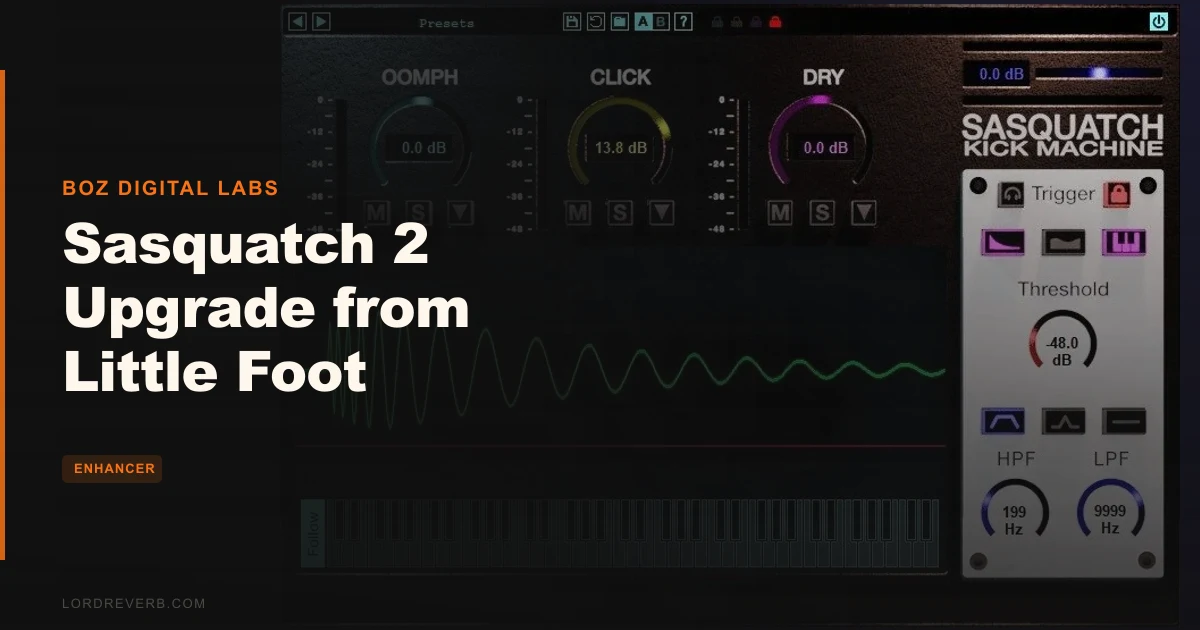
The foundation of Sasquatch 2 is three parameters: Oomph, Click, and Dry. Oomph handles the body and low-end mass of the kick. Click controls the attack transient. Dry is your original signal blend. You're not stacking a hundred processors; you're adjusting three things until the kick sits where you need it.
That simplicity is the point. The developer's argument is that low-end control is the hardest part of kick design to get right, and Sasquatch 2 gives you the tools to handle it without burying you in options. You also get high-pass and low-pass filters with selectable sidechain modes, which lets you shape what triggers the processing and what stays clean underneath.
The trigger system is one of the more satisfying details here. Instantaneous triggering with no phase or flam issues means the plug-in doesn't create timing artifacts when it fires. Put it on a kick with a complex room tail and it shouldn't ghost-fire on the decay. That matters in dense mixes where a flam on the kick bus turns everything into soup.
The redesigned interface is where most upgrade candidates will feel the biggest shift. Owners of the original are vocal about this: the new UI alone carries a significant portion of the upgrade's value. Icon-based design and better visual identification mean you spend less time hunting for controls and more time shaping sound.
A/B comparison functionality and four levels of lock mode round out the workflow features. Lock mode lets you experiment aggressively without losing your baseline settings. That's a clever addition for anyone who tends to get lost chasing tones and forgets where they started.
Who Qualifies
This upgrade is available only to owners of Little Foot. If you don't have Little Foot, there's no path in from the outside. That's the first gate.
The second gate is acceptance. Upgrading will cause your existing Little Foot settings to change slightly. The sound won't be identical to what you had before. If you've built sessions around a dialed-in Little Foot patch, those sessions will need revisiting after you make the switch. It's not a destructive change, but it is a real one.
If you're actively using Little Foot in ongoing projects, time that upgrade to a session break. Don't push it mid-album.
The Value Case
At $99, Sasquatch 2 needs to justify itself against the thing it replaces. Here's what we think it does well enough to earn it.
The UI redesign alone was the deciding factor for a meaningful chunk of existing owners. When people say the new interface is worth the upgrade price, they're saying the original was frustrating enough that paying to fix it feels satisfying rather than frustrating. That's a real signal.
The additional control depth matters too. Going from subtle enhancement to a completely transformed kick sound, within the same three-parameter frame, is a wider range than the original offered. A producer working in house or techno gets more creative room without adding another plug-in to the chain.
The CPU efficiency helps. This isn't a plug-in that punishes you for instancing it across a drum bus and individual channels. CPU-friendly is a real design choice, not a marketing afterthought, and on heavier sessions that choice compounds.
Whether $99 is the right number for you depends on how often you work on kicks and how much the Little Foot interface was holding you back. If kicks are a secondary concern in your work, the upgrade is probably not urgent. If kick design is something you do regularly and the original interface was slowing you down, this is an easy call.
The Controls in Detail
Oomph and Click: The Core Relationship
Oomph and Click aren't independent sliders you set and forget. They interact. Push Oomph hard on a thin, sample-library kick and the low end swells, but the transient can start to feel slow. Bring Click up to compensate and you're shaping an attack that sits on top of the added body rather than fighting it.
That interaction is where the interesting kick design lives. You're sculpting two elements of the same event. It's fast once you understand what each one reaches for.
Owners report the range runs from genuinely subtle, the kind of enhancement where you'd only notice it bypassed, all the way to complete creative transformation. That's a wide range for three knobs. The Dry blend is what keeps the original signal in play and stops the processed sound from floating into something unrecognizable when you push too far.
Filters and Sidechain Modes
The high-pass and low-pass filters with selectable sidechain modes give you control over what Sasquatch 2 responds to. This is where you stop the plug-in from triggering on room noise, bleed, or a ghost note from another drum. Set your sidechain filter to focus on the fundamental of the kick for cleaner triggering.
If you're running a kick with a lot of low-end rumble below the fundamental, the high-pass filter on the sidechain lets you tell the plug-in to ignore that rumble and trigger on the actual hit. Cleaner results, less fighting the plug-in.
Trigger Modes
Selectable trigger modes and instantaneous triggering mean you're not guessing when the processing fires or how it responds to different velocity levels. This is a known weak point from earlier versions, where velocity sensitivity caused variation between different kick levels.
Whether those velocity issues are fully resolved in Sasquatch 2 is something you'll want to test with your specific kick sources before committing to it on a critical session. The documented complaints were from earlier iterations, and the redesign addressed multiple trigger-related concerns, but different kick types behave differently.
Lock Mode and A/B Comparison
Four levels of lock mode is a clever feature. Lock what you know you want to keep, then experiment freely with what's left. You can lock Oomph and Click while you push the Dry blend, or lock the filters while you reshape the core parameters. This is the kind of workflow detail that sounds minor in a spec list but saves genuine time in a session.
A/B comparison functionality lets you flip between two states instantly. It's not exciting. It's just useful. You'll love it the first time you can't decide whether more Click is actually helping or just different.
Drop Design
The plug-in includes tools for creating and customizing drops. The developer mentions it enables electronic musical mutation of kick drums, and the drop design capability is part of that. If you work in genres where the kick transforms during a drop, having that shaping built into the same plug-in where you've been building your kick sound keeps the signal chain tighter.
Where It Falls Short
The inconsistency issue is real and worth discussing plainly. One user reported double clicks and unsatisfying output across multiple settings on different kick types. That's a frustrating result when it occurs.
It doesn't seem to be universal, but it's also not a one-off complaint. If you're working with a wide variety of kick sources, some acoustic, some heavily processed electronic, some with complex dynamics, you may hit a configuration that Sasquatch 2 doesn't handle cleanly. The trigger system is strong on paper, but the interaction between different kick characters and the detection engine can produce unexpected results.
The setting drift after upgrading is annoying. Not catastrophic, not a dealbreaker, but annoying. If you've spent time dialing in Little Foot patches across multiple sessions, you're doing that work again. Factor that into your upgrade timing.
And the exclusivity cuts both ways. It's good that this isn't a full-price standalone purchase for existing Little Foot users. But it also means Sasquatch 2 isn't available to anyone who doesn't already own Little Foot. If you're starting fresh without Little Foot in your library, you have a different decision to make.
Who Should Skip It
Skip it if you're happy with Little Foot. If your current patches work, your UI frustrations are manageable, and your kicks are sitting well in your mixes, there's no urgency here.
Skip it if you're mid-album or mid-project. The setting drift will cost you time you probably don't have. Upgrade at a natural break.
Skip it if your kick design needs are occasional. One kick per track, grab a sample, done? This level of dedicated kick processing is for producers who think about kicks a lot.
And if you've been hitting inconsistent trigger results with the kinds of kicks you typically use, try before you commit. The inconsistency reports aren't widespread enough to condemn the plug-in, but they're specific enough to be a real risk for certain workflows.
The Verdict
Sasquatch 2 is a focused, well-designed kick processor that earns its upgrade price for the right user. The redesigned interface is the headline improvement. The expanded control range makes it legitimately more capable than what it replaces.
But it's not perfect. Inconsistent results on certain kick types, the inevitable setting drift after upgrading, and the narrow eligibility window all limit who this is actually for. At $99, it's a sensible upgrade if Little Foot has been part of your regular workflow and the original interface frustrated you. If neither of those things is true, keep your money.
The best thing Sasquatch 2 does is make the relationship between a kick's body and its attack feel manageable instead of opaque. If that's the problem you're trying to solve, this is a direct answer to it.
Specs & Technical Details
| Developer | Boz Digital Labs |
| Price | $99 |
| Plugin Format | VST 32/64 (both), AU 32/64, RTAS, AAX Native (Mac); VST 32/64, RTAS, AAX Native (Windows) |
| OS Support | Mac / Windows |
| Activation | N/A |
| CPU Usage | Light |
| Trial Available | N/A |
| Version Reviewed | N/A |
Score Breakdown
| Category | Score | Notes |
|---|---|---|
| Sound Quality | 4.0/5 | Wide range from subtle to transformative, with some inconsistency on certain kick types |
| Value for Money | 4.0/5 | Upgrade pricing is fair for Little Foot owners who use the plug-in regularly |
| Ease of Use | 4.5/5 | Redesigned UI and three-parameter focus make it one of the faster kick processors to navigate |
| Features | 3.5/5 | Lock mode and A/B are smart additions; feature set is intentionally lean rather than comprehensive |
| CPU Efficiency | 4.5/5 | Genuinely light on resources, instances well across a full drum session |
| Overall | 4.0/5 | A meaningful upgrade for committed Little Foot users, with real limits for edge cases |
You've done the work on a kick, it's sitting right, and then you wonder if Sasquatch 2 is going to undo all of that when you upgrade. That's a fair worry. The answer is: a little. Your settings drift. But if the reason you're asking the question is that Little Foot's original interface was making your kick sessions slower and more frustrating than they should be, the trade is worth making. Dial back in. The tools you have on the other side are better.
If kicks aren't a major part of your production focus, keep that money. This plug-in is for people who care deeply about what happens between 60Hz and the transient crack of a beater. If that's you, it's a satisfying tool. If it's not, it's a specialist purchase that won't earn its place in your chain.
Frequently Asked Questions
Do I need to own Little Foot to purchase the Sasquatch 2 upgrade?
Yes. Sasquatch 2 is available exclusively as an upgrade for owners of Little Foot. There's no standalone purchase option. If you don't already have Little Foot, you'll need to factor that into your decision before this upgrade becomes relevant.
Will my existing Little Foot settings transfer cleanly to Sasquatch 2?
Not exactly. Upgrading causes existing settings to change slightly from their previous values. Your patches won't be destroyed, but they won't sound identical either. Plan to re-dial your key presets after upgrading, and don't make the switch mid-project if you're on a deadline.
Can Sasquatch 2 be used on instruments other than kick drums?
Owners report success using it on toms and bass guitar. The developer also mentions it can be applied beyond kick drums to other genres and sources. The three-parameter design is flexible enough to work on any instrument with a clear transient and low-end body, though kick drums are what it's built around.
What formats does Sasquatch 2 support on Mac and Windows?
On Windows, it's available in VST 32/64, RTAS, and AAX Native. On Mac, you get VST 32/64, AU 32/64, RTAS, and AAX Native. That covers Pro Tools, most DAWs running VST, and Logic or GarageBand via AU on Mac.
Is Sasquatch 2 heavy on CPU?
No. CPU efficiency is one of the plug-in's genuine strengths. It's designed to run light, which means you can instance it across individual drum channels and a bus without the kind of CPU hit that forces you to freeze tracks on busier sessions.