
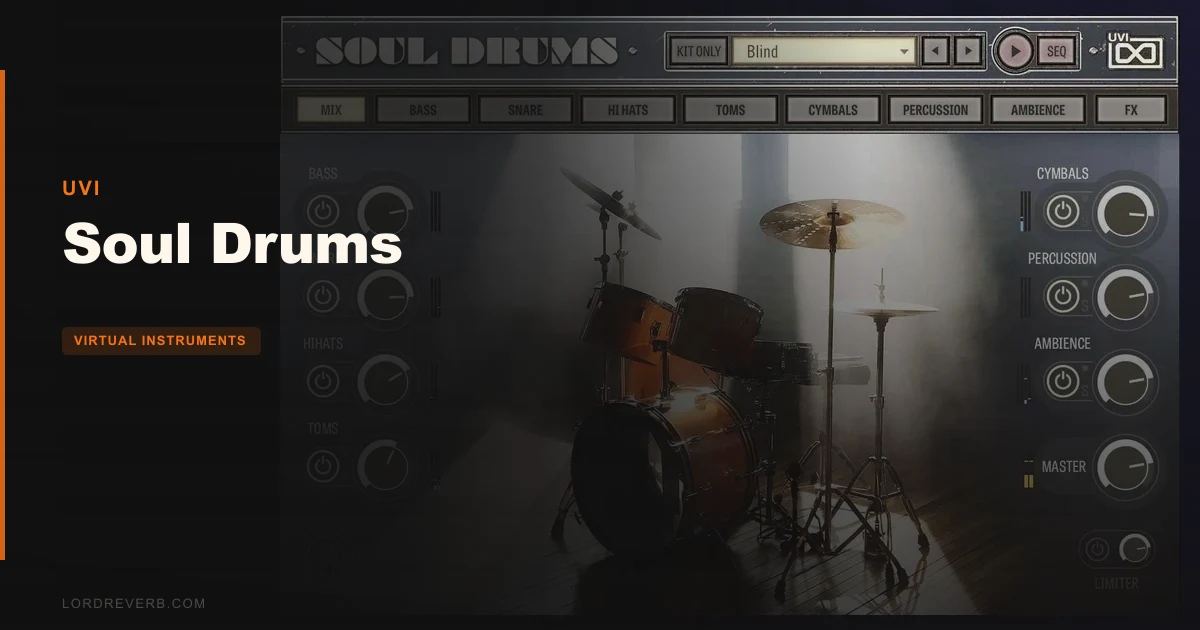
Soul Drums by UVI is a vintage-soul drum instrument built on 150,000+ samples from Miami's Criteria Recording Studios, and it's one of the most sonically honest drum libraries we've heard for soul, funk, and neo-soul production.
We were three hours into a neo-soul track. The chord progression was sitting beautifully. The bass had that low-mid weight you want at around 180Hz. But the drums were clinical. Every kick sample we tried from our usual go-to kit felt too clean, too quantized, too 2020-sample-pack. So we opened Soul Drums, picked a preset labelled for a '70s groove context, hit a single pattern from the built-in library, and the track locked in immediately. The snare had bleed. The hat had room. It sounded like someone had actually played in a room.
That's what Soul Drums does well. It's built at $149 for producers who are tired of modern drum kits that sound like they were recorded in a vacuum. If you make soul, R&B, hip-hop, lo-fi, or funk, this might be the most useful drum instrument you haven't tried yet.
First Impressions: Opening It for the First Time
Installation through UVI Workstation or Falcon is clean. No drama. The interface loads across 11 pages, which sounds like a lot until you realize each page covers a specific drum element: Bass, Snare, Hi Hats, Toms, Cymbals, Percussion, and Ambience, plus a global Mix page that ties everything together.
The first thing you'll notice is how good the default sounds are. Most drum plugins punish you for not tweaking. Soul Drums doesn't. Load a preset and it already has character. Saturation in the right places. Mic bleed that adds life rather than smearing transients. Room that breathes rather than overwhelms.
The interface looks dense at first glance. It isn't. Once you understand the logic of navigating per-element pages, the layout clicks. Still, new users might feel slightly lost before that moment of clarity arrives.
Getting It Into a Real Workflow
The pattern library is where most sessions will start. Over 1,000 patterns covering '60s and '70s grooves, breakbeats, hip-hop, funk, jazz, and more. That's not a marketing number we made up. That's a genuine library deep enough that you can stay in it for weeks without repeating yourself.
We pulled a breakbeat pattern into a 93bpm hip-hop session. Swung the grid slightly. The snare sat at beat two and four with natural ghost hits that didn't need EQ to sit in the mix. The pattern wasn't just rhythmically correct. It felt like it had been played by someone with an opinion.
The bleed matrix is where things get interesting. You can dial the exact amount of bleed from each drum element into each mic. Want your hi-hat bleeding subtly into the snare mic? Adjust it. Want a completely dry close-mic sound with zero bleed? Do that too. Most drum plugins give you a single "room" knob. Soul Drums gives you a 14-mic console.
Friction points do exist. Getting multi-out set up in your DAW requires some setup time. It's not plug-and-play. Users also report that the pattern editor, while powerful, has a steeper learning curve than expected for a tool positioned as "immediate." If you're used to a drag-and-drop groove browser, the first session will take longer than you'd like.
For producers exploring UVI's full drum toolkit, the workflow logic here will feel familiar. It's the same philosophy: deep control wrapped in a playable interface, as long as you're patient enough to find the flow.
The Mic Setup and Bleed Matrix: Where the Soul Actually Lives
14 mixable microphones. That number is the headline feature, and it earns its place.
The mics cover close positions for every drum element, overhead configurations, room mics at multiple distances, and bleed channels that capture how the drums interact with each other in the physical space of Criteria Recording Studios in Miami. The room in those recordings used to be called The Hit Factory. That matters. The acoustic signature of that room is baked into every sample.
We ran the snare close mic at around 70% and blended in the room mic at about 30%. Then we brought the overhead just slightly above zero. The result was a snare with body and air that we'd normally spend 20 minutes building with compression and reverb sends. Here it took about 90 seconds.
The per-element send effects and bus effects rack extend this further. You're not just mixing mics. You're shaping tone at the source, then processing it through a proper effects chain inside the plugin. This keeps your DAW session cleaner and your mix bus less congested.
What's slightly frustrating: there's no visual representation of mic positions in the interface. You're working from labels, not a spatial diagram. Experienced engineers will adapt quickly. Less experienced users might feel uncertain about what they're actually adjusting.
The Pattern Library: 1,000+ Grooves and What That Really Means
A drum plugin with a pattern library lives or dies on the quality of individual patterns, not the count. Soul Drums passes that test.
The '60s and '70s soul grooves are the strongest section. They have the rhythmic feel of a real session player, meaning slight human timing inconsistencies that make the loop feel played, not programmed. The hip-hop and breakbeat patterns hold up well too, with enough rhythmic variation that you can cycle through a verse and chorus without the pattern feeling repetitive.
Jazz patterns are present but limited in complexity. They work for lo-fi and background jazz-adjacent production. They'd frustrate a serious jazz producer.
The funk patterns are genuinely satisfying. We dropped a tight funk groove at 98bpm under a bass line and didn't touch it for two hours. It sat. It breathed. It didn't fight the low end.
Pattern editing is available but takes time to learn. You can modify existing patterns, build new ones, and map everything to your electronic drum kit using the integrated mapping presets. If you're new to drum programming in virtual instruments, expect a session or two before you're moving fluidly.
The Recording Pedigree: Does It Actually Sound Different?
Joe Galdo played the drums. Eric Schilling, Grammy-winning engineer, recorded them. Bob Olhsson, who worked for Motown, was involved in the process. The location was Criteria Recording Studios in Miami, a room with a discography most studios would trade their SSL for.
We want to be direct here: pedigree alone doesn't make a plugin sound good. We've heard plenty of "recorded by legends" plugins that sounded thin. Soul Drums doesn't. The combination of the room, the player's dynamics, and the engineering decisions in the recording process translates into samples that have real dynamic range and real harmonic complexity.
Hit a ghost note on the snare. Hit a full backbeat. The velocity response across those two hits has a natural ratio that sounds like a real player changing pressure, not just a sample pitched down. That's harder to engineer than it sounds, and they got it right.
Reviewers consistently report that Soul Drums sits in a mix without needing heavy EQ correction. That's the real test. Drums that sit without fighting other elements aren't just "warm." They have the right balance of low-mid body around 200-400Hz, controlled high-end transient crack between 4-8kHz, and room information that doesn't build up below 100Hz and cloud the kick's fundamental.
What It's Genuinely Good At
Soul Drums is strongest when the genre calls for character over precision. Soul, funk, R&B, neo-soul, lo-fi hip-hop: this is the library's native territory.
The 14-mic bleed matrix is the best implementation of mic-bleed control we've seen in a virtual drum instrument at this price point. Competitors offer room knobs. Soul Drums offers a console.
The kit presets are genuinely useful. Many drum plugins ship with presets that exist to demo the library rather than to use in production. The presets in Soul Drums are tailored to genre and production context. Load one and it's usually 80-90% of where you need to be. The remaining 10-20% is personal taste adjustments on the Mix page.
The integrated mapping for electronic drum kits is a smart inclusion. If you play rather than program, connecting an e-kit and playing into a session with these sounds is a legitimate workflow. For a broader look at how Soul Drums compares with other live-recorded sample libraries, that's a comparison worth making before you commit.
The Rough Edges
No trial version. That's a real problem at this price point. Buying a drum instrument without auditioning it in your actual sessions, on your actual music, is a risk. The demo audio on the product page is produced. Your mix won't be that mix.
CPU usage isn't clearly documented anywhere, which is annoying when you're managing a dense session. Users report it's moderate, not catastrophic. But "moderate" means different things on a 2019 MacBook versus a current Apple Silicon machine. Expect to test it before committing to heavy multi-out use in a large session.
The jazz and brushed patterns feel underserved. For a library emphasizing soul heritage, more nuanced jazz grooves would make this a full-genre solution rather than a specialist tool.
The learning curve on the full pattern editor and bleed matrix is real. The marketing says "immediate." It is immediate at the preset-and-play level. Going deeper takes hours, not minutes.
Who This Is Really For
- ✅ Buy if you make soul, funk, neo-soul, or R&B and want drums that sound like they were recorded in an actual room, not assembled from a sample folder.
- ✅ Buy if you want deep mic-blending control without building a complex drum bus from scratch every session.
- ✅ Buy if you connect an electronic drum kit to your DAW and want a library that actually responds to how you play.
- ❌ Skip if you need a jazz drum library with serious brushed-stick complexity.
- ❌ Skip if you're working with tight CPU budgets and can't afford to test the load impact before committing.
- ❌ Skip if you want a simple loop-grabber with no learning curve. There are faster tools for that job.
Specs & Technical Details
| Developer | UVI |
| Price | $149 |
| Plugin Format | Runs in UVI Workstation (VST / AU / AAX) or UVI Falcon |
| OS Support | Mac / Windows |
| Activation | iLok (account or dongle) |
| CPU Usage | Moderate (varies by mic count and multi-out configuration) |
| Trial Available | No |
| Version Reviewed | Current 2026 release |
Score Breakdown
| Category | Score | Notes |
|---|---|---|
| Sound Quality | 4.8/5 | Criteria Recording Studios, real player dynamics, and 150,000+ samples deliver genuine vintage character |
| Value for Money | 4.0/5 | Strong if you work in soul and funk; harder to justify if you only need it occasionally |
| Ease of Use | 3.8/5 | Preset level is easy; full bleed matrix and pattern editor require real learning time |
| Features | 4.5/5 | 14-mic matrix, 1,000+ patterns, per-element sends, bus rack, and multi-out is a serious feature set |
| CPU Efficiency | 3.5/5 | Undocumented load; moderate in practice but unverifiable before purchase |
| Overall | 4.3/5 | Best vintage soul drum instrument we've tested at this level; rougher at the edges than its sound quality suggests |
Alternatives to Consider
Superior Drummer 3 (Toontrack): Broader genre coverage and deeper MIDI groove editing. The sample quality is excellent across the board. If you work across multiple genres rather than staying in soul and funk territory, Superior Drummer 3 gives you more range.
Addictive Drums 2 (XLN Audio): Easier learning curve and a cleaner preset system. The sound quality doesn't have the same room character as Soul Drums, but the workflow is faster for producers who want to grab a kit and move on. Worth considering if the pattern editor complexity above felt like a dealbreaker.
UVI Drum Designer: If you're already in the UVI ecosystem and want something more flexible across styles, UVI's own Drum Designer is worth comparing directly before committing to Soul Drums. Different philosophy, similar ecosystem. And if you're evaluating UVI's reverb tools to complement a drum chain, the UVI Plate review covers that ground.
Our Verdict
Soul Drums is the drum plugin we'd reach for when the track demands something that sounds like it was played, not assembled. The bleed matrix alone is worth the session time it takes to learn. The recording pedigree isn't marketing copy. It translates into samples that sit in a mix without a fight.
The rough edges are real: no trial, undocumented CPU load, a pattern editor that takes time to master, and jazz coverage that's more decorative than functional. Those aren't reasons to skip it. They're reasons to go in with clear expectations.
At $149, it's priced for producers who take their drum sound seriously. If soul, funk, R&B, or neo-soul is your genre, this is an easy recommendation. If it's an occasional ingredient rather than a core tool, you might find the investment harder to justify.
The snare bleed on that neo-soul session we mentioned at the top? We never touched it again. That's the real review.
Frequently Asked Questions
Does Soul Drums require a separate UVI player or DAW plugin?
Yes. Soul Drums runs inside UVI Workstation or UVI Falcon. Both are free to download. UVI Workstation is the simpler host and the one most users will load it in. Falcon offers additional sound design flexibility if you already own it, but it's not required.
Is iLok hardware required to use Soul Drums?
iLok account authorization is required, but you don't need a physical iLok dongle. You can authorize to your computer directly through the iLok License Manager app. If you've used other UVI products before, the process will be familiar.
Can I use Soul Drums patterns directly in my DAW's piano roll?
Yes. Patterns can be dragged from Soul Drums into your DAW's MIDI editor, where you can edit them freely. This is one of the more useful workflow features for producers who want to start from the built-in grooves but customize timing, velocity, and pattern length for their specific track.
How does Soul Drums handle electronic drum kit input?
The plugin includes integrated mapping presets for most popular electronic drum kits. Connect your e-kit, select the appropriate mapping preset, and the incoming MIDI will trigger the Soul Drums samples correctly. This makes it a viable live-input tool, not just a programming-only instrument.
Is Soul Drums suitable for trap or modern hip-hop production?
The library includes breakbeat and hip-hop patterns, and the samples carry enough low-mid weight to work under modern hip-hop arrangements. That said, Soul Drums' core identity is vintage soul and funk. For trap-specific 808 patterns and hyper-compressed snare sounds, you'd be working against the library's natural character rather than with it.