If you own VocAlign or Revoice Pro and you're wondering whether the RePitch 2 Elements Crossgrade is worth picking up at $22.50, the honest answer is: only if stability issues won't cost you a session you can't afford to lose. This is an upgrade path built specifically for existing Synchro Arts users, not a standalone purchase, and what you're buying is a meaningfully improved editing interface on top of pitch correction that owners describe as genuinely natural-sounding. But there are real problems here, and at any price, they matter.
Synchro Arts has reworked the UI, added a floating toolbar, and brought multiple-track editing into a single view. For the right user, that's a satisfying workflow upgrade. For the wrong one, it's a frustrating source of corrupted sessions and licensing headaches.
What You Are Upgrading To
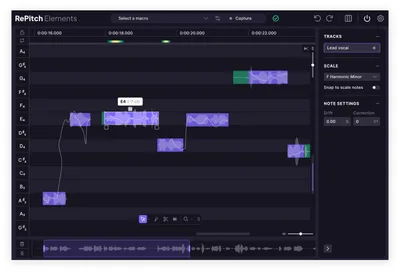
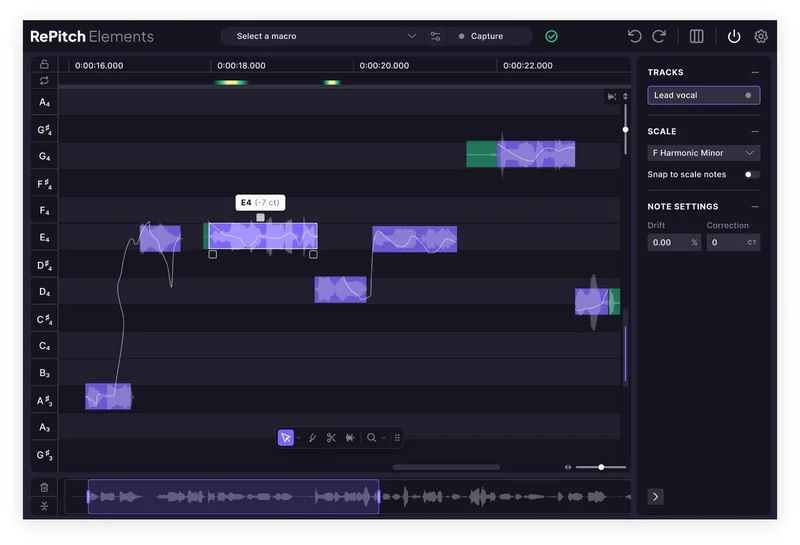
RePitch 2 Elements is a pitch correction plugin with a rebuilt interface. The biggest visible change is the floating toolbar, which stays accessible wherever you are in the workspace, putting pitch, timing, and correction controls within reach without digging through menus.
Note editing is more fluid. You can move, resize, or delete notes with less friction, and enhanced snapping gives you better visual feedback as you work. The UI has higher contrast and cleaner pitch curve visualisation, so transitions between notes are easier to read at a glance.
Zooming and scrolling are faster. New hotkeys reduce mouse dependency. SmartAttack lets you snap a performance to the groove. And you can pull multiple tracks into one unified view and edit them side by side, which is a clever addition if you're tuning stacked vocals or doubles.
Owners report the pitch correction itself sounds impressively clean. Artifacts are minimal. If transparency is your priority, that part of the pitch engine holds up.
Who Qualifies for the Crossgrade
This isn't for everyone. The crossgrade is available only if you already own VocAlign or Revoice Pro. If you're coming from outside the Synchro Arts ecosystem, there's no path in here for you.
If you're on VocAlign Ultra specifically, you'll also benefit from the reported close integration between that product and RePitch. That pairing gets called out as a strength. For everyone else in the eligible pool, the upgrade question comes down to how much time you spend on manual pitch editing and whether the UI improvements would actually change your day-to-day.
The Value Case
At $22.50, the entry cost is low. That's not in dispute. The question is what you're getting for it and what risks come with it.
The workflow improvements are real. A floating toolbar you don't have to chase, faster zooming, side-by-side track editing: these aren't gimmicks. If you spend serious time tuning vocals in a session, that friction reduction adds up. And if the pitch correction sounds as natural as owners say, that matters for the final result.
But the caching issue is ugly. Owners report hundreds of gigabytes of caching data generated per track. If you're on a system with limited storage, that's not a minor inconvenience. It's a session management nightmare.
Add crashes, session corruption, licensing server errors that knock you offline, and support turnaround that sometimes stretches past 10 days, and the picture changes. $22.50 buys you a tool you might love on a good day and hate on a bad one. That's not a great value proposition for a professional workflow where reliability isn't optional.
When a cheaper or free alternative is enough, honestly, skip this until the stability reports improve. If you're billing sessions by the hour, a corrupted project costs more than the upgrade saves you.
Who Should Skip It
Skip it if you work offline regularly. Licensing server errors have locked users out without an active connection, and support can take 10 or more days to respond. That's a ridiculous situation for a paid professional tool.
Skip it if you're a Pro Tools user expecting ARA integration. There's no Pro Tools ARA version available. That's a hard limit, not a workaround situation.
Skip it if you're on a machine with tight storage. Hundreds of gigabytes of caching data per track isn't a bug you can work around easily. It's a structural problem that eats drives.
And skip it if you lean heavily on undo while editing with the Draw tool. Undo on Draw actions is very slow. Annoying doesn't cover it when you're in the middle of a detailed tuning pass.
The Verdict
RePitch 2 Elements Crossgrade is a tool with a clever, cleaner design built on top of a stability record that isn't there yet. At $22.50 it's not a financial gamble, but the real cost is session risk. If you're a VocAlign or Revoice Pro owner who works online, has storage to spare, and can live with slow undo in exchange for natural-sounding pitch correction and a genuinely better editing layout, it's worth considering. Everyone else should wait for a more stable revision before spending even a small amount on something this unpredictable.
Specs & Technical Details
| Developer | Synchro Arts |
| Price | $22.50 |
| Plugin Format | N/A |
| OS Support | N/A |
| Activation | N/A |
| CPU Usage | N/A |
| Trial Available | N/A |
| Version Reviewed | RePitch 2 Elements |
Score Breakdown
| Category | Score | Notes |
|---|---|---|
| Sound Quality | 4.0/5 | Owners report natural, artifact-light pitch correction as a consistent strength |
| Value for Money | 2.5/5 | Low price point undercut by serious stability and caching issues that cost real time |
| Ease of Use | 2.5/5 | Floating toolbar and new hotkeys help, but jerky scrolling, slow undo, and crashes hurt badly |
| Features | 3.5/5 | Multi-track view, SmartAttack, and fluid note editing are legitimate additions |
| CPU Efficiency | 2.0/5 | Hundreds of gigabytes of caching data per track is a serious system resource problem |
| Overall | 3.0/5 | Good ideas, real pitch quality, but stability and support make it hard to recommend without reservation |
Alternatives to Consider
Melodyne is the go-to comparison when you need pitch correction with detailed macro controls for voiced and unvoiced balance. If that kind of surgical control over phoneme character matters to your work, Melodyne's toolset addresses it more directly. It also has a track record for stability that RePitch 2 Elements currently doesn't match.
Auto-Tune comes up in comparisons around pitch-down performance specifically. If you're correcting vocals that sit below their target pitch more than above it, that distinction may be worth testing before committing to this crossgrade.
Both alternatives are worth checking if reliability is non-negotiable for your sessions. The RePitch pitch engine sounds clean, but sound quality alone can't carry a product with this many reported workflow problems.
If you're a VocAlign user who's happy with what you have and your sessions run cleanly, staying put may be the most sensible call until Synchro Arts ships a more stable build. At $22.50, the upgrade isn't expensive. But losing a session to corruption always is.
Frequently Asked Questions
Who is the RePitch 2 Elements Crossgrade actually for?
It's for existing owners of VocAlign or Revoice Pro who want to move to RePitch 2 Elements. It's not a standalone product and there's no path in if you're coming from outside the Synchro Arts ecosystem. If you spend a lot of time on manual pitch editing and the new UI features sound useful, that's the target use case.
Can you use RePitch 2 Elements offline?
Owners have reported licensing server errors that make the plugin unusable without an active internet connection. If you regularly work in offline environments, that's a known risk worth taking seriously before you buy. Synchro Arts hasn't resolved this for all users based on current reports.
How serious is the caching data problem?
Owners report hundreds of gigabytes of caching data generated per track. On a session with multiple vocal tracks, that adds up fast. If your system drive is tight on space, this isn't a minor inconvenience: it's a practical blocker. Check your available storage situation before installing.
Is there a Pro Tools ARA version?
No. There's no Pro Tools ARA version of RePitch 2 Elements available. If ARA integration with Pro Tools is part of your workflow, this product doesn't cover that at all, and there's no workaround mentioned. That's a hard limit for PT-centric studios.
How does it compare to Melodyne for vocal tuning?
Melodyne comes up as the main comparison, particularly around macro functionality for voiced and unvoiced balance control. RePitch owners report natural-sounding results with minimal artifacts, but Melodyne has a more established stability record. If you need that kind of phoneme-level control and a reliable session experience, Melodyne is worth considering alongside this crossgrade.