
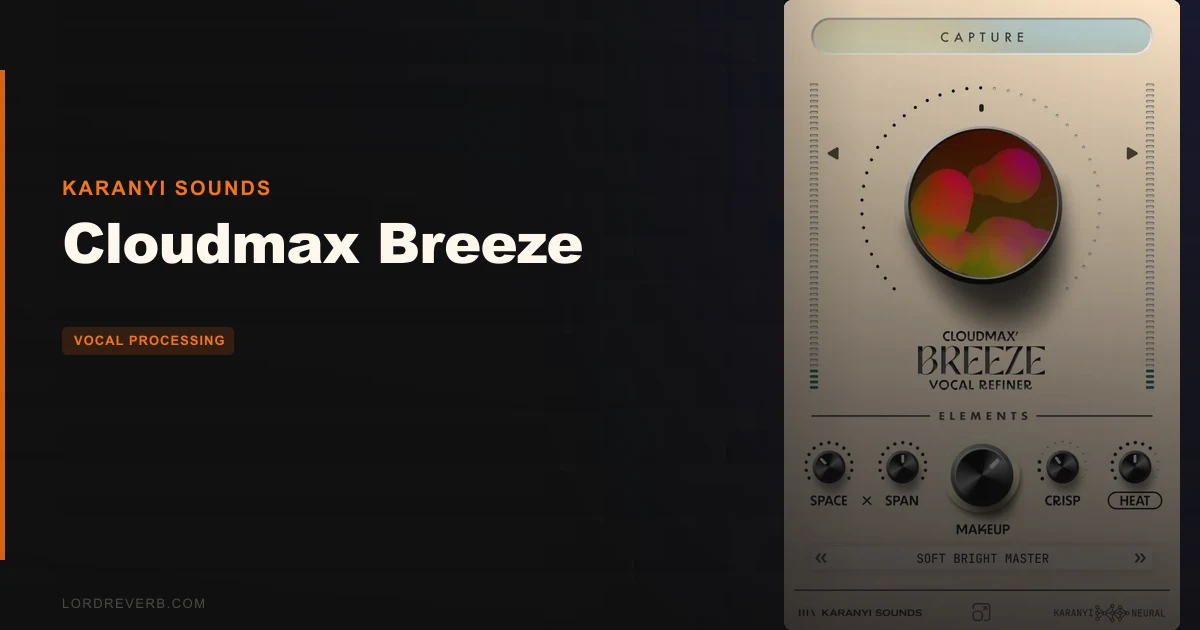
Cloudmax Breeze by Karanyi Sounds is a neural vocal enhancement plugin that processes raw vocals through five chained effects using a single master knob, priced at $24. It's built for producers who want a polished vocal chain in seconds rather than an hour of manual plugin stacking. If you're the kind of engineer who prefers surgical control over every frequency, this probably isn't your tool. But if you've got a vocalist's take that sounds flat out of the interface and you need it sitting in the mix before the session runs cold, Breeze has a specific answer for that moment.
What's Actually Inside Cloudmax Breeze
Five effects. One master knob. That's the core of it.
The five built-in processors are Space, Span, Crisp, Heat, and Makeup. Space and Span handle the reverb character, covering the range from tight, intimate rooms all the way out to large, open spaces. Crisp works on the top end, adding air or pushing toward crystal-clear brightness. Heat introduces tube-style saturation, moving from a gentle analog warmth to a fuller, more driven sound. Makeup handles dynamics, running from light leveling to more complete transformation of the vocal's shape.
The Breeze knob, powered by what Karanyi calls Neural technology, controls all five of these simultaneously. Turn it and everything moves together. Heat is the exception: it has its own on/off toggle, so you can keep the saturation completely out of the chain if the vocal doesn't need it.
Capture is the second major feature. It analyzes the incoming vocal for mood, style, and tempo, then automatically sets over 40 parameters. It's designed to do in a few seconds what would otherwise take several minutes of adjustment.
The plugin comes in two versions: standard and High Definition. The HD version runs more detailed modeling at the cost of higher CPU consumption.
System requirements: Mac OS X 10.11 or higher, Windows 8 or higher, 4 GB of RAM with 8 GB recommended, and 200 MB of disk space. Formats covered are VST3, AU, and AAX.
Where Cloudmax Breeze Fits In Your Signal Chain
Think of Breeze as the final polish pass on a vocal, not the corrective stage.
Your gain staging, pitch correction, de-essing, and noise reduction should all happen before this plugin sees the signal. Breeze is built to take a clean, corrected vocal and make it sound like it belongs in a finished mix. That's where owners consistently report it working well: clean vocal tracks, not problem signals with tuning issues or background noise baked in.
One interesting use case that's come up is stem separation. If you're working with an AI-separated vocal stem that has light separation artifacts, owners report Breeze handling that reasonably well. The Makeup effect's leveling combined with the Heat saturation can mask some of the thinness that stems often carry.
Place it after your corrective processors but before your bus compression, or use it as the last insert before the signal hits the vocal bus. The Capture function works best when the vocal coming in is already relatively clean, because it's reading mood and style from the audio. Feed it a noisy or heavily pitched signal and the analysis won't be as accurate.
The Breeze knob's range means you'll want to watch your output levels as you push it. The Makeup effect handles some of this, but keep an eye on headroom at the master stage, especially if you're running the HD version on a session with multiple vocal layers.
One real limit worth flagging: CPU performance and latency across different DAWs have limited documented coverage. The HD version is explicitly heavier than standard, but how it performs in Ableton versus Logic versus Pro Tools on a given machine is something you'll need to check at demo stage.
The Breeze Knob: What One Knob Actually Controls
The Breeze knob is the whole idea of this plugin, and it's worth spending time on what that actually means in practice.
When Karanyi says it adjusts over 40 parameters simultaneously, that's not marketing language for "we linked a few sliders." The Neural technology behind it is designed to move parameters in proportional relationships, not linearly. So as you push the knob, Space doesn't just get wetter at a fixed rate while Crisp gets brighter at a fixed rate. The relationships shift based on where you are in the range.
In a practical session, what this means is that small movements at lower Breeze values tend to be subtle. You'll hear the vocal open up slightly, get a little more air, sit a little further back in the space. Push it into the upper range and the effect becomes much more present: the reverb tail lengthens, the top end gets more pronounced, the dynamics level out more aggressively.
Your sweet spot on most pop and rap vocals will likely be somewhere in the lower-to-middle portion of the range. Owners report the combination of effects at moderate settings delivers a professional sound that's hard to get wrong quickly. That's the genuine strength here.
The flip side is that you can't move Space independently of Span or Crisp independently of the reverb character. If you want more air but no reverb tail, Breeze can't give you that. You'd need to reach for individual processors to split those decisions apart.
This is a design choice, not a bug. The whole point is that Breeze removes those decisions from your workflow. But if your session needs fine-grained control, that's the tradeoff you're accepting.
The Capture Feature: Genuine Intelligence or Marketing Shorthand?
Capture is the feature that separates Breeze from a simple multi-effect processor, and it's the one that generates the most interesting feedback from owners.
The way it works: you trigger Capture, it listens to the incoming vocal, analyzes mood, style, and tempo, then sets the 40+ parameters accordingly. Owners confirm that part is accurate. The speed is real.
The quality of the result depends heavily on what you're feeding it.
On clean pop vocals and rap tracks, Capture performs well, landing on settings that work for the genre and energy of the performance.
The problem shows up with vocal sources that sit dry in the room. Close-miked vocals, intimate singer-songwriter recordings, dry booth takes where you want minimal ambience: Capture has a habit of reaching for more reverb than those sources need. One reviewer noted it being "overly generous with reverb" on certain vocal sources.
The fix is simple but slightly annoying: you use Capture to get a starting point, then dial the Breeze knob back to reduce the reverb tail. It works, but it removes some of the speed advantage that Capture is supposed to deliver.
For sources where Capture nails it on the first pass, it's genuinely satisfying. Getting a production-ready vocal in a few seconds is not a small thing when you're in a creative session and momentum matters.
Space and Span: The Reverb Character Question
The Space and Span effects are where Breeze does its most opinionated work, and where opinions on the plugin split most clearly.
Space builds the room character. Span sets the size and spread of that room. Together, they're covering the same ground that a dedicated reverb plugin handles, but with no access to individual parameters like pre-delay, diffusion, or decay time.
What you get instead is a reverb character that's tuned to work on vocals. The developer has made decisions about pre-delay relationship, diffusion level, and decay curve that are baked in at each point of the Breeze range. If those decisions match your session, the result sounds like a thoughtful reverb choice. If they don't, you can't reach in and correct them without an additional reverb plugin after Breeze.
Owners working in pop and rap report the reverb sits well in the mix at moderate Breeze settings. That's a meaningful data point. Those are dense production contexts where reverb on a vocal can quickly become a problem, so the fact that it doesn't wash out the mix in those genres suggests the tuning is sensible for contemporary production.
Push the Breeze knob toward its upper range and the Space effect opens up considerably. The tail gets longer. The sense of room size grows. For a vocal that needs to feel cinematic or atmospheric, that upper range delivers it. But it's not subtle, and it's not adjustable beyond "more Breeze or less Breeze."
If you want intimate and dry, keep the knob low. If you want large and present, push it. The range between those is what you've got.
Crisp and Heat: The Tone Control Layer
Crisp handles the top-end character of the vocal. At low Breeze settings it adds a subtle presence boost, the kind that makes a vocal cut through a busy mid-range without sounding harsh. Push further and it moves into what the developer describes as "crystal brilliance," which in practical terms means the kind of airy, bright top end you'd associate with modern pop and R&B production.
The important thing to know about Crisp is that it's not a shelf or a bell you're adjusting. It's a character applied to the top end as part of the overall Breeze curve. If your vocal already has a lot of top-end energy from the microphone or the preamp, the Crisp effect can tip into harshness before you get to the reverb size you want from Space.
Heat is the warmth layer. The developer describes it as moving from gentle tube saturation to rich analog drive. What that means in signal terms: at low values you're adding subtle harmonic content, the kind of even-order distortion that makes a thin vocal sound fuller without obviously sounding distorted. Push it and the drive becomes more present, adding grit and density.
Heat's on/off toggle is a smart design decision. Some vocals don't need any saturation, and having to run the effect at zero is a workaround you shouldn't need. The toggle removes that issue cleanly.
For rap vocals in particular, pushing Heat into the more driven range adds the kind of grit that sits well in a beat with hard-hitting low end. For clean pop, keeping it at low values or switching it off entirely gives you the reverb and air of the other effects without muddying the fundamental.
Makeup: The Dynamics Layer
Makeup handles the dynamic shape of the vocal. The developer's description runs from "light leveling to complete transformation," which is a wide range to promise from a single effect inside a larger chain.
In practice, Makeup is functioning as a transparent compression-style leveler. At low values it gently reduces the difference between loud and soft phrases without obviously squashing the performance. At higher Breeze values it becomes more aggressive, pushing the vocal toward a more consistent, processed sound.
Owners report the combination of Makeup with the other four effects delivers a professional vocal sound. The fact that they're noting this in the context of a one-knob control suggests that the inter-effect relationships are well-designed. Makeup complements the reverb rather than fighting it.
The limit here is the same as everywhere in Breeze: you can't set a specific ratio, threshold, or attack time. You can't tell Makeup to level only the softest phrases while leaving the louder lines alone. The knob sets where everything lands together.
If a vocal has extreme dynamic range issues, a dedicated compressor or leveler before Breeze will give you more reliable results. Makeup is best understood as a finishing layer, not a corrective one.
The HD Version: When Is the Extra CPU Worth It?
Cloudmax Breeze ships in standard and High Definition versions. The HD version runs more detailed modeling. The CPU cost is higher.
Karanyi hasn't published specific CPU numbers, which is frustrating. We'd love to tell you whether HD version costs you two extra percent or eight percent per instance. That information isn't available from what the developer has shared.
What we can say is this: if you're running a dense session with multiple vocal layers, stack the standard version across all tracks during tracking and arrangement, then swap to HD on the lead vocal when you're ready to commit a final bounce. That approach keeps your CPU headroom available when you need it.
The 8 GB RAM recommendation rather than the 4 GB minimum is worth taking seriously if you're running HD on multiple instances. Voice tracks, harmonies, background vocals: each one will push the modeling harder.
For a single lead vocal on a modern machine, the HD version should be manageable. For a full vocal production stack on an older laptop, start with standard and monitor your performance meter before committing to HD across the board.
The Value for Money Question
At $24, Cloudmax Breeze is a genuinely interesting proposition. That price point puts it in the range of a single lunch rather than a plugin subscription commitment.
What you're getting for that money: a five-effect vocal chain driven by neural modeling, Capture auto-analysis of over 40 parameters, and a workflow that delivers professional-grade results in seconds. For producers who are building vocal chains from scratch with individual plugins, the question isn't whether Breeze sounds better than your compressor plus your reverb plus your exciter. It's whether the speed and simplicity are worth the reduced control.
At $24, for most producers that answer is yes.
The honest caveat is for advanced mixers. If you're building detailed vocal chains with specific EQ decisions, multiband processing, parallel compression paths, and carefully tuned reverb pre-delay, Breeze doesn't replace that workflow. It's not designed to. What it offers is a credible shortcut, and at this price point, a credible shortcut is worth having even if it's not your primary tool.
One user noted it was "exceptional but a bit more limited than expected." That's a fair summary of the value picture. Exceptional for what it is. Limited relative to what a full signal chain can do. At $24, the limitation is forgivable. At a significantly higher price, it wouldn't be.
If you work primarily in pop or rap and you regularly need fast, clean vocal enhancements, this is a clever tool at a price that makes the decision easy. If you work mostly in jazz, classical, folk, or any genre where minimal processing is the goal and reverb needs to be surgically chosen, Breeze is probably solving a problem you don't have.
What It's Genuinely Good At
The speed is real. Trigger Capture on a clean pop vocal, land on a Breeze position that feels right, toggle Heat on or off based on the vocal character, and you've got something mix-ready in well under a minute.
The five-effect chain is well-tuned for contemporary vocal production. Space and Span handle the room without washing out the mid-range where intelligibility lives. Crisp adds top-end air without introducing the harshness that an over-applied high-shelf can create. Heat gives you analog warmth without the phase issues that some saturation plugins introduce. Makeup keeps the dynamics controlled without obviously squashing the performance.
The stem-separation use case is worth calling out specifically. AI stem separation is now common enough that most producers have dealt with it. The thin, slightly artifacted quality of a separated vocal stem is a real problem. Owners report Breeze smoothing those artifacts effectively. That's a legitimate strength for remix and sample-based producers.
The interface is designed to be fast to learn. No deep menu diving, no manual required for basic use. You can be making sound with this plugin within two minutes of installing it.
The Rough Edges
The reverb over-application from Capture is the most consistent complaint and it's worth taking seriously. If your productions trend dry, or if you're mixing for a client who wants minimal space on their vocal, Capture will give you a starting point you need to walk back.
That's not a dealbreaker at this price. But it does mean Capture isn't always the full-solution shortcut it's designed to be. Sometimes it's a first draft.
The lack of published CPU data is annoying. For a plugin that ships with a High Definition version that's explicitly more CPU-intensive, some transparency about actual performance numbers would let producers make informed decisions before purchase.
The speed-focused design is both the main strength and the main limitation. Advanced users seeking deep customization are going to hit the ceiling quickly. The Breeze knob moves everything at once, which is brilliant for speed and frustrating the moment you want to separate the reverb decision from the air decision.
And the reverb in the upper Breeze range isn't subtle. Push the knob hard on a lead vocal and you'll hear it. For some contexts that's exactly right. For others it's too much.
Who This Is Really For
- ✅ Buy if you produce pop or rap and need vocals mix-ready fast without building a chain from scratch
- ✅ Buy if you work with stem-separated vocals and need to smooth artifacts quickly
- ✅ Buy if you're early in your production journey and want a vocal processing solution that works without deep signal chain knowledge
- ❌ Skip if you're an experienced mixer who needs individual control over each processing stage
- ❌ Skip if your productions trend dry and minimal, or if you're mixing in jazz, classical, or acoustic folk contexts
- ❌ Skip if you need documented, predictable CPU behavior across specific DAWs before committing to a tool in your production stack
Specs & Technical Details
| Developer | Karanyi Sounds |
| Price | $24 |
| Plugin Format | VST3 / AU / AAX |
| OS Support | Mac OS X 10.11 or higher / Windows 8 or higher |
| Activation | N/A |
| CPU Usage | Standard: not published. HD version: higher than standard, specific figures not published. |
| Trial Available | N/A |
| Version Reviewed | N/A |
Score Breakdown
| Category | Score | Notes |
|---|---|---|
| Sound Quality | 4.0/5 | Five-effect chain is well-tuned for pop and rap; reverb can overreach at high Breeze settings |
| Value for Money | 4.5/5 | At this price the speed-to-quality ratio is hard to argue with for the right user |
| Ease of Use | 4.5/5 | One-knob control and Capture make it accessible from the first session |
| Features | 3.0/5 | Five effects and Capture are clever but no individual parameter control limits advanced users |
| CPU Efficiency | 3.0/5 | HD version is explicitly heavier; no published benchmarks make planning harder |
| Overall | 3.5/5 | Smart, fast, and priced right for its target user; frustrating if you need deeper control |
The Verdict on Cloudmax Breeze
You've got a vocal sitting in your session that needs to sound finished. You've got twenty minutes before the client hears the rough mix. Breeze is built for that moment, and at $24 it costs less than the coffee you made while the plugin was installing.
The Capture feature won't nail it every time. When it overshoots on reverb, you'll wish you had a Space knob you could grab independently. That's a real complaint and it won't go away just because the price is low.
But the core tool works. Clean pop vocal into Breeze, Capture dialed in, Heat toggled on with a moderate Breeze position, and you've got something that sounds like a producer who knew what they were doing made deliberate choices. That's not nothing.
Advanced engineers building detailed chains will find the ceiling fast. For everyone else who works in pop and rap and wants a credible vocal enhancement tool that doesn't require a manual, this is a clever piece of software at a price where the risk is basically zero. Buy it. If the reverb is too heavy for your sources, back the Breeze knob off and place a subtle high-pass after the room tail. You'll find a workflow.
Frequently Asked Questions
What does the Breeze knob actually do?
The Breeze knob adjusts all five built-in effects simultaneously using Karanyi's Neural technology. It moves over 40 parameters in relationship with each other, so as you turn the knob, Space, Span, Crisp, Heat, and Makeup all shift proportionally. It's not a simple volume or wet/dry control; it's a single point of access to the entire processing chain. Heat has its own on/off toggle so you can keep saturation out of the signal if needed.
What is the Capture feature and how well does it work?
Capture analyzes the incoming vocal for mood, style, and tempo, then automatically sets the plugin's 40+ parameters. The speed is real and owners confirm it works well on clean pop and rap vocals. The main limitation is a tendency to over-apply reverb on dry or close-miked sources, so treat Capture's result as a starting point rather than a finished setting on intimate recordings.
What's the difference between the standard and High Definition versions?
The HD version runs more detailed modeling than the standard version. The developer states that it comes with higher CPU consumption. Specific CPU figures for either version haven't been published, so if you're on an older machine or running dense sessions, start with the standard version and monitor your performance before switching to HD.
Does Cloudmax Breeze work on stem-separated vocals?
Owners report it handles stem-separated vocals effectively, particularly for smoothing the light artifacts that AI separation tools introduce. The combination of the Makeup leveling and Heat saturation helps fill in some of the thinness that stems typically carry. It won't fix heavy separation artifacts, but on clean stems from modern separation tools it performs well.
Is Cloudmax Breeze suitable for genres other than pop and rap?
Owner reports are specific to pop and rap contexts, and the plugin's tuning reflects contemporary production values: reverb space, air in the top end, and smooth dynamics. For genres where dry, minimal processing is the goal, like jazz, classical, or folk, the Capture feature's reverb tendencies and the linked nature of the five effects will likely work against you. It's not impossible to use it carefully in those contexts, but it's not what the tool is built for.
Can you use Cloudmax Breeze as the only vocal processor in your chain?
You can, and for quick production work in pop and rap it's often enough. For a finished, professional mix it works best after gain staging and corrective processing like pitch correction, de-essing, and noise reduction. Breeze is a polish and enhancement layer rather than a corrective tool, and it performs best when the vocal coming in is already clean and controlled.
What DAWs does Cloudmax Breeze support?
Cloudmax Breeze supports VST3, AU, and AAX plugin formats, which covers Pro Tools, Logic Pro, Ableton Live, Cubase, Studio One, and most other major DAWs. It runs on Mac OS X 10.11 or higher and Windows 8 or higher, with a minimum of 4 GB RAM and 8 GB recommended.