
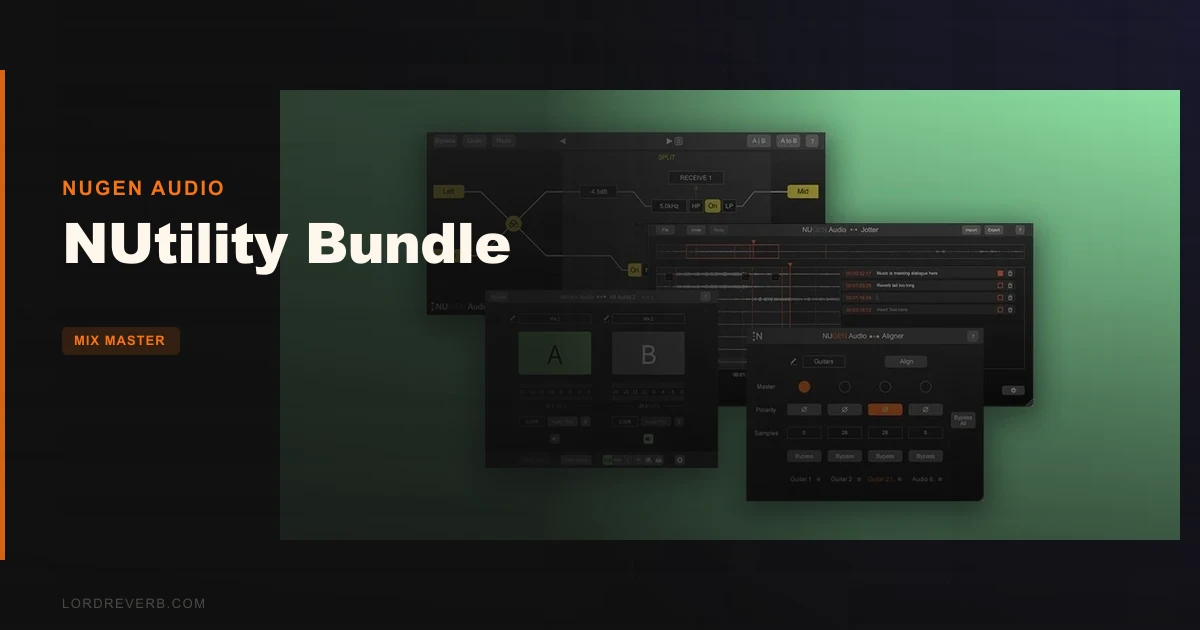
The NUtility Bundle is the best-value answer we know of to "which utility plugins should I buy instead of five separate tools?", and at $206 it undercuts buying each NUGEN Audio tool on its own.
It's a great fit for mixers, mastering engineers and tracking engineers who lose time to admin. It's a harder sell if you only ever need one of the four tools.
This is a source-based review. It's built from the NUGEN Audio product pages, the feature documentation and general production knowledge, not from weeks of sessions with the plugins. Anything that can't be verified yet is marked as such.
No free trial is mentioned in the material reviewed, so check the developer's page before you commit.
What Is in the Bundle, and Who Is It For?
The bundle packs four tools: Aligner, AB Assist 2, Jotter and SigMod. None of them is a creative effect. They fix, compare, annotate and route.
That makes this a different kind of purchase from a reverb or a compressor. You're not buying a sound. You're buying back minutes on every session.
If you record drums with six mics, flip between mix revisions all day, or keep losing client feedback in email threads, you're the target. If you mix entirely on one stereo pair of synths, you're not.
Formats are AAX, VST3, AU and AudioSuite on Mac (macOS 10.13 and later, 64-bit only). Windows gets AAX, VST3 and AudioSuite (Windows 7 and later, 64-bit only). The listing shows 512 MB RAM as the requirement.
Note the gap: the Windows list on the product page doesn't include AU, which is normal since AU is Mac-only.
Aligner: Does Automatic Phase Alignment Actually Save Time?
Aligner is an automatic phase and polarity alignment tool. It targets the classic multi-mic problem where audio reaches one microphone before the other.
The developer describes the symptom well. The time offset is often almost imperceptible, but the recording can sound thin or weak. That's the comb-filtering most engineers have chased by ear.
The Problem It Solves
Put a top mic and a bottom mic on a snare. The two capsules sit at different distances from the source. Sound arrives at different times, and the combined signal cancels at some frequencies.
The traditional fix is nudging a region by samples and flipping polarity until the low end fills in. It works. It's also tedious.
Aligner automates that decision. The pitch from NUGEN Audio is speed: the plugin works out the time and polarity relationship so you don't audition it by hand.
Where We're Sceptical
Automatic alignment is only as good as its judgement call. On a close-miked kick with a distant room mic, "perfectly aligned" isn't always what you want. Some of that room delay is the sound.
The source material says nothing about how Aligner handles that trade-off, so we can't confirm it. We'd treat its answer as a starting point and decide by ear.
Still, as a first pass on a 12-mic drum session, it's a clever idea. It earns its place if it gets you 90% there in seconds.
AB Assist 2: The Comparison Tool That Removes Bias
AB Assist 2 compares multiple pieces of audio quickly. That can be takes, mix revisions, master versions or plugin settings.
The headline in version 2 is that it receives and compares four audio sources. The first version handled fewer, so this is a real step up for anyone juggling several revisions.
Blind Test Mode
Test mode labels the channels randomly. That removes the loudest and most common source of bias: knowing which version is the new one.
We love this feature in principle. Everyone prefers the version they just spent an hour on. Hiding the labels is the honest fix.
What Version 2 Adds
- Receive and compare four audio sources
- Compare surround mixes in any channel count
- Auto-level-match using short-term loudness (LUFS)
- Mono-check for a mono fold-down comparison
- Smooth fades between sources
- Multiple plugin instances communicate directly instead of using an external send
Level matching is the part that matters most. A louder version nearly always sounds better, and that single fact ruins a lot of A/B decisions.
Matching on short-term LUFS instead of peak is the right metric. It tracks perceived loudness, not just the highest sample.
The Direct Communication Upgrade
Instances now talk to each other without an external send. That means less routing setup and fewer ways to get the session wrong.
The old method of building sends to feed a comparison plugin was fiddly. Cutting that step is a small but welcome change.
Jotter: Notes That Live Inside the Session
Jotter is a plugin for making notes and comments, built with collaboration in mind. You insert it anywhere in a project and add annotations locked to timecode.
Notes can be shared between collaborators through the plugin or through an exported .csv file. It also runs as a standalone application when a DAW is unavailable or unnecessary.
Why Timecode-Locked Notes Matter
"The vocal gets harsh somewhere in the second chorus" is a useless note. "02:14, vocal harsh at 3kHz" is a task.
Binding the comment to a position removes the guesswork. Whoever opens the session next sees the note at the exact moment it applies.
The CSV Export
CSV export is unglamorous and exactly right. A client or collaborator without your DAW can still read the list in a spreadsheet.
We'd want to see how clean the export is in practice. That's one of the things we can't verify from the documentation alone.
The standalone mode is a smart touch for review calls, where nobody wants to boot a full session to read a to-do list.
SigMod: Twelve Modules for Custom Signal Routing
SigMod is the deepest tool in the bundle. It gives you twelve single-process modules that you combine in any order to build the routing you need.
Each module can be inserted, swapped and moved around. Auto-resizing keeps the signal flow readable, according to the developer.
The Full Module List
- Mid/side
- Protect
- Tap
- Crossover
- Insert
- Mute/solo
- Trim
- Switch
- DC offset
- Mono
- Phase
- Delay
One note on counting. NUGEN Audio's own materials describe twelve modules, and the list above shows twelve. Some retail listings round to thirteen, so trust the list.
Fixing DAW Gaps
Several modules cover things certain DAWs either lack or bury in menus. Mute/solo and Trim work on the left and right sides of a stereo signal independently.
The Switch module flips the stereo image in one click. The DC offset module detects and corrects offset so you keep headroom.
The Mono module collapses the signal to mono in one click. That's the quickest honest check for phone and single-speaker listeners.
The Phase module shows the relationship between left and right. The Delay module fixes sync issues.
Creative Routing
The developer's examples are the interesting part. Run your go-to tape emulator in mid/side mode. Split a vocal into six bands and send each to a different compressor.
Or use older plugins in a DAW that doesn't support VST or AU. That last one is a surprisingly practical use.
The Mid/side, Tap, Crossover and Insert modules do most of the heavy lifting here. Together they make a modular toolbox, not a single effect.
The Learning Curve
Freedom costs clarity. A routing tool that does anything also lets you build a mess.
Plan on spending an afternoon learning how modules chain before it feels fast. We'd call that annoying only if you expect instant results.
How the Four Tools Work Together in One Session
The bundle makes more sense as a workflow than as four separate buys. Here's the order we'd expect to use them.
- Track a multi-mic source and run Aligner to settle phase and polarity.
- Use SigMod for mono checks, DC offset and mid/side routing while you mix.
- Drop AB Assist 2 on the bus to compare revisions with level-matched, blind sources.
- Log changes and client notes in Jotter, locked to timecode.
That's a complete loop from recording to feedback. It's the strongest argument for owning all four.
If you only touch one stage of that loop, the bundle logic weakens fast.
Specs and Requirements
| Spec | Detail |
|---|---|
| Developer | NUGEN Audio |
| Price | $206 |
| Plugin Format | VST3 / AU / AAX (AudioSuite also listed) |
| OS Support | Mac (macOS 10.13 and later, 64-bit) / Windows (7 and later, 64-bit) |
| Activation | N/A (not stated in the material reviewed) |
| CPU Usage | Light (utility processing; not independently measured) |
| Trial Available | N/A (not stated in the material reviewed) |
| Version Reviewed | Bundle with AB Assist 2, Aligner, Jotter, SigMod |
Where the NUtility Bundle Wins
It wins on scope. Four purpose-built utilities solve four separate session headaches, and they cost less together than apart.
It also wins on honesty of purpose. These tools don't pretend to make a record sound better. They remove friction so you can.
AB Assist 2's LUFS level matching is the clearest example. It attacks a bias most engineers fall for daily.
SigMod wins on flexibility. A routing toolkit that works in any DAW, including ones missing basic features, is hard to replace with built-in options.
Where It Falls Short
There are zero published user reviews and no third-party editorial coverage we could point to. That means real-world behaviour is unconfirmed.
Aligner's automatic decisions are the biggest open question. We can't tell you how it handles tricky room mics without hands-on use.
Jotter's CSV export and standalone mode sound good. We haven't seen either in action, so we're trusting the documentation.
SigMod has a learning curve. If you want one-click results, it will frustrate you at first.
And the plain truth: if you need only one of these four tools, the bundle is wasted money.
How the NUtility Bundle Compares
Each tool has rivals, and the bundle's value depends on how many you'd otherwise buy separately.
For phase alignment, the usual alternative is manual nudging or a dedicated tool like Sound Radix Auto-Align. Auto-Align is a well-known specialist in that one job.
For A/B comparison, you could build routing by hand or use a dedicated tool such as ADPTR Audio Streamliner or a comparison utility like Metric AB from Plugin Alliance. Those focus tightly on comparison and metering.
For routing, tools like Blue Cat's PatchWork or the built-in routing of your DAW cover similar ground. Patchwork hosts plugins in a chain and is a closer match to SigMod's creative side.
For annotation, most people use a text file, a shared document or DAW markers. Jotter is unusual in tying notes to timecode inside the session.
The NUtility Bundle isn't the first of its kind in any single category. Its edge is putting four of them in one purchase with a consistent interface.
Pricing and Value
The bundle costs $206. That's the number to weigh against buying each tool on its own.
The value case is simple. If you'd use three of the four, the bundle pays for itself fast. If you'd use one, buy that one alone.
We can't confirm a free trial or any current discount from the material reviewed. Check the developer's store before you buy.
Who Should Buy This
- ✅ Buy if you record with multiple mics and fight phase issues regularly.
- ✅ Buy if you compare mix or master revisions daily and want blind, level-matched tests.
- ✅ Buy if you collaborate with clients or co-producers and need timecoded feedback.
- ✅ Buy if your DAW lacks mid/side, mono check or stereo-flip tools.
- ❌ Skip if you only need one of the four tools.
- ❌ Skip if you mix entirely with a single stereo source and rarely compare versions.
- ❌ Skip if you want a creative effect that changes the sound on its own.
Score Breakdown
These scores are based on the documented feature set and published figures. We'll revisit them after longer use.
| Category | Score | Notes |
|---|---|---|
| Sound Quality | 4.0/5 | Utilities, not effects; clean signal handling is the goal and is unconfirmed by testing |
| Value for Money | 4.5/5 | Bundle pricing beats buying the four tools separately |
| Ease of Use | 4.0/5 | Aligner and AB Assist are quick; SigMod takes time to learn |
| Features | 4.5/5 | Twelve modules, four-source comparison, timecoded notes, auto alignment |
| CPU Efficiency | 4.5/5 | Utility processing should be light, but we haven't measured it |
| Overall | 4.3/5 | Strong workflow bundle held back by missing real-world confirmation |
Alternatives to Consider
If phase alignment is your only pain point, look at Sound Radix Auto-Align. It's a specialist in exactly that job.
If you mostly need A/B comparison and metering, Plugin Alliance's Metric AB is built around that task.
If custom routing is the draw, Blue Cat's PatchWork gives you a plugin host for chains and splits.
For a wider look at utility-focused tools, see our roundup.
The Verdict on the NUtility Bundle
We'd recommend the NUtility Bundle at $206 to anyone who'll use at least three of the four tools. The AB Assist 2 and SigMod pair alone justifies a serious look.
It's the wrong buy if you only need one tool, or if you expect a plugin that changes how your mix sounds.
What we still want confirmed is how Aligner behaves on messy real-world sessions and how clean Jotter's exports are. We'll update this review when we have more.
Four small tools that quietly stop you wasting an hour a week. That's the whole pitch, and it holds up.
Related reviews: All Dolby Atmos Bundle with Spacelab Ignition vs the Field
Frequently Asked Questions
What is in the NUtility Bundle?
The NUtility Bundle includes four NUGEN Audio tools: Aligner, AB Assist 2, Jotter and SigMod. Each handles a different workflow task. Together they cover phase alignment, comparison, notes and routing.
Is the NUtility Bundle worth buying?
It's worth it if you'd use three or more of the four tools. If you need only one, buy that one separately. The bundle price at $206 is the case for owning them together.
What plugin formats does the NUtility Bundle support?
On Mac it supports AAX, VST3, AU and AudioSuite, on macOS 10.13 and later in 64-bit. On Windows it supports AAX, VST3 and AudioSuite, on Windows 7 and later in 64-bit. The listing shows 512 MB RAM as the requirement.
What does Aligner do?
Aligner is an automatic phase and polarity alignment tool for multi-mic recordings. It addresses timing offsets between microphones that can make a recording sound thin or weak. It's meant to speed up what is normally a manual nudge-and-flip process.
How many sources can AB Assist 2 compare?
AB Assist 2 receives and compares four audio sources. It also offers a blind test mode with randomly labelled channels. Auto-level-match uses short-term loudness (LUFS) so a louder version doesn't win by default.
What modules are in SigMod?
SigMod has twelve modules: Mid/side, Protect, Tap, Crossover, Insert, Mute/solo, Trim, Switch, DC offset, Mono, Phase and Delay. You combine them in any order to build custom signal routing. Some retail pages say thirteen, but the published list shows twelve.
Does the NUtility Bundle have a free trial?
The material we reviewed doesn't mention a free trial or demo. Check the NUGEN Audio store or your retailer before buying. We'll update this answer if a trial is confirmed.