You’re mixing a dense, layered pop or electronic track in a DAW that has no idea what a 9.1.6 bed is, and you want it in Dolby Atmos without rebuilding your whole studio. That’s the job the Dolby Atmos Production Bundle from Fiedler Audio is built for. At $549, it’s a strong yes for some producers and a clear no for others.
It pairs two tools: Dolby Atmos Composer for mixing and monitoring, and Mastering Console 2 for finishing and delivery. Both are approved by Dolby Labs, per the developer.
Our take: it depends on your DAW, your patience and your tolerance for a few rough edges. We’ll split it by user type below.
Where It Belongs
Layered electronic, pop, ambient and cinematic music is where this bundle earns its keep. These are genres with lots of separate elements, and immersive audio rewards that.
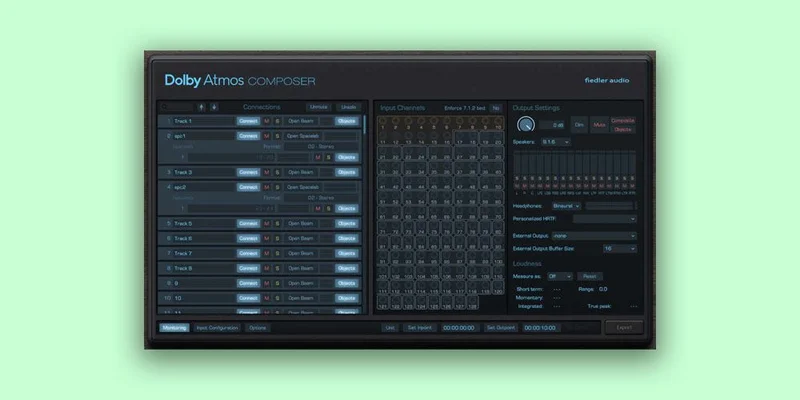
Dolby Atmos Composer works in any DAW, even one that can’t handle multichannel audio. That’s the headline. You don’t need a Pro Tools Ultimate rig to start placing sounds in a 3D field.
The Dolby Atmos Beam panning plugin does the placing. Composer monitors up to 9.1.6 on multichannel speakers directly from the plugin.
Headphone-only producers get a real option too. Owners say binaural monitoring with personalized HRTF makes a headphone-only workflow possible.
Where It Doesn't
If your music is a tight, mono-centric rock or hip-hop record where the vocal and kick own the middle, immersive audio gives you less to work with. You’ll spend the effort and hear modest payoff.
The bundle also isn’t a shortcut to an official Dolby Atmos release. Per our notes, it can’t reach official Dolby Atmos certification without external mastering. If you need a certified deliverable, budget for that step.
And if your DAW is Logic and your sessions are already fragile, read the stability section below before you spend anything.
Dolby Atmos Composer: Mixing Without the Plumbing
Composer’s pitch is simple. It removes the manual setup burden that makes Atmos feel like a second job. There’s no routing configuration and no external app.
You monitor on multichannel speakers from any DAW, right from the plugin. That’s the part we love. Fewer moving parts means fewer places for a session to break at 2 a.m.
Recording while you mix
The developer says you can record new tracks while already mixing for Dolby Atmos. That matters if you write and mix in the same pass. Plenty of Atmos workflows force you to commit before you spatialize.
The Beam panner
Dolby Atmos Beam is the panning plugin that ships inside Composer. You place sounds in the field from your DAW tracks.
Here’s the catch. There’s no panning tempo sync. If you want a hi-hat circling the room in time with your 120 BPM groove, you’ll automate it by hand. Annoying, and a clear gap for rhythm-driven music.
Spacelab 3D reverb
From version 1.5 onwards, Composer connects to Spacelab 3D reverb. Owners describe it as natural, with a seductive smoothness, and say it spreads across the immersive soundfield.
Send a pad or a vocal to it and let the tail fill the room around you. Reverb is where immersive mixes either come alive or turn to mush.
Binaural monitoring
Composer uses personalized HRTF for binaural monitoring. For anyone without a speaker array, that’s the difference between guessing and judging. It’s an honest way to work on headphones.
Be realistic, though. Headphone translation is still a compromise, and you’ll want to check on real speakers if you can.
Import, export and delivery
Composer exports ADM/BWF for Apple Music, Amazon Music, Tidal and Netflix. It exports speaker and headphone outputs at the same time.
It also imports ADM/BWF files for playback, corrections and re-export. Handy when a client sends you a file and asks for one fix.
Mastering Console 2: Where the Bundle Gets Serious
Mastering Console 2 is the heavier of the two tools. The developer calls it the fastest workflow on the market for Dolby Atmos mastering. We can’t verify that claim, but the feature list shows what they mean.
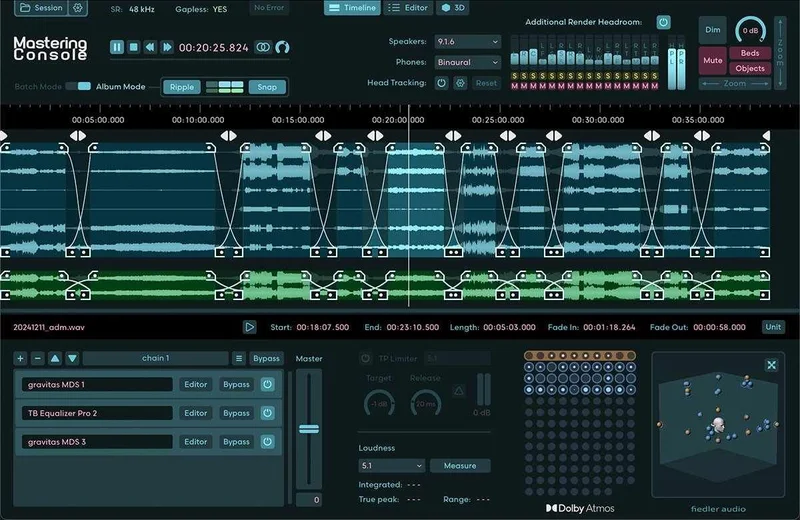
It supports 48 kHz and 96 kHz workflows. It monitors across stereo, binaural, 5.1, 5.1.2, 5.1.4, 7.1, 7.1.2, 7.1.4, 9.1.4, 9.1.6 and Apple Spatial Audio.
Batch work and albums
It processes multiple ADM/BWF files, plus their stereo counterparts, as a batch. It creates albums with seamless transitions using a crossfade feature. For an EP or album, that saves real hours.
It also batch downsamples ADM/BWF files from 96 kHz to 48 kHz. Small feature. Big time saver.
Cleaning up channels
You can edit the Binaural Mode, Description and Group of each Atmos channel. You can change channel order or deactivate channels you don’t want.
It automatically detects and removes silent channels. That tidies a bloated session fast.
Downmix, trim and balance
You can edit Downmix, Trim and Balance for different reproduction systems. A mix that sounds huge in 9.1.6 often collapses in a stereo fold-down. This is where you catch that.
Routing, calibration and visual feedback
The routing system is sophisticated and saved as presets. Speaker calibration covers volume, delay and EQ per channel, also saved as presets. A 3D view visualizes beds and dynamic objects.
Head tracking options are included. You can monitor speakers and headphones at the same time, and Undo/Redo works as you’d expect.
The True Peak Limiter and exports
A True Peak Limiter handles loudness compliance. Mastering Console 2 exports ADM/BWF, multichannel rerenders, binaural, Apple Spatial Audio and a stereo reference all at once.
It also processes ADM/BWF files through OBAM plug-ins, and VST3 plug-ins for stereo mixes. That’s flexible, and it’s why mastering engineers will care more than mixers.
How To Use It Well
Start with fewer moving objects than you think you need. Beginners pan everything and wonder why the mix feels like a washing machine. Keep your anchors (kick, bass, lead vocal) steady and let the supporting parts move.
Check your stereo fold-down early, not at the end. Open the downmix controls in Mastering Console 2 and listen to what survives.
Work at a sample rate you’ll deliver in. The bundle needs 48 kHz or 96 kHz, so set your session accordingly before you track.
Use reverb as your glue. A good 3D reverb on a send fills gaps between objects. Dry objects floating in space sound like a tech demo.
Stability and Support: The Part We Don't Love
Here’s the unglamorous side. Owners report stuttering, digital glitching and stability issues in Logic sessions. That’s a serious flag if Logic is your home.
Reviewers also report high GPU usage while plugin interfaces are open. Close the windows when you’re not using them.
Owners also describe technical support as inadequate and unresponsive. That’s frustrating at this price. If you hit a snag mid-project, don’t count on a fast rescue.
Against the Field
Pro Tools Ultimate offers native Dolby Atmos support. It wins on integration, but you pay for it with significant cost and hardware requirements.
Dolby Atmos Production Suite leans toward post-production workflows. It lacks music-oriented features, so for music it’s the weaker fit.
Logic Pro has native Atmos support, which is great if you already own it. But it has height panning accuracy and downmix setting issues, which is exactly where this bundle’s tools step in.
Who Should Buy It, and Who Shouldn't
The home producer on a single DAW
Buy it if your DAW isn’t Logic, or if you can live with workarounds. Composer gives you Atmos without a studio rebuild. Wait if you’re in Logic and your sessions already stutter.
The headphone-only mixer
Buy it, with caution. Personalized HRTF binaural monitoring makes the workflow real. Just plan to verify on speakers before you ship anything important.
The mastering engineer
Buy it. Mastering Console 2 is the strongest half of this bundle, with batch processing, crossfaded albums and simultaneous multi-format export. Keep in mind the certification limit.
The rhythm-driven electronic producer
Wait. The missing tempo sync on panning will frustrate you, and so will the missing monitor EQ.
The casual hobbyist
Skip it. At $549, this is a working tool for people who plan to deliver immersive mixes, not a curiosity.
The Verdict
This is a capable, well-featured bundle with a real stability question mark and a support problem. It suits mastering engineers and producers who deliver Atmos regularly. It’s wrong for anyone who needs certification out of the box, anyone fighting Logic instability, or anyone who just wants to experiment.
Specs & Technical Details
| Spec | Detail |
|---|---|
| Developer | Fiedler Audio |
| Price | $549 |
| Plugin Format | N/A |
| OS Support | N/A |
| Activation | N/A |
| CPU Usage | N/A |
| Trial Available | N/A |
| Version Reviewed | N/A |
Score Breakdown
| Category | Score | Notes |
|---|---|---|
| Sound Quality | 3.5/5 | Personalized HRTF and Spacelab reverb get good owner reports |
| Value for Money | 3.0/5 | Deep feature set, but support and stability reports hurt |
| Ease of Use | 3.5/5 | No manual routing, though Mastering Console 2 has a lot of depth |
| Features | 4.0/5 | Batch export, 3D view and calibration presets, minus tempo sync and monitor EQ |
| CPU Efficiency | 2.5/5 | Reviewers report high GPU usage with interfaces open |
| Overall | 3.4/5 | Strong mastering tools held back by stability and support concerns |
Alternatives to Consider
Pro Tools Ultimate
Pick it if you already live in Pro Tools and have the hardware budget. Native Atmos support is a real advantage. The cost and hardware demands are the trade-off.
Logic Pro
Pick it if you want Atmos with the DAW you may already own. Watch the height panning accuracy and downmix setting issues before you trust it for delivery.
Dolby Atmos Production Suite
Pick it if your work leans toward post-production rather than music. It lacks music-oriented features, so it’s a poor match for album work.
Buy or Skip?
Buy it at $549 if you deliver Atmos regularly and your DAW isn’t giving you stability trouble. Mastering engineers get the most from it. Skip it if you need certified delivery without extra steps, if you rely on Logic and already see glitching, or if you’re only curious about Atmos.
The tools are good. The support behind them is the gamble.
Related reviews: NUtility Bundle · All Dolby Atmos Bundle with Spacelab Ignition vs the Field
Frequently Asked Questions
Does the Dolby Atmos Production Bundle work in any DAW?
Dolby Atmos Composer works in any DAW, even one that can't handle multichannel audio. It needs no manual routing configuration or external app. Monitoring on multichannel speakers runs directly from the plugin.
Can I mix Dolby Atmos on headphones with this bundle?
Yes. Composer uses personalized HRTF for binaural monitoring, and owners report it enables headphone-only workflows. Mastering Console 2 also monitors binaural and Apple Spatial Audio. Check your mix on speakers when you can.
Does this bundle give me an officially certified Dolby Atmos master?
No. The product cannot achieve official Dolby Atmos certification without external mastering. It exports ADM/BWF for Apple Music, Amazon Music, Tidal and Netflix. Plan for the certification step separately.