
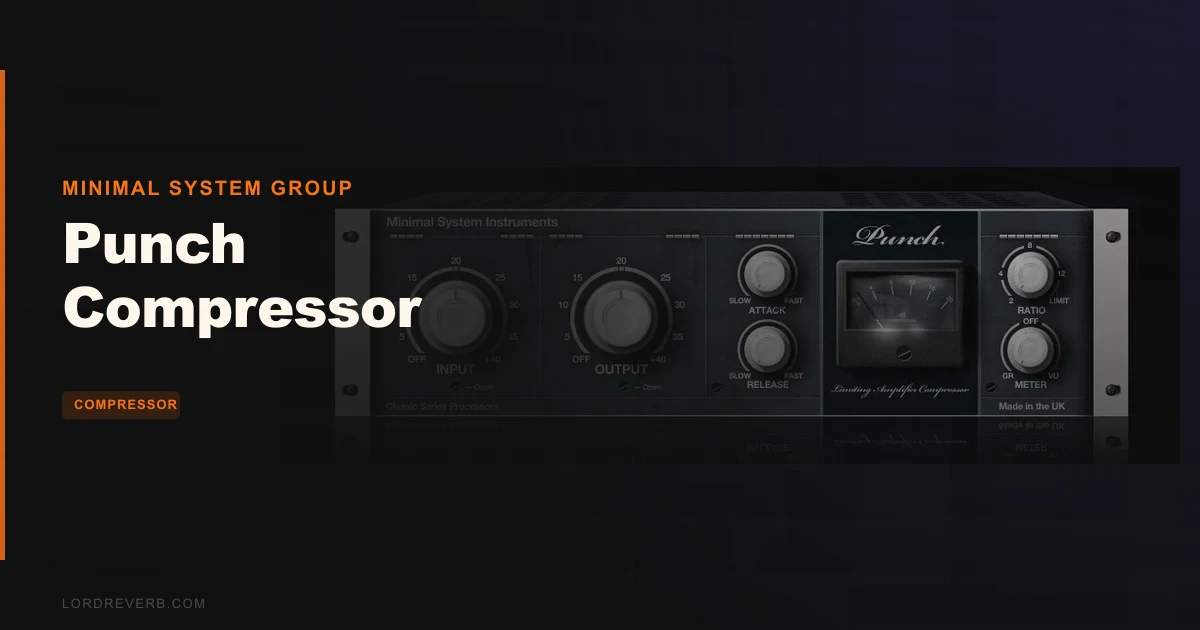
If you're tracking drums in a Windows DAW and you want FET-style compression that snaps hard without costing a session's worth of coffee money, the Punch Compressor by Minimal System Group earns a place in that conversation. It's a 1176AE-modelled VST, priced at $14, and it's built for one job: hitting transients fast and adding character. It's not trying to be a Swiss-army tool. It's not going to run on your Mac. And it hasn't been updated in a long time. But for a specific kind of producer, on a specific kind of signal, it does something satisfying that costs almost nothing.
This review is for Windows users who've stumbled across Punch, wondered if it's still worth loading in 2026, and want a straight answer before they bother with jBridge. We'll tell you who should grab it, who should skip it, and where Punch Evolved and the rest of Minimal System Group's catalogue fit into the picture.
Where It Belongs
Punch was built for drums. The developer says so directly, and owners confirm it. Put it on a snare bus, pull the attack to its fastest setting, and push the input gain until the needle bites. That's where this plugin earns its name.
The ultra-fast attack time means transients get grabbed immediately. You're not waiting for the compressor to catch up with a rimshot or a kick hit. Reviewers report it can make drums punchy and fat.
Room mics are another strong use case. Reviewers report it can crush room mics, which is a character move more than a control move.
Reviewers also report it can smooth dynamic vocals. Attack and release are both adjustable, so you can decide how hard it grabs. It isn't a transparent leveller; the FET character stays in the sound.
Loops benefit too. Users appreciate the simplicity of Punch for experimental processing, especially when you want a compressor that imparts vibe rather than just controlling levels. A heavy ratio on a drum loop is the obvious place to start.
For producers looking at character compressors in the $14 range, Punch fits neatly into a signal chain as a channel-strip compressor on drum buses, room mics, or any source where 1176-style aggression is the goal.
Where It Doesn't
Mac users: stop reading. Punch is Windows-only. Full stop.
If you're running a 64-bit DAW without native 32-bit bridging, you're looking at jBridge. That might work fine. It might not. Owners report inconsistent performance with jBridge, and that's a real operational risk if you're mid-session on a deadline.
Punch is a poor fit for transparent bus compression. If you want clean glue on a mix bus or a master chain that doesn't colour the signal, this isn't the tool. The analogue-modelled characteristics and transformer emulation are features, not bugs, but they mean everything that goes through Punch comes back with a sound that's been touched. For referencing or mastering work where transparency matters, look elsewhere.
String arrangements, delicate acoustic instruments, and anything that needs a compressor to stay invisible are a poor match for a character compressor. Not every source needs that.
And Punch Evolved is the redesigned version, with Mid/Side processing, EQ and Gate sections added. More on that in the comparisons.
Who Is This For, Section by Section
The Beginner Producer
You're learning compression. You've got a Windows machine, a 32-bit-friendly DAW, and you're trying to understand what a compressor actually does to a drum track before you spend money on something expensive.
Punch suits this. The controls are simple: input gain, output gain, attack, release, ratio, and VU metering. You set a ratio, pull the attack down, and watch the meter move.
The Kendal Osborne presets are a genuine head start. Load one, play your drums, and adjust from there. That's a legitimate learning path. At $14, the risk of getting it wrong is minimal.
The 32-bit issue might frustrate you though. If your DAW isn't on the native-bridging list, you'll hit the bridging question early. It's annoying, and it's the one thing that could kill the experience before it starts. If your DAW handles 32-bit natively, no problem. If it doesn't, factor that in.
Verdict for beginners: Buy it, if your DAW handles 32-bit natively. Otherwise, wait until you've sorted the bridging situation.
The Working Producer or Mix Engineer
You've got a session open, you've got drum tracks that need character and snap, and you want a compressor that doesn't require an hour of setup. Punch keeps the controls few, and the Kendal Osborne presets give you somewhere to start.
The ultra-fast attack is the key selling point here. With the attack that quick, the ratio does more of the work in deciding how hard the initial hit gets squeezed, which is worth experimenting with.
The VU metering options are flexible, which gives you visual feedback to work with. Automation is fully supported, so you can ride the input gain through a vocal performance or automate the ratio on a bus that changes character between verse and chorus.
The 32-bit situation is the practical concern. If you're on Reaper, Nuendo, Cubase, Bitwig, or FL Studio, the developer lists native bridging for your host. Ableton Live is on the tested list too.
The lack of updates is a legitimate flag. If a DAW update ever breaks compatibility, you'd be relying on a plugin that isn't being updated. That's a real operational risk for professional sessions.
Verdict for working producers: Buy it for drums and room mics as a character piece. Don't build a critical session around it as your primary compressor without a backup plan.
The Sound Designer or Experimental Producer
You're running loops through strange boxes trying to find textures. You want compression that does something audible rather than just controlling dynamics. You don't care that it's 32-bit or that it hasn't been updated.
Users appreciate its unique vibe on loops. A heavy ratio with the input pushed is the obvious place to start. Blend it with the dry signal in a parallel setup if you want weight without losing the original transient.
The analogue-modelled characteristics and custom output transformer emulation are what give it the colour that sound designers go looking for.
Simplicity is an asset for experimental work. When there are only a handful of controls, you're not fighting a menu system. You're adjusting and listening, which is how experimental processing should work.
Verdict for sound designers: Buy it. Users like the vibe, the price is trivial, and the simplicity helps.
The Legacy Windows User with a Deep Plugin Folder
You've got a catalogue of 32-bit plugins. You've got Reaper or Cubase handling bridging without much drama. You're not looking to replace your whole signal chain; you're looking to confirm whether Punch is worth keeping or removing.
Keep it. Owners call it a sleeper plugin with a distinct sound, and if it works in your setup, there's no reason to eject it from your template.
But also look at Punch Evolved, the redesigned version with Mid/Side processing, EQ and Gate sections.
Verdict for legacy users: Keep it, and look at Punch Evolved if you want the extra sections.
The Controls, What They Do, and Where They Fall Short
Input and Output Gain
The input gain knob drives the signal into the compression circuit. More input means more gain reduction, so it's the primary way you control how hard the compressor works.
The output gain knob brings the level back up after compression. Gain-staging through Punch matters: if you're running it on a drum bus, you want to leave enough headroom on the output that you're not clipping into the next plugin in your chain. Use the VU metering to check your output level and keep it where it belongs.
These two controls together are your loudness management. Set input for the character you want, set output to match the gain you had before compression. That's the foundation.
Attack and Release
Punch's attack is described as ultra-fast. The fast attack time means the compressor catches the initial transient of a snare or kick rather than letting it through. With Punch, you're leaning into the grab.
The release is adjustable. A fast release on a kick drum causes the compressor to breathe with the kick, adding a pumping quality that can be a feature or a problem depending on the tempo of your track. A slower release keeps the compression sustained and smooths out dynamic variation over a longer window.
On room mics, a slow release creates that classic "breathing room" sound where the compressor opens up slowly after a big snare hit, letting the room tail swell into the space the compressor creates. Push the input gain, set the release slow, and listen to what happens to the ambience.
Attack and release are adjustable, and you'll be setting them by ear.
Compression Ratios
Four ratios: 2:1, 4:1, 8:1, and 20:1.
2:1 is the gentlest. Use it for mild levelling on vocals or acoustic sources where you want to reduce dynamic range gently.
4:1 is the workhorse. Most drum bus work sits here. It's aggressive enough to tighten a performance without turning everything into a brick. Start here and move up or down based on what the source needs.
8:1 is where the compression becomes audible, which suits kicks and snares when you want the effect to be part of the sound.
20:1 is limiting territory. Push the input gain into 20:1 and you're crushing the signal. Room mics, loops, and parallel compression setups are the places this ratio makes sense. For anything that needs to breathe, 20:1 is too much.
The four-ratio design keeps things simple. Some producers will wish for a continuous ratio control. It's not here.
FET Gain Reduction and Analogue Emulation
The FET gain reduction emulation is the core of what Punch is. It's modelled on the 1176AE Limiting Amplifier Compressor, and the developer pairs it with analogue-modelled characteristics.
The custom output transformer emulation adds to this, modelling the transformer stage you'd find in analogue hardware.
Owners report a unique vibe and a distinct character, which is the practical test.
VU Metering
Punch includes flexible VU metering options. A VU meter shows average levels rather than peak levels, which makes it useful for reading how the compressor is working musically rather than technically. A VU reading gain reduction tells you how much the compressor is pulling down the signal on average, which is more useful for setting ratio and input gain than a peak meter would be.
The metering options are flexible, so you can set the plugin by eye as well as by ear.
Presets from Kendal Osborne
The included presets from Kendal Osborne are a practical inclusion. For a plugin with a small control set, presets give you a map of what the tool can do, and a launch point rather than starting from scratch.
The presets don't cover every use case, and they can't: four ratios and a handful of knobs don't produce infinite variation. But they make the plugin immediately useful for someone who hasn't spent time with FET-style compression before.
Automation Support
Full automation support means every parameter in Punch can be written and played back through your DAW's automation system. For a character compressor, the most useful automation targets are input gain and ratio.
Automate the input gain on a vocal to ride the performance into the compressor harder on chorus sections, letting the FET character increase when the track is at its most energetic. Automate the ratio on a bus to switch from 4:1 in verse sections to 8:1 on a drop. These are practical session techniques, and the fact that Punch supports them means it's not just a set-and-forget tool.
The 32-Bit Problem in 2026
This is where we have to be straight with you. Punch is a 32-bit plugin in 2026. That's not a minor inconvenience; it's a structural limitation that affects real sessions.
Most modern DAWs run 64-bit natively. Some, like Cubase, Nuendo, Reaper, Bitwig, FL Studio, Sonar, Mixcraft, Renoise, and Tracktion, include native 32-bit plugin bridging. If you're on one of those, Punch loads and runs without third-party software. Check your DAW's current documentation before assuming this still holds in the version you're running.
If your DAW doesn't bridge natively, jBridge is the standard solution. But owners report inconsistent performance with jBridge for Punch specifically. That's not a reason to give up, but it's a reason to test before you build a template around it.
Ableton Live, Adobe Audition, and Presonus Studio One are listed as tested environments. That doesn't mean they're officially supported with guaranteed bridging behaviour. Test in your specific setup before counting on it.
And Punch lacks updates, which is worth knowing before you get attached to it.
For producers looking at the best VST compressors for Windows, the 32-bit limitation is the single biggest filter for whether Punch belongs in your setup.
Against the Field
Three products come up when people talk about Punch. Here's where each one stands.
Punch vs. Punch Evolved
Punch Evolved is the redesigned version. It adds Mid/Side processing, an EQ section, and a Gate section.
The argument for keeping the original Punch is simplicity. Fewer controls means faster decisions. If your workflow is "load compressor, compress drums, move on," the original might actually suit you better than a version with more sections to configure.
If you want those extra sections, Evolved is the one to look at.
Punch vs. SSi Pro Compressor
Also from Minimal System Group, the SSi Pro is an SSL-style compressor clone rather than an 1176 emulation, so it's a different flavour of compressor from the same developer.
If you like Punch's approach but want the SSL flavour, it's the sibling to look at.
Punch vs. Cytomic The Glue
Reviewers compare Cytomic's Glue to Punch as the cleaner-sounding option with expanded functionality.
If you want the cleaner sound and the extra functionality, that's the direction to look. If you want FET character and you're on Windows with a compatible setup, Punch holds its own in a narrower lane.
They're aimed at different sounds, so it comes down to which one you're after.
How to Use It Well
Start on a drum bus, not a master bus. Punch's character is too strong for transparent mix-bus work, but it's exactly right for tightening a group of drums.
Gain-stage before you compress. Set your drum bus level so it's hitting Punch at a healthy but not excessive level before you touch the input gain knob. Then push input gain until the VU meter shows 4-6dB of gain reduction on the loudest hits. That's your starting compression depth.
Use the 4:1 ratio as your default and move up to 8:1 only if you want the compression to be audible as part of the character. At 8:1 with the input pushed, the compression becomes part of the sound. At 4:1, the effect is more controlled.
For room mics, go harder. Set the ratio to 8:1 or 20:1, push the input gain until the meter is pinning, and then pull the release to something slow enough that the room tail breathes back in. What you hear is a swelling, ambient quality underneath the close-mic kit. Blend it in parallel at low level and it adds depth without dominating.
You want to compress a vocal with Punch? Use the fastest attack setting and a medium release. Push input gain until you're getting 3-5dB of reduction on the loudest phrases. Try it on the choruses first and see if the added aggression works for the song.
Use automation on the input gain knob if your source has extreme dynamic variation. A loop that goes from quiet to loud benefits from riding the input into Punch rather than changing the ratio, which affects character as well as compression depth.
And check your output gain carefully. The compression will lower your perceived loudness if you're not compensating on the output. Match the compressed level to the bypassed level before you make an EQ judgment about the sound. A lot of "the compressed version sounds better" decisions are actually "the compressed version is louder" decisions in disguise.
The Verdict
Punch is a 32-bit Windows compressor with real character on drums and room mics. The FET emulation is the draw, the controls are simple, and the presets are a legitimate starting point. At $14, the floor for disappointment is extremely low.
But it's 2026. The plugin lacks updates. The 32-bit architecture is a genuine workflow risk depending on your DAW. And Punch Evolved exists and does more.
For a Windows producer who needs a fast, characterful FET compressor for drums and isn't ready to invest in something fully-featured: grab it. For anyone on Mac, anyone building a professional session that needs reliable maintained software, or anyone who wants something that does more than four ratios and a VU meter: look at Punch Evolved or The Glue instead.
What Punch is, it's very good at. It's just that what it is has gotten narrower as the world around it has moved forward.
Specs & Technical Details
| Developer | Minimal System Group |
| Price | $14 |
| Plugin Format | VST (32-bit) |
| OS Support | Windows only |
| Activation | N/A |
| CPU Usage | N/A |
| Trial Available | N/A |
| Version Reviewed | N/A |
Score Breakdown
| Category | Score | Notes |
|---|---|---|
| Sound Quality | 4.0/5 | FET character is distinct and convincing on drums and room mics |
| Value for Money | 4.5/5 | Character and simplicity hard to argue with at this price |
| Ease of Use | 4.5/5 | Minimal control set means fast decisions and no menu diving |
| Features | 2.5/5 | Four ratios and basic metering; no mid/side, no gate, no EQ |
| CPU Efficiency | N/A | No reliable data available |
| Overall | 3.5/5 | Strong character tool held back by 32-bit limits and no updates |
Alternatives to Consider
Punch Evolved (Minimal System Group), The redesigned version. Adds Mid/Side processing, an EQ section, and a Gate section.
SSi Pro Compressor (Minimal System Group), Minimal System Group's SSL-style compressor clone, rather than an 1176 emulation.
Cytomic The Glue, Compared by reviewers as the cleaner-sounding option with expanded functionality. If the 32-bit situation in Punch bothers you, it's the one to look at.
The short version: if Punch works in your setup and your sessions are Windows-based, it earns its place on the drum bus. The character is distinct, the price is trivial, and the simplicity is an asset in the right hands. What it can't do is pretend it's still being developed.
Frequently Asked Questions
Is the Punch Compressor compatible with Mac?
No. Punch is a Windows-only VST plugin. There is no Mac version available. If you're on macOS, Punch isn't an option.
Can I run the Punch Compressor in a 64-bit DAW?
Yes, with caveats. Punch is a 32-bit plugin, so it requires either native 32-bit bridging in your DAW or a third-party solution like jBridge. DAWs including Reaper, Cubase, Nuendo, Bitwig, FL Studio, Sonar, Mixcraft, Renoise, and Tracktion offer native bridging options. Owners report that jBridge performance can be inconsistent, so test in your specific setup before relying on it in a critical session.
What compressor is the Punch plugin modelled on?
Punch is modelled on the 1176AE Limiting Amplifier Compressor. It uses FET gain reduction emulation and includes custom output transformer emulation designed to replicate the analogue character of that hardware circuit.
What compression ratios does the Punch Compressor offer?
Punch offers four compression ratios: 2:1, 4:1, 8:1, and 20:1. There is no continuous ratio control; you choose between these four fixed options.
How does Punch compare to Punch Evolved?
Punch Evolved is a redesigned version of Punch that adds Mid/Side processing, an EQ section, and a Gate section. The original Punch's argument is its minimal control set and low price.
Is the Punch Compressor good for beginners?
For the right setup, yes. The control set is small: input gain, output gain, attack, release, ratio, and VU metering. There's no complex routing or signal flow to navigate. The included Kendal Osborne presets give you a starting point on drums and other sources. The main barrier for beginners is the 32-bit requirement, which requires some DAW setup knowledge to resolve on modern systems.