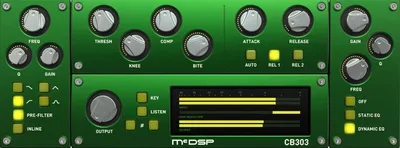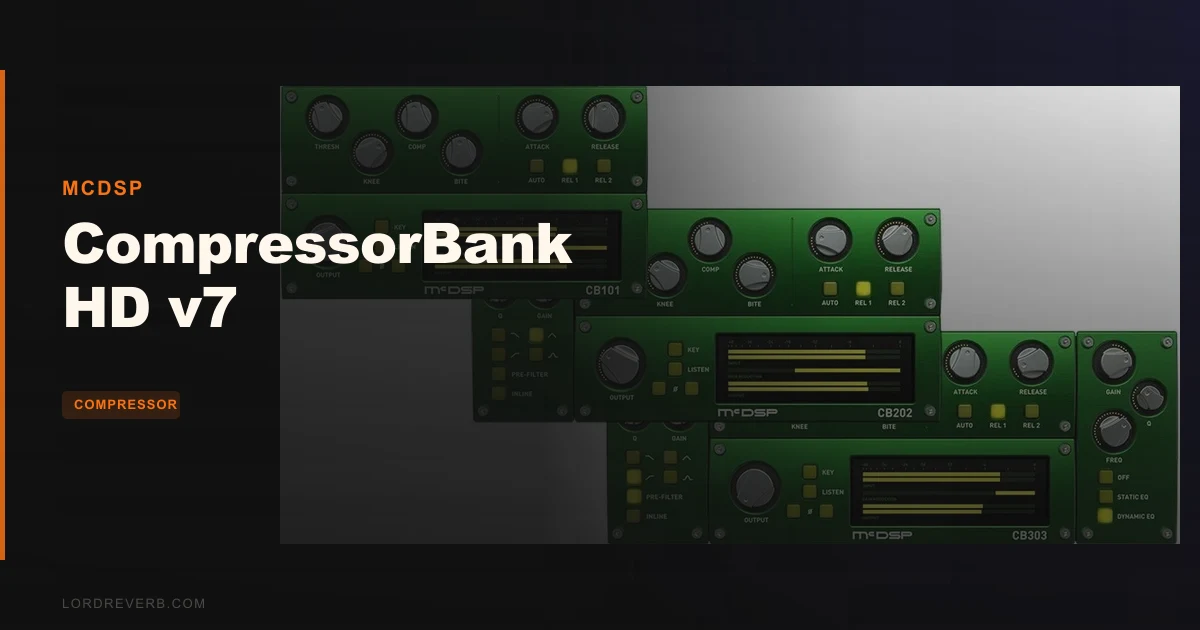
The question every buyer asks about CompressorBank HD v7 is whether McDSP has finally fixed the GUI lag problem from earlier versions. The short answer: no. The longer answer is that the sonic quality here is strong enough that plenty of engineers accept that trade-off anyway, and you need to decide before you spend $149 whether you're one of them.
Quick verdict: CompressorBank HD v7 is a technically accomplished compressor suite with three plugins covering basic compression, pre-filtered compression, and compression with full static and dynamic EQ. The BITE and Knee controls are genuinely clever tools for shaping transient behaviour with precision most compressors can't offer. The GUI opens in 1.5 to 2 seconds on every instance, and the bugs that slow the interface have not been resolved in v7. Score: 3.5/5. At $149, it's the right buy for engineers who track or mix in Pro Tools HD with VENUE S6L systems, or anyone who needs pre-filter sidechain control at this depth. It's the wrong buy if you open and close plugins constantly during a session, work in VST2 environments, or expect a bug-free v7 release.
Does CompressorBank HD v7 Deliver on Its Promise?
McDSP has been building professional-grade plugins since the late 1990s, and CompressorBank has long been one of their headline compression tools. The v7 update brings a high-definition UI refresh, double precision processing, and updated format support across AAX DSP, AAX Native, AU, and VST3.
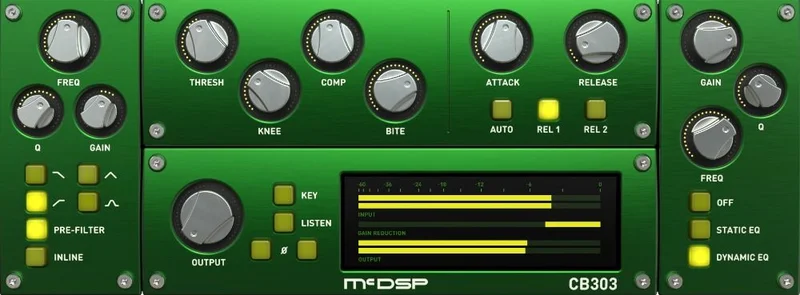
What the developer says is straightforward: this is a high-end compressor plug-in built for complete control of dynamic compression. That claim holds up on the sound side. The compression curve modelling, multiple detection circuits, analog saturation, and BITE control together give you a compression toolkit that goes well beyond threshold and ratio.
Where the promise gets complicated is the software side. The GUI lag is documented, reproducible, and apparently unresolved. Every instance takes 1.5 to 2 seconds to open. In a large session where you're checking settings across ten tracks, that adds up to actual wasted time and genuine workflow frustration.
So does it deliver? On sound: yes. On the full professional experience it implies: not quite. The plugins are worth having in your signal chain. They're not worth having if you need an interface that responds the way a $149 tool should.
Three Plugins, One Purchase: What You're Actually Getting
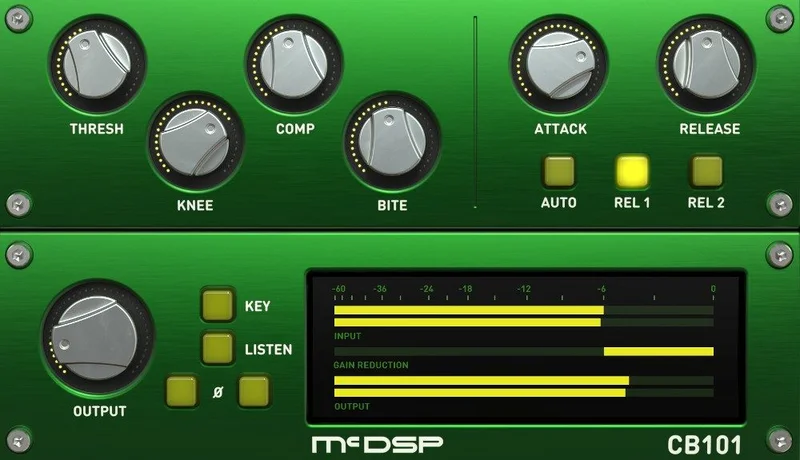
CompressorBank HD v7 isn't a single plugin. You get three: CB101, CB202, and CB303. Each one builds on the last, and the way they stack tells you a lot about how McDSP designed the product for different use cases.
CB101: The Foundation Compressor
CB101 is the baseline. It gives you standard compression controls: threshold from −48 to 0 dB, ratio from 1:1 to 10:1, attack from 0.25 to 25 ms, and release from 25 to 2500 ms. You also get the Knee and BITE controls that appear across all three plugins, plus three detection circuit types and analog saturation modelling.
Think of CB101 as the compressor you'd reach for when the other two are more than the track needs. It's clean, it's controlled, and it doesn't carry the weight of pre-filtering or EQ if all you need is dynamic control.
The attack range starting at 0.25 ms is fast. That gives you real control over how much transient information passes through before the compressor clamps. On drums, pulling attack back toward 0.25 ms tightens the feel significantly. Push it toward 25 ms and the stick hits first, the body gets caught afterward. That's a meaningful musical choice, not just a parameter.
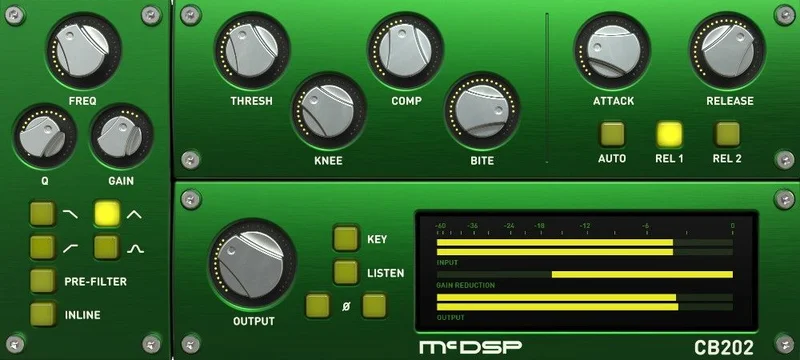
CB202: Adding Pre-Filter Sidechain
CB202 adds pre-filtering on top of everything in CB101. The pre-filter shapes what the detector circuit sees before it decides how hard to compress. That means you can dial in a high-pass filter on the sidechain signal so the compressor isn't triggered by low-frequency energy that isn't actually a problem.
Owners report this is where the plugin earns its keep on vocal tracking. The pre-filter sidechain lets you set a cutoff so plosive energy below a certain frequency doesn't throw the detector into clamp mode every time a vocalist hits a hard B or P. The result is more even gain reduction on the actual vocal body, not reactive compression caused by rumble or breath pops.
On bass, the pre-filter stops the compressor from pumping in response to sub-frequencies that are already there by design. Low-end density stays consistent. The nervous, breathing quality that poorly configured bass compression creates? CB202 with a well-set pre-filter cleans that up. Owners specifically mention this as one of the standout workflow fixes.
On the stereo bus, the same logic applies. A kick drum with a lot of sub energy won't pull the whole mix down every time it hits, because the detector is reading a filtered version of the signal rather than the raw sum.
CB303: The Full Signal Chain in One Plugin
CB303 is the one that most engineers working on complex sessions will reach for. It includes everything in CB202 and adds both static EQ and dynamic EQ post-compression. That means you're shaping the tone of the compressed signal before it leaves the plugin.
Having dynamic EQ inside the compressor is a specific advantage. Instead of stacking a separate dynamic EQ plug after your compressor on the bus, you handle it inside CB303. That's one fewer plugin in the chain, better gain staging, and in theory fewer phase interactions between separate processes.
The static EQ handles fixed tone shaping. The dynamic EQ section responds to signal levels, so you can tighten a frequency range that only gets harsh when the signal peaks, without permanently cutting it when the signal is sitting at a reasonable level.
For mix bus work, that combination is genuinely useful. You can compress for density, filter the sidechain so the detector isn't trigger-happy, and then EQ the output to manage any frequency buildup the compression introduced, all in a single plugin.
Where It Shines: The Controls That Actually Matter
The BITE Control
BITE runs from 1 to 50. It shapes the initial transient response of the compressor in a way that the attack control alone can't replicate. Think of it as adjusting how aggressively the compressor's detector bites into the signal at the moment of gain reduction.
On drums, a higher BITE value lets you push density while keeping the attack of the hit clear and defined. Owners describe it as achieving transient clarity while the body stays compressed and thick. That's the exact combination that drum compression usually forces you to choose between.
On pianos and keyboards, owners report that BITE preserves attack without introducing timing artifacts. That matters. Aggressive compression on piano tends to smear the front of the note, which changes the perceived feel of the performance. Getting density without that smear requires careful control of how the compressor sees and responds to transients, which is exactly what BITE is designed for.
A BITE value around 20 to 30 works as a starting point on melodic instruments. Push it higher on percussive material. Pull it back when you want smoother, more vintage-style compression behaviour that doesn't emphasise the attack moment.
The Knee Control
Knee ranges from −10 to +15. That's not a standard range. Most compressors give you either a hard knee, a soft knee, or a dial between the two. CompressorBank lets you go negative on the knee, which creates a more aggressive initial compression curve that catches the signal earlier and harder than a standard soft-knee setting.
A positive Knee value softens the transition into compression, which is the standard soft-knee behaviour you'd recognise from any compressor. A negative value creates the opposite: the compressor engages before the threshold is technically crossed, giving a forward, present quality to the compression that owners don't get from the Knee control going the other way.
Combine the Knee and BITE together and you have a compressor that can convincingly model a range of vintage and modern compression behaviours without locking you into a single circuit emulation. That's the design philosophy: give you the parameters to build the response curve, rather than a dropdown list of famous hardware presets.
Detection Circuits: Type-1, Type-2, and Auto
Three detection circuits are available. Type-1 and Type-2 each model a different approach to how the compressor reads the incoming signal. Auto selects between them based on the incoming signal characteristics.
The difference between Type-1 and Type-2 is in how they respond to transients and sustained material. Type-1 tends toward a faster, more reactive character. Type-2 is smoother. Auto mode is worth using when you're not sure which suits the source, but it removes one degree of deliberate control, which is the whole point of this plugin.
For sources with unpredictable dynamics, Auto is a reasonable starting point. For sessions where you need repeatable behaviour across takes, picking Type-1 or Type-2 and locking it in is the right call.
Analog Saturation Modelling
The analog saturation modelling is part of what gives CompressorBank its character as a compressor that emulates vintage and modern hardware rather than behaving like a purely transparent digital processor. Push the drive and the top end gets a subtle grit. The harmonic content that comes in with saturation adds density without adding volume.
On vocals, saturation at moderate levels reduces the pinned-down, over-compressed quality that heavy gain reduction can introduce. Owners report this directly. The compression does its job on the dynamics, and the saturation adds enough character to the sustained notes that the result sits in the mix rather than sounding clamped.
This isn't a distortion effect. It's a colouring mechanism. Keep the saturation subtle on transparent sources. On drums and bass where a little bite helps, push it further and see where the top end starts to harden.
Phase Buttons
Phase buttons are included. This is a straightforward utility feature that matters most in stereo instances and multi-mic tracking situations. If CompressorBank is sitting on a track that's summed with another signal, being able to flip phase inside the plugin without adding another utility to the chain keeps your signal flow tidy.
Zero Latency Processing
The AAX Native, AU, and VST3 versions run with zero latency. That makes real-time tracking through CompressorBank viable. If you're using it during a vocal take or live instrument recording, you're not introducing a processing delay that the performer will feel in their headphones.
The AAX DSP version carries a 16-sample minimum delay. In a live tracking scenario that's negligible, but it's not zero, and the difference matters if you're working with VENUE S6L live sound systems where timing consistency across channels is part of the professional requirement.
Pre-Filtering in Detail: Why CB202 and CB303 Are Worth the Extra Complexity
Pre-filtering is one of those features that sounds technical until you've dealt with a compressor that doesn't have it. The pre-filter shapes the signal going into the detection circuit, not the audio output. The compressor then decides how much gain reduction to apply based on that filtered version of the signal.
What that means in practice: you can set the compressor to ignore low-frequency energy below, say, 80 Hz when making gain reduction decisions. The sub content still passes through the audio path untouched. But the detector isn't reacting to it. So a bass guitar with heavy low end gets compressed on its midrange punch and presence without the sub-bass triggering aggressive gain reduction every time there's a fundamental hit.
Plosive control on vocals is the other obvious application. Compression on a close-mic'd vocal track can be particularly reactive to plosive bursts from B, P, and D sounds. The peak energy of a plosive is concentrated in low frequencies. A high-pass pre-filter keeps those plosive bursts from pulling down the whole vocal with unnecessary gain reduction.
Owners describe the pre-filter sidechain in CB202 and CB303 as the specific reason they prefer CompressorBank over compressors that only offer external sidechain routing. Having it built into the plugin means you're controlling the detection response with the same interface that controls the compression itself. No parallel routing, no extra track, no wondering what frequency the external feed was at.
On the stereo bus, the pre-filter is what lets you compress a full mix without the kick and bass dominating every compression decision the plugin makes. Set a low-frequency cutoff on the sidechain, and the compressor responds to the midrange content of the mix, which is usually where the dynamics you want to control actually live. The low end stays consistent. The mix breathes more evenly.
Dynamic EQ in CB303: Compression and Tone Shaping Together
The dynamic EQ in CB303 is post-compression. It works on the signal after gain reduction has been applied. That's a specific design choice: you're shaping the tone of the compressed output, not pre-shaping the tone before compression.
Static EQ in CB303 lets you apply fixed boosts or cuts to the output. This is useful when compression has introduced a tonal shift. Compressors can add weight to low-mids or pull air out of the top end as a side effect of gain reduction. A fixed cut at the relevant frequency corrects that without sending the signal to another plugin.
Dynamic EQ responds to level. A frequency band set in dynamic mode will only apply its boost or cut when the signal at that frequency crosses a threshold. So you can target a frequency range that only gets harsh or muddy under heavy compression, and have the EQ respond proportionally to that harshness rather than permanently cutting something that sounds fine at normal levels.
Put CB303 on a dense mix bus. Set the compressor for 3–4 dB of gain reduction on peaks. Then use the dynamic EQ to pull back a low-mid build around 250–350 Hz that only becomes a problem when the compressor is working hard. The result is a mix that compresses cleanly without accumulating the boxy density that heavy bus compression can introduce.
The combination of compression, pre-filter sidechain, static EQ, and dynamic EQ in CB303 means you're potentially replacing multiple plugins in your signal chain with one. That's efficient. It's also complex to set up correctly the first time. Allow yourself a full session to understand how the stages interact before committing it to a template.
Where It Falls Short: The GUI Problem Is Real
The GUI loading time isn't a minor inconvenience. It's the most-reported practical problem with CompressorBank HD v7, and it's documented clearly enough that it should factor into your buying decision.
Every instance takes 1.5 to 2 seconds to open. You open a plugin to check a setting. You wait. You make a change. You close it. Open another track. Wait again. In a session with CompressorBank on drums, bass, vocals, guitar, and the mix bus, you're adding real time to every pass of the session where you need to look at compression settings.
The lag extends to control surfaces. If you're using a DAW controller that integrates with plugin GUIs, the 1.5 to 2 second delay hits the controller response as well. That's genuinely annoying on a tightly managed session where control surface integration is part of the workflow.
Owners report sluggish GUI behaviour and unresolved bugs in v7. The sonic quality is praised. The interface is not. McDSP has not addressed this in v7 in any way that owners report as a fix.
Frustrating? Yes. Dealbreaker? That depends on how you work. If your session is built with templates and you rarely need to open the same plugin twice, the lag matters less. If you're constantly checking and adjusting compression across a large session, it costs you more than the $149 cost of the plugin suggests it should.
VST2 Is Gone and That's a Bigger Deal for Some Setups Than Others
VST is no longer supported as of v7.0. The supported formats are now AAX DSP, AAX Native, AU, and VST3.
For most current Windows users running Cubase, Nuendo, Reaper, or Studio One, VST3 covers the requirement. Those DAWs support VST3 fully, and there's no functional loss in the switch from a user experience standpoint in those environments.
The problem is template-heavy workflows built on older systems, or DAWs that don't handle VST3 the same way as VST2. If you've had CompressorBank sitting in session templates for years as a VST plugin, those templates need updating when you move to v7. That's a one-time administrative cost, but it's worth flagging before you upgrade.
Ableton Live users should check VST3 compatibility with their specific Live version before buying. Live's VST3 support has been a point of inconsistency in some versions, and it's the kind of thing you want to verify against your actual setup rather than assume.
iLok Activation: What You Need Before You Start
Activation requires either an iLok2 or iLok3 USB Smart Key, or an iLok License Manager account with iLok Cloud enabled. If you're already in the McDSP or iLok ecosystem, this is business as usual. If you're not, it's a consideration.
Each CompressorBank v7 plugin contains two activations per authorization. That means you can run the license on two machines simultaneously, which is the standard professional scenario of a studio desktop and a laptop for location recording.
iLok Cloud removes the hardware requirement if you have a stable internet connection. iLok USB key is the better option if your tracking space doesn't have reliable connectivity or if you're recording in environments where you don't want to depend on an internet connection staying live.
CPU Efficiency: Better Than Most at This Level
Users report CPU efficiency as notably better than competing offerings. That's a meaningful advantage when you're running CompressorBank on multiple tracks simultaneously. A compressor with good sound but poor CPU scaling becomes a liability in large sessions.
The double precision processing in v7 does mean more mathematical work per sample than single precision equivalents. Double precision generally costs more CPU. The fact that users report good efficiency despite that suggests the underlying algorithm is well-optimised.
For Pro Tools HD users running AAX DSP, the DSP acceleration offloads processing from the host CPU entirely. That's the standard advantage of DSP-based processing, and it's why the HD version exists. You're not taxing the host machine when the DSP card carries the load.
In a typical session with CompressorBank on eight tracks, CPU load should stay manageable on most current machines. Run CB303 with its full EQ section active on multiple instances and that changes. The more stages you engage in CB303, the more work the plugin is doing. Plan for that when building templates.
Apple Silicon and DAW Compatibility
McDSP HD plugins run natively on both Intel and M1 Apple Silicon processors. That's a genuine requirement in 2026, not a bonus feature. Any plugin that still requires Rosetta on an M-series Mac creates a compatibility layer that can introduce instability and performance issues.
Native M1 support means CompressorBank runs at full efficiency on current Apple hardware. The plugin isn't emulating an Intel environment. It's compiled to run on the actual architecture of the machine.
DAW compatibility is broad: Pro Tools, Logic Pro, Cubase, Nuendo, Ableton Live, LUNA, Reaper, Sonar, and Studio One are all supported, as well as other DAWs that accept AAX, AU, or VST3. The only common gaps are DAWs that still require VST2 format support and nothing newer.
VENUE S6L support is worth highlighting for the live sound engineers in the room. CompressorBank on a live mixing console is a different use case from ITB studio mixing, and having AAX DSP support for VENUE systems makes this a viable live compression option, not just a studio tool.
How Vocals Behave Under CompressorBank
You're tracking a vocalist. She's dynamic, pulling back on soft phrases and pushing hard on the chorus. You need compression that tightens the dynamic range without making her feel squeezed on the loud sections or invisible on the quiet ones.
Set the threshold low enough to catch the soft phrases. Keep the ratio around 3:1 or 4:1. Use the attack at 5 to 10 ms to let the consonants through before the compressor fully engages. The pre-filter in CB202 high-passes the sidechain around 80 Hz so her chest resonance and proximity effect don't trigger unnecessary gain reduction.
Owners report the pre-filter sidechain specifically solves plosive control on vocals. That's the practical scenario: the B and P sounds stop pulling the track down in a way that de-essing can't fix, because the problem isn't sibilance, it's low-frequency transient energy hitting the detector too hard.
The BITE control at around 15 to 20 on a vocal keeps the front of words clear. The compression catches the body and tail. The attack sits in front of the gain reduction. You get a vocal that sounds controlled without sounding squashed.
Owners also report reduced pinned-down quality on vocals compared to compressors without the BITE adjustment. That pinned-down feeling comes from gain reduction that's too uniform, catching the attack and the sustain with equal force. BITE breaks that pattern.
Drums: Where BITE Earns Its Place
You're in the drum room, mixing a snare track that needs to hit hard but sit under a dense arrangement without poking. Standard compression clamps the attack and you lose the crack. Back off the ratio and the snare is too loud between the downbeats.
Set CB101 on the snare bus. Threshold at around −18 dB. Ratio at 4:1 or 5:1. Attack at 1 to 3 ms. BITE at 25 to 35. The BITE control lets the compressor hit the body of the snare while the crack still lands first. The snare compresses but doesn't lose its definition.
Owners describe BITE as delivering convincing transient clarity on drums while maintaining density. That's the exact combination that parallel compression tries to solve by blending compressed and uncompressed signals. CompressorBank does it inside the plugin with one parameter, which is a cleaner solution.
On the kick, a similar approach works with the attack pulled slightly longer to let the click through. Type-1 detection on kicks tends to track faster transients more accurately. Experiment with Type-2 for a rounder, heavier quality where the detector responds more slowly and lets more of the punch through before clamping.
Stereo Bus and Mix Compression
Mix bus compression with CompressorBank HD v7 is where CB303 shows its full value. You're not just compressing. You're filtering what the detector responds to, shaping the compressed output with static EQ, and then targeting problem frequencies with dynamic EQ, all in one pass.
Start with the pre-filter set to cut everything below 60 to 80 Hz on the sidechain. The mix's low end contributes nothing useful to the compression decision and gives everything away if you let it drive the detector. With the cut in place, the compressor responds to midrange dynamics where the musical content lives.
Set gain reduction to 2 to 3 dB at peaks. Keep the ratio low: 2:1 is often enough on a bus. Use a slightly longer attack, 10 to 15 ms, so mix transients land before gain reduction engages.
Then use the dynamic EQ in CB303 to catch any low-mid buildup around 200 to 350 Hz that the compression adds. That range fills in during heavy gain reduction and can make a mix sound boxy. A 1 to 2 dB dynamic cut there, activated only when the signal peaks, cleans it without thinning the mix at normal levels.
Owners report pre-filter sidechain smoothing stereo bus compression specifically. The result is compression that holds the mix together without the pumping or frequency shift artifacts that bus compression can introduce when it's reacting to low-frequency content.
How It Stacks Up Against the Competition
The two products people compare CompressorBank HD v7 against most often are the SSL Native Channel Strip 2 and DMG Trackcomp.
SSL Native Channel Strip 2 is mentioned for faster performance. That means faster GUI response, not necessarily faster compression algorithms. If the 1.5 to 2 second GUI delay is a dealbreaker for your workflow, SSL's channel strip opens quickly and the compression section is solid. You lose the depth of BITE control and the specific three-plugin architecture that CompressorBank offers, but you gain a faster-responding interface.
DMG Trackcomp is noted specifically as a faster-loading GUI counterpart. If you work with compression settings that you revisit constantly during a session, Trackcomp's interface response makes that kind of iterative work less painful. DMG's compression algorithms have their own character, different from CompressorBank's approach to curve modelling.
What CompressorBank offers that neither alternative matches at this depth is the combination of BITE control, Knee range extending to negative values, pre-filter sidechain, and dynamic EQ all inside a single plugin architecture. That's a specific capability set, and if those features match your workflow, nothing at this price point replaces them exactly.
For best compressor plugins for Pro Tools, CompressorBank HD v7 ranks as a serious option specifically for HD hardware users. For more general DAW setups without DSP hardware, the GUI lag tips the balance toward the alternatives more quickly.
Is the Price Fair?
At $149, CompressorBank HD v7 sits in the professional plugin tier. That's not an impulse buy. You're paying for compression curve modelling depth, pre-filter sidechain precision, dynamic EQ integration, and the kind of BITE control that very few compressors offer at any price.
The GUI lag is the honest caveat against the price. A plugin at this level should open instantly. The fact that it doesn't is a real efficiency cost, and it's the kind of unresolved issue that shouldn't exist in a v7 release from an established developer.
If you use the pre-filter sidechain and dynamic EQ features in CB303 heavily, the $149 buy covers what would otherwise be three separate plugins in your chain. That justifies the cost on a per-feature basis. If you're buying this primarily as a compressor and those additional features are secondary, there are capable alternatives that don't have the GUI problem.
Specs and Technical Details
| Specification | Detail |
|---|---|
| Developer | McDSP |
| Price | $149 |
| Plugin Format | AAX DSP, AAX Native, AU, VST3 |
| OS Support | macOS 10.13 or higher (64-bit); Windows 7, 8, 10 (64-bit) |
| Activation | iLok2 or iLok3 USB Smart Key, or iLok License Manager with iLok Cloud |
| CPU Usage | Light to medium (user reports show better efficiency than competing plugins) |
| Trial Available | N/A |
| Version Reviewed | v7 |
| Plugins Included | CB101, CB202, CB303 |
| Threshold Range | −48 to 0 dB |
| Ratio Range | 1:1 to 10:1 |
| Knee Range | −10 to +15 |
| BITE Range | 1 to 50 |
| Attack Range | 0.25 to 25 ms |
| Release Range | 25 to 2500 ms |
| Latency (Native/AU/VST3) | Zero latency |
| Latency (AAX DSP) | 16-sample minimum |
| Detection Circuits | Type-1, Type-2, Auto |
| Apple Silicon | Native M1 support |
| Activations per License | Two per authorization |
| Live Sound Support | VENUE S6L |
Score Breakdown
| Category | Score | Notes |
|---|---|---|
| Sound Quality | 4.5/5 | BITE, Knee, and pre-filter controls produce genuinely precise compression behaviour; analog saturation adds musical character |
| Value for Money | 3.5/5 | Three plugins with deep feature sets justify the price; GUI bugs reduce the value equation |
| Ease of Use | 2.5/5 | GUI lag of 1.5–2 seconds per instance and unresolved bugs create real workflow friction |
| Features | 4.5/5 | BITE control, extended Knee range, pre-filter sidechain, and dynamic EQ in CB303 cover more ground than most compressors at any price |
| CPU Efficiency | 4.0/5 | User reports confirm better efficiency than competing offerings; DSP option offloads entirely to HD hardware |
| Overall | 3.5/5 | Outstanding compression toolset with a software interface that hasn't kept pace with the sound quality |
Alternatives to Consider
If the GUI lag in CompressorBank HD v7 is a deal-stopper, three alternatives are worth your time.
SSL Native Channel Strip 2 is the go-to comparison for engineers who need faster interface response. The compression section is capable and the full channel strip means you're handling EQ, dynamics, and filtering in one plugin. It doesn't have BITE control or the Knee range that extends negative, so you're trading depth for speed. Check SSL Native Channel Strip 2 review for the full picture.
DMG Trackcomp opens faster and gives you detailed compression control with a GUI that keeps up with fast workflow. If you're opening and tweaking compression settings repeatedly during a mix, Trackcomp's interface response makes that process less painful. The feature architecture is different from CompressorBank's three-tier approach, but the compression quality is competitive at the professional level.
FabFilter Pro-C 2 is the alternative for engineers who want deep compression customisation without iLok dependency and without GUI lag. The compression curve display is clear, the attack and release shapes are adjustable, and it handles sidechain filtering clearly. It doesn't match CB303's integrated dynamic EQ approach, but it's a strong single-plugin compressor that's well worth considering. See FabFilter Pro-C 2 review for a full comparison.
For a broader overview of the category, best compressor plugins 2026 covers where CompressorBank sits against the full field. And if you're building a Pro Tools HD setup where DSP acceleration matters, best AAX DSP plugins for Pro Tools HD is a useful starting point.
Who Should Buy CompressorBank HD v7 and Who Should Not
Buy it if you're a Pro Tools HD engineer who works primarily in fixed sessions and templates. The DSP acceleration, VENUE S6L support, and three-plugin architecture make it a serious professional tool. The GUI lag matters less if you're not constantly opening and closing plugin windows during a mix pass.
Buy CB303 specifically if you regularly use pre-filter sidechain on vocals, bass, or the stereo bus. The integrated dynamic EQ is a workflow advantage that no separate combination of compressor plus dynamic EQ plugin fully replicates, because the stages are designed to work together rather than being separate processes you're trying to align.
Buy it if you love the level of transient control that BITE and the extended Knee range provide and you haven't found anything else that gets you there. That's a legitimate reason to accept the GUI limitation.
Don't buy it if you work in a VST2-only environment. You'll need to update your templates to VST3, which isn't the end of the world but is a real conversion cost.
Don't buy it if you spend significant session time opening plugin windows to check and adjust settings. The GUI is genuinely a frustrating tax on that workflow.
Don't buy it if you're coming from a non-iLok studio setup and don't want to add iLok to your system. The activation requirement is non-negotiable.
CompressorBank HD v7 is a tool that sounds better than it runs. The compression engine is serious, the three-plugin architecture covers real professional use cases, and the BITE control is one of the most useful transient tools in any compressor at any price. The software delivery doesn't match that standard yet, and in v7 that remains an honest truth about the product. If you can live with the interface, the sound rewards you for it.
Frequently Asked Questions
What are the differences between CB101, CB202, and CB303 in CompressorBank HD v7?
CB101 is the core compressor with threshold, ratio, attack, release, Knee, and BITE controls. CB202 adds pre-filter sidechain on top of CB101's feature set, letting you control what the detection circuit responds to. CB303 includes everything in CB202 and adds both static EQ and dynamic EQ post-compression, making it the most complete of the three plugins for full signal chain work.
What does the BITE control actually do?
BITE controls the initial transient response of the compressor's detection circuit, running from 1 to 50. At higher values, the compressor lets more of the transient attack through before clamping the body of the sound. Owners report it delivers convincing transient clarity on drums while maintaining density, and preserves piano attack without timing artifacts. It's not a standard attack control: it shapes how the compressor engages with transient peaks specifically.
Is CompressorBank HD v7 zero latency?
The AAX Native, AU, and VST3 versions are zero latency, making them suitable for real-time tracking. The AAX DSP version carries a 16-sample minimum delay, which is standard for DSP hardware processing but not technically zero latency. For live tracking through headphones, use the Native, AU, or VST3 versions.
Does CompressorBank HD v7 require an iLok dongle?
Activation requires either an iLok2 or iLok3 USB Smart Key, or an iLok License Manager account with iLok Cloud. The hardware dongle is not mandatory if you have a stable internet connection and prefer the iLok Cloud option. Each CompressorBank v7 plugin includes two activations per authorization, supporting use on two machines simultaneously.
Why does the GUI take so long to open in v7?
Users consistently report GUI loading times of 1.5 to 2 seconds per instance in CompressorBank HD v7. This is a documented issue that extends to DAW and control-surface lag. It has not been resolved in v7, and McDSP has not issued a reported fix as of current user accounts. It's the most common complaint from owners who otherwise rate the plugin's sound quality highly.
Is VST2 still supported in CompressorBank HD v7?
No. VST plugin format was removed in v7.0. The supported formats are now AAX DSP, AAX Native, Audio Units (AU), and VST3. If your workflow relies on VST2, you'll need to update any existing session templates to VST3 before migrating to v7. Most current DAWs support VST3 fully, but check your specific DAW version before purchasing.
Does CompressorBank HD v7 work on Apple Silicon Macs?
Yes. McDSP HD plugins run natively on both Intel and M1 Apple Silicon processors. No Rosetta emulation layer is required on M1 or M2 Macs. This means full performance and stability on current Apple hardware without the compatibility risks that come with Rosetta-dependent plugins.
How does the pre-filter sidechain in CB202 and CB303 differ from standard external sidechain routing?
Standard external sidechain routing sends a separate audio signal to drive the compression detection, requiring additional routing in your DAW. The pre-filter sidechain in CB202 and CB303 shapes the detection signal internally using a built-in filter, so the compressor responds to a high-passed or otherwise filtered version of the plugin's own input signal. Owners report this approach solves plosive control on vocals and prevents low-frequency content from driving unnecessary gain reduction on bass and stereo bus tracks, all without additional routing complexity.