Squash by Minimal Audio is a free OTT-style compression plugin that gets you from flat to crushed in seconds, using a drag-and-drop X/Y pad instead of a wall of knobs.
You know the moment. You're finishing a synth lead at midnight, the mix is sitting flat, and you want that hyped, wide, over-compressed character that every modern pop and electronic record leans on. You don't want to route a sidechain or write MIDI automation. You want to grab one control and hear something happen right now.
That's exactly the situation Squash was built for. It's not a surgical tool. It's not a bus compressor you'd trust on a whole mix without checking the output. It's a fast, tactile plugin that takes the classic OTT concept and wraps it in an interface smart enough that you won't need to read anything before using it.
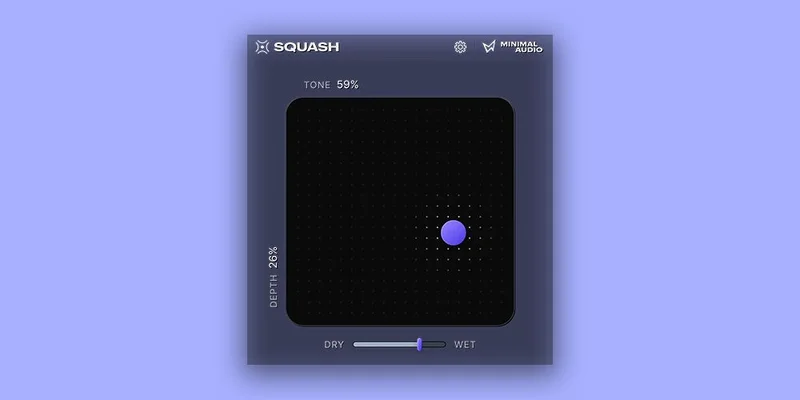
The developer says existing OTT compression options are sonically lacking and cumbersome. Squash is their answer: four bands of dual compression, a tone control, a mix knob, and a purple dot you drag around. That's the whole plugin.
It's free. Fully free. No nag screen, no limited tier.
OTT Reimagined, Not Just Repackaged
Squash is an OTT-style compressor. That means multi-band, upward and downward compression working together to crush dynamic range and push everything forward in the frequency spectrum. The result, when pushed, is that hyper-present, almost artificially loud sound you hear all over modern electronic and pop production.
But here's what it's not: a normal compressor. One reviewer put it plainly, and we'd repeat it. It will not become your go-to bus compressor. You can't dial in a slow attack on a kick, or set a 4:1 ratio on a vocal to control peaks. Those controls don't exist here. There's a tone control, a depth knob, a mix knob, and the X/Y pad. That's the design intention, not an oversight.
If you need transparent dynamic control on a drum bus, this isn't your plugin. If you need that OTT sound fast, for free, it is.
Where It Sits in a Real Session
Put Squash on a keys or pad channel and push the purple dot away from centre. Reviewers consistently report that soft material like keys responds well, and that staying closer to the middle of the X/Y pad tends to give the most musical results. Push too far and it gets excessive. Drag toward the edge and some users describe it going from a gentle buzz to a full sound crush. The developer says it covers everything from pristine enhancement to extreme styles, and that range checks out with what owners report.
The mix knob is worth using intentionally. The developer designed it to avoid phasing issues that can occur when blending dry and band-split signals. That's a real design decision. Without it, parallel OTT processing can go sideways fast.
Load it as an insert, not a send. It's a shaping tool, not a reverb or time-based effect. Drop it after your EQ in the signal chain, before any limiting, and use the mix knob to pull back if things get too hyped.
It requires an internet connection for activation, which is annoying for a free plugin. That's worth flagging up front if you work offline.
The Trade-Offs You Should Know About
The X/Y pad is clever. Drag one control, change both character and intensity at once. But it does create a practical ceiling: you can't tweak compression ratio, attack, release, or band thresholds independently. For producers who know exactly what they want on a technical level, that's frustrating. For producers who just want to hear a difference fast, it's brilliant.
The phase shift issue is a real one. Users report a noticeable volume increase when Squash is enabled, and there's no automatic output gain compensation to balance it. That means A/B comparisons aren't honest until you manually level-match. Annoying, and easy to miss if you're moving fast.
The stability reports on macOS Sonoma with Logic Pro 10.8.1 are harder to brush off. One user flagged clicks, crackles, and the plugin "swallowing itself" during audio processing. Check that against your exact system before committing to it on a serious session. Run it on a non-critical track first.
On the upside, the 4.3 rating across 54 Plugin Boutique ratings holds steady. The praise outweighs the complaints by a clear margin.
Against the Field
The two real reference points here are the OTT preset baked into Ableton Live and the OTT VST by XFER Records.
Ableton's version is useful if you're already in Live, but you can't load it anywhere else. XFER's OTT is the industry standard for this sound. It's three bands to Squash's four, and the interface is a simple grid of threshold and output knobs per band. It works. But the X/Y pad in Squash is genuinely faster to operate if you're exploring rather than dialing in a specific setting.
If you want more precise multi-band compression with real attack and release controls, FabFilter Pro-MB is the serious tool for that job. It costs real money and does real surgery. Squash does not compete with it, and doesn't try to.
For free, for OTT specifically, Squash is the most tactile option in this category right now.
Who Should Get It (and Who Should Skip It)
The Beginner Producer
Load it on a synth pad. Drag the dot. Listen. That's your entire tutorial. The developer says it's designed to let you keep moving, and for beginners, that's exactly what you need. You won't break anything. You won't get lost in menus.
Buy it. It's free. There's no argument here.
The Working Electronic or Pop Producer
You know what OTT sounds like. You want a version that's fast, doesn't cost anything, and sits cleanly in your template. The four-band compression gives it a bit more control under the hood than older three-band options. The mix knob is handled well. It fits between your EQ and your limiter without drama on most material.
The phase and gain compensation gap is worth monitoring. Level-match manually when A/B-ing. Don't rely on it on systems running macOS Sonoma with Logic until you've tested your setup.
Worth having. Put it in your toolkit and use it where it fits.
The Mixing or Mastering Engineer
You want attack times. You want ratio control. You want to know exactly what's happening to the transient. Squash won't give you any of that. The design philosophy is explicitly barebones. That's fine for the right job, frustrating for yours.
Look at the best multi-band compressor plugins for proper surgical work. Skip Squash as a primary tool in a mix or mastering chain.
Skip it as a main tool. Keep it around for creative effect processing.
The Sound Designer
This is actually a good fit. Push the purple dot to the edge of the pad on a drum loop or a synth stab. The developer says it can go to extreme, over-the-top styles, and reviewers confirm it can go from a gentle buzz all the way to a sound crush. That range is useful for designed sounds, not just corrective work.
Pair it with a saturator in your effects chain and use the mix knob to blend it back. That's a legitimate texture tool.
Grab it. It earns a spot on a sound design chain.
Specs & Technical Details
| Developer | Minimal Audio |
| Price | Free |
| Plugin Format | AU / VST / VST3 / AAX (64-bit only) |
| OS Support | macOS 10.11 or higher / Windows 10 |
| Activation | Internet connection required |
| CPU Usage | N/A |
| Trial Available | N/A (free plugin) |
| Version Reviewed | N/A |
Score Breakdown
| Category | Score | Notes |
|---|---|---|
| Sound Quality | 4.0/5 | Covers the OTT range well; phase shift on enable is a real flaw |
| Value for Money | 5.0/5 | Free. No argument. |
| Ease of Use | 4.5/5 | X/Y pad is genuinely fast; online activation is a mild irritation |
| Features | 3.5/5 | Four-band dual compression with tone and mix; intentionally minimal |
| CPU Efficiency | N/A | No published data; no confirmed user reports |
| Overall | 4.2/5 | Best free OTT option for speed and tactile control |
Alternatives to Consider
If you want the OTT sound with more hands-on band control, XFER OTT is the original benchmark. It's also free, three bands, and the threshold/output grid gives you more precision per band than Squash's single pad. Less fun to explore with. More reliable to dial in.
If you're finding that OTT isn't enough and you want real multi-band dynamics control, AudioThing Type X approaches compression from a completely different angle and is worth a look if you want character with more control than either OTT option gives you.
For anything beyond creative effect processing, look at a full multi-band compressor with adjustable crossovers and per-band parameters. Squash isn't competing in that lane.
Squash is free, installs in minutes, and you'll know within thirty seconds whether it fits your session. The lack of output gain compensation is a genuine workflow flaw. The macOS Sonoma stability reports are a real caution if that's your system. But for the creative, fast, drag-and-drop OTT experience at no cost, nothing else in this category is easier to pick up and use right now.
Grab it. Just level-match before you commit.
Frequently Asked Questions
Is Squash actually free, or is there a paid tier?
Squash is completely free. There's no paid upgrade tier and no feature-limited free version. You do need an internet connection for the initial activation, which is the one catch for offline setups.
What's the difference between Squash and XFER OTT?
Both are free OTT-style plugins, but they approach the interface differently. XFER OTT gives you a grid of per-band thresholds and output knobs across three bands. Squash uses a single X/Y pad with tone and depth controls across four bands of dual compression. Squash is faster to explore; XFER OTT is more precise to dial in.
Does Squash work as a regular compressor?
No. It's an OTT-style effect, not a utility compressor. You won't find attack, release, or ratio controls. If you need transparent dynamic control or peak limiting on a bus, you'll want a different plugin entirely.
Are there stability issues with Squash on macOS?
At least one user has reported clicks, crackles, and processing issues running Squash in Logic Pro 10.8.1 on macOS Sonoma. If you're on that combination, test it on a non-critical track before using it in a live session. Stability on other systems and hosts hasn't drawn the same complaints.