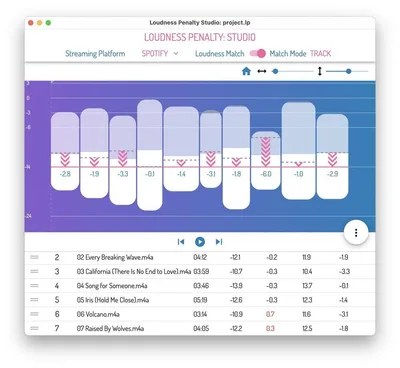
Loudness Penalty Studio is MeterPlugs' standalone desktop application for streaming loudness analysis, and it does one thing no plugin on the market does as well: it lets you hear your master the way Spotify, YouTube, and Apple Music will actually play it back, matched to platform loudness standards, before you upload a single file.
We were finishing a master for a drum-forward indie rock record. The mix was loud, intentional, punchy in the room. We'd already checked integrated LUFS in our DAW. Numbers looked fine. Then we ran it through Loudness Penalty Studio and hit the Spotify preview button. The snare transients that felt brilliant at -9 LUFS integrated turned brittle. The attack was getting clipped by normalization in a way we hadn't caught from the meter alone. That's the moment this software justified itself.
This review is for mastering engineers, mix engineers who handle their own delivery, and anyone who gets paid to make music sound right on streaming platforms.
First Impressions
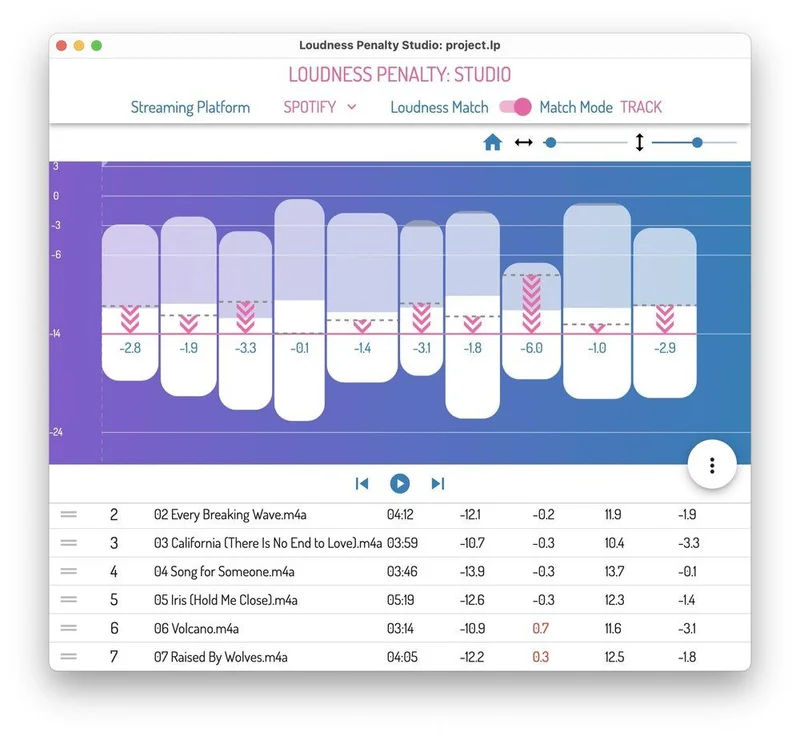
The interface opens clean. Drop a file in, and within 6-7 seconds you've got a Short-term Loudness Profile showing how loudness moves across the track's timeline, plus LP (Loudness Penalty) values for Spotify, YouTube, Apple Music, TIDAL, and Deezer displayed simultaneously.
No tutorial needed. The layout is sensible. The LUFS integrated value sits front and centre, and the PLR (Peak-to-Loudness Ratio) reading gives you a fast read on your dynamic range. The colour coding on LP values is immediately readable: green means the platform won't touch your level significantly, red means you're losing dB and you need to make a decision.
It's not flashy. It looks like software built by engineers for engineers. We didn't hate that.
Getting It Into a Real Workflow
Here's where we hit our first friction. Loudness Penalty Studio is standalone only. There's no VST3, no AU, no AAX version. You're bouncing a file, loading it into the application, listening, going back to your DAW, making adjustments, bouncing again. That loop adds time.
In practice, that bounce-and-check workflow wasn't as annoying as we expected for final-stage mastering. You're usually working with finished files at that point anyway. But for a mix engineer who wants to check a rough during a session, it breaks the flow. You're context-switching between two applications.
The preview playback feature is where the standalone format starts to make sense. Load your file, load a reference track from a streaming service's actual playlist, and you can A/B them at matched loudness with one click. Hearing your master next to a reference at the same perceived volume is genuinely different from reading a number that says you're 2 LUFS apart. We ran three different masters against Billie Eilish's "What Was I Made For" and caught a low-mid buildup around 280Hz that we'd been tolerating. Matched playback made it obvious in seconds.
The PDF report export is underrated for client work. Clients who ask "why does it sound quieter on Spotify?" stop asking when you send them a single-page visual showing the LP values per platform with the Short-term Loudness Profile chart attached. We've already used this on two projects and it's saved us two email threads each time.
What It's Genuinely Good At
The platform-specific LP values are the core value here, and they're accurate. Target LP values of +2 to -3 cover the sweet spot for contemporary releases that want audibility without sacrificing dynamics. Loudness Penalty Studio makes it trivial to see at a glance whether you're in that window for every major platform simultaneously.
Version 1.5 runs twice as fast as the original release. Analysis of a 4-minute track completes in 6-7 seconds on a mid-spec MacBook Pro. That's fast enough that the check doesn't feel like a workflow interruption. It feels like a quick sense-check.
The Short-term Loudness Profile is more useful than a single integrated number. You can see where a track gets loud, spot a section that's 3-4 LUFS hotter than the rest, and understand how normalization will affect that specific moment rather than just the average. That's meaningful for mastering decisions. We caught a bridge section in a pop track that was 4.2 LUFS hotter than the verses. The integrated average still passed. The bridge didn't.
The BUTE Loudness Suite 2 review gives you excellent metering inside your DAW. Loudness Penalty Studio gives you platform simulation outside it. They're solving adjacent problems, not the same one.
The Rough Edges
$149 is the number that makes us pause. Not because the software is bad. It's good. But $149 for a standalone tool that does one job requires honest accounting.
If you're already running a capable loudness meter in your DAW and you're disciplined about your target values, Loudness Penalty Studio is a refinement, not a necessity. The simulated playback is brilliant. The PDF reports are genuinely useful. But if your workflow doesn't involve client approvals and you're confident in your LUFS targeting, you can get meaningful loudness data from free tools like YouLean Loudness Meter and do the math manually.
The lack of batch processing is a real limitation for album work. Mastering a 12-track album means 12 separate file loads, 12 separate checks, no way to run the whole project and get a comparative report across all tracks. That's frustrating for the money.
We'd also love to see this become a plugin format option. A DAW plugin that showed LP values per platform in real time would be worth more than the standalone at this price.
Who This Is Really For
- ✅ Buy if you master music profession ally and bill clients for streaming-ready deliverables. The PDF reports alone save time that costs more than $149.
- ✅ Buy if you're a mix engineer who regularly gets notes about "sounding quiet on Spotify" and wants to diagnose the problem before delivery rather than after.
- ✅ Buy if you're eligible for the 50% cross-grade from the Loudness Penalty plugin. At that price, it's a straightforward decision.
- ❌ Skip if you're mastering for yourself only and you're already using a quality loudness meter. The workflow benefit doesn't justify $149 for solo home producers.
- ❌ Skip if you need to process albums efficiently. No batch processing means the per-track workflow doesn't scale well.
- ❌ Skip if you want DAW integration. Standalone-only means committing to that bounce-and-check loop permanently.
Score Breakdown
| Category | Score | Notes |
|---|---|---|
| Sound Quality | N/A | Analysis tool; not applicable |
| Value for Money | 3.5/5 | Brilliant at full price if you do client mastering; hard sell for solo producers |
| Ease of Use | 4.5/5 | Drop a file in, read the results in 7 seconds, done |
| Features | 4.0/5 | Platform simulation and PDF export are strong; no batch processing costs a point |
| CPU Efficiency | 4.5/5 | Standalone analysis, no live processing overhead |
| Overall | 4.1/5 | A sharp tool for a specific professional need; not a universal must-buy |
Alternatives to Consider
BUTE Loudness Suite 2 (Signum Audio): If you want loudness metering that lives inside your DAW rather than outside it, BUTE Loudness Suite 2 is our preferred in-session option. It doesn't simulate platform playback, but it gives you real-time integrated LUFS, true peak, and LRA readings without leaving your session. For mix engineers who want live feedback, it wins.
YouLean Loudness Meter (Free): The free tier of YouLean handles integrated LUFS, true peak, and LRA accurately. It won't simulate platform normalization or generate PDF reports, but it covers the fundamentals. If you're a producer on a tight budget, start here and decide later whether the Loudness Penalty Studio workflow is worth the upgrade.
iZotope Insight 2: iZotope Insight 2 review covers metering, loudness, and spectral analysis in one plugin. It's more expensive and more complex than Loudness Penalty Studio, but it stays in your DAW and adds imaging and frequency analysis to the picture. For producers who want one tool to handle everything, it's worth comparing. For mastering engineers who just need streaming simulation, Loudness Penalty Studio is more focused and faster to use.
You can also look at the best loudness metering plugins in 2026 if you're still deciding which category of tool fits your workflow.
Our Verdict
Loudness Penalty Studio is a specific solution to a real, expensive problem: delivering masters that behave on streaming platforms exactly the way you intended. The platform simulation is the feature no plugin has matched. The analysis is fast, the reports are client-ready, and version 1.5 has ironed out the performance complaints from the original release.
At $149 full price, it earns its place in a professional mastering setup. At 50% cross-grade pricing, it's an easy yes. At full price for a home producer who's not doing client work and isn't getting platform notes, skip it. Start with YouLean, learn your numbers, and come back when the PDF reports become a time problem you're actually having.
The first time a client stops emailing you about "sounding quiet on Apple Music," you'll have paid for this software in the hours you didn't spend explaining normalization.
Frequently Asked Questions
Is Loudness Penalty Studio a plugin or a standalone app?
It's standalone only. There's no VST3, AU, or AAX version. You drop a bounced audio file into the application for analysis. If you need loudness metering inside your DAW during a live session, you'll want a separate plugin like BUTE Loudness Suite 2 or YouLean Loudness Meter running alongside it.
Which streaming platforms does Loudness Penalty Studio analyse?
It covers Spotify, YouTube, Apple Music, TIDAL, and Deezer simultaneously. Each platform uses different loudness normalization targets, and Loudness Penalty Studio shows you the LP value for all five in a single view so you can see exactly where your master lands on each service without running separate checks.
What's the difference between LUFS, PLR, and LP in this context?
LUFS (Loudness Units relative to Full Scale) is your integrated loudness measurement, the number most platforms use to normalize playback. PLR (Peak-to-Loudness Ratio) tells you how much dynamic range exists between your peaks and your integrated level. LP (Loudness Penalty) is the specific number of dB a platform will add or subtract from your track during normalization, and it's the most directly useful metric for delivery decisions.
Is there a free trial of Loudness Penalty Studio available?
Check the MeterPlugs website for current trial availability, as trial access can change. MeterPlugs does offer a 30% new user discount and a 50% cross-grade discount for existing Loudness Penalty plugin owners until January 30, 2026. If the price is a barrier, the original Loudness Penalty plugin is the lower-cost entry point into MeterPlugs' ecosystem before committing to the Studio version.