
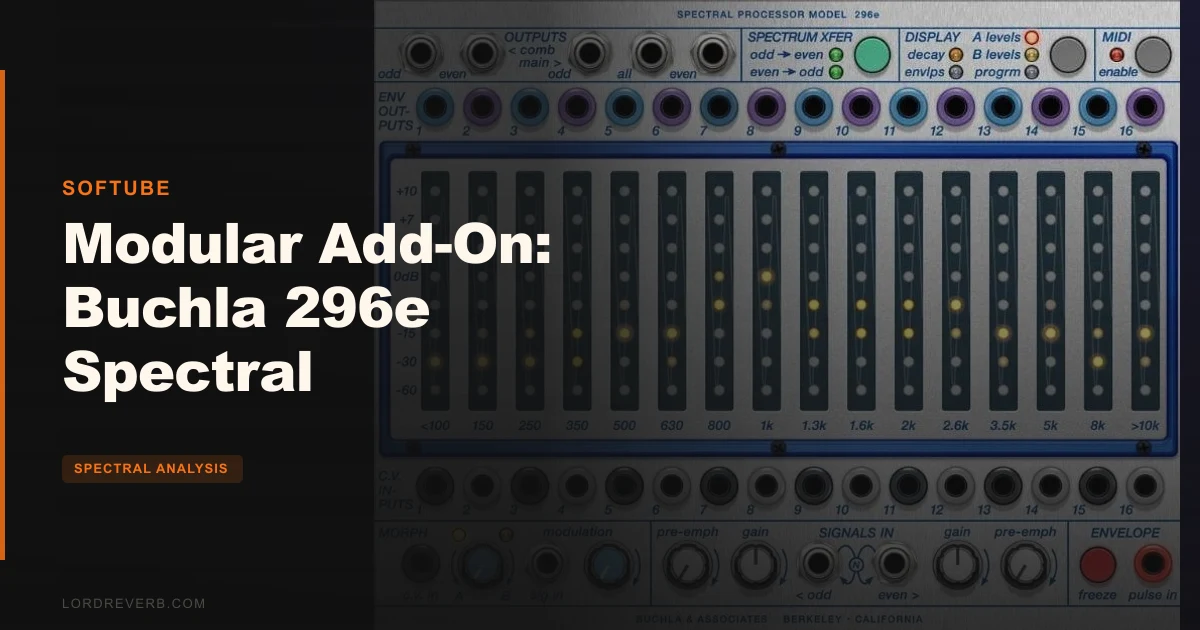
The Softube Buchla 296e Spectral Processor is the only officially licensed software version of the Buchla 296e hardware module, and whether it deserves a place in your Softube Modular setup depends almost entirely on what you're trying to build.
Picture this: it's late, you've got a white noise source running into your modular, and you want to carve it into something that breathes, shifts, and feels alive. You're not after a simple filter sweep. You want 16 bands responding to an envelope follower, each decaying at its own rate, morphing between two stored spectral states while a CV signal freezes the whole thing mid-breath. That's the moment you reach for the 296e.
It asks you to already own the Softube Modular platform before you can use it. For the right producer, it's a satisfying and deep tool. For anyone who hasn't already committed to Softube Modular, the entry cost is real and worth thinking through carefully.
This is a tool for sound designers, ambient composers, and experimental producers. If you want a quick EQ or a simple vocoder, look elsewhere. If you want something that rewards weeks of patching and delivers textures you genuinely could not build any other way, read on.
What the 296e Actually Is (and What It Isn't)
The 296e is not a standard EQ. It's not a simple vocoder. It sits in a category of its own: a 16-band spectral processor where every band contains a band-pass filter, a VCA, and an envelope follower working together.
What that means in practice is that the module doesn't just shape your signal. It analyzes it, responds to it in real time, and lets you redirect that analysis to other parts of your patch. Each of those 16 bands has its own decay time. Each one tracks the envelope of its frequency slice independently. You can freeze that tracking at any moment and store what you've captured as an A or B level setting.
It is not built for subtle corrective work. If you're looking for something to fix harsh frequencies in a mix or transparently tame a room recording, this is the wrong tool. Its 16 bands are tuned to the human ear's discrimination curve, which makes them musically meaningful but not necessarily surgical in the way a linear-phase EQ is.
What it IS built for: spectral transfer, vocoding, multiband envelope extraction, programmable compound equalization, and real-time performance filtering. That's a genuinely unusual combination in one module.
And the official Buchla U.S.A. licensing matters here. This isn't a clone or an approximation. The developer worked with Buchla U.S.A. directly, which gives it a credibility that unlicensed software versions of classic hardware rarely earn.
Who This Module Is Built For
Before going deeper into what the 296e does, it's worth being clear about the four types of producers who will actually consider buying it. The 296e is not a one-size tool, and each type of producer will have a different experience.
The Sound Designer
If you spend your sessions building textures from raw materials, white noise sources, and CV-driven chaos, the 296e is built for you. Users report that five minutes of patching yields instant drone-like ambient textures.
The spectral transfer function alone gives you the ability to impose the frequency character of one sound onto another. Run a rhythmic arp through the module's envelope followers, then use those extracted envelopes to drive the bands of a noise source. The result sounds alive in a way that static filtering never does. Buy it.
The Ambient Producer
Freeze function plus morphing between A and B states is a workflow that ambient producers will love. Capture a moment of spectral activity, store it, build a second state, and then automate or CV-control the morph between them over long passages. It's a legitimately satisfying way to create slow harmonic movement without automation curves.
The requirement to own and understand Softube Modular first is a real barrier. If you're already in that world, buy it. If you're not, budget for the platform first.
The Working Producer in a Deadline-Driven Session
Honestly? This is the wrong tool for deadline work. Owners are clear that the 296e requires extended exploration to unlock its potential. The factory presets are reported as poor quality, which means you're starting from scratch every time you open it. That's frustrating when you have a mix due in four hours.
The cable visualization issues compound this. With a complex patch, overlapping cables obscure the connectors you need to see. Skip it for session work. It's a studio-hours tool, not a commercial-deadline tool.
The Modular Enthusiast Who Already Uses Softube Modular
This is the clearest buy case. You already have the platform. You understand modular patching. You've probably hit the ceiling of what simpler filter modules can do. The 296e is a logical next step, and the recallable patch system solves the hardware workflow problem that hardware-only Buchla users have complained about.
Wait only if your CPU budget is already stretched. Multiple instances of this module are heavy, and that's a real constraint in complex patches.
The 16 Band-Pass Filters and Why the Tuning Matters
The module's 16 band-pass filters are the foundation of everything it does. Each one has a fixed center frequency, and those frequencies are tuned to match the human ear's ability to discriminate between pitches. This is not random spacing.
What that means for you: when you sweep through the bands or play them via MIDI, each step sounds like a meaningful and musically coherent jump. It doesn't feel like sliding through a standard 1/3-octave EQ where some transitions feel interesting and some feel dead. Every band sounds distinct and usable on its own.
Each filter band also has its own VCA controlling amplitude at that frequency. Raise a band's level and you're raising the amplitude of that specific frequency slice, not broad shelves or wide curves. This is spectral sculpting at a resolution that most EQ plugins don't attempt.
The envelope follower in each band is what turns this from an EQ into something alive. The module tracks the envelope of the input signal within each band's frequency range independently. If your input is a chord with energy in the low mids and high mids but not the low end, the module knows that, band by band, in real time.
Adjust the decay time for each band individually and the 296e starts responding to transients differently across the frequency range. Shorter decay on the high bands, longer on the lows, and suddenly a noise source starts moving like a breathing room.
Envelope Decay, Morphing, and the A/B Level System
This is where the 296e stops being a clever filter and starts being a compositional tool.
Each of the 16 bands has an adjustable envelope decay time. Set them all identically and the module responds uniformly to your input's dynamics. Stagger them and you get bands that hold their energy at different rates. The low bands sustain. The high bands release. The result sounds like the frequency content of your signal is evolving even when the source isn't changing.
The A and B level settings let you store two complete spectral states. Think of them as two EQ curves, but each one is a full picture of all 16 band levels, not just a simple frequency boost or cut. You can set state A to reflect a dense, spectrally full character, and state B to reflect a sparse, high-frequency-dominant character. Then morph between them.
The morph is controllable externally via CV. That's where it gets interesting for live performance or automated transitions in a DAW session. Automate a slow CV ramp into the morph input and your sound shifts between spectral states over bars, not milliseconds. It's a clever bit of design that gives you macro-level control over micro-level spectral behaviour.
Storing states via the freeze function adds another layer. The freeze captures the current input spectrum, whatever the envelope followers are reading at that moment, and stores it as an A or B level snapshot. You're essentially photographing a moment in your sound's spectral life and using it as a composition tool.
Vocoding: The Two-Bank Configuration
The 296e can run as a vocoder. This is not a marketing afterthought. The 16 bands split into two banks of eight, with one bank analyzing the modulator signal and the other driving the carrier. The result is an eight-band vocoder with a character that's distinctly different from dedicated vocoder plugins.
If you need a full 16-band vocoder with the 296e's character, two modules running together get you there. That's a significant CPU commitment and an additional cost of a second module license, but owners who've built this configuration report results that justify it.
Pre-emphasis is available for vocoding, which smooths the frequency response of the analysis. This matters because raw vocoding without pre-emphasis can produce a response that sounds tilted, too much energy in some parts of the spectrum, not enough in others. Applying pre-emphasis brings the result closer to intelligible and balanced.
The odd and even band division for spectral transfer functions is worth understanding. When the module performs a spectral transfer, it can process alternate bands separately, odd-numbered and even-numbered. This interleaved approach produces a different character from full-band processing and is one of the ways the 296e generates sounds that are hard to describe but easy to recognize as specifically Buchla.
MIDI-Playable Filter Bands
This feature is underrated. Each individual filter band can be played via MIDI, with MIDI note values mapped to the band's center frequency and velocity controlling the VCA amplitude for that band.
What this opens up: you can play the filter bands like a pitched instrument. Send a MIDI sequence into the module and the band-pass filters respond to note data, turning the 296e into a kind of spectral keyboard instrument. The filter frequencies are fixed, so you're not getting continuously variable pitch, but you're getting 16 discrete frequency points that are all tuned to sound good.
Playing this with a melodic MIDI sequence through a noise or drone source is one of the genuinely satisfying things you can do with the module. The velocity-to-VCA mapping means you can shape the dynamics of each frequency slice directly from your MIDI controller.
This is not a replacement for a pitched synthesizer. The band-pass nature of the filters means each note sounds filtered and spectrally specific rather than harmonically rich. But as a texture instrument, it's brilliant and unlike most things in a standard Softube Modular setup.
External CV Control and the Freeze Function
External CV control reaches into individual band levels. This means you can patch CV sources from elsewhere in your modular setup directly to specific frequency bands and automate their amplitude with CV voltage rather than static settings or DAW automation.
Imagine a slow LFO patched to the mid-range bands while a faster envelope controls the high bands and a sequencer steps through the low bands. All of that is possible within Softube Modular's patching environment. The 296e becomes one node in a larger CV network rather than a standalone effect.
The freeze function is externally controllable too. A gate signal into the freeze input stops the envelope followers in place, locking the current spectral snapshot. Release the gate and the followers resume tracking the live input. This is a performance tool as much as a composition one.
The software version offers the added advantage of recallable patches, something the hardware version cannot provide.
Recallable patches are worth emphasizing. Hardware Buchla users love the hardware but have always dealt with the fact that patches don't save. Owners of the software version report this as a meaningful practical advantage. Build a complex 296e patch over three hours, save it, and open it tomorrow exactly as you left it. That alone changes how you approach the instrument.
Interface Realities and the Cable Visualization Problem
The interface follows Softube Modular's visual language, which means patch cables shown as coloured ropes connecting module inputs and outputs. For simple patches, this is clear and satisfying to work with. For complex ones, it becomes a problem.
Owners report that overlapping cables obscure connectors. With 16 bands, each with CV control available for individual levels, plus freeze inputs, plus morphing controls, a fully patched 296e has a lot of connections. When cables start layering over each other, finding the specific connector you want to adjust or disconnect requires patience. It's annoying in practice, not just on paper.
This is not a 296e-specific flaw. It's a Softube Modular interface issue that the 296e's density makes worse than most modules. If you're used to working in Softube Modular already, you've dealt with this. If you're new to the platform, factor it into your expectations.
The factory presets deserve their own complaint. Owners report them as poor quality. For a module at this price point, that's frustrating. The best Softube Modular add-ons ship with presets that demonstrate the module's range and serve as learning tools. The 296e's presets apparently don't do that job well, which means your first hours with the module are spent figuring out the basics rather than building on demonstration patches.
The flip side: owners who push through that initial period and build their own patches from scratch report beautiful results. The module rewards the investment. But the investment is real, and the missing scaffold of good factory presets makes it steeper than it should be at $149.
System Requirements and the Platform Dependency
The 296e requires Softube Modular to run. Full stop. This is not a standalone plugin. It's a module within a platform, and if you don't own Softube Modular, the 296e is not purchasable in any useful sense until you do.
macOS support covers Big Sur, Monterey, and Ventura. Windows 10 and 11 64-bit are supported. On macOS you need Intel Core i3, i5, or i7, or Apple Silicon M1 or newer. On Windows, a quad-core Intel or AMD processor with SSE 4.2 support is the minimum. Sample rates run from 44.1 kHz up to 192 kHz, and both mono and stereo operation are supported.
Plugin formats cover AU, VST, VST3, and AAX, with Pro Tools 11.0.2 or higher required for AAX. It's been officially tested in Pro Tools, Logic Pro, Cubase, Ableton Live, Studio One, and Reaper, so DAW compatibility isn't a concern for most working setups.
Activation requires both a Softube account and an iLok account. That's two accounts to manage, two potential points of failure during installation. It's not a dealbreaker but it's not streamlined either. If your iLok hardware goes missing on a session day, you need to verify your license management situation before it becomes a problem.
CPU usage with multiple instances is heavy. Single-instance use is manageable on a modern machine, but the 296e is not a lightweight module. If your sessions are already CPU-dense, adding multiple instances will push you toward audio dropouts. Plan for it.
The Trade-Offs You Need to Weigh
The 296e's strengths and weaknesses are genuinely balanced, and they tend to be two sides of the same coin.
The depth that makes it capable of building complex, evolving textures is the same depth that makes it hard to approach without prior modular experience. Five minutes of patching can yield brilliant results, but only if you know what you're connecting to what. If you don't, five minutes of patching yields confusion.
The official Buchla U.S.A. licensing is a real credential, but it also reflects in the price. At $149, plus the cost of Softube Modular if you don't already have it, the total entry cost is significant. For producers who already own Softube Modular and want a credible Buchla spectral tool, the price-to-capability ratio is defensible. For producers who would need to buy the platform first, the math gets harder.
The recallable patches advantage over hardware is a genuine win. But the poor factory presets mean you're building that library yourself from zero. It's a trade-off between long-term workflow advantage and short-term learning friction.
The CPU hit for multiple instances is real, and the vocoding configuration that uses two modules to get full 16-band operation requires two separate instances running simultaneously. That's not a dealbreaker for anyone with a modern Apple Silicon Mac, but it's a constraint worth knowing before you build a track around the concept.
Specs & Technical Details
| Spec | Detail |
|---|---|
| Developer | Softube |
| Price | $149 |
| Plugin Format | AU / VST / VST3 / AAX |
| OS Support | macOS Big Sur, Monterey, Ventura / Windows 10 & 11 64-bit |
| Activation | Softube account + iLok account required |
| CPU Usage | Heavy (multiple instances) |
| Trial Available | N/A |
| Version Reviewed | N/A |
| Sample Rates | 44.1, 48, 88.2, 96, 176.4, 192 kHz |
| Filter Bands | 16 band-pass filters with individual VCA and envelope follower |
| DAW Compatibility | Pro Tools 11.0.2+, Logic Pro, Cubase, Ableton Live, Studio One, Reaper |
| Platform Required | Softube Modular |
| Licensing | Official Buchla U.S.A. |
| MIDI Support | Yes (note value to filter frequency, velocity to VCA amplitude) |
| CV Control | Yes (individual band levels, freeze function) |
Score Breakdown
| Category | Score | Notes |
|---|---|---|
| Sound Quality | 4.5/5 | Owners report beautiful results; 16-band spectral resolution produces textures most tools can't match |
| Value for Money | 3.0/5 | Price is steep, platform dependency adds to total cost, and poor factory presets reduce out-of-box value |
| Ease of Use | 2.5/5 | Requires extended exploration, cable visualization becomes cluttered, no quality presets to learn from |
| Features | 4.5/5 | 16-band spectral transfer, vocoding, MIDI-playable bands, freeze, morph, external CV: genuinely comprehensive |
| CPU Efficiency | 3.0/5 | Heavy with multiple instances; single-instance use is manageable on modern hardware |
| Overall | 3.5/5 | A specialist tool with real depth and real limitations: extraordinary for the right producer, overkill for most |
The Real Verdict
The Buchla 296e Spectral Processor is a brilliant, frustrating, and rewarding module in roughly equal measure. The sound design ceiling is high. The entry cost and learning curve are also high. Neither fact cancels the other out.
If you already own Softube Modular, work in ambient, experimental, or sound design territory, and you want a 16-band spectral tool that's officially licensed and genuinely capable, this is worth the investment. Clear your preset expectations before you open it, give it real time, and it will return textures you can't build any other way.
If you're a working session producer who needs results fast, or you don't already have Softube Modular, or you're hoping the factory presets will do the heavy lifting, this is the wrong purchase right now.
At $149, it earns its place in a serious sound design rig. It doesn't belong in one that isn't ready for it.
Frequently Asked Questions
Do I need Softube Modular to use the Buchla 296e Spectral Processor?
Yes, the 296e is a module within the Softube Modular platform, not a standalone plugin. You need a Softube Modular license before the 296e is usable. If you don't already own the platform, factor that into your total budget calculation.
Can the Buchla 296e Spectral Processor work as a full 16-band vocoder?
A single module splits into two banks of eight bands and functions as an eight-band vocoder. For full 16-band vocoder operation you need two modules running simultaneously. That doubles the CPU load and the license cost, but the configuration is fully supported.
Is the Buchla 296e Spectral Processor officially licensed by Buchla U.S.A.?
Yes. The developer worked with Buchla U.S.A. directly and holds an official license. The developer also states it's the only software version of the 296e that carries that official endorsement. For producers who care about authenticity relative to the hardware original, that matters.
What do owners say about the factory presets?
Owners and reviewers consistently report the factory presets as poor quality. They don't do an effective job of demonstrating the module's range or serving as learning tools. Plan to build your own patches from scratch, which requires time and familiarity with Softube Modular's patching environment.
Is the Buchla 296e Spectral Processor CPU-heavy?
Single-instance use is manageable on modern hardware. Multiple instances push CPU usage significantly. The full 16-band vocoder configuration, which requires two modules running simultaneously, is the most demanding use case. If your sessions are already CPU-dense, test a single instance before committing to complex multi-instance patches.
What operating systems and DAWs is the Buchla 296e Spectral Processor compatible with?
macOS Big Sur, Monterey, and Ventura are supported, as are Windows 10 and 11 64-bit. The module runs in AU, VST, VST3, and AAX formats and has been officially tested in Pro Tools (11.0.2 or higher), Logic Pro, Cubase, Ableton Live, Studio One, and Reaper. Both Intel and Apple Silicon Macs are supported.