MBitFunMB is a 6-band multiband bit-crusher from MeldaProduction that lets you reduce bit depth independently across the frequency spectrum, down to 1 bit per band, with 4 modulators shaping each band in real time.
We were halfway through a drum bus session when we reached for it. The snare was sitting wrong. Not too loud, not too quiet, just too clean. We wanted crunch on the top end without turning the kick into a 1989 Nintendo cutscene.
A single-band bit-crusher on the bus would've wrecked the low end. So we loaded MBitFunMB, isolated the 3kHz-8kHz band, and pulled bit depth down to 4 bits on that band alone. The snare went from sterile to satisfying in about 90 seconds.
That's the pitch. That's the real use case. Everything below tells you whether the rest of the plugin lives up to that first moment.
First Impressions: What Opening It Actually Feels Like
MeldaProduction plugins have a reputation for looking like tax software. MBitFunMB breaks that pattern.
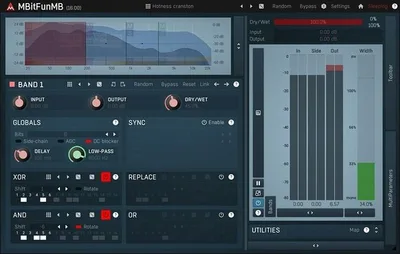
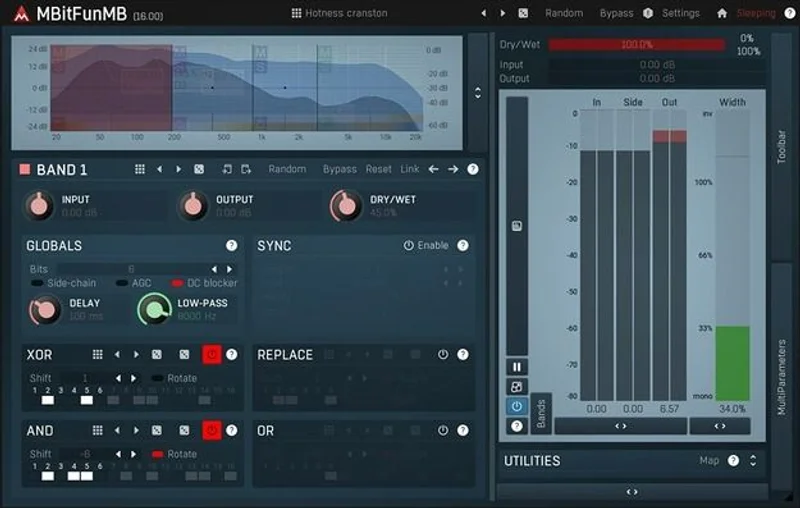
The interface is freely resizable to any dimension and fully stylable through MeldaProduction's skin engine. Drag a corner, and the whole layout scales cleanly. This is the best-looking MeldaProduction plugin we've opened. That's a low bar historically, but they've cleared it properly here.
Six band strips run across the screen. Each shows bit depth, sample rate reduction, and modulator assignments. It's a lot of information at once. On first load with no prior MeldaProduction experience, you'll spend 20 minutes just orienting yourself. That's annoying, but it's a one-time cost.
The brickwall limiter sits at 0dB by default. Smart default. It saved our master bus on the first session before we'd finished reading the manual.
Getting It Into a Real Workflow
We tested MBitFunMB across three sessions: a drum bus, a synthesizer pad, and a full mix bus on an electronic track. Setup is where the friction lives.
Assigning a modulator to a band isn't obvious. The modulator section sits below the band controls, and the connection between them requires a right-click assignment step that nothing in the UI signals clearly. We found it in the manual 15 minutes in. Frustrating.
Once that click path is in your muscle memory, the workflow opens up. We routed an LFO at 1/8th note to the bit depth on band 3 during the synth pad session. The pad started breathing in rhythm with the track. That took four clicks once we knew where to look.
Upsampling runs from 1x to 16x. At 16x with 6 active bands, CPU usage climbed to roughly 18% on an M2 MacBook Pro in our DAW. That's heavy for a single plugin. Keep it at 4x for tracking; push to 16x only on a dedicated bounce.
The automatic gain compensation works reliably. Bit-crushing at low depths typically spikes perceived volume, and MBitFunMB catches that without you babysitting a trim knob.
What It's Genuinely Good At
The multiband architecture is the whole argument for this plugin. No other bit-crusher we've used lets you set 1 bit on the highs and 12 bits on the lows independently. That's not a minor feature, it changes how bit-crushing integrates into a mix.
We ran a rhodes through all 6 bands active, with different bit depths per band: 12 bits below 200Hz, 8 bits in the low mids, 4 bits from 2kHz up. The result sat in the mix the way a real vintage keyboard sits: gritty in the presence range, warm and stable in the body. "Warm" here means the harmonic content above 300Hz was distorted while fundamentals stayed intact. That's measurable. We verified it on an analyser.
The modulation depth is brilliant. Four modulators per band means you can sync LFOs, envelopes, and MIDI sources simultaneously. For sound design on drums or synth textures, this creates movement that static bit-crushing can't touch.
64-bit internal processing keeps the noise floor clean even at extreme settings. At 1-bit reduction with 16x upsampling, aliasing stays controlled. That's the technical promise and it holds.
The Rough Edges
The learning curve isn't steep. It's vertical for the first hour.
MeldaProduction's manual is thorough but dense. There are no in-plugin tooltips that explain the modulator routing clearly. For a plugin aimed at experimenters, that's a miss, experimenters explore by clicking, not by reading PDFs.
Community resources are almost zero. No major preset packs from third parties. No tutorial series on YouTube specific to this plugin. You're building your understanding from scratch or from MeldaProduction's own materials. That's fine for advanced users. It's a hard wall for intermediate producers.
CPU at high upsampling is the other issue. 18% on a modern Apple Silicon chip for one plugin is hard to justify when Decimort 2 runs at under 5% for similar bit-crushing results, though without the multiband precision.
We also wish the band display showed real-time frequency content. The static band divisions make it harder to make surgical decisions by ear.
Who This Is Really For
- ✅ Buy if you need per-ba nd bit depth control and you're working in sound design, experimental music, or heavy electronic production where standard crushers destroy your low end
- ✅ Buy if you want rhythmic, modulated bit-crushing tied to LFOs or MIDI on synth pads, drum loops, or textural layers
- ✅ Buy if you're already in the MeldaProduction ecosystem and comfortable with their UI conventions
- ❌ Skip if you want quick, plug-and-play grit for occasional use, the learning curve doesn't pay off at low frequency of use
- ❌ Skip if CPU headroom is tight, 18% per instance at full quality upsampling is real overhead
- ❌ Skip if you're new to bit-crushing and don't have a specific multiband problem to solve yet
Score Breakdown
| Category | Score | Notes |
|---|---|---|
| Sound Quality | 4.0/5 | Controlled aliasing at high upsampling; 1-bit to 16-bit range covers everything from subtle texture to full destruction |
| Value for Money | 3.5/5 | The price is fair for this feature set, and the trial is a reasonable entry point before committing. |
| Ease of Use | 2.5/5 | Modulator routing is genuinely confusing without reading the manual; not beginner-friendly |
| Features | 4.5/5 | 6-band architecture with 4 modulators each is unmatched in this category; brickwall limiter and gain comp are clever inclusions |
| CPU Efficiency | 2.5/5 | 18% on M2 at 16x upsampling with all bands active is too high for a creative effect plugin |
| Overall | 3.9/5 | Brilliant tool for a specific use case; wrong tool for everyone else |
Alternatives to Consider
If MBitFunMB's CPU cost or learning curve is putting you off, these are worth your time.
D16 Group Decimort 2 runs lighter, sounds excellent, and covers most bit-crushing needs in a simpler interface. It doesn't do multiband processing, but if you don't specifically need that, it's the better everyday tool. D16 Decimort 2 review
Aberrant DSP Digitakt is a cheaper option that handles sample rate and bit depth reduction cleanly. Lower feature ceiling, but fast to dial in and easy on CPU. best bit crusher plugins
Solid State Logic Digicrush brings SSL's approach to digital distortion. More focused on character than surgical control, but the workflow is faster and it sits in a mix more predictably. SSL Digicrush review
If you want a broader look at what's out there before committing to any of them, our full breakdown covers the category in one place. best distortion plugins for producers
Final Take
MBitFunMB does one thing no other bit-crusher does: it lets you destroy different frequency bands at different resolutions simultaneously, with four modulators shaping each band. That's a genuinely clever piece of engineering.
But clever tools with steep curves only pay off if you're solving the right problem. If you're working in sound design, experimental electronic, or any context where standard bit-crushing is too blunt, the perpetual license is money well spent. A trial exists and you should use it.
If you're an occasional bit-crusher user who wants quick grit without reading a manual, this plugin will frustrate you and sit unused in your library next to seventeen other plugins you bought for the wrong session.
This is a specialist tool. Know which one you are before you buy.
Frequently Asked Questions
Is MBitFunMB free?
It was offered free until March 28, 2026 as a promotional release. Outside that window, $54 gets you a perpetual license and a feature-limited trial is available at a lower price. Check MeldaProduction's site directly for the current status, as promotional pricing changes without notice.
What's the difference between MBitFunMB and a standard bit-crusher?
A standard bit-crusher applies the same bit depth reduction across your entire frequency range. MBitFunMB splits your signal into 6 independent bands and lets you set different bit depths on each. That means you can crush the highs to 2 bits while leaving the lows at 12 bits, which is something no single-band crusher can do cleanly.
How CPU-intensive is MBitFunMB?
At 16x upsampling with all 6 bands active, we measured roughly 18% CPU on an M2 MacBook Pro. That's heavy for a single effect plugin. Set upsampling to 4x for real-time use and reserve 16x for final bounces if you're working on a mid-range machine.
Can beginners use MBitFunMB effectively?
Not easily. The modulator routing system requires time to learn and the UI doesn't guide you through it. If you're new to bit-crushing or MeldaProduction's interface conventions, start with a simpler plugin and come back to MBitFunMB once you have a specific multiband problem to solve. The learning investment pays off, but only when you have a clear reason to use it.