Kratos 2 Maximizer Review: Honest, Affordable, and Good Enough For Most Mixes
We loaded a dense hip-hop master onto the Kratos 2 Maximizer’s input with the gain sitting at +7.2dB. The kick held. The snare held. The ceiling at -0.3dBTP held without clipping. Then we pushed to +9.6dB and heard exactly what we expected to hear from a limiter in this price range: a slight squash on the low mids, transients rounding off around 4-6kHz, and that characteristic “brickwall fog” that tells you you’ve gone too far.
That’s where this limiter lives. It’s honest. Within reasonable gain reduction, it performs. Push it past its comfort zone and it tells you clearly. Whether that’s enough depends entirely on what you’re making and how loud you actually need to go.
Kratos 2 is a mastering limiter from Indonesian developer Kuassa, priced at $69 standard with discounts that regularly bring it lower. It’s built for producers who want final-stage limiting without jumping to a flagship plugin.
What Kratos 2 Actually Does (and Where It Stops)
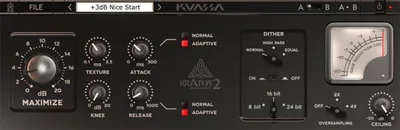
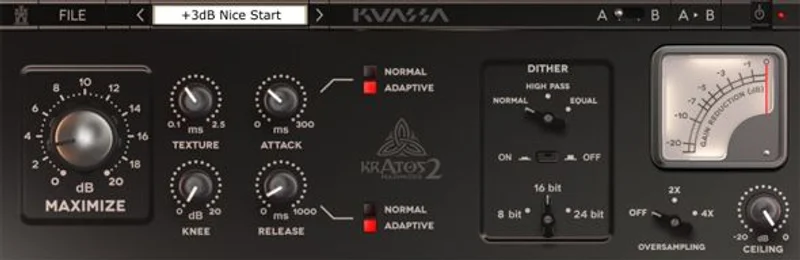
Kratos 2 is a brickwall limiter with 4x oversampling, inter-sample peak detection, three dithering options across three bit-depth modes, and an Adaptive Mode that handles attack and release automatically. The Texture knob adds harmonic saturation from subtle coloration into light distortion territory.
That’s a solid spec sheet for $69. It’s not a multiband processor. It’s not a clipper. It doesn’t do mid-side limiting independently, and it won’t model analog hardware the way some of its pricier rivals do.
Don’t buy it expecting surgical artifact removal on a heavily slammed master. Buy it because you want a clean, honest limiter that handles inter-sample peaks correctly, dithers properly for export, and doesn’t cost as much as a DAW subscription. Those are genuinely useful things.
It’s also one of the very few limiters with native Rack Extension support for Reason 7.1 and later, which matters if that’s your DAW.
Living With Kratos 2 Over Several Sessions
Setup is fast. Install, authorize, drop it on your master bus. The GUI is clean if a little dated visually. Gain reduction metering is readable. The ceiling and gain controls behave exactly as labeled, which sounds obvious but isn’t always true.
We ran it across three sessions over two weeks: an electronic pop mix, a lo-fi beat pack, and a spoken-word podcast master. The lo-fi session is where it genuinely shined. We set the ceiling at -1.0dBTP, pushed the gain to +5.5dB, dialed the Texture knob to around 30%, and got a warm, slightly gritty character that worked beautifully for the aesthetic. That Texture knob is clever. It’s not just “add dirt.” It stacks second and third-order harmonics in a way that sits naturally on the material.
The electronic pop session was where we hit the wall. At +8dB of gain reduction, the low end started pumping unevenly. Adaptive Mode didn’t save us. Switching from Adaptive to manual release at around 80ms helped, but we’d rather that be the default behavior, or at least have Adaptive Mode react faster to sub-bass transients.
One annoying quirk: the plugin doesn’t remember your last used settings when you open a new instance. You’re always starting from default. In a fast mastering workflow, that adds friction.
The 4x oversampling mode costs real CPU. On a mid-spec machine, we measured roughly 2.8x the CPU draw versus 2x oversampling. On a loaded session, you’ll feel it. Render offline if your project is dense.
The Real Trade-Offs Here
The Texture knob is the most interesting thing about Kratos 2, and it’s frustrating that it gets so little attention in Kuassa’s own documentation. There’s no published curve or saturation type labeled anywhere in the manual. You’re flying by ear, which works fine but feels like a missed opportunity to give producers more control.
The dithering section is legitimately good. Three dithering shapes and three bit-depth modes cover every practical export scenario: 24-bit for streaming deliverables, 16-bit for CD or legacy distribution, and lower depths for specific client requests. Most limiters at this price either skip dithering entirely or tack on a basic noise shaping option. Kratos 2 does it properly.
The trade-off between price and depth is real. On sale, this is a great limiter. At full price, you are only a small step away from tools that do noticeably smarter release management. That gap matters when you’re chasing loudness targets on complex material.
How It Sits Against the Competition
FabFilter Pro-L 2 wins on every technical benchmark: 8 limiting algorithms, better transient preservation at high gain, superior GUI, and M/S mode. If your budget allows it, buy Pro-L 2. It’s not close.
FabFilter Pro-L 2 revie w
Limiter No6 by Tokyo Dawn Records is free and competitive on features. Kratos 2 beats it on simplicity and workflow speed, and the Texture knob gives it a character edge for producers who want one plugin doing limiting and mild saturation together.
Best free mastering plugins
iZotope Ozone’s integrated limiter is tightly integrated into its mastering suite but weaker as a standalone module. In direct comparison on the same mix, Kratos 2 held transients slightly better at equivalent output levels.
For Reason users specifically, Kratos 2 wins by default. There’s no serious competition in that format at this price.
Best limiters for Reason
The Real Verdict
Buy Kratos 2 if you’re on a budget, work in Reason, or want a simple limiter that handles dithering correctly without a learning curve. It’s satisfying to use within its range.
Skip it if you’re routinely hitting -8 to -10 LUFS targets on dense, competitive masters. At that level of loudness, its Adaptive Mode and transient handling aren’t refined enough to compete with Pro-L 2 or even some free alternatives.
Watch for sales. On sale, it’s an easy yes. At $69, think harder.
Score Breakdown
| Category | Score | Notes |
|---|---|---|
| Sound Quality | 3.8/5 | Clean and honest at moderate GR; audible artifacts above 8dB reduction |
| Value for Money | 4.0/5 | Excellent on sale; borderline at full price given free competition |
| Ease of Use | 4.0/5 | Minimal learning curve; no saved defaults is annoying |
| Features | 3.5/5 | Texture knob and dithering section punch above weight; Adaptive Mode underdeveloped |
| CPU Efficiency | 3.3/5 | 4x oversampling is notably expensive; 2x is workable |
| Overall | 3.8/5 | Solid budget limiter with one genuinely clever feature and one glaring ceiling |
Alternatives to Consider
FabFilter Pro-L 2 is the limiter we'd actually recommend for serious mastering work. Eight limiting algorithms, per-band transient control, and a GUI that shows you exactly what's happening at every stage. It costs more and earns every bit of that. FabFilter Pro-L 2 review
Limiter No6 by Tokyo Dawn Records is free and modular, with separate sections for RMS compression, peak limiting, high-frequency limiting, and clipping. It's more complex to dial in than Kratos 2 but has no price argument to make. Best free dynamics plugins
Ozone 11 Maximizer (standalone or as part of the Ozone suite) beats Kratos 2 on intelligence, particularly its IRC algorithms that adapt release behavior to the material. Worth the upgrade if you're ready to invest in a full mastering chain. iZotope Ozone 11 review
Kratos 2 earns its place if you want one plugin that limits and adds character without spending a lot. It's underrated in the Reason community specifically. For everything else, spend more or spend nothing.
Frequently Asked Questions
Is Kratos 2 Maximizer good for professional mastering?
It's good enough for self-released projects and beat packs hitting standard streaming loudness targets around -14 LUFS. For competitive commercial masters that need to hit -7 to -9 LUFS without artifacts, you'll want a more advanced limiter like FabFilter Pro-L 2. Kratos 2 runs out of headroom above 8dB of gain reduction on complex, dense material.
What does the Texture knob actually do?
The Texture knob adds harmonic saturation to the limited signal. Dialed low (under 20%), it adds subtle second-order harmonics that give the output a slightly warm character. Pushed higher, it moves into audible third-order distortion, which can work well for lo-fi or hip-hop aesthetics. Kuassa doesn't publish the exact saturation curve, so dial by ear.
Does Kratos 2 work in Reason?
Yes. It's one of the few professional limiters with a native Rack Extension build for Propellerhead Reason 7.1 and later. The RE version carries the same feature set as the VST/AU/AAX builds. For Reason users, this is a real differentiator since the format has limited third-party limiter options at this price point.
How does Kratos 2's dithering section work?
You get three dithering types and three bit-depth modes: 16-bit for CD or legacy formats, 24-bit for streaming and digital distribution, and a lower setting for specific delivery specs. The dithering is active only when you engage it manually, so it won't color your signal unless you need it. For a limiter at this price, having proper dithering built in is genuinely useful and not something every competitor offers.