
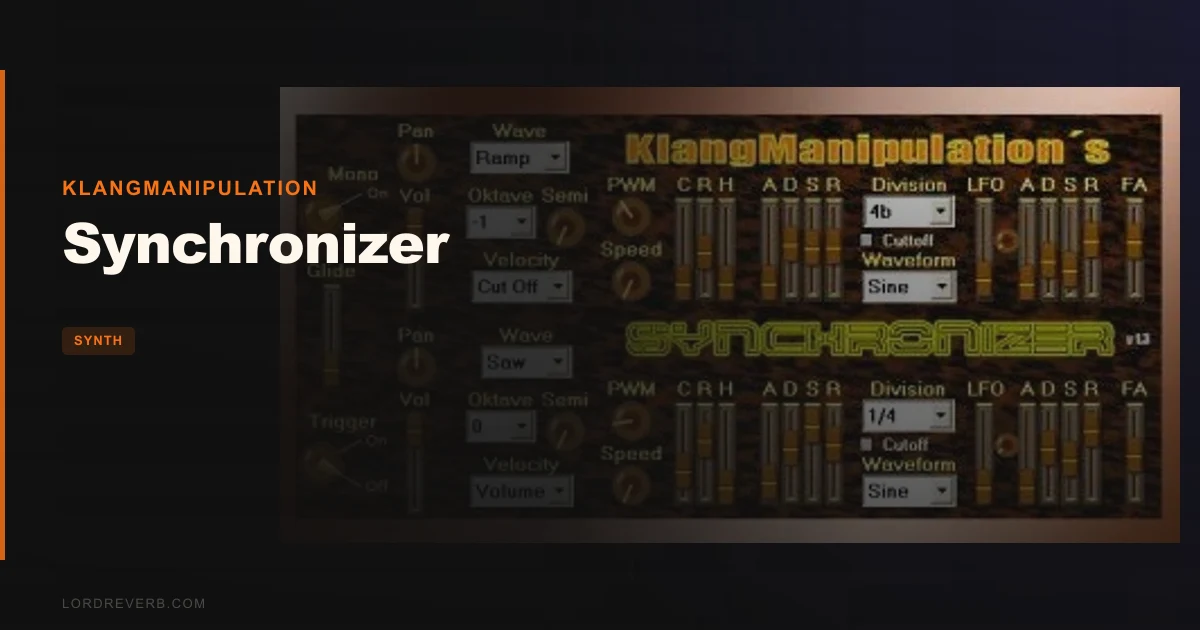
Klangmanipulation's Synchronizer is a free subtractive synthesizer that solves a specific, frustrating problem: you're sketching a track at midnight, your paid synths are asleep behind license servers, and you just need two oscillators, a filter, and an envelope that work right now.
That's the exact itch Synchronizer scratches. It's a no-frills, no-cost dual-oscillator subtractive synth built for Windows, aimed at producers who want something functional in their signal chain fast. Not a feature showcase. Not a prestige buy. A tool.
If you're a beginner on PC trying to understand subtractive synthesis without paying for the lesson, this is a clever place to start. If you're a Mac user, stop reading. This one isn't for you.
The Frustration It Was Built For
Subtractive synthesis is still the foundation of most synth patches you'll dial in: oscillator, filter, envelope, done. But the problem is that every synth with a decent filter and a usable preset library costs money.
Free synths tend to split into two camps. Either they're stripped to the point of uselessness, or they're so complex they take an afternoon to understand. Synchronizer lives in neither extreme.
It gives you 2 oscillators with standard waveforms, per-oscillator filter and ADSR, tempo-synced LFOs on both, and pulsewave modulation. That's a real, functional synthesizer architecture. The fact that it costs nothing is genuinely surprising given what's here.
For producers learning how filter cutoff interacts with envelope attack, or why LFO rate changes the feel of a pad, this is a sandbox you can afford to break.
How It Performs in the Session
We loaded Synchronizer into Ableton 12 via a bridging wrapper (since it's a VST2 DLL and Ableton dropped native VST2 support) and dropped it onto a MIDI channel routed to a bass line at 128 BPM.
The preset bank has 90 patches covering basses, leads, keys, and pads. We pulled up a bass preset and ran it through our mix. The low-mids sat at around 200-400Hz with decent body, and the filter self-resonance, when pushed past 70%, added a satisfying bite without screaming out of the low end. Not a Moog ladder, but it tracks musically.
The tempo-synced LFO is one of the cleverer touches here. We set oscillator 2's LFO to a 1/8th note rate on a pad patch, targeting filter cutoff. The movement locked to the grid cleanly, and the stereo spread created by slightly detuning oscillator 2 by 7 cents produced a wide, slow-breathing texture that sat behind a vocal without fighting it.
CPU load is light. We ran 8 instances simultaneously on a mid-spec session and saw roughly 3-4% CPU total. That's where the value story gets real.
Pulsewave modulation is present, and it works. We pushed a lead patch through it and the tone shifted from thin to thick as width increased from 10% to 80%, thickening harmonics in the 2kHz-5kHz range without getting brittle. It's not as smooth as what you'd get from the BLEASS Analog/FM Synth Bundle, but it's functional and free.
The frustrating part: installation. There's no installer. You manually drag a DLL file into your Steinberg program folder. In 2026, that's annoying. If you've never done it before, you'll spend 20 minutes confused and another 5 in a forum.
Strengths and Weaknesses
The dual-oscillator architecture with per-oscillator ADSR is the real win here. Most free synths give you one shared envelope. Synchronizer gives each oscillator its own filter and ADSR, which means you can set oscillator 1 to a short punchy attack for the transient and oscillator 2 to a slower, filtered bloom behind it. We built a plucked-key patch doing exactly that in about four minutes.
We love that the tempo-synced LFOs don't drift. We've tested free synths where the LFO gradually falls out of sync with the session tempo after 8 bars. Not here. Both LFOs held tight to the grid over a 4-minute render.
The weaknesses are real, though. There's no mod matrix. If you want LFO to modulate pitch instead of filter, you're stuck hoping the preset already does it. There's no unison mode, so wide leads require stacking instances. And there are zero built-in effects: no reverb, no chorus, no delay. You're routing to a send immediately after loading it.
The preset naming is also ugly in places. "Bass 12" tells you nothing. Half the satisfaction of a preset library is discovery, and this one makes you click through blind.
Is Free Actually Worth It?
Free is free. The question is really: is Synchronizer worth the time investment to install and learn?
For Windows producers learning subtractive synthesis, yes. The dual-oscillator setup with per-oscillator envelopes teaches the right lessons. The 90 presets give you reference points for what different combinations actually sound like.
For experienced producers, it's a light utility synth. We'd reach for it on a session bus for a pad sketch, or to quickly prototype a bass shape before committing to a heavier synth. It's not replacing BeatSurfing LOW for dedicated bass work. Not even close. But it's a scratchpad that costs nothing.
The manual install is the only real tax you pay. Price it at that.
Who Should (and Shouldn't) Buy This
- ✅ Buy if you're a Windows producer learning subtractive synthesis and want a structured preset library to reverse-engineer.
- ✅ Buy if you need a light, CPU-efficient synth for pad sketching and don't want another heavy instrument on a dense session.
- ✅ Buy if you want to prototype bass and lead ideas before committing to a paid instrument like the Audio Blast ABX3 Bundle.
- ❌ Skip if you're on Mac. It's a Windows-only VST2 DLL and won't run.
- ❌ Skip if you need a mod matrix, unison, or built-in effects in your signal chain. You'll outgrow this in a session.
- ❌ Skip if you hate manual plugin installation. The drag-and-drop DLL method is a real barrier with no workaround.
Score Breakdown
| Category | Score | Notes |
|---|---|---|
| Sound Quality | 3.0/5 | Usable filter with real resonance, but no depth of character compared to paid alternatives |
| Value for Money | 5.0/5 | It's free. The score is the score. |
| Ease of Use | 2.5/5 | Manual DLL install and no mod matrix drag the experience down hard |
| Features | 3.0/5 | Dual osc with per-oscillator ADSR and tempo-synced LFOs is solid; no effects chain or mod matrix hurts |
| CPU Efficiency | 4.5/5 | Among the lightest-loading synths we've tested; 8 instances barely register |
| Overall | 3.2/5 | A genuinely useful free synth for Windows, held back by dated format and limited modulation |
Alternatives to Consider
Surge XT (free): If you're on Windows or Mac and want a free synth with a real mod matrix, multiple filter types, and a serious preset library, Surge XT is the correct answer. It's more complex, but it's also in a different league for sound design. There is no paid alternative that competes with it at that price.
BLEASS Analog/FM Synth Bundle: If you're ready to spend money and want dual-engine synthesis with built-in effects and a polished workflow, check out our BLEASS Analog/FM Synth Bundle review. It costs more, but it does things Synchronizer simply can't.
BeatSurfing LOW: For anyone who keeps pulling Synchronizer up specifically for bass patches, we'd point you to BeatSurfing LOW. It's built for bass. Synchronizer is a generalist. If bass is your focus, use the dedicated tool.
And if you're looking to understand where synthesizer sounds sit in a finished mix, our Tape Synths Expansion review covers how layered synth textures actually behave against other elements in a session.
Synchronizer is a free, Windows-only, dual-oscillator subtractive synth with 90 presets and genuinely light CPU draw. Get it, install it the annoying way, and use it for sketching. Just don't expect it to stay in your chain once you've dialled in the idea.
Frequently Asked Questions
Is Synchronizer by Klangmanipulation compatible with Mac?
No. Synchronizer is a Windows-only VST2 plugin distributed as a DLL file. There's no AU or VST3 version, so Mac users running Logic, Ableton on Apple Silicon, or any AU-only host are completely locked out. Mac producers should look at Surge XT or similar free cross-platform options instead.
Does Synchronizer work in Ableton Live?
It can, but not natively in recent versions. Ableton dropped VST2 support in Live 12. You'll need a VST2-to-VST3 bridging utility like Patchwork or Blue Cat's PatchWork to host the DLL inside Ableton on Windows. It's an extra step, and it adds a tiny amount of latency overhead. In older versions of Ableton (11 and below), it loads directly.
How do I install the Synchronizer plugin?
There's no installer. After downloading from Plugin Boutique, unzip the file and manually drag the DLL into your VST folder, typically C:/Program Files/Steinberg/VstPlugins. Then rescan plugins in your DAW. It's a one-time process but more fiddly than it should be in 2026.
Is Synchronizer good enough for professional use, or is it just for beginners?
It's honest about what it is: a lightweight subtractive synth for sketching ideas and learning the fundamentals. The sound quality is functional but not distinctive enough for front-of-mix leads or characterful basses in a finished record. We'd use it for pad beds, background texture, or teaching sessions, and reach for something like the BLEASS Analog/FM Synth Bundle or BeatSurfing LOW when the mix needs to hold up to scrutiny.