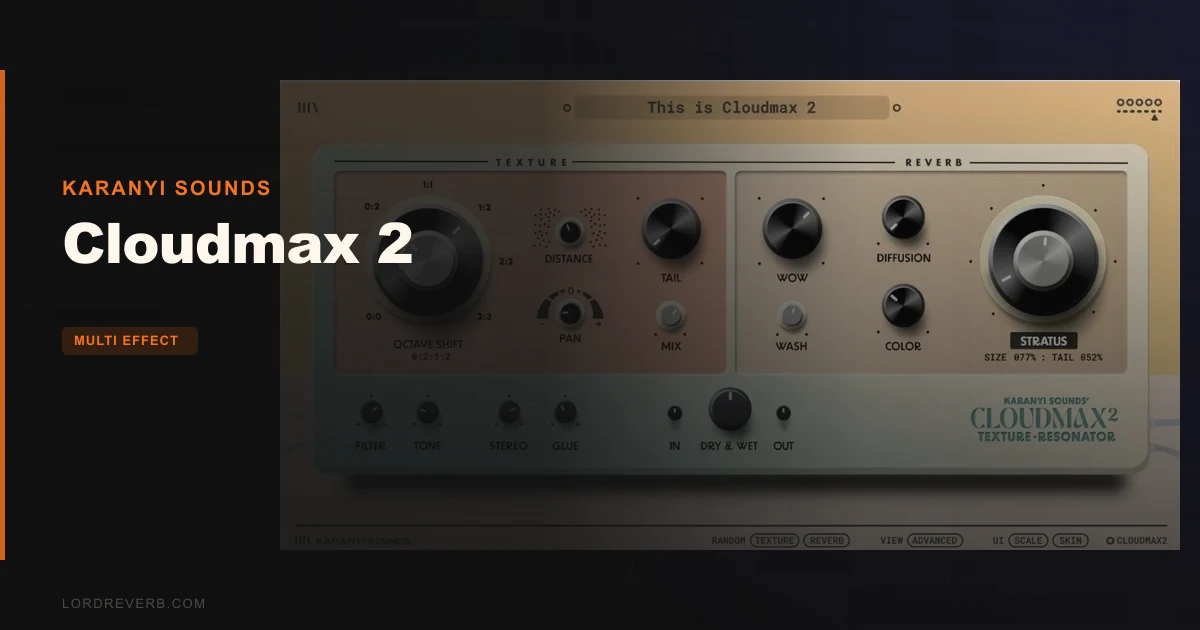
You’re sitting on a four-bar synth pad that’s fine but flat, and you want it to bloom into something cinematic without rebuilding the patch. That’s the track Cloudmax 2 from Karanyi Sounds suits best: ambient, cinematic, soundscape and texture-driven work where a single sustained sound needs to become an atmosphere. At $49, it packs a granular engine, three reverbs, tape movement and a glue compressor into one window. It’s for producers who build mood, not for people hunting a transparent mix reverb.
Quick Verdict
Cloudmax 2 earns a 4.0 out of 5. The granular-plus-reverb combination is the draw, and at $49 the amount of sound design packed into one plugin is hard to argue with. The caveats are real: no Maschine support, a Logic Pro visibility bug on some systems, and owners who say support never answered them. Buy it if you live in textures and soundscapes. Skip it if you want one clean reverb for a mix bus.
Where Does Cloudmax 2 Belong in Your Tracks?
Ambient and cinematic work is the home turf. The developer pitches it as a way to build epic chords from a single lead, add weight to bass, turn vocals into soundscapes and drop unusual spaces onto keys. Those are the jobs it was built around.
Think film cues, lo-fi beds, dark synth intros, pad layers, and the long breakdown where a vocal dissolves into air. The upgraded pitch system is what makes the chord trick possible: one held note, several pitched grain layers, and suddenly you have harmony you never played.
Owners also report it works as a quick vocal sound-dialing tool, with spaces ranging from a small room to a large hall. That’s the more everyday use, and it’s a real one.
Where Does It Fall Short?
Hard, dry, forward genres are a poor fit. If your reference is a tight punk record or a bone-dry trap vocal, a granular texture machine is the wrong tool and you’ll fight it the whole session.
It also isn’t a surgical utility. You don’t reach for it to fix a resonance or tame a harsh cymbal.
And if your workflow lives in Maschine, stop here. It doesn’t run there.
How Is the Quad Granular Engine Built?
The core of Cloudmax 2 is a quad granular engine with 4 layers. Granular processing chops incoming audio into tiny grains and replays them, scattered, stretched or pitched. Four layers means four independent versions of that smear running at once.
That’s the reason one note becomes a chord. Each layer can be pitched differently, so a single lead turns into stacked harmony.
For a producer, the practical upside is speed. You don’t build four sampler tracks to get that stack. You load one plugin on one track.
The catch is the usual granular one. Push it hard and the result is thick, blurry, sometimes ugly. That’s the point, but you should know it going in.
Layering and pitch
Treat the pitch system like a harmony generator. Start with an interval that fits your key, keep one layer at the original pitch so the source stays recognisable, and let the others sit around it.
If everything is detuned and smeared with nothing anchoring it, the result sounds like mush rather than a chord. Keep one layer honest.
Texture and grain behavior
The Smart Randomizer includes a Random Texture function, and it’s a fast way to find grain behavior you wouldn’t program by hand. Roll the dice a dozen times, keep the one that makes you grin, then refine it manually. Don’t ship the first roll.
What Do the Three Reverbs Actually Do?
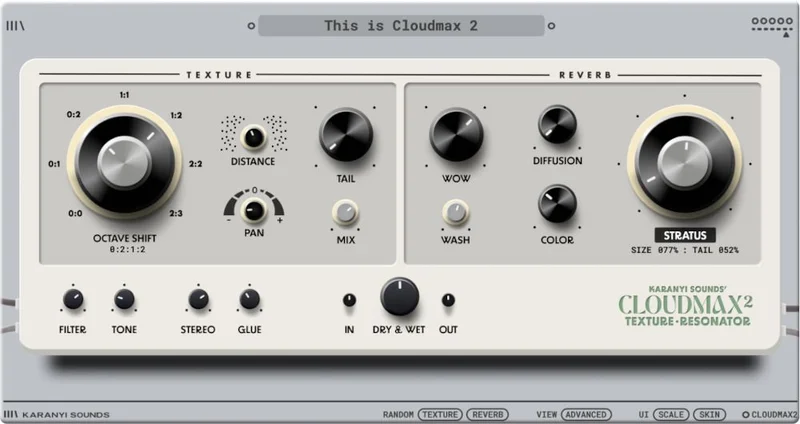
Cloudmax 2 includes three algorithmic reverbs: Stratus, Cirrus and Wash. They’re different enough that picking between them is a creative decision, not a cosmetic one.
Stratus is described by the developer as a colorful, analog-style reverb. Reach for it when you want character on the space itself, a bit of color rather than a clean tail.
Cirrus is the delicate one, with super long tails. That’s the ambient workhorse. A sparse piano phrase and a Cirrus tail that outlives the notes is the whole genre in one move.
Wash is different. The developer says it blurs textures before they hit the main reverb units. Think of it as a smear stage ahead of the reverb, which is a clever way to turn a recognisable sound into a cloud before the space is even applied.
Choosing between them
For a lead you want to dissolve, run Wash into Cirrus. For keys that need a vintage-tinted room, try Stratus. For quick vocal placement, owners say you can get from a small room to a large hall quickly, so start there and adjust.
Does the Tape WOW and Flutter Earn Its Place?
Yes, for the right material. The plugin has tape WOW and Flutter emulation, which adds slow pitch drift and faster wobble to the signal.
On a static pad, that movement is the difference between sounding like a preset and sounding like a recording. Slow drift makes a sustained chord feel alive. Heavy flutter makes it sound broken.
Go gently. A little movement is satisfying. A lot of it makes your harmony sound out of tune, which defeats the pitch work you did in the granular layers.
What About the Filters, EQ and Compressor?
Cloudmax 2 has built-in ladder low-pass and high-pass filters, plus low and high boost EQ. These matter more than they look like they should.
Reverb and granular washes eat low end and pile up in the top. Filtering the wet signal is how you keep the effect from clouding your mix. Roll off the lows on the tail so it doesn’t fight your bass, and tame the top so the shimmer doesn’t turn harsh.
The glue compressor
A glue compressor sits at the end of the chain. Its job is to hold the whole effect together so the four granular layers and the reverb behave like one sound instead of a pile of parts. Use it when the texture feels like it’s falling apart.
Stereo control
Stereo control is included, which matters when four layers and a long reverb tail are all trying to be wide at once. Narrow it if the effect is swamping your center image.
Which Owner-Praised Features Are Worth Knowing?
Owners call out a few specifics. The Crisp mode sharpens bland tracks. The Heat feature adds warmth to sounds. And the guitar-pedal-like interface gets praised for sounding excellent.
Be careful with the word warmth. Here, it’s owners describing Heat as making material sound fuller and less sterile. Judge it by ear on your own source, because how much you hear depends on what you feed it.
Crisp is the opposite move. If a track sounds dull and lifeless, it’s a quick way to wake it up. Use sparingly or it gets fizzy.
How Does the Interface Work?
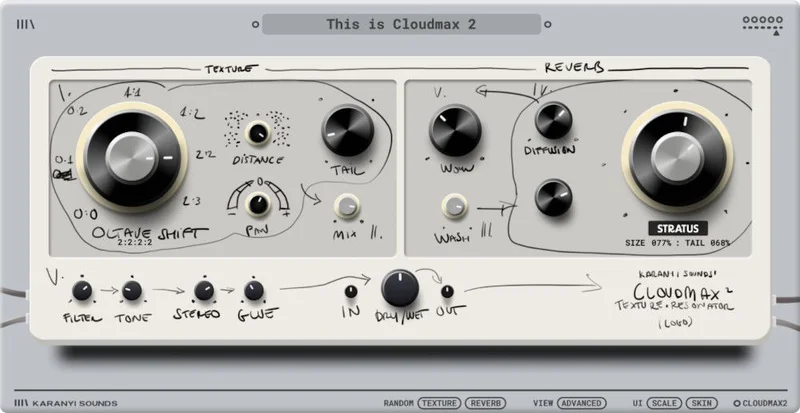
Two views are available. The Front view keeps the essentials up front so you can dial in a sound quickly. The Advanced view opens up 45 controls for deeper edits.
That split is smart. Most sessions, you want to move fast and stay in the Front view. When a sound almost works and one parameter is off, you open Advanced and fix it.
Four UI skins are included: default, Legacy Skin, Concept Art skin and Summer Skin. It’s cosmetic, but eyes get tired in long sessions and a skin change is free.
Controls are MIDI-learnable, so you can map knobs to a hardware controller and perform the effect live. Wire the reverb mix and a granular parameter to two faders and ride them through a breakdown. That’s where this plugin gets fun.
Are the Presets Any Good?
There’s a lot of them. Cloudmax 2 ships with 170 factory presets, plus over 60 artist presets built for instruments, keys, bass, vocals and soundscapes. All 110 presets from Cloudmax 1 come along too.
That’s a deep bank, and the artist presets are organised by use, which saves time. Load a vocal preset on a vocal, a bass preset on a bass.
Use presets as starting points, not endpoints. A preset sounds good on the source it was made for, and your source is different.
What Does the Smart Randomizer Add?
The Smart Randomizer has two functions: Random Texture and Random Reverb. They randomise the granular side and the reverb side separately, which is the right call. You can lock a reverb you love and keep rolling the texture, or the reverse.
It’s an idea generator, not a finished-sound button. Hit it repeatedly, bounce the ones that surprise you, and keep working from there.
What Are the System Requirements?
Plan around these. At least 4 GB of RAM is required, and 8 GB is recommended. You need a 2 GHz CPU with at least 4 cores, and 150 MB of free disk space.
Mac OS X 10.11 or higher is recommended, as is Windows 8 or higher. You need a VST3/AU compatible 64-bit host.
Formats on Mac are AU and VST3 (64-bit). On Windows they’re VST3 and AAX (64-bit). The plugin has been tested stable in Ableton Live 11.3.4, Logic Pro 10.7.4 and Reaper 6.8.
Because it integrates over 10 advanced DSP modules into a single plugin, don’t expect it to be featherweight. A 4-core minimum is a hint. On a busy session, freeze the track once you’ve settled on the sound.
What Are the Real Problems?
Three, and they’re worth taking seriously.
First, Maschine. It doesn’t run there. If that’s your host, it’s a dead end.
Second, a Logic Pro quirk. Some owners report the plugin fails to appear in Logic Pro track effects on their systems, showing up only on the master track. That limits it badly, because this is an effect you want on individual tracks and sends. The developer lists Logic Pro 10.7.4 as tested stable, so this appears to be system-specific. Check your own setup before committing.
Third, support. Some owners say support never replied to their inquiries. That’s frustrating, and it matters most if you hit that Logic issue. If you’re on Logic, treat the visibility question as a risk and verify it early.
How To Use It Well
Run Cloudmax 2 on a send, not as an insert, for most jobs. That lets you blend the texture in underneath the dry sound instead of replacing it. A wet-only send keeps your source clear and the atmosphere optional.
Filter the wet signal before it hits the mix. Cut the lows so the tail doesn’t muddy your bass, and soften the top so it doesn’t get fizzy next to your hats.
Automate it. A static granular wash gets tiring in thirty seconds. Move the reverb mix or a granular parameter across a section and the effect feels intentional.
Start with presets for speed, then break them. And keep one layer anchored to the original pitch so the chord trick doesn’t turn into noise.
Who Should Buy It?
Ambient, cinematic and soundscape producers. Vocal-texture people. Anyone who builds beds, breakdowns and intros and wants one plugin to do the heavy lifting. At $49, the depth is the draw.
Who Should Skip It?
Maschine users, full stop. Logic users who can’t confirm the track-effects behavior on their system. Anyone who wants a single clean reverb for mixing, because that isn’t what this is.
The Verdict
Cloudmax 2 is a texture machine, and a good one. The four-layer granular engine plus three distinct reverbs gives you a fast route from a plain sound to an atmosphere, and $49 is a fair ask for that much sound design in one window. Buy it for ambient and cinematic work. Hard pass if you live in Maschine, and think twice if Logic is your host and support responsiveness matters to you.
Specs & Technical Details
| Spec | Detail |
|---|---|
| Developer | Karanyi Sounds |
| Price | $49 |
| Plugin Format | Mac: AU, VST3 (64-bit). Windows: VST3, AAX (64-bit) |
| OS Support | Mac OS X 10.11 or higher recommended; Windows 8 or higher recommended |
| Activation | N/A |
| CPU Usage | N/A (2 GHz, 4+ cores required) |
| Trial Available | N/A |
| Version Reviewed | Cloudmax 2 |
Score Breakdown
| Category | Score | Notes |
|---|---|---|
| Sound Quality | 4.0/5 | Three distinct reverbs and a four-layer granular engine give real range, though heavy settings get thick and blurry. |
| Value for Money | 4.5/5 | 170 factory presets, 60+ artist presets and the full Cloudmax 1 bank at $49. |
| Ease of Use | 4.0/5 | Front view is quick; Advanced view with 45 controls is there when you need it. |
| Features | 4.5/5 | Granular, reverbs, tape movement, filters, EQ, compressor and randomizer in one plugin. |
| CPU Efficiency | N/A | No figures to score; a 4-core CPU is the stated minimum. |
| Overall | 4.0/5 | A strong texture tool held back by Maschine incompatibility, a Logic visibility bug and quiet support. |
Buy or Skip?
Buy it if your tracks live on atmosphere, and if your DAW is Ableton Live, Reaper or a Logic setup where the plugin shows up properly. At $49, you’re getting a granular engine, three reverbs and a deep preset bank that would otherwise be a pile of separate tools.
Skip it if Maschine is your host, or if all you need is a clean reverb to glue a mix. And if you’re a Logic user, confirm the track-effects behavior before you commit, because an unanswered support email is a miserable way to learn about it.
A plain pad goes in. A cloud comes out. That’s the whole pitch, and it mostly delivers.
Frequently Asked Questions
What is Cloudmax 2?
Cloudmax 2 is a multi-effect plugin from Karanyi Sounds built around a quad granular engine with 4 layers. It also includes three algorithmic reverbs, tape WOW and Flutter emulation, filters, EQ, a glue compressor and a smart randomizer.
Which DAWs and formats does Cloudmax 2 support?
On Mac it comes as AU and VST3 (64-bit), and on Windows as VST3 and AAX (64-bit). It has been tested stable in Ableton Live 11.3.4, Logic Pro 10.7.4 and Reaper 6.8. It does not run in Maschine.
Does Cloudmax 2 work in Logic Pro?
It's listed as tested stable in Logic Pro 10.7.4. Some owners report it doesn't appear in track effects on their systems and only shows on the master track, so check your own setup early.
What are Stratus, Cirrus and Wash?
They're the three algorithmic reverbs. Stratus is a colorful, analog-style reverb, Cirrus offers delicate sound with super long tails, and Wash blurs textures before they reach the main reverb units.
Does Cloudmax 2 include presets from the first version?
Yes. All 110 presets from Cloudmax 1 are included, alongside 170 factory presets and over 60 artist presets for instruments, keys, bass, vocals and soundscapes.
What computer do I need to run Cloudmax 2?
You need at least 4 GB of RAM (8 GB recommended), a 2 GHz CPU with at least 4 cores, 150 MB of free disk space and a VST3/AU compatible 64-bit host. Mac OS X 10.11 or higher and Windows 8 or higher are recommended.