If you own RX Advanced and you're wondering whether the Everything Bundle Crossgrade is worth the jump, the answer is yes for anyone who mixes, masters, or produces regularly and wants Ozone 12 Advanced, Neutron 5, Nectar 4 Advanced, and a full rack of creative tools added to the RX workflow they already rely on. This crossgrade is available to owners of RX 1 through 8 Advanced, it brings the full Everything Bundle scope at $1,399, and it's the kind of purchase you'll either feel brilliant about in six months or quietly regret because half of it sits unopened. Let's figure out which one you'll be.
RX is what brought you here. It's the tool that pulled your location recording back from disaster, the plugin that turned that wind-wrecked interview into something broadcastable. iZotope knows that. The crossgrade is built on the idea that if you trust RX, you'll trust the rest of the ecosystem. That's a reasonable argument. Whether the full bundle justifies $1,399 on top of what you already paid depends entirely on what you produce, how you work, and whether Ozone 12 alone would close the gap.
This review builds the case by user type. Find yours, read it, and you'll know whether to buy today, wait for a sale, or leave it alone.
What You Are Upgrading To
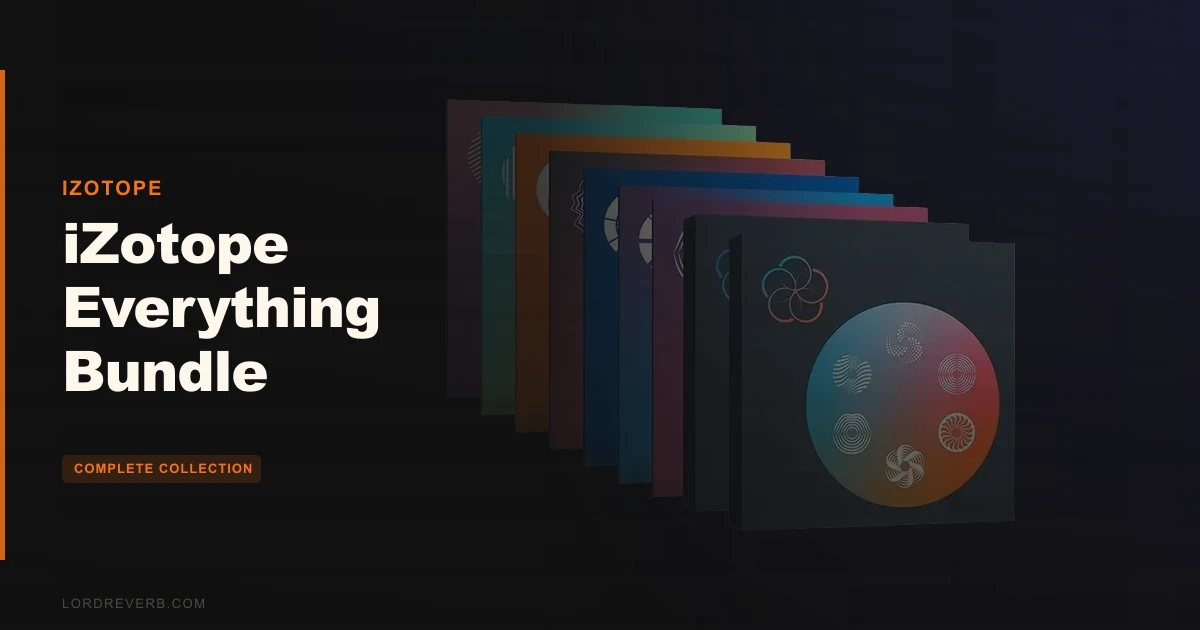
The Everything Bundle Crossgrade from RX Advanced adds Ozone 12 Advanced, Neutron 5, Nectar 4 Advanced, the Catalyst Series (Plasma, Aurora, Cascadia, Velvet, FXEQ, and Equinox), VEA, and Trash to your existing RX 12 Advanced licence.
Ozone 12 Advanced is the centrepiece. It's not just the mastering plugin; it ships as a mothership plus 20 component plugins. That means you can run Bass Control, Stem EQ, Clarity, Impact, Imager, Spectral Shaper, Match EQ, IRC 5 Maximizer, Vintage Compressor, Vintage EQ, Vintage Tape, and the Transient/Sustain controls all as individual inserts across your session, not just chained inside the Ozone shell.
Neutron 5 handles mixing. Nectar 4 Advanced handles vocal production. The Catalyst Series handles creative sound design. And RX 12 Advanced, the tool you're crossing over from, stays exactly as it was. It doesn't get upgraded by this crossgrade if you're already on RX 12 Advanced. If you're on an older version, check your eligibility carefully.
The bundle also comes with Audiolens, the referencing app, plus Native Instruments effects, Brainworx effects, and Guitar Rig 7 Pro. That's not filler. Those additions alone have real value for producers building out a signal chain on a budget.
Who Qualifies for This Crossgrade
The crossgrade is open to owners of RX 1 through RX 8 Advanced. That's the documented eligibility window. If you're on RX 9 Advanced or later, the path may differ, so check the iZotope product portal before you buy.
One real-world warning: owners report product activation failures with serial number recognition in the Product Portal. It's annoying, and it's not rare. Plan for the possibility that you'll need to contact support before the bundle activates cleanly. And then plan for the follow-up: customer support response times are slow. That's not a dealbreaker, but if you're buying the night before a session, you're taking a risk.
The crossgrade licence also does not provide an upgrade path to future Everything Bundles. What you're buying is a snapshot of this bundle at this moment. When Everything Bundle 2027 ships with something you need, you'll be paying again at a crossgrade or upgrade price that iZotope sets at that time.
The Value Case for This Crossgrade
At $1,399, this crossgrade asks you to do some honest math. You already own RX Advanced. The question is what you're adding and whether you'd buy those tools individually if you had the choice.
Ozone 12 Advanced alone, bought outright, would run you a significant amount. Neutron 5, Nectar 4 Advanced, Trash, the full Catalyst Series, Guitar Rig 7 Pro: add those up and the crossgrade price starts looking like the kind of deal that's hard to argue with on paper.
But "good value on paper" and "actually useful to your workflow" are different things. If you're only going to use Ozone and RX, you'd be better served buying Ozone 12 Advanced as a standalone or waiting for iZotope's frequent sales. The crossgrade justifies itself when you can honestly say you'll reach for Neutron 5 on mix sessions, Nectar 4 on vocal production, and at least two or three of the Catalyst Series tools on creative projects.
If those tick boxes for you, $1,399 is a strong deal. If you're buying on the hope that you'll use everything, the reality is you probably won't. iZotope bundles reward producers with broad workflows. Specialists tend to find the edges of the licence more frustrating than freeing.
Who Should Skip It
Skip it if you only do audio restoration. RX Advanced is what you need, and you already have it. The rest of this bundle won't change your restoration workflow.
Skip it if you're a hardware-first mixer who only uses a DAW for bouncing. Neutron 5 and Ozone 12 are built for ITB work. If your mixing happens on a console and your mastering goes to an external chain, most of this bundle will sit idle.
Skip it if activation stress would wreck your deadline. Owners report serial number recognition failures in the Product Portal, and support is slow. If you need tools live and working on a Monday morning, buying Friday night is a gamble.
Skip it if you're not on RX 1 through 8 Advanced. The crossgrade eligibility window is specific. Outside of it, you're looking at a different purchase path entirely.
And honestly? Skip it if you're the kind of producer who buys bundles and uses three things. This is a wide toolkit. If your workflow is narrow and focused, a targeted plugin purchase will serve you better than a sprawling licence that creates option paralysis every time you open your DAW.
Ozone 12 Advanced: The Mastering Suite at the Centre
Ozone 12 Advanced is the reason most people buy this crossgrade. Everything else is bonus territory. And Ozone 12 is genuinely impressive in scope.
The mothership shell holds everything together, but the real power is in the component plugins. You can place Bass Control directly on your low-end bus. You can drop the Vintage Compressor on a drum room, the Spectral Shaper on an acoustic guitar, and the IRC 5 Maximizer only on the master. The 20 component plugins aren't locked inside a mastering-only shell. They're mixing tools when you deploy them that way.
Bass Control
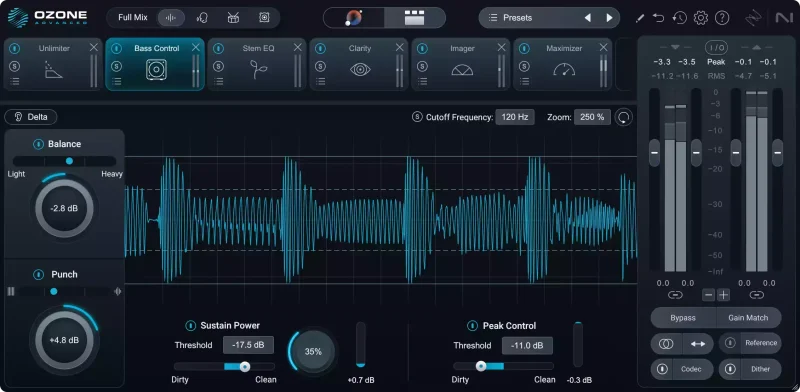
Bass Control is new in Ozone 12. The developer says it balances low-end energy while adding clarity, punch, and impact. Those are describing words, so here's what that means in practice: it's a targeted low-end processor that works on the stereo field of your low frequencies without you needing to manually carve with a broad EQ.
If you've ever bounced a track that sounded tight on your monitors and flabby on everything else, Bass Control is the kind of tool that addresses that problem. It's not a substitute for good low-end production decisions, but on a stereo master where the sub is competing with the kick, it gives you a focused intervention point.
Stem EQ
Stem EQ is probably the most ambitious new feature in Ozone 12. It lets you apply separate EQ curves to vocals, bass, drums, and instruments within your stereo bounce, without needing the original stems.
Imagine you've delivered a master and the client comes back saying the vocals are buried. Normally, that means going back to the session, re-balancing, re-bouncing, re-mastering. With Stem EQ on the stereo mix, you can nudge the vocal frequency range up without touching the drums. It's not perfect separation, and it won't replace a proper mix revision. But for quick tweaks on a final bounce, it's a genuinely clever piece of engineering.
Use it with restraint. Owners and reviewers consistently note that over-processing creates artifacts. Push Stem EQ too hard and you'll hear the neural net struggling at the separation boundaries.
Unlimiter
Unlimiter is a machine-learning module that attempts to restore transients from over-limited audio. The developer says it recovers lost transients from heavily limited masters. Owners don't report much direct experience with it compared to the other modules, but the concept is sound: if you're working with a streaming-era over-compressed master and need to recover some dynamics for a re-release or remix, Unlimiter gives you a starting point that manual EQ and compression alone can't replicate.
Expect it to work best on moderately over-limited material. Severely damaged audio cannot be fully restored by any plugin in this bundle. Physics still wins.
IRC 5 Maximizer
IRC 5 is Ozone's most advanced limiting algorithm. The developer's claim is outstanding loudness and clarity without pumping or distortion. That's a bold promise in a space where every limiter makes the same claim, so the detail that matters is the algorithm name: IRC 5 specifically targets the pumping artifact that earlier IRC modes struggled with on dense low-end content, particularly bass-heavy electronic music.
If you've pushed IRC 4 and heard it lose composure on sub hits, IRC 5 is worth hearing. Loudness Optimize is reported to produce excellent results with minimal manual adjustment, suggesting the AI-assisted path into IRC 5 is well-tuned for most genres.
Master Assistant and Assistive Vocal Balance
Master Assistant analyses your track, optionally compares it to a target reference, and builds a custom signal chain with settings dialled in. It won't replace a skilled mastering engineer's ears, but it's a legitimate starting point that cuts setup time considerably on routine mastering jobs.
Assistive Vocal Balance pairs with the Vocal Checker guide to flag when vocals are sitting outside a frequency-balanced range for the genre. This is clever for producers who finish mixes and move straight to mastering without a second set of ears. It won't tell you if the vocal performance is good. It tells you if the vocal is sonically buried or forward relative to the mix energy around it.
Tonal Balance Control 3
Tonal Balance Control 3 is the referencing layer that sits across your whole session. The new version adds meters for vocal balance, dynamics, and stereo width, alongside an updated audio capture flow and dozens of new genre targets.
The genre targets matter more than they sound. Matching your master to a "pop" target is too broad to be useful. The expanded target library means you can aim for something much closer to your actual reference point: the sub-bass weight of a specific era of R&B, the bright, forward midrange of modern country, the dense compression of competitive EDM. More targets means more accurate calibration, and more accurate calibration means fewer late-night "why does this sound wrong on headphones" sessions.
The Ozone 12 Module Set: What Else Is In There
Clarity and Impact are modules aimed at mix translation. Clarity works on frequency masking. Impact focuses on transient behaviour. Neither replaces dynamic EQ or a good compressor, but they're fast, assistive tools for the final stages of a master when you're asking "why doesn't this translate."
The Vintage modules (Compressor, EQ, Tape) add harmonic character. The Vintage Tape in particular introduces subtle high-frequency roll-off and saturation, which can round off overly sharp digital transients without an obvious processing signature.
The Imager handles stereo width with multiband control. The Spectral Shaper is a frequency-aware dynamics tool that works like a spectral compressor. The Match EQ learns from a reference track and can apply that spectral shape to your mix. The Transient/Sustain controls let you separate the attack from the body of a sound and treat them independently.
That's a lot of tools. Some you'll use every session. Some you'll open once to understand and park. The honest answer is that Ozone 12 Advanced at this component count rewards producers who've hit the ceiling of simpler mastering tools and know specifically what they need.
RX 12 Advanced: What You Already Know
If you own RX Advanced, you know what this does. The crossgrade doesn't fundamentally change your RX workflow. What it may do is move you to a newer version of RX if you're currently on an older licence, though eligibility and version details depend on your current standing.
What's worth revisiting here is what owners specifically praise in RX 12 Advanced, because it's the foundation everything else in this crossgrade is built on.
Dialogue Isolate's multiband noise reduction gets called shockingly effective by owners. That's not an overstatement. If you've used older dialogue cleanup tools, the neural-net-assisted separation in RX 12 represents a generational jump. You can drop Dialogue Isolate on a recording made in a live room with HVAC noise and mechanical interference, and what comes out still sounds like a person talking. Not clean, but intelligible. Not restored, but workable.
Music Rebalance receives the same praise. Owners describe it as shockingly accurate for vocal/stem separation. It's not clean enough for professional stem mastering on a detailed acoustic recording, but for remix purposes, creative production, and remix stem preparation, it handles the job owners throw at it.
Loudness Optimize produces excellent results with minimal manual adjustment, according to owners. That's the podcast and broadcast pipeline use case: ingest, optimise to target, deliver. RX handles that chain with minimal intervention.
The Limits That Don't Go Away
RX 12 Advanced cannot fully restore missing detail from severely damaged audio. This comes up repeatedly. If the recording never captured the information, no amount of machine learning brings it back. RX is a restoration tool, not a reconstruction tool. There's a meaningful difference.
Noise and Reverb sliders in certain modules require separate passes for optimal results. Running both simultaneously creates interaction artifacts. Owners learn this quickly, but it's worth flagging: if you're new to RX and you slam both sliders on a problem recording, you'll get a result that sounds processed in an unpleasant way. Work the Noise slider first, evaluate, then address Reverb on a second pass.
Dialogue Contour's Variation slider creates pitch and frequency tradeoffs. Use it conservatively. Small movements on that slider can shift the perceived naturalness of a voice in ways that are hard to reverse without starting over.
Neutron 5: The Mixing Engine
Neutron 5 is the mixing counterpart to Ozone's mastering focus. It's a full channel strip with EQ, compression, transient shaping, exciter, and gating, plus iZotope's assistive features layered on top.
The key capability here is inter-plugin communication. If you place Neutron 5 on multiple channels in a session, Tonal Balance Control 3 and the Mix Assistant can see the whole session and suggest adjustments based on how tracks interact. This isn't magic, but it's genuinely useful when you're ITB and working fast.
Say you're building a dense mix with layered synths competing in the 300 to 800Hz range. Neutron 5's assistive features can flag the masking and suggest which tracks to cut from that range. You still make the decisions. But the analysis shortens the diagnostic step considerably.
The Unmask function within Neutron 5 handles dynamic frequency carving between competing instruments. It's not the same as manually riding EQ automation, but for producers who don't come from a traditional mixing background, it handles a problem that otherwise requires developed ears and time to address.
Neutron 5 fits the working producer who mixes their own material. If you send your tracks to a mix engineer, you won't use it much. If you're finishing your own records ITB, it's the kind of tool that trains your instincts while also catching problems your ears miss at hour four of a session.
Nectar 4 Advanced: Vocal Production from Start to Finish
Nectar 4 Advanced is a complete vocal processing suite. It covers pitch correction, EQ, compression, de-essing, reverb, saturation, and harmonic generation in one plugin, with an assistive layer that analyses the vocal and builds an initial chain.
The Vocal Assistant in Nectar 4 is genuinely well-regarded in the iZotope ecosystem. Load a vocal, hit Assist, and you get a starting point that's usually within range of usable. It won't replace dialling in a vocal chain by hand, but it's a faster starting point than a blank channel strip.
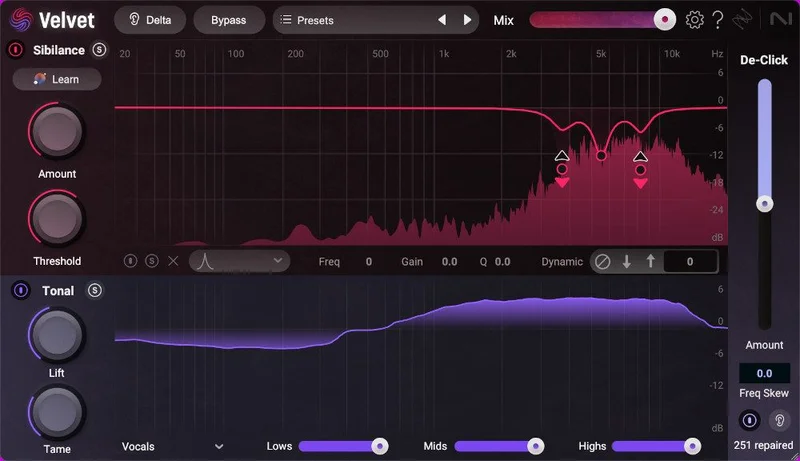
Velvet is worth a specific mention here because it ships with the Catalyst Series and adds Sibilance Learn alongside De-Click for mouth sounds, pops, and clicks. If you've spent time manually editing out mouth clicks in a DAW, you'll love Velvet for what it automates. It's not 100% perfect on unusual vocal textures, but it handles the standard pop-and-click problem cleanly enough that you can skip the manual edit stage on most recordings.
Nectar 4 Advanced suits singer-songwriters producing their own material, pop and R&B producers handling in-house vocal sessions, and podcasters who want a one-stop vocal treatment chain. It's overkill for anyone who sends vocals to a dedicated vocal producer or engineer.
Trash: Distortion and Destruction Done Right
Trash is the most fun tool in the bundle. And fun is the right word.
Over 300 presets and impulse responses, with the Convolve module simulating spaces and objects that have no business being in a studio: clock radios, plexiglass tubes, piano cabinets, tin cans. This isn't reverb. This is timbral transformation.
The Envelope Follower in Trash creates dynamic distortion that tracks your signal's amplitude. Push a bass through Trash with the Envelope Follower tied to the distortion amount and the grit follows the note's attack and release. It's the kind of effect that makes a synthesiser line feel like a living thing rather than a programmed sequence.
The Scream Filter is described as a self-oscillating low pass filter. Run something through it and push it into self-oscillation and you get a feedback character that sits somewhere between a modular synth and a broken guitar amp. Annoying if you don't control it. Brilliant if you dial it in carefully.
The signal chain order in Trash matters. You can swap the Trash and Convolve modules so the convolution happens before the distortion, or after. Run the distortion into a tin can impulse response and you get one character. Run the tin can first and distort the result and you get something completely different. This kind of flexibility is what separates Trash from a simple saturation plugin.
Trash's intelligent autogain and limiter keep output levels from destroying your session when you push the distortion hard. That's a thoughtful design choice. It means you can be aggressive without constantly gain-staging your way out of clipping.
The developer says over 60 distortion presets are in Trash specifically. With 300 total presets covering both Trash and Convolve territory, you have a wide range of starting points. Sound designers and producers who want creative destruction in their signal chain will reach for Trash regularly. It's not a tool for transparent processing. If you want clean, don't open it.
The Catalyst Series: Six Creative Tools
The Catalyst Series is Plasma, Aurora, Cascadia, Velvet, FXEQ, and Equinox. They're positioned as creative and mix tools rather than restoration or mastering tools. Each one serves a different part of the signal chain.
Plasma: Dynamic Saturation
Plasma uses Flux Saturation technology for dynamic processing saturation. The developer says it analyses the sound and applies processing for warmth and depth. What that means in tangible terms: it's a saturation plugin that responds to the dynamics of the input rather than applying a static amount of harmonic distortion.
Push a drum bus through Plasma and the saturation intensifies on louder transients and backs off on quieter hits. The result sounds warm, which in measurable terms means increased second and third harmonic content in the 200 to 2000Hz range, without the constant low-level thickening that static saturators apply even to quiet passages.
Plasma suits mixing scenarios where you want analogue character without commitment. It's a tool for the producer who's ITB but wants the mix to feel like it was touched by real hardware.
Aurora: Reverb with Unmasking
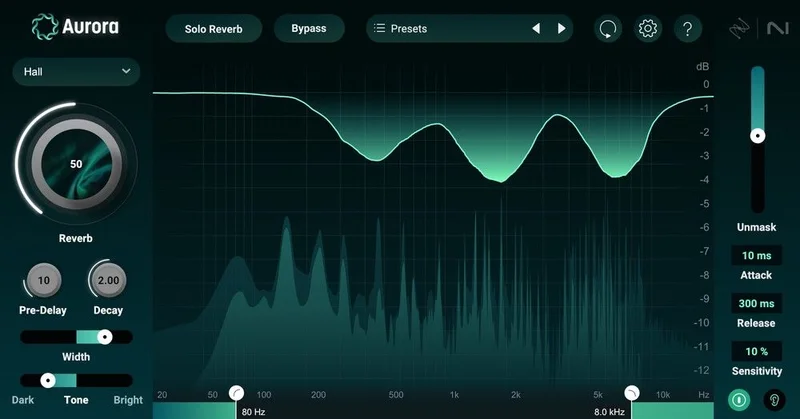
Aurora has an Unmasking section for dynamic instrument and vocal separation within the reverb signal. The developer describes it as a state-of-the-art reverb engine. What the Unmasking section does in practical terms is duck the reverb tail when the dry signal is active, so reverb fills space without competing with the attack of the source.
Place Aurora on a vocal send. With Unmasking active, the reverb breathes into the gaps between words rather than washing over the consonants. It's a satisfying effect when you get the balance right, and it's the kind of intelligent processing that makes ITB reverb feel more like a room and less like a plugin.
Cascadia: Delay with Character
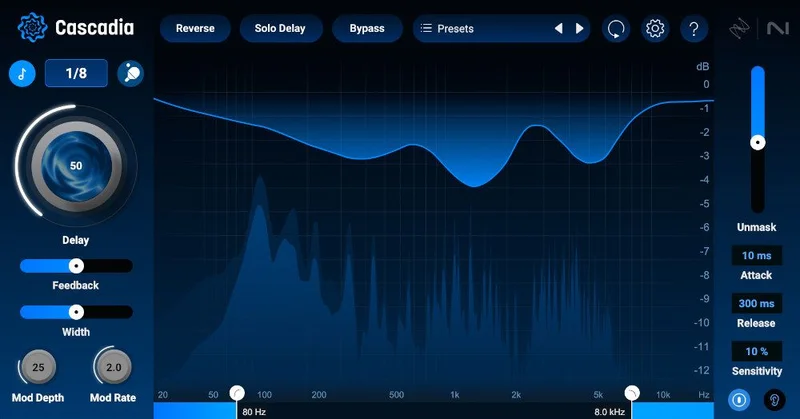
Cascadia offers beat-synced or time-based delays with ping-pong and reverse delay modes. It has vintage pitch drift, width control, and an adjustable unmasking section similar to Aurora's.
The vintage pitch drift is the detail that makes Cascadia worth using over a standard delay. Real tape delay machines had mechanical instability that introduced subtle pitch modulation in the feedback. Cascadia recreates that instability in a controllable way. Push the drift on a guitar delay and you get the characteristic warmth of a hardware echo. Keep it subtle on a synthesiser pad and the feedback takes on a vaguely analogue movement that static digital delays don't do.
Beat-synced delay with ping-pong and reverse modes covers the standard production toolkit. The vintage drift and width control are what differentiate Cascadia from a DAW's built-in delay.
FXEQ: EQ Meets Creative Effects
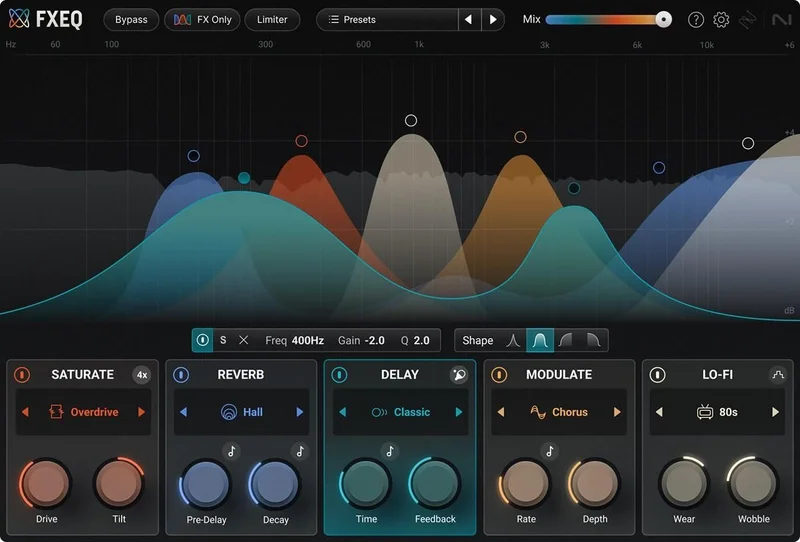
FXEQ includes five creative effects within an EQ workflow. The concept is EQ nodes that trigger effects, so you're not just cutting and boosting, you're applying per-band processing that changes the character of specific frequency ranges.
This is a tool for sound design and mix creativity rather than corrective EQ. If you need to surgically fix a problem frequency, reach for a standard parametric EQ. If you want to transform the character of a synth or drum by applying different texture to the high-mids versus the low-end, FXEQ is where that happens.
Equinox: Reverb for Immersive and Stereo
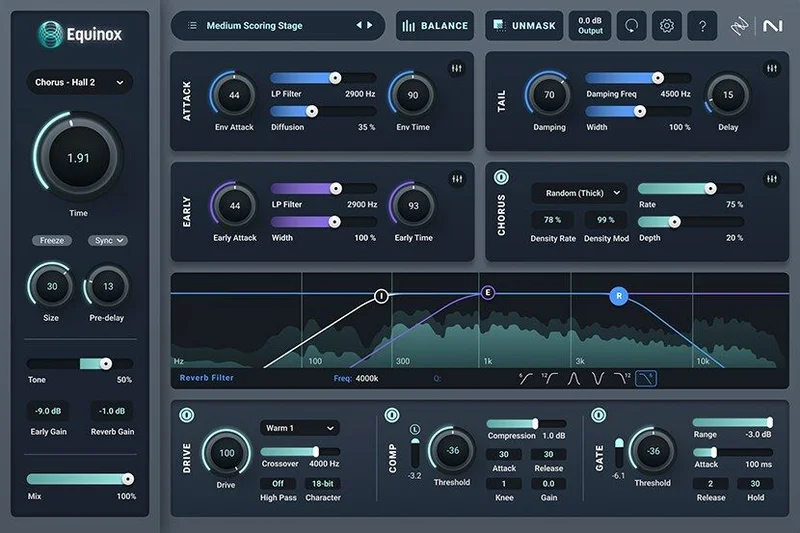
Equinox is built on Exponential Audio's Stratus and Symphony reverb engines. The developer says it's an industry first in immersive and surround reverb. It ships with over 1,250 professional presets.
1,250 presets is a lot. The sheer number is both a strength and an argument for a good preset browser. The Exponential Audio engines at the foundation have a strong reputation in the reverb world, and that heritage matters: these are the algorithms behind some of the most-used reverb sounds in film and broadcast scoring.
If you're working in stereo pop or electronic music, Equinox is a high-quality room, hall, and plate reverb with an unusually large preset library. If you're working in immersive audio formats, it may be the most relevant tool in the entire bundle for your workflow.
VEA: Vocal Enhancement and Automation
VEA is the vocal enhancement and automation tool. It sits between restoration and creative processing, designed to make recorded vocals sit cleanly in a mix without extensive manual work.
The practical use case: you have a vocal that moves dynamically across a performance. The quiet passages feel fragile, the loud passages feel harsh, and the middle of the range where most of the words live doesn't quite cut through the mix. VEA handles that balance curve in a way that levelling automation alone doesn't. It's intelligent dynamic processing with vocal-specific targeting.
VEA suits producers who record live vocalists and need to manage performance dynamics before the mix chain takes over. It's also useful for podcasters and voice-over engineers who need consistent, forward vocal presence without obvious compression signatures.
Who Should Buy This, by User Type
The Working Music Producer Who Mixes Their Own Tracks
You're finishing records ITB. You've been limping along with stock DAW tools or entry-level third-party plugins for mastering and mixing. You have RX Advanced for the occasional recording problem.
This crossgrade completely transforms your production toolkit. Ozone 12 Advanced for mastering, Neutron 5 for mixing, Nectar 4 for vocals, Trash and the Catalyst Series for creative sound design: this is a full professional ITB signal chain at a crossgrade price.
Buy it. This is exactly who the crossgrade is built for.
The Podcast Producer and Voice-Over Engineer
You live in RX already. You clean recordings, optimise loudness, and deliver broadcast-ready audio. The crossgrade gives you Nectar 4 Advanced and VEA for vocal enhancement on top of your existing restoration workflow.
The question is whether you need Ozone 12 Advanced, Neutron 5, and the Catalyst Series for your work. Probably not regularly. But Nectar 4 and VEA alone would justify a significant portion of the crossgrade price if you bought them separately.
Wait for a sale if possible. The bundle is worth it at the right price point, but you'll leave a lot of it unused unless your work expands into music production.
The Film and TV Sound Post Professional
You're doing dialogue editing, music spotting, and sometimes final delivery. RX Advanced is already central to your workflow. Equinox and Aurora give you professional-grade reverb and space design that's credible at the level where your work is judged. Music Rebalance in RX is a tool you'll use more than you expect when a music editor needs a quick stem separation for a creative edit.
Buy it. The Equinox reverb engines alone have standing in the film and broadcast world, and the total toolkit matches your professional context.
The Electronic Music Producer and Sound Designer
Trash is your entry point here. Plasma, Cascadia, FXEQ, the Convolve module's 300 impulse responses: this bundle is a creative sound design system, not just a finishing toolkit.
If you're building textures, designing synthesis patches with post-processing, running samples through bizarre signal chains, or just looking for a distortion tool that behaves like a system under stress rather than a polished plugin, Trash alone changes what your productions can sound like.
Add Ozone 12 Advanced for mastering and Stem EQ for quick final-stage adjustments, and this crossgrade makes a strong argument for anyone producing electronic music at a serious level.
Buy it. And spend the first afternoon in Trash.
The Dedicated Hardware Mixer and External Mastering Client
You run analogue hardware. Your mix happens on a desk. Your mastering goes to a dedicated engineer or facility. You bought RX Advanced for location recording cleanup and the occasional post-production rescue job.
This crossgrade is mostly wasted on you. You'll use RX the same way you always did. Ozone 12 stays closed. Neutron 5 stays closed. Nectar 4 stays closed.
Skip it. Buy it only if your workflow is about to shift ITB, and even then, consider whether Ozone 12 Advanced as a standalone wouldn't be a more focused purchase.
The Beginner Producer Starting Out
You're learning. You have a DAW, some entry-level plugins, and you've been using an older version of RX for cleanup. The crossgrade is eligible from RX 1 through 8 Advanced, so you might qualify.
The honest answer is that this bundle is a lot to learn at once. Ozone 12 Advanced with 21 plugins, Neutron 5, Nectar 4 Advanced, the Catalyst Series, Trash, and RX 12 Advanced is an overwhelming surface area when you're still building fundamentals. You could use Master Assistant and Vocal Assistant to shortcut the learning curve, and there's value in that. But you'll also spend time in plugin menus when you should be making music.
Wait. Build your fundamentals first. Come back when you know what problem you're trying to solve with each tool. The bundle will still be here, probably at a sale price.
The Workflow Friction Points
It would be dishonest to review this bundle without spending real time on the activation problem. Owners report product activation failures with serial number recognition in the Product Portal. This isn't a one-off complaint. It's a pattern.
If your activation fails, you need support. And support is slow. Owners report it. iZotope is a large company with a large user base, and the gap between "how fast you need an answer" and "how fast you get one" is a real frustration, not a hypothetical one.
Plan for this. Download and install during a week when you have time to wait. Don't schedule a critical session that depends on the bundle activating cleanly on the day you buy. That's frustrating advice to give about a product at this price point. But it's the honest call based on what owners consistently report.
The Dialogue Contour Variation slider issue is more of a technique note than a dealbreaker. Keep moves small. The pitch and frequency tradeoffs it creates at larger values are subtle but cumulative, and they're hard to hear in context until you've bounced and listened on headphones. Build in an evaluation pass on any Dialogue Contour work before delivery.
Over-processing is the other consistent owner warning. Stem EQ, Music Rebalance, Dialogue Isolate: all of them degrade when pushed too hard. The neural nets that drive the separation have limits. When those limits are hit, the artifacts are obvious. Train yourself to hear the ceiling early and work inside it.
The Verdict
The Everything Bundle Crossgrade from RX Advanced is the right move for working producers, mix engineers, and post-production professionals who've already proven they use RX and want a complete ITB toolkit that covers mastering, mixing, vocal production, and creative sound design without buying each tool individually.
At $1,399, it's a serious commitment. It's also one that makes financial sense if you can honestly tick at least four of the tool categories as active parts of your workflow. Ozone 12 Advanced with Stem EQ, IRC 5, Bass Control, and 20 component plugins is a mastering suite worth having on its own terms. Everything else in the bundle is a genuine addition, not padding.
The activation friction and slow support are real complaints that iZotope has yet to solve at scale. That knocks this off a perfect score. The crossgrade licence's lack of a future upgrade path is a legitimate long-term consideration.
But for the right user, this crossgrade delivers what it promises: a professional-grade collection of tools, rooted in RX's trusted foundation, that extends a restoration-focused workflow into every other stage of professional audio production. That's worth something. At the right price, it's worth quite a lot.
Specs & Technical Details
| Developer | iZotope |
| Price | $1,399 |
| Plugin Format | VST3 / AU / AAX |
| OS Support | Mac (Apple Silicon native) / Windows |
| Activation | iZotope Product Portal (serial number) |
| CPU Usage | N/A |
| Trial Available | N/A |
| Version Reviewed | Ozone 12 / RX 12 / Nectar 4 / Neutron 5 |
Score Breakdown
| Category | Score | Notes |
|---|---|---|
| Sound Quality | 4.5/5 | IRC 5 Maximizer and Exponential Audio reverb engines set a high bar; Stem EQ degrades when over-pushed |
| Value for Money | 4.5/5 | Crossgrade price covers a toolkit that would cost considerably more bought individually |
| Ease of Use | 3.5/5 | Master Assistant and Vocal Assistant speed onboarding, but activation failures and tool depth create real friction |
| Features | 5.0/5 | 21 Ozone components, full Catalyst Series, Trash, Guitar Rig 7 Pro, Brainworx and Native Instruments effects: nothing is missing |
| CPU Efficiency | N/A | No data available |
| Overall | 4.5/5 | A complete professional ITB toolkit for RX Advanced owners with broad, active workflows |
If you've read this far and you're a working producer or post-production professional who already lives in RX, the crossgrade case is clear: you're buying a mastering suite, a mixing engine, a vocal suite, and a sound design toolkit on top of a restoration workflow you already rely on. That's a rare proposition at a crossgrade price. The only thing between you and buying it today is whether your workflow is wide enough to use it, and whether you can live with the activation process. If both answers are yes, don't hesitate.
Frequently Asked Questions
Who is eligible for the iZotope Everything Bundle Crossgrade from RX Advanced?
The crossgrade is available to owners of RX 1 through RX 8 Advanced. If you're on a newer version of RX Advanced, check the iZotope product portal to confirm your eligibility and the upgrade path available to you. Eligibility is tied to your existing RX Advanced licence, not to other iZotope products you may own.
Does the crossgrade upgrade my existing RX Advanced to RX 12?
The crossgrade is to the Everything Bundle, which includes RX 12 Advanced. If you're currently on an older version of RX Advanced, moving to the Everything Bundle should bring you to RX 12. Check your specific version situation in the iZotope Product Portal before purchasing to confirm exactly what your licence state will look like post-crossgrade.
What is included in the Everything Bundle Crossgrade from RX Advanced?
The bundle includes Ozone 12 Advanced (the mothership plus 20 component plugins), Neutron 5, Nectar 4 Advanced, RX 12 Advanced, the full Catalyst Series (Plasma, Aurora, Cascadia, Velvet, FXEQ, and Equinox), VEA, and Trash. It also includes the Audiolens referencing app, Native Instruments effects, Brainworx effects, and Guitar Rig 7 Pro.
What is Stem EQ in Ozone 12 Advanced and how does it work?
Stem EQ is a new module in Ozone 12 Advanced that separates a stereo bounce into vocal, bass, drum, and instrument components using neural separation and allows you to apply independent EQ curves to each. It works directly on a finished stereo mix without requiring the original session stems.
Does the Everything Bundle Crossgrade licence include future bundle updates?
No. The crossgrade licence does not provide an upgrade path to future versions of the Everything Bundle. When iZotope releases a new version of the Everything Bundle, you will need to purchase a separate upgrade or crossgrade at whatever price iZotope sets at that time. This is a meaningful consideration if you plan to stay current with the ecosystem long-term.
Are there known activation issues with this bundle?
Yes. Owners consistently report product activation failures related to serial number recognition in the iZotope Product Portal. Customer support response times are also reported as slow. Plan for the possibility of activation friction by purchasing during a period where you have time to wait for a support response rather than immediately before a critical session deadline.
Is the iZotope Everything Bundle Crossgrade worth it for someone who only does audio restoration?
No. If your workflow is exclusively audio restoration and you're satisfied with your current RX Advanced version, the crossgrade adds tools you won't use regularly. The mastering suite, mixing channel strips, vocal suite, and creative tools in the bundle are built for music production and post-production workflows that extend well beyond restoration. A restoration-only workflow is better served by a targeted RX upgrade rather than a full bundle crossgrade.